MS Fundamentals - MS 900
 Studied by 0 people
 Call Kai
 Learn
Learn Practice Test
 Spaced Repetition
 Match
Match Flashcards
 Knowt Play
1/90

There's no tags or description
Looks like no tags are added yet.
Name | Mastery | Learn | Test | Matching | Spaced | Call with Kai |
|---|
No analytics yet
Send a link to your students to track their progress
91 Terms
What is Microsoft 365?
A productivity cloud designed to help each of us achieve what matters in work and in our life with best-in-class office apps, intelligent cloud services, and advanced security.
What is Microsoft 365 described as?
A cloud-powered productivity platform and SaaS application that brings together productivity apps, advanced device management, intelligence security, and innovative online services.
What can the tools in Microsoft 365 help you and your organization do?
Helps drive productivity, collaboration, and allows you to communicate securely across many devices, and ensures a trusted and secure modern experience for everybody.
What is Microsoft Graph?
The gateway to rich people-centered data and intelligence in Microsoft 365, collecting telemetry and signals to enhance user productivity.
What role does Microsoft Graph play in Microsoft 365 Copilot?
It plays a vital role in Microsoft 365 Copilot by utilizing data from the Microsoft Graph and integrating into Microsoft 365 apps and services to provide real-time intelligent assistance.
What is the primary difference between Office 365 and Microsoft 365?
Microsoft 365 combines productivity apps, advanced device management, intelligence security, and innovative online services, while Office 365 includes apps like Outlook, Word, Excel, PowerPoint, and services like Exchange, OneDrive, SharePoint, and Microsoft Teams.
What is hybrid work?
A combination of traditional in-person office work and remote off-site work, offering employees greater flexibility.
What is flexible work?
A hybrid work model that allows you to combine remote and in-person days, giving employees the most freedom to set their own schedules.
Who are frontline workers?
Employees whose primary function is to work directly with customers or the general public providing services, support, selling products, or involved in manufacturing/distribution.
What is the objective behind Microsoft 365?
Giving you the capabilities to pretty much empower an organization to meet the diverse needs of all your workers, and gives you the flexibility to work on-site or remotely.
What should you be able to do after completing this learning objective of understanding productivity solutions through Microsoft 365?
Boost productivity, craft compelling content in real-time, and optimize operations with work management tools. Also to be able to describe additional Microsoft three sixty five productivity apps as well that might not appear just in the generic list.
How do productivity solutions through Microsoft 365 help?
Optimize operations, enhance content creation, and empower people to perform tasks in real-time, providing access to create content, access files, and stay up-to-date, organized, and collaborative anywhere with connected experiences and intelligent features.
What does Microsoft 365 combine?
Microsoft 365 combines that enterprise mobility EMS suite with the functionalities of Office three sixty five
How does Microsoft 365 expand on Office 365?
By expanding into creativity and enablement with Microsoft three sixty five Copilot and expanding into Microsoft Project, Planner, Bookings, To do forms, lists, Power Apps, and Power Automate.
With Microsoft 365 apps, how often can you get updates?
Monthly.
Where does Microsoft three sixty five Copilot sit?
It sits alongside you seamlessly embedded into these applications that you're using daily, and it'll help you stay in the flow of work and freeze you from focus on the task at hand.
How can Microsoft Teams help you?
Bring everyone together into one place to meet, chat, call, collaborate, and makes meetings more productive with real-time summaries and action items directly in the context of the conversation.
How can Microsoft Word help you?
Helps you create impressive documents and improve your writing with built-in intelligent features like Microsoft editor and researcher, and rewrites, edits, summarizes, and creates content right alongside you as you work.
How can Microsoft Excel help you?
Helps you simplify complex data, create easy to read spreadsheets and visualizations, and unlock insights and identify trends to create professional looking data visualizations.
How can Microsoft PowerPoint help you?
Helps you create a polished presentation that stands out with intelligent features of Presenter Coach and PowerPoint Designer, and turns your ideas into presentation material using natural language commands.
How can Microsoft Outlook help you?
Helps you manage your email, calendar, tasks, and contacts all in one place, and drafts emails, summarizes long threads, and helps catch up on important conversations.
How can Microsoft OneNote help you?
Helps you with your note taking. You can organize your notes into tabs and subsections to create a single digital notebook, and supercharges your note taking and helps you understand, create, and recall information at the click of a button.
How can Microsoft OneDrive help you?
Save, access, edit, and share files and photos wherever you are.
How can Microsoft Project help you?
Quickly kick off projects, assign tasks, schedules, and keeps team members and managers on the same page. Automatically update the timeline through the scheduling engine, which helps you reduce your time and effort and utilize easy to use views such as grid views, Kanban style task boards, and timeline Gantt charts. Integrates with Microsoft Teams to collaborate across the project and create stunning interactive dashboards in Power BI so that you can visualize every aspect of the project at a glance.
How can Microsoft Planner help you?
Add structure to task based teamwork and organize activities in your project by creating a plan and assigning management tasks on a Kanban style board using task cards, and adds those tasks to buckets. The task cards populate with various information such as due dates, status, priority, checklists, applies labels, and even add attachments.
How can Microsoft Booking help you?
Manage staff schedules, set business hours, services, pricing, and define appointment types; customize how appointments are scheduled through a web based business facing page, add buffer time between appointments, and create a booking page where your customers and clients can schedule and reschedule appointments on their own.
How can Microsoft To Do help you?
Focus and achieve the most important tasks with a daily to do list called My Day. It can use smart suggestions, add tasks, upcoming or overdue tasks, and share lists and assign tasks with colleagues, friends, and family.
How can Microsoft Forms help you?
Insert quizzes, surveys, polls, and other types of forms into other Office products. Enhance that form with a logo, and display pictures or videos next to the questions; share that form or collaborate with other users and share it as a template. It invites others to respond to your form by using any web browser or mobile device.
How can Microsoft Lists help you?
You can create a list from scratch or use ready made templates. You can create a list in a SharePoint site or directly in Microsoft Teams, and you can create it with various columns, including, links, pictures, attach files. Sort, group format, and filter lists to highlight the most important information.
What should you be able to do after completing this learning objective of understanding collaboration solutions through Microsoft 365?
Promote synergy, boost teamwork with Microsoft Teams, organize creative thriving work cultures with Microsoft Viva, and foster connections with Yammer communities.
How do collaboration solutions within Microsoft 365 help?
Works together with others to get things done by allowing you to attend meetings online, reply to chats, share files or information, co author in real time (Microsoft Loop), and network and collaborate with anyone from anywhere.
What is Microsoft Teams?
An app for people and teams to come together, stay connected, and pretty much just get things done; can be across work, home, school, or on the go. Helps you pull together a team and connect with colleagues through real time messaging and engaging inclusive meetings; set up Teams channels, secure it and compliant, and link it to your telephone system and make calls outbound directly from Microsoft Teams.
What does Microsoft Viva aim to address?
It brings together all the tools that employees need to be successful in today's world of work into one unified solution across four different experience areas: connection, insight, purpose, and growth.
What concept of technology is Microsoft Viva trying to address with the Connection experience?
Keep everybody informed, included, and inspired.
What concept of technology is Microsoft Viva trying to address with the Insight experience?
Improve productivity and well-being with actionable insights.
What concept of technology is Microsoft Viva trying to address with the Purpose experience?
Align people's work to team and organizational goals.
What concept of technology is Microsoft Viva trying to address with the Growth experience?
Help employees learn, grow, and succeed.
What does Microsoft Viva Insights allows you to do?
Allows you to improve your work-life balance and offers some activities that you can help complete by sending praise to colleagues, tap into self-reflection, take breathing breaks, and book focus time.
What needs to be done so Viva Insights does not disappearing back into the ellipsis area?
Pin, which is done by right clicking on the applications that are along the left hand nav
How can you select between other viva applications?
Select the hamburger icon up at the top
What does Microsoft Viva Learning allow you to do?
To browse and discover a library of 10,000 and more courses and greets you with your progress on any course or training that you've already started.
What does Veeva connection allow you to do?
Brings people together across the organization to connect with leaders, coworkers, and communities, providing an experience where people can crowdsource answers and ideas and share their work and experience.
How is Viva Engage different from Viva Connections?
It provides the social fabric for Microsoft Viva and Microsoft three sixty five, bringing community and conversations into the workplace, while Viva Connections is that gateway, to the entire Viva experience.
How are the Yammer services working in Veeva Engage?
Connects with leaders, coworkers, and communities, while connections is the gateway, to the entire Viva experience.
Cloud Computing
The delivery of computing services over the Internet, including virtual machines, storage, databases, and networking.
Private Cloud
A cloud delivering services over the internet, used by a single entity, providing greater control but potentially higher costs.
Public Cloud
Cloud built, controlled, and maintained by a third-party provider, accessible to anyone wanting to purchase cloud services.
Hybrid Cloud
A computing environment using both public and private clouds in an interconnected manner, allowing for flexible resource deployment.
Multi Cloud
A cloud setup where multiple public cloud providers are used, potentially leveraging different features from each.
Capital Expenditure (CapEx)
Upfront expenses to purchase tangible resources
Operational Expenditure (OpEx)
Spending money on services or products over time
Consumption Based Model
A pricing model where you only pay for the IT resources you use.
Uptime (Availability)
The percentage of time a cloud service is operational and accessible to users.
Scale (Scalability)
The ability of a cloud service to handle increasing or decreasing demand for resources without compromising quality.
Types of Scalability
Vertically (up or down)
Horizontally (in or out)
Automatic
Vertical Scaling
Adding or removing power to an existing cloud server by upgrading or downgrading its memory, storage, or processing power.
Horizontal Scaling
Adding or removing servers or machines to a cloud system by linking them together.
Automated Scaling (Auto Scaling)
Adjusting the resources of a cloud service automatically based on predefined rules and policies.
High Availability
Cloud service is designed to always be accessible and operational, that’s regardless of any failures, outages, disasters that might occur.
Elasticity
Cloud services can automatically and seamlessly adjust their resources according to current demand workload.
Cloud benefits
High availability
Scalability
Elasticity
Reliability
Predictability
Security
Governance
Manageability
What are the cloud surface types
Infrastructure as a service
Platform as a service
Software as a service
Infrastructure as a Service (IaaS)
The most flexible cloud service. You can figure and manage the hardware for your application. Renting servers, virtual machines, storage networks, and operating systems from a cloud provider on a pay-as-you-go basis.
IaaS responsibility
Information and data
Device devices (mobile, and PC)
Accounts and identities
Identity and directory infrastructure
Application
Network controls
Operating system
Platform as a Service (PaaS)
Focus on application development. Platform management is handled by the club provider.
Provides an environment for building, testing, and deploying software applications without managing the underlying infrastructure.
PaaS responsibility
Information and data
Device devices (mobile, and PCs)
Accounts and identities
Can include
Identity and directory infrastructure
Application
Network controls
Software as a Service (SaaS)
Pay as you go pricing model. Users pay for the software they use on a subscription model.
Provides users with access to software applications over the Internet, without the need to install, update, or maintain the software.
SaaS responsibility
Information and data
Device (mobile and PCs)
Accounts and identities
Can include identity and Directory infrastructure
Shared Responsibility Model
Defines the roles and responsibilities of both the cloud provider and the customer in securing and managing the cloud environment.
responsibility always retained by Customer
Information and data
Device (mobile, and PCs)
Accounts and identities
Responsibility transfers to club provider
Physical host
Physical Network
Physical data center
Responsibility varies by type
Identity and directory infrastructure
Application
Network controls
Operating system
What are the types of Microsoft 365
Home
Business
Enterprise
Frontline workers
Are employees whose primary function is to work directly with customers or the general public providing services, support, and selling products, or employees directly involved in the manufacturing and distribution of products or services.
What capabilities does M365 give you
Stay Connected
Stay secure
3 ways copilot can transform your work
unleash creativity
unlock productivity
uplevel skills
Azure Virtual Desktop
is a desktop and app virtualization solution on Azure
multi-session desktops and remote app streaming
Run Microsoft 365 Apps in multi-user virtual Scenarios
Full control over management and deployment
Flexibility consumption-based pricing
Optimized for flexibility
Windows 365
a subscription based-cloud PC Service
Personalized Windows 10 or windows 11 desktops
Copilot
Stream your apps, data, content, and settings to any device
Management and deployment with familiar desktop tools
Predictable per-user pricing
Optimized for simplicity
Windows-as-a-service (WaaS)
a model designed to make life easier for both users and IT pros by simplifying the deployment and servicing of Windows Client Computers
Two types of servicing
Feature Updates: Updates that provide security and reliability fixes and can also add new functionality or features periodically.
Quality Updates: Updates that provide security and reliability fixes and can also add new functionality or features periodically.
Types of Servicing Channels
The General Availability Channel receives feature updates as soon as they're available. New functionality. Testing of feature updates.
The Long-Term Servicing Channel (LTSC) is designed to be used only for specialized devices such as those that control medical equipment or ATM machines. LTSC receives new feature releases every two to three years.
The Windows Insider Program provides organizations with the opportunity to test and provide feedback on features that will be shipped in upcoming updates.
Deployment Rings - deployment timeline
Preview: planning and deployment
Limited: pilot & Validation
Broad: Wide Deployment
Deployment methods
Modern: which utilizes cloud-based tools for seamless installation
Dynamic: allowing for adaptable updates based on user needs. Good for use cases
Traditional: Uses existing tools for managing deployments, relying on legacy methods.
Deployment methods for M365 Apps
Deploy from a local source with Configuration Manager
Deploy from the cloud with the Office Deployment Tool (ODT)
Deploy from a local source with the Office Deployment Tool (ODT)
Self-install from the cloud
Update Channels for M 365 Apps
Current Channel: Provide your users with new Microsoft 365 Apps features as soon as they're ready, but on no set schedule.
Monthly Enterprise Channel: Provide your users with new Microsoft 365 Apps features only once a month and on a predictable schedule.
Semi-Annual Enterprise Channel: For non-interactive devices and those running specialized or business-critical workloads that require extensive testing before new Microsoft 365 Apps features are implemented. Suitable for select devices performing automated tasks where end-users aren't present, ensuring compliance with regulatory and organizational standards.
Categories of updates
Feature Updates
Security Updates
Non-security updates
Types of Viva Insights
Personal
Team
Organization
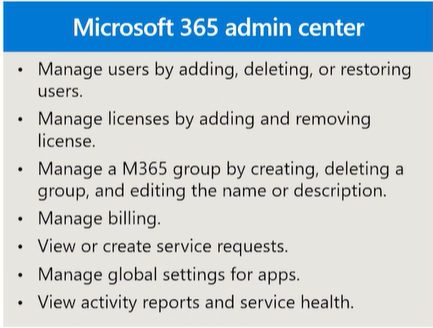
Use for M365 admin center
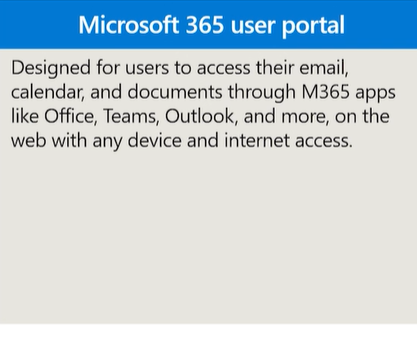
Use for User Portal
M365 admin center reports
Adoption score: provides metrics, insights, and recommendations in two areas:
people experiences
technology experiences
Usage: helps you see how users are using M 365 apps and services across your organization.
other admin centers with reports
Security: M 365 Defender
Compliance: Microsoft Purview
Endpoint Manager
Microsoft Entra ID: Azure ID
Exchange
SharePoint
Teams
 Note
Note  Flashcards (39)