2.4 Organisation and structure of data
 Call Kai
 Learn
Learn Practice Test
 Spaced Repetition
 Match
Match Flashcards
 Knowt Play
1/45

There's no tags or description
Looks like no tags are added yet.
Name | Mastery | Learn | Test | Matching | Spaced | Call with Kai | Chat |
|---|
No analytics yet
Send a link to your students to track their progress
46 Terms
Field
A field is a single data item. (With a defined data type)
Record
A record is a collection of fields, all relating to an object (such as a person), that can store a single set of values. A record can be fixed length or variable length
File
A file is an organized collection of related records.
What is the purpose fo files in data processing?
Data storage - Allows for preservation of information beyond the duration of the programs execution
Data persistence - this is improtant as applications may need to remeber information between sessions so data will stay the same
Data retrieval - Programs can read from files to access stored information, facilitating the processing and manipulation of data
How do programs interact with files?
Create files
Organise files (using defined structures and access methods)
Updating files (adding, deleting, or modifying records)
Processing files (reading records, performaing calculations, and producing outputs)
Master File
A master file stores long-term descriptive information. It stores all data required to perform processing operations and results from processing operations (Long-term records that do not change or is only periodically updated). They are generally updated periodically from a transaction file and held in a sequential order
e.g. Montly hours worked
Transaction File
A tranaction file is a temporary file that stored data collected over a short period of time. These files act as temporary storage, which means the system can run efficiently whilst storing required data. At the end of the short period the tranaction files are copied and processed to update the master file and the transaction file is cleared after.
Tranactions are the changes that are supposed to be made to data in the master file
Data is held serially (order it was collected)
(Could be used for daily time sheets)
File Update Process
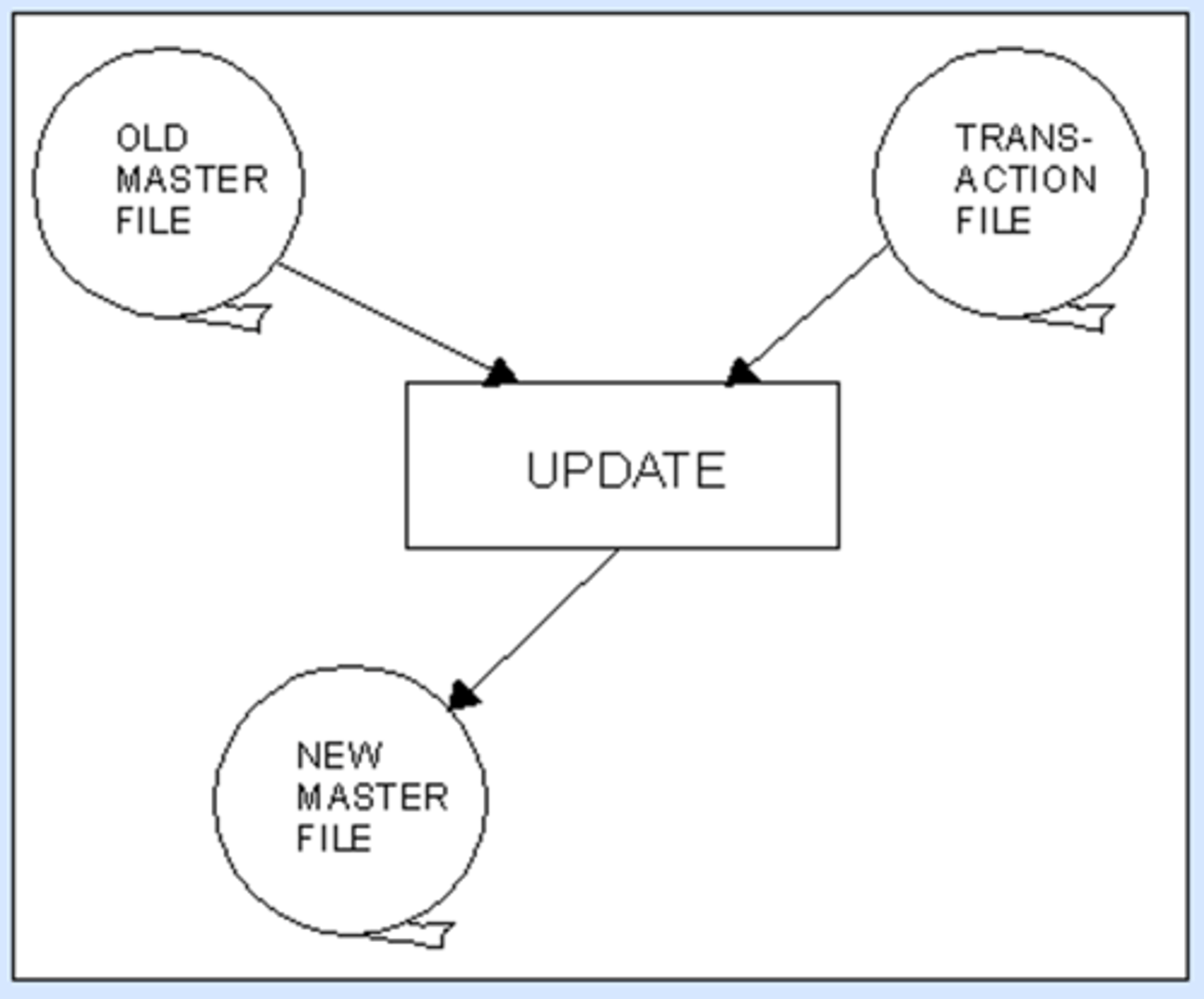
The transaction file is sorted.
The master file and transaction file go through an update process to create the new, updated master file.
Fixed Length Records
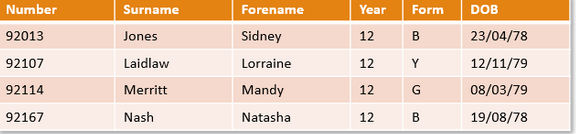
Fixed-length record is a type of file where all the records are of the same size in terms of bytes and fields. Which means the size of fields must be defined before inserting data.
Each field has a defined size, which means all records are the same length.
Advanatges of fixed length records
Fixed length record is easier to program as it can be calculated to know how much storage space will be required (as all records are the same length)
Fixed length allows for faster access and simpler processing (can directly access data with a calculation)
Disadvantages of fixed length records
If data is too long it will have to be truncated (Inflexible)
Space may be wasted if there is blank space in the fields
What are variable length records?
A variable length record will vary in size depending on the data it contains.
When the record is stored, each field has a field terminator, and there will be a record terminator at the end of a whole record.
Generally used where efficient searching is less crucial like in a transaction files that is processed sequentially
Advanatges of variable length records
Variable-length records are suitable for situations where no searching or updating is necessary, e.g., transaction files, which will be used later to update a master file
Less space is wasted as only storage required is used (more efficient use of space)
Flexible
Disadvantages of variable length records
Variable length records are more difficult to manage because it is harder to predict storage requirements
Searchibng is less efficient
The position of a specific record cannot be caluclated directly using the record size
If a record is updated and the size changes the file will need to be rebuilt and the record inserted at the correct point in the sequence
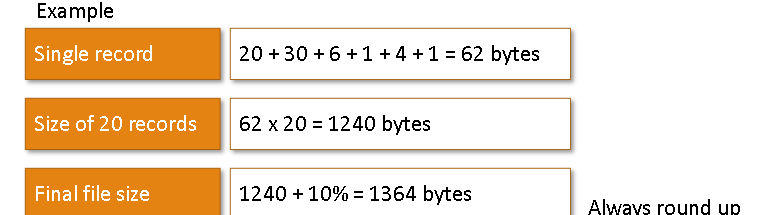
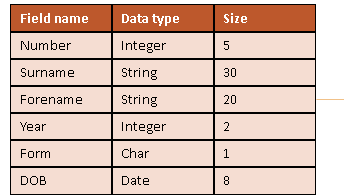
How would I estimate file size?D
You would calcualte the size of a single record. Then you would multiply that by the number of total records. Then you would add 10% for meta data
What is a data dictionary?
A file containting information on the structure of a record
What are file access methods?
It describes how records are located and read from a file. They determine the order in which data is accessed and how quickly a specific record can be found. (They will change based on needs of the user)
Why are file access methods important?
Efficiecny - How quickly data can be retrieved which is affected by this
Perfromacne - LArge files have lots of data so to be more efficient there may be skipping of files
Suitability - some may require differenta ccess
Scalability - As files grow some methods degrade in performance
What are the types of files and access methods?
• Serial
• Sequential
• Random (Direct)
• Indexed Sequential
Serial File
Records are stored in the order they are added with no logical order (not sorted). Records are appended onto the end of a file (like a shopping list). Serial file access goes from the start and reads one at a time untill it has read them all).
This is used when records dont need to be sorted, data is processed once (like transaction files), or data is stored in the order it arrives. Generally good when files need to be chronological order like phone logs
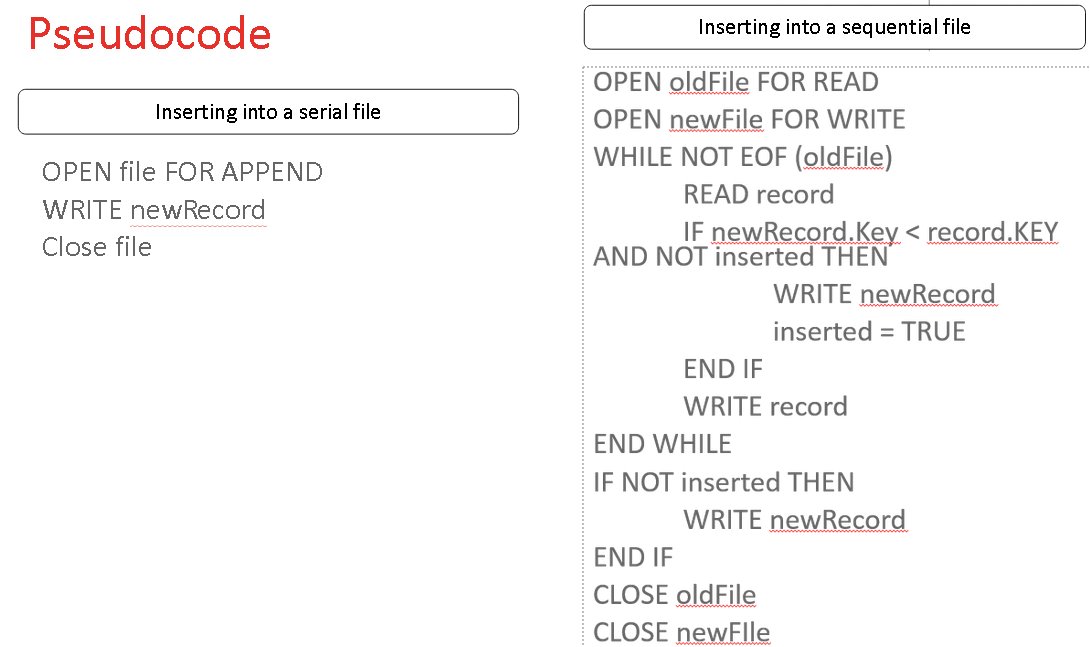
How to add a new record to a serial file
To add to a serial file, the new record is appended (added) to the end of the file.
Sequential File
Records are stored in a defined logical order based on key fields (like an ID or surname). Records are accessed from the start of the file one after another reading each record untill it finds the correct one (faster than serial but slower than direct).
Gnerally used when records need to be kept in order, searching is required but cannot direct access, or processing data in order (like student grades based on surname)
How to add a new record to a sequential file
• Make a new copy of the records until the correct place to add a new record is reached.
• Add the new record to the new copy
• Continue until end of file is reached.
• If multiple records are to be added, these should be sorted into order first to prevent multiple updates to the file.
How to delete a record from a sequential file
• Make a new copy of the records until the record to be deleted is reached.
• Do not copy the record to be deleted.
• Continue until the end of the file is reached.
• If multiple records are to be deleted, these should be sorted in advance.
Pros and Cons of serial
Simple to implement
Efficient for procesing data once
Suitable for large volumes of data (transaction files)
Cons:
Not organised
Inefficient if records need to be re-used/searched for
Pros and Cons of sequential?
Pros:
Data is organised and sorted
Suitable for batch processing of structured data
Cons:
Slower than direct access
Records must be read in order
Need to copy file when inserting data
Pseudcode for inserting into a serial and sequential file
Random (Direct) Files
A random file is where records are stored at an address calculated by the hashing algorithm based on the key field, which allows individual records to be accessed quickly without the need to reload the entire file.
Random (Direct) Files: Data hashing to the same index
• A data collision occurs when two data items are hashed to the same location
• In this case there needs to be overflow areas where the latest data is stored
• When there are many items in the overflow area, access may become slow
• In which case a new hashing algorithm is required and a larger file may be needed.
What is indexing?
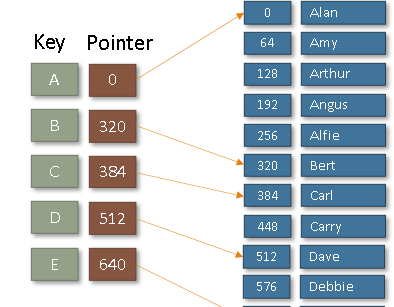
An index stores key values and the locations of records within a file (instead of searching a whole file the index is searched then it points to where the required record is (pointer position) and the program jumps to the correct part and reads the record)
Indexed Sequential Files
An index file is used to speed up searching by having pointers to key groups within the file (like A group and B group). Once the correct group is found using the index the records are read sequentially. (This reduces the number of data needed to be searched by using a combination of sequential and random access).
Inserting and deleting records is more expensive as records and index entries need to be updated.
In an indexed sequential file, blocks are normally partially filled (when the file is first created) to allow for more entries later.
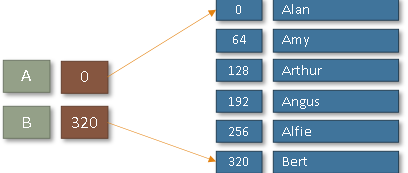
The index in an indexed sequential file
The Index is stored at the start of the file - it gives the highest key stored in each 'block' of the file.
When a certain key is searched for, the index will indicate in which block of the file it is stored.
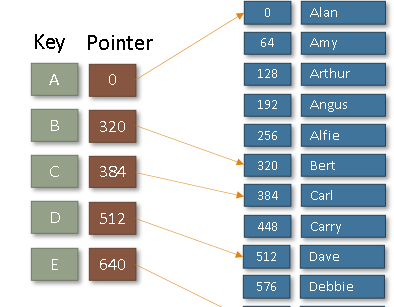
How would you search this?
You would find get your key (256) and then search the index for the next highest value (320) then you would start from the previous group (A) and sequentially search untill you reach the end iof the group (320)
Multi-Level Indexes
A multi-level index is one where the index is too large and so is split into a number of separate indexes.
The index at the start of the file would point to other, smaller indexes located at intervals in the file.
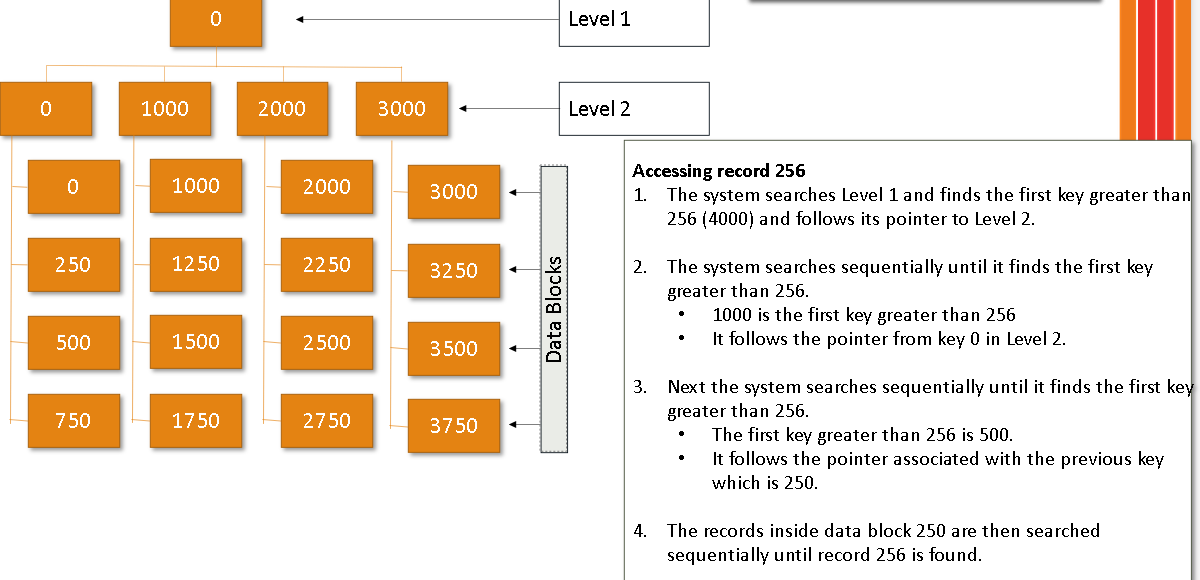
A multilevel index arises where this index is a main index which itself contains a range of addresses and the location/block of the next level index. This process may extend to several levels, with the last index containing the physical address of the record. This reduces overhead where indexes will point to other indexes before reaching data (which speeds up searching but makes updates even more expensive)
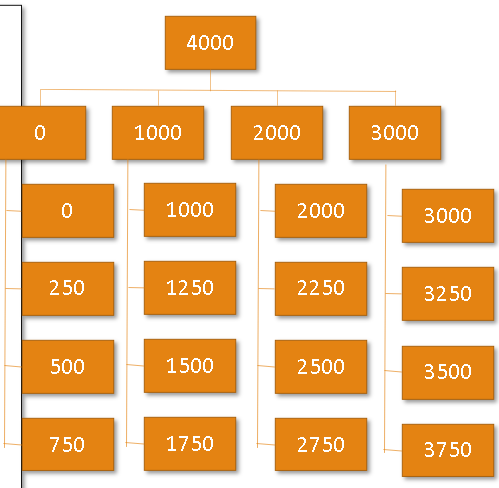
Example of a multi level index
The search will start from the top moving down each index level pointing to indexes and then reaching data
Adding Records to an Indexed Sequential File
• Place in a block if possible
• If a block becomes full, an overflow area is used.
• Access may become slow as more records in the overflow area, so re-organisation may become necessary.
Deleting Records from an Indexed Sequential File
• Record is normally marked as deleted in the index but not physically removed.
What is a hashing algorithm?
A hasing algorithm is a process that includes a mathematical hasing function that converts the key field of random length into a compressed numeriacal hash value of fixed length to determine the disc address.
What is an overflow area?
An overflow area is necessary in case the calculated address is already occupied by data. When this happens, the hashing algorithm points to a separate overflow area, where the data is normally stored and searched in linear order.
Archiving
Archiving is the process of storing data/files which are no longer in current or frequent use outside of the main system in long term storage.
It is held for security / legal / historical reason, or even just as a backup.
Archiving frees up resources on the main computer system which could mean faster access of the 'in-use' data (improving performacnce, saving storage space)
Can still be acessed but not used alot
Backing-up Files
Backing up files is very important to protect against data loss (either accidental or deliberate)
A three generation file backup system involves storage of three of the most recent versions of master file (& transaction file if appropriate) (More may require more storage)
This is useful if one version is corrupted: the previous version(s) is still available.
GFS – Grandfather, Father, Son are three generations of backup
Files ar ecopies from the main system to a sperate location (usually off-site) so data can be restored if lost/corrupted/deleted.
Passwords
Passwords protect data from unauthorized people using user ID and personal password.
Transaction Logs
Transaction logs can help track down the person responsible if data is damaged or deleted.
Any file access requests are logged with the time, data and username along with the names of the files that were accessed.
Encryption
Encryption is the encoding of data to safeguard it during transfer or storage by making a file impossible to read without the encryption key, algorithm, / code.
File Management Utilities
Archivers
• To archive job folders for future reference.
• Output a single file when provided with a directory or a set of files for long term storage.
Data conversion utilities
• Transform data from a source file to some other format, such as from a text file to a PDF document for customers’ distribution
Data recovery
• Used to rescue good data from corrupted files.
Revision / version control utilities
• Recreate a coherent structure where multiple users simultaneously modify the same file to help several translators work on a common source document.
File managers
• Provide a method of performing routine data management tasks; assist in deleting, renaming, moving, copying, merging, setting write protection status, setting file access permissions, and generating and modifying folders and data sets.
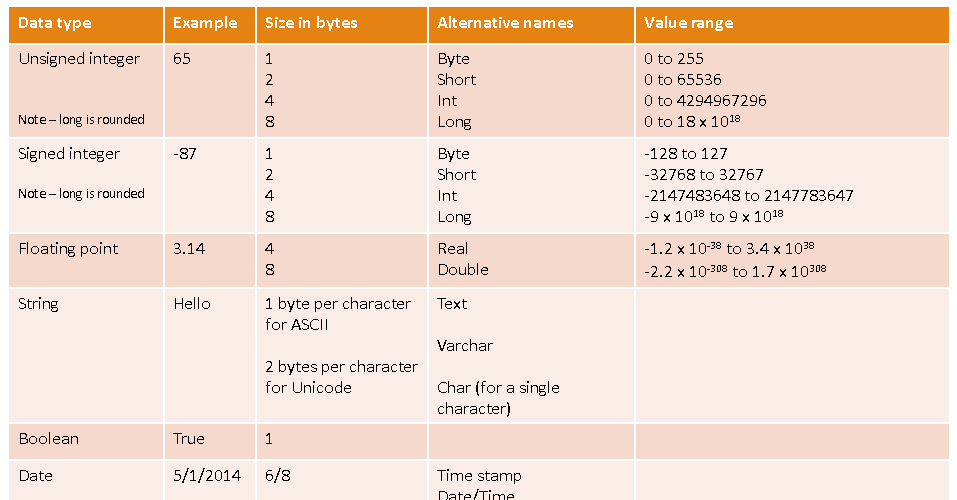
Datatypes