M2: Describe the authentication capabilities of Microsoft Entra ID
 Studied by 1 person
 Call Kai
 Learn
Learn Practice Test
 Spaced Repetition
 Match
Match Flashcards
 Knowt Play
1/22

There's no tags or description
Looks like no tags are added yet.
Name | Mastery | Learn | Test | Matching | Spaced |
|---|
No study sessions yet.
23 Terms
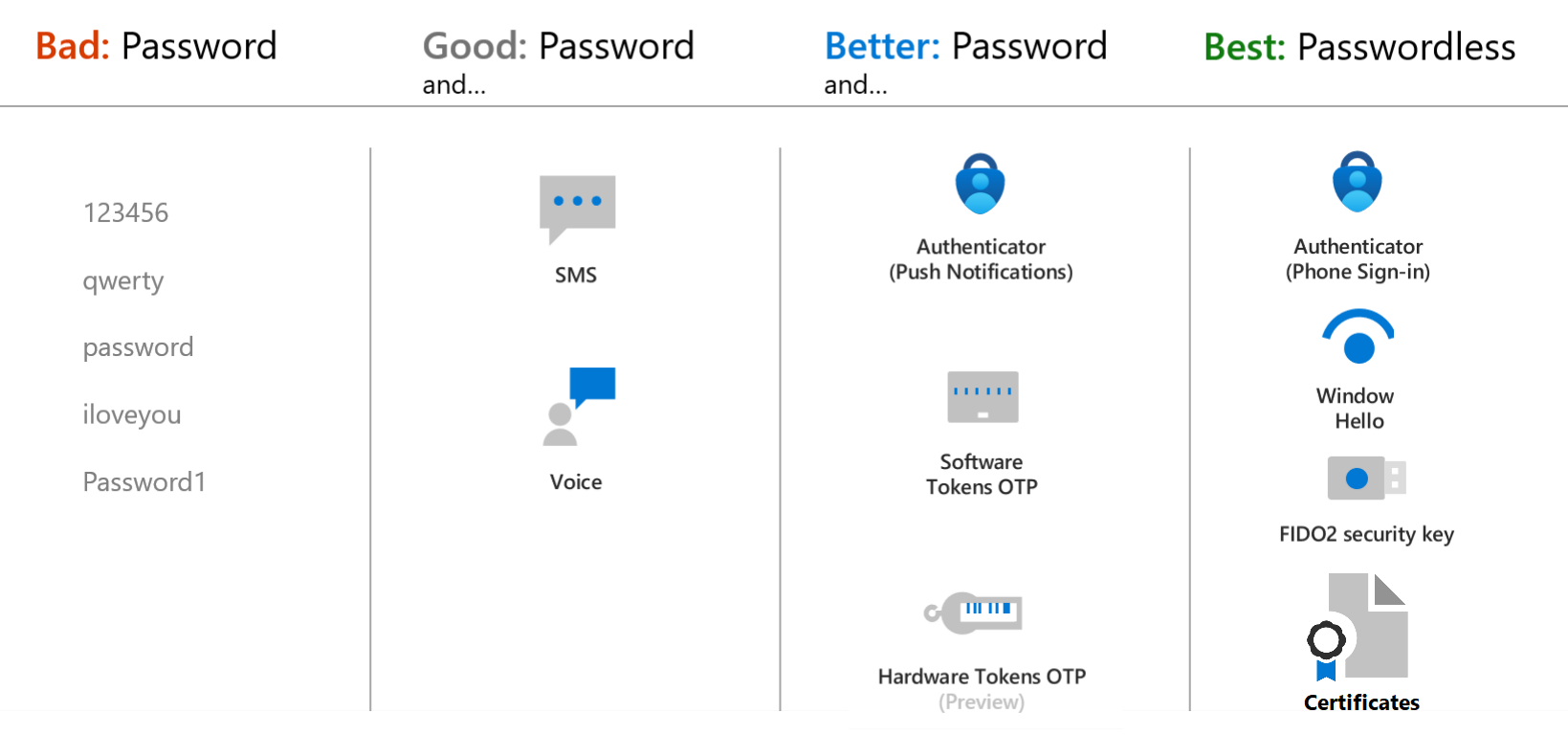
Authentication types supported by Entra ID ?
Passwords
Phone
SMS-based authentication: SSPR
Voice call verification: only supported as secondary forms of authentication. SSPR
OATH (Open Authentication)
Software OATH tokens
OATH TOTP hardware tokens (supported in public preview)
Passwordless Authentication:
Windows Hello for Business
FIDO2 Fast Identity Online (FIDO)
Microsoft Authenticator app
Certificate-based authentication : X.509
What is Oauth ?
OATH (Open Authentication) is an open standard that specifies how time-based, one-time password (TOTP) codes are generated It is implemented using either software or hardware to generate the codes.
Software OATH tokens are typically applications. Microsoft Entra ID generates the secret key, or seed, that's input into the app and used to generate each OTP.
OATH TOTP hardware tokens (supported in public preview) are small hardware devices that look like a key fob that displays a code that refreshes every 30 or 60 seconds. OATH TOTP hardware tokens typically come with a secret key, or seed, preprogrammed in the token. These keys and other information specific to each token must be input into Microsoft Entra ID and then activated for use by end-users.
OATH software and hardware tokens, are only supported as secondary forms of authentication in Microsoft Entra ID, to verify an identity during self-service password reset (SSPR) or Microsoft Entra multifactor authentication
Microsoft Authenticator app - Primary AuthN
To sign in to their Microsoft Entra account, a user enters their username, matches a number displayed on the screen to the one on their phone, then uses their biometric or PIN to confirm.
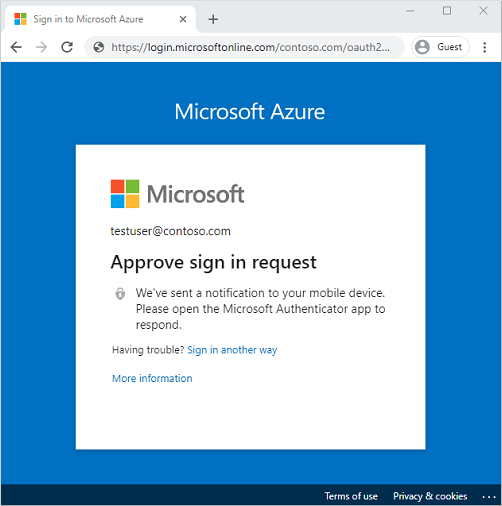
Microsoft Authenticator app - Secondary AuthN
When a user chooses Authenticator as secondary form of authentication, to verify their identity, a notification is pushed to the phone or tablet. If the notification is legitimate, the user selects Approve, otherwise, they select Deny.
Microsoft Authenticator app - Oauth TOTP tokens
The Authenticator app can also be used as a software token to generate an OATH verification code. After entering your username and password, you enter the code provided by the Authenticator app into the sign-in interface. The OATH verification code provides a second form of authentication for SSPR or MFA.
Certificate-based authentication
Microsoft Entra identity certificate-based authentication (CBA) enables customers to allow or require users to authenticate directly with X.509 certificates against their Microsoft Entra identity, for applications and browser sign-in. CBA is supported only as a primary form of passwordless authentication.
X.509 certificates, which are part of the public key infrastructure (PKI), are digitally signed documents that bind an identity (an individual, organization, website) to its public key.
Services that support AuthN of
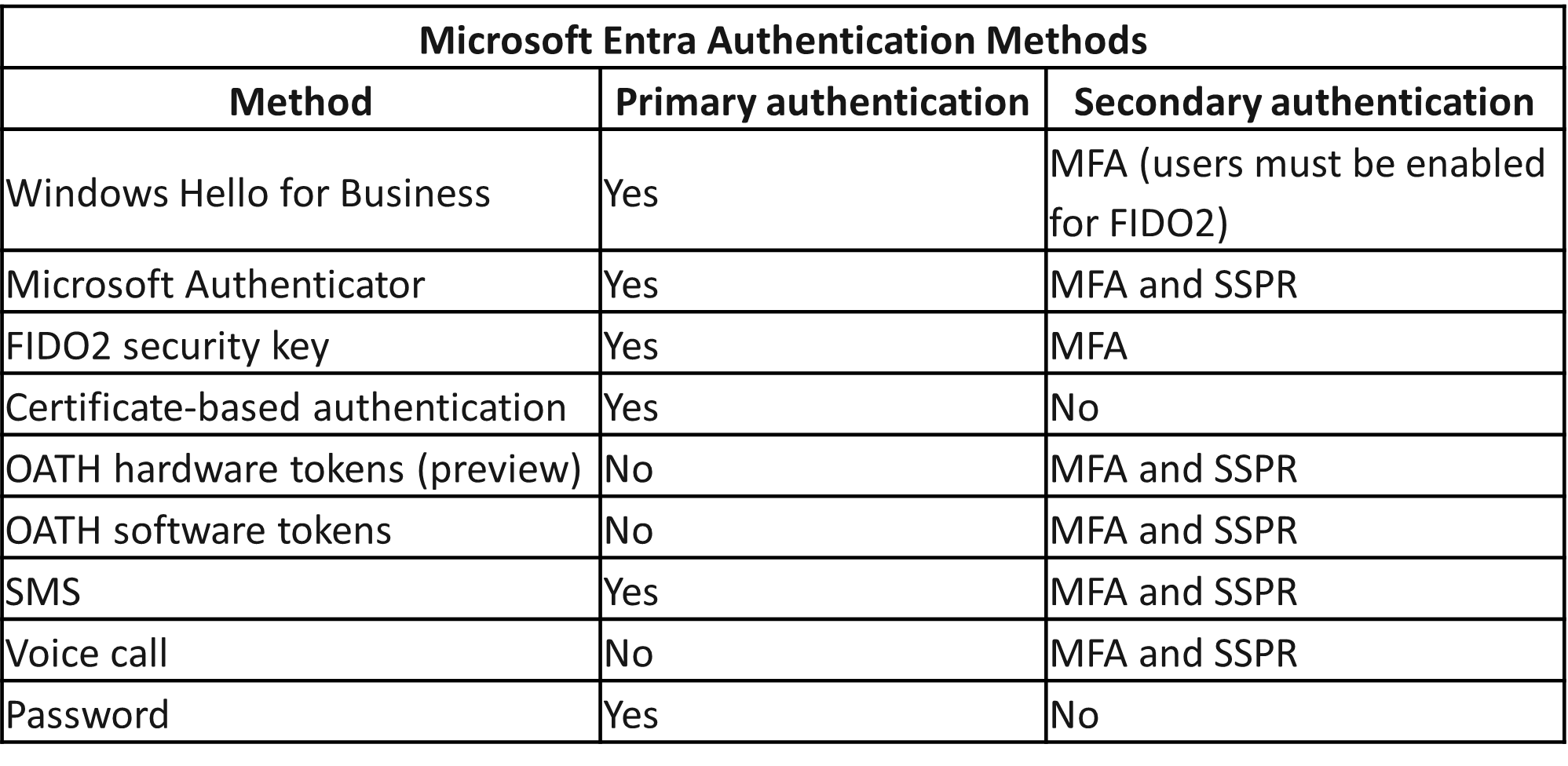
Primary: 6
Secondary
MFA - 6 & SSPR - 5
Multifactor authentication
Multifactor authentication is a process in which users are prompted during the sign-in process for an additional form of identification, such as a code on their cellphone or a fingerprint scan.
Microsoft Entra multifactor authentication works by requiring:
Something you know – typically a password or PIN and
Something you have – such as a trusted device that's not easily duplicated, like a phone or hardware key or
Something you are – biometrics like a fingerprint or face scan.
Multifactor authentication verification prompts are configured to be part of the _________ .
Microsoft Entra sign-in event
Microsoft Entra ID automatically requests and processes multifactor authentication, without you making any changes to your applications or services. When a user signs in, they receive a multifactor authentication prompt, and can choose from one of the additional verification forms that they've registered.
Methods of Microsoft Entra multifactor authentication:
Microsoft Authenticator app
Windows Hello for Business
FIDO2 security key
OATH hardware token (preview)
OATH software token
SMS
Voice call
Except password & CBA (Certified Based Authentication)
Security defaults
Security defaults are a set of basic identity security mechanisms recommended by Microsoft. When enabled, these recommendations are automatically enforced in your organization. The goal is to ensure that all organizations have a basic level of security enabled at no extra cost. These defaults enable some of the most common security features and controls, including:
Enforcing Microsoft Entra multifactor authentication registration for all users.
Forcing administrators to use multifactor authentication.
Requiring all users to complete multifactor authentication when needed.
SSPR (Self Service Password Reset)
Self-service password reset (SSPR) is a feature of Microsoft Entra ID that allows users to change or reset their password, without administrator or help desk involvement
Key benefits of SSPR?
reduces IT support costs by enabling users to reset passwords on their own.
SSPR allows users to get back to work faster and be more productive.
Administrators can change settings to accommodate new security requirements and roll these changes out to users without disrupting their sign-in.
SSPR includes robust audit logs that are available from an API, enabling data to be imported to a Security Incident and Event Monitoring (SIEM) system of choice.
To use self-service password reset, users must be:
Assigned a Microsoft Entra ID license.
Enabled for SSPR by an administrator.
Registered, with the authentication methods they want to use. Two or more authentication methods are recommended in case one is unavailable.
What authentication methods are available for SSPR?
Mobile app notification
Mobile app code
Email
Mobile phone
Office phone
Security questions
Security questions aren't used as an authentication method during a sign-in event.
________ accounts can't use security questions as verification method with SSPR.
Administrator
By default, _________ are enabled for self-service password reset and are required to use _____ factor authentication methods to reset their password, such as an email address, authenticator app, or a phone number.
administrator accounts | two
________ allows users to use their updated credentials with on-premises devices and applications without a delay.
Password write-back
All _____ admins would be notified when SSPR is used on an admin account.
global admins
Password protection
Password protection is a feature of Microsoft Entra ID that reduces the risk of users setting weak passwords. It detects and blocks known weak passwords and their variants, and can also block other weak terms that are specific to organization.
With Microsoft Entra password protection, default global banned password lists are automatically applied to all users in a Microsoft Entra tenant that can't be disabled and can define entries in a custom banned password list.
Global banned password list
A global banned password list with known weak passwords is automatically updated and enforced by Microsoft. This list is maintained by the Microsoft Entra ID Protection team, who analyzes security telemetry data to find weak or compromised passwords.
Variations are created using an algorithm that transposes text case and letters to numbers such as "1" to an "l".
The global banned list is sourced from real-world, actual password spray attacks
Hybrid security ?
For hybrid security, admins can integrate Microsoft Entra password protection within an on-premises Active Directory environment. A component installed in the on-premises environment receives the global banned password list and custom password protection policies from Microsoft Entra ID. Domain controllers then use them to process password change events. This hybrid approach makes sure that, wherever a user changes their password, Microsoft Entra password protection is applied.
 Note
Note  Flashcards (86)