MIS Rutgers
 Studied by 0 people
 Call Kai
 Learn
Learn Practice Test
 Spaced Repetition
 Match
Match Flashcards
 Knowt Play
1/109

There's no tags or description
Looks like no tags are added yet.
Name | Mastery | Learn | Test | Matching | Spaced | Call with Kai |
|---|
No analytics yet
Send a link to your students to track their progress
110 Terms
Moore's Law
the observation that computing power roughly doubles every two years. price will go down.
Five components of MIS
hardware, software, data, procedures, people
SaaS
Software as a Service
BYOD
Bring Your Own Device
social capital
the networks of relationships among people who live and work in a particular society, enabling that society to function effectively.
SQL
Structured Query Language
*does not like space
* statements end with semi-colon ( ; )
*case sensitive
What's the Most popular Database?
Relational Database
relational database
relational database is based on relationships between two tables
Types of Relationships
one to one 1:1
one to many 1:N
many to many N:M
many to one N:1
three types of enterprise version of database
IBM = DB2
ORACLE = ORACLE DATABASE
MICROSOFT = SQL SERVER
Microsoft Access
One person version of database
Primary Key
A field (or group of fields) that uniquely identifies a given entity in a table.
*does not allow duplicates
*does not allow blanks
ALTER command
Alter table tbldepartment
add dept_mgr_name char(50);
DROP TABLE command
drop table tbldepartment;
CREATE TABLE command
create table tbldepartment
(dept_id char(3) primary key,
dept_name char(20));
Foreign Key
A primary key from one table that is used in another table.
* allows blanks and duplicates
server farm
large collection of coordinated servers
Binary Code
The most basic language a computer understands, it is composed of a series of 0s and 1s. The computer interprets the code to form numbers, letters, punctuation marks, and symbols.
DDL
Data Definition Language
CREATE, ALTER, DROP
DML
Data manipulation language
Insert into
delete from
update
select
INSERT INTO Statement
INSERT INTO tblemployee
VALUES ('111', 'doe', 'john', 'AAA');
Delete From Statement
DELETE *
FROM tblemployee
WHERE emp_id='111';
UPDATE Statement
UPDATE tblemployee SET last_name = 'patel'
WHERE emp_id='111';
SELECT * FROM statement
SELECT *
FROM tbldepartment;
1 byte
8 bits
Referential Integrity
A set of rules that Access enforces to maintain consistency between related tables when you update data in a database.
A row is called a
record
Views in Access
datasheet view
design view
DBMS
Database management system,
a software suite designed to organize and search data.
controls who can access data
RAM
Random Access Memory; volatile
columns are called
fields
Meta-Data
a set of data that describes and gives information about other data.
*Data Dictionary
Components of a Database
tables or files
relationships among rows in tables
metadata
Four DBMS operations
1. Read
2. Insert
3. Modify
4. Delete data
Components of a Database Application System
User, Database Application, DBMS, Database
basic categories of computer software
Client server
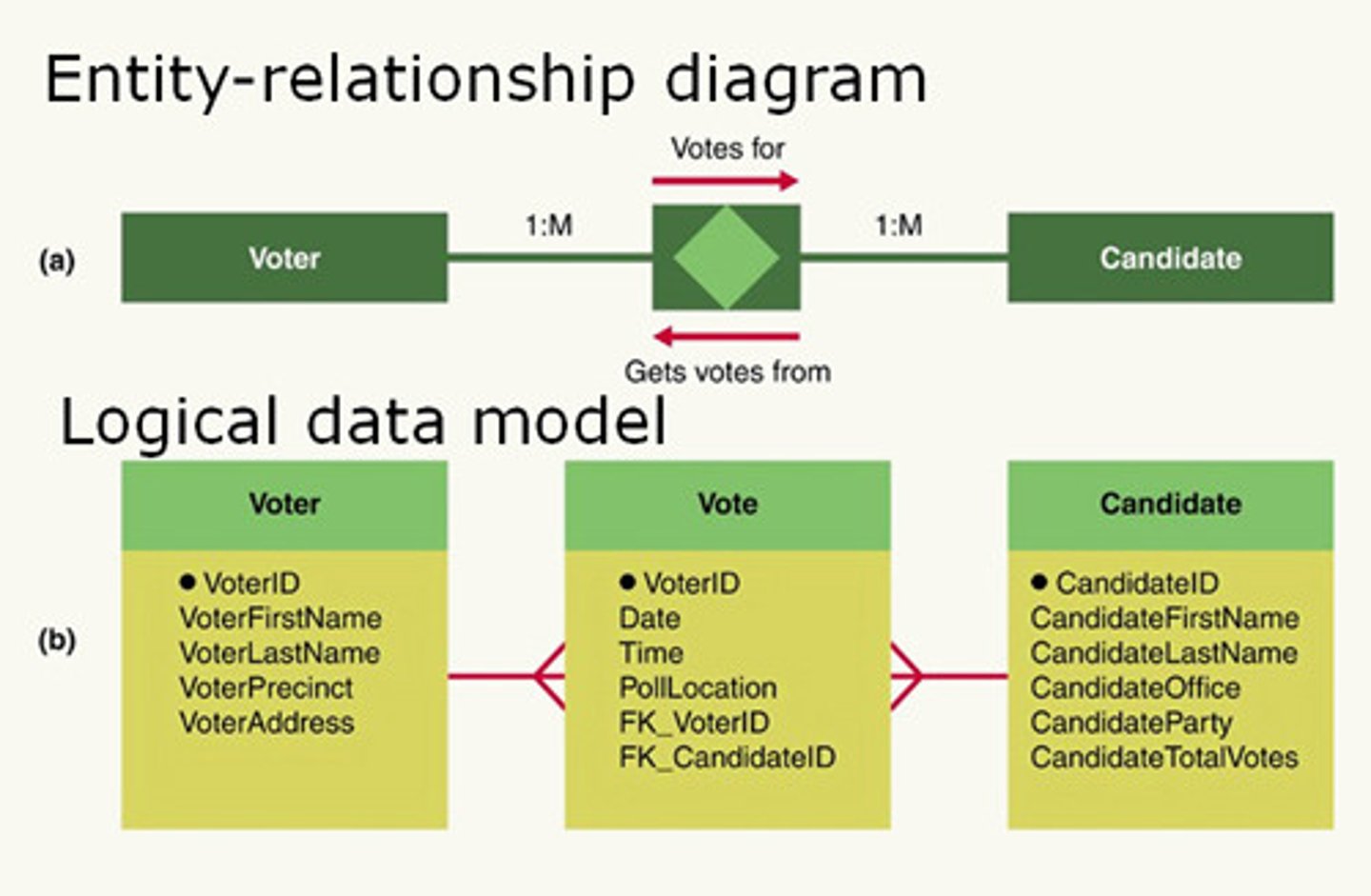
E-R Diagram
Entity-Relationship Diagram.
A diagram that represents the entities in a Database and the relations between them.
relationship diagram
the table with foreign key, allows duplicate, has many relationship
cache memory
a type of high-speed memory that a processor can access more rapidly than main memory. small memory that is used to access most recently visited websites.
*volatile
VBA
Visual Basic for Applications. The macro programming language available in Excel .
virtual memory
a portion of a storage medium functioning as additional RAM
(Memory swapping is slow)
Hardrive
The main storage device in a computer.
Non-volatile
thin-client application
a software application that requires nothing more than a browser
PC virtualization
a personal computer hosts several different operating systems
thick-client application
A software application that requires programs other than just the browser on a user's computer
All Excel formulas begin with the ____.
equal sign (=)
Auto excel functions
Auto calculate
Auto sum
auto-fit
auto-fil
HTML
Hypertext Markup Language
license
rights to use specific number of copies
limit vendor liability
open sourse software
free usage license
F4 key
Absolute reference
Firmware
System software that controls hardware devices.
Types of reference in excel
Relative Reference (the default reference)
Mixed Reference
Absolute reference( locks values)
Ctrl G
gives you go to box( search cell range)
source code
computer code as written by humans and understandable by humans
Goal Seek
allows you to change a single cell value
*What if analysis
Name Box
The cell reference area located below the Ribbon, which displays the cell reference of the active cell.
F3
Gives you past cell names
nested function
a function within a function
nested if statement
=IF(D2>89,"A",IF(D2>79,"B",IF(D2>69,"C",IF(D2>59,"D","F"))))
command tabs
Task-oriented tabs that are organized on the ribbon.
screen tips
A small, onscreen rectangle that displays descriptive text when you rest the pointer on a command or control.
formular bar
a bar that displays the value or formula entered in the active cell
Backstage view
The view that opens when you click the File tab, containing commands for managing files, setting program options, and printing.
Push vs. Pull
push: Sending information
Pull: is opening pushed information
Auto Calculate
doesn't require formula or cell, answer shown in status bar
fill handle
The small black square in the lower right corner of a selected cell
Auto Fill
An Excel feature that automatically fill cells with data, formatting, or both.
Auto Correct
A feature that replaces symbols, commonly misspelled words, and abbreviations with specific text strings.
auto fit
A software feature that automatically adjusts the width and height of a column, row, cell, or header.
Pivot Table
The tool used by most spreadsheet programs to create a summary table.
*Delete source data will not delete from the pivot table.
*you have to refresh under analysis
Insert Slicer
allows you to sort or filter pivot table data
What-if analysis
Goal seek( one value)
Scenario Manager
Solver (add in)
Solver
An Excel add-in that searches for the optimal solution to a problem involving several variables.
*Allows you to change more than one cell range
Future Value(FV) Formula
Present Value(PV) Formula
NPV (net present value) Formula
IF function
Sum ifs=
average ifs=
Count ifs=
VLOOKUP
uses a lookup table that is organized in vertical columns
HLOOKUP
An Excel function that looks up values that are displayed horizontally in a row.
Freeze Panes
A command that enables you to select one or more rows or columns and freeze (lock) them into place; the locked rows and columns become separate panes.
Error Excel
#value= something is wrong
#######= column not big enough
#Div/0= cannot divide by zero
OR function
A logical function that returns TRUE if either part of the condition is true.
Data Validation
used to enforce rule, also makes the rule
*circle invalid data does not correct data
error alert
Stop- More restrictive
Warning
Protect Work sheet
allows you to choose which cells can be edited. lock cells to prevent change to work
Protect Workbook
Macro
are programs that carry out routine, repetitive task.
*default reference is absolute
*the default options in excel trust center is disable all macros
conditional formatting
Formatting that is applied to a cell when a specified condition is met.
Data visualization
format cells with icons, fill color, or shaded bars to distinguish values
Data Visualization commands
data bars, color scales, icon sets
PMT function
Format Painter
copies and pastes formatting from one cell or range to another without duplicating any data
Merge and Center
Combine cells and center the contents.
Wrap Text
displaying the cell contents on multiple lines, rather than one long line.
And Function
test multiple condition and show true only when all conditions are met
VBE (Visual Basic Editor)
Visual Basic Editor is an application that run in a separate window from Excel. used to edit Macro
Add the Developer tab to the Ribbon.
Click the File tab. Click Options to open the Excel Options dialog. Click Customize Ribbon. At the right side of the Customize the Ribbon window, the Customize the Ribbon list shows all the tab and groups available. Click the Developer check box to add the Developer tab to the Ribbon. Click OK.
How to lock a cell
how to protect a workbook
 Note
Note  Flashcards (24)