Computer Science Chapter 5
 Call Kai
 Learn
Learn Practice Test
 Spaced Repetition
 Match
Match Flashcards
 Knowt Play
1/46

Earn XP
Description and Tags
The internet and its uses
47 Terms
Inernet
Worldwide collection of interconnected networks.
Relies on physical infrastructure that allows networks and individual devices to connect to other networks and devices. Uses transmission protocols and internet protocols.
World Wide Web
Only part of the internet that users can access using a web browser software. It is a massive collection of web pages, and is based on hypertext transfer protocol.
Web Browsers
Software that allow users to access and display web pages on their device screens.
URLs (Uniform Resource Locators)
Text addresses used to access websites.
Format of URL …://…/…/…
protocol:// website address/path/file name
Protocol: usually either http or https
Website Address:
» Domain Host (www)
» Domain Name (website name)
» Domain Type (.com, .org, .net, .gov, etc.)
» Country Code (.uk, .id, etc.)
Path: web page — often omitted and it then becomes the root directory of the website
File name: item on the web page
Hypertext Transfer Protocol (http)
Set of rules that must be obeyed when transferring files across the internet. When some form of security (SSL/TLS) is used, then this changes to https The ‘s’ stands for secure, and it indicated a more secure way of sending and receiving data across a network.
Features of Web Browsers
Home page
Favorite website/webpages
History of websites
Navigating forwards/backwards through websites/pages that have already been opened
Multiple tabs (open many at same time)
Cookies
Hyperlinks
Data stored as cache
Uses JavaScript
Address Bar
Domain Name System (DNS)
System for finding IP addresses.
It involves converting URL into an IP address the computer can understand. DNS provides more than one server. It contains a database of URLs with the matching IP address.
Mention the 5 Stages of Retrieval and Location of Web Pages
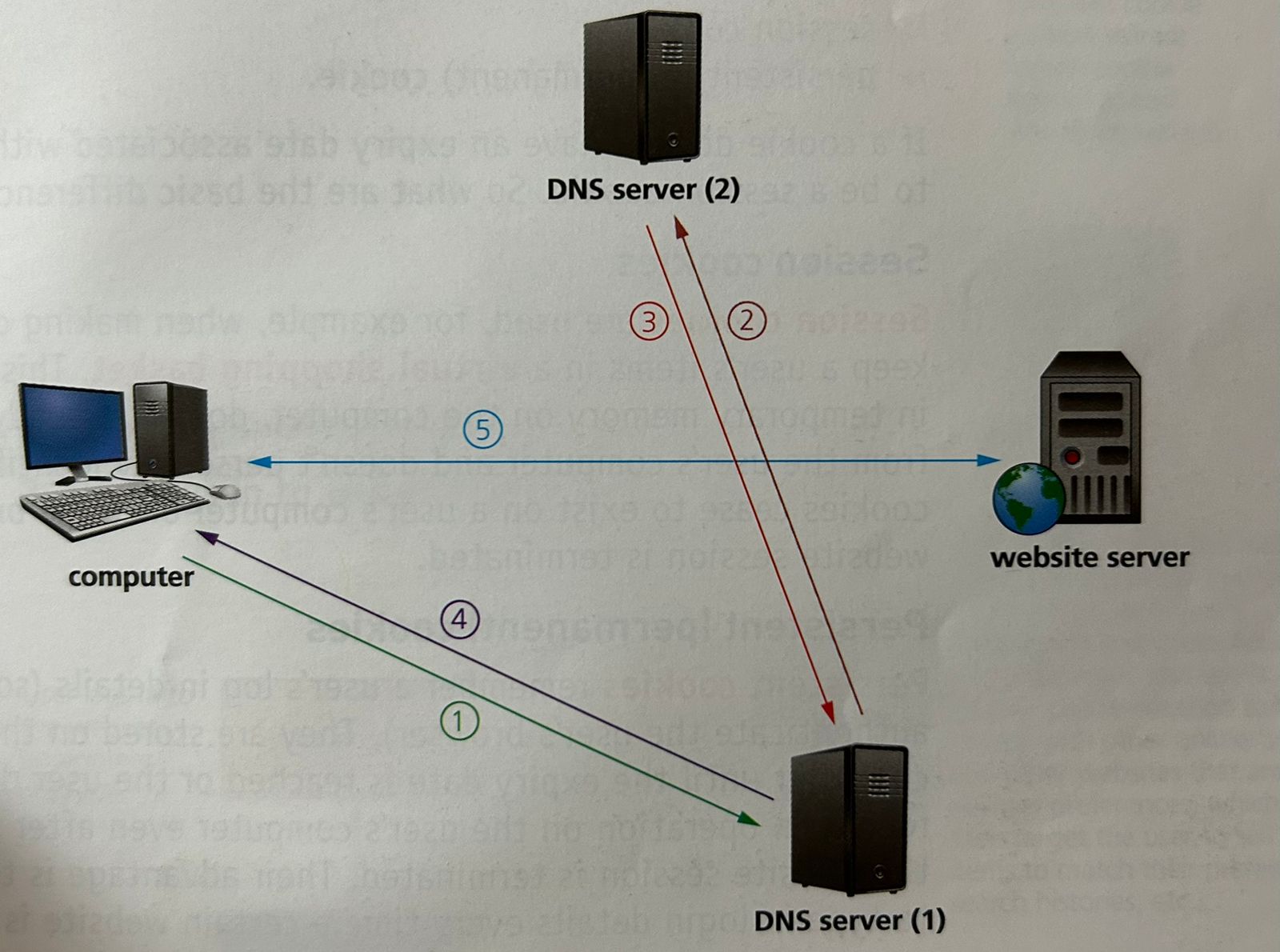
The user opens their browser and types in the URL. The browser asks the DNS server (1) for the IP address of that website.
If unable to find the IP address in its cache or database it sends out a request to DNS server (2)
DNS Server (2) finds the URL and maps it to the IP address which is sent back to DNS Server (1) which now puts this IP address and associated URL into its cache/database.
IP address is sent back to the user’s computer
The computer now sets up a communication with the website server and required files are downloaded. HTML files are sent from the website server to the computer. Browser interprets the HTML, which is used to structure content, and then displays the information on the user’s computer.
Cookies
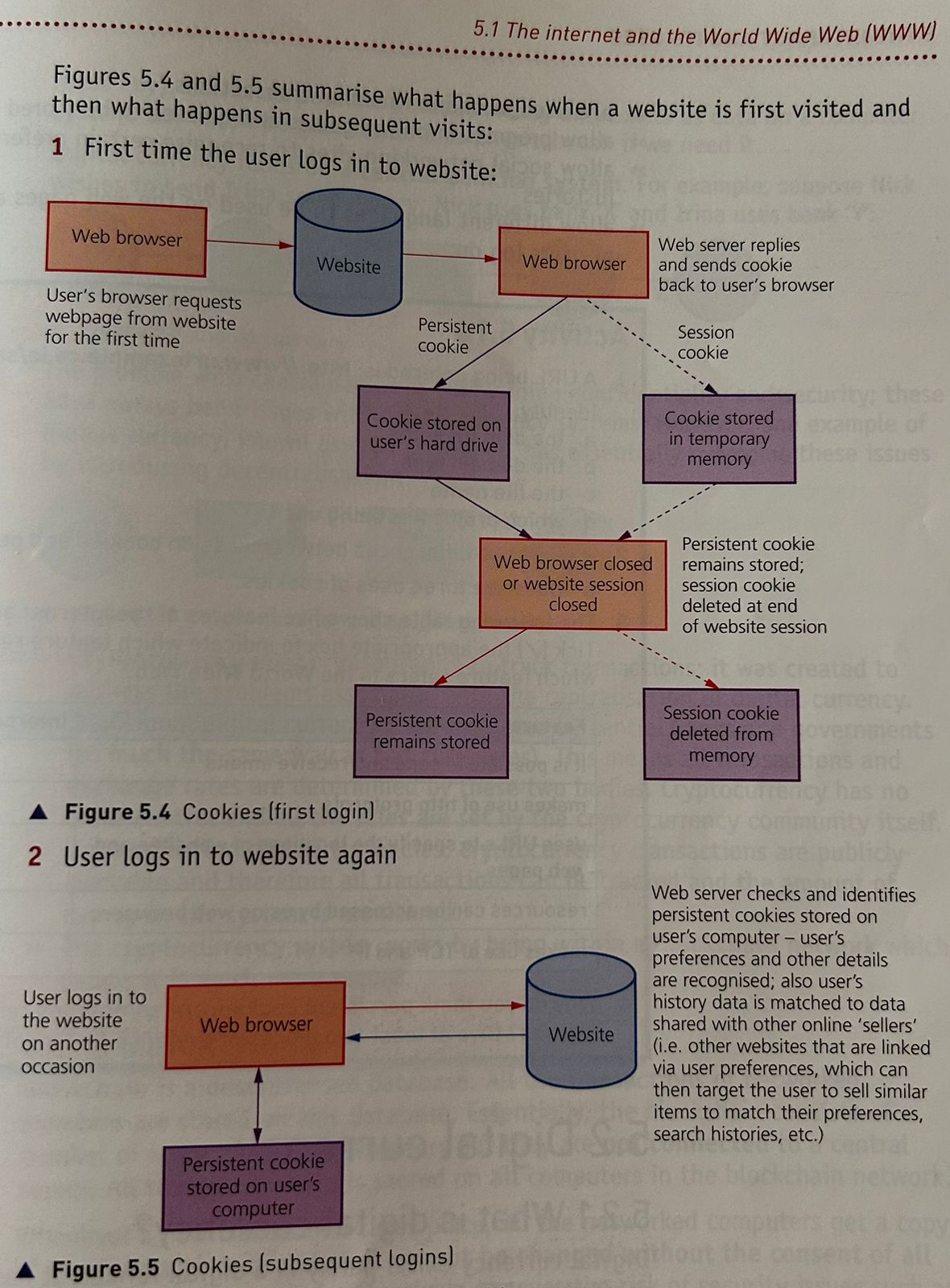
Small files or code stored on a user’s computer.
They are sent by a web server to a browser on a user’s computer. Each cookie is effectively a small look-up table containing pairs of (key, data) values.
Every time a user opens a server it checks if it has set cookies on their browser before. If so, the browser reads the cookie which holds key information on the user’s preferences such as language, currency, and previous browsing activity.
Purpose of Cookies
Cookies allow user tracking and maintain user preferences. Collected data can also be used to customize the web page for each individual user.
What are the two types of cookies?
» Session Cookies
» Persistent (permanent) Cookies
Session Cookie
A cookie that is stored temporarily on a computer; it is deleted when the browser is closed or the website session ends
They keep user’s items in a virtual shopping basket.
Stored: Temporary Memory on the computer
Doesn’t collect any information from user’s computer
Doesn’t personally identify a user
Only exist until browser closes or website session is terminated
Persistent Cookie
A cookie that is stored in the hard drive and only deleted when the expiry date is reached or the cookie is deleted by the user
Stored on the hard drive of a user’s computer
Exists until its expiry date or if deleted
Remember a user’s login details
Advantage: remove the need to type in login details every time a certain website is visited
Very efficient way of carrying data from one website session to another, or even between sessions on related websites; they remove the need to store massive amount of data on the web server itself
Uses of Persistent Cookie
Remember user’s passwords, email addresses and invoice details
Serve as memory
Save user’s items in virtual shopping basket or cart
Track internet habits and users’ website histories or favorites or bookmarks
Target users with advertising related to previous habits
Store users’ preferences
Used in online financial transactions
Allow progress in online games and quizzes to be stored
Allow social networking sites to recognize certain preferences and borrowing histories
Allow different languages to be used on the web pages automatically as soon as users log on
Digital Currency
Currency that exists on electronic form only.
Exists purely in digital format. It has no physical form unlike conventional fiat currency.
Meaning of Fiat
‘Let it be done’
Centralisation
Digital currency relies on a central banking system.
Example:
nick —> bank ‘x’ —> CENTRAL BANK —> bank ‘y’ —> irina
The problem with centralization is maintaining confidentiality and security; these have always been issued with digital currency systems. Cryptocurrency has overcome these issues.
Cryptography
The protection of data/information by use of coding; it usually involves encryption and decryption
Cryptocurrency
A form of digital currency that uses a chain of decentralized computers to control and monitor transactions
Significance of Cryptocurrency
transactions are publicly available, therefore all transactions can be tracked and the amount of money in the system is monitored
works with blockchain network which means it is much more secure
Blockchain
A decentralized database where all transactions are stored.
It consists of a number of interconnected computers but not a central server.
not connected to a central server
transactions cannot be changed without the consent of all the network members
effectively removes risk of security issues like hacking
Uses of Blockchaining
Cryptocurrency
Smart Contracts
Research
Politics
Education
How Blockchain Works
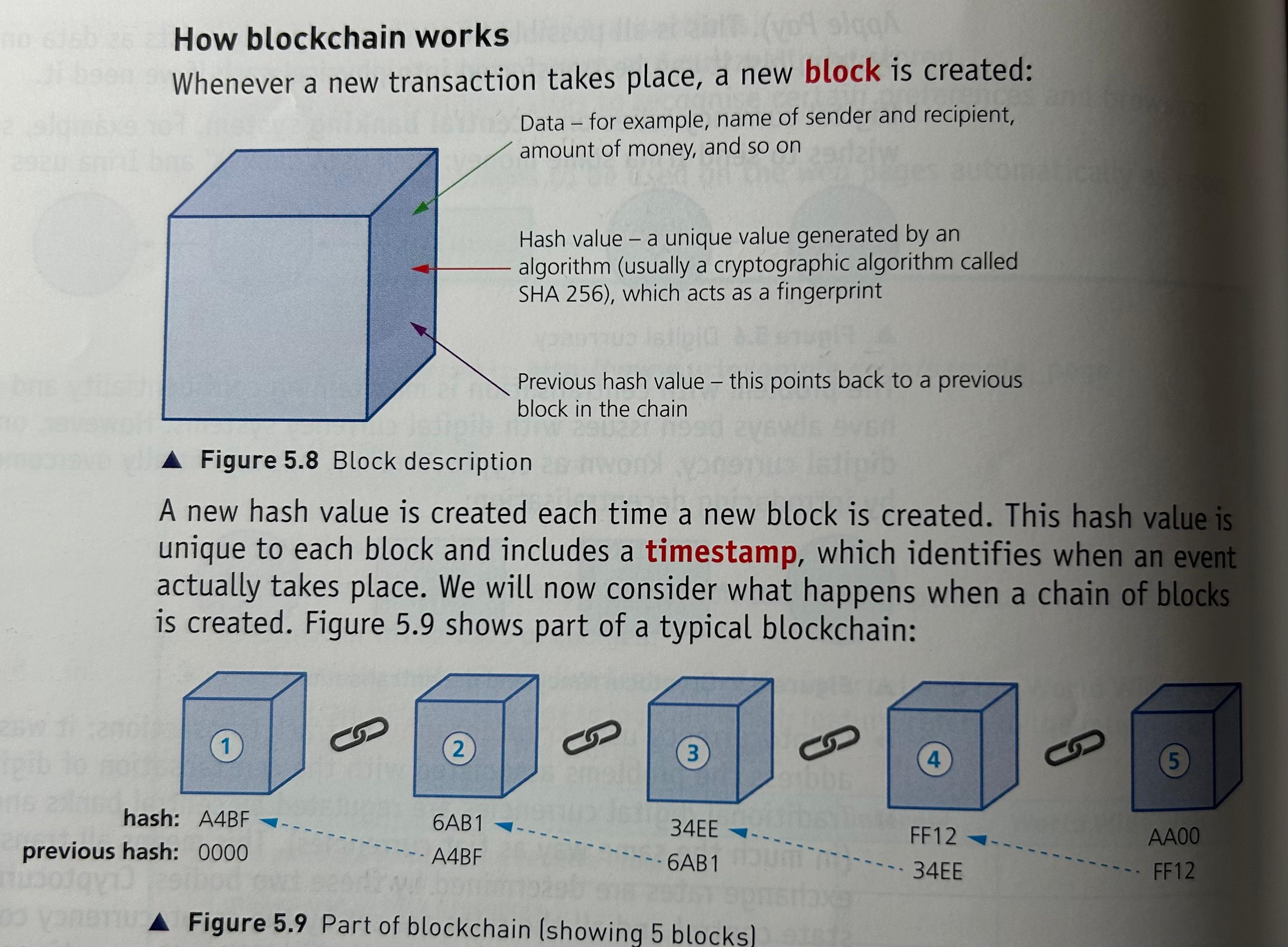
whenever a new transaction takes place, a new block is created
new hash value created each time new block created
contains timestamp
contains hash value of that block and of the previous block
Block ‘1’ (first block) is known as the genesis block since it doesn’t point to any previous block
Containing previous hash value prevents tampering since all the following blocks will then become invalid
Proof-of-work makes it almost impossible to hack into the blockchain
If a new network user is created, they get a copy of everything in the whole blockchain system.
Proof-of-Work
The algorithm used in blockchain networks to confirm a transaction and to produce new blocks to add to the chain; special users called miners complete and monitor transactions on the network for a reward
Proof-of-work makes sure it takes ten minutes to determine the necessary proof-of-work for each block before it can be added to the chain
This process slows down the creating of a new block which foils hackers and also means that the currency is regulated by all the network computers
8 Cyber Security Threats
Brute Force Attacks
Data Interception
Distributed Denial of Service (DDos) Attacks
Hacking
6 Malware (viruses, worms, Trojan Horse, Spyware, Adware, Ransomware)
Phishing
Pharming
Social Engineering
Brute Force Attack
A ‘trial and errorr’ method used by cybercriminals to crack passwords by finding all possible combination of letters, numbers and symbols until the password is found.
how it works:
checks if password is most simple (qwerty, 11111, abc123, 123456, password)
word list: a text file containing a collection of words used in a brute force attack
Data Interception: Packet Sniffing and Wardriving
An attempt to eavesdrop on a wired or wireless network transmission; cybercriminals often use packet sniffing or access point mapping/wardriving to intercept data
Packet sniffing: a method used by a cybercriminal to examine data packets being sent over a network and to find the contents of a data packet, which are sent back to the cybercriminal
Wardriving: using a laptop, antenna, GPS device and software to intercept Wi-Fi signals and illegally obtain data; sometimes called Access Point Mapping
Avoid Data Interception
Wired Equivalency Privacy (WEP): an algorithm for wireless networks to protect them against data interception
Firewall
Protect use of wireless router by having complex password
Not use Wi-Fi connectivity in public places
Denial of Services (DoS) and Distributed Denial of Service (DDoS) Attack
DoS: A cyberattack in which cybercriminals seek to disrupt the normal operation of a website by flooding it with requests; also used to clog up a user’s mailbox by sending out thousands of spam emails
Prevents users from…
» accessing their emails
» accessing their websites/web pages
» accessing online services (such as banking)
DDoS: A cyberattack in which cybercriminals in which the fake requests come from many different computers, which makes it harder to stop
‘Spam’: unsolicited emails sent to a user’s mailbox
How does DoS work?
When a user enters a website’s URL in their browser, a request is sent to the web server that contains the website or web page.
Server can only handle a finite number of requests.
So if it becomes overloaded by an attacker sending out thousands of requests, it won’t be able to service a user’s legitimate request.
3 Ways to Avoid DoS/DDoS
using up-to-date malware checker
setting up firewall to restrict traffic to and from the web server or user’s computer
applying email filters to filter out unwanted traffic
3 Signs user has become victim of DDoS Attack
slow network performance (opening files or accessing certain websites)
inability to access certain websites
large amounts of spam email reaching the user’s email account
Hacking
The act of gaining illegal access to a computer system without the owner’s permission
can lead to → identity theft, gaining personal information, deleted data, passed on data, changed data, corrupted data
5 Ways to Avoid Hacking
firewalls
user names
frequently changed strong passwords
anti-hacking software
intrusion-detection software
Ethical Hacking
Occurs when companies authorise paid hackers to check out their security measures and test how robust their computer systems are to hacking attacks
Malware
Programs installed on a user’s computer with the aim of deleting, corrupting, or manipulating data illegally
6 types of malware → viruses, trojan horse, worms, spyware, adware, ransomware
Viruses
A program or program code that replicated itself with the intention of deleting or corrupting files or by causing the computer system to malfunction
need an active host program on the target computer or an operating system that has already been infected, before they can actually run and cause harm (that is, they need to be executed by some trigger before being able to start any damage)
Often sent as email attachments, reside on infected websites or on infected software downloaded to the user’s computer
3 Ways to Avoid Viruses
Don’t open emails from unknown sources
Don’t install non-original software
Always run up-to-date virus scanner
Worms
A stand-alone type of malware that can self-replicate, they can spread throughout a network without the need for any action by an end-user
Intention is to corrupt whole networks — unlike viruses, they don’t need an active host program to be opened in order to do any damage.
They rely on security failures within networks to permit them to spread unhindered
How Worms Work
Worms frequently arrive as message attachments and only one user opening a worm-infested email could end up infecting the whole network.
Ways to mitigate are same as that of viruses.
Significance of Worms
Worms tend to be problematic because of their ability to spread throughout a network without any action from an end-user; whereas viruses require each end-user to somehow initiate the virus
Example: 'I love you’ worm
Attacked nearly every email user in the world, overloaded phone systems and even brought down television networks. All of this makes them more dangerous than viruses
Trojan Horse
A type of malware that is designed to look like legitimate software but contains malicious code that can cause damage to a computer system
Intent of carrying out some harm to the user’s computer system
they need to be activated by end-user
usually arrive as an email attachment or are downloaded from an infected website
once installed, they will give cybercriminals access to personal information
Spyware and Ransomware are often installed on a user’s computer via Trojan Horse malware
Firewalls and other security systems are often useless since user can overrule them and initiate the running of the malware
Spyware
A type of malware that gathers information by monitoring a user’s activities on a computer and sends the gathered information back to the cybercriminal who sent out the spyware
Designed to monitor and capture web browsing activities to gain personal data.
Can be removed by anti-spyware software
Adware
A type of malware that attempts to flood the end-user with unwanted advertising
Adware can…
» highlight weaknesses in a user’s security defenses
» be hard to remove — anti-malware software may be confused whether or not they are dangerous
» hijack a browser and create its own default search requests
Ransomware
A type of malware that encrypts data on a user’s computer and ‘holds the data hostage’ until a ransom is paid
Can be installed through trojan horse or social engineering
Best way to avoid: keep regular back-ups of key files
Phishing
Sending out legitimate-looking emails to trick users into giving personal information to the sender of the email