System Integration & Architecture MIDTERMS
 Studied by 0 people
 Call Kai
 Learn
Learn Practice Test
 Spaced Repetition
 Match
Match Flashcards
 Knowt Play
1/178

There's no tags or description
Looks like no tags are added yet.
Name | Mastery | Learn | Test | Matching | Spaced | Call with Kai |
|---|
No analytics yet
Send a link to your students to track their progress
179 Terms
System Usability Scale
Is a questionnaire that is used to evaluate the usability of products and services.
System Usability Scale
Was originally created as a “quick and dirty” scale for administering after usability tests on systems like VT100 Terminal (“Green-Screen”) applications.
System Usability Scale
Consists of only 10 questions, which are answered using a Likert scale. The range goes from “I strongly agree” to “I strongly disagree.”
John Brooke in 1986.
was released into this world by
System Usability Scale
It has become an industry standard with references in over 600 publications, almost 30 years of use.
True
T or F: The System Usability Scale is a Likert Scale which includes 10 questions which users of your website will answer.
Participants will rank each question from 1 to 5 based on how much they agree with the statement they are reading. 5 means they agree completely, 1 means they disagree vehemently.
The SUS is a 10 item questionnaire
I think that I would like to use this system frequently.
I found the system unnecessarily complex.
I thought the system was easy to use.
I think that I would need the support of a technical person to be able to use this system.
I found the various functions in this system were well integrated.
I thought there was too much inconsistency in this system.
I would imagine that most people would learn to use this system very quickly.
I found the system very cumbersome to use.
I felt very confident using the system.
I needed to learn a lot of things before I could get going with this system.
68
The average System Usability Scale score is?
score < 68
There are probably serious problems with your website usability which you should address
score > 68
All goods imo website
A
80.3 or higher
C
68
F
51 or under
Scoring
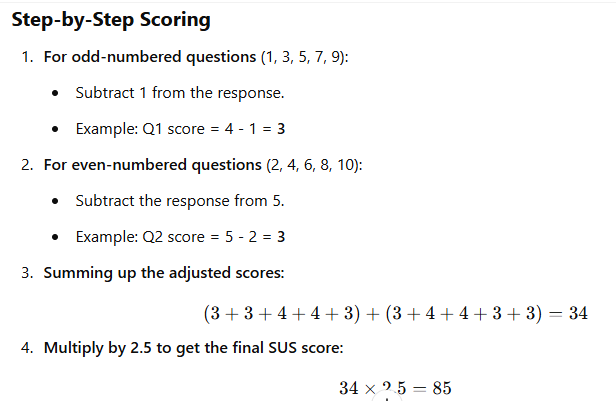
True
T or F: Even though a SUS score can range from 0 to 100, it isn’t a percentage.
Requirements Elicitation
Is the process of identifying, gathering, and understanding the needs and expectations of stakeholders for a software project.
Requirements Elicitation
It is a critical phase in the Software Development Life Cycle (SDLC) as it lays the foundation for defining the system's functionality, constraints, and objectives.
Requirements Elicitation
Stakeholder Identification
Techniques for Gathering Requirements
Stakeholder Identification
Determining key users, clients, and decision-makers.
Techniques for Gathering Requirements
Interviews & Surveys
User Stories and Use Cases
Prototyping
Requirement Workshops
Requirement Workshops
Document Analysis
Brainstorming Sessions
Interviews
Direct interaction with stakeholders through —- allows for a deep dive into their needs.
Surveys
Can gather quantitative data from a larger audience, providing a broader perspective.
Interviews & Surveys
ex. business analyst might use structured interviews to gather detailed user requirements
User Stories and Use Cases
These narrative tools help in visualizing the end-user's interaction with the system, making it easier to understand and communicate requirements.
User Stories and Use Cases
ex. user stories describe how a customer will use an online shopping platform can help developers understand the features needed.
Prototyping
Creating mock-ups for validation.
Prototyping
ex. Clickable prototype of a mobile app interface can help stakeholders visualize the end product and suggest changes early in the development process.
Requirement Workshops
These collaborative sessions bring together various stakeholders to discuss and reconcile different needs and viewpoints
Requirement Workshops
ex. Conducting a workshop with end-users, developers, and quality assurance teams to define the acceptance criteria for a new feature.
Observation & Job Shadowing
Analyzing existing workflows.
Observation & Job Shadowing
ex. Shadowing a nurse during their shift to understand the requirements for a healthcare management system
Document Analysis
Reviewing existing documentation can provide insights into current processes and systems, helping to identify areas for improvement.
Document Analysis
e.g. Analyzing user manuals to identify gaps in current software functionalities
Brainstorming Sessions
Collaborative sessions to explore ideas.
Brainstorming Sessions
e.g. A brainstorming session that leads to the idea of integrating AI
Requirement Classification
Functional vs Non-functional Requirements
Requirements Documentation
Requirements Maintenance & Management
Modeling Tools and Methodologies using UML
Testing of Requirements
Functional Requirements
These define the specific features, functionalities, and behaviors that the system must perform.
Functional Requirements
Examples:
User authentication and authorization
Data input and validation
CRUD operations (Create, Read, Update, Delete)
Payment processing in an e-commerce system
Generating reports and dashboards
Non-functional Requirements
These define the quality attributes, constraints, and system performance that do not directly relate to specific functionalities.
Types of Non-functional Requirements
Performance Requirements – System response time, load capacity
Scalability – Ability to handle growing user loads Security
Requirements – Data encryption, authentication standards
Usability Requirements – User experience, accessibility
Reliability & Availability – System uptime, error handling
Maintainability & Portability – Ease of updates, system migration
How to Gather Functional Requirements
Interviews: Talk to stakeholders or users to understand their needs.
Surveys: Distribute questionnaires to gather input from a larger audience.
Workshops: Host sessions to brainstorm features and gather feedback.
How to Gather Non-functional Requirements
Performance Benchmarks: Consult with IT teams to set expectations for performance and load.
Security Standards: Consult with security experts to define the best practices for data protection.
Usability Testing: Test the system to find areas where users might struggle and refine the interface.
Functional Requirements Definition
Describes what the system should do, i.e., specific functionality or tasks.
Non-Functional Requirements Definition
Describes how the system should perform, i.e., system attributes or quality.
Functional Requirements Purpose
Focuses on the behavior and features of the system.
Non-Functional Requirements Purpose
Focuses on the performance, usability, and other quality attributes.
Functional Requirements Scope
Defines the actions and operations of the system.
Non-Functional Requirements Scope
Defines constraints or conditions under which the system must operate.
Functional Requirements Measurement
Easy to measure in terms of outputs or results.
Non-Functional Requirements Measurement
More difficult to measure, often assessed using benchmarks or SLAs.
Functional Requirements Impact on development
Drives the core design and functionality of the system.
Non-Functional Requirements Impact on development
Affects the architecture and overall performance of the system.
Functional Requirements focus on user needs
Directly related to user and business requirements.
Non-Functional Requirements focus on user needs
Focuses on user experience and system performance.
Functional Requirements Documentation
Typically documented in use cases, functional specifications, etc.
Non-Functional Requirements Documentation
Documented through performance criteria, technical specifications, etc.
Functional Requirements Evaluation
Can be tested through functional testing (e.g., unit or integration tests).
Non-Functional Requirements Evaluation
Evaluated through performance testing, security testing, and usability testing.
Functional Requirements Dependency
Determines what the system must do to meet user needs.
Non-Functional Requirements Dependency
Depends on how well the system performs the required tasks.
Requirements Documentation
Software Requirements Specification (SRS) .
User Stories and Use Case Diagrams
Business Requirement Document (BRD) vs. Functional Requirement Document (FRD)
IEEE Standard for SRS
Traceability Matrix
Software Requirements Specification (SRS) .
Lists out all the requirements stated by the user inconsistent manner.
Requirements Maintenance & Management
Change Management in Requirements
Version Control for Requirements
Impact Analysis of Requirement Changes
Handling Requirement Conflicts
Modeling Tools and Methodologies Using UML
UML Diagrams (Use Case, Class, Sequence, Activity, State Machine)
Data Flow Diagrams (DFD)
Entity-Relationship Diagrams (ERD)
BPMN (Business Process Model and Notation)
Agile Requirement Modeling (User Stories, Epics)
Testing of Requirements
Requirements Validation and Verification
Test-Driven Development (TDD) and Behavior-Driven Development (BDD)
Requirement-based Test Case Design
Ensuring Test Coverage of Requirements
Acceptance Criteria and User Acceptance Testing (UAT)
The Use Case Diagram
Visually represents interactions between users and the system.
Processes (Functionalities)
These are actions or operations performed in the system (e.g., user registration, book search).
Modules (Components of the System)
These are structural divisions of the system that group related functionalities (e.g., User Management Module, Book Management Module).
Use Cases (User Interactions)
These describe how users interact with specific functionalities (e.g., “Register/Login” represents the process of authentication).
System Development Life Cycle
Refers to the overall process of developing software from conception to deployment and maintenance.
System Development Life Cycle
It is a framework that defines the stages (e.g., planning, analysis, design, implementation, testing, deployment, and maintenance) and can follow various models like Waterfall, V-Model, Agile, etc.
10 System Development Life Cycle
Waterfall
Agile system development
Spiral
V-model (Verification and validation model)
Prototyping model
RAD (Rapid application development)
Incremental model
DevOps Methodlogy
LEAN development
Object oriented development
Waterfall
A linear, sequential approach.
Each phase must be completed before the next begins.
Best suited for projects with well-defined requirements.
Agile
An iterative and incremental approach.
Focuses on flexibility, continuous feedback, and delivering working software in small increments.
Ideal for dynamic projects with evolving requirements.
Spiral
Combines iterative development with risk management.
Focuses on cycles (or "spirals") where each loop involves planning, risk analysis, development, and evaluation.
Suitable for large, high-risk projects.
V-model
A structured, linear approach where each development phase is directly associated with a corresponding testing phase.
Verification (design and development) and validation (testing) activities run in parallel.
Relation to SDLC: It is a variant of the Waterfall model, emphasizing early and systematic testing within the SDLC framework.
Prototyping model
Focuses on building a prototype early in the development process to understand user requirements better.
Feedback from the prototype is used to refine requirements and develop the final product.
Relation to SDLC: It emphasizes iterative design and user involvement during the SDLC phases, particularly in requirements gathering and design.
RAD
A user-centered, iterative approach that emphasizes speed and rapid prototyping.
Encourages the use of reusable components and collaborative development.
Relation to SDLC: It aligns with SDLC by compressing stages like design, development, and testing into iterative cycles for faster delivery.
Incremental development
Divides the project into smaller, manageable parts (increments) that are developed and delivered sequentially.
Each increment builds upon the previous one until the final product is completed.
Relation to SDLC: It executes the SDLC phases incrementally, providing working software at the end of each cycle
DevOps meetthodology
Focuses on collaboration between development and operations teams to automate and streamline software delivery.
Incorporates CI/CD (Continuous Integration and Continuous Deployment) pipelines and emphasizes monitoring and feedback.
Relation to SDLC: It enhances the implementation, deployment, and maintenance stages of SDLC by integrating automation and collaboration throughout the lifecycle
LEAN methodology
Inspired by lean manufacturing principles, it aims to minimize waste and maximize value.
Encourages iterative development, continuous improvement, and customer-focused solutions.
Relation to SDLC: It optimizes SDLC processes by focusing on efficiency and removing unnecessary steps.
Object-oriented methodology
A design approach based on the principles of object-oriented programming, emphasizing encapsulation, inheritance, and polymorphism.
Models the system using objects and their interactions to represent real-world entities.
Relation to SDLC: Primarily influences the design and implementation phases of SDLC, but the overall process follows the SDLC structure.
Traditional SDLC approaches
Waterfall
Spiral
V-model
Prototyping
RAD
Incremental
Modern SDLC approaches
Agile
DevOps
OOP
Lean
Agile methodology
Is unequivocally a modern approach, designed to address the dynamic and unpredictable nature of contemporary software development.
Agile methodology
It is well-suited for projects requiring flexibility, rapid iteration, and close collaboration with stakeholders.
RAD
Is a traditional methodology due to its origins and limitations, its iterative nature and emphasis on user feedback make it a precursor to modern approaches like Agile. Serves as a bridge between the rigid traditional methods (e.g., Waterfall) and the adaptive, iterative methods of today.
Prototyping
Is fundamentally a traditional methodology with iterative principles. While it is not fully modern, its core ideas have significantly influenced the development of modern, user-focused methodologies like Agile, Lean UX, and Design Thinking.
Additional phases uses
Feasibility Study
Risk Management
Prototyping and Validation
CI/CD
Customer Feedback and Collaboration
Monitoring and Optimization
User Experience (UX) Design
Knowledge Transfer and Training
Retirement and Decommissioning
Compliance and Security Auditing
Key focus of Feasibility Study
Project viability and risk assessment.
Key focus of Risk Management
Proactive identification and mitigation of risks.
Key focus of Prototyping and Validation
Early requirement refinement and validation.
Key focus of CI/CD
Automation of integration and deployment.
Key focus of Customer Feedback and Collaboration
Incorporating continuous feedback.
Key focus of Monitoring and Optimization
Ongoing performance tracking and improvement.
Key focus of User Experience (UX) Design
Creating intuitive and user-friendly designs.
Key focus of Knowledge Transfer and Training
Ensuring smooth adoption and operational continuity.
Key focus of Retirement and Decommissioning
Safe phasing out of software systems.
Key focus of Compliance and Security Auditing
Adherence to standards and legal requirements.
True
T or F: Frameworks and methodologies explicitly designed for software development align closely with SDLC because they provide structured ways to manage its phases, such as planning, design, development, testing, and maintenance.
 Note
Note  Flashcards (345)