COMM190 - Bus Tech Final Exam
 Call Kai
 Learn
Learn Practice Test
 Spaced Repetition
 Match
Match Flashcards
 Knowt Play
1/220

There's no tags or description
Looks like no tags are added yet.
Name | Mastery | Learn | Test | Matching | Spaced | Call with Kai | Chat |
|---|
No analytics yet
Send a link to your students to track their progress
221 Terms
Post Midterm - Week 6: Dashboards
Dashboards - what and why?
WHAT is a dashboard?
a dashboard is a tool used to visually display data to gain deeper insight into the overall well-being of the organization, a department, or even a specific process
WHY are dashboards important?
connecting dashboards to specific metrics or key performance indicators (KPIs), you gain vital business intelligence and the ability to dive deep into specific pieces of information to continually monitor success
WHAT can you do with a dashboard?
provide up-to-date information and context to help inform business decisions and empower employees
performance measurements
data transparency and accessibility
detect changes
forecasting
WHAT are the benefits of a dashboard?
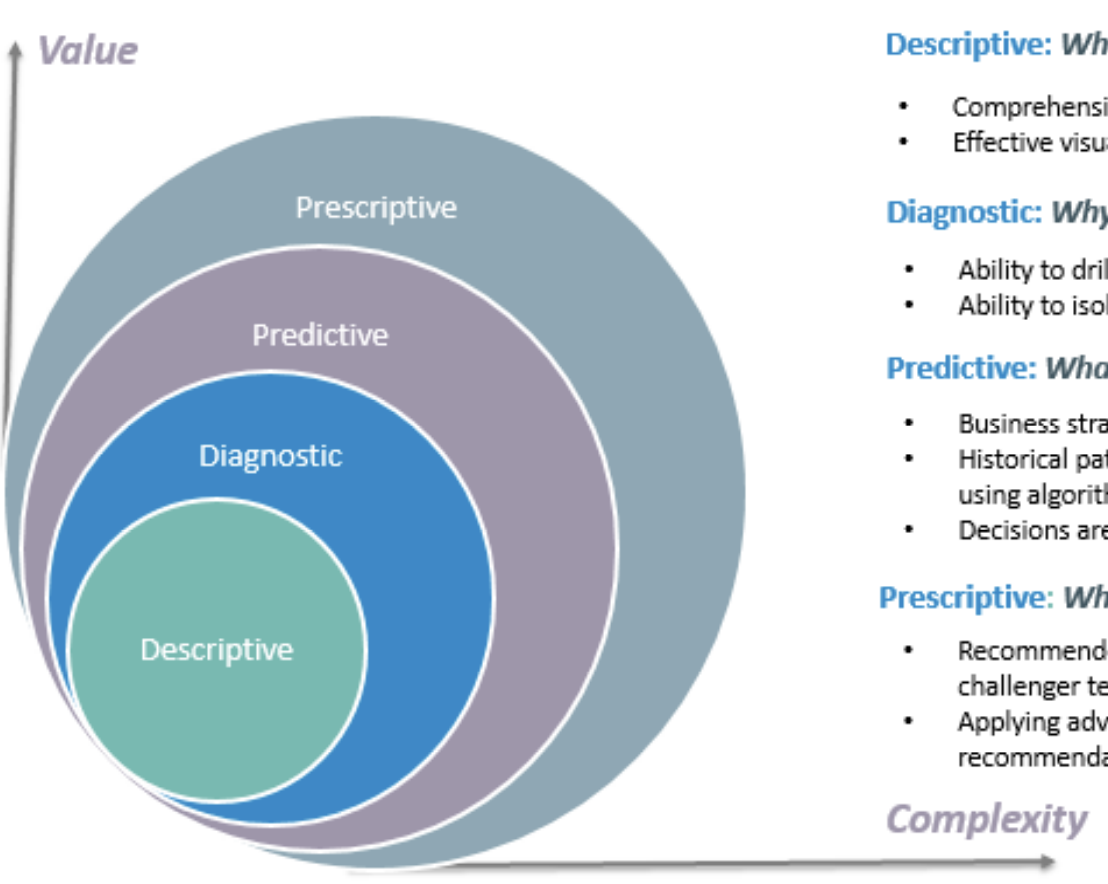
4 types of data analytics
what is the data telling you?
from least to most valuable and complex
descriptive: whats happening in my business
comprehensive, accurate and live data
effective visualization
diagnostic: why is it happening?
ability to drill down to the root-cause
ability to isolate all confounding information
predictive: what’s likely to happen
business strategies have remained fairly consistent over time
historical patterns being used to predict specific outcomes using algorithms
decisions are automated using algorithms and technology
prescriptive: what do I need to do?
recommend actions and strategies based on champion/challenger testing strategy outcomes
applying advanced analytical techniques to make specific recommendations
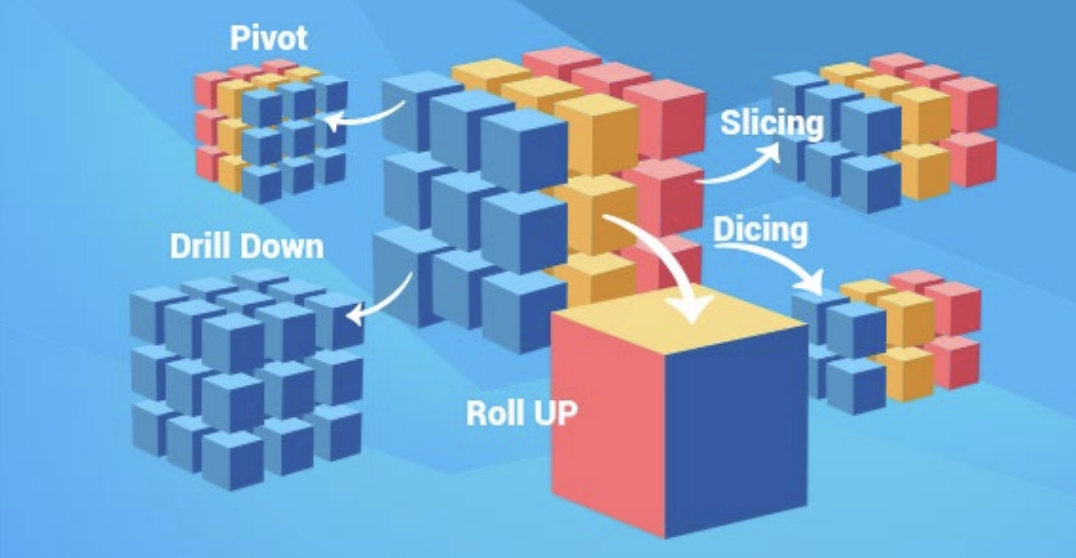
Data Cube
Dashboard Visual
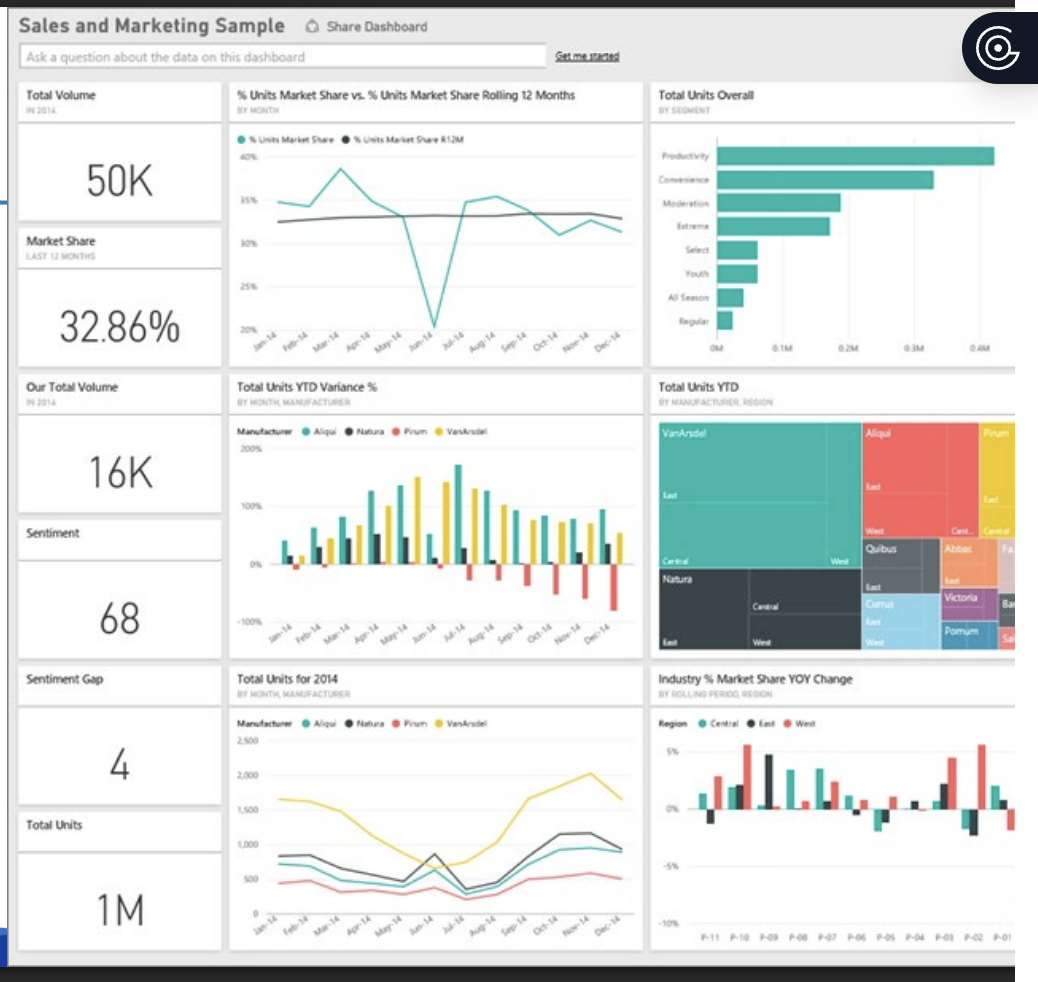
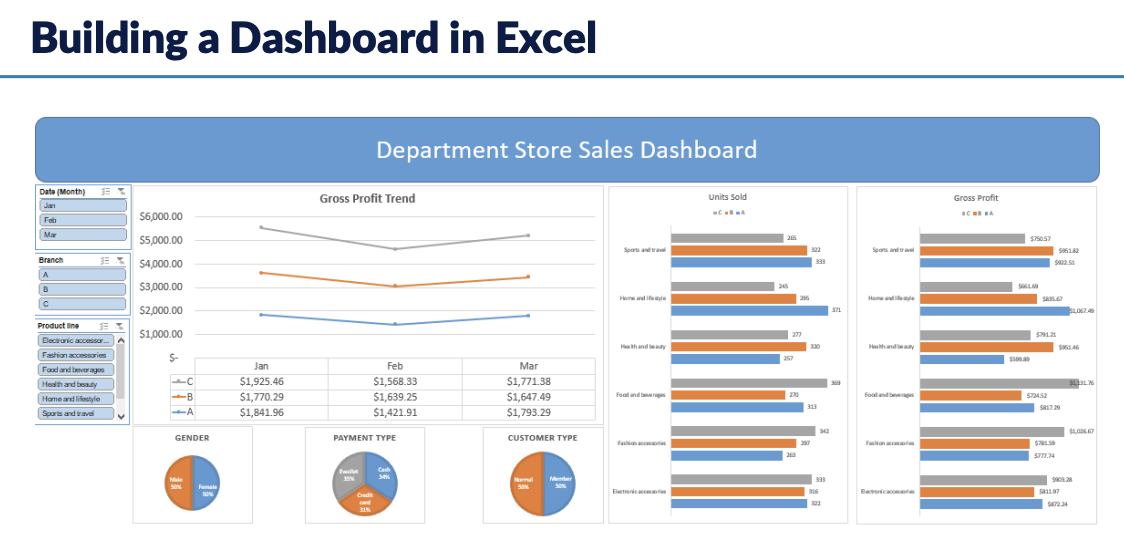
Dashboards with AI
manus AI example
can also create dashboards with other AI tools
Python is a great programming language for creating visualizations
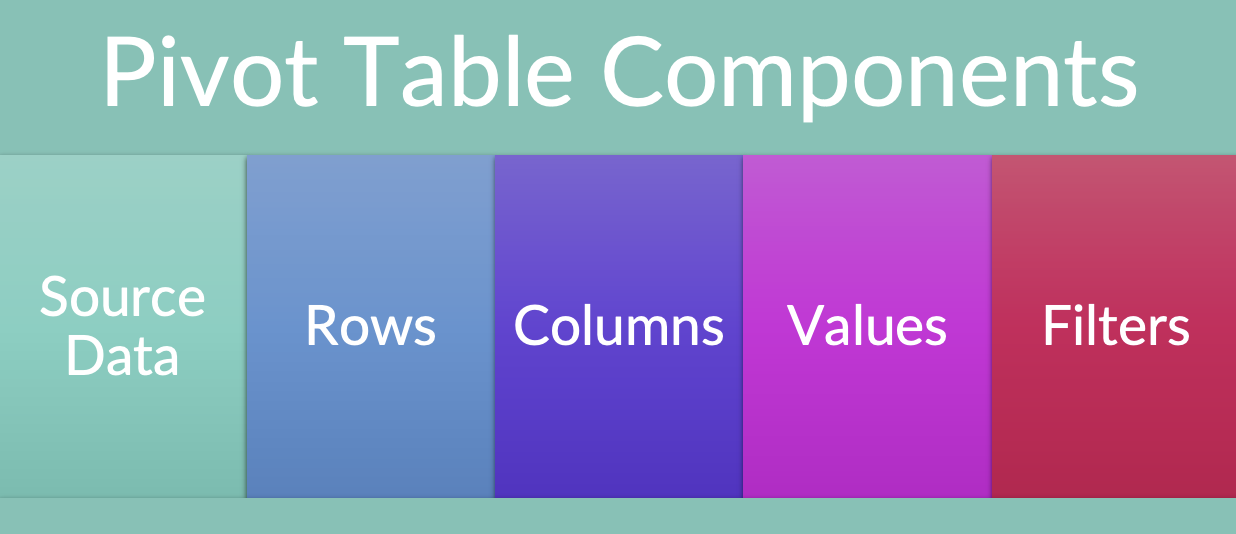
Building a Dashboard in Excel: Pivot Table Components
Week 7: Artificial Intelligence
“because of AI, 100% of jobs will be different”
IBM CEO Ginni Rometty (2019)
“AI is the new electricity. It will transform every industry and create huge economic value”
Dr. Andrew Ng
“The development of full AI could spell the end of the human race”
Stephen Hawking
“AI is highly likely to destroy humans”
Elon Musk
“Elon Musk’s doomsday AI predictions are ‘pretty irresponsible'"
Mark Zuckerberg
reactive maintenance vs predictive maintenance
(not on slides)
Reactive Maintenance: This approach follows a "run-to-failure" logic, where repairs only happen after a machine breaks down, leading to high costs from unplanned downtime and emergency fixes.
Predictive Maintenance (AI): Using IoT sensors and machine learning, this method analyzes real-time data like vibration and heat to identify failure patterns and perform maintenance just before a breakdown occurs.
Strategic Impact: While predictive maintenance requires more upfront investment in technology, it significantly extends asset life and reduces long-term operational expenses by transforming "surprises" into scheduled, minor tasks.
Robotic Process Automation
robotic process automation is a form of business process automation that allows anyone to define a set of instructions for a robot or ‘bot’ to perform
these bots are capable of mimicking most human-computer interactions to carry out a ton of error-free tasks, at high volume and speed
the “robot” in robotic process automation is software robots running on a physical or virtual machine
In the beginning - Dartmouth College (1956)
The 1956 Dartmouth Summer Research Project on Artificial Intelligence established AI as a formal academic field. Organized by John McCarthy, Marvin Minsky, Nathaniel Rochester, and Claude Shannon, it provided the discipline with its name and foundational goals.
Highlights
The Goal: The organizers believed that every aspect of learning or intelligence could be precisely described and simulated by a machine.
The Name: John McCarthy coined "Artificial Intelligence" to distinguish the field from cybernetics and computer science.
The Breakthrough: Allen Newell and Herbert Simon introduced the "Logic Theorist," the first program designed to mimic human problem-solving skills.
The Impact: Though the workshop did not achieve immediate human-level AI, it shifted computing from simple number crunching toward symbolic logic and language.
Quick Stats
Location: Dartmouth College, Hanover, New Hampshire.
Funding: A $7,500 grant from the Rockefeller Foundation.
Duration: Eight weeks during the summer of 1956.
From slide:
this conference is “to proceed on the basis of the conjecture that every aspect of learning of any other feature of intelligence can in principle be so precisely described that a machine can be made to simulate it”
Professor John McCarthy, 1956 (convenor of the AI meeting)
What is Artificial Intelligence?
there is much debate surrounding what is artificial intelligence
some feel that it is acting and thinking like a human, while others feel it is to act and think rationally
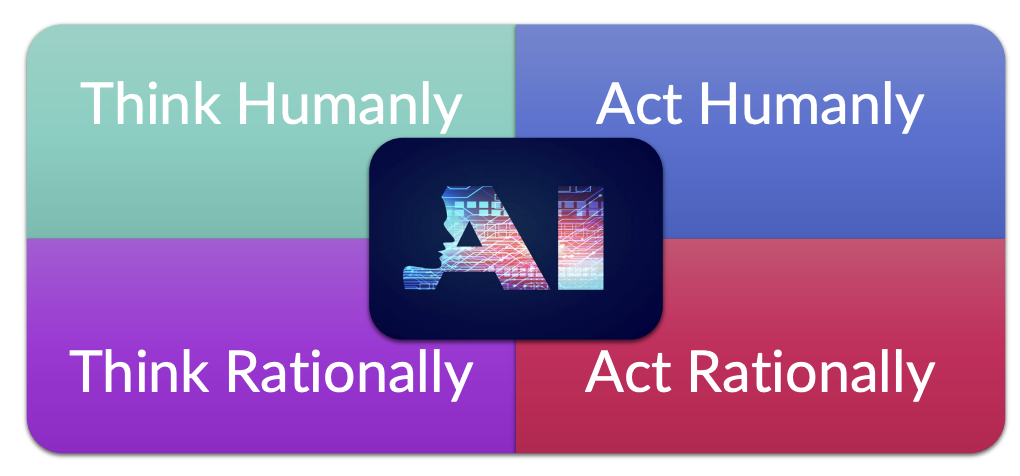
think humanly, act humanly
think rationally, act rationally
What is AI: Act Humanly
What does it mean to act like a human?
Need to be able to…
natural language processing
communicate successfully in a human language
knowledge representation
store what it knows or hears
automated reasoning
answer questions and to draw new conclusions
machine learning
adapt to new circumstances and to detect and extrapolate patterns
computer vision and speech recognition
vision and speech recognition to perceive the world
robotics
manipulate objects and move about
What is AI: Think Humanly
What does it mean to think like a human?
to say that a program thinks like a human, we must know how humans think
we can learn about human thought in 3 ways:
introspection
trying to catch our own thoughts
psychological experiments
observing a person in action
brain imaging
observing the brain in action
once we have enough information, we have a working model
if the program’s input-output matches corresponding human behaviour, we have evidence of human thinking
What is AI: Act Rationally
What does it mean to act rationally?
This is the field of logical thinking that many philosophers and mathematicians have been working on
In artificial intelligence, it is called Logicism, which hopes to build intelligent systems
Though the systems are intelligent, it does not generate intelligent behaviour
What is AI: Think Rationally
What does it mean to think rationally?
It is called the Rational Agent Approach
Computer programs are expected to do something, but agents are expected to do more;
operate autonomously
perceive the environment
persist over a prolonged time
adapt to change
create and pursue goals
Artificial Intelligence: Broad
AI, in the broadest term, applies to any technique that enables computers to mimic human intelligence, using logic, if-then rules, decision trees and machine learning
Time Magazine, 2017
Machine Learning
Machine learning is a method of data analysis that automates analytical model building
It is a branch of AI based on the idea that systems can learn from data, identify patterns, and make decisions with minimal human intervention
SAS (2017)
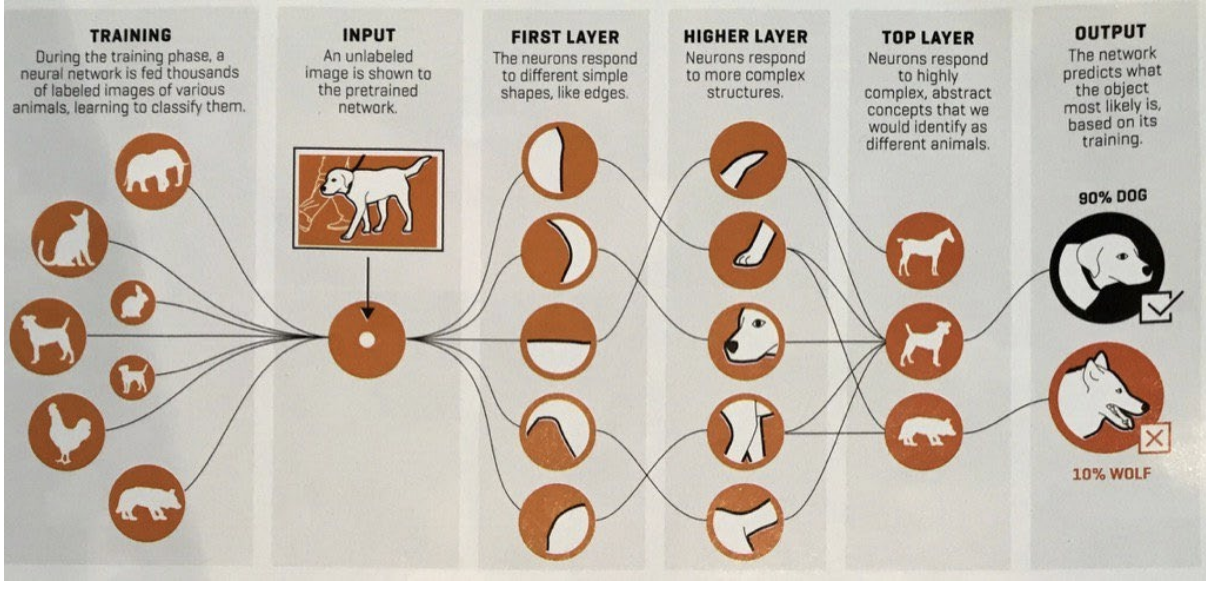
Neural Networks
software constructions modelled after the way adaptable networks of neurons in the brain are understood to work, rather than through rigid instructions predetermined by humans
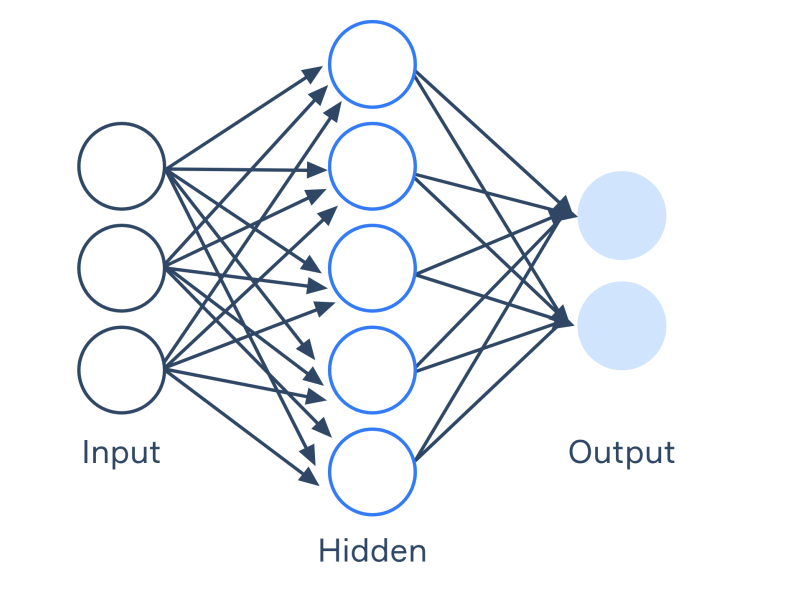
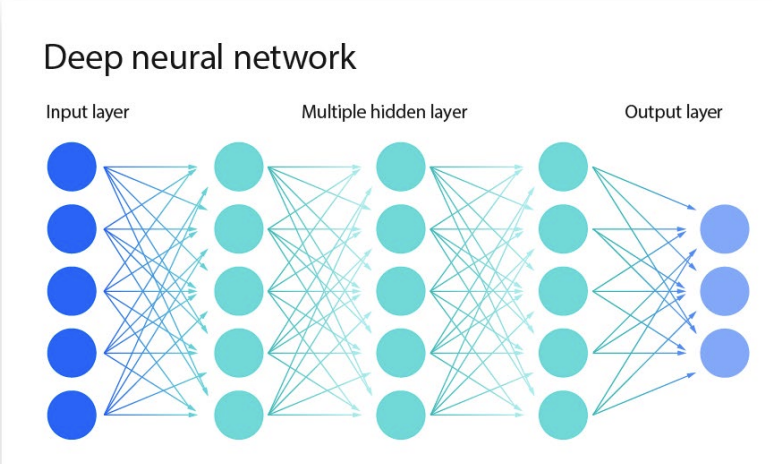
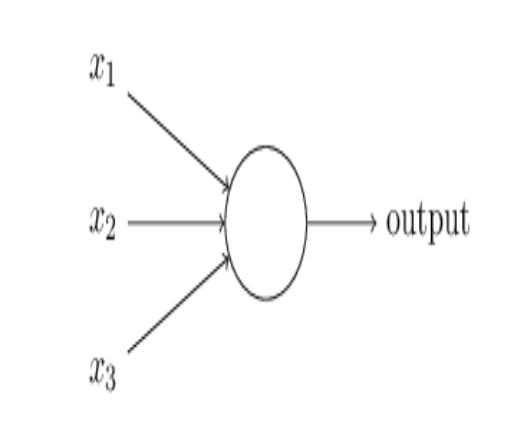
A simple neuron
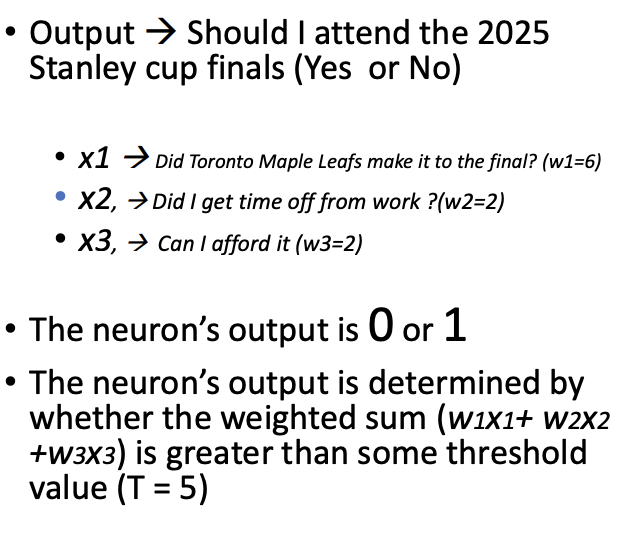
a perception takes several binary inputs (x1, x2, x3), and generates an output
weights (w1, w2, w3), representing the importance of each input is identified
the neuron’s output is 0 or 1
the neuron’s output is determined by whether the weighted sum (w1×1 + w2×2 + w3×3) is greater than some threshold value
Types of machine learning
supervised learning
a model uses known input and outputs to generalize future outputs
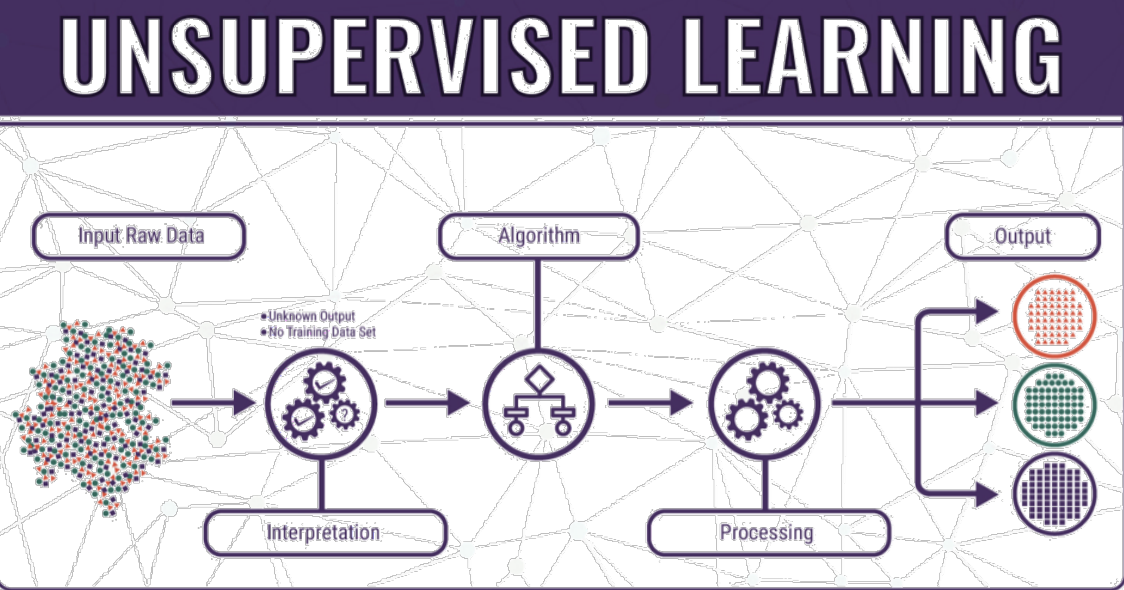
unsupervised learning
the model doesn’t know input or outputs, so it finds patterns in the data without help
reinforcement learning
where the model interacts with its environment and learns to take actions that will maximize rewards
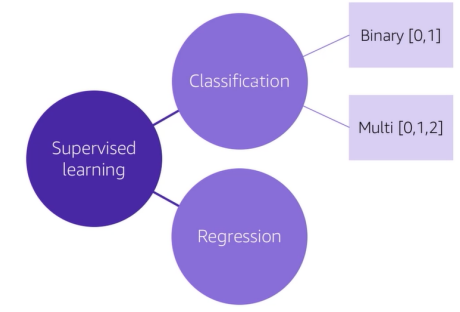
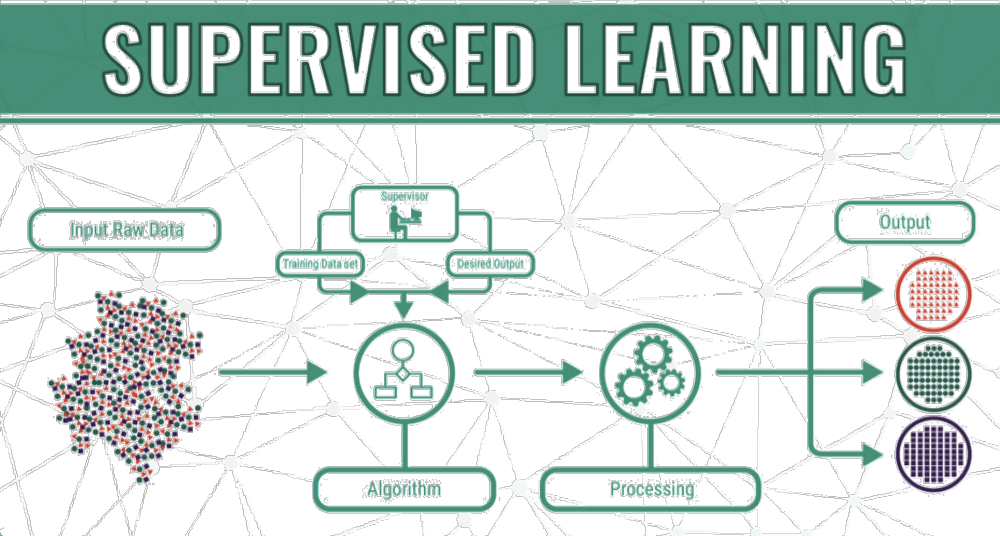
Supervised learning
Learn by identifying patterns in data that is already labelled
Classification:
fraud detection
image recognition
customer retention
medical diagnostics
personalized advertising
Regression:
product sales prediction
weather forecasting
market forecasting
population growth prediction
Unsupervised learning
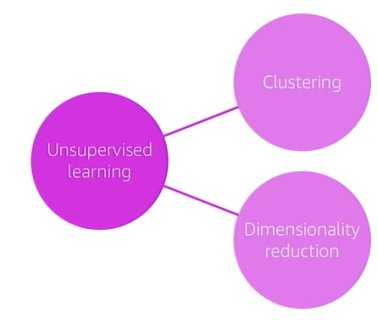
The machine must uncover and create the labels itself
Clustering:
product recommendations
customer segmentation
targeted marketing
medical diagnostics
Dimensionality reduction:
visualization
natural language processing
data structure discovery
gene sequencing
ing
machine learning examples
a tale of two games
chess
GO
Chess
IBM Deep Blue
vs
Garry Kasparov, May 11, 1997
GO
DeepMind AlphaGo
vs
Fan Hui (Go), 2015
IBM’s Deep Blue was programmed with decision trees or equations on how to evaluate board positions of with if-then rules
AlphaGo learned how to play Go essentially from self-play and from observing big professional games
WHY NOW? - machine learning
increased availability: in volume, velocity, and variety of data
as of 2025, the world generates approximately 463 exabytes of data daily, which is equivalent to 463 million terabytes
to put this in perspective, this data generation is comparable to the storage capacity of about 212 million DVDs
this exponential growth in data creation is driven by factors such as increased internet usage, the proliferation of Internet of Things (IoT) devices, and the expansion of cloud-based services
significant improvements in computing power and storage (at affordable cost)
computing power improvements
1970s-1980s
early personal computers, like the Apple II (1977), operated at speeds around 1 MHz (million instructions per second)
limited multitasking capabilities; computations took hours or days
1990s-2000s
pentium processors (1993) reached speeds around 100 MHz - 1 GHz
performance improvements enabled graphical interfaces, gaming, and productivity software
2000s-2010s
multi-core processors emerged, allowing parallel processing
typical CPU speeds increased significantly (2-3 GHz per core became common)
GPUs (Graphics Processing Units) became popular for complex computations (AI, rendering, gaming)
2010s-today
high-performance GPUs and specialized AI hardware (ex// NVIDIA GPUs and TPUs) now deliver petaflops of computing power
modern GPUs (like NVIDIA A100 or H100) handle thousands of parallel processes, vastly accelerating AI tasks
Storage Capacity and Cost Improvements
Current Snapshot (2025):
the ability to store massive data at affordable costs has transformed how businesses and individuals operate
affordable SSDs (NVMe) offering storage at roughly $0.05-$0.10 per GB
cloud providers (AWS, Azure, Google) offering virtually unlimited storage at declining prices

Big Data
extremely large data sets that are used for computational analysis, many for neural networks to reveal patterns or trends
Time Magazine
Computer Vision
ability of computers to “see” and understand images and videos, just like humans do
this technology helps computers identify objects, people, text, or even actions in images and videos
its used in things like:
face recognition (unlocking your phone with your face)
self-driving cars (helping the car see the road and avoid obstacles)
checking out groceries at a store without scanning each item (the camera sees and recognizes them)
its like teaching a computer how to see and understand the world visually
Natural Language Processing (NLP)
capabilities within AI for a computer to interpret written or spoken language, and respond in kind
NLP enables you to create software that can:
analyze and interpret text in documents, email messages, and other sources
interpret spoken language, and synthesize speech responses
automatically translate spoken or written phrases between languages
interpret commands and determine appropriate actions
Microsoft (2024)
GPT
GPT stands for Generative Pre-trained Transformer, a type of advanced artificial intelligence model developed by OpenAI
its designed to understand and generate human-like text based on input it receives
Generative
it creates or generates content, such as answers to questions, stories, or summaries, rather than just analyzing or recognizing patterns
Pre-trained
the model is trained on a cast amount of data (like books, websites, and articles) before being fine-tuned for specific tasks
this pre-training allows it to “understand” language and context
Transformer
the architecture of GPT is based on a technology called the Transformer, which is excellent at processing sequences of words and understanding relationships between them
its the reason GPT is so good at tasks like conversation and text generation
what is generative AI
Generative AI refers to a class of artificial intelligence systems designed to generate new content or data that is similar to what humans might produce
These systems are capable of creating original content, such as text, images, audio, and even video, based on patterns and examples learned from large datasets
Large Language Model (LLM)
An LLM, or Large Language Model, is a kind of super-smart computer program designed to understand and generate human language
It’s like a virtual assistant that can read, write, and even answer questions in a way that feels natural
Trained on lots of text: LLMs learn from huge amounts of text, like books, websites, and articles, so they can understand the way people communicate
Generates responses: when you ask it a question or give it instructions, it uses what it learned to create a response that makes sense
Popular examples include ChatGPT and Claude
They’re used in chatbots, virtual assistants, and tools that help people with writing, customer service, or research
Tokens
tokens are like the building blocks of language for LLMS
a token is a piece of text that LLMs use as the smallest unit of understanding
It can be:
a word: “cat”
part of a word: “walk” from “walking”
a single character: “$” or “.”
or even a space
for example:
the sentence “Hello, world!” might break into tokens like:
[“Hello”, “,”, “world”, “!”]
Tokens and LLMs
input and output:
when you type something into an LLM, the text is broken into tokens
the model processes these tokens, understands their relationships, and generates tokens as an output (ex// a response or prediction)
training and learning:
LLMs are traiend on billions (or even trillions) of tokens
these tokens are derived from vast datasets like books, websites, and articles
by seeing patterns in token sequences, the model learns grammar, context, and meaning
efficiency:
breaking text into tokens makes it easier for LLMs to process language
it allows the model to handle partial words, special symbols, or even languages with different stuctures
Tokens and GPTS
Token limits: modern GPT models have varying limits on the number of tokens they can process in a single interaction:
GPT-5 Context window: ~196,000-256,000 tokens (150k-200k words) of text in a single chat session
this is the amount of text GPT-5 can remember and reference at once in a conversation
Cost and usage: API usage of GPT models is priced based on the total number of tokens processed, counting both input prompts and generated outputs
longer prompts and responses consume more tokens, increasing costs
Prediction method: GPT models generate text incrementally, one token at a time
for example
user prompt: What is the capital of France?
GPT model output tokens sequentially as:
[“The”, “capital”, “of”, “France”, “is”, “Paris”, “.”]
Tokens & Context Window
Token Limit and Context Windows:
token limit = max tokens per interaction (prompt + response)
Also called “context window”
What happens after reaching the limit?
limit resets with new interactions
context doesn’t carry over automatically
provide summaries or key points to reconnect the context between sessions
What is prompt engineering?
prompt engineering is a technique used in natural language processing (NLP) and machine learning to fine-tune or guide the behavior of AI language models, such as GPT (Generative Pre-trained Transformer) models
it involves designing and crafting specific prompts or instructions that are provided to the model to achieve desired responses or outcomes
the goal of prompt engineering is to influence the AI model’s generation in a way that produces more accurate, relevant, and context-aware responses
Training responsibility?
“800 million workers globally could be displaced by robotic automation by 2030”
McKinsey & Company

Canada: Data Privacy and AI Regulation
Personal Information Protection and Electronic Documents Act (PIPEDA):
This federal law governs how private-sector organizations collect, use, and disclose personal information during commercial activities. It grants individuals rights to access and correct their personal data and mandates organizations to obtain consent for data handling.
Artificial Intelligence and Data Act (AIDA):
Introduced as part of Bill C27, the Digital Charter Implementation Act, 2022, AIDA aims to establish a legal framework for the responsible development and deployment of AI systems in Canada. It focuses on mitigating risks associated with highimpact AI systems, including bias and potential harm to individuals. AIDA was proposed under Bill C-27 but has not been enacted.
Provincial Privacy Laws:
Certain provinces have enacted their own privacy legislation deemed substantially similar to PIPEDA
Privacy Act:
This federal statute regulates how government institutions handle personal information, ensuring transparency and accountability in public sector data management.
Voluntary Code of Conduct for Generative AI:
In September 2023, Canada launched a voluntary code of conduct for organizations developing advanced generative AI systems. This initiative encourages adherence to principles of transparency, accountability, and safety in AI development.
Europe: Data Privacy & AI Regulation
General Data Protection Regulation (GDPR):
Enforced since May 25, 2018, the GDPR is a robust regulation that governs the processing of personal data across the European Union (EU). It grants individuals significant rights over their personal information and imposes stringent obligations on organizations handling such data. The GDPR applies to all entities processing personal data of EU residents, regardless of the organization's location.
Artificial Intelligence Act (AI Act):
Effective from August 1, 2024, the AI Act is the world's first comprehensive legal framework for AI. It adopts a risk-based approach, categorizing AI systems into different risk levels and imposing corresponding obligations. High-risk AI systems are subject to strict requirements, including transparency, accountability, and human oversight, to ensure they do not compromise safety or fundamental rights.
USA: AI Regulation (before trump)
Executive Order on AI:
On October 30, 2023, President Biden issued an Executive Order aimed at ensuring the safe, secure, and trustworthy development and use of AI. This order outlines principles for AI deployment, emphasizing safety, equity, and civil rights, and directs federal agencies to establish guidelines and standards for AI technologies.
AI Bill of Rights:
In October 2022, the White House Office of Science and Technology Policy released the "Blueprint for an AI Bill of Rights," which provides guidelines to protect individuals from potential harms associated with AI systems. The blueprint outlines five principles: Safe and Effective Systems, Algorithmic Discrimination Protections, Data Privacy, Notice and Explanation, and Human Alternatives, Consideration, and Fallback.
USA: Executive Orders and Federal AI Policy Shifts (2025)
Rescinding Biden’s AI Order:
Immediately upon taking office, President Trump revoked former President Biden’s sweeping October 2023 executive order on AI.
The Trump administration, viewing these measures as overregulation, repealed the order as “hindering AI innovation”.
“Removing Barriers” Executive Order:
On January 23, 2025, President Trump issued a new AI executive order, EO 14179 “Removing Barriers to American Leadership in Artificial Intelligence.” This order proclaims it U.S. policy to “sustain and enhance America’s global AI dominance” for economic and national security benefit.
It represents a significant shift toward deregulation and rapid innovation.
Focus on AI Infrastructure:
The Trump White House has also emphasized domestic AI infrastructure and deployment.
Quote
“The ability to think outside the box, to adapt, and to think about things from unconventional perspectives are exactly what future employers are looking for. ” – Globe and Mail, 2018
Data Analytics Literacy Skills
the ability to understand how to make better decisions using qualitative and quantitative data (in addition to experiential knowledge)
AI LIteracy Skills
the ability to understand what AI is all about and how AI applications can be best leveraged within an organization (while taking into consideration the potential for bias)
The biggest threat in the AI era!
Week 8: Cloud Technologies
Course Framework

Focus: Technology
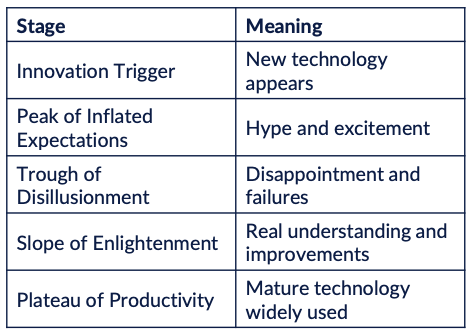
Technology Trends
SOME of the trending technologies in 2026:
AI & GenAI
Autonomous AI Agents
Cloud Computing
Internet of Things (IoT)
Quantum Computing
Extended Reality (XR) - combination of VR, AR, MR
Robotics & Automation
Cybersecurity
Edge Computing
Blockchain & Web3

Top 10 Trending Technologies in 2026: 1. AI & GenAI
AI continues to dominate technology trends
Examples:
ChatGPT-like AI assistants
AI copilots for coding, marketing, and finance
AI agents that automate tasks
AI-generated images, video, and music
Impact:
Automation, productivity, decision-making, and new business models
Top 10 Trending Technologies in 2026: 2. Autonomous AI Agents
The next step beyond chatbots
Examples:
AI that can plan tasks
AI that completes workflows automatically
AI assistance managing emails, research, and scheduling
Impact:
Knowledge work automation
Top 10 Trending Technologies in 2026: 3. Cloud Computing
Still one of the most important technologies
Examples:
AWS
Microsoft Azure
Google Cloud
Trends within cloud:
AI infrastructure
Serverless computing
Multi-cloud strategies
Top 10 Trending Technologies in 2026: 4. Internet of Things (IoT)
Smart devices (tangible) connected through the internet
Examples:
Smart homes
Industrial sensors
Smart sensors
Smart cities
Connected cars
Impact:
Real-time data collection and automation
What are Smart Devices?
Electronic devices that can connect to the internet, collect data, and interact with users or other devices automatically
They usually have:
Sensors (to collect information)
Software/AI (to process information)
Internet connectivity (WiFi, Bluetooth, cellular)
Automation capabilities (they can perform actions without manual control)
In simples terms:
A smart device is a device that can sense, connect, process, and act
Smart devices are a major part of the Internet of Things (IoT), where physical objects communicate and exchange data through the internet
Top 10 Trending Technologies in 2026: 5. Quantum Computing
Still early but advancing rapidly
Companies involved:
IBM
Google
Microsoft
Potential uses:
Drug discovery
Cryptography
Financial modeling
What is Quantum Computing?
a type of computing that uses the principle of quantum mechanics (the physics of very small particles) to process information
unlike traditional computers that use bits (0 or 1), quantum computers use quantum bits (qubits)
classical computer: bit = 0 or 1
quantum computer: qubit = 0 or 1, or both at the same time
this ability allows quantum computers to solve certain extremely complex problems much faster than traditional computers
Top 10 Trending Technologies in 2026: 6. Extended Reality (XR) - combination of VR, AR, MR
Combination of:
Virtual Reality (VR)
a technology that creates a completely digital environment that users can explore and interact with using devices like VR headsets
Augmented Reality (AR)
a technology that overlays digital elements (images, text, or objects) onto the real world through devices like smartphones or AR glasses
Mixed Reality (MR)
a technology that blends the real world and digital objects so they can interact with each other in real time
Examples:
Apple Vision Pro
Meta Quest
Industrial AR training
Top 10 Trending Technologies in 2026: 7. Robotics & Automation
Robots are becoming smarter due to AI
Examples:
Warehouse robots
Delivery robots
Surgical robots
Humanoid robots (Tesla Optimus)
Top 10 Trending Technologies in 2026: 8. Cybersecurity
Increasingly important due to AI-driven attacks
Trends:
AI-powered security
Zero-trust architecture
Identity security
Cloud security
Top 10 Trending Technologies in 2026: 9. Edge Computing
Processing data closer to where it is generated instead of sending everything to the cloud
Examples:
Autonomous vehicles
Smart factories
IoT devices
Benefit:
Lower latency
Faster processing
Top 10 Trending Technologies in 2026: 10. Blockchain & Web3
Blockchain is a secure digital system that records transactions across many computers so the information cannot easily be changed or hacked
Web3 refers to a new version of the internet that uses blockchain to give users more control over their data, identity, and digital assets
Think of blockchain like a shared digital ledger (record book) where every transaction is permanently recorded and visible to everyone in the network
Applications of Blockchain and Web3
Applications of Blockchain and Web3
Cryptocurrencies
digital money that operates without banks
ex// Bitcoin, Ethereum
Smart Contracts
programs stored on a blockchain that automatically execute agreements when conditions are met
ex// automatic payment when goods are delivered
Supply Chain Tracking
companies track products from the manufacturer to the customer
ex// tracking food safety in grocery supply chains
Digital Identity
people can control and verify their identity online without relying on large tech companies
ex// secure login systems
NFTs (digital ownership)
blockchain can verify ownership of digital items
ex// digital art, gaming items, music rights
Decentralized Finance (DeFi)
financial services that operate without traditional banks
ex// lending, trading, payments
Emerging Technologies

Computer Hardware - Group Exercise
Computer hardware
what are the hardware components of a laptop?
as a group, identify 5 key hardware components of a laptop
Computer software
what software comes pre-installed on a laptop?
as a group identify 5 pieces of software that comes pre-installed on your computer
as a bonus try to identify WHY they come pre-installed on a laptop
Cloud software
what is software?
what is cloud software and what makes it cloud software?
as a group identify the top 5 cloud software that you use regularly
What is the cloud?
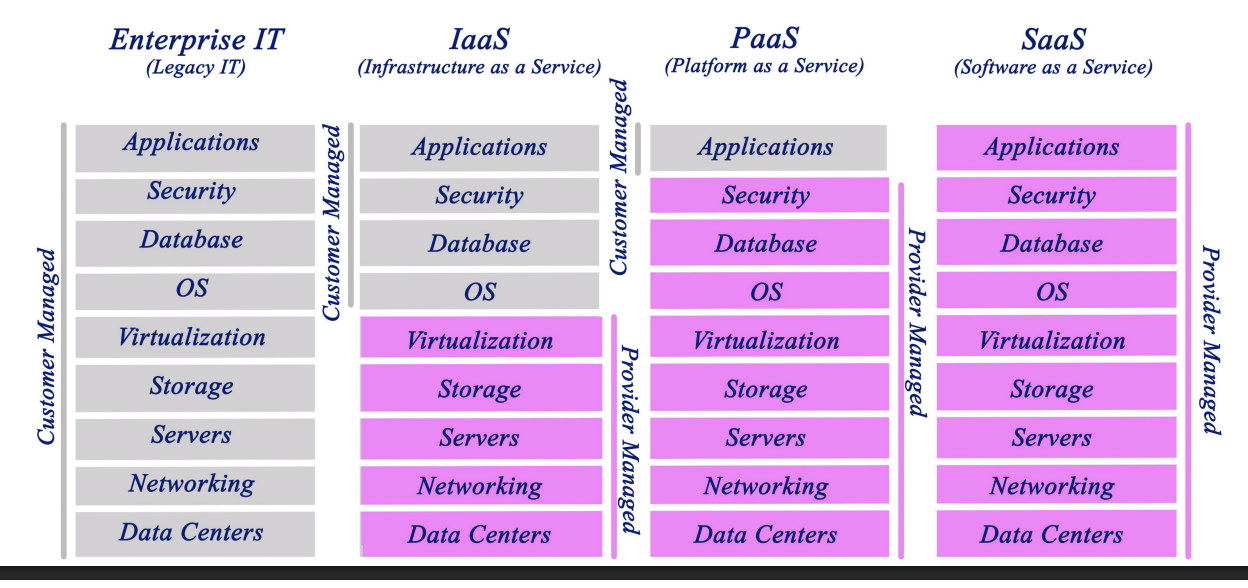
The higher you go, the more the cloud provider handles for you
Software as a Service
Platform as a Service
Infrastructure as a Service

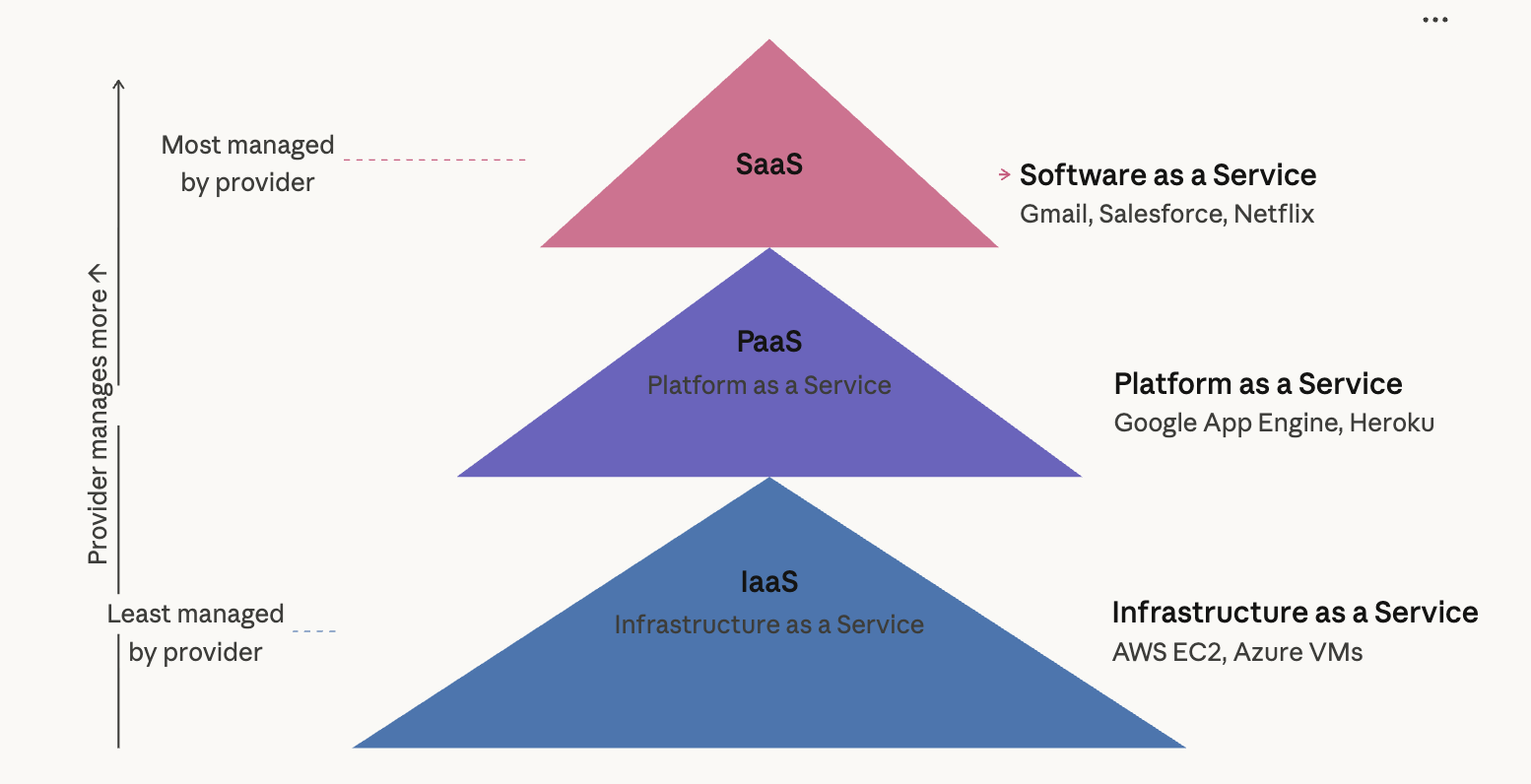
What is the Cloud: How much is managed? - Customer vs. Provider
Cloud: Pizza Analogy
Think of making pizza
Depending on how much help you want, you can do it 4 ways:
On-Premises
like a homeade pizza, made from scratch, you do everying yourself
ex// datacentre
Infastructure as a Service
you share a kitchen with others. the utilities and oven are provided, but you make and cook the pizza yourseld
ex// EC2
Platform as a Service
you order a pizza for delivery, the pizzeria makes and cooks the pizza using their facilities
ex// app engine
Software as a Service
you go to someone’s house for a party, they provide the pizza and invite others around for you to meet. conversation with the guests is still your responsibility
ex// Gmail


Cloud: Car Analogy
On premise
you own your own car
you can drive yourself anywhere you want, but are responsible for all repairs and maintenance, and upgrading means buying a new car
IaaS
leasing a car
you can pick any car you want and drive it anywhere you want, but at the end of the day the car is never yours
PaaS
like taking a taxi
you tell the driver exactly where you want to go, and then sit back and enjoy the ride by yourself
SaaS
like taking the bus
a bus has an assigned route and schedule, so you’ll eventually get to where you want to go, but you will have to ride with other passengers along the way

Cloud Platforms
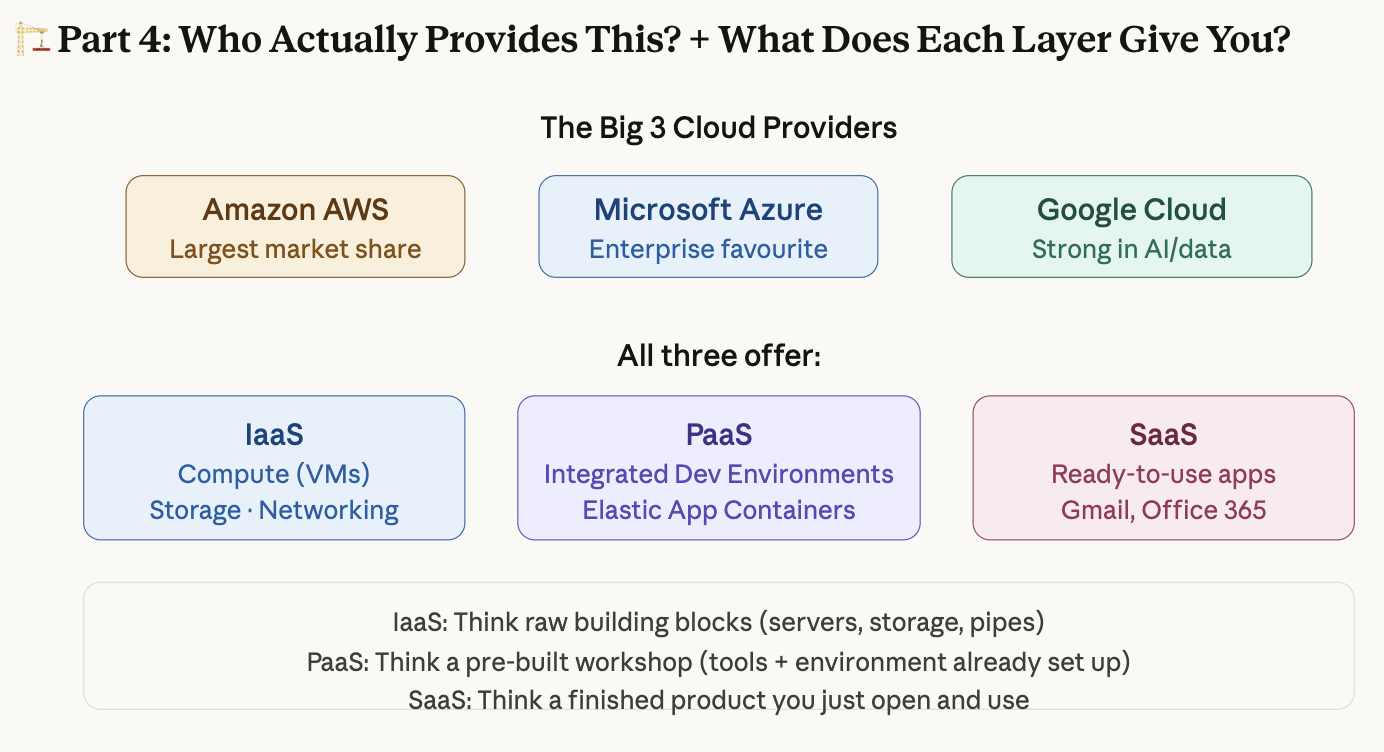
Cloud: Iaas, Paas (AWS, Azure, Google Cloud)
Iaas
compute
storage
networking
Paas
integrated development environment
elastic app containers
Cloud Considerations: What should you consider before moving to the cloud?
Cost
Security/Privacy
Control
People
Cloud Considerations: Cost


The key insight on cost: On-premises means buying and owning everything — expensive upfront, but cheap to run later. The problem is that hardware gets old (value lowers), and leaving early is painful. Cloud flips this — low entry, but you pay continuously. No depreciation headache.
Cloud Considerations: Security/Privacy
increased attack surface
due to its size, cloud environment have become a large and highly attractive attack surface for hackers
lack of visibility and tracking
in the IaaS model, the cloud providers have full control over the infrastructure layer and do not expose it to their customers
the lack of visibility and control is further extended in the PaaS and SaaS cloud models
cloud customers often cannot effectively identify and quantify their cloud assets or visualize their cloud environments
like renting an office and not knowing where all the doors are
complex environments
there are multiple ways of leveraging the cloud
Hybrid (some on-premises, some cloud) and Multi-cloud (using AWS + Azure + Google at once)
Single vs. Multi-tenant (do you share infrastructure with other companies, or have dedicated resources?)
Public vs. Private cloud (internet-accessible vs. restricted access)
Cloud Considerations: Control
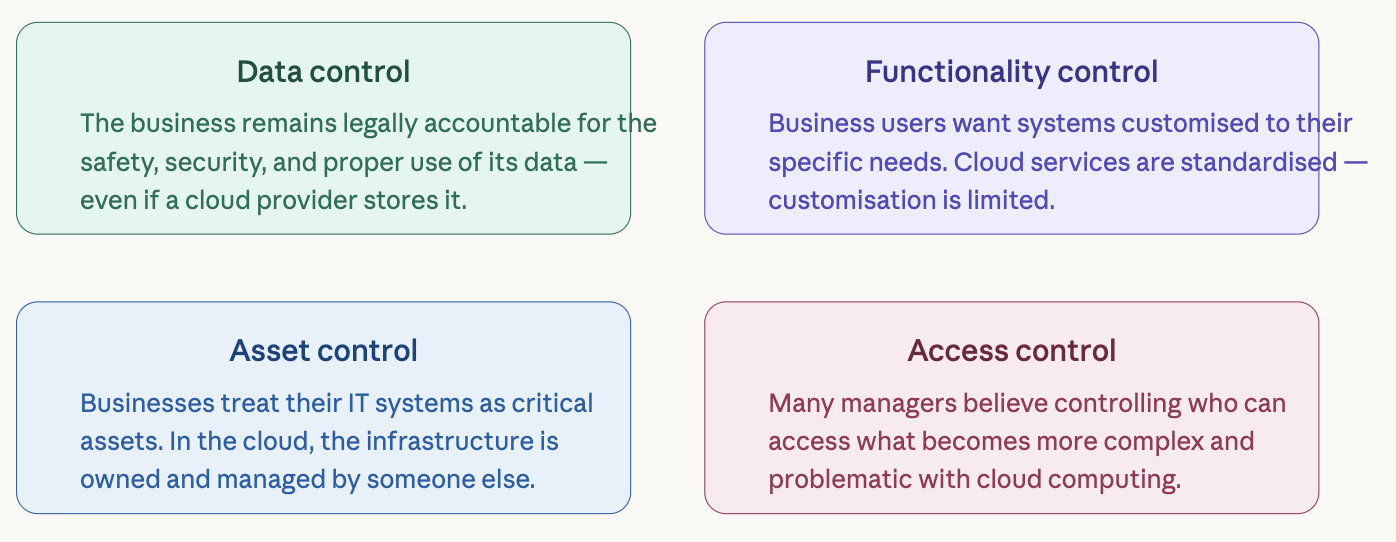
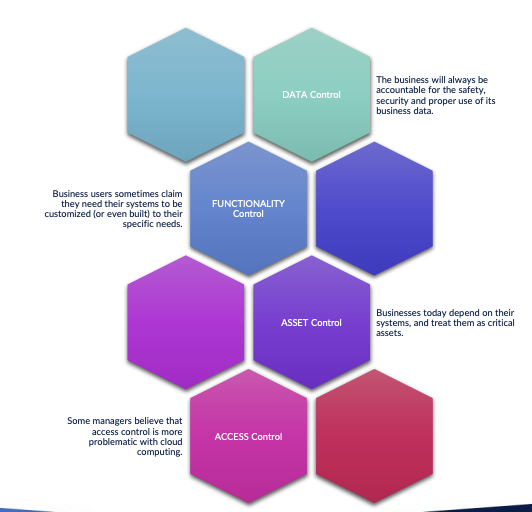
DATA control
FUNCTIONALITY control
ASSET control
ACCESS control
Cloud Considerations: People
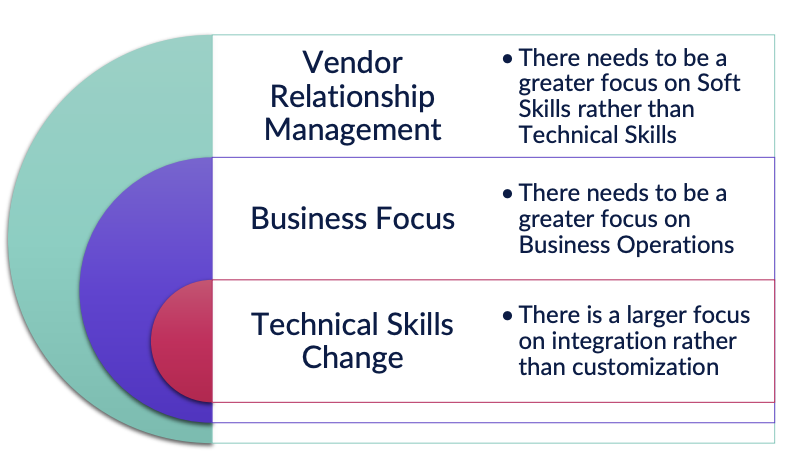
Moving to the cloud doesn't just change technology — it changes what skills and roles your organization needs
The mental model: you used to need someone who could build a car from parts. Now you need someone who can pick the right car from a dealership and keep it fuelled.
Are you ready for the Cloud? - Readiness Assessment
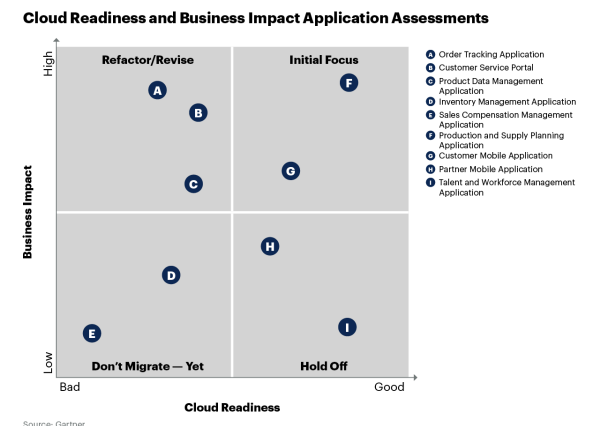
Not every application should move to the cloud, and not all at once. The Gartner framework from the slides gives organizations a systematic way to decide.
The process has 3 steps:
Enumerate all your applications (list everything you have)
Assess each application on two dimensions
Plot them on a matrix and prioritize migration
The two assessment dimensions:
Cloud Readiness → How technically compatible is the app with cloud architecture? Can it migrate easily, or does it need major code changes?
Business Impact → How much value does migrating this app actually create for the business?


Top outcomes Achieved by Adopting Cloud

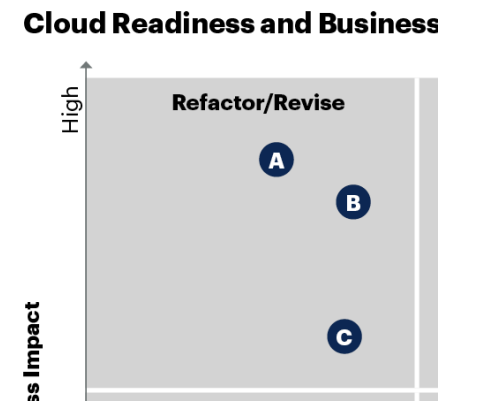
Cloud Readiness and Business Impact Application (Matrix)
Cloud Readiness
How compatible is the application, its dependencies and its technology stack with the cloud architecture and design patterns? This aspect also helps you understand the challenges, approach and effort of migrating it to the cloud.
Business Impact
What is the degree of positive business impact of migrating the application to the cloud? This aspect helps identify the business motivation and rationale for migrating it to the cloud. Consult and engage business stakeholders during this assessment.
Quadrants
Initial Focus
Each of the applications in this quadrant has been deemed a reasonable to good technical fit for cloud migration. There is a strong business motivation to migrate them to the cloud. This is where you should place your initial focus, and you can migrate applications in this quadrant to the cloud with the least amount of time and effort, as compared with others in the portfolio.
Refactor/Revise
Applications in this quadrant are less cloud -ready from a technical perspective, but they have been evaluated as supporting a high business motivation for cloud migration. They will likely require more code refactoring or other reengineering than those in the Initial Focus group. Other prioritization aspects aside (see the next section), these applications will be the next to migrate.
Hold Off
This quadrant contains applications that are a good technical fit for the cloud, but for which there is no strong business directive or motivation to move them from their current environment. These applications will require minimal refactoring, as opposed to the applications to their left in the graph, but their migration is not a priority at present.
Don’t Migrate - Yet
Applications in this quadrant score lower on both the technical and business assessments than other applications in the portfolio. They are not a good technical fit for migration in their current form. There also isn’t a strong business driver to move them. The recommendation is to leave these applications as they are for the time being or to wait until they are replaced.
What each quadrant means — in plain English:
Initial Focus (top-right): These apps are technically ready AND have strong business value. Migrate these first. Least effort, most benefit. Think of these as "low-hanging fruit."
Refactor/Revise (top-left): High business value but not very cloud-ready. Worth migrating, but they'll need significant code rework first. Do these second.
Hold Off (bottom-right): Technically easy to migrate, but there's no strong business reason. They'll require minimal refactoring — but migration isn't a priority right now.
Don't Migrate — Yet (bottom-left): Poor technical fit AND low business value. Leave them alone or wait until they're replaced.
When prioritizing within quadrants, also consider: (Refactor/Revise)
Business Priority
Present the quadrant to business stakeholders and discuss it with them to check the business impact assessment and how their priorities relate to the applications. What gaps do they see in their business capabilities? What opportunities do they see, and what impediments do they have, that could benefit from cloud migration?
Business Strategy
Discuss with business stakeholders whether, and how, applications are related to strategic programs and what milestones should be taken into account.
Cost of delay
This is the money that would be lost by delaying the migration for a period.
Cost of migration
A high -level appreciation of the expected effort, time and cost of migration. When business impact and cloud readiness are comparable, lower cost lifts priority.
Return on investment
Is the investment of migrating to the cloud in -line with the business value of the application or the anticipated benefits?
Risk of migration
The business risk associated with the migration. Lower risk lifts priority.
Part of an application cluster
It may be more efficient to bundle applications together based on their dependency on a value stream, business capability or technology platform.
Enterprise Resource Planning (ERP)
Enterprise Resource Planning (ERP) is a type of business management software that integrates various core business processes into a unified system
ERP systems enable organizations to streamline operations, improve efficiency, and facilitate data-driven decision-making by centralizing information from different departments
Key Functions of ERP Systems
ERP systems typically include modules for:
Finance & Accounting
manages budgets, payroll, expenses, and financial reporting
Human Resources (HR)
handles employee records, payroll, performance management, and recruitment
Supply Chain & Inventory Management
tracks raw materials, inventory levels, procurement, and logistics
Customer Relationship Management (CRM)
manages customer interactions, sales, and marketing efforts
Manufacturing & Production
helps with production planning, quality control, and workflow automation
Procurement & Vendor Management
automates purchasing processes and supplier management
Project Management
tracks project progress, costs, and resource allocation
Benefits of ERP Systems
Efficiency & Productivity
automates repetitive tasks and reduces manual data entry
Data Integration
provides a single source of truth for all business data
Scalability
supports business growth by adapting to increased complexity
Improved Decision-Making
delivers real-time analytics and reporting
Regulatory Compliance
ensures adherence to industry and legal standards
Popular ERP Software Solutions
SAP ERP
Oracle ERP Cloud
Microsoft Dynamics 365
NetSuite
Infor ERP
Odoo (Open-source ERP)
Best of Breed vs. Best of Suite
Best of Breed vs. Best of Suite: Who is going to win?
Best of Breed
Word processing —> Google Docs
(software, templates, data)
Spreadsheets —> Microsoft Excel
(software, templates, data)
Presentations —> Prezi
(software, templates, data)
Notes —> Evernote
(software, templates, data)
Best of Suite: all (templates and data)
Word processing —> Microsoft Office 365 (Word)
(software)
Spreadsheets —> Microsoft Office 365 (Excel)
(software)
Presentations —> Microsoft Office 365 (PPT)
(software)
Notes —> Microsoft Office 365 (Notes)
(software)
or
Word processing —> Google Apps (Docs)
(software)
Spreadsheets —> Google Apps (Sheets)
(software)
Presentations —> Google Apps (Slides)
(software)
Notes —> Google Apps (Notes)
(software)
Back Office Systems
What really makes you tick?
Back Office Systems:
technology system(s), that, in conjunction, enable an organization to manage their business operations that are not directly related to the sales of products or services
Includes:
Accounting
Supply Chain Management (SCM)
Customer Relationship Management (CRM)
Human Capital Management (HCM)
Back Office Systems: best of suite? breed?
Best of Suite?
cloud
hybrid
on-premise
Best of Breed?
cloud
hybrid
on-premise
Back Office Systems: Best of Breed
Enterprise Resource Planning (ERP)
Accounting —> Oracle NetSuite
general ledger
accounts receivable
accounts payable
tax management
fixed assets management
cash management
Human Capital Management (HCM) —> WorkDay
HRM
workforce planning
recruiting
talent management
compensation
benefits
payroll management
time and absence
expenses
Supply Chain Management (SCM) —> SAP
supply chain planning
supply chain logistics
manufacturing
R&D/engineering
asset management
Customer Relationship Management (CRM) -> Salesforce
sales
service
marketing
commerce
platform

Back Office Systems: Best of Suite
Microsoft Dynamics ERP
SAP
Oracle - PeopleSoft
SAP
best for:
finance
HCM
SCM
CRM
Software: process
Platform: technology
Data: data

Week 9: Project Management
Project Management
scope
cost
risk
procurement
quality
HR
communication
time
Learning Objectives
describe the Project Management Landscape in terms of People, Processes, Methodologies
recommend and justify the appropriate methodologies to apply to a variety of real-world Digital Projects
Project Management Landscape
Projects
there are a variety of different types of projects
Methodologies
there is more than one way to manage a project
People
there are many different types of people required for a project to be successful
Projects - Technical vs. Business
What is a project - Technical
What is a project - Technical
a project is a sequence of unique, complex and connected activities that have one goal or purpose and that must be completed by a specific time, within budget and according to specifications
Triple Constraint Triangle

Scope Triangle
Changes in cost, time, and specifications affect the other constraints
As a project’s scope changes, the project work extends beyond what was originally planned (in other words, “scope creep”)


Scope Triangle: COVID-19 Example
ex// Developing a COVID-19 Vaccine
Time
research & development
clinical trials (quality control)
manufacturing
urgency of pandemic
Budget
funding
resources
Specifications
safe (product and processes)
effective
transportable
RISKS
safety
reputation
Why Projects Fail - The FBI Virtual Case File
Goal: develop new software system to manage FBI case documents
Outcome: abandoned after 5 years while still in development, costing $170 million
Reasons for failure:
lack of planning and personnel training
overly ambitious schedule (22 months)
too many system requirements and changes (scope creep)
Projects - Technical vs. Business
What is a project - Business
A project is a sequence of finite dependent activities whose successful completion results in the delivery of expected business value that validated doing the project
What is business value?
New product or service
new operational capabilities
Improve existing products or services
improve existing operational capabilities
Project Definition Variables
Clear, Unclear
Goal
What do we want the project to achieve?
+
Solution
how will we achieve the solution?
—>
Project
Goal vs. Solution
Goal
a high-level statement that gives an overall context of what the project will accomplish
Solution
the project output for achieving the goal
What is an unclear goal?
What is a solution that does not meet a specific goal?
Types of Projects

Traditional (clear goal, clear solution)
low complexity
few scope challenges
predictive
Agile (clear goal, not clear solution)
complex
multiple scope challenges
adaptive
Extreme (not clear goal, not clear solution)
chaotic
continual scope challenges
extreme planning
Emertxe (not clear goal, clear solution)
chaotic
continual scope challenges
extreme planning
Project Methodologies
What is a Project Methodology?
A methodology is a system of practices, techniques, procedures and rules used by those who work in a discipline
Traditional Project Methodology
Traditional project management is a linear approach to delivering a project throughout its life cycle
Traditional project management does not easily adapt to change and is reliant on having a well-defined solution and goal
The focus is primarily on scope and quality with resources, schedule, and budget estimated
Tell me what you want, and I will tell you how long, how much and what resources I need
Traditional Project Methodology: Principles
PREDICTIVE
low complexity
well understood technology
few scope changes
low risk
experiences and skilled teams
plan driven
linear approach