CSC 203 Final: Arrays
 Studied by 1 person
 Call with Kai
 Learn
Learn Practice Test
 Spaced Repetition
 Match
Match Flashcards
 Knowt Play
1/27

There's no tags or description
Looks like no tags are added yet.
Name | Mastery | Learn | Test | Matching | Spaced | Call with Kai |
|---|
No study sessions yet.
28 Terms
How to create an array?
import numpy as np
array_name = np.array([#,#])
array_name.ndim
an array’s number of dimensions
array_name.shape
Always outputted as a tuple specifying an array’s dimensions (e.g., rows, columns)
array_name.size
An array’s total number of elements (product of the shape tuple’s values)
1-dimensional so a.ndim → 1 & a.shape → (3,) & a.size → 3
2-dimensional so b.ndim → 2 & b.shape → (2,3) & b.size → 6
2-dimensional so d.ndim → 2 & d.shape → (5,1) & d.size → 5
3D array_name.shape format
(layers, rows, columns)
Another way to think about ndim
How many indices do you need to refer to one specific element of the array? That "how many" is your n or dimensionality of the array
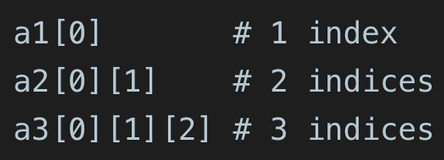
In 1D arrays
A tuple with only one element in Python must have a trailing comma, e.g., (5,), to distinguish it from just the number 5.
Example:
floats = np.array([0.1, 0.2, 0.3, 0.4])
floats.shape
(4,)
1D shape example
a = np.array([1, 2, 3, 4, 5]) # a simple list of 5 elements.
print(a.shape) # (5,)
print(a.ndim) #1
2D column example
b = np.array([[1], [2], [3], [4], [5]]) # 5 rows, 1 column.
print(b.shape) # (5, 1)
print(b.ndim) #2
2D row example
c = np.array([[1, 2, 3, 4, 5]]) # 1 row, 5 columns.
print(c.shape) # (1, 5)
print(c.ndim) #2
np.arange(#)
np.arange() parameters
start = The beginning value of the sequence (default is 0).
stop = The sequence will go up to, but not include, the stop value.
step = The difference between consecutive elements (default is 1). To decrement, step is negative and start is a number greater than stop.
np.arange() output
array([#, #])
array_name.reshape(#,#)
Changes the shape of an array without changing its data. By reshaping, we can add or remove dimensions or change number of elements in each dimension.
Broadcasting
When one operand is a single value, called a scalar, NumPy performs the element-wise calculations as if the scalar were an array of the same shape as the other operand, but with the scalar value in all its elements.
Broadcasting also works with arrays of different shapes when compatible.
Original array is unchanged
Indexing 2D arrays
Use array_name[row, column] to access an element
Selecting a row in 2D array
Use array_name[row]
Selecting sequential rows
Use slicing and indices: array_name[start:stop]
(stop not included)
Selecting non-sequential rows
Use a list of indices: array_name[[0,2,4]]
Example: c = np.array[
[[1, 2, 3],
[4, 5, 6]], # Layer 1
[[7, 8, 9],
[10, 11, 12]] # Layer 2
]
3-dimensional so c.ndim → 3 & c.shape → (2,2,3) & c.size → 12
No extra brackets
ndim is 1D → shape has one number, hence the trailing comma.
Extra brackets
like np([[1], [2], [3]]) make it 2D → shape is (3,1) or (3 rows, 1 column).
 Note
Note  Flashcards (32)