M1: Connect data to Microsoft Sentinel using data connectors
 Studied by 0 people
 Call with Kai
 Learn
Learn Practice Test
 Spaced Repetition
 Match
Match Flashcards
 Knowt Play
1/13

There's no tags or description
Looks like no tags are added yet.
Name | Mastery | Learn | Test | Matching | Spaced | Call with Kai |
|---|
No analytics yet
Send a link to your students to track their progress
14 Terms
Data is ingested to the Microsoft Sentinel workspace by configuring ____.
data connectors
The data connectors are included in ______ for Microsoft services and products, and third-party solutions.
Content Hub solutions
Types of connectors in Sentinel ?
Microsoft Sentinel uses several distinct types of data connectors to ingest logs, ranging from direct cloud integrations to agent-based collectors for on-premises systems.
1. Service-to-Service Connectors (Native Cloud)
These connectors link Microsoft Sentinel directly to other cloud services via internal backends or APIs, requiring no infrastructure setup.
Microsoft Defender XDR: A specialized connector that streams incidents, alerts, and raw "Advanced Hunting" events from the entire Defender suite (Office 365, Identity, Endpoint).
Azure Services: Uses diagnostic settings or direct API connections to ingest logs from Microsoft Entra ID, Azure Activity, and Key Vault.
Third-Party Cloud APIs: Connects to non-Azure clouds like AWS (CloudTrail) and Google Cloud Platform (GCP) using their respective APIs.
2. Agent-Based Connectors (AMA)
For servers and devices that cannot connect directly via API, Sentinel uses the Azure Monitor Agent (AMA).
Syslog Connector: Collects standard Linux system logs (kernel, auth, cron).
Common Event Format (CEF) Connector: A specialized version of Syslog used by security appliances (Firewalls, IDS/IPS) to send normalized data.
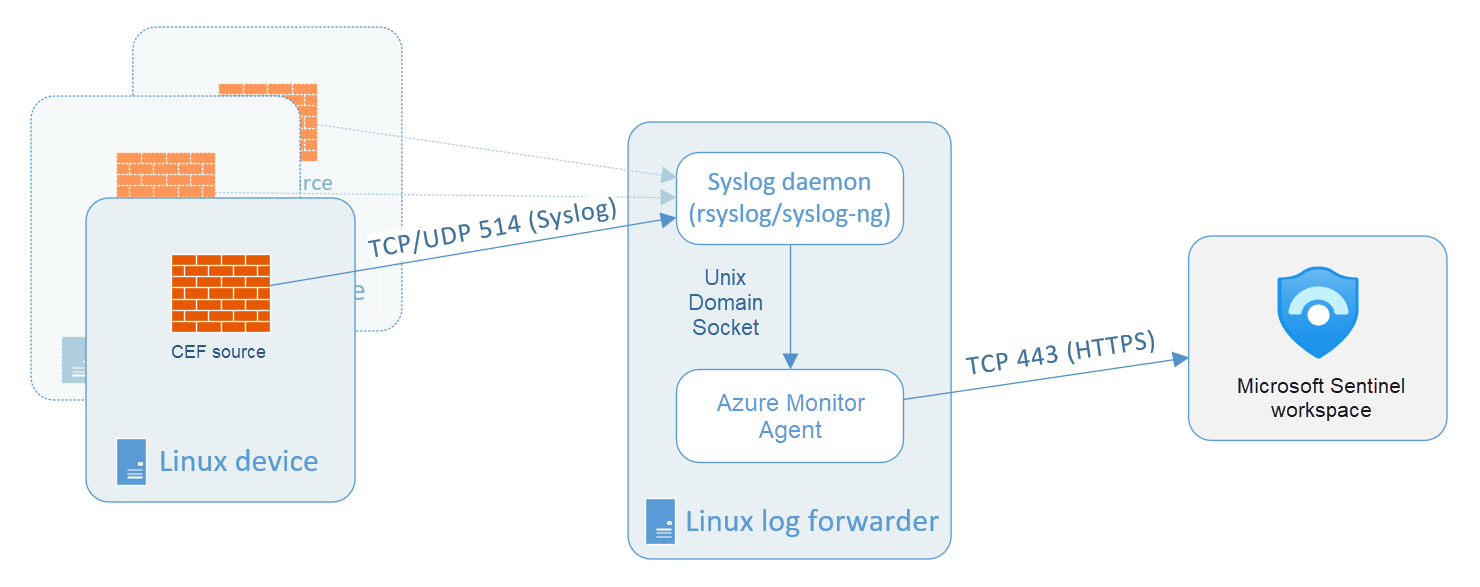
Note: These often require a Linux Log Forwarder (a dedicated VM) to collect logs from network devices and securely forward them to Sentinel.
3. API-Based & Custom Connectors
Codeless Connector Platform (CCP): Allows you to build your own connector for any SaaS product that has a REST API without writing complex code.
Azure Functions: Used for complex ingestion needs where custom scripts (Python, PowerShell) are required to "pull" data from a source and "push" it into Sentinel.
4. Logstash Connector
As previously discussed, this uses an output plugin to pipe data from an existing Logstash pipeline into your workspace.
When you select the Open connector page, the detailed connector page is split and has a left half and a right half, what does it contains ?
The left half provides information about the connector, the connector's status, and the last time a log was received if connected. On the bottom section of the left side is the Data Types. The Data Types lists the table(s) that the connector writes to.
The right half has an Instructions tab. The Instructions tab can vary based on the connector. In general, there are Prerequisites and Configuration. Follow the Configuration to connect to the data source. The Next steps tab provides a quick reference to workbooks, query samples, and analytical templates. Data Connectors can only be disconnected/deactivated, not deleted.
In left split side ____ lists the table(s) that the connector writes to.
Data Types
Can data connectors be deleted ?
Data Connectors can only be disconnected/deactivated, not deleted
Vendor connectors primarily use the ____ and ____ connector as their foundation.
CEF and Syslog
Custom connectors use the _____ API to send log data to the Microsoft Sentinel Log Analytics workspace.
Log Analytics Data Collector
What is Logstash plugin
The Microsoft Sentinel Logstash plugin is used to ingest logs from non-Microsoft or custom data sources into Log Analytics workspace in Microsoft Sentinel when native connectors are not available or not sufficient and If the device doesn’t supports Azure Monitor Agent.
The logs are written to a custom table that you define using the output plugin.
Common Event Format and Syslog connector
If there's no vendor-provided connector, you can use the generic Common Event Format(CEF) or Syslog Connector.
Syslog is an event logging protocol that is common to Linux. Applications send messages that may be stored on the local machine or delivered to a Syslog collector.
Common Event Format (CEF) is an industry-standard format on top of Syslog messages, used by many security vendors to allow event interoperability among different platforms.
Syslog vs Common Event Format
CEF is always a superior choice because the log data is parsed into predefined fields in the CommonSecurityLog table. Syslog provides header fields, but the raw log message is stored in a field named SyslogMessage in the Syslog table. For the Syslog data to be queried, you need to write a parser to extract the specific fields.
To connect the CEF or Syslog Collector to Microsoft Sentinel, the ____ must be deployed on a dedicated Azure virtual machine (VM) or an on-premises system to support the appliance's communication with Microsoft Sentinel.
agent .
You can deploy the agent automatically or manually.
Automatic deployment is only available if your dedicated machine is connected to ______ or is a Virtual Machine in _____ .
Azure Arc or is a Virtual Machine in Azure
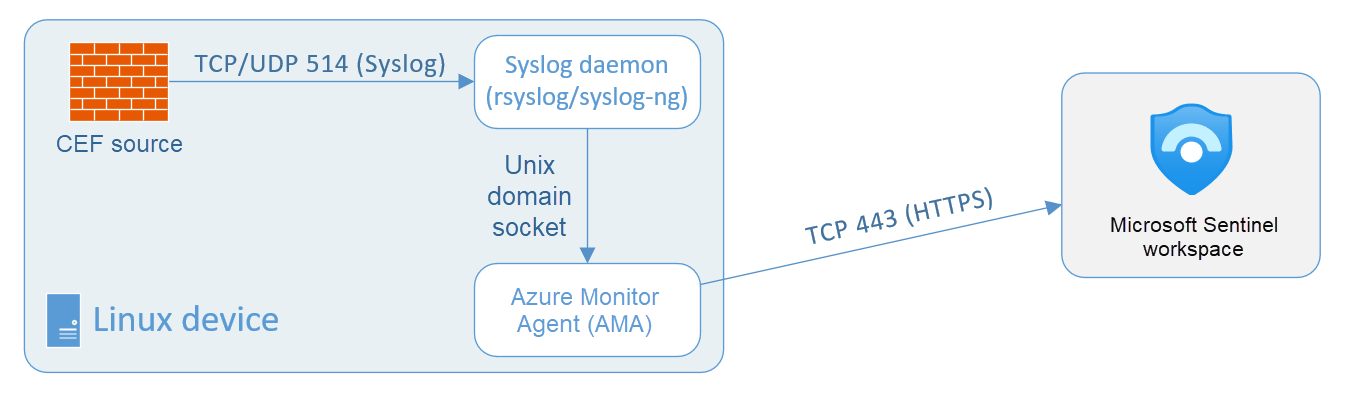
Manually deploy the agent on an existing Azure VM, on a VM in another cloud, or an on-premises machine.
 Note
Note  Flashcards (74)