IDM - Concepts
 Call Kai
 Learn
Learn Practice Test
 Spaced Repetition
 Match
Match Flashcards
 Knowt Play
1/127

Earn XP
Description and Tags
For IDM, theoretical concepts to know
Name | Mastery | Learn | Test | Matching | Spaced | Call with Kai |
|---|
No analytics yet
Send a link to your students to track their progress
128 Terms
Inpendence Mismatch
The resistance you encounter when trying to connect & persist data between your application & the database.
(E.g. converting Java objects to Tables in PostgreSQL?)
Object Persistence
ACID
ACID is a Framework to comply to, it stands for
Atomicity
Consistency
Isolation
Durability
Transactions
Small database programs that comply to ACID.
You can essentially think of it as a set of operations that happen as one unit of work.
Think of a database transaction like a promise that a series of changes will either all happen or none will. If something goes wrong with either, the entire transaction should be “rolled back” to make it as if nothing happened
How do transactions work?
Here’s the typical life cycle of a database transaction:
Begin Transaction: The transaction starts.
Execute Operations: All the actions within the transaction (like updates, inserts, or deletions) happen.
Commit Transaction: If everything goes smoothly, the transaction commits, making the changes permanent.
Rollback Transaction: If something goes wrong, the transaction rolls back, undoing any changes.
In SQL, you usually see commands like BEGIN TRANSACTION, COMMIT, and ROLLBACK to control this process. This ensures that either all parts of the transaction succeed, or none of them do.
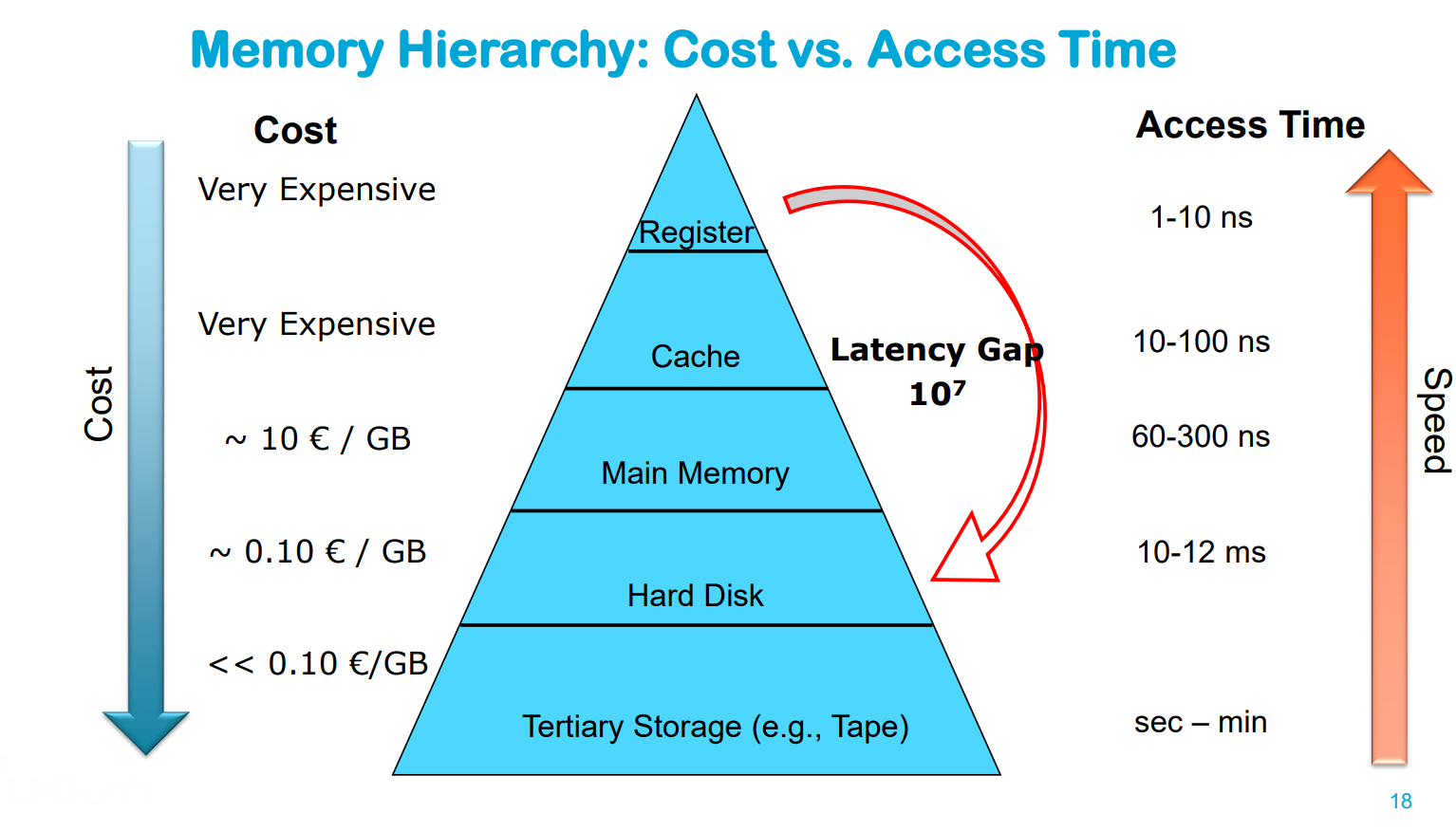
Hierarchy of storage
Primary Storage (e.g., RAM): Fast, limited capacity, high price, usually volatile electronic storage → Frequently used data / current work data
Secondary Storage (Hard Disk / SSD): Slower, large capacity, lower price → Main stored data
Tertiary Storage (Tape): Even slower, huge capacity, even lower price, usually offline → Backup and long-term storage of not frequently used data
Biggest trade-off relation in different media types
The faster the access time, the more the storage costs
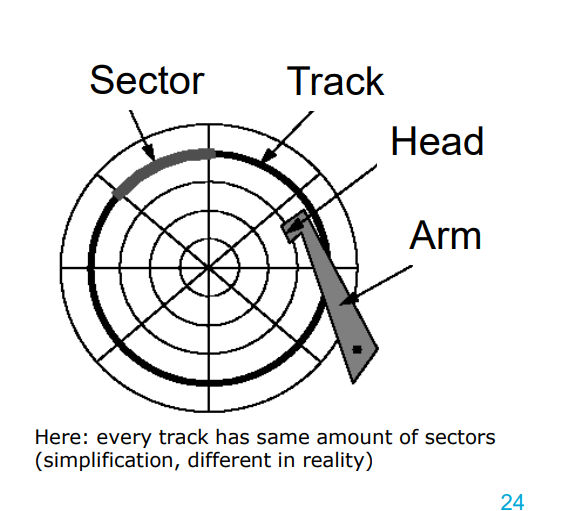
(Spinning) Hard Disk — Structure
Tracks: each surface is divided into circular tracks
Sector (e.g., 1-8 KB) is the smallest physical transfer unit – Size is fixed by manufacturer – More sectors on outer tracks of disk
Gaps between sectors make 10% of a track – Not magnetized – Serve to find the start of a sector
Platters are fixed on the main spindle – Rotate at constant speed (5400 rpm - 10000 rpm)
Head is attached to an arm —→ Arms can position heads along the surface
Blocks are logical transfer unit (more later) – Can consist of one or more sectors
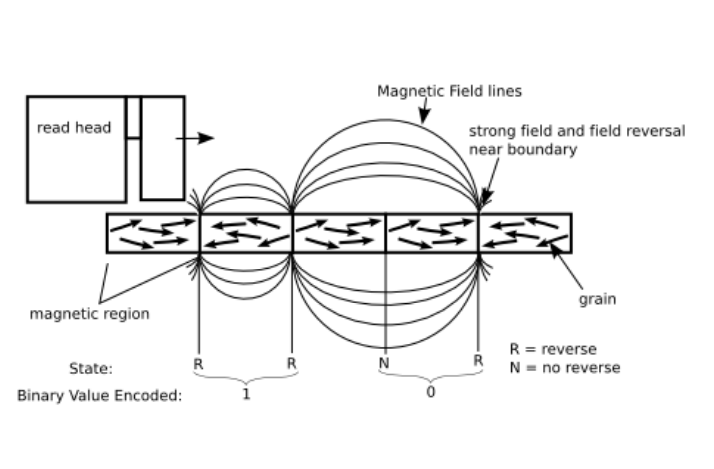
HHD - How it works
Directionally magnetization of a ferromagnetic material
Realized on hard disk platters
Magnetic grains worked into base platter to form magnetic regions
Each region represents 1 Bit
Read head can detect magnetization direction of each region
Write head can change magnetization direction
What impacts latency in HHD?
1. Communication time between processor and disk controller (■ Fraction of a millisecond can be ignored in this course )
2. Seektime to position R/W-head at the right cylinder
■ Between 0 and 42 ms proportional to distance
■ Start time (1 ms), movement time (10 – 40 ms), Stop time (1 ms)
3. Rotational delay until first sector of the block appears under R/W-Head
4. Transfer time during disk rotation until all sectors and gaps of the block have passed the R/W head
Buffering
Buffering refers to the process of using a temporary storage area (buffer) to hold data in transit between a sender and a receiver. In buffering, whether the communication is direct or indirect, messages exchanged between communicating processes reside in a temporary queue.
Why is Buffering needed?
Buffering is essential in scenarios where devices or processes operate at different speeds or data sizes. Key needs for buffering include:
Speed Matching: It helps to match the speed between two devices, such as between a modem and a hard disk.
Data Size Adaptation: Facilitates adaptation between devices with differing data transfer sizes.
Data Manipulation: Allows devices to manipulate or reformat data before sending or receiving.
Support for Copy Semantics: Enables temporary data retention for applications that need multiple reads of the same data.
Note: The primary purpose of buffering is to manage and regulate the data flow rate, allowing the sender to transmit data at a faster rate while the receiver processes the data at its own pace.
Explain how to efficiently use HDD
—> finding where “the block” of data is takes a lot of time so:
– Avoid Random Accesses → Reposition head for each access ==> Which is slow because of: Seek Time + Rotational Delay + Block Transfer
– Aim for sequential access →Position head once, and then just read sectors & transfer
– Aim for re-using data already stored in the Buffers (RAM)
How does writing vs updating work with HHD? — Explain the latency / time involved
Writing of blocks the same algorithm and latency as reading.
Changing of blocks (aka updates) – Not possible to do it without RAM (main memory)
1. Read block into main memory
2. Modify the data
3. Write block back to disk
4. Check for success – Latency: t_read + t_write
(If no one reads anything in the meantime, the Head is still very close to the block we just read (and now want to update)
Why are Magnetic Tapes still used?
Cost Efficiency • Durability (30+ years)
Energy Efficiency (no power when not in use)
Scalability (up to exabytes)
Security → will be safe & untouched when offline
High Sequential Read/Write Speeds (400 MB/s) // HDD (30-150 MB/s), SSD (500-3500 MB/s)
—> Note: Tape is cheap BUT drivers are expensive
What is SSD?
SSD is an alternative to hard-drives that use microchips to store data.
They don’t contain moving parts
• Use the same interface as hard disk drives – Easy replacement in most applications possible
Advantages of SSD
– Low access time and latency (remember those 12ms?)
– No moving parts shock resistant • MTBF about 1.5 million hours
– Lighter and more energy-efficient than HDDs
Disadvantages of SSD
Divided into blocks/pages
one byte changes the whole page has to be rewritten
The old page will be marked as stale • Only whole blocks can be deleted
Limited ability of being rewritten
Expensive
The “Data” cells are not permanent, they have a limit of how many times they can be changed (e.g. writing to memory)
→ Did you know that a chip of 1GB of SSD actually has about 1,5GB of storage?
→ This is because when the cells die after a lot of use, all data gets copied and transferred to new cells
→ after time, there’s no free cells (the buffer got used), now you can’t write / change anymore and your SSD becomes “READ-ONLY”
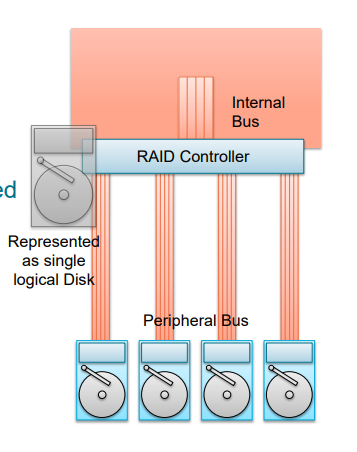
What is RAID?
RAID stands for: (Redundant Array of Independent Disks)
RAID Array treats multiple hardware disks as a single logical disk
More HDs for increased capacity
Parallel access for increased speed
Controlled redundancy for increased reliability
How does RAID work?
The RAID controller connects to multiple hard disks
Disks are virtualized and appear to be just one single logical disk
The RAID controller acts as an extended specialized HBA (Host Bus Adapter)
Still DAS (Directly Attached Storage)
RAID 0
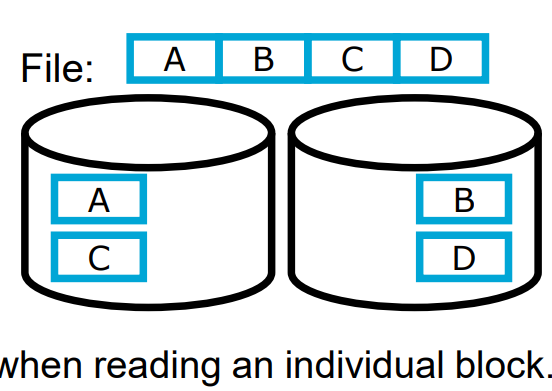
Splitting a file into 2 disks
Double bandwidth when sequentially reading a file → Cyclical distribution of blocks, when all blocks are read/written with uniform frequency (round robin)
Disadvantages:
No acceleration when reading an individual block.
Data loss probability grows with growing number of disks.
RAID 1
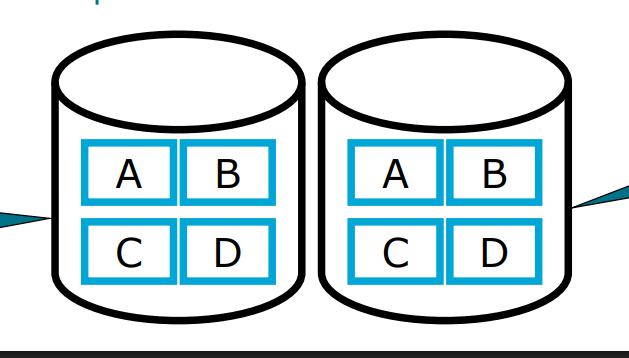
—> basically having 2 complete copies of the same data:
This results to
Faster access
A back-up copy
But obviously costs more & sometimes redundant
Also when writing —> have to do it twice, which is slower ofc
RAID 0 + 1 (also called RAID 10)
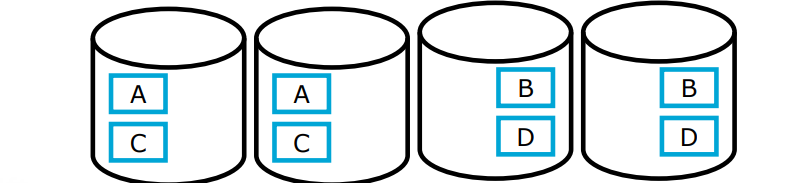
Combines RAID 0 and RAID 1
Double storage consumption
Increased fault tolerance (through RAID 1)
Further reduced latency when reading files
File can be read from four disks in parallel.
Downside / considerations
Reading of a single block is hardly faster than without RAID
The write rate of a file doubles.
You’re using twice as much space
RAID 2
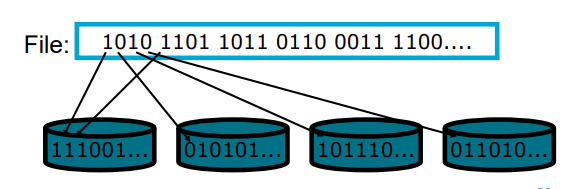
RAID-2 is a specialized RAID level that uses bit-level striping combined with error correction.
In this configuration, data is distributed at the bit level across multiple drives and a dedicated parity drive is used for error detection and correction.
While it offers strong fault tolerance and higher throughput
Downsides:
cost & complexity
reading 1 sector takes same amount of time as 1/8th of a sector
every read/write accesses all disks in parallel —→ meaning there’s no acceleration for parallel reading operations
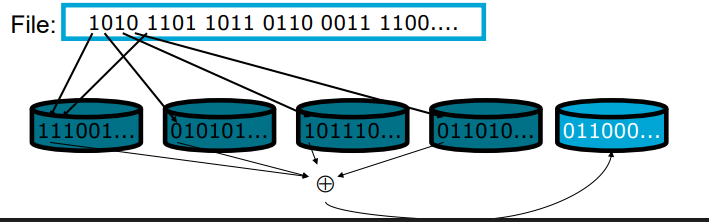
RAID 3
Bit-level (or Byte-level) striping (like RAID 2)
Additional parity disk for the other disks
Parity = bit-wise xor
Single disk failure can be compensated
If a disk fails, based on the parity and the data on the other disks you can “puzzle” back the lost data
Downsides:
Reading/writing requires access of all disks
RAID 4
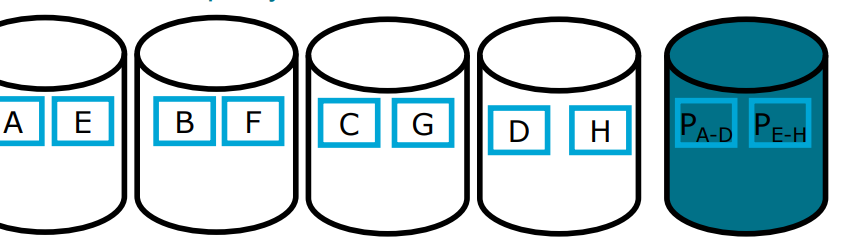
Better Load Balancing than RAID 3
Multiple processes can read in parallel from multiple disks.
Thus: The parity disk becomes a bottleneck
Every write must access it.
Every read must (potentially) access it for error checking.
That means the old state of A must be read when changing A; and the new parity block and the new block A‘ must be written.
RAID 5
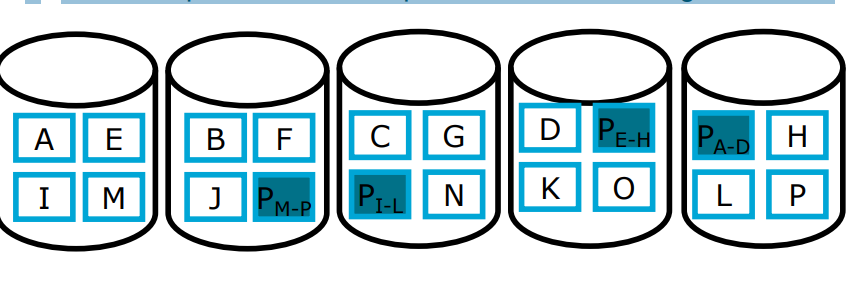
It uses Block Striping with Distributed Parity
The parity of a specific part of data is on disk that does not contain any data blocks of that data
Much better load balancing than RAID 4
Parity disk is not bottleneck anymore
Write requires n-1 disks for data and 1 disk for Parity
Often used in practice.
Typically, slower than RAID 0+1
But better storage utilization
Good compromise between performance and storage utilization
RAID 6
RAID-6 is an advanced version of RAID-5 that provides enhanced fault tolerance by introducing double distributed parity.
This allows RAID-6 to recover from the failure of up to two disks simultaneously, making it more reliable for critical systems with larger arrays.
However, the added parity calculations can impact write performance.
Which RAID options are often used?
RAID1: Simple and fast to realize, increased fault tolerance and performance, but doubles disk space requirement
RAID5: More complex, but increased fault tolerance and speed, only small increase of disk space requirement; requires at least 3 disks
What about SSD RAID?
The RAID principle is not really applicable to SSD because RAID involves a lot of writing. This is okay for HHD but as we know, with SSD a lot of writing operations in SSD damages the “data cells” and thus reduced the storage & performance of the SSD.
Differences RAID 3 & RAID 4?
Both use:
Striping & parity
Both are bottlenecked by the parity disk because all write operations have to also edit the parity disk
Differences:
Byte-level striping in RAID 3 → superior performance for big file transfers
Block-level striping in RAID 4 → improves random read speed.
What is load balancing?
Load balancing is the process of distributing a set of tasks over a set of resources with the aim of making their overall processing more efficient.
What is fault tolerance?
Fault tolerance in distributed systems is the capability to continue operating smoothly despite failures or errors in one or more of its components.
Primary Indexes + properties
Primary Index is a sorted file which is of fixed length size with two fields. The first field is the primary key and second field, is pointed to that specific data block. In the primary index, there is always one to one relationship between the entries in the index table.
* Created by default for the primary key attributes of a table
* Index physically reorders the whole table
* Efficient search is possible
* – Forward search, skip-forward search, binary search, etc.
Secondary Indexing + properties
- In secondary indexing, our main file is unsorted.
- Secondary indexing can be done on key as well as non key attribute.
- A non clustered or secondary index just tells us where the data lies, i.e. it gives us a list of virtual pointers or references to the location where the data is actually stored.
- We can have only dense ordering in the secondary indexing as sparse ordering is not possible because data is not sorted in the main file.
Advantages:
* Extremely beneficial for speeding up joins on foreign key constraints!
* Builds an additional data structure containing the index
– Usually, this is a B-Tree / Hash Table, etc.
– Costs space for storage and performance for updates
Hash Indexes
A hash index uses a hash function to map each value of the indexed column into a “bucket” (or slot) where related rows are stored. This mapping allows the database to quickly determine where to find a specific value by directly looking at the relevant bucket, rather than scanning the entire table.
Hash Function: A hash function takes an input (in this case, the column value, such as a shipment ID) and produces a unique “hash code.” This hash code represents the location of the data within the hash table (index).
Buckets: Each unique hash code corresponds to a “bucket,” which can store one or multiple rows depending on the hashing mechanism.
Advantages vs Disadvantages of Hash Indexes
PRO:
Insanely fast → hash indexes is constant time complexity O(1) for lookups, which means search time doesn’t increase with the number of rows, as long as there are no significant hash collisions.
CON:
No Range Queries: Hash indexes cannot be used for range queries (e.g.,
tracking_number BETWEEN 'ABC123000' AND 'ABC123999') since hash functions don’t preserve ordering.Handling Collisions: Sometimes different values produce the same hash code (called a “collision”). While this is usually manageable, excessive collisions can slow down lookups.
What are B-Trees?
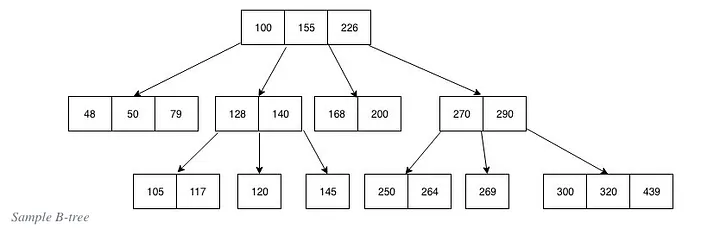
A B-tree is a self-balancing search tree data structure that maintains sorted data.
B-trees are generalizations of binary search trees, allowing more than two children per node. This characteristic makes B-trees particularly well-suited for systems that read and write large blocks of data, such as databases and file systems.
Name the properties of a B-tree
All leaves are at the same level: This ensures that the path length from the root to any leaf is always the same, providing balanced access times.
Nodes have a variable number of children: Each node in a B-tree can have a variable number of children, ranging from a predefined minimum to a maximum number. This flexibility helps maintain balance in the tree.
Keys are stored in sorted order: Each node contains keys that are sorted in non-decreasing order. This sorting allows for efficient searching and sequential access.
Nodes have a minimum and maximum number of keys: For a B-tree of order
m(maximum number of children a node can have), each node (except the root) must have at least⌈m/2⌉ - 1keys and at mostm - 1keys. This ensures that nodes are never too sparse or too full.
Name the elements that are part of a B-Tree
A B-tree node contains several elements:
Keys: Ordered elements that act as separation values, dividing the data into subtrees.
Pointers: References to child nodes, which provide the hierarchical structure of the tree.
Leaf Indicator: A flag indicating whether a node is a leaf (contains no child pointers).
Advantages of B-Trees
Balanced Access: The balanced nature of B-trees ensures that operations like search, insertion, and deletion have consistent performance, typically in logarithmic time,
O(log n).Efficient Disk Access: B-trees are designed to minimize disk I/O operations, making them ideal for applications that require frequent data retrieval from disk storage. By using a larger node size (with multiple keys), B-trees can reduce the number of disk reads and writes.
Scalability: B-trees can efficiently handle large amounts of data due to their ability to maintain balance with a variable number of children per node. This scalability is crucial for applications with growing data needs.
Disadvantages of B-trees
Complexity of Implementation
Extra space since nodes have keys & values
Overhead in Small Data Sets
For small datasets that fit entirely in memory, the overhead of maintaining a B-tree structure may not be justified. Simpler structures can be faster and easier to manage.Less Efficient for In-Memory Operations
B-trees are optimized for systems with slow access to large blocks of data (like disks). For purely in-memory operations, other balanced trees (e.g., red-black trees) or hash tables might offer better performance.
What are B+Trees?
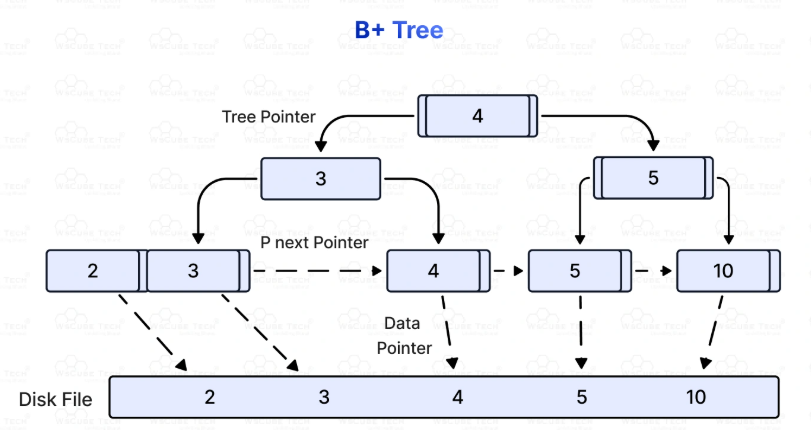
B+ Trees: A B+ tree is a variant of the B-tree in which all values are stored at the leaf level, and internal nodes only store keys for indexing. B+ trees are widely used in databases for efficient range queries. Also the leave nodes are connected via a linked list to facilitate sequential access.
Name different Spatial Queries
Point queries
Range Queries (find all x within a certain radius)
Nearest Neighbor Queries
Explain how Point Queries work (in multi-dimensional cases)
Definition: Retrieve data points that exactly match a specific coordinate or multi-dimensional key.
Example: "Find the location exactly at (x=10, y=20)" or "Find the record with coordinates (latitude=52.0, longitude=4.3)."
Use case: When you want to find a precise object or event at an exact position in space.
Explain how Range Queries work (in multi-dimensional cases)
Definition: Retrieve all data points that lie within a specified multi-dimensional region or boundary.
Example: "Find all locations within a rectangular bounding box defined by (x1, y1) and (x2, y2)" or "Find all points within a radius of 5 km from a given coordinate."
Use case: When you want to find all objects or events within a geographic area, volume, or spatial region.
Explain how Nearest Neighbor Queries work (in multi-dimensional cases)
Query: Find the 3 nearest restaurants to your current location.
Process: The system calculates distances from your location to each restaurant, but uses a spatial index to quickly narrow down candidates.
Result: Returns the 3 restaurants closest to you.
Key Points
Indexing: Efficient NN queries rely on spatial indexes that prune the search space, avoiding exhaustive search.
Dimensionality: As the number of dimensions increases, NN search becomes more complex (curse of dimensionality), sometimes requiring approximate methods.
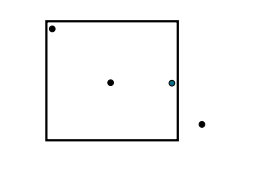
Growing Box: You use a rectangle that grows and “captures” the closest elements within it
Explain how Multiple-Key Indexes work
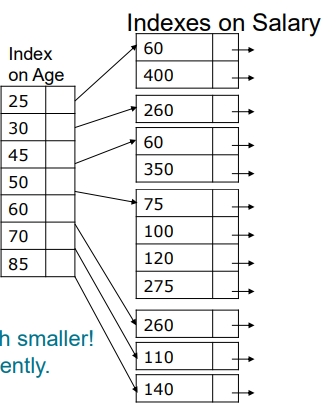
==> You essentially do the same as other indexes only you use multiple (so e.g. all age indexes point to a salary range eventually points to an employee
Explain what KD-Trees are
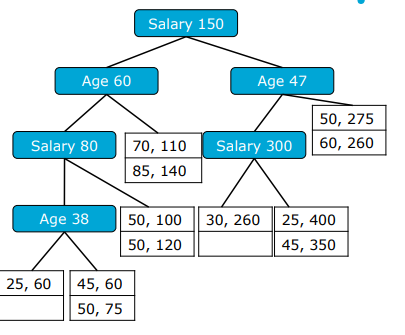
KD stands for k-dimensional trees
They’re similar to binary trees, only now you filter based on multiple different attributes
Attributes alternate through levels (e.g. first age, then salary, then age again
The leaf nodes point to disk blocks with records
Essentially you’re break up the data into little boxes
Give 3 downsides of KD-Trees
1) Partial Queries are super ineffective, e.g if you want to look only on age then you must go down every branch that as a different attribute (since you can make any path choices except when it comes to age)
2) The pathlenght to a leaf is much longer than with B-trees
3) It’s much more complicated to balance kd-trees
What are efficient index for existence / single equality searches?
Especially Hash Indexes but B+-trees also work well
What are efficient index for existence / single equality searches?
B-trees
KD-trees (in cases of multi-dimensional trees)
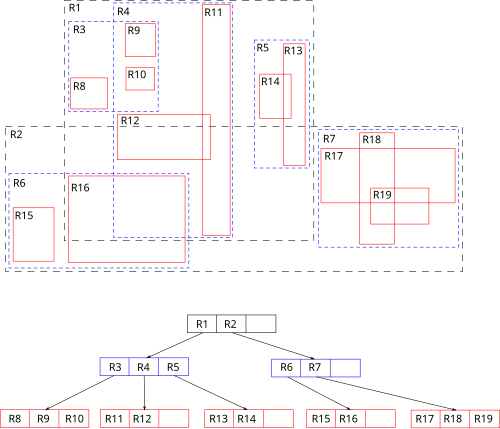
What are R-Trees?
R-tree stands for Rectangle-tree.
It is a balanced tree structure, similar in concept to B-trees but optimized for spatial objects.
Instead of indexing single points, R-trees index minimum bounding rectangles (MBRs) that enclose spatial objects.
The tree organizes these MBRs hierarchically, allowing efficient querying of spatial data.
What are downsides of R-Trees
Cons |
|---|
Can suffer from overlapping MBRs, leading to less efficient pruning |
Performance can degrade with highly irregular or skewed data |
More complex to implement than simpler structures like k-d trees |
Overlapping bounding rectangles may cause multiple subtree searches |
What are R*-Trees?
Like R-trees, R*-trees organize spatial objects using Minimum Bounding Rectangles (MBRs).
Each node contains entries with MBRs that cover its child nodes or spatial objects.
The tree is balanced, with all leaf nodes at the same level.
Key Improvements Over R-trees
Forced Reinsertion:
When a node overflows, instead of immediately splitting, some entries are removed and reinserted into the tree.
This reinsertion helps to better organize entries and reduce overlap before splitting.
Better Node Splitting:
Splitting tries to minimize the sum of perimeters (or margins) of resulting MBRs rather than just their areas.
This reduces the chance of overlap between sibling nodes.
Overlap Minimization Priority:
The algorithm prioritizes minimizing overlap between bounding rectangles, which directly improves query pruning efficiency.
How to Query Optimise — Cost-Based Algorithm
– Enumerate alternative query plans equivalent to
naïve plan
– Estimate cost for each alternative
– Choose the cheapest Query plan
Pro:
Typically better results than heuristic-based
Cons:
Designing a cost cost metric & function
more complex & expensive (research wise)
How to Query Optimise — Heuristic-Based Algorithm (aka rule of thumb)
– Start with naïve plan
– Repeat: Rewrite plan using common heuristics
which are “known to help”
Pros:
very easy & cheap
not a lot of data needed
Cons:
results can vary
Name 3 common rules for query optimization
1) convert catersian products with joins
2) convert subqueries into joins
3) project attributes as early as possible + only project attributes you actually need instead of the whole table
4) apply selections as early as possible
5) use pipelining for adjacent unary operators
Name 2 relevant cost metrics (we use in this course)
1) Size of intermediate result sets
2) Number of Block Accesses (e.g. how many accesses on secondary storage (like HHD which is slow)
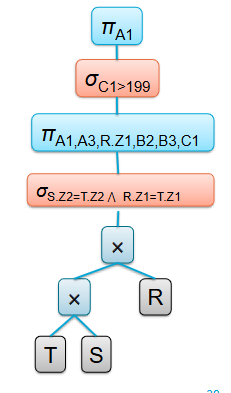
What is the Canonical Operator Tree?
An unoptimized relational algebra statement representing the SQL query as provided by the application
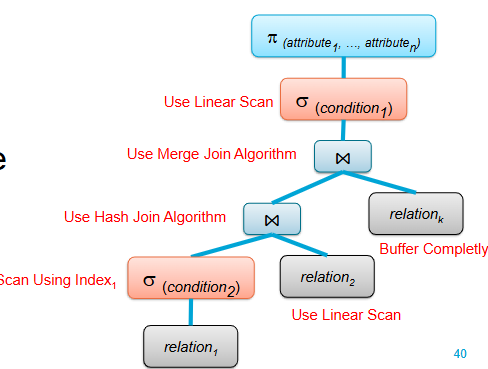
What is the Annotated Operator Tree
An intermediate step towards the execution plan:
An operator tree also containing algorithm annotations
How does query optimization happen?
1) Transform the canonical operator tree into a more efficient final operator tree for evaluation
2) The canonical and final tree have equal semantics, but different operators/execution orders
3) Common Heuristics and/or DB statistics are used to transform the canonical tree step-by-step
• Heuristic query optimization
• Cost-based query optimization
Give a plan for optimising heuristic wise
— Input: canonical query plan
• Step 1: Break up all selections
• Step 2: Push selections as far as possible
• Step 3: Break, Eliminate, Push and Introduce Projection. Try to project
intermediate result sets as greedily as possible
• Step 4: Collect selections and projections such that between other
operators there is only a single block of selections followed by a single
block of projections (and no projections followed by selections )
• Step 5: Combine selections and Cartesian products to joins
• Step 6: Prepare pipelining for blocks of unary operators
— Output: Improved query plan
State 2 problems with transactions
Recovery: —> what do you do when the system fails in the middle of execution?
Concurrency: what happens when 2 transactions try to access the same object?
Simple assumptions for transactions (in the IDM course)
A single central database server → no agreement & communication between multiple servers
Data stored non-redundantly → one copy of each data item
Multiple concurrent transaction need to be interleaved
List the different type of Concurrency Issues
Dirty reads
Dirty writes
Non repeatable reads
Phantom reads
Write Skew
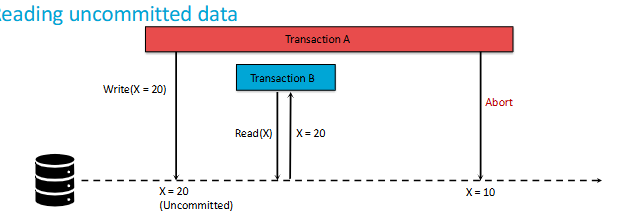
What are Dirty Reads?
A Dirty Read in SQL occurs when a transaction reads data that has been modified by another transaction, but not yet committed. In other words, a transaction reads uncommitted data from another transaction, which can lead to incorrect or inconsistent results.
What are Dirty Writes?
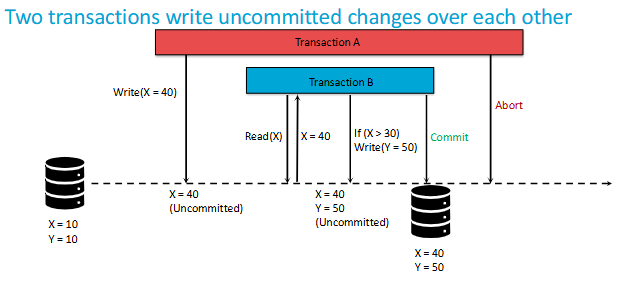
A dirty write happens when two transactions modify the same data without proper synchronization, leading to data corruption.
What are Non-Repeatable Reads?
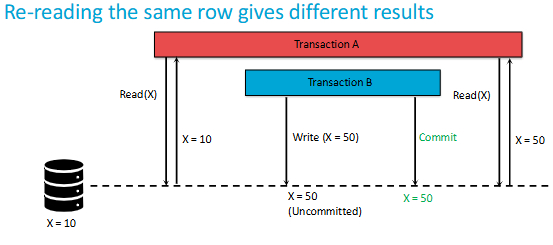
A non-repeatable read occurs, when during the course of a transaction, a row is retrieved twice and the values within the row differ between reads.
What are Phantom Reads?
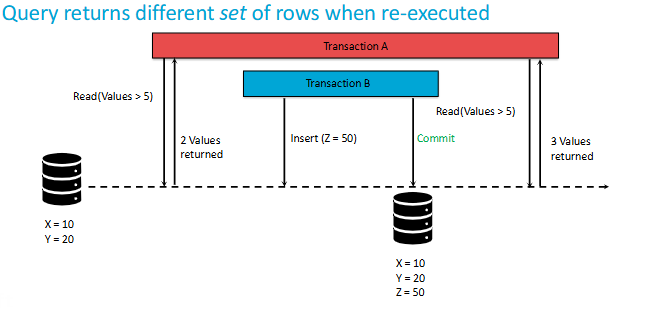
A phantom read occurs when, in the course of a transaction, two identical queries are executed, and the collection of rows returned by the second query is different from the first.
What are Write Skews?
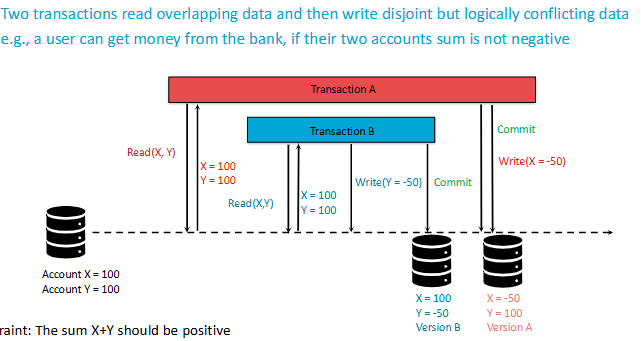
Write skew occurs when two or more transactions read overlapping data, then each makes decisions based on what they read, and finally, they update the data without being aware of each other's changes. This can lead to inconsistencies.
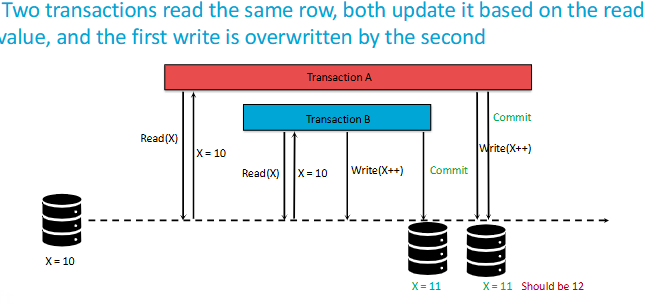
What are Lost Updates?
Basically it’s as if 1 update never happened since it got overwritten.
Difference between non-repeatable reads & phantom reads?
non-repeatable reads see a different value in the SAME ROW
phantom reads see a DIFFERENT SET of rows coming from the same query (e.g. some rows got added / deleted)
What are Isolation Levels?
Imagine you're at a library where several people are reading, borrowing, and returning books at the same time. To keep things organized and prevent chaos, the library might enforce certain rules. For example, they might say, "You can only borrow a book after it's been returned," or "You can check out a book, but others can't read it until you're done."
In a database, transaction isolation levels work in a similar way.
Transaction Isolation Levels define how & when changes made by one transaction become visible by others.
Give the 5 different type of Isolation Levels
Read Uncommitted
Read Committed
Repeatable Read
Serializable
Snapshot Isolation
Give an example of Write Skew
Example of Write Skew:
Transaction A and Transaction B both check if a bank account balance is above a certain threshold before allowing a withdrawal.
Both transactions see that the balance is sufficient and proceed with the withdrawal.
After both transactions commit, the account balance might drop below the threshold, even though each transaction checked it.
Explain Read Uncommitted
At the lowest isolation level, Read Uncommitted allows dirty reads, non-repeatable reads, and phantom reads. Transactions are free to read data that other transactions have modified but haven't yet committed. It's like being able to borrow a book that someone else is still reading and hasn't finished yet.
Pros: It's fast and doesn't involve much locking.
Cons: Consistency is very prone to errors

Explain Read Committed
Read Committed prevents dirty reads, ensuring that only committed data is read. However, it still allows non-repeatable reads and phantom reads. It's like waiting until a book is returned to the shelf before you can borrow it.
Pros:
a good balance between data accuracy and performance.
only read committed data
Cons:
non-repeatable reads can still happen.
other ones too
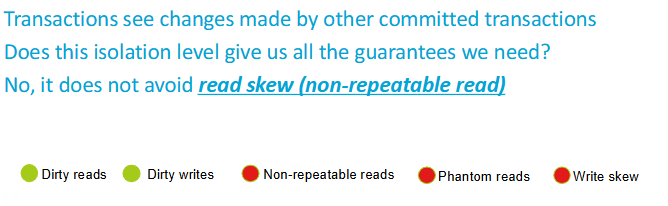
Explain Repeatable Read
With Repeatable Read, the database ensures that once you've read a piece of data, it won't change for the duration of your transaction. It's like checking out a book and knowing that no one else can take it until you're done.
Pros:
prevents both dirty reads and non-repeatable reads.
data read in your transaction remains consistent, even if other transactions are trying to modify it.
Cons:
requires more locking
doesn't fully prevent phantom reads
Often used with financial transaction
Explain Serializability
At the top level, Serializable ensures the highest degree of isolation. It's like closing the entire library just for yourself, so no one else can borrow or return books while you're in there.
Pros:
You prevent all data consistency errors
Your transactions will behave as if they're running one after the other, rather than concurrently.
Cons:
can be very slow.
to reduced system throughput and potentially long delays.
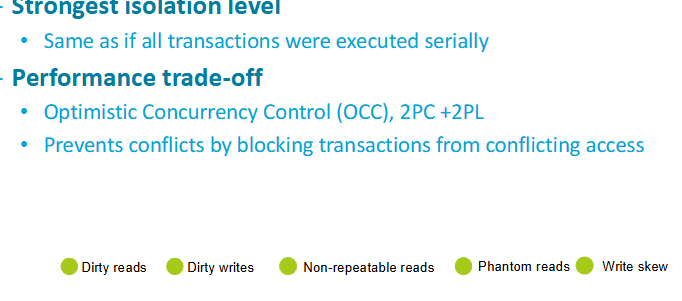
Explain Snapshot Isolation
When a transaction starts under Snapshot Isolation:
1) it gets a "snapshot" of the data as it existed at that moment.
2) Throughout the transaction, even if other transactions are updating the data, your transaction sees a consistent, unchanging view based on that initial snapshot.
3) No dirty reads, non-repeatable reads, or phantom reads
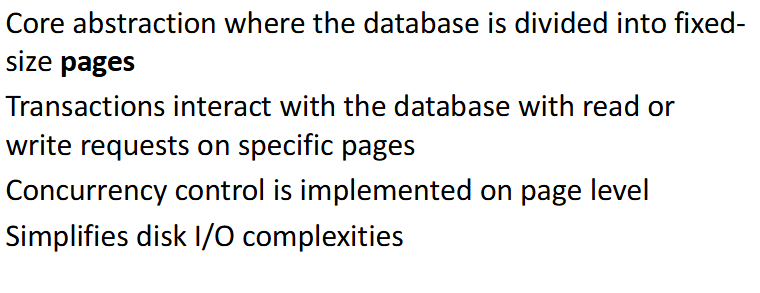
Explain the Page model (also called block / buffer model)
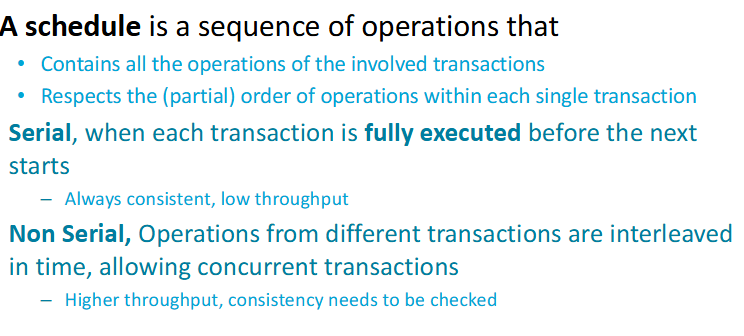
What is a Schedule?
When are 2 schedules equivalent?
They comprise the same set of operations
Every transaction in both schedules reads and writes the same
values from/to a given record
When is a schedule serializable?
A complete schedule is called serializable, if it is
equivalent to any serial schedule of the respective set of
transactions
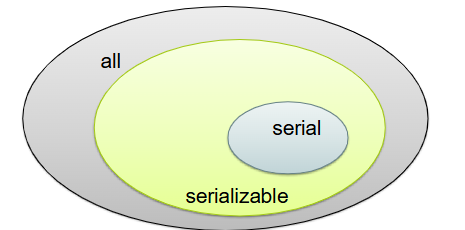
What is Conflict Serializability?
Conflict Serializability ensures that a concurrent schedule produces the same result as some serial execution by reordering non-conflicting operations.
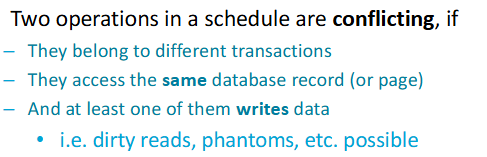
What is Conflict Equivalence?
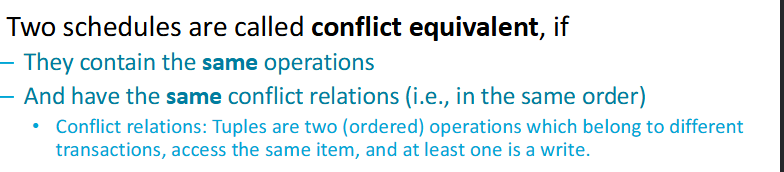
What is a conflict graph?
It’s a graph of a schedule S where:
All committed transactions of S are nodes
If there is an edge between two transactions there is at least one
conflict between themThe direction of each edge respects the ordering of the conflicting steps
There’s no obvious cycle
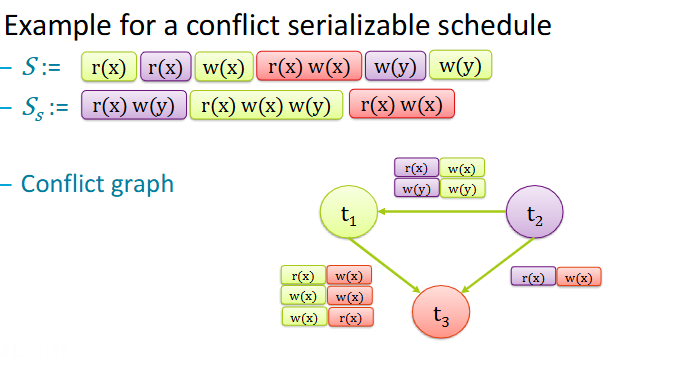
How does the graph of a non-conflict serializable schedule look like?
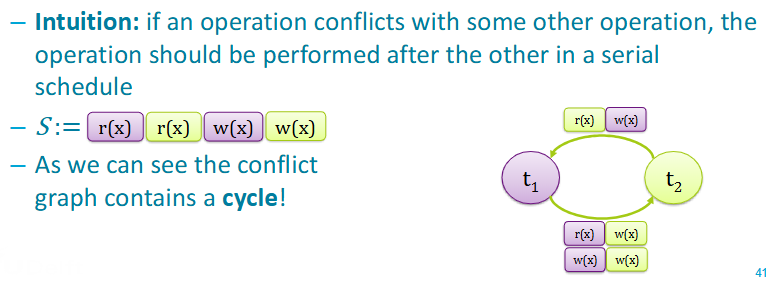
Quick overview of Serializable
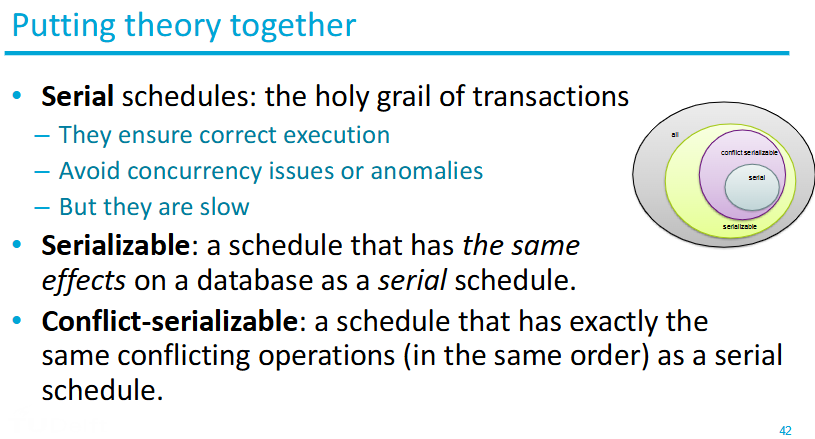
What is locking? (give the 2 types)
Locking is a technique for concurrency control, locks are a mechanism to ensure data integrity.
There are 2 major types:
Shared locks let you read the row or the table that is being locked. Hence, it’s also called a read lock. No transaction is allowed to update the resource while it has a shared lock.
Exclusive locks lock the row or table entirely and let the transaction update the row in isolation. Only 1 transaction can get an exclusive lock at a time.
Locks Overview
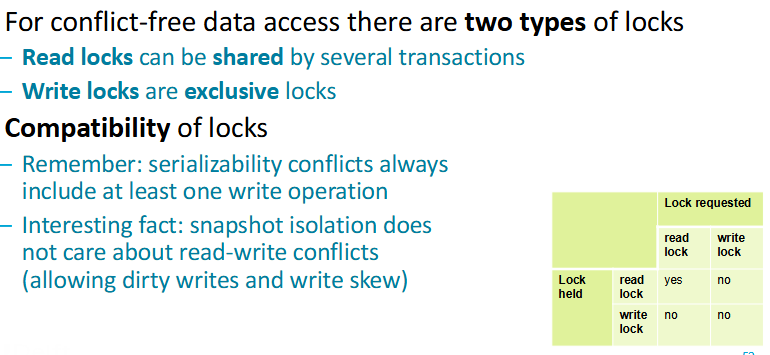
How do you generate a conflict-serializable schedule?
with Two-Phase Locking
—> Two-phase locking protocols are a simple way to generate
only serializable schedules
What is Two-Phase Locking?
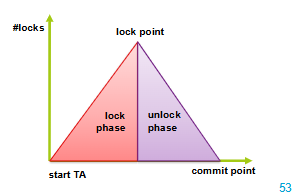
The Two-Phase Locking Protocol defines clear rules for managing data locks. It divides a transaction into two phases:
Growing Phase: In this step, the transaction gathers all the locks it needs to access the required data. During this phase, it cannot release any locks.
Shrinking Phase: Once a transaction starts releasing locks, it cannot acquire any new ones. This ensures that no other transaction interferes with the ongoing process.
Pros & Cons of 2-phase locking
Pros:
Correctness —> ensured serializability
Easy to build into transaction manager
Intuitive
Cons:
Deadlock —> especially during growing phase
Cascading rollbacks —> If one part fails, other parts need to be rolled back too
Reduced Concurrency —> Transactions can hold onto locks for a long time
What is timestamp concurrency control?
The Optimist approach:
Assumes conflicts are rare.
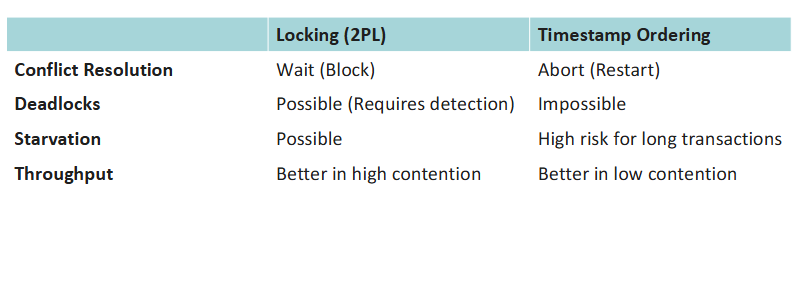
Transactions execute without waiting. Validation is performed via timestamps to ensure serializability.
How does timestamp concurrency control work?
It uses timestamps to determine the order of transaction execution and ensures that conflicting operations follow a consistent order.
Each transaction T is assigned a unique timestamp TS(T) when it enters the system. This timestamp determines the transaction’s place in the execution order.
The Timestamp Ordering Protocol enforces that older transactions (with smaller timestamps) are given higher priority. This prevents conflicts and ensures the execution is serializable and deadlock-free.
Timestamp vs Locking
What are database logs?
Database logs are:
ordered, persistent records of database state changes
more than journals, they’re the definitive history enabling the DBMS to uphold the ACID properties
What is undo logging?
Undo logging is a recovery mechanism where the database records the old value of a data element before it is overwritten.
The primary goal is to guarantee that an aborted or failed transaction has absolutely no effect on the disk

