Chapter 1: Why distributed? - Distributed Systems And Design NodeJS (copy)
 Studied by 0 people
 Call Kai
 Learn
Learn Practice Test
 Spaced Repetition
 Match
Match Flashcards
 Knowt Play
1/9

There's no tags or description
Looks like no tags are added yet.
Name | Mastery | Learn | Test | Matching | Spaced | Call with Kai |
|---|
No analytics yet
Send a link to your students to track their progress
10 Terms
JavaScript's Transition to Multithreading
JavaScript is evolving from a single-threaded to a multithreaded language. The Atomics object facilitates communication across different threads, while SharedArrayBuffer allows data to be read and written across threads. This transition enhances JavaScript's ability to handle concurrent operations efficiently.
Maximum Call Stack Size in JavaScript
The maximum call stack size in JavaScript is typically determined by the JavaScript engine.
The V8 JavaScript engine, which is used by Node.js v14, has a maximum call stack size of over 15,000 frames. This limit ensures that recursive functions and deeply nested calls can be handled efficiently without causing stack overflow errors.
How the Event Loop Manages Work in JavaScript
The event loop in JavaScript checks for more work to do only after the current call stack is complete. It does not check for new tasks after every single instruction. This design ensures that the event loop efficiently manages the execution of tasks, allowing the current stack to finish before moving on to the next set of tasks.
The event loop requires a nonzero amount of time to check for new tasks and prepare the new call stack. As a result, even though the function is scheduled to run in 0 milliseconds, it may take a few milliseconds to execute, especially as the application load increases.
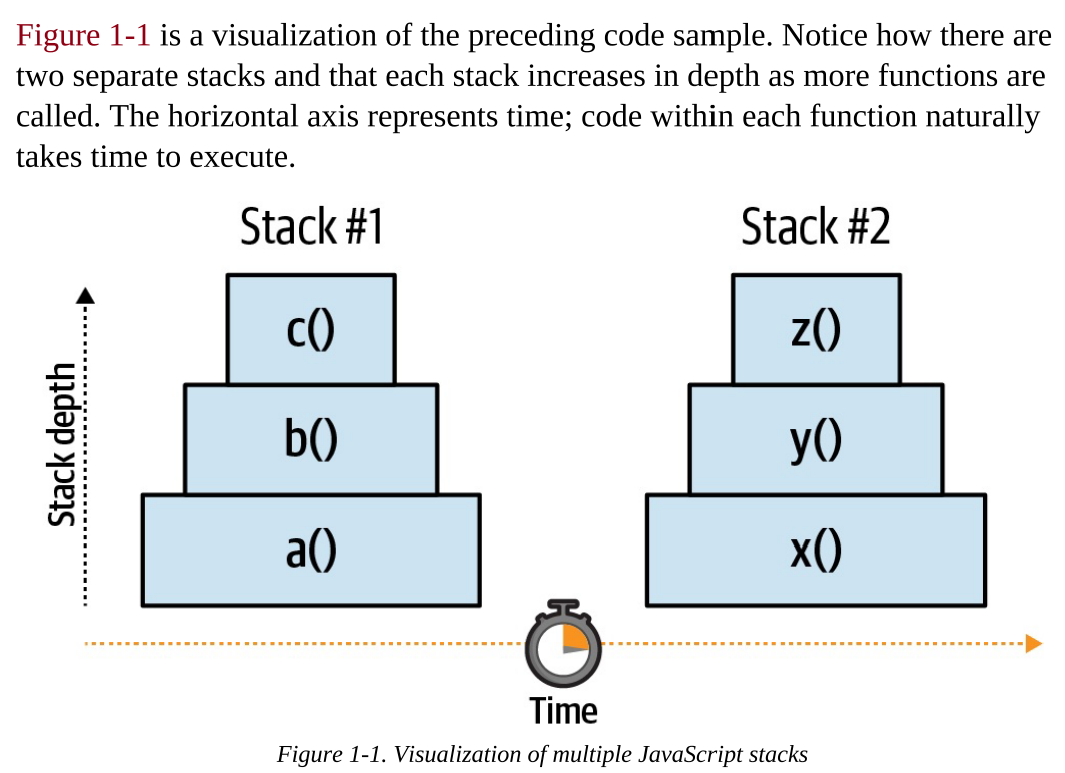
Message Passing in Isolated JavaScript Contexts
Since objects cannot be directly shared between different isolated JavaScript contexts, message passing is used to communicate. This involves sharing a serialized representation of an object or data (such as JSON) between the isolates.
Directly sharing objects is impossible and would lead to complex debugging issues like deadlocks and race conditions, where two separate isolates could modify the same object simultaneously. Message passing ensures safe and efficient communication between isolated contexts.
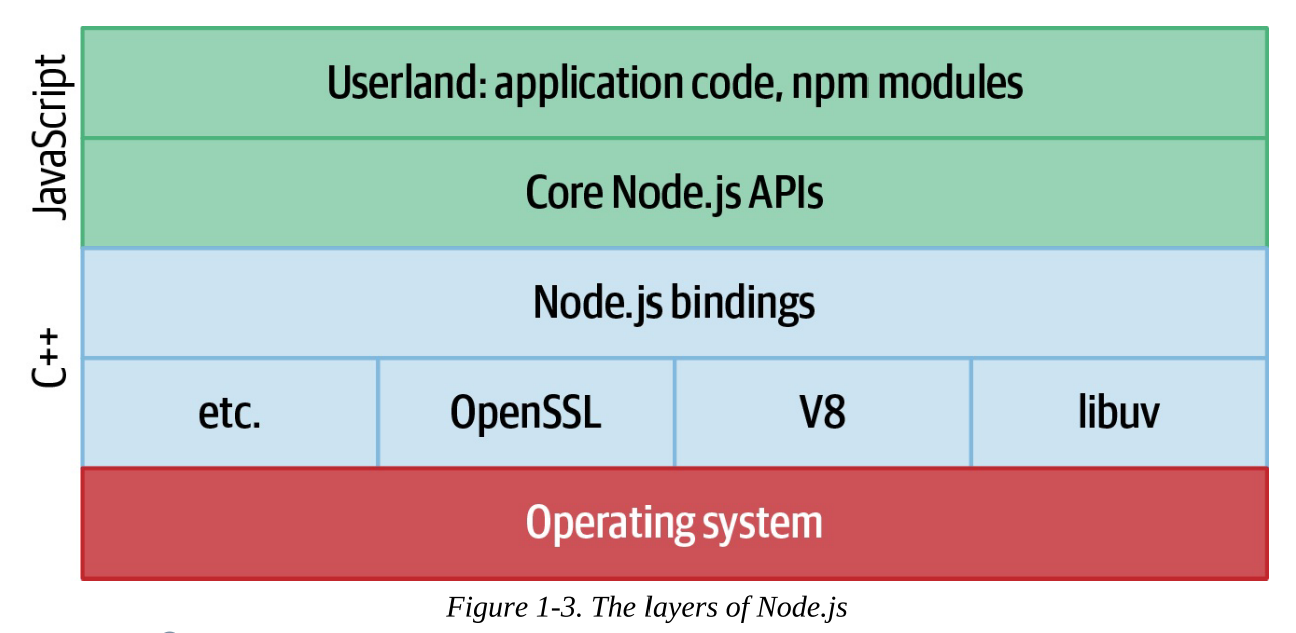
NodeJS Layers
libuv Thread Pool: Manages I/O operations and CPU-heavy tasks like cryptography and compression.
Finite Size: The thread pool has a limited number of threads, e.g., if there are four threads, only four files can be read simultaneously.
JavaScript Execution: While JavaScript code runs in the application, the underlying thread pool manages the I/O operations efficiently.
Example Scenario: When an application reads a file, performs other tasks, and then processes the file content, a thread within Node.js handles reading the file from disk into memory.
About Configuring libuv Thread Pool Size in Node.js
Default Size: The libuv thread pool size defaults to four threads.
Maximum Size: The maximum size is 1,024 threads.
Customization: The size can be overridden by setting the
UV_THREADPOOL_SIZE=<threads>environment variable.Practical Use: Modifying the thread pool size is uncommon and should only be done after thorough benchmarking in a production-like environment.
Environment Differences: An application running on a macOS laptop will behave differently than one in a container on a Linux server, highlighting the importance of environment-specific testing.
The Event Loop Phases of NodeJS
The order of the event loop in Node.js is similar to that in the browser, but with some additional phases specific to Node.js. In NodeJS, each one of the phases maintains a queue of callbacks that are to be executed. Callbacks are destined for different phases based on how they are used by the application.
Poll: Executes I/O-related callbacks. This is the phase where most applications’ code runs.
Check: Executes callbacks triggered by
setImmediate().Close: Executes callbacks triggered by
EventEmitterclose events, such as when anet.ServerTCP server closes.Timers: Executes callbacks scheduled by
setTimeout()andsetInterval().Pending Callbacks Phase: Executes I/O callbacks that were deferred to the next loop iteration. These are callbacks for operations that were not completed in the previous iteration of the event loop and need to be handled in the next cycle, such as reading files or other asynchronous operations.
These phases ensure that different types of callbacks are handled efficiently within the Node.js event loop.
(25-29)
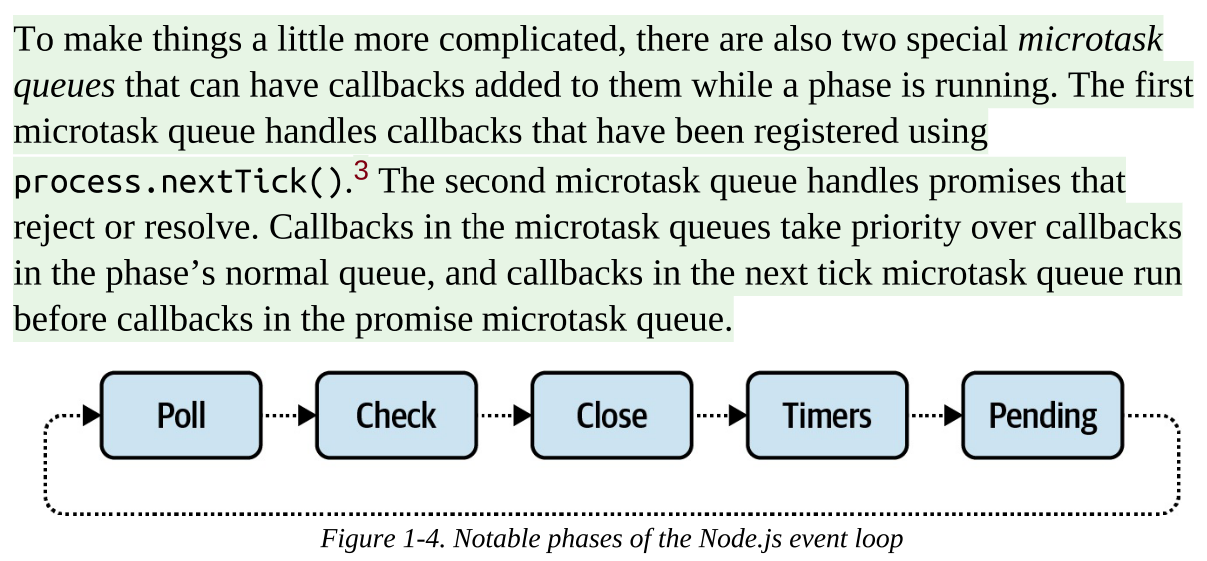
The order of execution of the NodeJS event loop
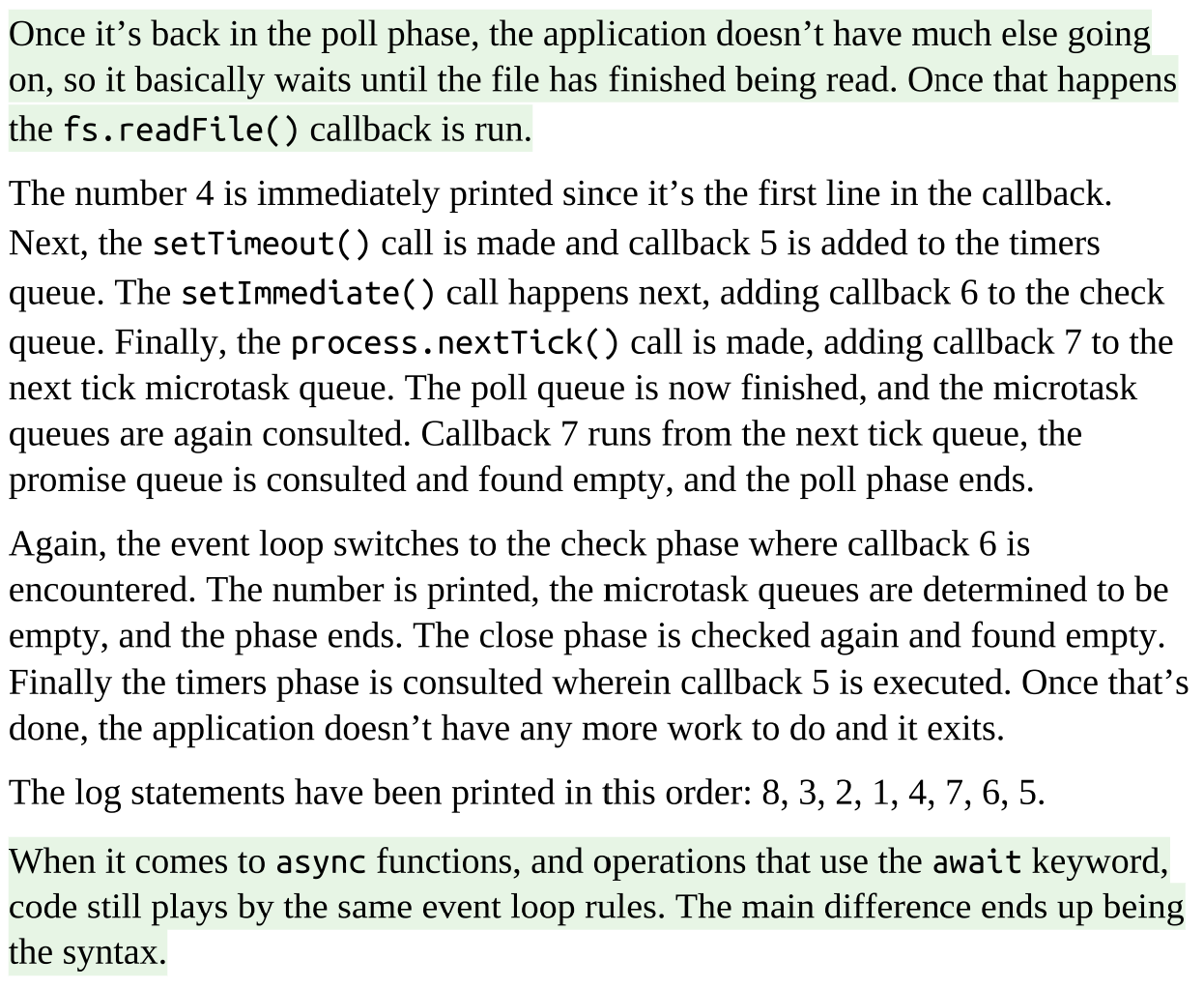
The script starts off executing line by line in the Poll Phase.
Next Tick Queue: This queue is for callbacks scheduled using
process.nextTick(). These callbacks are given the highest priority and are executed before any other microtasks.Microtask Queue: This queue is for other microtasks, such as those created by promises. These microtasks are executed after the next tick queue has been processed.
Check Phase: Executes callbacks triggered by
setImmediate().The Close Phase: Executes callbacks triggered by
EventEmitterclose events, such as when anet.ServerTCP server closes.Timers: Executes callbacks scheduled by
setTimeout()andsetInterval().Pending Phase: the event loop continues back around to the poll phase. If nothing in the poll phase, it exits.
Event Loop Tips
Don’t starve the event loop: void blocking the event loop with long-running tasks. Break tasks into smaller chunks and use asynchronous functions to keep the event loop responsive. For example, if you need to process 1,000 data records, you might consider breaking it up into 10 batches of 100 records, using setImmediate() at the end of each batch to continue processing the next batch. Depending on the situation, it might make more sense to offload processing to a child process.
Don’t introduce Zalgo: This tip warns against writing functions that can behave both synchronously and asynchronously. Such functions can lead to unpredictable behavior and make your code harder to debug. To avoid introducing Zalgo, ensure that your functions are consistently asynchronous, even if they execute immediately. You can use techniques like
process.nextTickorsetTimeoutto always invoke callbacks asynchronously.
(30-31)
 Note
Note  Flashcards (84)