Pro Tools 110 Study Guide
 Studied by 0 people
 Call with Kai
 Learn
Learn Practice Test
 Spaced Repetition
 Match
Match Flashcards
 Knowt Play
1/119

There's no tags or description
Looks like no tags are added yet.
Name | Mastery | Learn | Test | Matching | Spaced | Call with Kai |
|---|
No study sessions yet.
120 Terms
Buffer
an allocated amount of your computer’s memort for temporary storage of data as your computer works on processing. pro tools has 2 hardware buffers
Low latency buffer domain
the one that you can see and change in playback engine box, it applies to all tracks that have a live input (record enabled)
high latency buffer domain
is invisible and is always set to be the highest buffer setting possible (based on sample rate)
what is placed on the low latency domain
aux input tracks that are being used for effects, returns, subgroups have a live input
What buffer size do Virtual instruments require?
higher buffer settings
what to do if your session contains large numbers of VSTs?
deactivate or freeze tracks
shortcut for session setup dialogue box
Command + 2
True or False: sample rate is changeable in the session setup dialogue box
false
Monitor Path:
allows you to tell
Pro Tools which output path is
attached to your speakers. When a
monitor path is selected on a system,
sessions that were created on other
systems can automatically re-map
their outputs to your speakers.
Audition Path:
The path that you
choose here will be the one used for
previewing audio from the Workspace
browser, Clip List, and AudioSuite plug-in window
Output Bus
enable routing signals to a physical output path
Internal Bus
allows routing a signal from one point within Pro Tools to another.
how to check for an internal bus
unchecked boxes
.pio file
Create a new input, output, or bus path in the
I/O Setup window
Command+N
To select input, output, or bus paths:
• Hold the Shift key to select a range of paths
• Hold the Command key (Mac) or Ctrl key (Windows) to select
and deselect individual paths
• Hold the Option key (Mac) or Alt key (Windows) and clicking on
a single path will select all paths in the ta
Import I/O settings to all tabs of the I/O Setup
dialog box
Hold the Option key (Mac) or Alt key (Windows) while importing a single tab
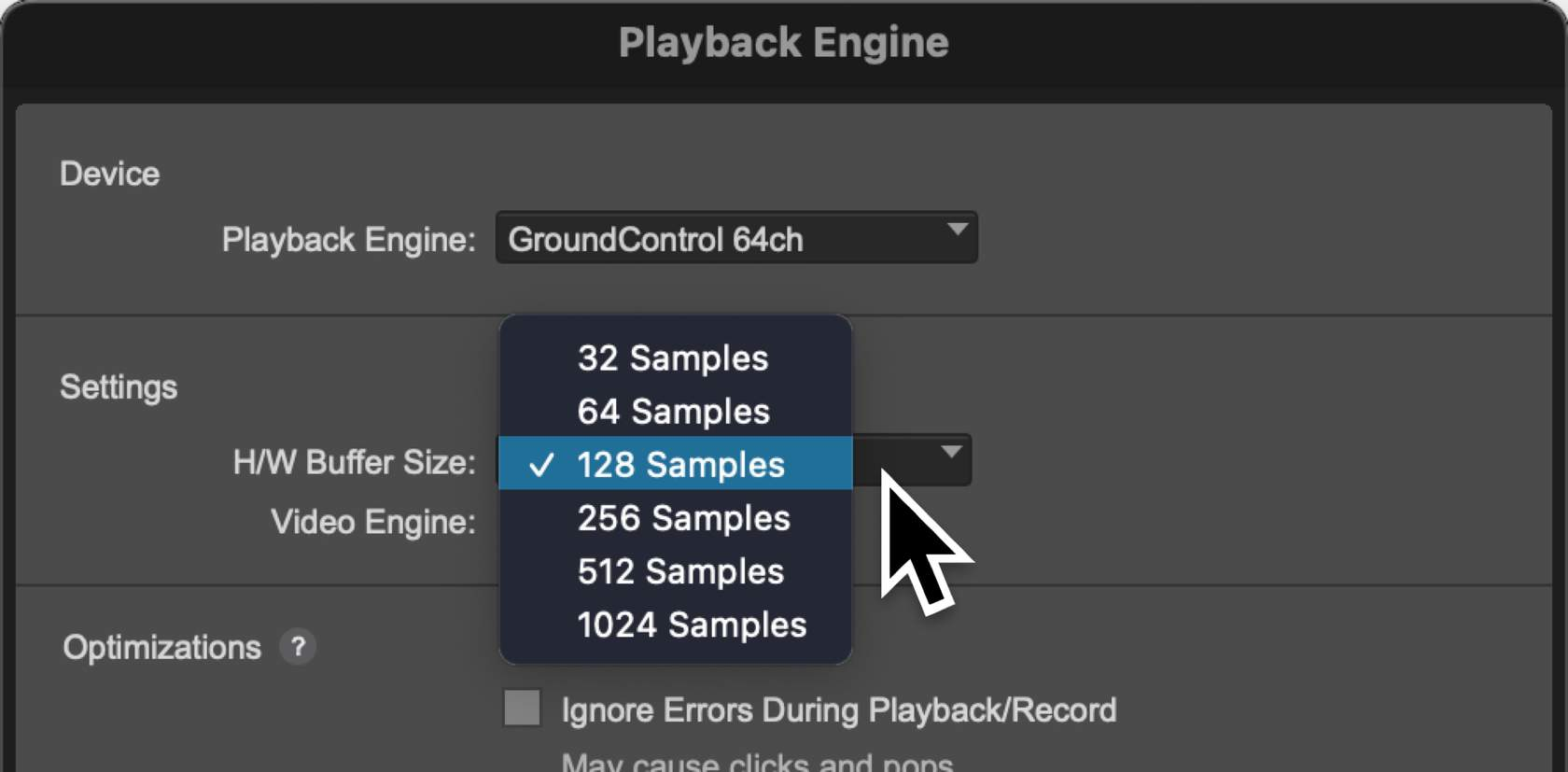
True or False? The pop-up menu shown here affects the Hardware Buffer setting for audio tracks that are not record-enabled.
False, it only affects all tracks that have a live input (for example a record-armed audio track).
Disk Playback Cache Size → Dynamic
playback cache is dynamically managed by Pro Tools, and will vary in size based upon the amount of audio file data on the timeline.
Disk Playback Cache Size → Fixed
Varies based on the amount of RAM in your system. Choosing any of these will copy audio used in your session from your storage into RAM for playback from the cache.
Memory Meter
shows the amount of your system's RAM used by Pro Tools
CPU meters
gives valuable feedback of your total CPU usage (in the Total meter) as well as the activity of your CPU's individual processors
Green vs. Yellow Meter
Green- indicates that all of the audio file data (from the session's timeline and clips list) has been copied to the playback cache.
Yellow- indicates that not all of the audio file data has been copied to the playback cache
True or False? In the image shown here, all of the session's audio has been copied into RAM.
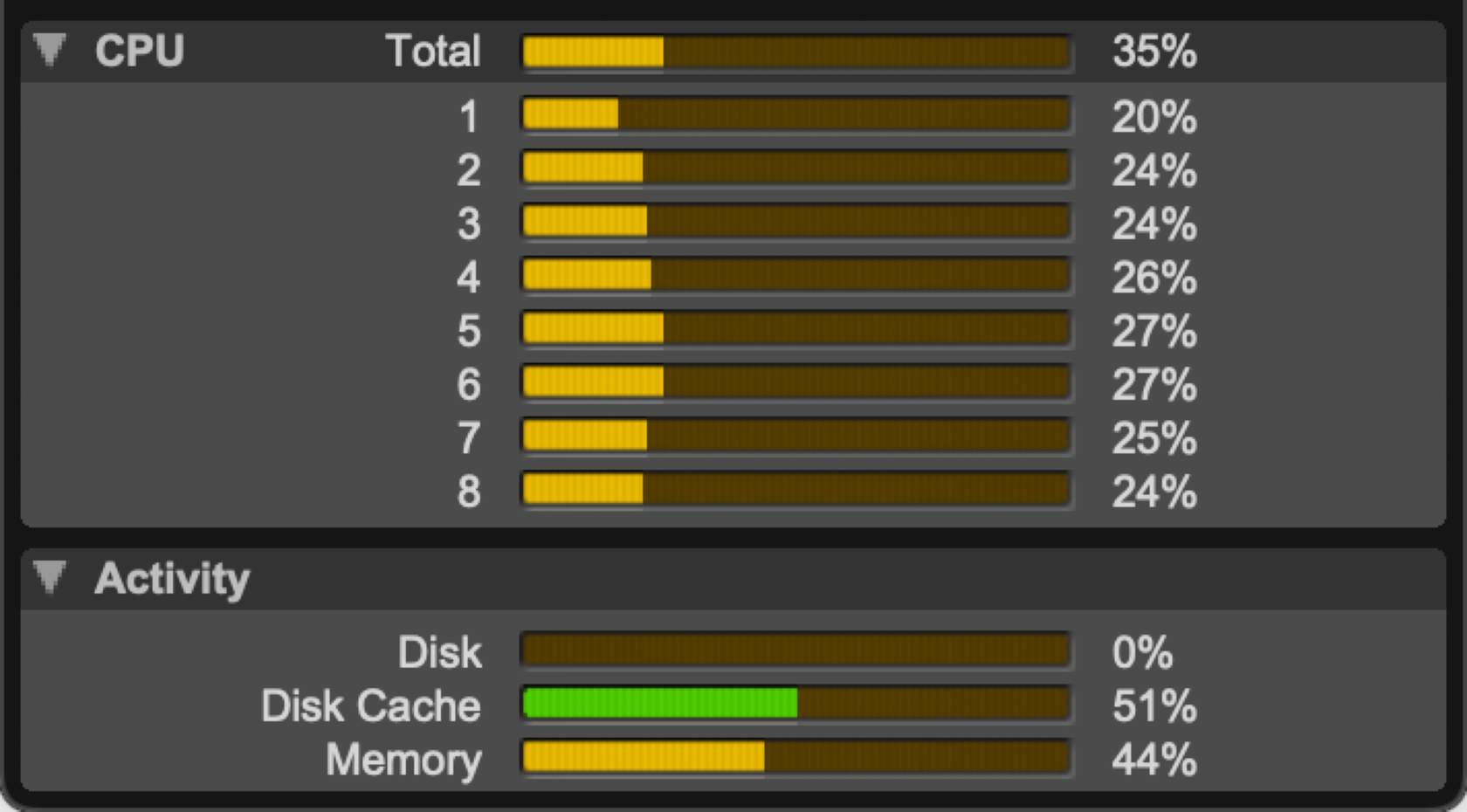
True
The _______________ is used for previewing audio from the Workspace browser, Clip List, and AudioSuite plug-in window.
audition path
True or False? All track outputs are busses.
True
True or False? I/O settings can be directly imported from one session file into another.
True
Which value cannot be changed in the Session Setup window?
Sample Rate
How many active output paths are in the Output tab of the I/O Setup dialog box?
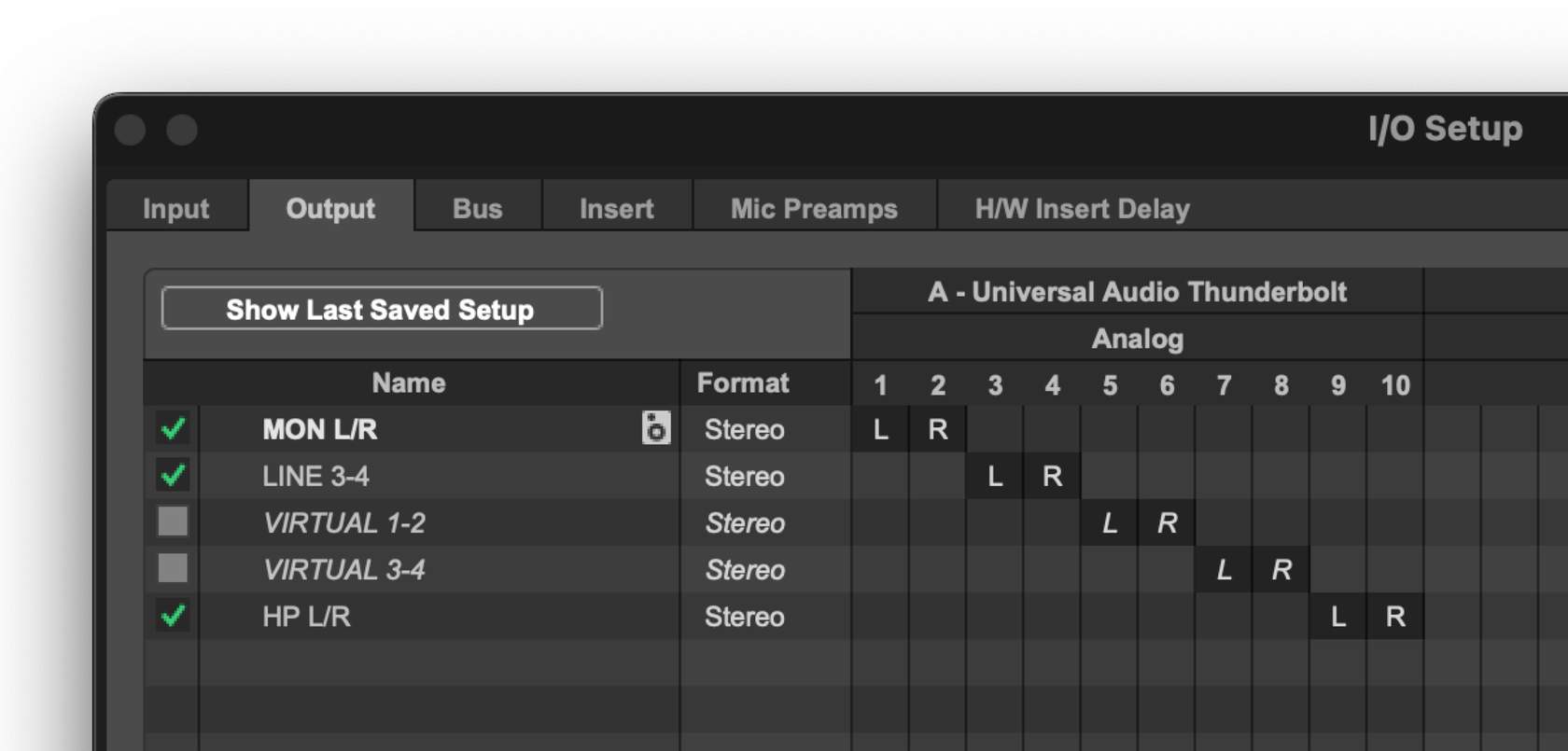
3, the ones that are selected
Monitor Path:
allows you to tell Pro Tools which output path is attached to your speakers. When a monitor path is selected on a system, sessions that were created on other systems can automatically re-map their outputs to your speakers.
Audition Path:
used for previewing audio from the Workspace browser, Clip List, and AudioSuite plug-in window.
True or False? All track outputs are busses.
True, when an output path is created pro tools creates a bus that is named after that path
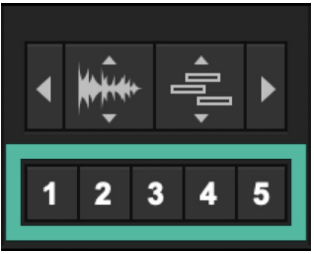
what is this
Zoom presets, hold the Command key (Mac) or Ctrl Key (Windows) and click the button to which you want to assign the settings. shortcuts can be set up in the setup menu under preferences
asterisk key
selects field of main counter
/
immediately selects a field of the Edit Selection Start section
Forward Slash (/) key in the numeric keypad
selected will cycle between Edit Selection Start > Edit Selection End > Edit Selection length.
Memory Locations
enables jumping to a desired section on the timeline or track view instantly
how many memory locations does pro tools provide in a session
up to 32,000
Recall Zoom Presets
Press keys 1 through 5 on your QWERTY keyboard
Single Zoom tool
Repeatedly press the F5 key to toggle between the two Zoom tool modes
Zoom Toggle Button
E
Select a field of the Main Counter
Asterisk (*)
Select a field of the Edit Selection Start section
Press the Forward Slash (/) key in your computer's numeric keypad
Navigate between different fields of the Main
Counter or Edit Selection value
Left Arrow and Right Arrow keys
Confirm changes to the Main Counter or Edit
Selection value
Press the Return key (Mac) or the Enter key (Windows)
Move a selected area on the timeline without changing its length
Hold the Option key (Mac) or Alt key (Windows), and drag either the Timeline Selection In Point or the Timeline Selection Out Point
Show or hide the Memory Locations window
Command+5 (on the computer keyboard's numeric keypad) for a Mac, or Ctrl+5 (on the computer keyboard's numeric keypad) on a Windows computer
Create a Memory Location
Enter key on your keyboard's numeric keypad
Recall a Memory Location
Press the Period (.) key on your keyboards numeric keypad, then the number of the Memory Location that you want to recall (also on the numeric keypad), and then the Period key again
Create a Memory Location from the Markers ruler
Hold the Control key (Mac) or Start key (Windows) and move your cursor to the position that you want to recall. When you see the cursor turn into a pointing finger with a Plus (+) sign, click the ruler
Modify a Memory Location in the Memory Locations window
Right-click (or hold the Control key (Mac) or Start key (Windows) when clicking) the Memory Location that you want to change
Hide (or show hidden) floating windows
Control+Option+Command +W
Create a Window Configuration
Press the Period (.) key, then the number of the Window Configuration that you want to create, and then the Plus (+) key, all on your computer's numeric keypad
Recall a Window Configuration
Press the Period (.) key, then the number of the Window Configuration that you want to recall, and then the Asterisk (*) key, all on your computer's numeric keypad
Refer to the Image: In order to move a ruler selection without changing its duration, hold the _______ key while dragging a timeline selection in or out point.

option
True or False? The Universe view in the Edit window shows clips on hidden tracks.
false
Refer to the image: The Universe can be shown or hidden from the ___________ menu
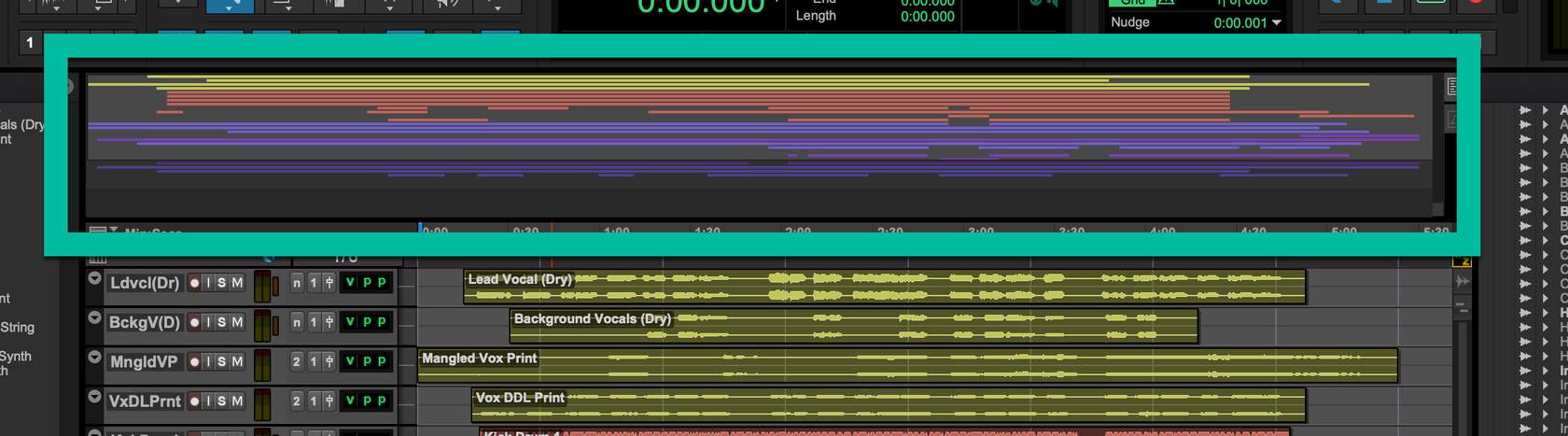
view
True or False? The Marker shown below will change position on the Pro Tools timeline if the session's tempo is changed.
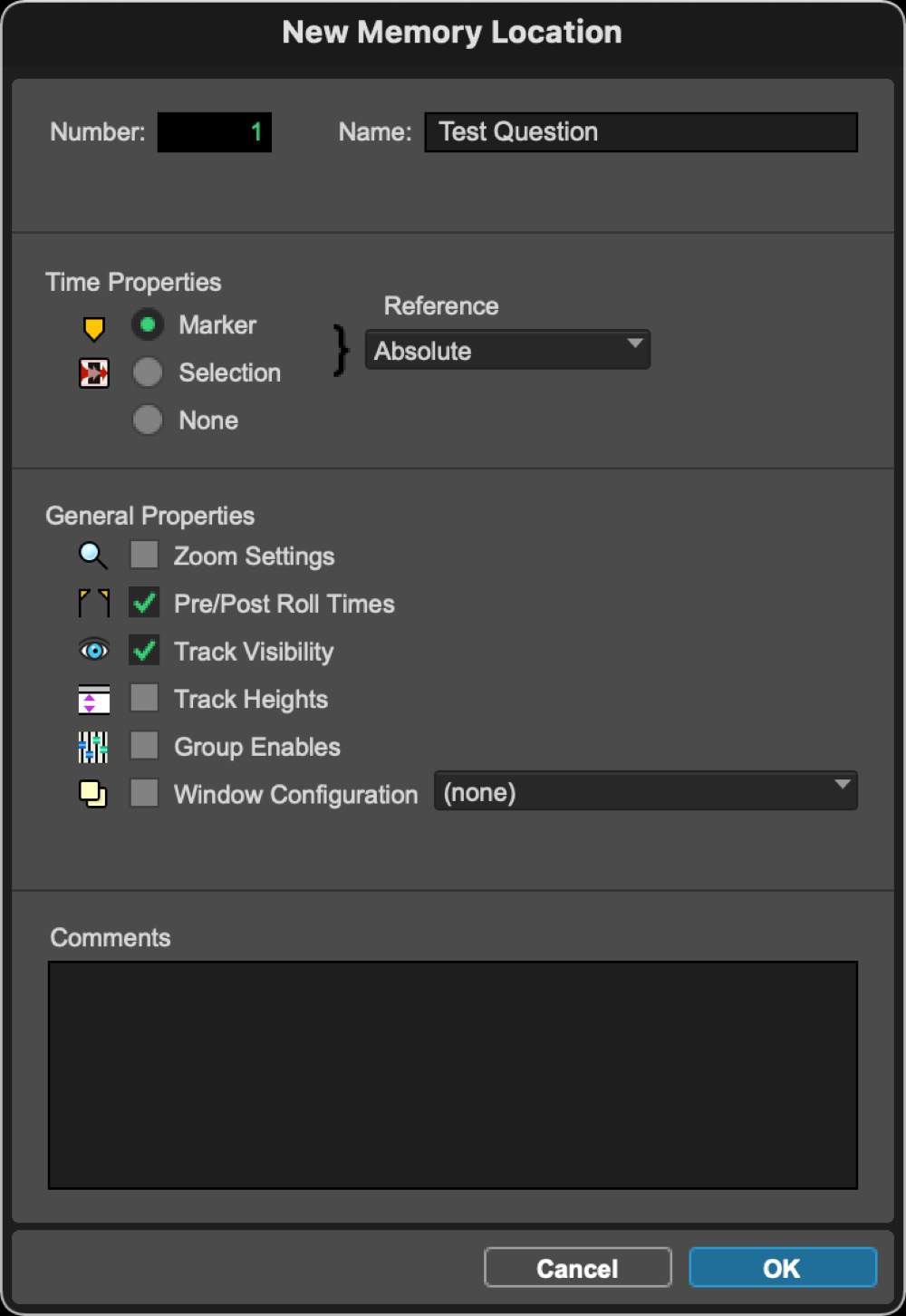
false
The shortcut to recall memory location #15 is to press_____________ on your computer keyboard's numeric keypad.
.15.
A new window configuration can be created from the ____________ > Configurations menu.
window
True or False? A Window Configuration can be recalled from a Memory Location.
true
Basic Folder
primarily used to simply organize complex sessions into more easily managed chunks, in exactly the way that you would use a folder on your computer's hard drive to collect a number of files.
Routing Folder
includes all of the controls seen in a Basic Folder track (group membership, Solo, Mute, Audio and MIDI Signal Indicators), plus the inputs, outputs, pan, and volume controls that are also found in an Auxiliary Input track
Change track types in the New Tracks dialog box
Command (Mac) or Ctrl (Windows) and the Up Arrow or Down Arrow keys
Create an Audio track
Hold down the Command key (Mac) or the Ctrl key (Windows) and double-click in an empty space in the Edit window, Mix window, or Tracks List.
Create an Auxiliary Input track
Hold down the Control key (Mac) or the Start key (Windows) and double-click in an empty space in the Edit window, Mix window, or Tracks List.
Create an Instrument track
Hold down the Option key (Mac) or the Alt key (Windows) and double-click in an empty space in the Edit window, Mix window, or Tracks List.
Create a Master Fader track
Hold down the Shift key and double-click in an empty space in the Edit window, Mix window, or Tracks List
Store a preset in the Batch Track Rename dialog box
Hold the Command key (Mac) or Ctrl Key (Windows) and click the Batch Track Rename Preset button to which you want to assign the settings
Solo (or unsolo) a track
Shift+S
Mute (or unmute) a track
Refer to the Image: What will the track name result be after clicking the OK button in the Batch Track Rename dialog box?
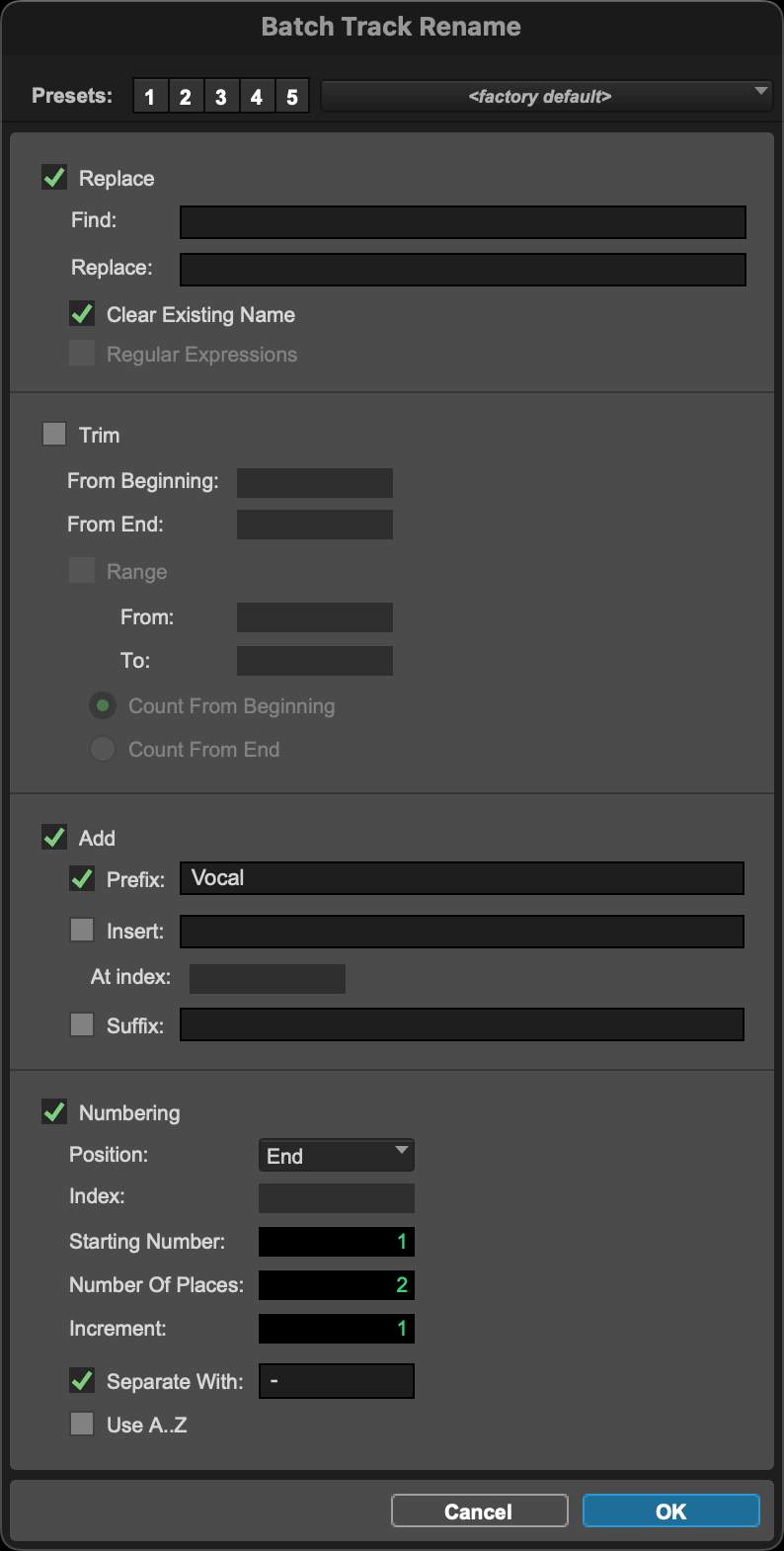
Vocal-01, Vocal-02, Vocal-03
True or False? Clicking the Mute Status indicator will "clear" all mutes in your session.

False
Refer to the Image: Based on the image shown here, which tracks will be muted if the Shift+M shortcut is used? (CHOOSE ALL THAT APPLY)
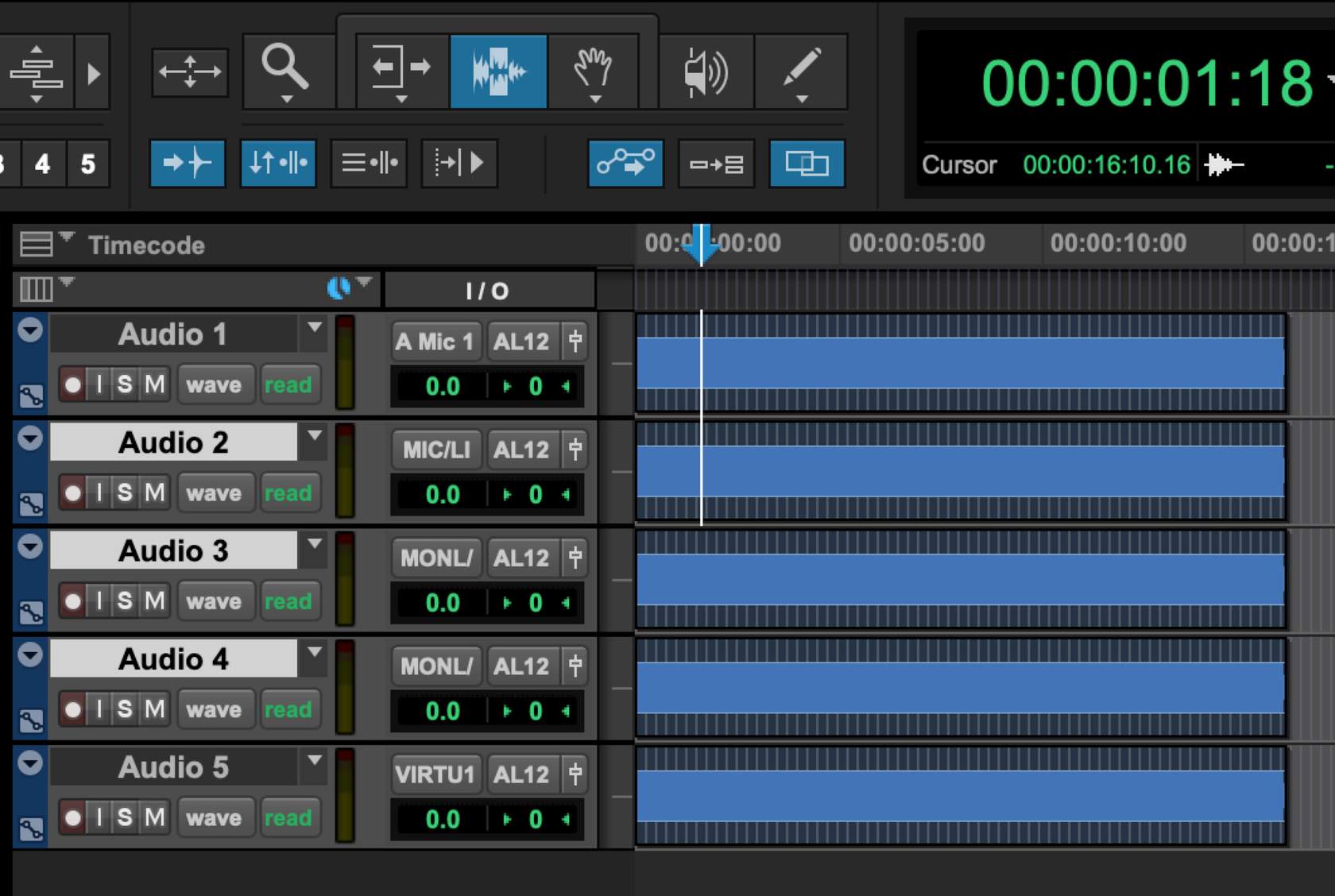
Audio 1 & 2
Refer to the Image: Which of the shown tracks will be affected if the session's starting tempo is changed? (CHOOSE ALL THAT APPLY)
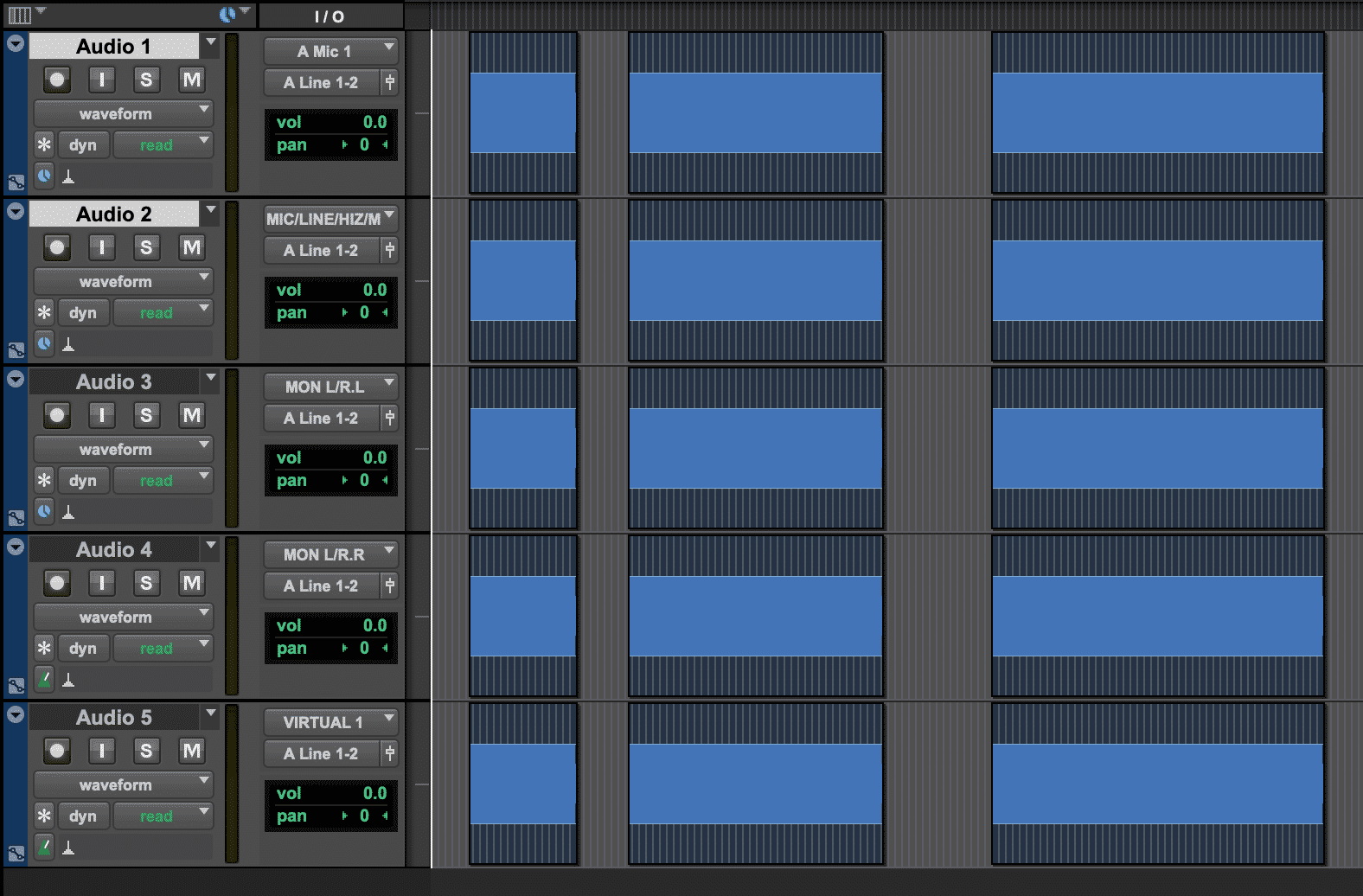
Audio 4 + Audio 5 since they are tick based (green metronome bottom left of track)
If the New Tracks Default to Tick Timebase preference is unchecked, which tracks will be created as tick-based tracks by default?
MIDI
One way to quickly scroll a track into view is to hold ___________________ and click on a track's name in the Tracks list.
Shift + Control
When Batch Renaming clips, which are the Process Order options?
Timeline Order (Left to Right, Top to Bottom) - Clips will be numbered according to their position on your session's timeline, Clips List Sort Order - Clips will be numbered according to their current order in the Clips List.
In order to audition a clip in the Clips List, hold the _________________________ , then click and hold on the clip that you want to hear.
Option key (Mac)
True or False? Clips can be independently colored in a track's playlist and in the Clips List.
true
True or False? Manually recolored clips will keep their color even if they are dragged to another track.
true
Refer to the Image: What kinds of clips are included in this Clip Group?
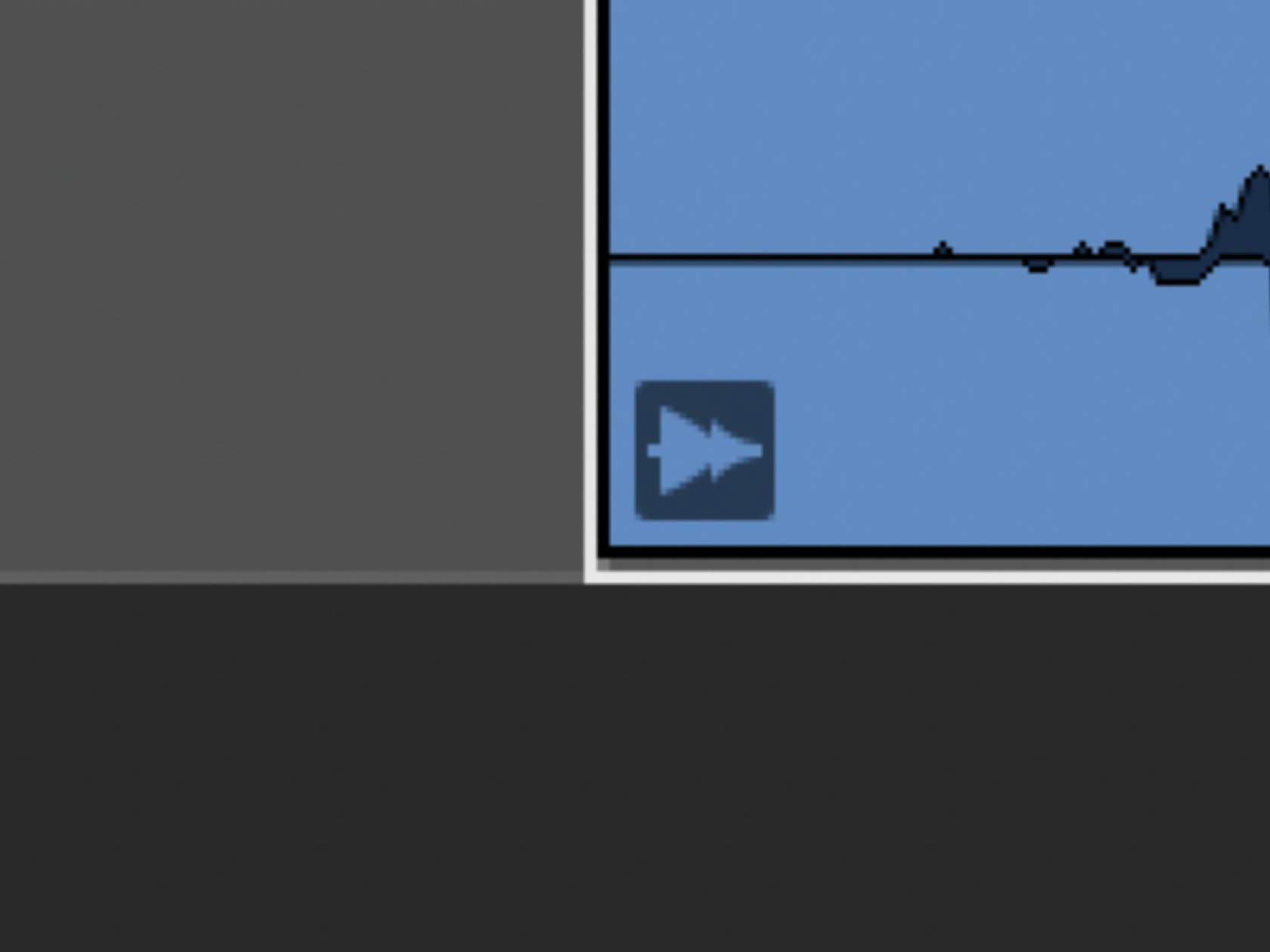
audio
Refer to the Image: What kinds of clips are included in this Clip Group?

multiple
True or False? A Clip Group can be looped.
true
Unloop Dialogue Box: Flatten
results in a series of clips on your timeline that is equal to the length of the previous Clip Loop. This is similar to the result that you'd get if you had repeated or duplicated the clip (though there may be partial loops at the beginning and/or end of the Clip Loop, depending on the length of the Clip Loop)
Unloop Dialogue Box: Remove
completely eliminate the Clip Loop, resulting only in the first iteration clip.
An Edit Playlist is _____________________________________
a series of clips on a track
True or False? Deleting unused Edit Playlists is undoable.
True

what button is this
freeze track
True or False? Based on the image of the Vocal track (a frozen Audio track), additional plug-ins can be added on available inserts.
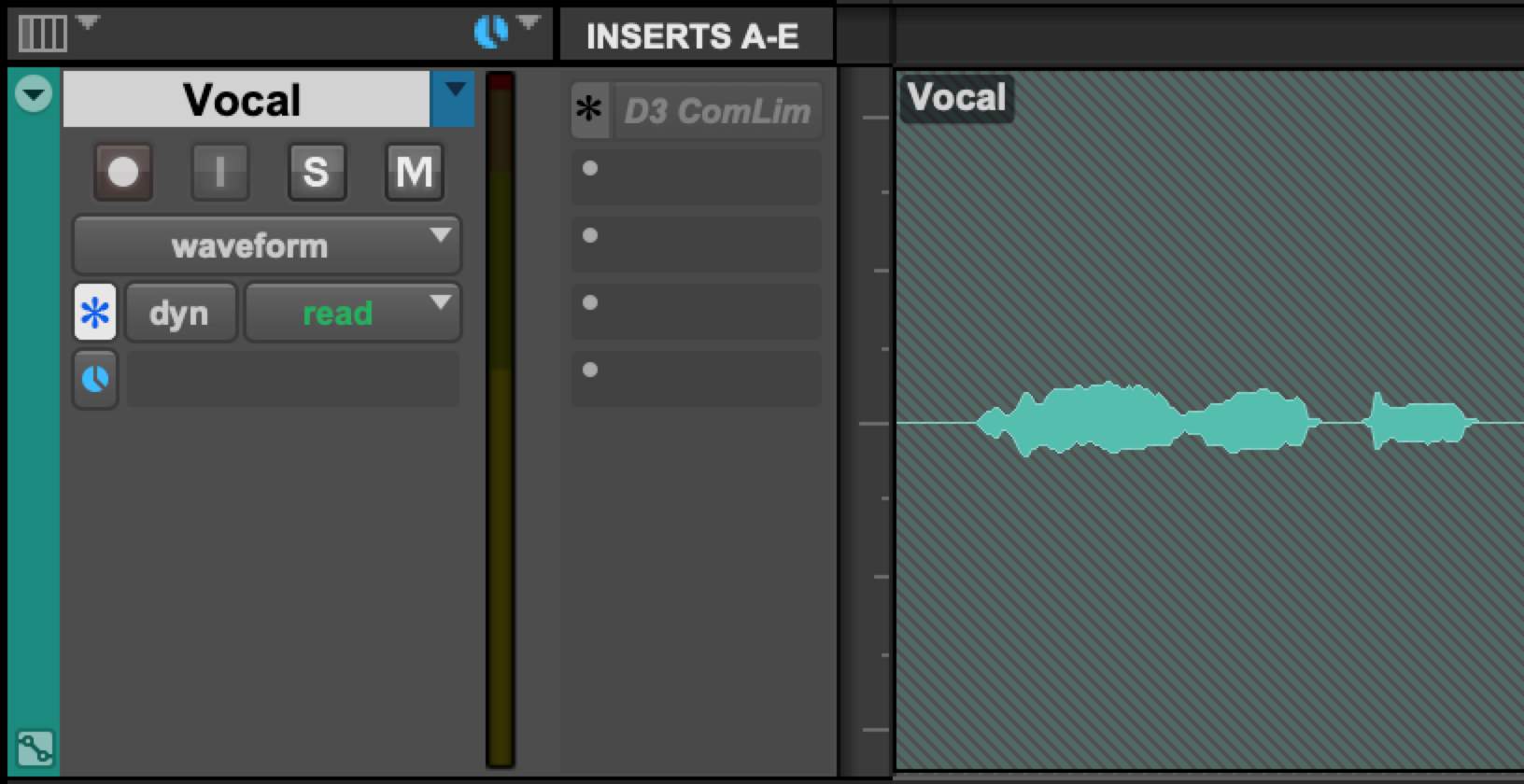
true
What cannot be done on frozen tracks?
Editing clips, edit MIDI or continuous controller, change any plug-in on a frozen insert, change input of track
what can be done on frozen tracks?
add/remove/modify plug ins on any un-frozen inserts, change any sends on a track, change automation parameters like volume and pan and send automation (frozen plug-in parameters are not changeable)
When committing a track, the committed track will be ___________________ .
an audio track
Refer to the Image: The window shown will appear with which Pro Tools feature?
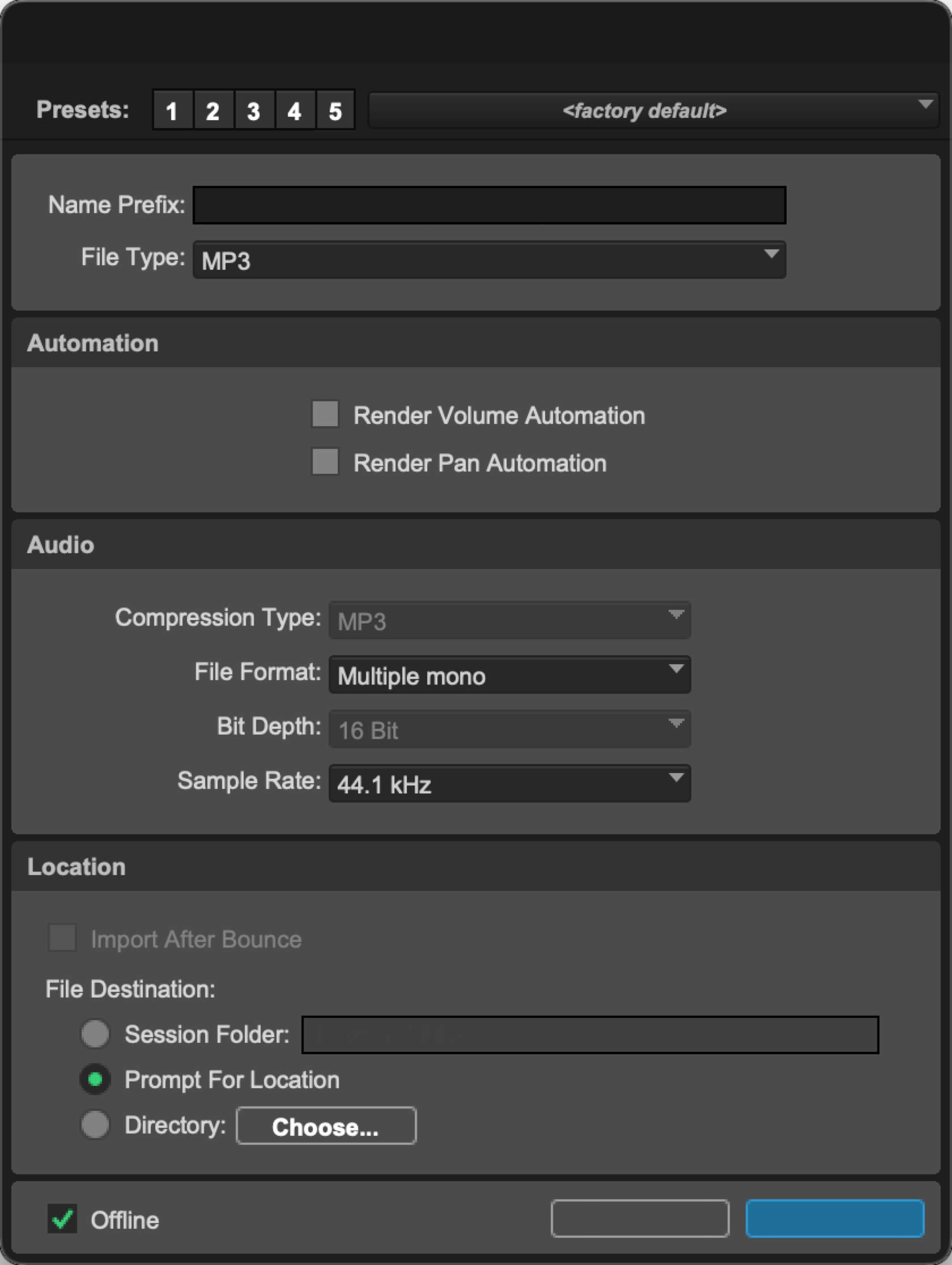
Bounce Track
Refer to the Image: Which control will change the level of the signal being sent to the compressor plug-in?
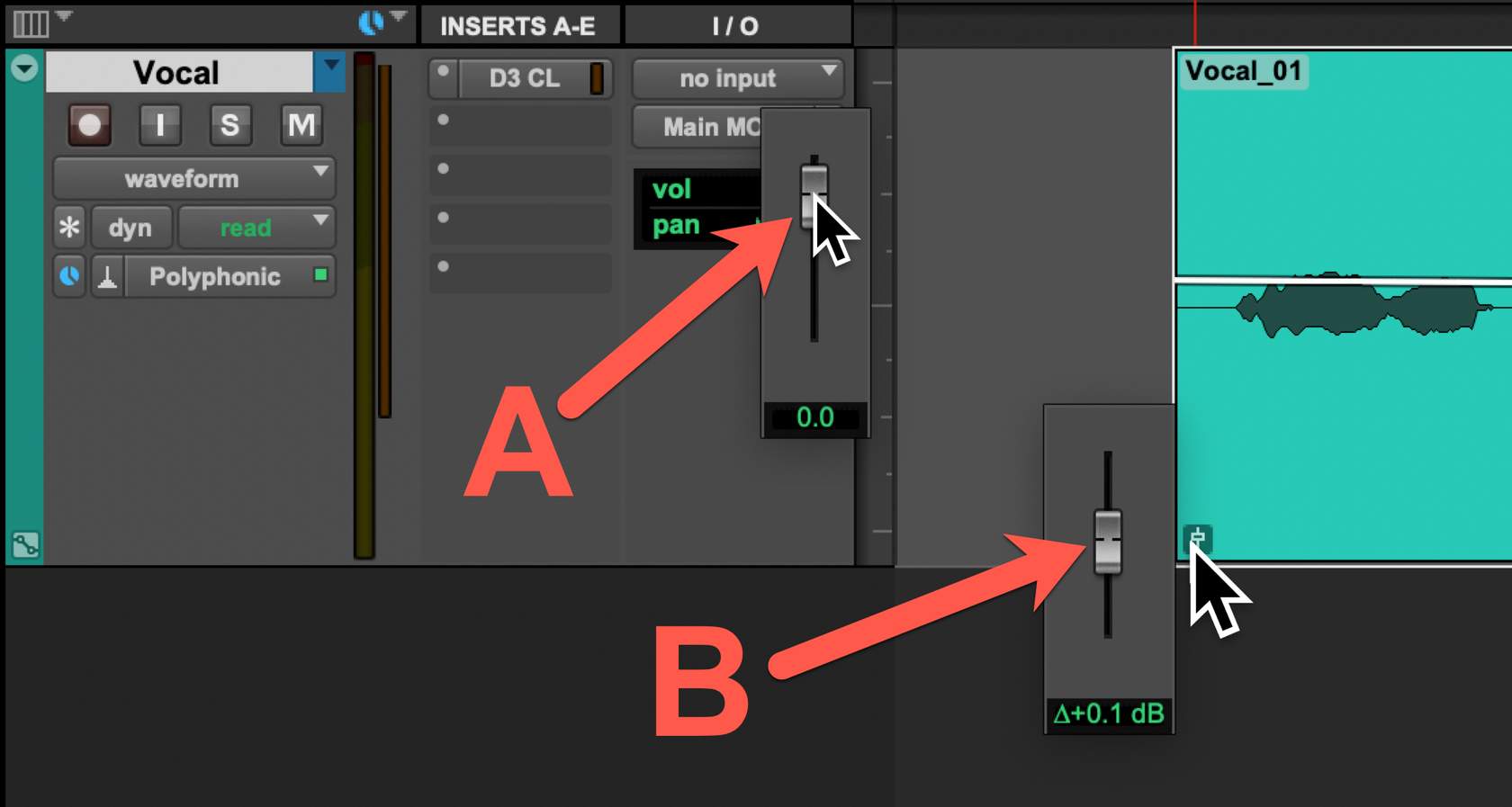
B
Refer to the Image: How can clip gain be vertically nudged upward, as shown here?

shift + Control + Up
Which views are only available on Elastic Audio-enabled tracks?
Analysis & Warp
When importing audio into Pro Tools, holding which modifier will create a new track (one track per audio file)?
Shift
True or False? When batch importing multiple audio files into Pro Tools, only files with the same sample rate as the session will be imported.
False
Clips may be exported as files from ______________.
The Clips list pop-up menu
 Note
Note  Flashcards (58)