CompTIA A+ 220-1201 (5.2 - Troubleshooting Storage Devices)
 Studied by 0 people
 Call Kai
 Learn
Learn Practice Test
 Spaced Repetition
 Match
Match Flashcards
 Knowt Play
1/13

Earn XP
Description and Tags
Name | Mastery | Learn | Test | Matching | Spaced | Call with Kai |
|---|
No analytics yet
Send a link to your students to track their progress
14 Terms
Storage failure symptoms
• Read/write failure
- "Cannot read from the source disk"
• Slow performance
- Constant LED activity - Retry...retry...retry
• Loud clicking noise
- The click of death
- May also include grinding and scraping
Troubleshooting disk failures
• Get a backup - First thing - a bad drive is bad
• Check for loose or damaged cables
• Check for overheating
- Especially if problems occur after startup
• Check power supply
- Especially if new devices were added
• Run hard drive diagnostics
- From the drive or computer manufacturer
- Preferably on a known-good computer
Boot failure symptoms
• Drive not recognized, Boot Device Not Found
- Lights (or no lights), beeps, error messages
• Operating system not found
- The drive is there - Windows is not
Grinding noises
• Hard drives are mechanical devices
- Spinning drives (often 5,400 RPM and higher)
- Moving actuator arms
• Very high tolerances
- One small problem can cause the drive to fail
• Metal on metal
- Clicking or grinding
- Poor performance, or no access at all
• Difficult to recover from this issue
- Time to get your well-managed and
very recent backup
Troubleshooting disk failures 2
• Get a backup (if possible)
- First thing - a bad drive is bad
• Check for loose or damaged cables
• Check for overheating
- Especially if problems occur after startup
• Check power supply
- Especially if new devices were added
• Run hard drive diagnostics
- From the drive or computer manufacturer
- Preferably on a known-good computer
Boot failure symptoms 2
• Drive not recognized, Boot Device Not Found
- Lights (or no lights), beeps, error messages
• Operating system not found
- The drive is there - Windows is not
Troubleshooting boot failures
• Check your cables - Physical problem
• Check boot sequence in BIOS
- Check for removable disks (especially USB)
- Check for disabled storage interfaces
• For new installation, check hardware configuration
- Data and power cables
- Try different SATA interfaces
• Try the drive in a different computer
Data loss/corruption
• Hard drives are mechanical devices
- They will eventually fail
• Repairs are difficult and expensive
- Dust-free environment
- Not always successful
• An SSD may simply stop working
- Sometimes can read but not write
• Data becomes unavailable or corrupted
- Can be impossible to recover
• ALWAYS HAVE A BACKUP
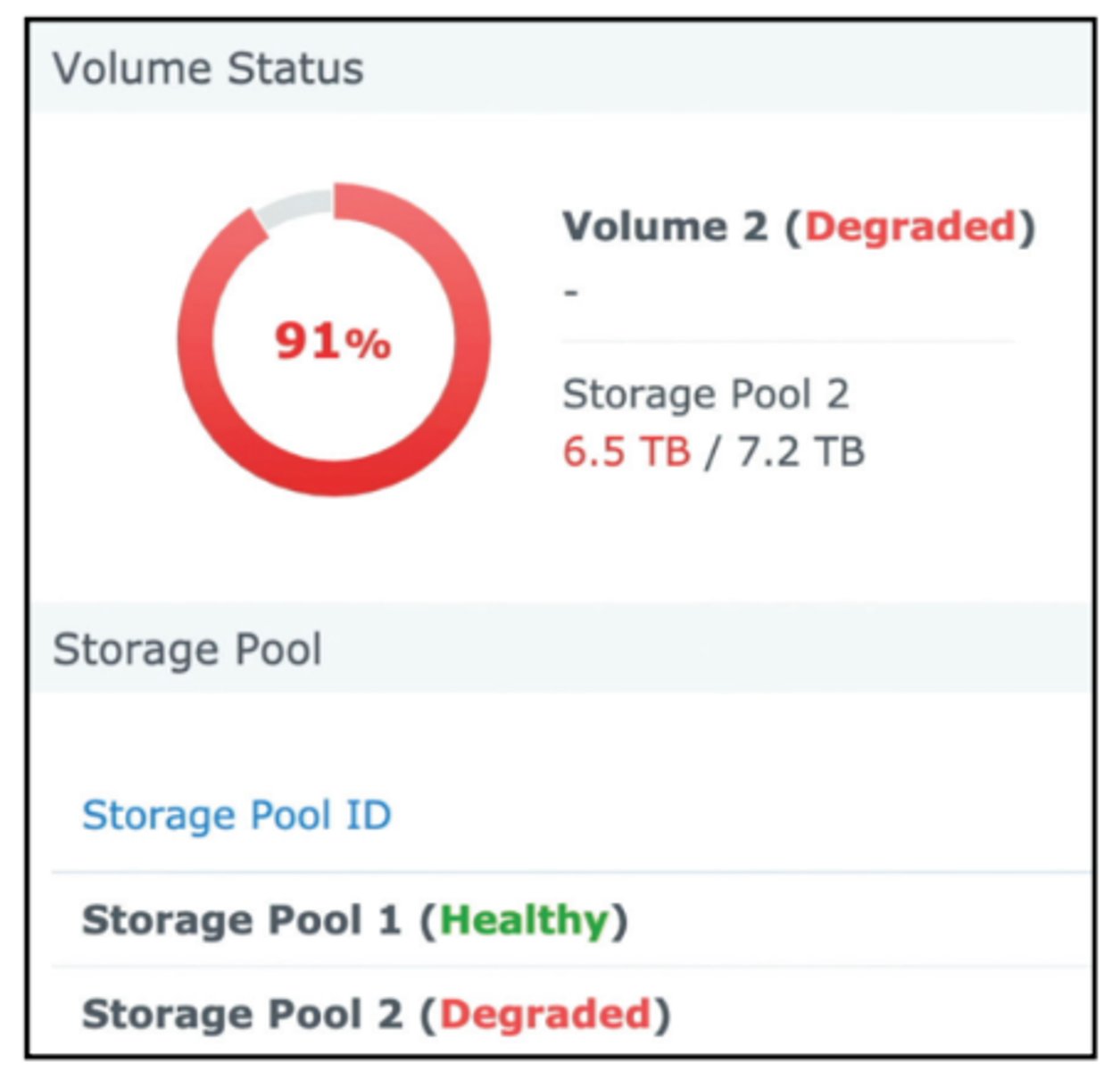
RAID failure
• A drive in a RAID array has failed
- Hardware failure, power issue, communication issue
• Almost always very obvious
- Error messages
- Email notifications
- Audible alarms
• A careful analysis is required
- Many drives, different volumes
• Each RAID is different
- Don't start pulling drives until you check the console!
S.M.A.R.T.
• Self-Monitoring, Analysis, and Reporting Technology
- Use third-party utilities
• Avoid hardware failure - Look for warning signs
• Schedule disk checks - Built-in to most drive arrays
• Warning signs - Replace a drive
S.M.A.R.T. analysis
• Monitoring S.M.A.R.T. metric over time
- Watch for changes or incrementing values
- May be part of a NAS or third-party software
• Automated notifications
- Text message
- Console notifications
• Resolve the issue before it's a problem
- Get a good backup
- Replace the bad drive
Extended read/write times
• A lot happens when reading or writing data
- Memory access, communication across the bus, spinning
drive access, writing or reading the data to the storage
device, etc.
• Delays can occur anywhere along the way
- Need a way to measure storage device access
• Input/output operations per second (IOPS)
- A broad metric of maximum performance
• Useful for comparing storage devices
- Hard drive: 200 IOPS
- SSD: 1,000,000 IOPS
Missing drives in OS
• OS boots normally
- Other drives not shown - Check the BIOS
• Internal drives - Bad drive or disconnected cable
• External drives
- No power to the drive or bad cable connection
• Network shares
- Shared drives can be connected during startup
- Option to reconnect at sign-in
- Connected with login script
RAID recovery
 Note
Note  Flashcards (31)