Contact lens in practice - week 3 mfl trouble shooting
 Call Kai
 Learn
Learn Practice Test
 Spaced Repetition
 Match
Match Flashcards
 Knowt Play
1/22

There's no tags or description
Looks like no tags are added yet.
Name | Mastery | Learn | Test | Matching | Spaced | Call with Kai |
|---|
No analytics yet
Send a link to your students to track their progress
23 Terms
mfl trouble shooting process
1.Optimal sphero-cyl correction
2. Derive BVS ( up to date eye test with right rx) astig > 1.00D Cyl will require toric or GP CLs
3. Place BVS in a trial frame
• push further + power wants to optimise the vision they have
• want to add more plus power in the centre , if maximum plus in distance .allows you to fit lowest add
4.FCC refined near addition
• Select lowest add possible
5.Select a trial
• Allow lens to settle, let patient walk around the practice
• Assess with full illumination
• Use loose lenses or flippers
• Select appropriate reading material, often a cell phone
• 6/HAPPY
Alcon mfl powers and add
+6.00D -10.00D in 0.25 steps
add- low medium and high
alcon determining power
Determine initial CL power using vertex-corrected, most PLUS, spherical equivalent distance Rx,
then add +0.25D for each eye.
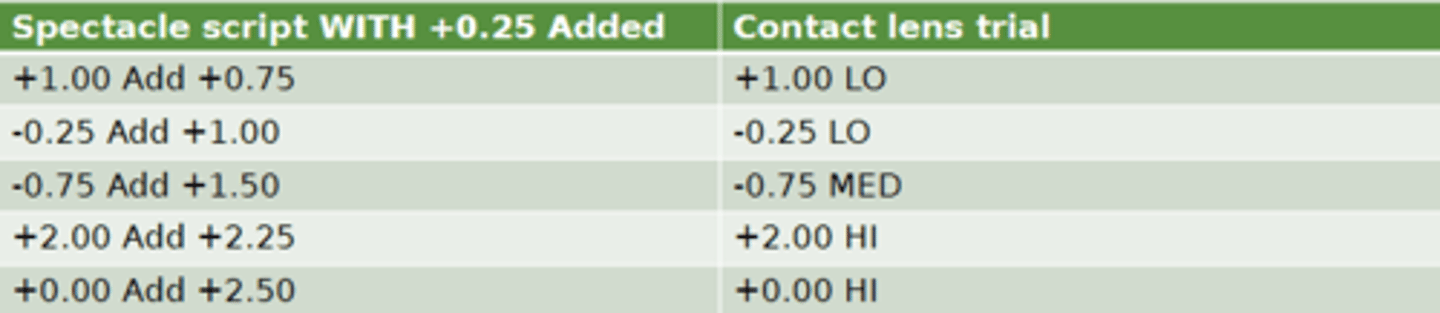
Determine the spectacle ADD, then select the contact lens ADD (LO, MED, HI) using the chart:
alcon add high medium and low
low- up to 1.25
medium- 1.5-2.00
high- 2.25-2.50
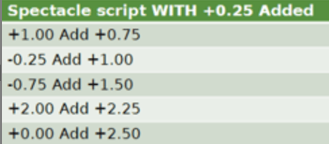
alcon specatcle and add example trials
( +1.00 was 0.75) alcon requires you to add 0.25
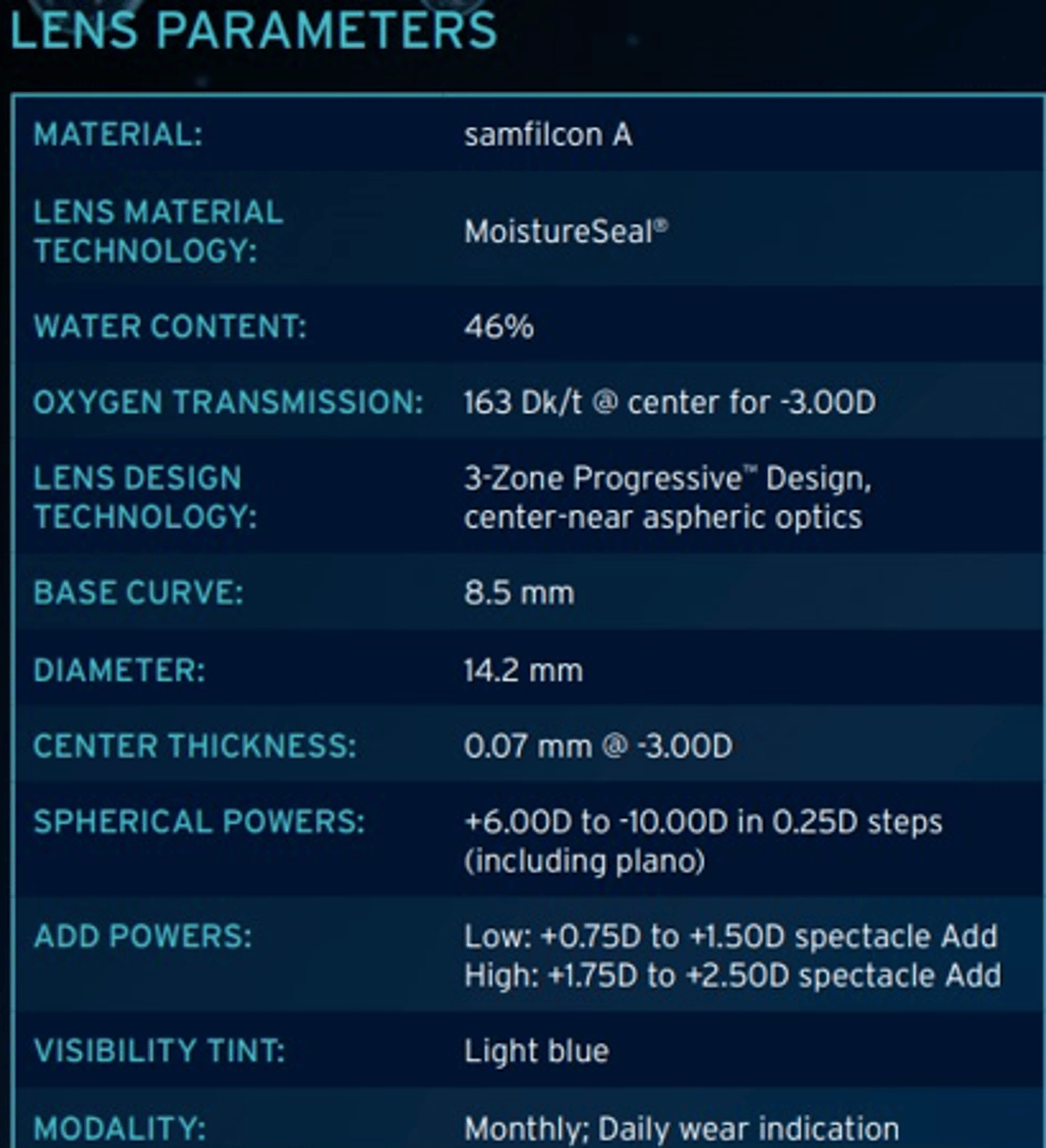
baushe and lomb lens parameters
bause and lomb adds
low - 0.75-1.5
high- 1.75 -2.50
specatcle refraction remains the same
right and left eyes should ahve the same adds ( 2 high adds or 2 low adds)
bauche and lomb troubleshooting near issues
low adds-
up the add in non-dominant eye
-if still issues add +0.25 sph lens in non dominant eye
high adds-
add 0.25 D sphere
bauche and lomb troubleshooting distance issues
low adds-
modified monovision , only sphere and not mfl in dominant eye
high adds-
lower add in the dominant eye
if further issues add -0.25DS in dominant eye hand held assessing BV in normal illumination
coopervision monthly parameters
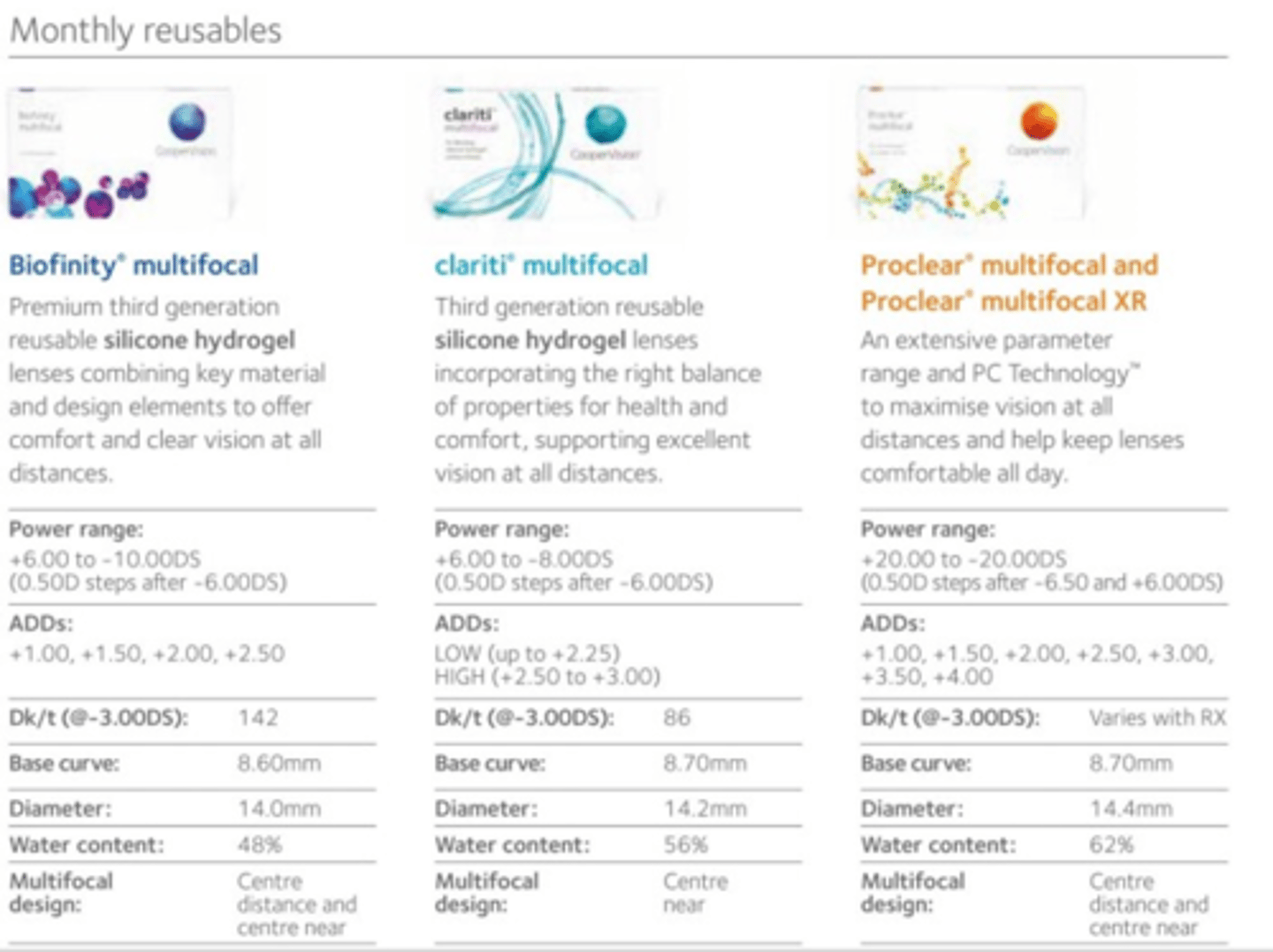
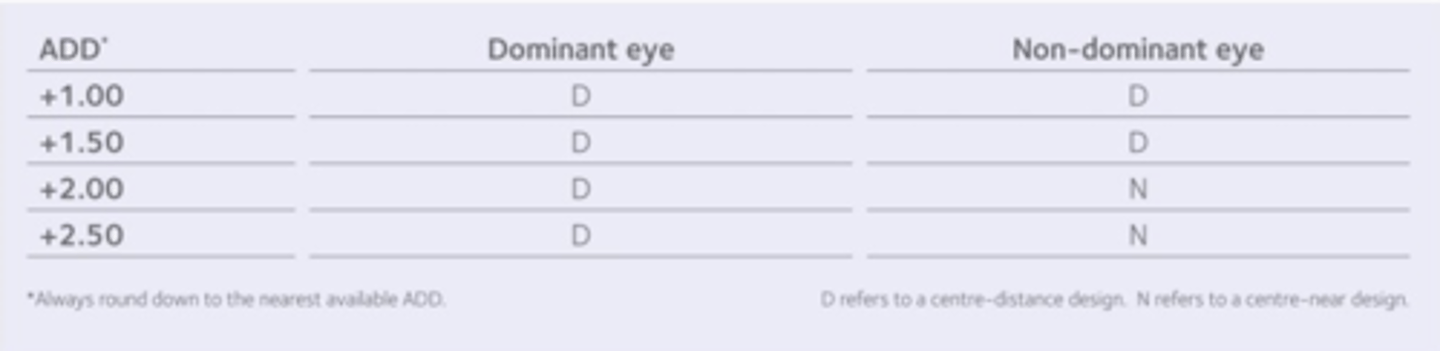
coopervision- biofinity and proclear fitting ADDs
CD design, not found in the other mfl
3 Pieces of info needed to order lens:
◦ Distance power
◦ Add power: this is specific to a power and not low, medium, high
◦ Is the lens CD or CN
Only lens that the ocular dominance is critical before selecting
the trial as you need to determine which eye received the CN in higher
adds
◦ +1.75 can go either way, pt dependent, usually start with lowest add
coopervision- proclear 1 day mfl fitting boost sphere table
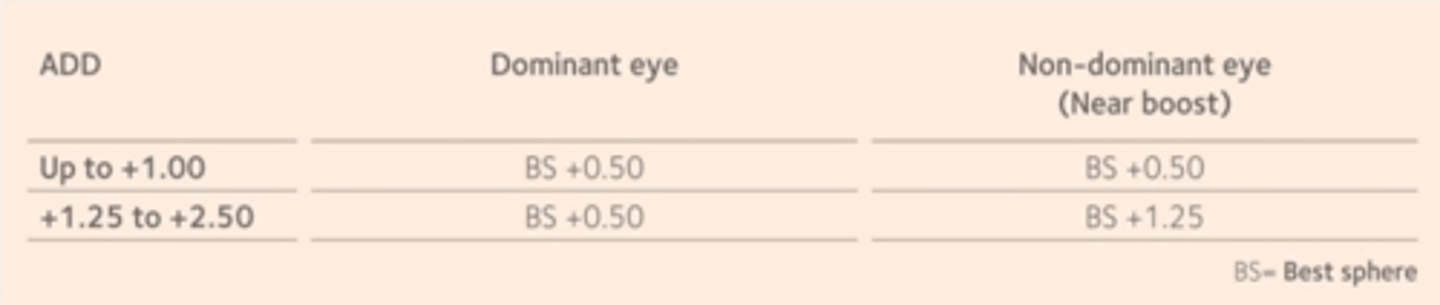
coopervision- proclear 1 day mfl fitting boost sphere
use table to see if add 0.5 or 1.25
add the boost to the best sphere
that gives you trial lens
coopervision clariti multifocal fitting
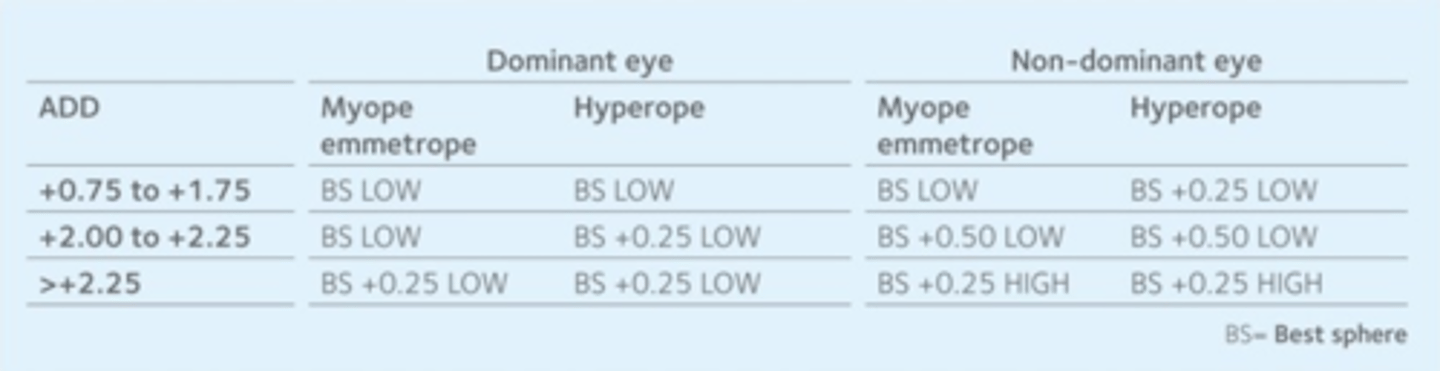
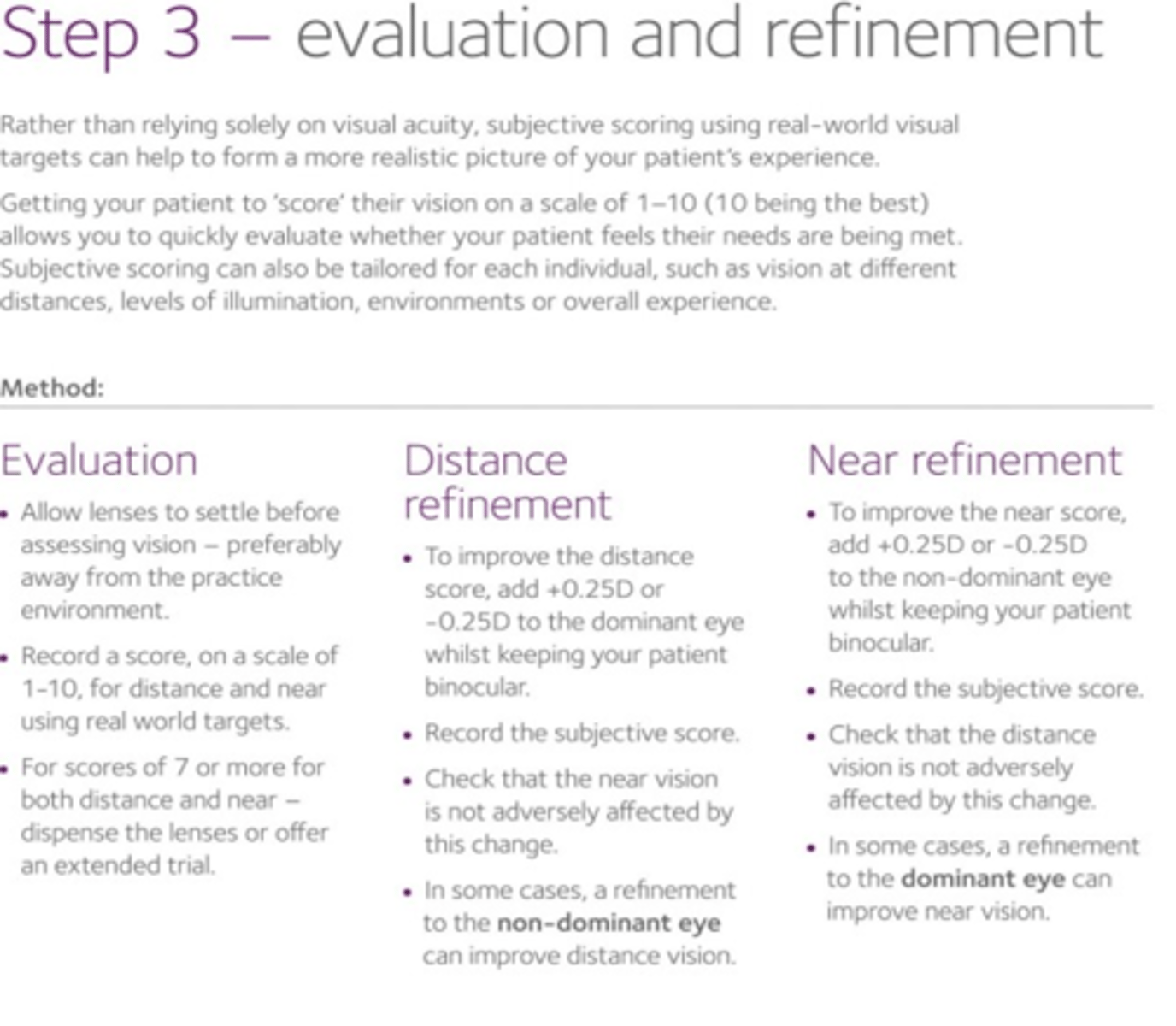
evaluation and refinement
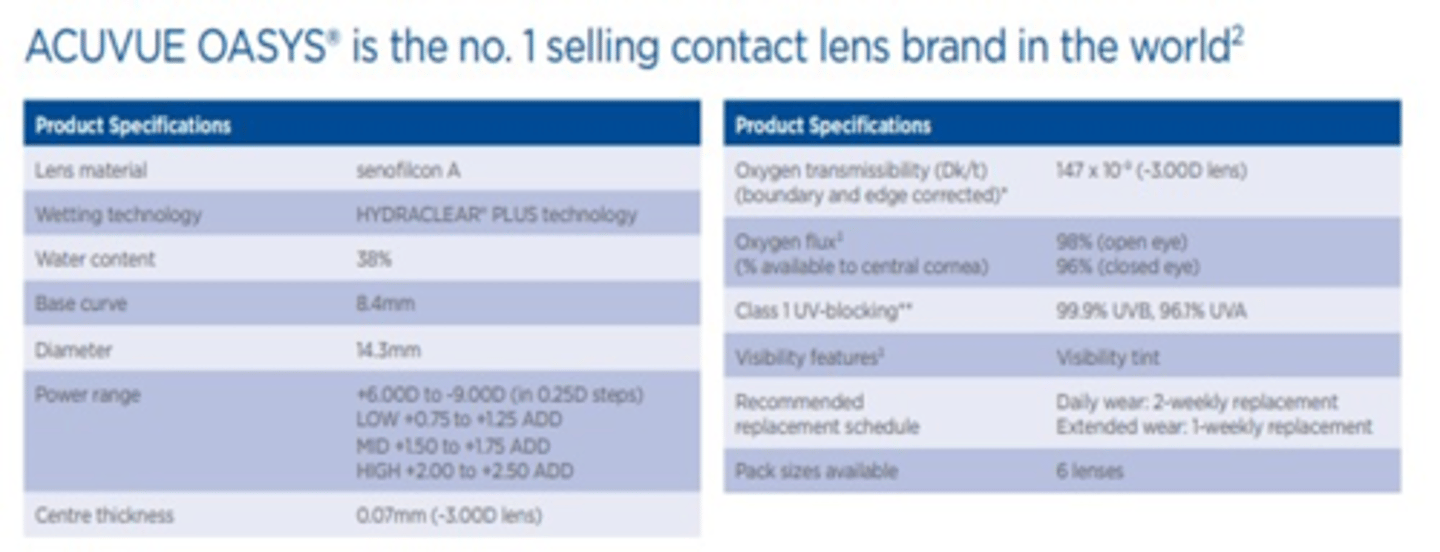
jphnson and johnson powers and add
2x weekly
+6.00 to -9.00
LOW +0.75 to +1.25
MID +1.50 to +1.75
HIGH +2.00 to +2.50
CN
johnson and johnson specifications
BEFORE over refraction
Distance
Check the binocular VA at distance and near first
Then monocular VA distance and near. If not optimal, perform an O/R
BE are open
Use loose lenses
Ret is not feasible as multiple powers are within the pupil zone
over refraction steps
Binocular rather than monocular refraction
• fog with +0.75 DSph or +1.00 DSph do not occlude the eye
• check to ensure VA fogged by 2 lines
Start by adding + power in 0.25 D steps while viewing distance chart
• if +0.25 D accepted, add to trial frame & continue until drop in VA reported
• check ±0.25 D, only add Minus power if more letters become readable
• Repeat for the other eye Finally, repeat the ±0.25 D checking with pt viewing chart binocularly
• present flippers binocularly simultaneously & resist adding more minus power
overefraction add when to do
Small changes in distance powers can have a large influence on near acuity.
Recheck the near VA for every change made to the distance
Remember additions in contact lenses are usually only available in +0.50 steps
overrefraction add
• Measure near acuity under binocular conditions
• If near acuity close to what is expected, don't assess further, proceed to a trial period.
• If near acuity isn't as good as expected, measure acuity monocularly, occluding each eye in turn, to achieve acceptable near acuity (0.25 D steps)
• If near addition still insufficient, refer to manufacturer's troubleshooting guide
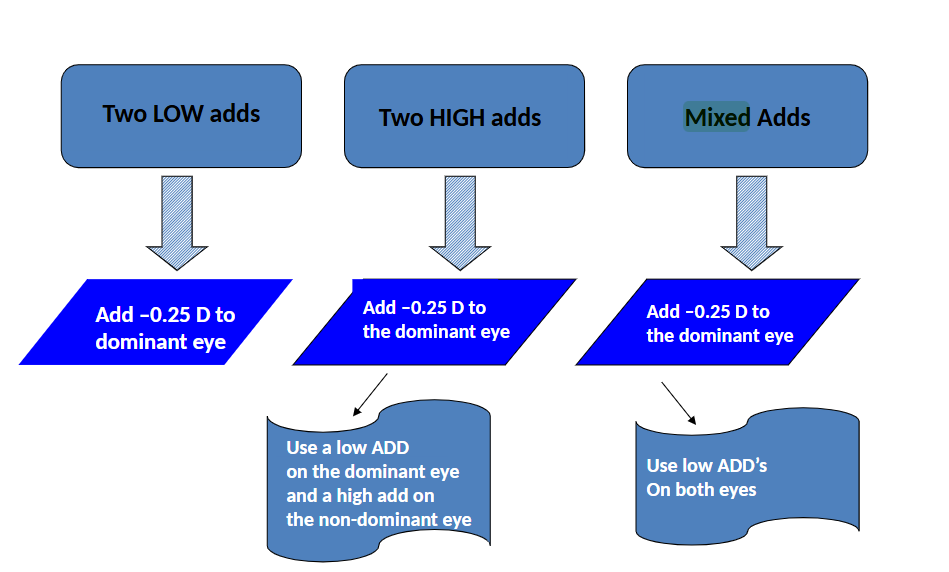
iacle troubleshooting distance
low adds- -0.25 ds dom
high add- -0.25 ds dom
if still issues:
Use a low ADD on the dominant eye
and a high add on the non-dominant eye
mixed adds-
Add –0.25 D to the dominant eye
if troubleshooting
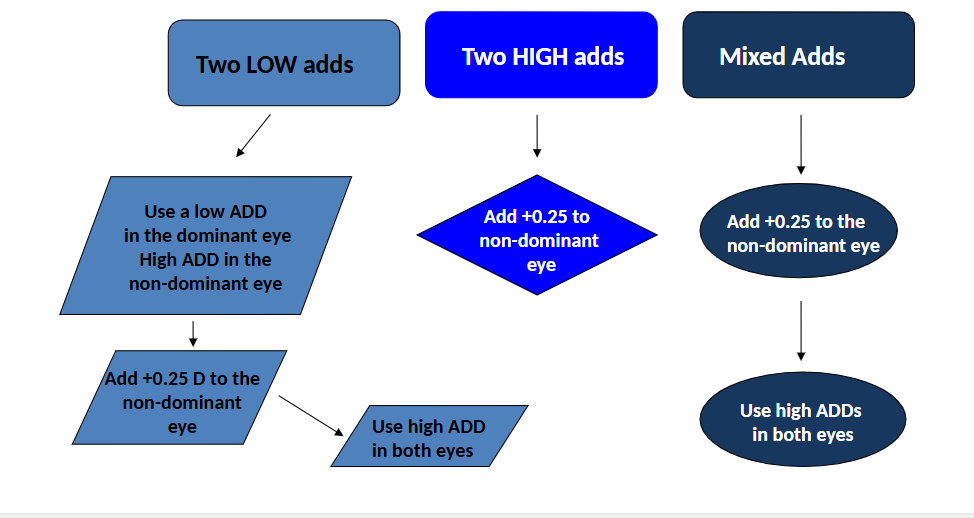
iacle troubleshooting near
2 Low adds: low add = dom high add = non dom
2 high adds : add 0.25 to non dom
Mixed adds: +0.25 non dom , if not high adds both eyes