1.3.3 Networks
0.0(0)
Studied by 0 people Call Kai
 Learn
Learn Practice Test
 Spaced Repetition
 Match
Match Flashcards
 Knowt Play
Card Sorting
1/106

Earn XP
Description and Tags
Last updated 11:28 AM on 10/26/23
Name | Mastery | Learn | Test | Matching | Spaced | Call with Kai |
|---|
No analytics yet
Send a link to your students to track their progress
107 Terms
1
New cards
Computer Newtork
This is created when two or more devices are connected to each other. This allows the devices to share data and resources
2
New cards
Advantages of networks
* Sharing devices such as printers saves money
* Site (software) licences are likely to be cheaper than buying several standalone licences
* Files can easily be shared between users
* Network users can communicate by email and instant messenger
* Security is good - users cannot see other users' files unlike on stand-alone machines
* Data is easy to backup as all the data is stored on the file server
* Site (software) licences are likely to be cheaper than buying several standalone licences
* Files can easily be shared between users
* Network users can communicate by email and instant messenger
* Security is good - users cannot see other users' files unlike on stand-alone machines
* Data is easy to backup as all the data is stored on the file server
3
New cards
Disadvantages of Networks
* Purchasing the network cabling and file servers can be expensive
* Managing a large network is complicated, requires training and a network manager usually needs to be employed
* If the file server breaks down the files on the file server become inaccessible. Email might still work if it is on a separate server.
* Viruses can spread to other computers throughout a computer network.
* There is a danger of hacking, particularly with wide area networks. Security procedures are needed to prevent such abuse, e.g. a firewall.
* Managing a large network is complicated, requires training and a network manager usually needs to be employed
* If the file server breaks down the files on the file server become inaccessible. Email might still work if it is on a separate server.
* Viruses can spread to other computers throughout a computer network.
* There is a danger of hacking, particularly with wide area networks. Security procedures are needed to prevent such abuse, e.g. a firewall.
4
New cards
Name three examples of networks
* PAN
* LAN
* WAN
* LAN
* WAN
5
New cards
Personal Area Network (PAN)
* The smallest type of network
* Consists of connected devices that are close together
* The devices must be able to communicate with one another
* The main technology used is bluetooth
* Consists of connected devices that are close together
* The devices must be able to communicate with one another
* The main technology used is bluetooth
6
New cards
Local Area Network (LAN)
* A group of computers connected over a small geographical area
* Uses connections that are owned by the organisation
* More secure than WAN as it doesn’t use any third party connectivity and so data can only be transferred ‘internally’
* Uses connections that are owned by the organisation
* More secure than WAN as it doesn’t use any third party connectivity and so data can only be transferred ‘internally’
7
New cards
Benefits of LAN
* Resources and files can be shared by users on the LAN (files can be added to shared directories and any user can access the files)
* Users can log on to any workstation on the network (log onto any computer on the LAN)
* Peripherals, such as printers, can be shared by users on the LAN. (less equipment needed, less cost)
* Backups can be made centrally (saves time and ensures all work is backed up)
* Software can be installed centrally (save time and money, network licenses for software are often cheaper than individual licences)
\
* Users can log on to any workstation on the network (log onto any computer on the LAN)
* Peripherals, such as printers, can be shared by users on the LAN. (less equipment needed, less cost)
* Backups can be made centrally (saves time and ensures all work is backed up)
* Software can be installed centrally (save time and money, network licenses for software are often cheaper than individual licences)
\
8
New cards
What is the disadvantage of LAN?
* Network failure (problems with the central file server will mean no one can access their files)
* Cost (Networks are expensive to maintain, organisations have to pay for the network hardware and cables, staff cost money)
* Support staff needed (if off sick network is vulnerable, cost money to train and recruit staff)
* Malware (if malware is introduced it will rapidly spread)
* Cost (Networks are expensive to maintain, organisations have to pay for the network hardware and cables, staff cost money)
* Support staff needed (if off sick network is vulnerable, cost money to train and recruit staff)
* Malware (if malware is introduced it will rapidly spread)
9
New cards
Wide Area Network (WAN)
Covers a large geographical area and connects two or more LANs together, the hardware is owned by a third party
The largest WAN that exists is the internet
The WWW is the collection of web pages that are stored on the internet rather than the infrastructure itself
10
New cards
How can you connect LANs to form WANs?
* Fibre optic cables
* Leased telephone lines
* Satellite communication links
* Microwave links
* These connection are usually owned by a their party making a WAN less secure than a LAN
* Leased telephone lines
* Satellite communication links
* Microwave links
* These connection are usually owned by a their party making a WAN less secure than a LAN
11
New cards
Benefits of a WAN
* They enable LANs to be connected together
* They enable data to be shared between LANs
* They allow workers to collaborate, even if they are geographically far apart
* They enable data to be shared between LANs
* They allow workers to collaborate, even if they are geographically far apart
12
New cards
What are the disadvantages of WAN?
* Cost (organisations have to hire/ lease bandwidth from a telecom operator in order to transmit data)
* Network failure (sometimes things go wrong, but because the organisation doesn’t own this part of the network, they are reliant on their external supplier to fix the issue)
* Security (third party media is being used so data is being transferred is at a higher risk of being intercepted, you are reliant on the security provided by the third party)
\
* Network failure (sometimes things go wrong, but because the organisation doesn’t own this part of the network, they are reliant on their external supplier to fix the issue)
* Security (third party media is being used so data is being transferred is at a higher risk of being intercepted, you are reliant on the security provided by the third party)
\
13
New cards
Network hardware
This includes all computers, peripherals, interface cards and other equipment needed to perform data-processing and communications within the network.
14
New cards
Network Interface Card (NIC)
* Provides the physical connection between the network and teh computer workstation
* Most are internal, and they are included in the purchase of most computers
* They are a major factor in determining the speed and performance of a network
* Most are internal, and they are included in the purchase of most computers
* They are a major factor in determining the speed and performance of a network
15
New cards
Media Access Control Address (MAC)
* Each NIC has its own individual MAC address
* The MAC address enables every device on the network to be uniquely identified
* Because of this, data can be sent to the direct device
* The MAC address enables every device on the network to be uniquely identified
* Because of this, data can be sent to the direct device
16
New cards
Hub
* A small box which links nodes together to form a network.
* Every node on a wired network is connected to the hub by a cable
* They transmit data from one node, to another, in the form of data packets
* When a data packet arrives at the hub, it is transmitted to every other node on the network.
* This is not very secure as every node can view the data, whether it was intended for them, or not.
* If two or more computers on the network transmit data at exactly the same time, a data collision will occur.
* The collided data is marked as unusable and the data has to be transmitted again.
* This can lead to a delay and the network slowing down
* Every node on a wired network is connected to the hub by a cable
* They transmit data from one node, to another, in the form of data packets
* When a data packet arrives at the hub, it is transmitted to every other node on the network.
* This is not very secure as every node can view the data, whether it was intended for them, or not.
* If two or more computers on the network transmit data at exactly the same time, a data collision will occur.
* The collided data is marked as unusable and the data has to be transmitted again.
* This can lead to a delay and the network slowing down
17
New cards
Data packet
A small chunk of data which has a destination address included.
18
New cards
Switch
* For larger networks, where security is important, a switch is a better option than a hub
* It allows computers to be linked together to exchange data (like a hub)
* However, unlike a hub, a switch sends the data packet only to the intended node
* It does this by reading the destination information within the data packet
* The switch knows the location of every node on the network because of their individual MAC addresses.
* Because data is only sent to the intended devices, security is improved.
* There is also a much lower risk of data collisions when switches are used.
* The disadvantage of switches are that they cost more than hubs, so they only tend to be used in high bandwidth, high performance networks
* It allows computers to be linked together to exchange data (like a hub)
* However, unlike a hub, a switch sends the data packet only to the intended node
* It does this by reading the destination information within the data packet
* The switch knows the location of every node on the network because of their individual MAC addresses.
* Because data is only sent to the intended devices, security is improved.
* There is also a much lower risk of data collisions when switches are used.
* The disadvantage of switches are that they cost more than hubs, so they only tend to be used in high bandwidth, high performance networks
19
New cards
Hub Vs Switch
* Connects nodes on the network together (not intelligent) vs An intelligent device which connects nodes on the network together
* Data packets are transmitted to every node on the network vs Data packets are transmitted only to the node for which it is intended
* Higher risk of data collisions, leading to slower network performance vs Less risk of data collisions leading to improved network performance
* Security risks because data is sent to all nodes vs Better security as data is only sent to the correct node
* Less expensive vs More expensive
* Data packets are transmitted to every node on the network vs Data packets are transmitted only to the node for which it is intended
* Higher risk of data collisions, leading to slower network performance vs Less risk of data collisions leading to improved network performance
* Security risks because data is sent to all nodes vs Better security as data is only sent to the correct node
* Less expensive vs More expensive
20
New cards
Router
* A device which transfers data from one network to another i.e. between networks.
* Often used to connect Local Area Networks (LANs) together to form a Wide Area Network (WAN).
* A data packet arrives from the node or hub
* The router reads the data packet’s destination IP address (internet protocol address) – this is not the same as the MAC address.
* The router uses a database to look up where the IP address is located.
* It identifies all of the different routes that could be used to send the data packet through.
* It checks how busy each route is at that very moment.
* It sends the data packet via the fastest route/ path.
* Often used to connect Local Area Networks (LANs) together to form a Wide Area Network (WAN).
* A data packet arrives from the node or hub
* The router reads the data packet’s destination IP address (internet protocol address) – this is not the same as the MAC address.
* The router uses a database to look up where the IP address is located.
* It identifies all of the different routes that could be used to send the data packet through.
* It checks how busy each route is at that very moment.
* It sends the data packet via the fastest route/ path.
21
New cards
Gateway
* Similar to a router, but is a device which connects two dissimilar networks i.e. networks which use different protocols
* It converts the data passing between dissimilar networks so that each side can communicate with each other i.e. the gateway converts data into the correct network protocol
\
* It converts the data passing between dissimilar networks so that each side can communicate with each other i.e. the gateway converts data into the correct network protocol
\
22
New cards
Ethernet Cables
* Used to join individual nodes together to form LANs
* The cables are Ethernet cables, CAT-5 or CAT-6
* Using cables in a network is otherwise known as a ‘wired connection’. Wired networks have a higher bandwidth than wireless networks.
* The cables are Ethernet cables, CAT-5 or CAT-6
* Using cables in a network is otherwise known as a ‘wired connection’. Wired networks have a higher bandwidth than wireless networks.
23
New cards
Fibre Optic Cables
* Can be used to connect WANs together.
* They use light to transmit data.
* They provide extremely high bandwidth
* Are able to cover much longer distances than copper cables without losing their signal.
* They use light to transmit data.
* They provide extremely high bandwidth
* Are able to cover much longer distances than copper cables without losing their signal.
24
New cards
Wi-Fi
* A wireless access point (WAP) is used to connect Wi-Fi devices to a wired network, without the need for physical cables.
* WAPs are commonly found in homes and also in public areas e.g. cafes, airports, offices etc.
* To access a Wi-Fi hotspot you need the name of the network and the correct password.
* On a home network there is a single box that has the role of a WAP, router and a switch.
* On larger networks, a WAP can provide access to the network without the need to be physically connected with cables.
* WAPs are commonly found in homes and also in public areas e.g. cafes, airports, offices etc.
* To access a Wi-Fi hotspot you need the name of the network and the correct password.
* On a home network there is a single box that has the role of a WAP, router and a switch.
* On larger networks, a WAP can provide access to the network without the need to be physically connected with cables.
25
New cards
What are disadvantages of Wi-Fi?
* WAPs are similar to hubs. They do **NOT** read the destination address of the data packet. They simply broadcast the data to every device connected to the Wi-Fi network.
* This is a security issue as anyone connected to the network can access the data.
* The bandwidth on a wireless network is less than a wired or cabled network.
* This is a security issue as anyone connected to the network can access the data.
* The bandwidth on a wireless network is less than a wired or cabled network.
26
New cards
Server
* A powerful, specialist computer which is designed to allow multiple users to access it
* Its primary role is to store and ‘serve’ files/and or resources to users whenever they are requested
* Large networks may have multiple servers which are dedicated to performing a specific task
* Its primary role is to store and ‘serve’ files/and or resources to users whenever they are requested
* Large networks may have multiple servers which are dedicated to performing a specific task
27
New cards
Client-Server network
* A group of computers are connected to a very powerful computer called a server
* A personal has to log in with a username and password, Once a user has logged onto the network, they can request files and resources stored on the server. They can also send work to print, access their email and the internet.
* Because resources are stored on the file server, rather than individual workstations, users can log onto any computer on the network and still access their files.
\
* A personal has to log in with a username and password, Once a user has logged onto the network, they can request files and resources stored on the server. They can also send work to print, access their email and the internet.
* Because resources are stored on the file server, rather than individual workstations, users can log onto any computer on the network and still access their files.
\
28
New cards
Advantages of client server networks
* Centrally administered in one location.
* Backups are central so **all** data is backed up each time and individual computers do not need to backup their own data
* All files can be stored centrally so workers can access files from any computer
* Monitor clients to ensure they are working correctly
* Upgrade software centrally so you do not have to install on each computer individually
* Central security (antivirus/firewall) so you do not need to install protection on all computers
\
* Backups are central so **all** data is backed up each time and individual computers do not need to backup their own data
* All files can be stored centrally so workers can access files from any computer
* Monitor clients to ensure they are working correctly
* Upgrade software centrally so you do not have to install on each computer individually
* Central security (antivirus/firewall) so you do not need to install protection on all computers
\
29
New cards
Client-Server Networks - Disadvantages
* There is a central point of failure. If the central file server is unavailable, no one on the network can access their files. If the print server goes down, no one can print any documents. This can be both frustrating to the users and expensive for the organisation in terms of lost productivity.
* Can be expensive to set up and maintain
* Need specialist knowledge to set up
* Need specialist staff to maintain them e.g. a network manager - this makes them the more expensive of the two architectures
* Can be expensive to set up and maintain
* Need specialist knowledge to set up
* Need specialist staff to maintain them e.g. a network manager - this makes them the more expensive of the two architectures
30
New cards
Peer-to-Peer networks
* Usually found in homes and small offices
* All devices have equal status and there is not a central server. The devices on the network share data
* Files and folders, which are to be shared with other users on the network, are assigned shared permissions. Users can then access those resources directly from the workstation where they are stored.
* If one peer is switched off or unavailable, other users can still use the network. However, they will not be able to access any files from the unavailable peer
* Backups have to made directly from each individual workstation
\
* All devices have equal status and there is not a central server. The devices on the network share data
* Files and folders, which are to be shared with other users on the network, are assigned shared permissions. Users can then access those resources directly from the workstation where they are stored.
* If one peer is switched off or unavailable, other users can still use the network. However, they will not be able to access any files from the unavailable peer
* Backups have to made directly from each individual workstation
\
31
New cards
Switching
This sends data along the appropriate path and prevents all data being sent to all parts of the network.
It is more efficient **not** to send data where it is **not** required
It is more efficient **not** to send data where it is **not** required
32
New cards
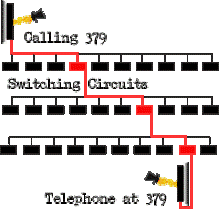
Circuit switching
* A connection is made between two nodes, but can go through any number of nodes
* A path is reserved bewteen the two computers for the duration of the transmission
* No other data can use any part of this circuit until the transmission is complete
* Data is divided into packets of equal size which are sent down the circuit in the correct order
* A path is reserved bewteen the two computers for the duration of the transmission
* No other data can use any part of this circuit until the transmission is complete
* Data is divided into packets of equal size which are sent down the circuit in the correct order
33
New cards
Advantage of circuit switching
* Communication can occur at any time without waiting for a connection delay
* Data arrives in the same order that it is sent
\
* Data arrives in the same order that it is sent
\
34
New cards
Disadvantages of circuit switching
* Bandwidth is wasted if no communication takes place
* Only connects devices with the same transfer rate
* Only connects devices with the same transfer rate
35
New cards
Packet switching
* Data is split into equal sized blocks (called packets)
* Each packet is placed on the network and each may travel by a different route
* At each node on the network, the destination address is read and the best route is found (least busy path)
* Packets need to be reordered at the destination
* Each packet is placed on the network and each may travel by a different route
* At each node on the network, the destination address is read and the best route is found (least busy path)
* Packets need to be reordered at the destination
36
New cards
Packet
A complete self-contained chunk of data that contains enough routing information for it to reach its destination.
Each packet has a header which contains important information such as:
* Source IP address
* Destination IP address
* Packet number – so that the message can be reassembled
Each packet has a header which contains important information such as:
* Source IP address
* Destination IP address
* Packet number – so that the message can be reassembled
37
New cards
Advantages of Packet switching
* It makes very efficient use of the network - no tied-up lines.
* It is easy to avoid broken bits of the network.
* As the numbers of users increases, the network only has to expand slowly compared to circuit switching
* It is easy to avoid broken bits of the network.
* As the numbers of users increases, the network only has to expand slowly compared to circuit switching
38
New cards
Disadvantages of packet switching
* Sometimes packets can get lost and keep bouncing around from router to router, never quite getting to their destination.
* It can take a long time to put the data back together which can be a problem for time-critical information such as an emergency signal. This is known as 'latency'.
* It can take a long time to put the data back together which can be a problem for time-critical information such as an emergency signal. This is known as 'latency'.
39
New cards
Circuit switching vs Packet switching
* Establishes a route for the duration of the message vs had no established route
* Sends all packets on the same route vs packets sent on individual routes
* message can be intercepted if route can be tapped into vs more secure because packets all use different routes
* packets remain in correct order (but must be reassembled) vs packets arrive out of order (and must be reordered)
* ties up large areas of network for duration of message vs maximises use of network
* Sends all packets on the same route vs packets sent on individual routes
* message can be intercepted if route can be tapped into vs more secure because packets all use different routes
* packets remain in correct order (but must be reassembled) vs packets arrive out of order (and must be reordered)
* ties up large areas of network for duration of message vs maximises use of network
40
New cards
Why is packet switching preffered?
* Transmission is safer from interception because it is impossible to intercept all the packets as they use different routes
* Very efficient use of network as each channel only used for short time which does not tie up a part of the network
* If there is an error then only a small, identifiable, part of the data is affected, which can be re transmitted easily
* Very efficient use of network as each channel only used for short time which does not tie up a part of the network
* If there is an error then only a small, identifiable, part of the data is affected, which can be re transmitted easily
41
New cards
Routing
* Transmissions will be routed through a number of nodes before a connection is established.
* A router will be used to send the data to the appropriate node.
* It finds the fastest path from sender to receiver by forwarding the data to the next ‘best’ node in the route
* This can be achieved by using a routing table and routing algorithm
* A router will be used to send the data to the appropriate node.
* It finds the fastest path from sender to receiver by forwarding the data to the next ‘best’ node in the route
* This can be achieved by using a routing table and routing algorithm
42
New cards
Routing tables
* Stores information about different paths along which data is sent
* The tables are constructed in the memory of network components such as routers and gateways
* Each router knows the information about it’s closest neighbours, but by sharing this information it is possible to determine the fastest route
* The tables are constructed in the memory of network components such as routers and gateways
* Each router knows the information about it’s closest neighbours, but by sharing this information it is possible to determine the fastest route
43
New cards
Client server vs peer-to-peer
* Central file folder vs no central file server
* Things stored on server vs installed on each workstation
* Good security, users have to log in to gain access to resources vs less secure Users can be assigned groups which controls what they have access to vs of users know the passwords for the file/folder they can access everything
* Backups can be made centrally vs backups have to be made for each workstation
* Software can be installed centrally vs software has to be installed on each workstation
* If the central file server goes down, users cannot access any files vs if one workstation goes down, users can still use the network and access files from the other workstations
* More expensive to set up vs less expensive to set up
* Usually need specialist staff to keep the network and server running vs don’t need specialist staff
* Things stored on server vs installed on each workstation
* Good security, users have to log in to gain access to resources vs less secure Users can be assigned groups which controls what they have access to vs of users know the passwords for the file/folder they can access everything
* Backups can be made centrally vs backups have to be made for each workstation
* Software can be installed centrally vs software has to be installed on each workstation
* If the central file server goes down, users cannot access any files vs if one workstation goes down, users can still use the network and access files from the other workstations
* More expensive to set up vs less expensive to set up
* Usually need specialist staff to keep the network and server running vs don’t need specialist staff
44
New cards
Protocol
A set of rules to govern communication and/or data transmission between devices. This ensures that they interpret data in the same way. TCP/IP is the network protocol used on the internet, any equipment connecting to the internet will need to support the TCP/IP protocol
45
New cards
What are the components of a protocal?
* How to set up a connection
* How to end a connection
* How to start a message
* How to end a message
* How to deal with corrupted data
* How to format the data being sent
* How to end a connection
* How to start a message
* How to end a message
* How to deal with corrupted data
* How to format the data being sent
46
New cards
What rules need to be agreed before communication can take place (protocols)
* Error correction (odd/even parity, checksum, echoing)
* Connection Media (cable, including type of cable/wireless)
* Mode of transmission (simplex/duplex/serial/parallel)
* Coding used for characters (ASCII/UNICODE)
* Bit rate used for communication
* Connection Media (cable, including type of cable/wireless)
* Mode of transmission (simplex/duplex/serial/parallel)
* Coding used for characters (ASCII/UNICODE)
* Bit rate used for communication
47
New cards
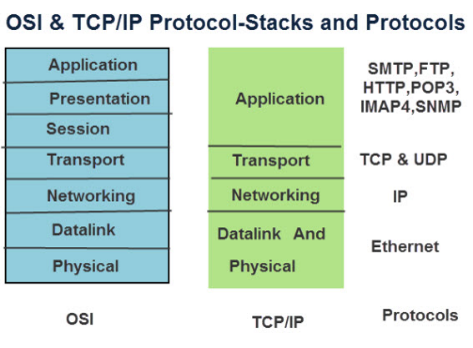
Layer
* a group of protocols organised by function.
* There are various models, which organise the protocols differently, but what all models have in common is that they arrange their layers so that protocols from one layer **only interact with the layers directly above and below them**.
* There are various models, which organise the protocols differently, but what all models have in common is that they arrange their layers so that protocols from one layer **only interact with the layers directly above and below them**.
48
New cards
What are the benefits of using a layer model?
* We use layers because it can be difficult to conceptualise a complex system such as network communication. By dividing the system of protocols into layers we can focus on a particular area individually without worrying too much about the other layers.
* The layer model is useful for manufacturers so that when they are developing new hardware they can ensure that it is compatible with existing protocols. When a new protocol is developed, it can be slotted into the appropriate layer.
* We can map how protocols relate and interact with one another.
* We can recognise roughly what a protocol does by knowing which layer it resides within.
* A newly developed protocol is simply slotted in to the appropriate layer
* The layer model is useful for manufacturers so that when they are developing new hardware they can ensure that it is compatible with existing protocols. When a new protocol is developed, it can be slotted into the appropriate layer.
* We can map how protocols relate and interact with one another.
* We can recognise roughly what a protocol does by knowing which layer it resides within.
* A newly developed protocol is simply slotted in to the appropriate layer
49
New cards
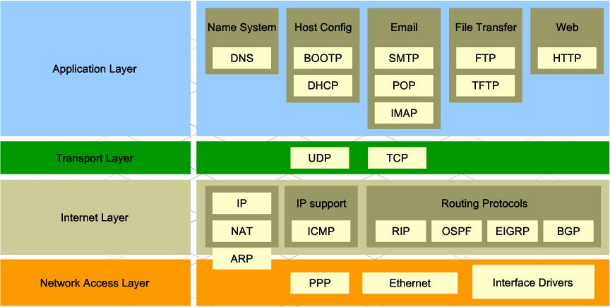
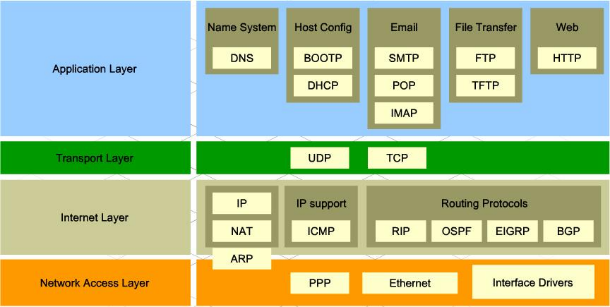
TCP/IP layers
* Stands for “Transmission Control Protocol / Internet Protocol”
* A protocol is a set of rules for communicating across a network
* Each protocol belongs to a different layer
* Starting at the Application layer, data is further encapsulated as it is pased to the next layer
* A protocol is a set of rules for communicating across a network
* Each protocol belongs to a different layer
* Starting at the Application layer, data is further encapsulated as it is pased to the next layer
50
New cards
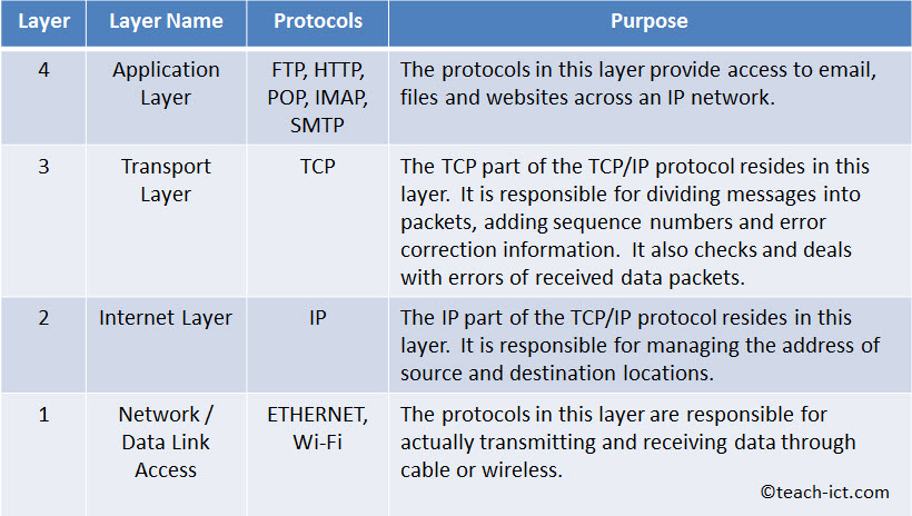
Four Layer model
* Each layer is given a number and a name.
* A layer has a particular function to perform.
* **The protocols in each layer can only communicate with those in the layers directly above and below it**.
* A layer has a particular function to perform.
* **The protocols in each layer can only communicate with those in the layers directly above and below it**.
51
New cards
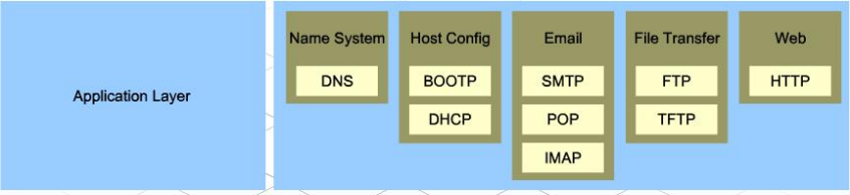
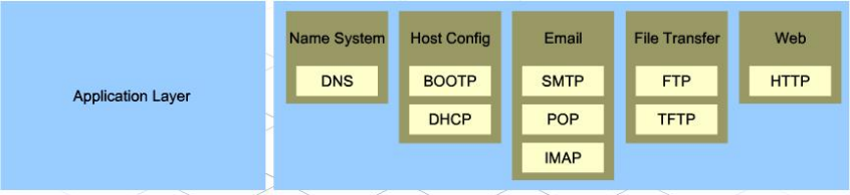
Application Layer
* The topmost layer in the Four Layer Model.
* Holds protocols that deal with how data moves in and out of applications, including web browsers (the HTTP protocol), email applications (POP and SMTP) and servers (FTP)
* The protocols in this layer only interact with the protocols in the Transport layer
* Holds protocols that deal with how data moves in and out of applications, including web browsers (the HTTP protocol), email applications (POP and SMTP) and servers (FTP)
* The protocols in this layer only interact with the protocols in the Transport layer
52
New cards

Transport Layer
* Contains protocols that govern the transport of data packets across a network.
* It interacts with the application layer above it and the Internet layer below it.
* It provides services for both 'connection mode' and 'connectionless' transmissions.
* ***Connection mode***\*\*:\*\* Like a telephone call, there is a 'session' set up between devices that is maintained until the connection is dropped. TCP uses connection mode.
* ***Connectionless mode***\*\*: (\*\****e.g.*** \*\*UDP)\*\*The transmitter just sends its packets without setting up a session
* Establishes and closes the connection
* It interacts with the application layer above it and the Internet layer below it.
* It provides services for both 'connection mode' and 'connectionless' transmissions.
* ***Connection mode***\*\*:\*\* Like a telephone call, there is a 'session' set up between devices that is maintained until the connection is dropped. TCP uses connection mode.
* ***Connectionless mode***\*\*: (\*\****e.g.*** \*\*UDP)\*\*The transmitter just sends its packets without setting up a session
* Establishes and closes the connection

53
New cards

Internet layer
* Contains protocols that govern how messages are prepared before they are sent, and how they are unpackaged after they are received e.g. Internet Protocol
* **Outgoing messages:** The Internet or IP layer is responsible for preparing messages for transmission e.g. adding the remote address
* **Incoming messages:** It checks the destination address of each packet and if it matches its own address it passes the packet up to the transport layer.
* If it does not match, then the packet is ignored.and any additional parts such as routing information to the message.
* The internet layer is the only layer that talks to the data link layer below it.
* **Outgoing messages:** The Internet or IP layer is responsible for preparing messages for transmission e.g. adding the remote address
* **Incoming messages:** It checks the destination address of each packet and if it matches its own address it passes the packet up to the transport layer.
* If it does not match, then the packet is ignored.and any additional parts such as routing information to the message.
* The internet layer is the only layer that talks to the data link layer below it.

54
New cards

Data Link/Network Layer
* Responsible for handling the physical connection to the network e.g. Ethernet is partly a physical protocol that defines the hardware performance expected and software in terms of the data format for a network.
* Regulates the flow of data off and on the physical medium
* Deals with transmission errors
* Provides an interface between the physical medium and layer 2 (Internet layer)
* Regulates the flow of data off and on the physical medium
* Deals with transmission errors
* Provides an interface between the physical medium and layer 2 (Internet layer)

55
New cards
Physical protocols
* Has a hardware aspect to it, so it defines to some extent what kind of hardware is needed to support it
* e.g Ethernet protocol includes definitions of the performance required of cables, plugs and sockets.
* e.g Ethernet protocol includes definitions of the performance required of cables, plugs and sockets.
56
New cards
Logical protocols
* A set of rules that define the communication of data focusing on how data is represented e.g. character set/baud rate
* Not concerned with anything physical - they define the structure, format and control of data entities.
\
* Not concerned with anything physical - they define the structure, format and control of data entities.
\
57
New cards
What is the advantage of separating logical and physical protocols?
The physical layer can be changed without rewriting the software working on the logical layers.
In the four layer model, logical protocols exist in Layers 2, 3, and 4 whilst physical protocols exist in Layer 1.
In the four layer model, logical protocols exist in Layers 2, 3, and 4 whilst physical protocols exist in Layer 1.
58
New cards
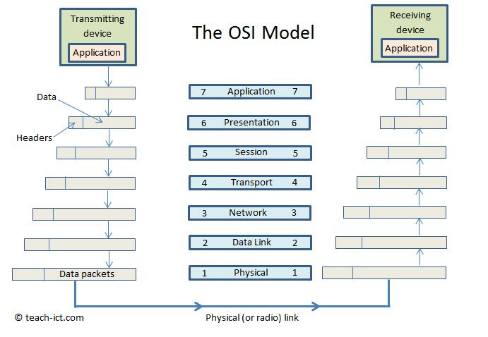
OSI model
* Has 7 layers, developed by ISO as a standard
* Split into two 'legs', one for transmitting data and the other for receiving data.
* Data flows down the transmit leg, travels across the physical medium (or radio link) and back up the receiving leg.
* On transmit, each level adds extra information in the header.
* Then on receive, each level removes their part of the header.
* Split into two 'legs', one for transmitting data and the other for receiving data.
* Data flows down the transmit leg, travels across the physical medium (or radio link) and back up the receiving leg.
* On transmit, each level adds extra information in the header.
* Then on receive, each level removes their part of the header.
59
New cards
What are the layer of the OSI model?
* 7. Application (human interface)
* 6. Presentation (encryption)
* 5. Session (Hi/Bye)
* 4. Transport (Break into packets)
* 3. Network (route)
* 2. Data Link (error detection/correction)
* 1. Physical (physical transmission using the required medium)
* 6. Presentation (encryption)
* 5. Session (Hi/Bye)
* 4. Transport (Break into packets)
* 3. Network (route)
* 2. Data Link (error detection/correction)
* 1. Physical (physical transmission using the required medium)
60
New cards
What are the layers in the four layer model?
* 4. Application layer
* 3. Transport layer
* 2. Internet layer
* 1. Network / Data link access
* 3. Transport layer
* 2. Internet layer
* 1. Network / Data link access
61
New cards
IP address
* A numerical address made of 4 numbers each between 0 and 255 that uniquely identifies a device on a network.
* It is a logical identifier (i.e. can change on a physical device).
* Alocated by software rather than hardware (unlike MAC addresses) and is used for routing data across WANs.
* Contains the address of the network
* The address of the node within the network (also known as the subnet address) which allows the data to reach the specific device
* It is a logical identifier (i.e. can change on a physical device).
* Alocated by software rather than hardware (unlike MAC addresses) and is used for routing data across WANs.
* Contains the address of the network
* The address of the node within the network (also known as the subnet address) which allows the data to reach the specific device
62
New cards
IPv4
* The most common type of IP address, which allows each device to have a unique 32-bit binary number address
* To improve readability this is broken in to 8 digit chunks which are then converted in to denary numbers.
* There are 4 billion possible unique IPv4 addresses.
* To improve readability this is broken in to 8 digit chunks which are then converted in to denary numbers.
* There are 4 billion possible unique IPv4 addresses.
63
New cards
IPv6
* Uses 128 bits rather than 32 bits to generate addresses which gives 2^6128 unique addresses
* They are arranged as groups of hexadecimal numbers
* They are arranged as groups of hexadecimal numbers
64
New cards
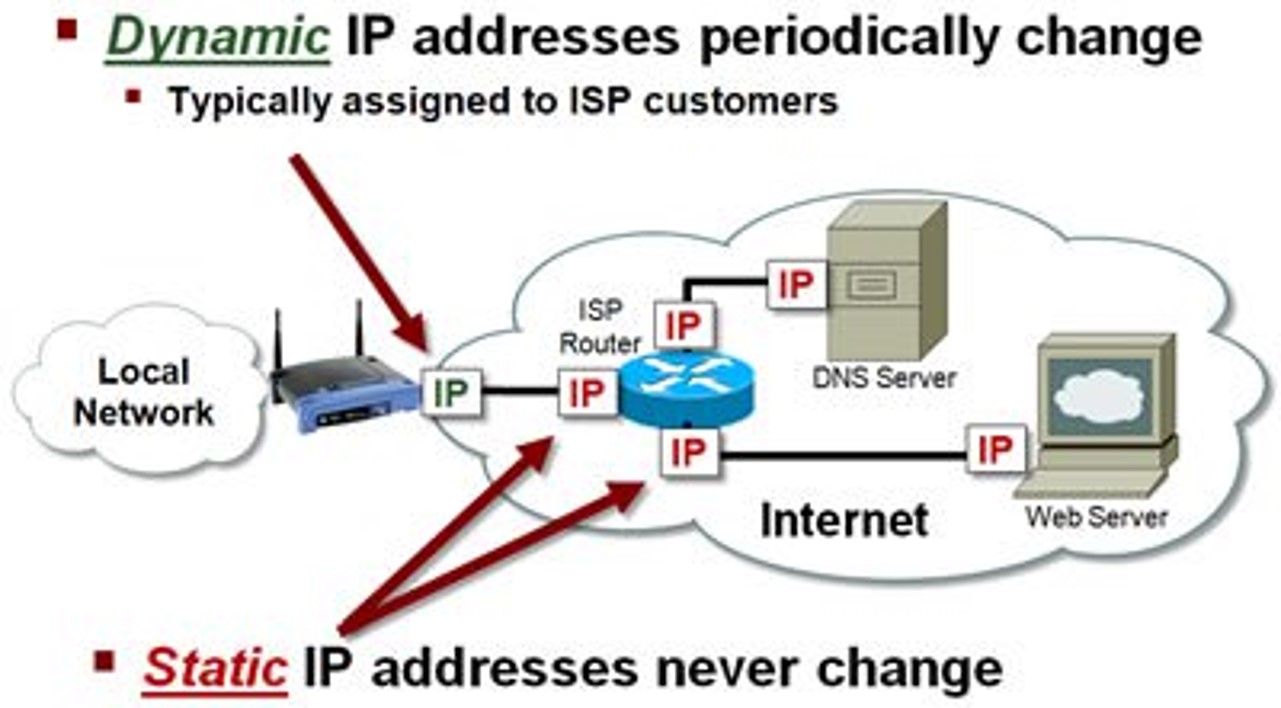
Static IP Adresses
* If you own a public web site, the IP address of the server should never change.
* If it changed, people would find it very difficult to reconnect to the website.
* This is called a **static** IP address
* If it changed, people would find it very difficult to reconnect to the website.
* This is called a **static** IP address
65
New cards
Dynamic IP addresses
* When a device is temporarily connected to the Internet a **dynamic** IP address is allocated to it.
* When the device disconnects, the IP address becomes available for another device to use.
* The dynamic address is generally allocated to a home router by the ISP when it connects.
* Each time you connect a different address may be allocated.
* When the device disconnects, the IP address becomes available for another device to use.
* The dynamic address is generally allocated to a home router by the ISP when it connects.
* Each time you connect a different address may be allocated.
66
New cards
Internet Service Provider (ISP)
* A company that provides access to the Internet , usually for a monthly fee
* They will usually issue you with a router, a username and password, and an email address
* Many also offer extra services such as landlines and digital television services.
* They will usually issue you with a router, a username and password, and an email address
* Many also offer extra services such as landlines and digital television services.
67
New cards
Uniform Resource Locator (URL)
* e.g http://www.ocr.org.uk
* http tells the computer to use the hypertext transfer protocol which puts the packets together to be used in a web browser
* www tells us that this is a webpage and that it is located on the world wide web
* •ocr.org.uk is the domain name
* http tells the computer to use the hypertext transfer protocol which puts the packets together to be used in a web browser
* www tells us that this is a webpage and that it is located on the world wide web
* •ocr.org.uk is the domain name
68
New cards
Domain Name Server (DNS)
* DNS has a database of all domain names and their associated IP addresses which is constantly updated by other DNS servers
* DNS Lookup Process:
* User types in domain name and this is sent to DNS servers.
* DNS servers map this domain to an IP address
* If the DNS server can’t resolve, it passes the request (recursively) to another DNS server.
* DNS Server sends the IP address to browser so it can retrieve the website from server on which it is hosted.
Without a DNS server the user would have to type in IP addresses to access a webpage.
* DNS Lookup Process:
* User types in domain name and this is sent to DNS servers.
* DNS servers map this domain to an IP address
* If the DNS server can’t resolve, it passes the request (recursively) to another DNS server.
* DNS Server sends the IP address to browser so it can retrieve the website from server on which it is hosted.
Without a DNS server the user would have to type in IP addresses to access a webpage.
69
New cards
What are the advantages of a DNS server?
* People do not need to remember IP addresses
* As long as you are connected to a DNS server you can have access to all the addresses
* Easily upgradable (eg IPv4 toIPv6) without all web addresses needing to be the same
* As long as you are connected to a DNS server you can have access to all the addresses
* Easily upgradable (eg IPv4 toIPv6) without all web addresses needing to be the same
70
New cards
Websites
* A collection of web pages
* Stored on a web server and arranged in a folder structure similar to *My Documents*.
* The home page for a website is usually *Index.html*.
* For a website to work and be available to the outside world it needs to be **hosted** on a web server.
* Stored on a web server and arranged in a folder structure similar to *My Documents*.
* The home page for a website is usually *Index.html*.
* For a website to work and be available to the outside world it needs to be **hosted** on a web server.
71
New cards
Hosting
* For a website to work and be available to the outside world it needs to be **hosted** on a web server.
* The domain name needs to be registered with a domain registrar who would ensure that the domain name is unique and not already registered
* Each registered domain name would have an associated IP address – this would then be registered on a DNS.
* The domain name needs to be registered with a domain registrar who would ensure that the domain name is unique and not already registered
* Each registered domain name would have an associated IP address – this would then be registered on a DNS.
72
New cards
Local hosting
* Your own PC is set up as a web server which other devices can connect to. The server is given a default address *localhost*.
* Local hosting saves the costs of the monthly fees paid to external hosts.
* However, you need a large bandwidth, your device would need to be continually on and connected and in this scenario it can be difficult to protect your device from malware etc.
* Dynamic IP addresses can also cause problems.
* Local hosting saves the costs of the monthly fees paid to external hosts.
* However, you need a large bandwidth, your device would need to be continually on and connected and in this scenario it can be difficult to protect your device from malware etc.
* Dynamic IP addresses can also cause problems.
73
New cards
External Hosting
* An external company is paid to *host* the website on one of their web servers.
* You can pay for a **shared server** where many other web sites will also be hosted on the same server. This could affect the performance, but the cost is usually lower.
* A **dedicated server** is often used by companies who have a lot of website traffic as the server resources do not have to be shared.
* You can pay for a **shared server** where many other web sites will also be hosted on the same server. This could affect the performance, but the cost is usually lower.
* A **dedicated server** is often used by companies who have a lot of website traffic as the server resources do not have to be shared.
74
New cards
The Cloud
* A network of servers
* Some serves will run applications
* Some servers will store data
* Some serves will run applications
* Some servers will store data
75
New cards
What is the advantage of the cloud?
* You can increase storage e.g. from mobile phones
* Access files from anywhere in the world
* Collaborate with others from around the world
* Ensure that your data is backed up
* Access files from anywhere in the world
* Collaborate with others from around the world
* Ensure that your data is backed up
76
New cards
Virtual Private Network (VPN)
* A secure tunnel between two or more devices
* Used to protect private web traffic from snooping, interference, and censorship.
* When your device connects to the internet, it connects to your ISP, which then connects your device to any website. Your internet traffic crosses through your ISP’s servers and can be inspected by your ISP.
* If your device uses a VPN, it connects to the VPN provider server via an encrypted connection (VPN tunnel). All internet traffic is encrypted and secured from eavesdropping.
\
* Used to protect private web traffic from snooping, interference, and censorship.
* When your device connects to the internet, it connects to your ISP, which then connects your device to any website. Your internet traffic crosses through your ISP’s servers and can be inspected by your ISP.
* If your device uses a VPN, it connects to the VPN provider server via an encrypted connection (VPN tunnel). All internet traffic is encrypted and secured from eavesdropping.
\
77
New cards
Virtual Network
A smaller part of a LAN or WAN in which only specific machines can see each other
78
New cards
Who can cause damage to networks?
* Legitimate users who might accidentally delete or overwrite the data, or make it public without meaning to
* Unauthorised users who could deliberately harm the system, they may steal, corrupt or delete data
* Unauthorised users who could deliberately harm the system, they may steal, corrupt or delete data
79
New cards
Hacking
The act of intruding into a system by unauthorised means - this is in breach of the UK Computer Misuse Act
80
New cards
Malware
Malware (malicious software) is any software intentionally designed to cause damage to a system
81
New cards
Viruses
A computer virus is a piece of code that, like a biological virus, makes copies of itself by attaching itself to another program.
The virus can waste the host's resources, and sometimes destroy or change files.
The virus can waste the host's resources, and sometimes destroy or change files.
82
New cards
Spyware
* Software designed to collect information about what you are doing on the computer.
* For example a 'key logger' is a type of spyware that monitors and stores a record of every keystroke made on the computer.
* This data may then be sent to a remote server without your knowledge
* For example a 'key logger' is a type of spyware that monitors and stores a record of every keystroke made on the computer.
* This data may then be sent to a remote server without your knowledge
83
New cards
Phishing
* A form of Internet fraud where criminals aim to steal valuable information such as credit cards, social security numbers, user IDs and passwords for bank accounts.
* They set up a fake website which looks identical to a legitimate company such as a bank or insurance company. They then try to trick people into logging into the site and giving their account details and security codes.
* They set up a fake website which looks identical to a legitimate company such as a bank or insurance company. They then try to trick people into logging into the site and giving their account details and security codes.
84
New cards
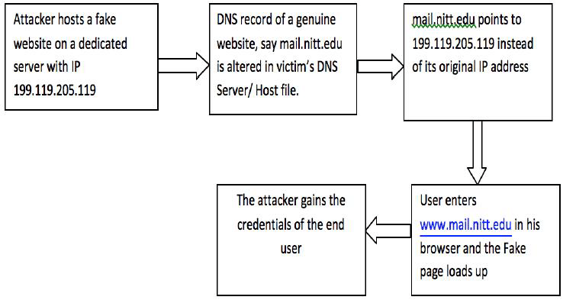
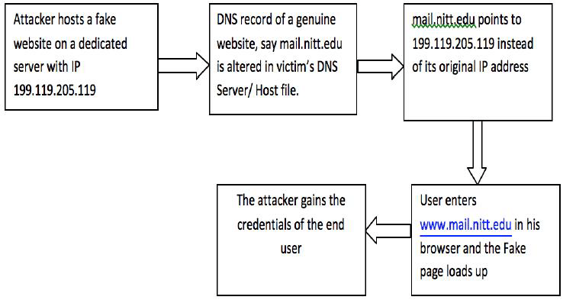
Pharming
* A scamming practice in which malicious code is installed on a personal computer or server, misdirecting users to fraudulent Web sites without their knowledge or consent
* Has been called "phishing without a lure."
* Has been called "phishing without a lure."
85
New cards
Brute Force Attacks
* The most basic way to guess a password is called the ‘brute force’ approach.
* This means a computer program is written to go through every possible combination of letters, number and symbols until the right one is found.
* If you used a single character as your password it would take a maximum of 26 attempts to guess it (using the English alphabet)
* In general, the more characters there are within a password, the stronger it is.
* They rely on being able to automatically try different combinations of characters so one way to prevent this is by limiting the number of attempts a user can have at logging on.
* Additional authentication such as CAPTCHA could also be used. \n \n
* This means a computer program is written to go through every possible combination of letters, number and symbols until the right one is found.
* If you used a single character as your password it would take a maximum of 26 attempts to guess it (using the English alphabet)
* In general, the more characters there are within a password, the stronger it is.
* They rely on being able to automatically try different combinations of characters so one way to prevent this is by limiting the number of attempts a user can have at logging on.
* Additional authentication such as CAPTCHA could also be used. \n \n
86
New cards
Brute Force - Dictionary Attack
* Longer passwords take longer to guess, but if they are “real” words, they are susceptible to a **dictionary attack**.
* Instead of using random combinations of characters, all of the words in the most popular languages are used before brute force is tried.
* The entire dictionary only contains a few hundred thousand words and so this attack can work much more quickly.
* Instead of using random combinations of characters, all of the words in the most popular languages are used before brute force is tried.
* The entire dictionary only contains a few hundred thousand words and so this attack can work much more quickly.
87
New cards
Denial of Service Attack (DoS)
* A method of preventing legitimate users from connecting to a server.
* Typically uses one computer and one internet connection to flood a targeted system with millions of fake requests.
* There are so many requests that all the server’s memory and CPU cycles are used up and the server then crashes.
* Typically uses one computer and one internet connection to flood a targeted system with millions of fake requests.
* There are so many requests that all the server’s memory and CPU cycles are used up and the server then crashes.
88
New cards
Distributed Denial of Server (DDoS)
* Often involves hundreds or thousands of computers and internet connections to flood a targeted system.
* Are often global and distributed by **botnets** (several connected computers coordinated together to perform a task).
* Each machine sends a stream of fake requests.
* If an attack is suspected, the requests (or IP addresses) can be blocked, but this is difficult if 100s of random computers are being used.
* Are often global and distributed by **botnets** (several connected computers coordinated together to perform a task).
* Each machine sends a stream of fake requests.
* If an attack is suspected, the requests (or IP addresses) can be blocked, but this is difficult if 100s of random computers are being used.
89
New cards
Data Interception and Theft
* Sometimes called the “man-in-the-middle” attack or “passive attack”, as it doesn’t damage data.
* It is a form of eavesdropping as users are unaware that their data is being extracted.
* All data moving across the internet or IP network does so in the form of data packets which could be intercepted.
* Ordinarily, data packets are passed back and forth from server and client via a series of routers.
* With a man-in-the-middle attack, an extra server or router is placed in to the network so that packets are copied before being sent on.
* data within each packet can then be extracted.
* An effective defence against this is to encrypt each packet which would give the eavesdropper the additional job of decrypting the information.
* It is a form of eavesdropping as users are unaware that their data is being extracted.
* All data moving across the internet or IP network does so in the form of data packets which could be intercepted.
* Ordinarily, data packets are passed back and forth from server and client via a series of routers.
* With a man-in-the-middle attack, an extra server or router is placed in to the network so that packets are copied before being sent on.
* data within each packet can then be extracted.
* An effective defence against this is to encrypt each packet which would give the eavesdropper the additional job of decrypting the information.
90
New cards
SQL injection
* A form of database attack with the aim of getting access to confidential information such as other peoples’ login details
* When the user inputs their username and password, the system sends an “SQL request” to the database
* This is a command to look for a record in the database which matches the username and password combination.
* The attacker tries to insert extra SQL commands in to the input boxes, hoping that these commands will be carried out by the server.
* The usual way to protect against this is for the server to validate the information properly before the SQL request is formed.
* For example, the username and password may only be a certain length and not allow spaces.
* When the user inputs their username and password, the system sends an “SQL request” to the database
* This is a command to look for a record in the database which matches the username and password combination.
* The attacker tries to insert extra SQL commands in to the input boxes, hoping that these commands will be carried out by the server.
* The usual way to protect against this is for the server to validate the information properly before the SQL request is formed.
* For example, the username and password may only be a certain length and not allow spaces.
91
New cards
Protecting Data
* Passwords needed to access the data restricts access to data to authorised personnel
* UserIDs to identify the person who has accessed the data allows for auditing whoever has accessed the material
* Firewall can limit access to particular external machines
* Proxy server hardware that accesses data for external users without allowing access to the database
* Protocol based protection like SSL allows for an encrypted link between devices to stop third party access
* Encryption of the data so that, even if accessed, data cannot be read
* Backup data provides a copy of the data in case of corruption
* UserIDs to identify the person who has accessed the data allows for auditing whoever has accessed the material
* Firewall can limit access to particular external machines
* Proxy server hardware that accesses data for external users without allowing access to the database
* Protocol based protection like SSL allows for an encrypted link between devices to stop third party access
* Encryption of the data so that, even if accessed, data cannot be read
* Backup data provides a copy of the data in case of corruption
92
New cards
Authentification
* To tell legitimate users from hackers and other illegitimate users, network security uses an authentication process.
* Users are asked to identify themselves before they are given access to the network.
* Users are asked to identify themselves before they are given access to the network.
93
New cards
Username and Password (authentification)
* This is the most common form of authentication.
* The user types in their username and password which are then checked against a database of legitimate users
* However, the person may not keep their login details confidential
* The password might be so weak that an unauthorised user can guess it or can use brute force software on it
* The user types in their username and password which are then checked against a database of legitimate users
* However, the person may not keep their login details confidential
* The password might be so weak that an unauthorised user can guess it or can use brute force software on it
94
New cards
Two factor authentication
The user types in their username and password and the security service then sends a text message containing a code to their mobile phone which they also have to enter. This could also be generated by a hardware device.
95
New cards
Biometric Authentication
This means that some physical aspect of the person is used to confirm their identity e.g. finger print
96
New cards
User Access Rights
* Will be set up by the network manager who will define groups (e.g. students, teachers, senior management, accounting staff) and allocate permissions to them.
* Common access rights are: Read, write and execute
* These rights can have further restrictions put on them, such as:
* Access restricted to specific workstations
* Access restricted to certain times of day
* Access to files/folder sending notifications to managers \n
* Common access rights are: Read, write and execute
* These rights can have further restrictions put on them, such as:
* Access restricted to specific workstations
* Access restricted to certain times of day
* Access to files/folder sending notifications to managers \n
97
New cards
Educating Users
* To keep a network secure, users should know how to use it properly
* Legitimate users are the most likely people to cause accidental damage and it is good practice to get them to sign a **Code of Conduct** agreement
* This sets out the expected standard of behaviour and ensures that users cannot claim that they have not been shown how to do things correctly
* They can include things such as:
* Not giving out passwords
* Not leaving the computer logged in when away from the desk
* Making sure that the screen can’t be overlooked if dealing with confidential information
* Encrypting files that do have to be taken out of the office
* Legitimate users are the most likely people to cause accidental damage and it is good practice to get them to sign a **Code of Conduct** agreement
* This sets out the expected standard of behaviour and ensures that users cannot claim that they have not been shown how to do things correctly
* They can include things such as:
* Not giving out passwords
* Not leaving the computer logged in when away from the desk
* Making sure that the screen can’t be overlooked if dealing with confidential information
* Encrypting files that do have to be taken out of the office
98
New cards
Anti-Virus Software
* This software is designed to detect viruses using a database of “signatures”.
* It also looks out for typical virus behaviour such as the modification of system files.
* Anti-virus software needs to be updated regularly as new viruses are being written all the time.
* It is also very important that virus scans are made regularly.
* It also looks out for typical virus behaviour such as the modification of system files.
* Anti-virus software needs to be updated regularly as new viruses are being written all the time.
* It is also very important that virus scans are made regularly.
99
New cards
Anti-malware
* Not all malware are viruses
* They could be key-stroke loggers or other forms of spyware.
* It could also be secretly taking control of your computer.
* This type of attack can be detected and removed by anti-malware software.
* They could be key-stroke loggers or other forms of spyware.
* It could also be secretly taking control of your computer.
* This type of attack can be detected and removed by anti-malware software.
100
New cards
Encryption
* The process of scrambling a message or data so that if it is intercepted it is unreadable to anyone who doesn’t have the key
* The method used to encrypt the data is called a **cipher**
* A **key** is a very large number, usually up to 256 bits which is applied to the data using a mathematical procedure.
* The Advanced Encryption Standard(AES) currently uses a 256 bit key.
* The method used to encrypt the data is called a **cipher**
* A **key** is a very large number, usually up to 256 bits which is applied to the data using a mathematical procedure.
* The Advanced Encryption Standard(AES) currently uses a 256 bit key.

