1.5 Systems Analysis and Approaches
 Studied by 1 person
 Call Kai
 Learn
Learn Practice Test
 Spaced Repetition
 Match
Match Flashcards
 Knowt Play
1/127

There's no tags or description
Looks like no tags are added yet.
Name | Mastery | Learn | Test | Matching | Spaced | Call with Kai |
|---|
No analytics yet
Send a link to your students to track their progress
128 Terms
What are the types of Approches?
Waterfall
Agile
Which are performed after a feasibilty study
What are methodologies?
Approaches/frameworks that manage + organise how stages of systems development life cycle (SDLC) are completed
What do methodologies do?
Outline
-Guidelines - for what to do at each stage
-Techniques - for managing time, communication, and quality
-Tools and principles for designing and testing systems
What is systems analysis?
Researching and understanding an existing system in order to create an improved version
What is the SDLC
Systmes development life cycle - a strucutred processes to develop a system
Waterfall approach
Sequential process (Linear)
The waterfall approach has separate stages arranged linearly, with each stage cascading down to the next. step-by-step
It is impossible to begin one stage of development until the previous stage has been completed. Must be completed
Each stage ends with a deliverable or handover document produced to inform the next stage. They ensure no requirements are missed as they are detailed and accurate documents of what has been done
They are succeeded by:
Analysis -> Design -> Implementation -> Testing -> Evaluation
Waterfall Advanatages
- Clear Design Upfront: The waterfall approach encourages thorough analysis and design upfront, providing a clear blueprint for development phases.
- Less Communication Overhead: With the client's input primarily required during the analysis and design stages, there may be less need for ongoing communication between the client and developer. So less time
- Regular deadlines give dicipline to a larger project that could be lacking and help client confidence (time efficient too)
-Large client involvement
-High level of documentation gives better understanding of project, builds client confidence
-Easier to project manage
-Good for small projects where requirements are unlikley to change
Waterfall Disadvantages
- Lack of flexibility (Rigidity): Once the analysis and design stages are complete, developers cannot go back to make any changes. Difficult to accomodate changes during final feedback (high cost modifications)
- No risk analysis: If the analysis or design stages are inaccurate or incorrect, the project may fail due to the waterfall inability to accommodate changes or revisions. As problems during design will need the project to revert to analysis/
- Limited user involvement: Client input is primarily sought during the analysis and design stages, potentially resulting in limited opportunities for client feedback or adjustments during development. COuld lead to failure with innacuracies or lack of feedback. Could result in dissatisfaction as hard to understand requirements
-Risk of project failure
-Long Delivery Time
What are the stages of waterfall analysis?
Requirements analysis - gathers info and documents for exact requirements - outputs a detailed requirements sheet
Design - devlopers plan how the system will work designing data structures, algorithms, and user interfaces - outputs documents, designs, psuedocode, diagrams
Implementation - design is turned into code
Testing - system is tested to check it meets requirements and for errors to fix
Deployment - a finished system is delivered and installed for users (training and documentationr required_
Maintenance - after release bug fixes, improvements, and updates are done through patches and updates
What types of systems would use waterfall
Banking or finance (accuracy and security are important)
Air traffic control or medical equipment software
Government systems with long approval and detail specs
These are systems where requirements are unlikley to change and time is important
Agile techniques
The Agile approach is an incremental approach to development in which developers start off with a simple project design instead of a huge document and work on small modules at a time in an iterative way. Adding complexity with iterations
This approach does not fully dismiss the waterfall approach but rather aims to improve the process of system analysis.
It is more flexible as sections are done in small parts (sprints) with user feedback after each sprint for continuous feedback and improvement
It requires strong communication with the client
What are the stages of aglie?
Identify - The team will work with the stakeholders to define a goal. Then a list of requiremnets will be made
Plan Sprint - The project is divided into sprints that are timed periods (e.g. 2 weeks). Before each sprint the team will decide what requriement to work on and define a sprint goal
Sprint - The team will collaborate to complete tasks for the goal. The team will be communcating on what they did each day
Sprint review - the team will present a new iteration to the stakeholders where feedback is given
Retrospective - the team reflects on the sprint and feedback
Plan next sprin
Agile Advantages
- Agile follows an iterative approach where development starts with a simple project design and requirements. (more flexible allows programmers to efficiently respond to changes in requirements)
- Analysis and design rely on each other, allowing for continuous revision and improvement.
- Changes can be made after each phase of development, and analysis can be revisited and designs changed as needed. So informed decisions
- Agile emphasizes regular and strong communication between the client and developer throughout all stages of development. Clients are involved in the process, and their feedback is valued and done after each sprint, leading to greater satisfaction and better alignment with client needs. (Clients are invovled at every stage of the project)
- Agile values collaboration and people over processes and tools. Teams are trusted to organize and manage themselves, with a focus on regular meetings and interactions rather than heavy documentation.
- Agile projects are able to quickly adapt to changes, such as competitor releases or new operating systems becoming available.
Agile Disadvanatges
- Agile programmers favor producing software over detailed documentation, which may lead to gaps in documentation and potential difficulties in maintaining and understanding the codebase.
- The focus on responding to change may sometimes result in challenges in adhering strictly to requirements as set out in the analysis stage. This can lead to scope creep and difficulties in managing project scope.
-Complex for large projects due to lack of coordination
-Requires and exerienced team
-Difficult to estimate timelines
-Dependant on client availabilty
Where would i use an agile approach
Mobile apps
Game development
THings that need to adapt to new technologies and user requirements
What are the variations in agile methodology?//
Extreme
Scrum
What is the purpose of software projects?
To meet the need sof users to achieve a set of criteria
What is problem definition phases?
Identification of stakeholders
Requirements sepcification
What is identficiation of stakeholders?
Identify all individuals or groups with a vested interest in the system (users, programmers, systems analysits etc from both the client and developmment company).
Passive - not involved in production of the system (user)
Active - will have a part to play in the system being built (programmer)
What is the requirements specification?
A recorded document that contains everything that is to be included in the new system and is used as a basis for designs.
All requiremetns are mesurable (can see if it has been met clearly)
Types of requirements:
Interface requirements (Where user inetracts must conform to rules such as accesible)
Functional requirements (What the system should do)
Perfromance requirements (Like response times and loading times)
What will requirements specification show?
Purpose of system
Scope of system (boundaries like not including things)
Function of system
User characteristics (who will use it)
Contraints (budget etc)
Feasibility Study
The feasibility study identifies whether a project can be done given the problem defined:
• Technical feasibility: can the project be completed with existing technology, skills, and resources available
• Economic feasibility: Assessing if the solution is affordable based on costs and benefits (With software licences, hardware, wages, and overall running costs) and if it is worth it
• Time feasibility: can the project be completed within an acceptable time frame (Late projects will cost money and create a bad reputation)
• Legal feasibility: Some systems may not comply with some countries laws as laws can damage the development company and cost money (like could breach copyright)
• Political feasibility: some systems may have politically sensitive aspects (animal testing) that can show they development company is a bad light
• Operational - Does the system align with organisations operational processes (can it be easily integrated with current operations)
• Organisational - does the system align with the organisations strategic goals (like growth) so will stakeholders support this
Why is a feasibility study important?
Because it may deem that the project will bring negative attention/not generate profit. Or a project may not be able to be completed within budget and the time frame. And therefore not worth it. So they must be within budget, time, and value constraints
What is investigation and analysis
Finding out exactly what a system will include to allow production of a requirement specification
Method for a investigation and analysis
• Observing or using the current system in operation (shadowing and employee orr customer)
• Document inspection - including business documents related to the system, user manuals, and maintenance records. (Allow to see data that is used and stored, give better undertaing of data flows and processes)
• Questionnaire - handed out to the current employees to find out their views of the current system. (Open (text) and closed (limited options) questions )
• Interview with the manager/customers/employees to find out how the current system works and identify the main problems.
Pros and cons of Observations?
+Pick up parts of the system not immediately obvious
+Confirm information gathered
-People may act differently when watched
-More subtle parts of system may not be used during observation period
Pros and cons of questionaires?
+Given to large numbers of people (large number of different opions)
+Closed questions (like number 1 to 5) can easily be analysed
+Open questions give reasoning
-Hard to created/design
-Easy to sit on fence with closed Qs (picking 3)
-Open questions are time consuming to analyse
Pros and cons of document collecting?
+Documents are reliable and show most of data stored
+Document trails help give better idea of data flows and processes
-Document may give a limited view of system and are not annotated
-Documents may contain sensitive information
Pros and cons of interview?
+Large amounts of information gathered
+Interviewer and query responses unlike questionaire
+Detailed responses
-Time consuming so limited number of interviewees
-May not be fully truthful in response or may be misinterpreted
Outcomes of a Feasibility Study
• A description of the problem, detailed system requirements or requirements specification is produced
• Different possible methods of solutions are identified
• Storage requirements are considered
• Hardware requirements will be considered
• Legal, social and environmental issues are considered
• Whether the project is technically feasible - does the technology / skills exist to complete the project
• Whether the project can be completed in the time scale - acceptable or projected time scale for the solution produced
• Whether the project can be completed on budget - the projected cost of the solution
• Involves a cost-benefit analysis to decide if a solution is affordable
• Training requirements for staff on the new system are considered
System Analysis
is a process overseeing the creation, development, testing, and implementation of new systems. Methods for analysis are observations, questionnaires, document collecting, and interviews. At the end of analysis the requirements specification is produced (a document with the exact requirements of the new system.)
Analysing an existing system structure can be completed using flow chart software or UML (Unified Modeling Language) software. .
System Design
• Design of Data structures / data types / variables and constants
• Design and write Algorithms / pseudo code / flowcharts of processes
• Sub routines
• Design HCI / inputs / outputs
• Produce Data Flow Diagrams
• Recommend suitable hardware
System Testing
Quality assurance / control software to test that a solution meets internal and external standards.
Test environments can be used to test the portability of software on different platforms, such as Linux and Windows.
A version control repository can be used to report, monitor, and analyse code errors, defects, and bugs.
Built-in automated testing features within IDEs, such as breakpoints, to generate unit and system performance testing.
Investigation
Use of questionnaires, etc. to find out how the current system works and identify input, processes, outputs, and the main problems with the current system.
Data flow diagrams of how the current system works.
Set the objectives- reduce the problem to its essential features.
Break the problem down- top down approach.
What documentation would you create in the investigation?
Documentation that would be produced during Investigation (Feasibility Study and Analysis) and Design stages:
• Detailed system requirements and objectives of the new system
• Data flow diagrams
•Algorithms
•HCI designs
• Data structure designs
• User instructions - how to get started, how to use the system, error messages and how to recover from them, how to back-up and recover data, how to navigate the UI.
Implementation
Implementation involves installing and testing the overall system. Staff Training is probably needed.
• Type and level of language and IDE
• Translation method
• Writing / debugging of code (developmental testing).
Maintenance
All systems need to be maintained - making sure the system continues to function correctly, modifications made, errors corrected, documentation kept up to date.
• Maintenance manuals, - inc. pseudocode and annotated listings, algorithms designs, variable lists, data dictionary, class diagrams, list of subroutines, hardware and software requirements, design documents and ERD
Decomposition (Analysis)
Decomposition is the process of breaking a complex problem (requirements / application) down into smaller subproblems.
These subproblems are easier to manage throughout the entire software development process.
If a complex problem is not decomposed, the project will be too difficult to solve and become unmanageable.
If a problem is too complex, it is prone to errors, bugs, and going over its initial costs.
An example of a subproblem for the given requirements would be 'To design and develop the back-end database'.
Abstraction (Analysis)
Abstraction is the process of ignoring or removing specific information and data to allow developers to focus on the important details of a specific subproblem. (Seeing the biggert picture)
Abstraction allows developers to think about a problem in more general terms.
This allows developers to identify common solutions to the general problem they have abstracted.
If a problem is not abstracted, the solution can become unnecessarily complicated.
An example of abstraction for the given requirements would be identifying 'to allow customers to find products.'' as a common searching problem.
What are data flow diagrams
Diagrams used to show an abstract view of how data flows in a system. There are multiple levels going further into detail with each diagram.
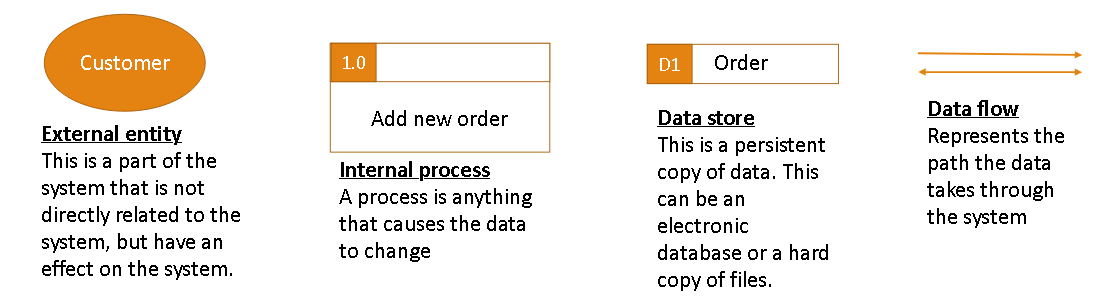
What does each level on a data flow diagram show?
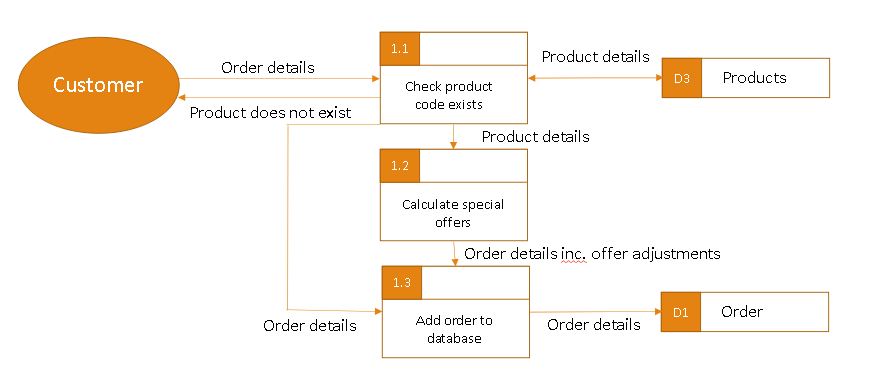
Level 0 (Context diagram): Show a view of the whole system and the data that flows between the system and externatilites (e.g. showing data entered by customers and staff and what is output to each group)
Level 1: Breaks down a system into major sub processes showing how data moves between them
Level 2: Each internal process is broken up into smaller steps (data flows from level 1 should exist at level 2)(shown in image)
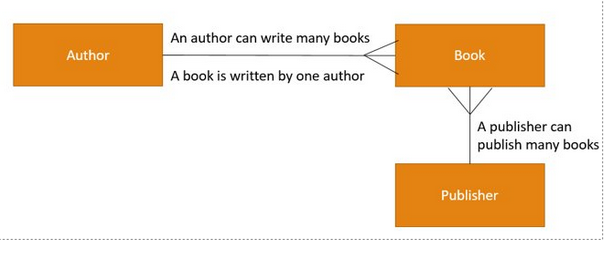
What is an ERD
Entity realtionship diagmram contains entities (represneting tables in a database) showing the relationships between tables (like one-to-one, one-to-many etc)
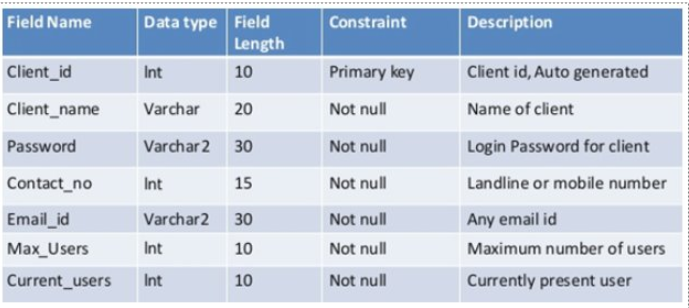
What is a data dictionary?
A table/document that describes the structure of a database. It contains information(metadata) abouve the data (like table names, data types, etc)
What is a Use Case Diagram?
A UML (Unified Modelling Language) diagram that shows how different users interact with the system. It is simple but shows how the system is used
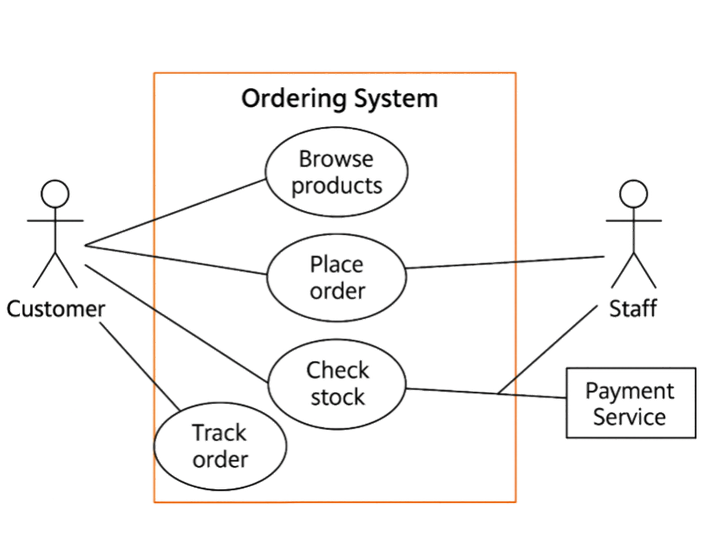
What are key parts of a Use Case Diagram?
Actors - Users/External systems that interact with the system
Use Cases - Actions or goals the actor want to achieve (ovals)
System boundary - A rectangle containing all use cases
Relationships - lines showing connections
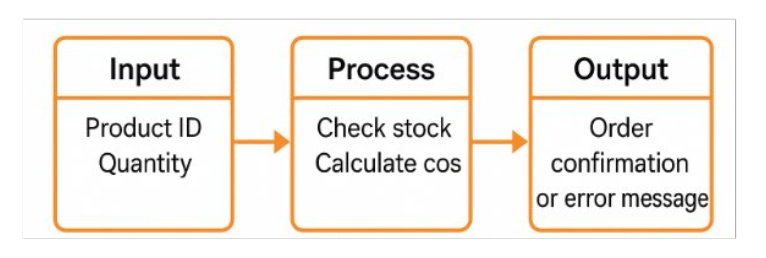
What is an IPO
Input-Process-Output diagram is a simple method of showing how a system works by breaking it up into 3 main pars (Input, Process, and Output) to provide a simple overview
What does the design stage involve?
Taking the requirement specification and deciding:
-What the system will look like (Interface design where decisions are made on how data will be input into the system and displayed aswell)
-How it will store data (DFD/ERD used for this)
-How it will process data
Including designs for Inputs, Outputs (Like error messages, validation for outputs, and how outputs are presented), Data structures
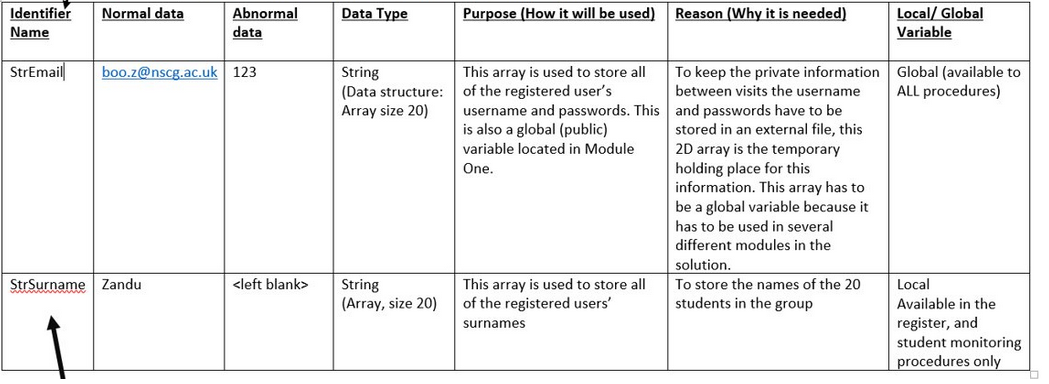
How are inputs designed in the design stage?
This shows all required data for inputs
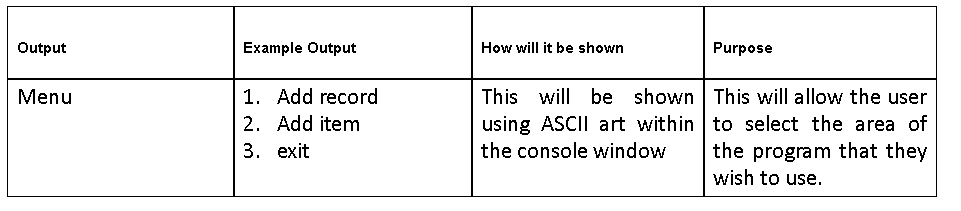
How are outputs designed?
A table that shows example outputs, error messages, etc
What are ways of representing algorithms?
Flow charts and Psuedocode
What would a design document generally include?
Algorithm designs (Pseudocode/Flowcharts)
Abstraction and Decomposition diagrams (UML diagrams)
Data structure documents (ERD)
Variable lists
Data dictionaries
Screen Designs
Input/Output tables
Alpha Testing
Alpha testing is conducted in-house by developers or an internal test team on early versions of the software. The aim is to find obvious bugs and logic errors with the code. This should not be given to the client at this stage as software is incomplete
Beta Testing
Beta testing is conducted after alpha testing and are shared with a limited number of end users to beta test with live data. Beta builds will contain the main functionality but will still include some bugs, however the version is stable enough to test, which are reported and corrected by the development team.
The aim is to test under real-world conditions, gather feedback, and detect remaining bugs
Acceptance Testing
The final phase of testing which is undertaken by actual end users with real data before deployment. The purpose of this is to ensure the system has met the original requirements and specifications of the customer to determine acceptance of the system.
What does each testing system aim to check?
Alpha - Functionality, Logic errors, Performance issues, Reliability, Security, Error Handling
Beta - Usability, Compatibility (with data), Reliability, Real world behaviour
Acceptance - Compliance with requirements, Usability, If system is fit for purpose
Benefits of alpha testing?
Provides a clearer view of the reliability of software at an early stage
Improves software quality
Reduces risk before beta testing
Benefits of beta testing?
Reduces risk of product failure
Improve quality through feedback
Increases customer trust
Identifies problems
Provides insight into performance
Benefits of acceptance testing?
Confirms requirements are met
Less chance of system rejection
Ensures client satisfaction
Validation for deployment
Protects firm from dispute
What are types of acceptance testing?
User Acceptance Testing - End user validating the system meets their requirements and works as intended
Operational - Ensures system can operate and be maintained in the target environment
Contract - Ensures system meets specifications outlined in the contract
What are program development techniques?
Incremental
Iterative
Prototyping
What is incremental Development?
Building software in small pieces (increments) rather than all at once. Instead of waiting until the whole system is finished each part is released as it is completed.
( Build → Test → Add to System → Repeat)
Pros and Cons of Incremental?
+Early user feedback on sections
+Flexible to change - new requirements can be done for each increment
+New features can be added easily
+Different teams can work in parallel (on different modules)
+Improved testing - focus on small parts after each module
-System must be carefully planned and divided into logical modules
-Integration testing is required to ensure modules work together
-Difficult to fix badly designed early modules
-Progress may depend on early modules and can delay later stages
What is iterative devlelopment?
Software is built by repeatedly improvinf the same system thorugh iterations. The aim is to improve and expand the functionality in each iteration (Done by fixing bugs, improving, performance, adding features)
(Basic system → Released to users → Collect feedback → Fix bugs and improve → Release better version → repeat)
Pros and Cons of iterative
+CUstomers use the system from early stages and can give feedback
+Bugs can be fixed at the next iteration
+Works well where requirements are mostly understood
-Early versions lack features and can disappoint users
-Difficult to estimate time and cost
-Changing requirements can cause scope creep
-Weak structure can lead to poor design
What is prototyping?
Development where a working model of a system (prototype) of a system is built quickly to show what the system looks like and how it might work. It is used to (test ideas, explore features, get feedback, improve deisgn)
(Rough build → show it to users → Gather feedback → Improve design → Decide on final system)
Pros and Cons of Prototyping?
+Helps clarify user requirements quickly
+Quick to produce and demonstrate ideas
+Encourages user feedback
+Flexible to change
+Reduces risk of developing the wrong system
-Scope creep (may get too big)
-Wasted development time
-Design may become inefficient
-Prototype may become final system
Changeover
Changeover is the process of replacing old system with new one
4 Types (Direct, Parallel, Phased, Pilot)
Direct Changeover
Direct changeover is when an old system is completely replaced by a new system at once. It should only be employed where there is no existing system.
It is very fast, simple and cheap to implement, but it could be disastrous if anything goes wrong. e.g., if there are bugs or compatibility issues, there will be an impact on business and productivity.
There is no backup! if the system fails.
You would use this for a small system where failures are not a huge issue and the system is quite simple
Pros and cons of driect changeover?
+QUick and cheap to execute
-High risk (if fail theres no fallback)
-Errors are hard to trace as no system for comparison
Parallel Changeover
Parallel changeover is where new and old systems run together (simultaneously) for a period of time. The old system is only removed when it is certain that the new system is functioning correctly. Tasks are duplicated to ensure consitency of the new system is checked and the old system can be a fallback
Parallel changeover is employed for critical systems, such as those in hospitals and banks, where data access and integrity are critical. And safe fallback
It's safe for data, but it causes a lot of duplication of work and so increases costs.
Having two systems running concurrently can cause confusion for both staff and customers.
Pros and cons of Parallel
+Low risk as data can be cross checked
-Expnesive and time consuming
Phased Changeover
Phased changeover implements a new system alongside an existing system in modules. It aligns well with an iterative development approach.
If the new system fails, the rest of the organisation can still function as it is only a module that has failed
Phased changeover is used when a system can be deployed in units or modules. This works well when parts of a new system are being developed independently and upgrading an existing system.
When each module is implemented into an existing system, many compatibility issues can occur between the new system's modules and the existing system.
This works best for large organisations with complex systems that can be divided into modules. It is good as introducing the whole system at once may be too risky
Pros and cons of phased changeover
+Problems are isolated and found early
+Easier staff training as users adapt gradually to small changes
-Only suitable for systems that can be modularised
-Long time to complete changeover
Pilot Changeover
Pilot changeover is used to deploy the system in one area/team at a time. A Pilot team tests a system which allows problems to occur with only the pilot group being affected so the system can be fixed and rolled out to the whole firm.
Pilot changeover is usually employed when a business has the required amount of resources to effectively test a new system by deploying it into one area, for example, a new stock management system in one of a company's many warehouses.
This method allows bugs and other issues to be restricted to just one area, and when fixed, the system can be rolled out on a much larger scale.
Pros and Cons of Pilot changeover
+Lower risk as issues can be found before rollout
-Not suitable for very small organisations who have not many people
What is a backup procedure?
A plan for how and when data is copied from the main system to a separate torage location
(How often backups are made, where are they stored, what data is backedup, how long backups are kept)
Why are backups important?
Protection against data loss if files re lost or corrupted
Allows recovery after system failure
Reduces downtime after failure
Protects against ransomeware
Provides safety net for mistakes
Where are backups generally stored?
Usually on a dedicated backup server
Can also be stored off-site to improve protecion
Generally done is a fireproof area or on cloud storage for protection
When are backups generally done
Overnight to ensure productivity is not impacted (can slow network)
How often are backups made?
Need to be made frequently however there is a trade off as more backups mean higher cost for storage, energy.
What is a full backup?
A complete copy of al;l files and data is made each time the backup is run even if files havent changed.
Used when: systems are failrly small, backups are done less frequently, fast and simple recovery is more important than storage
Pros and Cons of full backup?
+Easiest and quickest to restore due to reduced risk of mmisiing files or restoring data in the wrong order
+All data in one place
-Takes a long time to copy each file, especially on large systems
-Uses lots of storage space
-Unsuitable for large system (long time for backup and high storage requirements)
How is a full backup recovery done
Chose backup set (e.g. 1/12/12)
Restore all files to main system (or new server)
System is resorted to time of backup
Users may lose work done after backup
What is an incremental backup?
Only files that have changed since the last backup of any time (full or incremental) are coped. The first backup must be a full backup.
This is used when backups need to be done frequently, storage space is limited, systems are large and busy so backups need to have a low impact
Pros and cons of incremental backup?
+Fast to run because only changed files are copied (reduces disruption)
+Uses the least storage space (unchanged files are unchanged)
+Small size means data can be more frequently backedup
-Recorver is slow and more complex
-IF one incremental backup is missing in the chain then data may not be recoverable
-Requires good labelling, schedulling, and monitoring
How an incremental recovery works?
Identify last full backup
Restore full backup
Apply each incremental backup in sequence
The system is restored
This is more time consuming but uses less storage
What is differentail backup?
The backup copies all files that have changed since the last full backup (not differentail). The first backup must be a full backup. Each differentail backup grows larger over time because it copies files that have changed since the last full.
Used when: Faster recovery than incremental but dont want a full backup every day, Systems are medium sized and update regularly
Pros and cons of differential?
+Faster recovery than incremental (Only full backup and last differental are needed)
+Safe and simpler to restore than incremental
+good balance between time and storage
-Backups grow larger each time
-Uses more storage than incrremental
-Slower to backup than incremental
How recovery works for differentail
Identify the last good full backup taken before data loss
Restore full backup
Restore lastest differential backup
System is restored
What is documentation and the types?
All written materials produced during and after software development.
Two types: User, Technical/Maintenance
What is user doucmentation?
Documentation written for the end user. It explains how to solve basic problems and help them operate the system properly (examples: Installation guides, Manuals, Tutoials etc)
What is technical documentation?
Documentation for developers and technicians. It explains how the system works internally and how it can be maintained and improved (e.g. Test plans, System design diagrams, Data dictionaires etc)
What are types of documentation produced
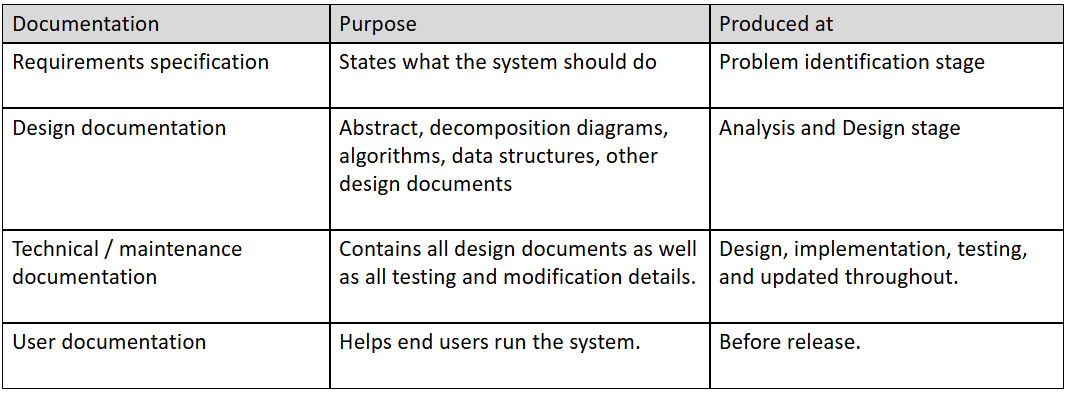
What is maintenance and its types?
It occurs after implementation or deployment (Perfective, Corrective, Adaptive).
Maintenance can be quite costly as it requires a development team to work on it (so is rarely free).
It should be clearly defined for both client and developer with what the maintenace aims (Fixing bugs and problems or additonal functionality to the system)
How is maintenance given to firms?
The client will enter an agreement with the developers which could be:
A fixed-term maintenance contract (often during warranty period)
Pay-as-you-go scheme where the client pays as issues arise
Perfective Maintenance,
Maintenance that improves the system by adding new features, improving performance, or enhancing usability after deployment.
For example when user feedback or business needs mean that new requirements are needed
Adaptive Maintenance
Maintenance that modifies software so that it continues to work in a changed environment. (This may include a change in hardware, operating system, laws and regulations, and external systems)
For when external factors mean change is needed
Corrective Maintenance
Corrective maintenance involves fixing errors / bugs discovered while the system is in use that were not detected during development or system testing (after deployment)
For example when there are bugs found in the software
Evaluation
•Requirements - evaluate whether the original requirements should be met for a solution to be successful.
• Cost – include financial costs, human costs and resource costs. A solution must not exceed any budgeted costs.
• Robustness - evaluate against its test results. Should use error trapping and validation methods to be robust and reduce the chance of system errors and failures.
• Usability – evaluate the solution against ease of use for the end user. A solution should use an intuitive user interface suitable for the end user to be successful. (Users can use it)
• Performance – against memory usage and speed of processing (like a search needs to take less than 30 seconds)
Technical Manual
Contains system specifications and algorithms:
System Specifications
• Description of Systems
• Data Flow Diagrams (or similar)
Algorithm Specifications
• Algorithm flowcharts (or pseudocode)
• Annotated Program Listing
• Lists of Variables Used (see data dictionary)
 Note
Note  Flashcards (43)