Paper 1 - Unit 2 - Communication
 Call Kai
 Learn
Learn Practice Test
 Spaced Repetition
 Match
Match Flashcards
 Knowt Play
1/108

There's no tags or description
Looks like no tags are added yet.
Name | Mastery | Learn | Test | Matching | Spaced | Call with Kai |
|---|
No analytics yet
Send a link to your students to track their progress
109 Terms
LAN
Local Area Network
Small geographical area
High data transfer rate
Uses dedicated infrastructure // company-owned/private infrastructure
WAN
Wide Area Network
Covers a large geographical area.
Most WANs are made from several
LANs connected together
Lower data transfer rate due to distance, sharing with more users etc.
Infrastructure primarily managed by telecommunication companies
An example is the internet.
Server
A device or software that provides a specific function for computers using a network.
Server examples
Web server
Print server
Mail server
File server
Database server
Example: downloading a file from server
The user's browser is the client software
The file is made available from a web/email/FTP server
The client (software browser) requests the file from the server
The desired file is returned to the client computer
Client server network
At least one computer used to "serve", other computers are referred to as "clients".
Server provides services / applications requested by clients.
Client server benefits
Files and resources are centralised:
Can access files from different locations on the network
Improves security
Easier to manage
Centralised backup. Easier to retrieve data as needed, don't need to back up individual computers one by one
User needs user name and password to access network
Internet monitoring - allows network administrators to monitor for bugs or security breaches
Clients can be less powerful machines, therefore less expensive to buy. Don't need as much storage space if using file server.
Client server drawbacks
Centralised Dependency: The server is a single point of failure. If it goes down, all clients relying on it may lose access to services.
Configuring and managing servers and their security can be complex and time-consuming. Servers can be costly.
The client-server model may be overkill for simple applications or environments with a small number of users.
Peer to Peer features
Suitable for a small companies with fewer computers
Computers can communicate and share resources. Every computer provides access to resources and data.
There is no central server - each computer is responsible for its own security.
All computers has equal status - each can act as both a client and a server
Peer to peer benefits
Cheap to set up and maintain - less hardware required
All computers can communicate with each other without going through a server
Peer to Peer Drawbacks
No central management of security:
Only as secure as the weakest computer on the network
Each computer is at risk from viruses from other computers
No central management of backup. If the data from one computer is not backed up it is lost to all of them
No central management of files/software. Consistency may be difficult to maintain, and each computer may have different software from the others
In order to share files, all the computers involved need to be switched on. The files may not be always available
Performance can degrade for larger networks
Peer-to-peer applications
File sharing sites
On demand video sites
Torrent file sharing
Internet
Global infrastructure of interconnected computer networks that use the Internet protocol suite (TCP/IP) to link devices worldwide.
Internet registries
Responsible for allocating IP addresses to specific domain names
These registries work together to maintain a database of address assignments that ensure that IP addresses and domain names are unique
World Wide Web
A collection of (multimedia) web pages/documents stored on websites
• http protocols used to transmit data
• web pages are written in HTML
• URLs specify the location of the web pages
• web documents are accessed using browsers
URL
Uniform Resource Locator
Used to access a resource and its location across a network
URL = protocol + domain name
http:// - specifies that the resource requires the http protocol
www.sky.co.uk/index.html - the fully qualified domain name and the name of the page to be accessed (index.html)
The URL is a combination of these http://www.sky.co.uk/index.html
IP address
Internet Protocol address
Each device on a network needs to be uniquely identified so that data can be sent to the correct destination much like an address on a letter
e.g.
16.152.210.10
DNS
Domain Name System
DNS servers are computers with a list of domain names and their IP addresses.
When a computer asks a DNS server for a domain name, the DNS server returns an IP address so the computer can access the content.
How the browser uses the Domain Name Service (DNS) to display the web page
URL is a reference address to a resource on the Internet.
• The URL is passed to the nearest Domain Name Server (by browser software).
• DNS server stores a database / list of URLs and matching IP addresses.
• DNS (Name Resolver) looks for the URL in its database.
• Finds the matching IP address and returns it to the originator.
• Or if it cannot find it, it forwards to another Domain Name Server at a higher level.
• (Original) DNS server adds the returned IP address to its cache.
• (Original) DNS server returns the IP address to the browser.
IPv4
The Internet Protocol version 4 is the dominant protocol for routing traffic on the Internet
Uses 32 bit addresses (four 8 bit numbers)
Could support 232 unique addresses (although this is not strictly the case due to sub-netting and private/public addressing).
e.g. 122.45.255.0
IPv6
Enhanced version of IPv4 and can support very large numbers of nodes
A set of 8 numbers
Each number is 4 hexadecimal digits
Separated by colons:
Valid example e.g. 12F3:2356:AB12:2015:0000:0000:1234:5123
Why IPv6 is needed
The number of IP addresses needed will eventually exceed the number available with IPv4.
IPv6 Simplification/Compression Rules
Due to their size, there are a few rules for simplifying IPv6 addresses written out in hex.
Leading zeros in the address are optional. So, for an address block, 0A45 could be equal to A45, and 0000 could be equal to 0.
Multiple fields of zeros can be expressed as ::, but this can be done only once per address. This is because if it was used more than once it would be ambiguous how many missing fields there are.
e.g. 12F3:2356:AB12:2015:0000:0000:1234:5123
Can be expressed as: 12F3:2356:AB12:2015::1234:5123
Private IP address
Can only be reached internally/through the LAN/Intranet, and cannot be reached across the Internet.
More secure than a public IP address
NAT (Network Address Translation) is necessary for a private IP address to access the Internet directly
It is assigned by the router (of the network concerned).
It is unique within the network, but can be duplicated within other (discrete) networks.
Private address space:
10.0.0.1 to 10.255.255.254
172.16.0.1 to 172.31.255.254
192.168.0.1 to 192.168.255.254
Public IP address
Can be reached across the Internet.
Less secure than a private address.
Provided by ISP
Unique (to the Internet)
Network Address Translation (NAT)
Allow multiple devices within a private network to share a single public IP address.
When a device within your private network initiates an outgoing connection to a website, the NAT device (usually your router) changes the source IP address of the outgoing packet to the public IP address before forwarding it to the internet.
The reverse happens for incoming traffic
Static IP
When a computer disconnects and re-joins a network, its IP address does not change
Static IP is assigned by the server/ISP
Benefits:
Good for running servers. Convenient remote access - IP doesn't change, so you do not need to change the IP you are accessing.
It provides geolocation that is more accurate and reliable than a dynamic IP address
Avoids conflicts i.e. DHCP assigns an IP which already exists as a static IP (More control than DCHP)
Web server can be accessed directly - Potentially faster download speeds
IP can be held in cache (no DNS look-up). DNS does not need updating
Reduced downtime - does not need renewal so useful for online games, VoIP, VPNs
Drawbacks:
Security - IP address is constant = greater chance of hacking. You cannot easily change the Static IP once it has been hacked. This makes your system very susceptible to continuous attack
Configuration - The process to set up a static IP is manual and relatively complex.
Dynamic IP
Each time the computer re-joins a network, the address changes
Dynamic IP is assigned by the network OS
Benefits:
Security - relatively lower security risk (as your computer is assigned a new IP address each time you log on).
More cost effective as compared to the static address
Automatic network configuration, saving the user hassle.
Drawbacks:
Security - Can also be a drawback if there is a rogue DHCP server which intercepts information
Network failure - If only a single DHCP server is in place, it's failure causes a system-wide issue. Computers cannot gain IP
Less reliable - not suitable for VOIP, online games, VPNs etc
Web hosting
Provides server storage space and an IP address for your website.
The website on the server can then be accessed from a web browser.
Your web hosting provider is who gives your website the IP address that is entered into DNS.
When someone types www.bbc.co.uk, the web browser goes to the hosting provider’s web server to pull up the pages for your website that you have stored on the server.
Circuit switching
A method of implementing telecommunications networks.
Involves creating and maintaining a continuous, dedicated connection between two endpoints for the duration of a phone call or transfer of data
The connection is established prior to start of communication, and removed at the end of communication
This does not work very well for the internet
Packet switching
A mode of data transmission in which a message is broken into a number of parts which are sent independently, over whatever route is optimum for each packet, and reassembled at the destination.
Data packet
A unit of data made into a single package that travels along a given network path.
Used in Internet Protocol (IP) transmissions for data that navigates the Web, and in other kinds of networks.
Why the Internet uses packet switching instead of circuit switching
Bandwidth is not reserved. There is less waste as multiple users share the same channel simultaneously, “Silence” on the line is filled with other users’ packets. Line usage is maximized.
Packets can automatically re-route around failed or congested nodes (Circuit switching would just drop the call).
Only the single corrupted packet is re-sent, not the entire message stream.
Router
Connects two (or more) networks.
Can act as a (hardware) firewall
Forwards data packets from one network to another
Each router stores data about the available routes to the destination node in routing table
Looks up the destination IP address in its routing table to find the best router to forward the packet to
Each forwarding by a router is called as a hop
Routers continue to forward the packet until it reaches its destination node
Provides the public/routable IP address for a network
Holds the (private) IP addresses of the devices on the network (those connected to the router)
Can perform NAT (Network Address Translation) to translate private/local addresses into public Internet addresses (and vice versa).
Packet header
Contains the recipient's address so that it can be directed appropriately across the network
The address of the sender is also included so that replies can be sent back data
The packet number and overall number of packets in the message is included to assist in reordering the data
The Time To Live (TTL) or hop limit is also included
Packet Payload
The main segment of the packet.
Contains the data to be transferred across.
Sometimes called the 'body'
This part of the packet will often vary in size from 500 to 1,500 bytes
Packet trailer
This contains error checking data that verify the data received in the payload has not been corrupted
Techniques such as checksums or Cyclical Redundancy Checks (CRCs) are used to check the data
The same checksum is recalculated at the destination
If they do not match, the data has become corrupted and is refused and a new copy is requested to be sent again
Why packets are kept small
To ensure that individual packets do not take too long to transfer, preventing other packets from moving.
Should not be too small as the additional data added makes data transfer inefficient as unnecessary headers and trailers would be required each time
Packet transmission in LAN
•• Packet has address of recipient
•• Sender transmits packets directly to the server
•• Server reads address and identifies where recipient is
•• Server transmits packets directly to the recipient
•• Server transmits packets only to the recipient
Public switched telephone network
Main points
Consists of many different types of communication lines
• Data is transmitted in both directions at the same time // (full) duplex data transmission
• The communication passes through different switching centres
Other points
dedicated channel used between two points for the
duration of the call
connection maintained throughout the telephone
call
lines remain active even during a power outage
How PSTN works
Uses various physical media like telephone lines, fibre optics, cellular networks, satellites, and undersea cables.
Features switches located at centralized network points.
These switches serve as nodes enabling communication across the network.
Communication involves establishing a circuit through multiple switches between users.
This circuit is dedicated exclusively to the communicating parties for the duration of the connection (e.g., a call).
This type of network operation is called circuit-switching.
Benefits of companies using a dedicated line between buildings
• (Probably) faster connection / communication / transmission of data
• (Usually) more consistent transmission speed
• Improved security
drawbacks of companies using a dedicated line between buildings
Expensive to set-up / maintain
• Disruption to the dedicated line would leave no alternative
Gateway
Computer which acts as a bridge between a local area network and the Internet.
Required where data is travelling from one network to another that use different protocols (dissimilar networks)
Header data is removed and reapplied using the correct format of the new network
A router and gateway can often be combined into one device rather than 2 separate ones
packet filtering
Packets of data are inspected by the firewall to check which port they are attempting to access
Different network protocols use different port numbers for example, HTTP traffic, used to transfer web page data, uses port 80 or 8080
If this traffic is to be allowed through, the port must be opened for the duration of the connection, otherwise the firewall will automatically reject it
Fibre optic cable
One or more thin flexible fibres with a glass core through which light signals can be sent with very little loss of strength.
Fastest transmission media
Fibre optic benefits
Greater bandwidth
Need less signal boosting // can transmit over longer distances
Greater security (more difficult to "tap" into)
Immune to electromagnetic and other effects
Lighter in weight (easier to install)
Consume less power
Copper cable
Uses electrical signals to pass data between networks
Twisted-pair is an example
Copper benefits
Less expensive to install
Easier to install because it is more flexible
Easier to make terminations using copper cabling
The expertise in use of copper cabling is more extensive...
...Has been around for years ... so very little is "unknown" about installations
Wireless transmission
Radio, microwave or infrared
the only difference is the frequency of the waves.
e.g. Bluetooth uses low frequency radio waves
Wireless Networks
Connection provided through a Wireless Access Point (AP)
A process for handling collisions has to be implemented (CSMA/CA) due to broadcast nature of network.
Wireless Hardware Components
Wireless Access Points (AP)
• Wireless Network Interface Card // Wireless adapter
• Wireless Router
• (Wireless) Repeater - amplifies signal
Wireless Access Point (WAP)
A wireless hardware device allowing wireless devices to connect to a wired network (e.g. a LAN) using wi-fi/radio communication, via this central point.
Wireless Send process
Encrypts the data (using TKIP or AES)
...encodes the data into radio / analogue signal
Listens for other radio signals
• Transmits / broadcasts when quiet
...using an antenna / WNIC / WAP / aerial
Wireless Receive Process
(Constantly) checking / detecting signals
Receives radio / analogue signal...using an antenna / WNIC / WAP / aerial
Checks if the signal is for that device
If so, decodes the signal...and decrypts the data
Wireless connection benefits
Freedom of movement
... can move between different rooms with a mobile device and still receive/transmit data
... no need of a physical connection
Easily expanded if friends want to access the same network
Less cabling / expertise is needed
... making the initial setup less expensive
Wired benefits
Faster connection // higher bandwidth
.... needed for downloading/streaming large files
... less latency
More reliable / stable connection
... is less susceptible to issues with distance/walls/interference
More secure
Radio waves
'Wireless' transmission medium
WiFi
LAN hardware
•• NIC // Network Interface Card
•• WNIC // Wireless Network Interface Card
•• WAP // Wireless Access Point
•• Hub
•• Switch
•• Router
•• Bridge
•• Repeater
•• Modem
Bit streaming
The data is compressed before transmitting
• The video is transmitted continuously as a series of bits
• The video is hosted on a media server
• On download, the server sends the data to a buffer on the client computers // The buffer stores the data from the server
• The recipient / user's software receives bit stream from the buffer
Benefits of bit streaming example (watching a film)
no need to wait for a whole file to be downloaded
- no need to store large files on user's computer
- allows on demand playback
- no specialist software is required for playback in browser
Drawbacks of bit streaming example (watching a film)
video stops / hangs if very slow Internet / broadband speed low
- video stops / hangs if inadequate buffering capacity
- loss of Internet means can't access films / files
- may require specific software to run the files / films
- viruses can be downloaded from the websites
On-demand bit streaming
Digital video tape, analogue video tape, or digital files are converted to bit streaming format for broadcasting on the net. This is known as encoding
These encoded streaming video files are then uploaded to a dedicated server
- a link for the encoded video is placed on a web site
- a user clicks on the link to download the encoded streaming video
the streamed video is then broadcast to the user as and when they require it
- can be paused / can go back and re-watch / fast-forward, etc.
Real time bit streaming
an event is captured live with a video camera
- the video camera is connected to a computer
- the video signal is converted to streaming media files (encoded) on the computer
- the encoded feed is then uploaded from the computer to a dedicated streaming server
via cable, DSL, or a high-speed internet connection
- the server then sends the live images it to all users requesting it as real-time video
streaming
- cannot be paused etc.
Real-time vs on-demand bit streaming main differences
Real-time - a live stream of an event that is currently taking place
• On-demand - streaming of an event/programme that has taken place in the past
• Real time - the event is captured live with a video camera connected to a computer
• On-demand - Existing media are encoded to bit streaming format and uploaded to a
server
• Real-time - cannot be paused / rewound etc
• On-demand - can be paused / re-wound / fast forwarded etc
Buffering in streaming video
User needs high-speed internet
Data is streamed to a buffer (in the computer)
Buffering pausing the video as bits are streamed to the computer
As buffer is emptied, it fills up again so that viewing is continuous
Actual playback is (a few seconds) behind the time the data is received by computer
Buffering occurs when the bits are not able to be streamed fast enough
Cloud Computing
Software or services that are hosted remotely on the internet, usually using multiple redundant servers
Cloud storage
Files are stored offsite on multiple internet connected servers
When you want to access or download a file your computer connects to the nearest available server and accesses the file.
The files are stored on multiple servers - if one server goes down you can still access the file
Cloud storage benefits
You have access to your files whenever you are connected to the internet
Often cheaper to pay for cloud storage than to buy a hard drive/SSD (depends on service).
Can be free for small quantities
Backing up is done automatically for you
You can easily share access to files/ folders with multiple people
If you need to scale your storage then this can be done easily and quickly
Security can be better than local storage
Cloud storage drawbacks
Can only access with internet access
No control over security
No control over backups
It can take a long time to upload/download the data
It can be more expensive in the long term
There could be a limit to the amount of storage unless paid for
There could be compatibility/access issues
There could be issues with the company offering cloud services
Cloud software
Software that is hosted and run entirely or partly on offsite servers.
When you want to use the software you connect to the server (usually via your web browser) and the software runs within your browser.
Cloud software benefits
You don't need a powerful computer to run graphics intensive software
Software updates are handled automatically
Up front costs for cloud software are usually less than the upfront costs for standard software
No need to install the software on your machine - saves storage space
Cloud software drawbacks
You don't own the software, you are usually just paying a subscription service so it can cost more in the long term
You can usually only use the software if you have an internet connection
Some software requires a high speed internet connection
Public Cloud
Where data or software is stored on third-party offsite servers
Private cloud
Where a company has its own servers that host the data.
Public Cloud Benefits
Easy, Inexpensive setup
Scalability
You don't need to pay for expensive hardware and pay high salary technical IT staff
Private cloud benefits
More control of where you data is stored.
You can customise your data centre server hardware and software to your own requirements.
Useful if data is very sensitive
Thin client
Server performs all processes required by the task and/or data storage
Often has a small hard drive or none at all, as data and programs are primarily stored in cloud / on the network's main servers.
Clients only sends requests to the server and displays the returned results
Thin client benefits
Devices are generally cheaper to purchase and maintain...
...as they have fewer hardware requirements...
...software is installed and maintained centrally on the server.
Can be more secure as fewer locally installed programs are used and therefore there are fewer attack vectors.
Thick client
Most processing and storage occurring on the client itself (i.e. less processing completed by the server).
This often includes tasks such as video encoding and graphics intensive tasks.
Thin client drawbacks
The devices are largely or completely useless when not connected to the network
Software that is CPU or GPU intensive will not function well on thin devices unless cloud servers are very powerful
If the central network goes down then all the devices will fail to function.
Thick client benefits
Devices can largely retain their functionality when not connected to the internet / central network.
They don't rely on external servers to process tasks and therefore there is no network related lag.
More adaptable to different uses and software can be installed locally.
Thick client drawbacks
Tend to be more expensive to buy and maintain due to the high hardware requirements for each device.
They are generally less secure as software locally installed can be compromised.
Software updates are slower and more difficult to implement as each device needs to be updated individually.
Bus Topology
Uses a single central cable for all connections.
Data travels in only one direction at a time.
Only one device can transmit simultaneously.
Requires terminators at each end to prevent signal bounce.
Uses broadcasting; all devices receive packets.
Devices check MAC addresses to identify packets intended for them.
Needs collision handling (like CSMA/CD) due to single transmission path.

Bus Topology Advantages
-Cheap and easy to install and maintain as uses less cable than star networks.
-New hardware can be added (e.g. more computers, printers, scanners etc) without disrupting the other computers.
-If one computer breaks down, the remainder of the network can still function
Bus Topology Disadvantages
A fault in the central cable causes the entire network to fail.
Performance slows down as more computers are added.
Data collisions can be frequent.
Maximum cable length limits network size and the number of devices.
Lower security because all computers receive all sent packets.
Star Topology
Requires a central device (typically a switch).
Each node connects directly to the central device.
Every node possesses a dedicated connection.
Connections must be bidirectional (usually full-duplex).
Packets are sent only to the intended computer(s)
No collisions
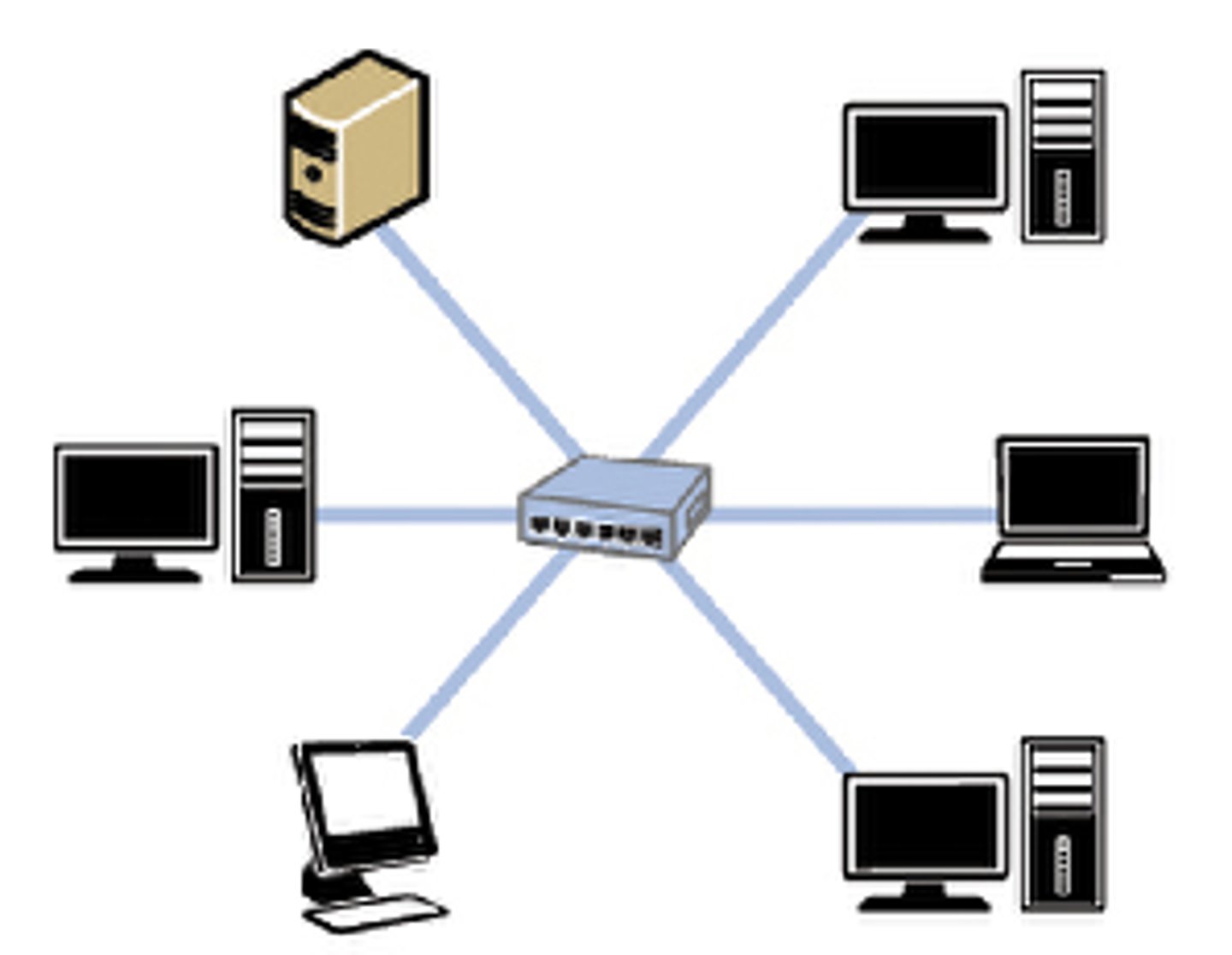
Star topology benefits
Signals only go to destination//secure
Easy to connect/remove nodes or devices/trouble shoot.
Centralised management helps in monitoring the network.
Failure of one node or link doesn't affect the rest of network.
Performance does not degenerate under load
Connections may use different protocols
Fewer collisions
Star topology drawbacks
If central device fails then whole network goes down.
Performance is dependent on capacity of central device.
Mesh Topology
All computers are connected to at least one other device
Multiple routes between devices
The computers can act as relays/routers, passing packets on towards the final destination
Mesh benefits
If one line goes down there are more routes available
Improved security as not using one main line
No/fewer collisions
New nodes can be added without interruption or interfering with other nodes
More secure because data is sent over a dedicated connection
Hybrid Topology
Any topology that exhibits the characteristics of more than one standard network topology.
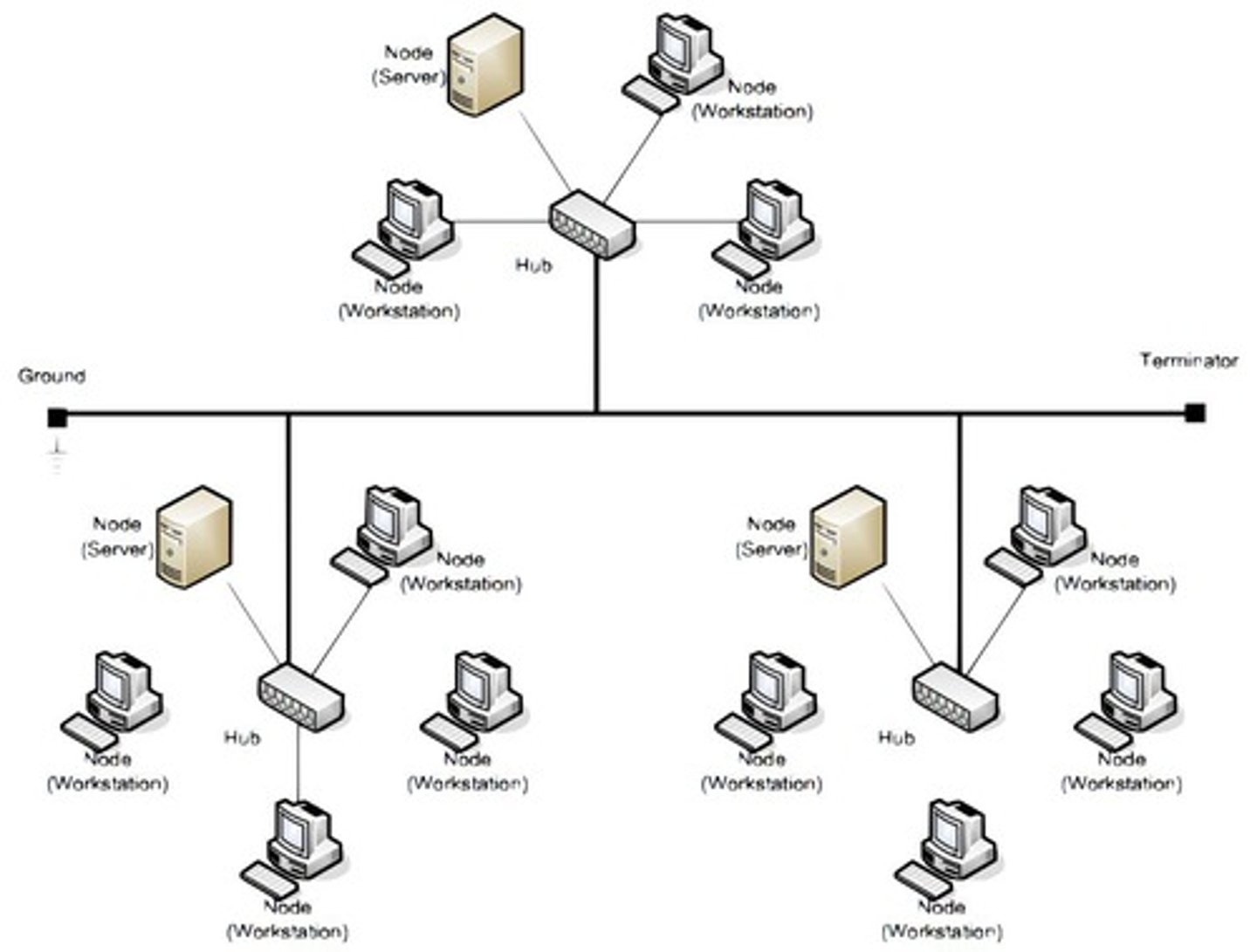
Subnet
A logical section of a larger network, created by an administrator to improve network performance or to provide security and help with network management
Benefits of Subnetting
improves security and performance
reduces congestion
allows extension of the network / devices attached
aids day-to-day management
Network Identifier (NetworkID)
Left hand bits of an IP address, used to define the network where nodes are communicating.
Alongside the HostID, this forms a full IP address.
The number of bits designated to the NetworkID portion varies dependent upon the network configuration.
The number of networks available using n bits for the NetworkID is 2^n.
Host Identifier (HostID)
Right hand bits of an IP address, used to identify separate (routable) nodes on the network.
Alongside the NetID, this forms a full IP address.
The number of bits designated to the HostID portion varies dependent upon the network configuration.
The number of hosts available using n bits for the HostID is (2^n) - 2.
NetID and HostID Example
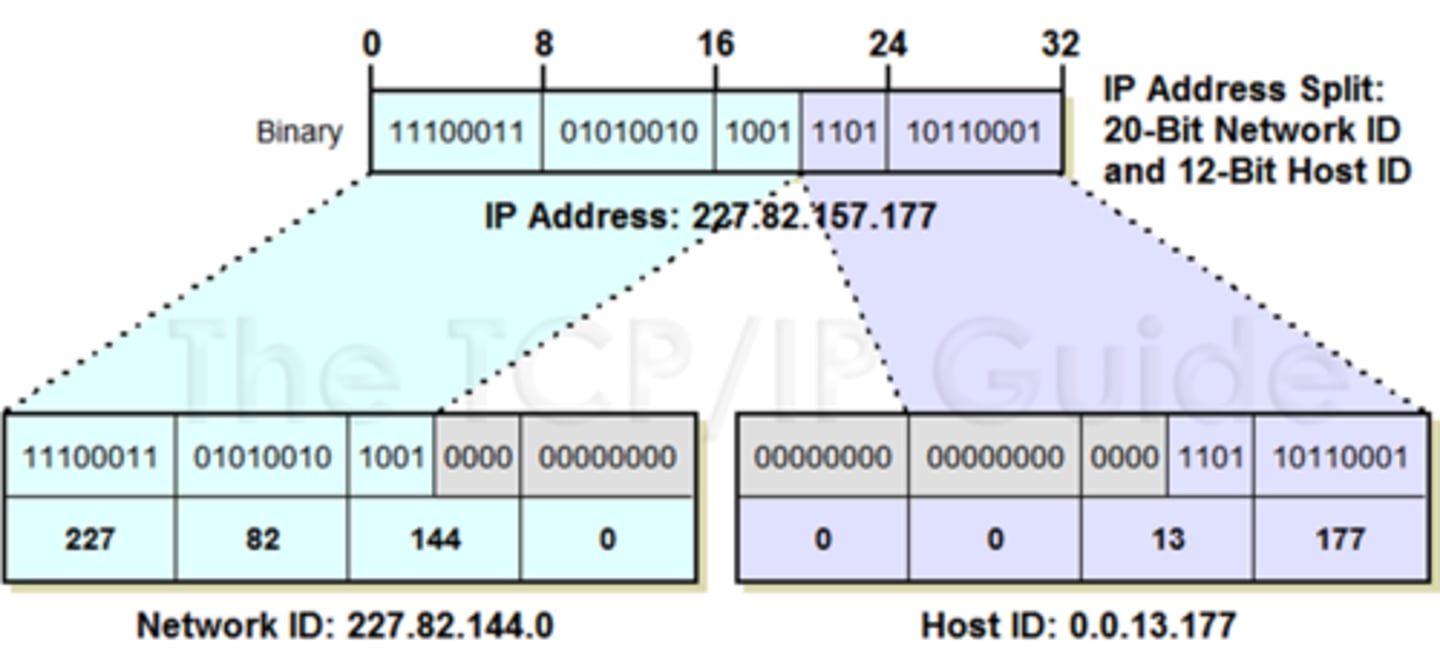
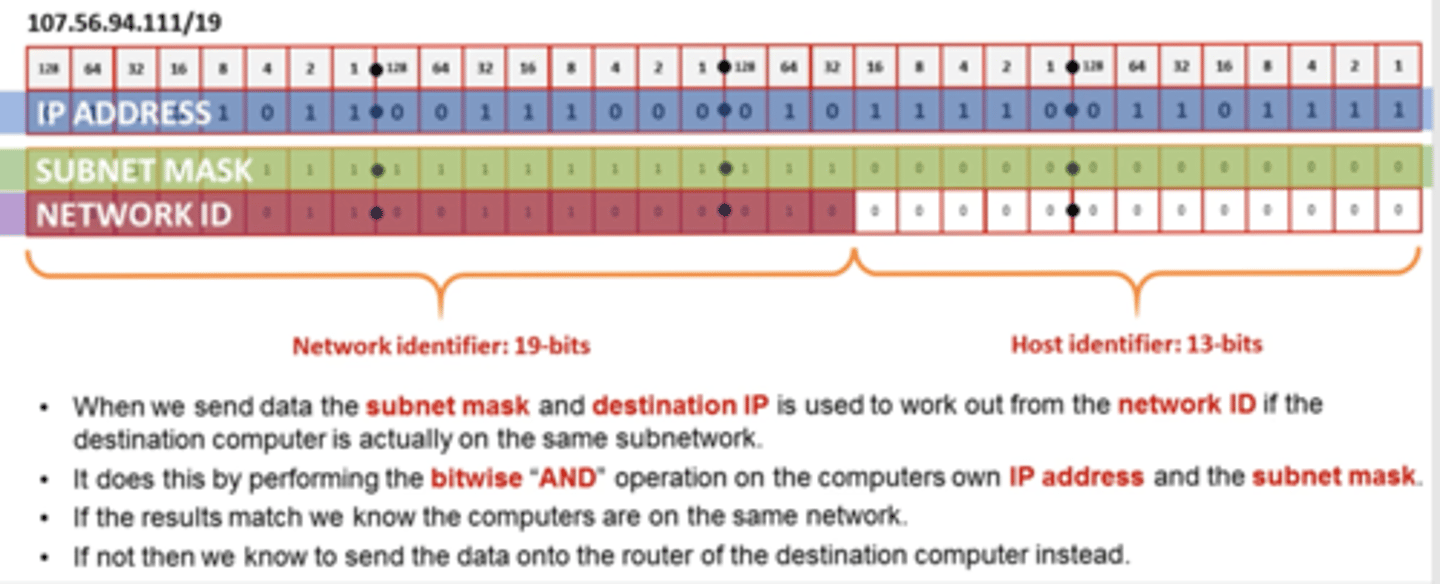
Subnetting example
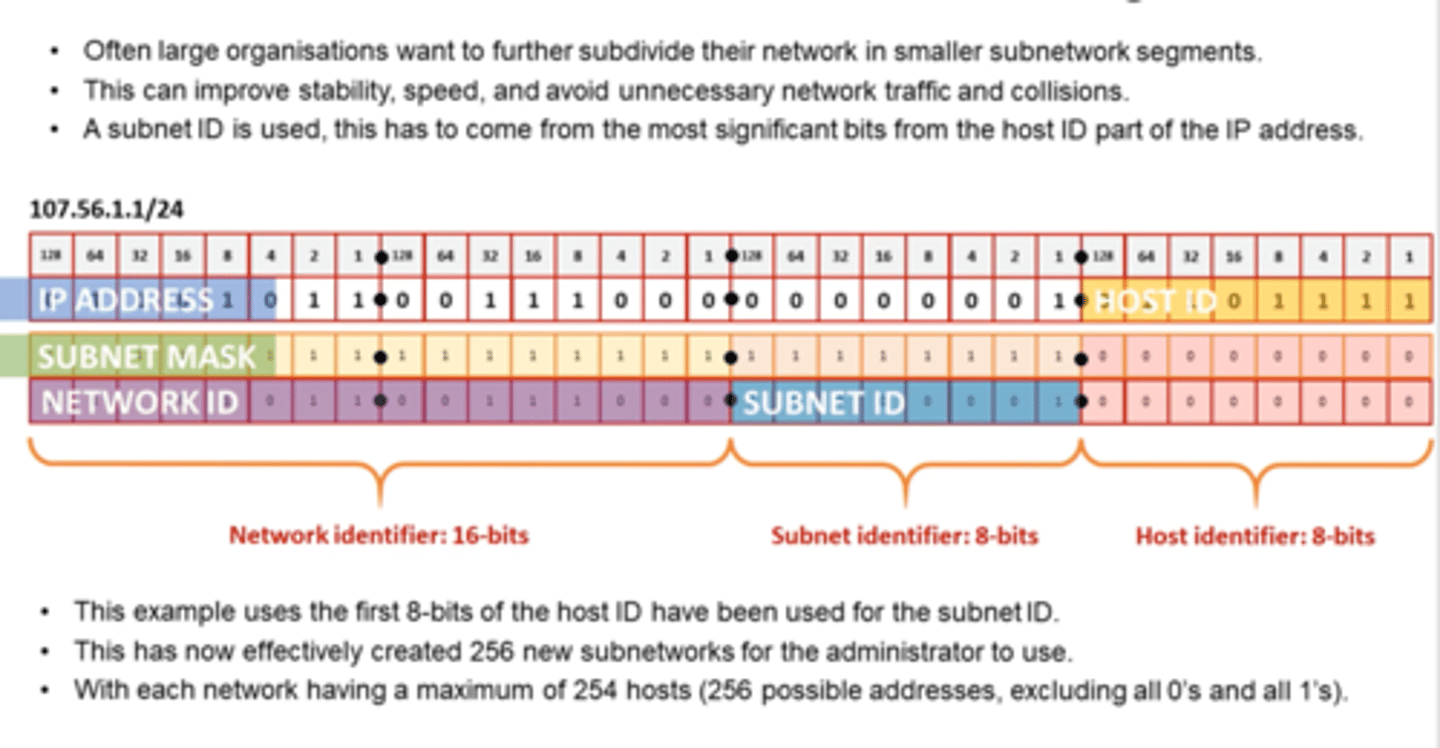
subnet mask
A subnet mask is used together with an IP address obtain the NetworkID portion.
The subnet mask has all networkID bits set to 1 and all hostID bits set to 0 so that, when compared to the IP address using a bitwise AND operation, the NetworkID is identified.
Collision
When two nodes attempt to broadcast packets of data at the same time on a shared communications medium (e.g. bus central cable or wireless frequency), a collision can occur, preventing either transmission to be successful.
CSMA/CD is used on wired networks of this type (not needed on star network using switch)
CSMA/CA is used on wireless networks.

