Amazon S3 Encryption
 Studied by 0 people
 Call Kai
 Learn
Learn Practice Test
 Spaced Repetition
 Match
Match Flashcards
 Knowt Play
1/52

There's no tags or description
Looks like no tags are added yet.
Name | Mastery | Learn | Test | Matching | Spaced | Call with Kai |
|---|
No analytics yet
Send a link to your students to track their progress
53 Terms
Amazon S3 – Object Encryption
Amazon S3 supports multiple encryption methods to protect data at rest and in transit. Understanding when to use each method is important for the AWS exam.
S3 provides 4 main encryption methods:
1. SSE-S3 (Server-Side Encryption with S3-Managed Keys)
2. SSE-KMS (Server-Side Encryption with KMS Keys)
3. SSE-C (Server-Side Encryption with Customer-Provided Keys)
4. Client-Side Encryption
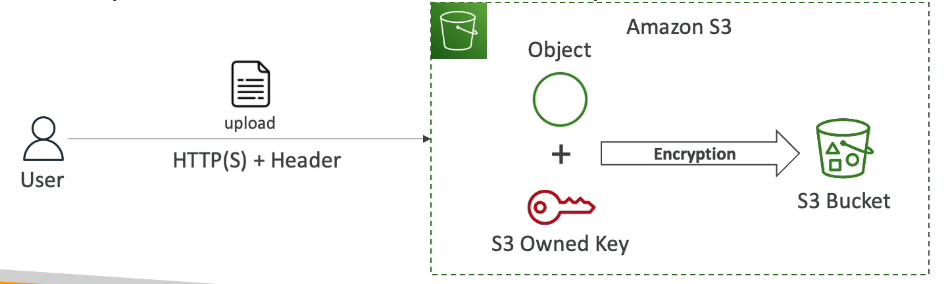
1. SSE-S3 (Server-Side Encryption with S3-Managed Keys)
Enabled by default for new S3 buckets and objects
Encryption keys are owned, managed, and handled by AWS
You never see or manage the key
Uses AES-256 encryption
Object is encrypted server-side by Amazon S3
Header must be set to:
(x-amz-server-side-encryption: AES256)
How it works:
User uploads object
S3 automatically encrypts the object using an AWS-owned key
Encrypted object is stored in the bucket
2. SSE-KMS (Server-Side Encryption with KMS Keys)
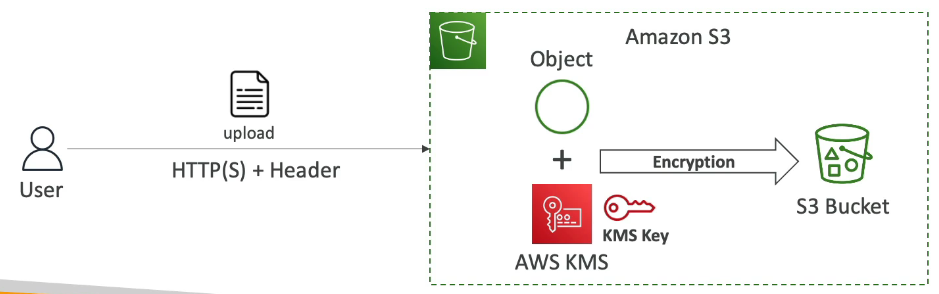
Encryption keys are managed using AWS KMS
KMS advantages:
user has control over keys
user can audit keys using CloudTrail —> anytime someone uses a key in KMS, this is going to be logged in a service that logs everything that happens in AWS called CloudTrail.
Object is encrypted server side
Header must be set to:
x-amz-server-side-encryption: aws:kms
How it works:
User uploads object and specifies a KMS key
S3 uses the KMS key to encrypt the object
Encrypted object is stored in the bucket
Access requirements:
Permission to access the S3 object
Permission to use the KMS key
SSE-KMS Limitation
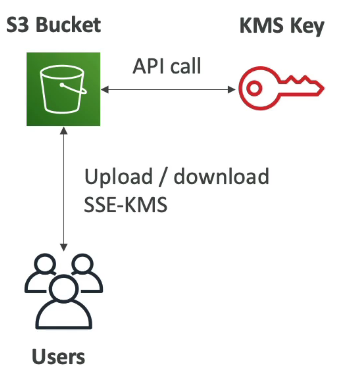
If you use SSE-KMS, you may be impacted by the KMS limits —> the reason to that is because now that you upload and download files from Amazon S3, you need to leverage a KMS key.
When you upload, it calls the GeneratedDataKey KMS API
When you try to download, it calls the Decrypt KMS API
Each of these API calls is going to count towards the KMS quotas of API calls per second. —> (Based on the region, you have between 5,000 and 30,000 requests per second)
You can request a quota increase using the Service Quotas Console
If you have a very, very high throughput S3 bucket, and everything is encrypted using KMS keys, you may hit KMS throttling.
3. SSE-C (Server-Side Encryption with Customer-Provided Keys)
Server-Side Encryption using fully managed by the customer outside of AWS
Encryption key is provided by the customer
Key is not stored by AWS, instead they will be discarded after encryption/decryption or being used
Still server-side encryption
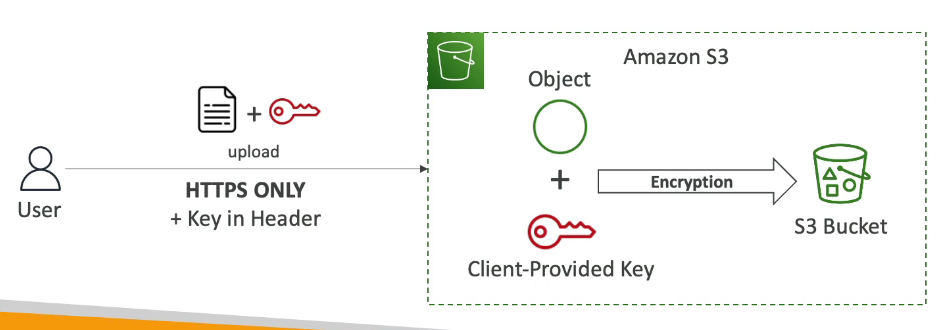
Must use HTTPS
Encryption key must be provided in HTTP headers, for every HTTP request made
Still server-side encryption
How it works:
User uploads object + encryption key
S3 encrypts the object using the provided key
Encrypted object is stored in the bucket
To read the object inside the bucket, the user must again provide the key that was used to encrypt that file.
4. Client-Side Encryption
Use client libraries such as Amazon S3 Client-Side Encryption Library
Client must encrypt the data themselves before sending to Amazon S3
Client must decrypt data themselves when retrieving from Amazon S3
Customer fully manages the keys and encryption cycle
How it works:
Client encrypts data locally
Encrypted file is uploaded to S3
Client downloads and decrypts data locally
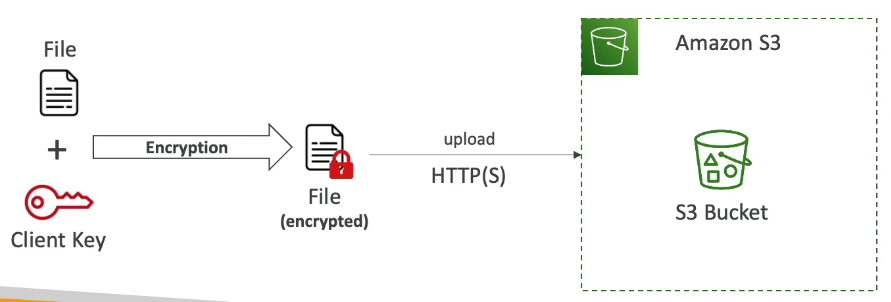
Amazon S3 - Encryption in transit (SSL/TLS)
Encryption in flight is also called SSL/TLS
Amazon S3 exposes two endpoints:HTTP Endpoint - non encrypted
HTTPS Endpoint - encryption in flight
Important Notes:
HTTPS is strongly recommended
HTTPS is mandatory for SSE-C
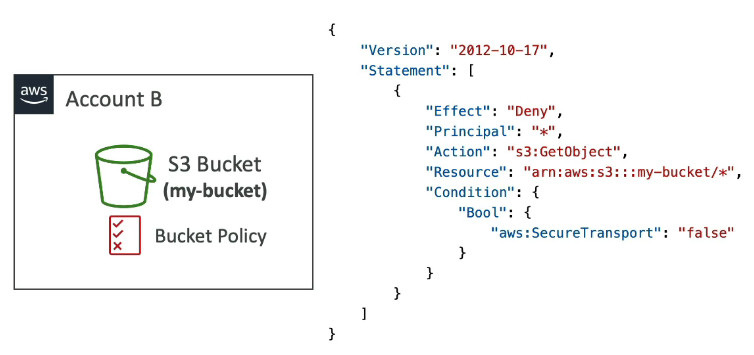
How do you go about Forcing Encryption in Transit?
You can do so by using a bucket policy
In this case, we attached a bucket policy to your S3 bucket. In the below screenshot, we are saying that we deny any GetObject operation if the condition is "aws:SecureTransport": "false" —> which means It will be True when you are using HTTPS and False when using HTTP which is considered insecure encryption method.
Effect:
Blocks all HTTP requests
Allows only HTTPS traffic
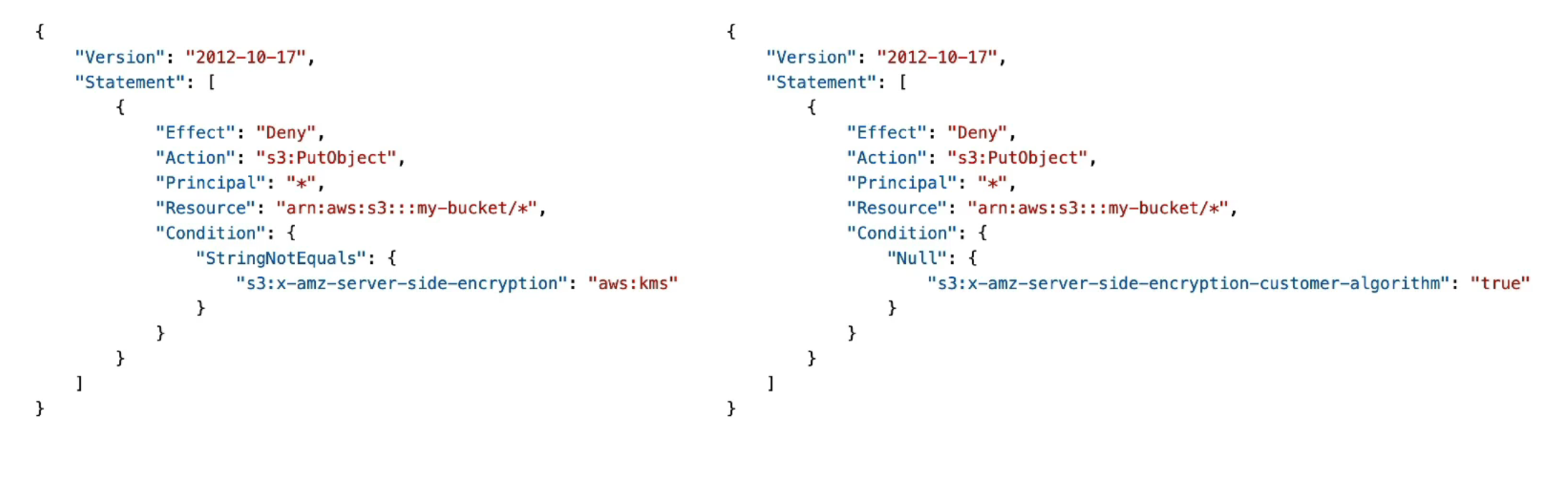
Amazon S3 – Default Encryption vs Bucket Policies
Amazon S3 provides two ways to ensure objects are encrypted:
Default Encryption
Bucket Policies (Enforcement)
Default Encryption (Bucket-Level Setting)
Key Points
All new S3 buckets now have default encryption enabled
Default encryption is SSE-S3:
Server-Side Encryption with S3-managed keys
Automatically encrypts all new objects
Does not require encryption headers from the user
Customizing Default Encryption
You can change the default encryption to:
SSE-KMS (using AWS KMS keys)
SSE-S3 (default)
Example:
Set bucket default encryption to SSE-KMS
Any object uploaded without encryption headers will still be encrypted using KMS
Important Limitation ⚠
Default encryption does not prevent unencrypted PUT requests
It only ensures encryption after upload
Bucket Policies (Encryption Enforcement)
Key Points
Bucket policies can force encryption
They can deny uploads that do not meet encryption requirements
Applied before default encryption
What Bucket Policies Can Enforce
Require SSE-KMS
Require SSE-C
Require specific encryption headers
Example Enforcement Logic
Deny
PutObjectif:x-amz-server-side-encryption≠aws:kms
Deny
PutObjectif:SSE-C headers are missing
Why Use a Bucket Policy?
Prevents users from uploading objects without encryption
Ensures compliance and security standards
Guarantees encryption before data is stored
What is CORS?
CORS (Cross-Origin Resource Sharing)
CORS is a web browser security mechanism
Controls whether a web page from one origin can request resources from another origin
Enforced by the browser, not the server
What Is an Origin?
An origin is defined by three components:
Scheme (Protocol) –
httporhttpsHost (Domain) –
www.example.comPort –
443for HTTPS (default)
Same Origin
Same protocol
Same domain
Same port
Example:
https://www.example.com
https://www.example.com/index.html
➡ Same origin
Different Origin
https://www.example.com
https://other.example.com
➡ Different origins
Why CORS Exists?
Prevents malicious websites from accessing resources on another site
Blocks cross-origin requests unless explicitly allowed
How CORS Works (High-Level Flow)
User visits Origin A (e.g.,
example.com)Web page tries to load resources from Origin B (e.g.,
other.com)Browser sends a preflight request (OPTIONS) to Origin B
Origin B responds with CORS headers
Browser decides whether to allow or block the request
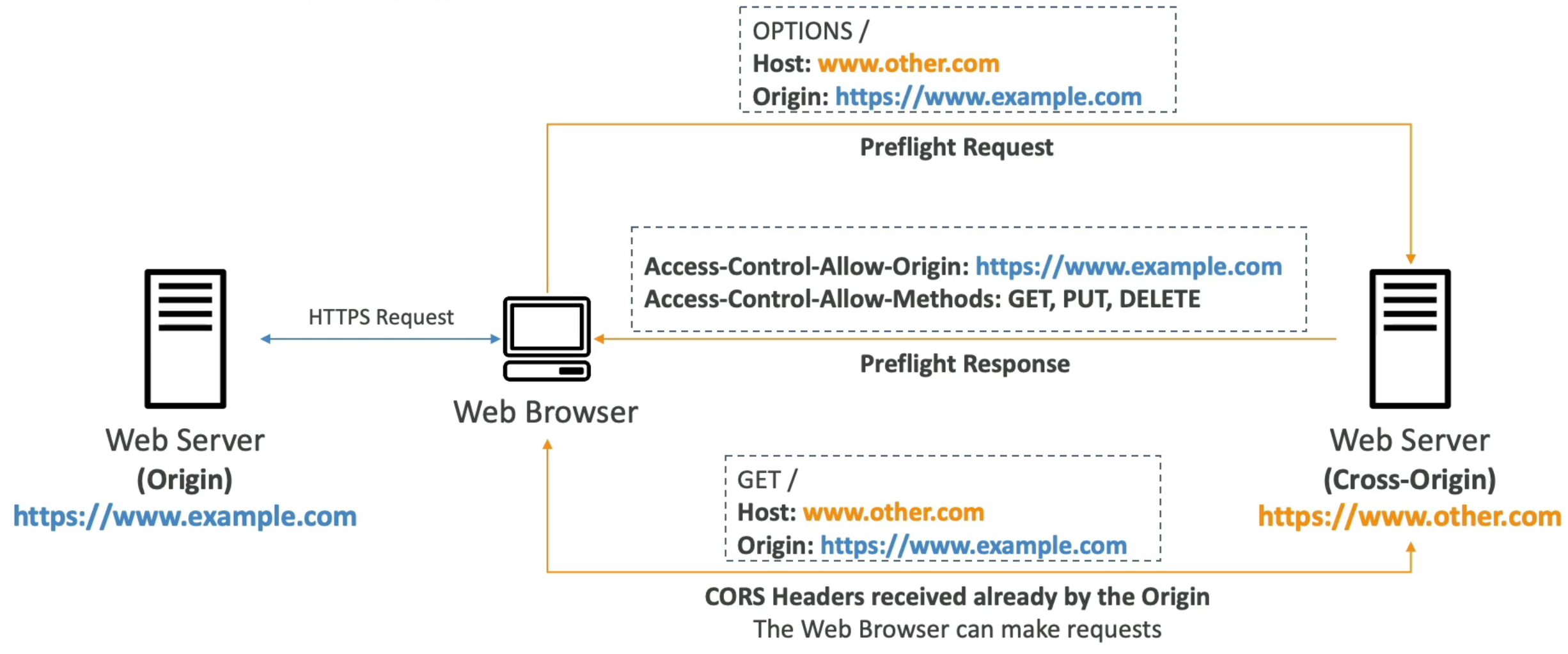
CORS Headers (Key Concept)
The most important header:
Access-Control-Allow-Origin
Other possible headers:
Access-Control-Allow-MethodsAccess-Control-Allow-Headers
If headers allow the request ➜ browser proceeds
If not ➜ browser blocks the request
CORS and Amazon S3 (VERY IMPORTANT FOR EXAM ⭐)
When Is CORS Needed in S3?
When a browser requests files from:
One S3 bucket
Another S3 bucket
You can do this by allowing for a specific origin or for * (all origins)
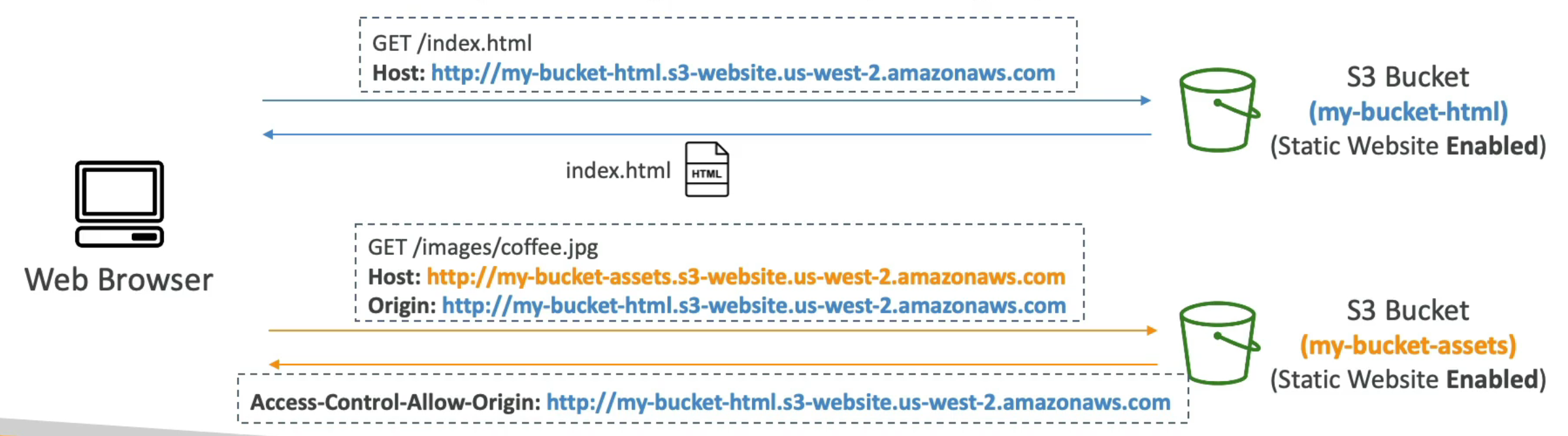
S3 CORS Example (Static Website)
Flow
Browser loads
index.htmlfrom Bucket 1index.htmlreferences an image in Bucket 2Browser sends a cross-origin request to Bucket 2
Bucket 2 must allow Bucket 1 via CORS configuration
If allowed ➜ image loads
If not allowed ➜ request is blocked
Remember CORS is web browser security that allows you to enable images or assets or files being retrieved from one S3 bucket in case the request is originating from another origin.
Amazon S3 – MFA Delete
What is MFA Delete?
MFA (Multi-Factor Authentication) Delete is a security feature for Amazon S3
Requires an MFA code in addition to normal credentials
Protects against accidental or malicious permanent deletions
How MFA Works
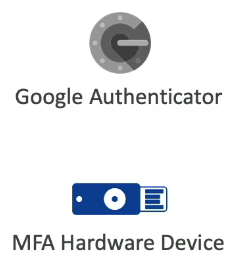
MFA code is generated by:
Mobile apps (e.g., Google Authenticator)
Hardware MFA devices
The MFA code must be provided at the time of the operation
When MFA Delete Is Required ⭐
MFA Delete is required for destructive operations:
Permanently deleting an object version
Deletes a specific version forever
Suspending versioning on a bucket
These actions are considered high-risk and require extra protection.
When MFA Delete Is NOT Required
MFA is not required for non-destructive actions:
Enabling versioning
Listing object versions
Listing deleted object versions
Reading or uploading objects
What needs to be done prior to using MFA Delete?
Versioning must be enabled on the bucket
Who Can Enable or Disable MFA Delete? ⚠
ONLY the bucket owner (root account) can:
Enable MFA Delete
Disable MFA Delete
IAM users and roles cannot manage MFA Delete
MFA Delete is an extra protection to prevent against the permanent deletion of specific object versions.
Amazon S3 – Access Logs
What Are S3 Access Logs?
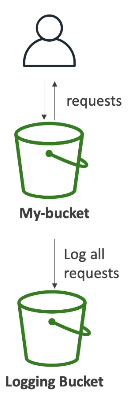
S3 Access Logs record all requests made to an S3 bucket
Used for:
Auditing
Security analysis
Troubleshooting
Logs both successful and denied requests
What Gets Logged
Every request to the bucket, including:
GET,PUT,DELETE,LISTRequests from any AWS account
Authorized and unauthorized requests
Each request is written as a log file to another S3 bucket.
Where Logs Are Stored
Logs are delivered to a target S3 bucket
The logging bucket must be in the same AWS region
Logs are stored as objects in the logging bucket
Analyzing S3 Access Logs
Access log data can be analyzed using:
Amazon Athena
Logging bucket location
The target logging bucket must be in the same AWS region
How S3 Access Logs Work (Flow)
Client makes a request to an S3 bucket
S3 processes the request (allow or deny)
S3 writes a log record
Log file is delivered to the logging bucket
CRITICAL Warning ⚠ (Exam Favorite)
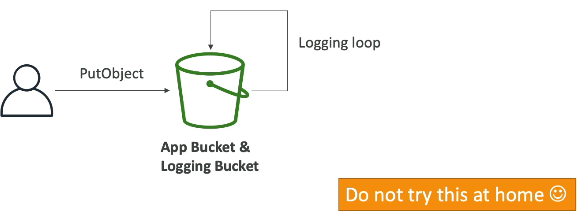
🚫 NEVER use the same bucket for:
Source bucket (being monitored)
Target logging bucket
Why?
Causes an infinite logging loop
Each log write generates another log
Bucket grows exponentially
Results in very high costs
Amazon S3 – Pre-Signed URLs
What Is a Pre-Signed URL?
A temporary URL that grants access to a specific S3 object
Generated using:
AWS Management Console
AWS CLI
AWS SDK
URL includes:
Authorization information
Expiration time
URL Expiration
S3 Console - 1 min up to 720 mins (12 hours)
AWS CLI - (default 3600 secs, max. 604800 secs —> 168 hous)
How Pre-Signed URLs Work
The user who generates the URL must have permission to:
s3:GetObject(for downloads)s3:PutObject(for uploads)
Anyone who receives the URL:
Inherits the permissions of the creator
Does not need AWS credentials
What is the use case?
Scenario
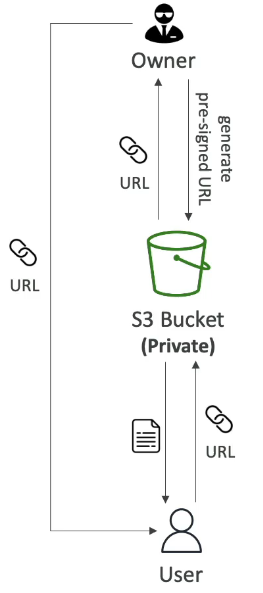
You have a private S3 bucket
You want to give external access to one specific file
You do not want to make the file public or compromise security
Steps
Generate Pre-Signed URL
As the bucket owner or an authorized IAM user
URL carries your credentials/permissions (GET or PUT)
URL has an expiration time (temporary access)
Share the URL
Send the pre-signed URL to the target user
User does not need AWS credentials
Access the File
User clicks the URL or uses it in a browser/app
S3 verifies the signature and permissions
File is returned (download or upload) for the limited time allowed
Common Use Cases:
Allow only logged-in users to download premium video from your s3 bucket
Allow an ever-changing list of users to download files by generating URLs dynamically
Allow temporarily a user to upload a file to a precise location in your s3 bucket.
Amazon S3 Glacier Vault Lock
S3 Glacier Vault Lock is a security feature used to implement a WORM model
(Write Once, Read Many).The idea is:
You take an object
You store it in an S3 Glacier vault
You lock it so it can never be modified or deleted
How Glacier Vault Lock Works
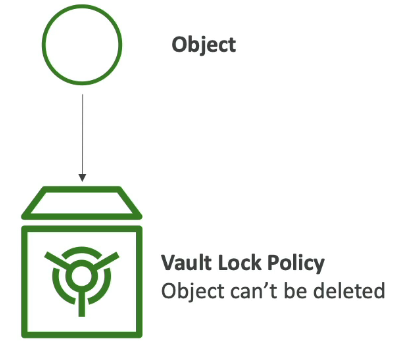
You create a Vault Lock Policy on the Glacier vault
Once the policy is locked, it:
Cannot be changed
Cannot be deleted
Cannot be overridden by anyone
After the policy is locked:
Any object inserted into the vault can never be deleted
This includes administrators, root users, and even AWS
Use Case
Compliance and Data Retention
S3 Object Lock (S3 Buckets)
S3 Object Lock provides a similar WORM model but for S3 buckets
It is more granular than Glacier Vault Lock
Versioning must be enabled before Object Lock can be used
Key Difference from Glacier Vault Lock
Glacier Vault Lock applies to the entire vault
S3 Object Lock applies to individual object versions
S3 Object Retention Modes
1. Compliance Mode
Very strict retention mode
Object versions:
Cannot be overwritten
Cannot be deleted
Cannot be altered by anyone (including root)
Retention period:
Cannot be shortened
Retention settings cannot be changed
Used when absolute compliance is required
2. Governance Mode
More flexible than compliance mode
Most users:
Cannot delete or modify object versions
Admin users with special IAM permissions:
Can override retention settings
Can delete objects
Useful when compliance is needed but admins still need control
Retention Period
Applies to both compliance and governance modes
Defines how long an object is protected
Retention period:
Can be extended
Cannot be shortened in compliance mode
Legal Hold
Legal Hold is independent of retention period
Protects an object indefinitely
Used when an object is required for:
Legal investigations
Court cases
Managing Legal Holds
Requires IAM permission:
s3:PutObjectLegalHoldUsers with this permission can:
Place a legal hold on an object
Remove a legal hold once it is no longer needed
What Problem Do Access Points Solve?
Large S3 buckets often store multiple types of data (finance, sales, analytics, etc.)
Different users and groups need access to different parts of the same bucket
Managing access with one large S3 bucket policy becomes complex and hard to scale
What Are S3 Access Points?
S3 Access Points provide separate access paths to the same S3 bucket
Each access point:
Has its own policy
Controls access to specific prefixes (folders) in the bucket
Policies look just like S3 bucket policies
Example Use Case
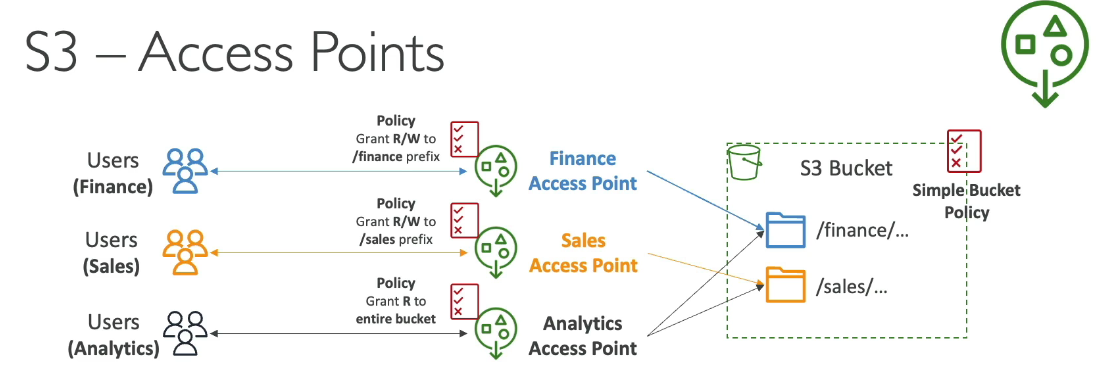
One S3 bucket contains:
/finance/sales
Access Points Created:
Finance Access Point
Read/Write access to
financeprefix
Sales Access Point
Read/Write access to
salesprefix
Analytics Access Point
Read-only access to both
financeandsales
Each access point has its own policy, making security easier to manage.
To Summarize:
Access Points simplify security management for S3 Buckets
Each Access Point has:
its own DNS name (Internet Origin or VPC Origin)
you can attach an access point policy (similar to bucket policy) - manage security at scale
S3 VPC-Origin Access Points
Used for private access from within a VPC
Example: EC2 instances accessing S3 without going through the internet
Requirements:
Create an S3 VPC endpoint
VPC endpoint policy must allow:
Access to the S3 bucket
Access to the S3 access points
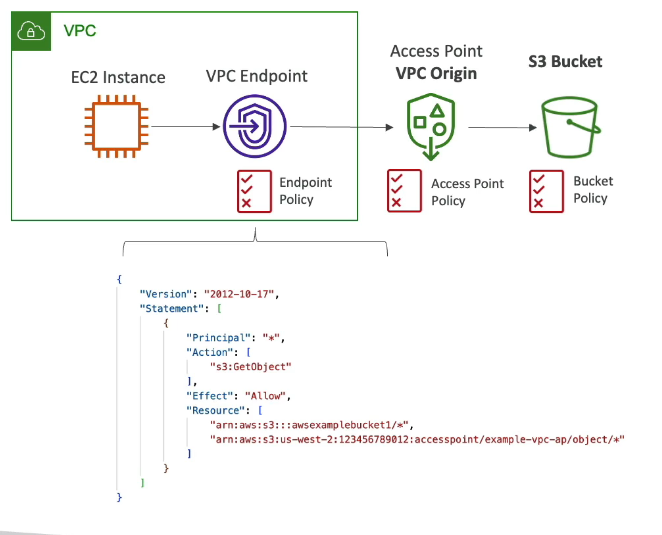
S3 Object Lambda — Notes
What Is S3 Object Lambda?
S3 Object Lambda allows you to modify an object just before its being retrieved by the caller application
The original object in the S3 bucket is not changed
Uses S3 Access Points + AWS Lambda
How It Works (High-Level Flow)
Application requests an object
Request goes through an S3 Object Lambda Access Point
The access point invokes a Lambda function
Lambda function:
Retrieves the original object from S3
Modifies the data (redact, enrich, transform, etc.)
Modified object is returned to the application
Example 1: Analytics Application (Redacted Data)
E-commerce app:
Direct access to the S3 bucket
Can read/write original objects
Analytics app:
Uses an S3 Object Lambda access point
Lambda function redacts sensitive data
Result:
Analytics app receives redacted objects
Original data remains unchanged
 Note
Note  Flashcards (156)