DBMS L7
 Studied by 3 people
 Call with Kai
 Learn
Learn Practice Test
 Spaced Repetition
 Match
Match Flashcards
 Knowt Play
1/19

Earn XP
Description and Tags
Managing Schema Objects
Name | Mastery | Learn | Test | Matching | Spaced | Call with Kai |
|---|
No study sessions yet.
20 Terms
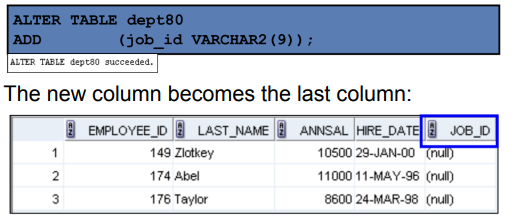
ALTER TABLE Statement
Use this statement to
Add a new column
Modify an existing column
Define a default value for the new column
Drop a column
Rename a column
Change table to read-only status
Adding a Column
Modifying a Column
You can change a column’s data type, size, and default value.
A change to the default value affects only subsequent insertions to the table.

Dropping a Column

Deferring Constraint
Constraints can have the following attributes:
DEFERRABLE or NOT DEFERRABLE
INITIALLY DEFERRED or INITIALLY IMMEDIATE
INITIALLY DEFERRED
Waits to check the constraint until the transaction ends
INITIALLY IMMEDIATE
Checks the constraint at the end of the statement execution
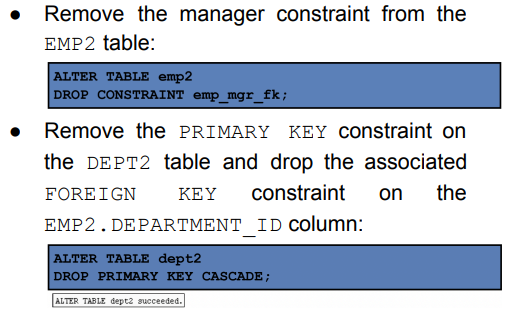
Dropping a Constraint
Disabling Constraints
Execute the DISABLE clause of the ALTER TABLE statement to deactivate an integrity constraint
Apply the CASCADE option to disable dependent integrity constraints.

Enabling Constraints
Activate an integrity constraint currently disabled in the table definition by using the ENABLE clause.
A UNIQUE index is automatically created if you enable a UNIQUE key or a PRIMARY KEY constraint
Cascading Constraints
is used along with the DROP COLUMN clause.
drops all referential integrity constraints that refer to the primary and unique keys defined on the dropped columns.
drops all multicolumn constraints defined on the dropped columns.
RENAME COLUMN
Use this clause of the ALTER TABLE statement to rename table columns.
RENAME CONSTRAINT
Use this clause of the ALTER TABLE statement to rename any existing constraint for a table.
READ ONLY
Put a table into read-only mode, which prevents DDL or DML changes during table maintenance
READ WRITE
Put the table back into read/write mode
DROP TABLE
Moves a table to the recycle bin
Removes the table and all its data entirely if the PURGE clause is specified
Invalidates dependent objects and removes object privileges on the table
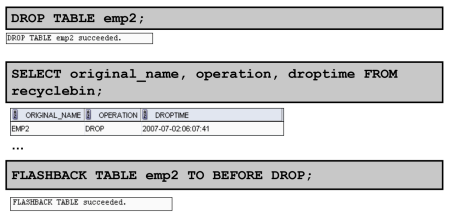
FLASHBACK TABLE Statement
Enables you to recover tables to a specified point in time with a single statement
Restores table data along with associated indexes, and constraints
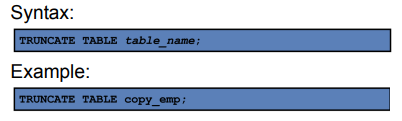
TRUNCATE Statement
Remove all rows from a table, leaving the table empty and the table structure intact
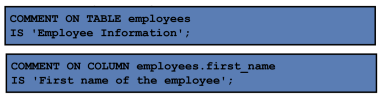
COMMENT
You can add comments to a table or column by using th statement
 Note
Note  Flashcards (409)