Storage and Use of Arrays 1
 Call Kai
 Learn
Learn Practice Test
 Spaced Repetition
 Match
Match Flashcards
 Knowt Play
1/13

There's no tags or description
Looks like no tags are added yet.
Name | Mastery | Learn | Test | Matching | Spaced | Call with Kai |
|---|
No analytics yet
Send a link to your students to track their progress
14 Terms
What are arrays?
a fundamental data structure, and an important part of most programming languages.
In Python, they are containers that can store more than one item at the same time.
an ordered collection of elements with every value being of the same data type.
they can only hold a sequence of multiple items that are of the same type
three ways to import array module
array.array()
arr.array()
array()
for printing arrays: for i in range ()
import array
import array as arr
from array import

for i in range ()defining arrays in python
variable_name = array(typecode,[elements])List of type code to define Arrays in Python
typecodes
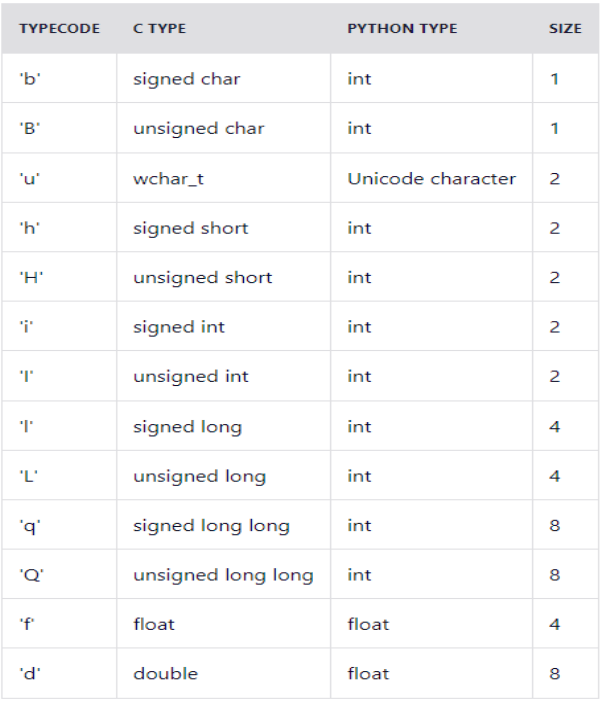
create arrays with a float typecode
import array as arr
b = arr.array('d', [2.5, 3.2, 3.3])
print(b)If you want to print original copy
for i in range (0, 3):
    print(b[i])

2.5
3.2
3.3creating an array with integer type
import array as arr
a = arr.array('i', [1,2,4])
print(a)

array('i', [1, 2, 4])adding elements to an array
insert(position, value)
append()
insert(position, element)
a.insert(1,4)
print(a)

array('i', [1, 4, 2, 3])append(element)
import array

s1 = array.array('i', [1,2,3])
s2 = array.array('i', [4,5,6])
print(s1)
print(s2)
s3 = s1 + s2
print(s3)
s1.append(4)
print(s1)

array('i', [1, 2, 3])
array('i', [4, 5, 6])
array('i', [1, 2, 3, 4, 5, 6])
array('i', [1, 2, 3, 4])Accessing the elements from an Array
can access the elements of an array using the index operator [ ]
import array as arr

a = arr.array('i', [1, 2, 3, 4, 5, 6])
print("Access element is: ", a[0])
print("Access element is: ", a[3])
b = arr.array('d', [2.5, 3.2, 3.3])
print("Access element is: ", b[1])
print("Access element is: ", b[2])

Access element is:  1
Access element is:  4
Access element is:  3.2
Access element is: 3.3Remove the elements from an Array
import array
x = array.array('i', [1,2,3,1,5])
print("The new created array is : ")
for i in range (0,5):
    print(x[i])

The new created array is :
1
2
3
1
5Remove the elements from an Array using pop(position) function
print("The popped element is : ")
print(x.pop(2))

print("The array after popping is : ")
for i in range (0,4):
    print(x[i])

The popped element is :
3
The array after popping is :
1
2
1
5Remove the elements from an Array using remove(position) function
x.remove(1)
print("The array after removing is : ", end ="")
for i in range (0,3):
    print (x[i])

The array after removing is : 2
1
5
