2. PowerShell Basics
 Studied by 0 people
 Call Kai
 Learn
Learn Practice Test
 Spaced Repetition
 Match
Match Flashcards
 Knowt Play
1/14

Earn XP
Description and Tags
Pipelines, loops, error handling, control flow, conditional logic
Name | Mastery | Learn | Test | Matching | Spaced | Call with Kai |
|---|
No analytics yet
Send a link to your students to track their progress
15 Terms
What is a pipeline?
A pipeline is a method for chaining together commands in a singl, allowing the output of one command to be used as the input for the next.
How do you add a pipeline?
You add one using |
Example: command1 | command2 | command 3
Use a pipeline to get the notepad process then stop it.
Get-Process notepad | Stop-Process
Not all commands can be piped. How can you check whether a command can be piped?
Use the get-help command. Under “-InputObject” it will say whether the command accepts pipeline inputs.
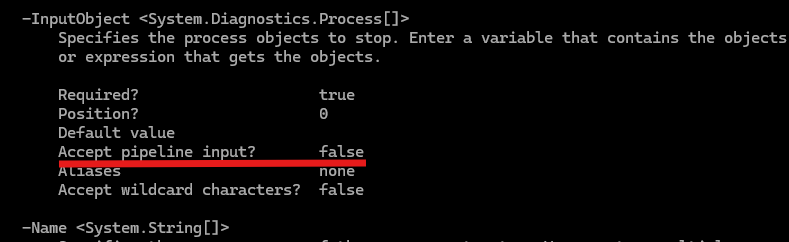
You want to find out if the get-process command accepts pipeline inputs. What command would you type?
get-help -name get-process -full
How many commands can you chain together via the pipeline?
as many as you want
If you are going to perform the same action on multiple things such as users or computers, you should define those objects in an ______
array
Write a command that tests the connection (or pings) the loopback address but instead of showing the detailed ping results, make it return true or false.
Test-connection -Quiet
Comparison operators can be used in PowerShell to test values for conditional logic. What do the below operators mean?
-eq
-ne
-gt
-lt
-ge
-le
-eq (equal to)
-ne (not equal to)
-gt (greater than)
-lt (less than)
-ge (greater than or equal to)
-le (less than or equal to)
(Example: 4 -gt 3)

The simplest kind of conditional logic are if/else statements. Write a statement where if $number equals 1, write “True”, else write “False”
if ($number -eq 1) {
Write-Host “True”
} else { Write-Host “False”
}
You have an array called $computers (PC1, PC2, PC3)
Enter a command to display a message saying “The computer PC1 is offline”.
Write-Host “The computer $($computers[0]) is offline”
You can put multiple conditions in an if statement. Each condition is encased with brackets. If you want to require both conditions be true, what do you need to add between the conditions?
-and
Example:
if ((condition1) -and (condition2)) {
do blah
} else { do blah blah
}
Write an if statement with two conditions called “condition1” and “condition2”. Make it so one or the other has to be true for the code to run.
if ((condition1) -or (condition2))
 Note
Note  Flashcards (74)