MOBILE PROGRAMMING (MIDTERM)
 Call Kai
 Learn
Learn Practice Test
 Spaced Repetition
 Match
Match Flashcards
 Knowt Play
1/59

There's no tags or description
Looks like no tags are added yet.
Name | Mastery | Learn | Test | Matching | Spaced | Call with Kai |
|---|
No analytics yet
Send a link to your students to track their progress
60 Terms
activity
represents a single screen in the app where the user can perform a single focused task such as sending an e-mail. It is usually presented to the user as a full-screen window.
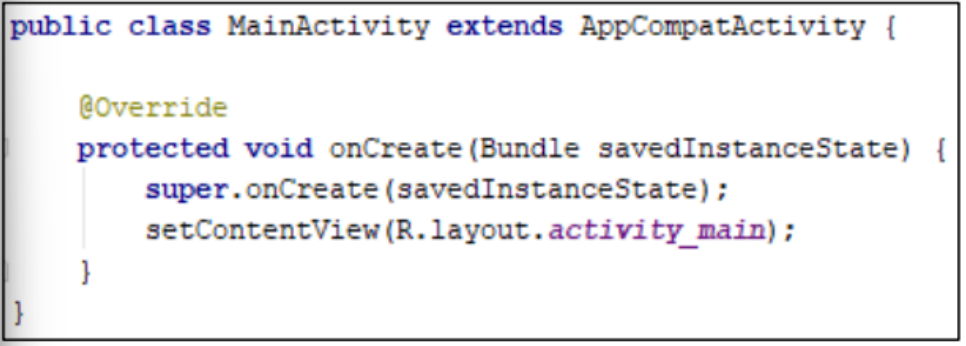
Create an Activity Java class.
main activity
is presented to the user when the app is launched. It can then start other activities to perform different actions.
activity life cycle
is the set of states an activity can be in during its entire lifetime.
actvity life cycle
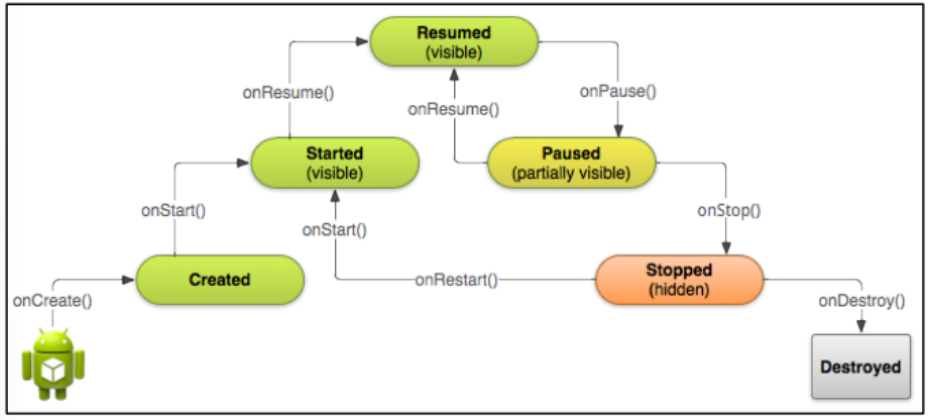
onCreate()
It is invoked when the app is launched for the first time. It happens only once for the entire life of the activity.
onStart()
It is invoked before the activity becomes visible to the user.
onResume() onStart()
if the activity comes to the foreground
onStop() onStart()
if the activity becomes hidden
onResume()
It is invoked before the activity starts interacting with the user.
onPause()
It is invoked when the system is about to start resuming another activity.
onResume() onPause()
if the activity returns to the background
onStop() onPause()
if the activity becomes invisible to the user
onStop()
It is invoked when the activity is no longer visible to the user.
onRestart() onStop()
if the activity is coming back to interact with the user
onDestroy() onStop()
if the activity is about to end
onDestroy()
It is invoked when:
the activity is finishing (due to the
user completely dismissing the
activity or due to finish() being
called on the activity)
the system is temporarily destroying
the activity due to a configuration
change (such as device rotation or
multi-window mode)
onRestart()
It is invoked if the activity comes back after being stopped. It is always followed by onStart().
back stack.
Each time a new activity starts, the previous activity is stopped, but the system preserves the activity in a stack called the
Intent
An activity is started or activated with an ______. An ______is an asynchronous message that is used in an activity to request an action from another activity, or from some other app component.
can be used to start one activity from another activity, and to pass data between activities.
Target activity
the activity that will receive the intent.
Intent data/object
contains a reference to the data you want the receiving activity to operate on.
Intent extras
carry information the receiving activity requires to accomplish the requested action (optional).
Intent flags
may instruct the Android system how to launch an Activity or how to treat it after it's launched (optional).
Explicit intent:
The target of the intent (the class name of the activity) is already identified.
Implicit intent:
The target of the intent is not yet identified but there is a general action to perform. It also includes an action, category, and data type.
<activity> elements in the AndroidManifest.xml
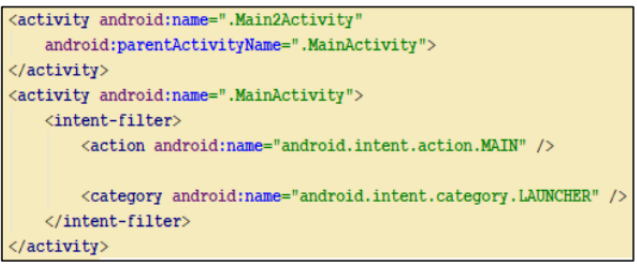
parentActivityName
attribute indicates that the main activity is the parent of the second activity. This enables a left-facing arrow that allows the user to navigate from the current activity to its parent activity.

Add the android:onClick attribute to the Button element that will be used to start another activity.

Define the method that will be used to start another activity.

To verify if the intent works, add a toast to Main2Activity.
layout
defines the structure for an app's user interface.
View (widget)
ViewGroup (layout)
All elements in the layout are built using:
View (widget)
draws something the user can see and interact with
ViewGroup (layout)
an invisible container that defines the layout structure for View and other ViewGroup objects
Declare UI elements in XML.
The presentation of the app can be separated from the code that controls its behavior.
Instantiate layout elements at runtime.
The View and ViewGroup objects can be created and their properties can be manipulated programmatically.
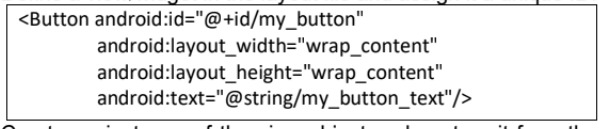
Define a view/widget in the layout file and assign it a unique ID.

Create an instance of the view object and capture it from the layout (typically in the onCreate() method)

To manipulate the property of a widget in Java code:
Context
is an interface to global information about an application environment.
width (layout_width)
height (layout_height)
All view groups include a _________ and _________, and each view is required to define them.
wrap_content
sets the size of the view to the dimensions required by its content.
match_parent
sets the view to be as big as its parent view group will allow.
Constraint Layout
creates large and complex layouts with a flat view hierarchy (no nested view groups).
Linear Layout
organizes its child view elements into a single horizontal or vertical row.
Relative Layout
is used to specify the location of child objects relative to each other (child A to the left of child B) or to the parent (aligned to the top of the parent).
Web View
is used for displaying web pages.
Frame Layout
is designed to block out an area on the screen to display a single item.
Table Layout
arranges its child objects into rows and columns.
Grid Layout
arranges its child objects in a rectangular grid that can be scrolled.
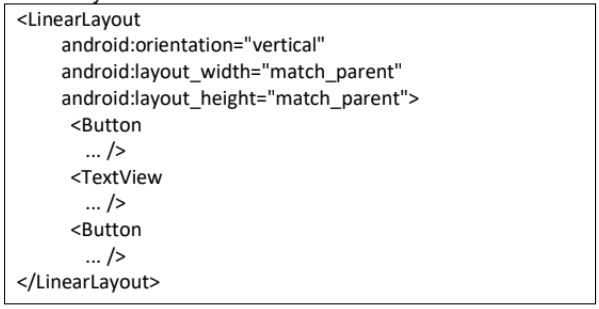
To create a layout in XML:
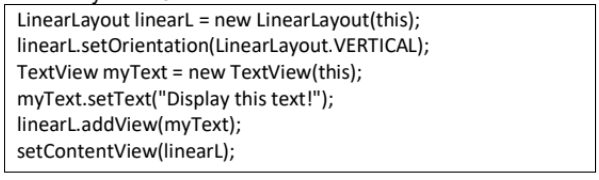
To create a layout in Java code:
notification
is a message that Android displays outside the app's UI to provide the user with reminders, communication from other people, or other timely information from the app.
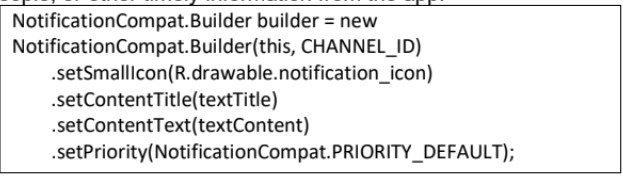
notification drawer
allows to view more details and take actions with the notification.
app bar/action bar
provides a visual structure and interactive elements that are familiar to users.
Its key features are:
A dedicated space for giving the app an identity and indicating the user's location in the app
Access to important actions in a predictable way, such as search
Support for navigation and view switching (with tabs or drop-down lists)

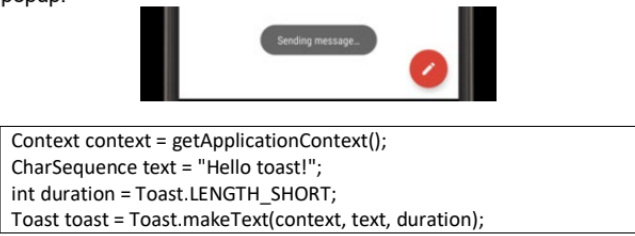
toast
provides simple feedback about an operation in a small popup.
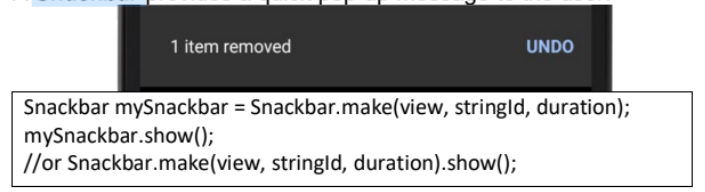
Snackbar
provides a quick pop-up message to the user.
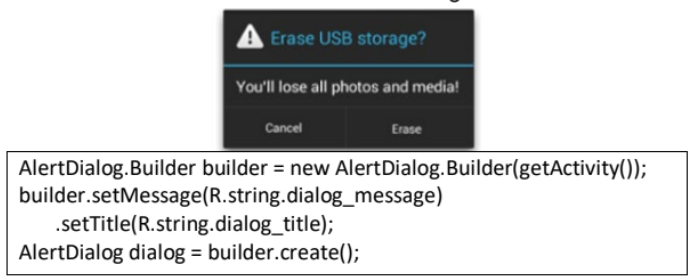
dialog
is a small window that prompts the user to make a decision or enter additional information. It is not designed to fill the screen.
menu
is used to present user actions and other options in the app's activities.