L4 - Prototyping

0.0(0)
studied byStudied by 0 people
0.0(0)
full-widthCall Kai
learnLearn
examPractice Test
spaced repetitionSpaced Repetition
heart puzzleMatch
flashcardsFlashcards
GameKnowt Play
Card Sorting

1/17

encourage image

There's no tags or description

Looks like no tags are added yet.

Study Analytics
Name
Mastery
Learn
Test
Matching
Spaced

No study sessions yet.

18 Terms

1
New cards

What is a task?

Set of activities required to achieve particular goal
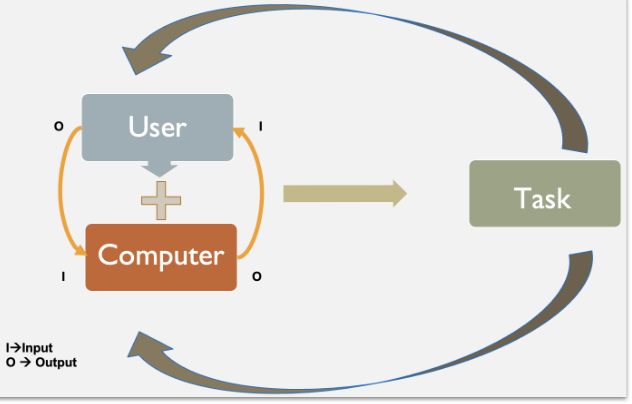
<p>Set of activities required to achieve particular goal</p>
2
New cards
<p>What are 2 ways to analyze a task?</p>

What are 2 ways to analyze a task?

  1. GOMS

  2. Cognitive task analysis (CTA)

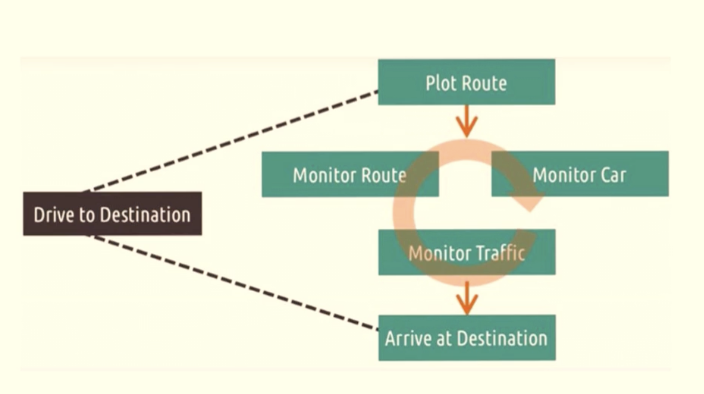
“Task analysis is the process of learning about users by observing them in action to understand how they perform their tasks and achieve their intended goals.”

  • Identify user goals

    • Create a copy of stick note

  • Observe user actions to reach those goals

    • Mouse clicks, keyboard shortcuts

  • Analyze environmental and system influences

    • Workspace setup, distractions

  • Extract insights for design

    • Reduce unnecessary steps

<ol><li><p><span style="font-family: &quot;Helvetica Neue&quot;, sans-serif;"><strong>GOMS</strong></span></p></li><li><p><strong>Cognitive task analysis (CTA)</strong></p></li></ol><p></p><p><span>“Task analysis is the process of learning about users by observing them in action to understand how they perform their tasks and achieve their intended goals.”</span></p><ul><li><p style="text-align: justify;"><span style="font-family: &quot;Helvetica Neue&quot;, sans-serif;"><strong>Identify user goals</strong></span></p><ul><li><p style="text-align: justify;"><span style="font-family: &quot;Helvetica Neue&quot;, sans-serif;">Create a copy of stick note</span></p></li></ul></li><li><p style="text-align: justify;"><span style="font-family: &quot;Helvetica Neue&quot;, sans-serif;"><strong>Observe user actions to reach those goals</strong></span></p><ul><li><p style="text-align: justify;"><span style="font-family: &quot;Helvetica Neue&quot;, sans-serif;">Mouse clicks, keyboard shortcuts</span></p></li></ul></li><li><p><span style="font-family: &quot;Helvetica Neue&quot;, sans-serif;"><strong>Analyze environmental and system influences</strong></span></p><ul><li><p><span style="font-family: &quot;Helvetica Neue&quot;, sans-serif;">Workspace setup, distractions</span></p></li></ul></li><li><p style="text-align: justify;"><span style="font-family: &quot;Helvetica Neue&quot;, sans-serif;"><strong>Extract insights for design</strong></span></p><ul><li><p style="text-align: justify;"><span style="font-family: &quot;Helvetica Neue&quot;, sans-serif;">Reduce unnecessary steps</span></p></li></ul></li></ul><p></p>
3
New cards

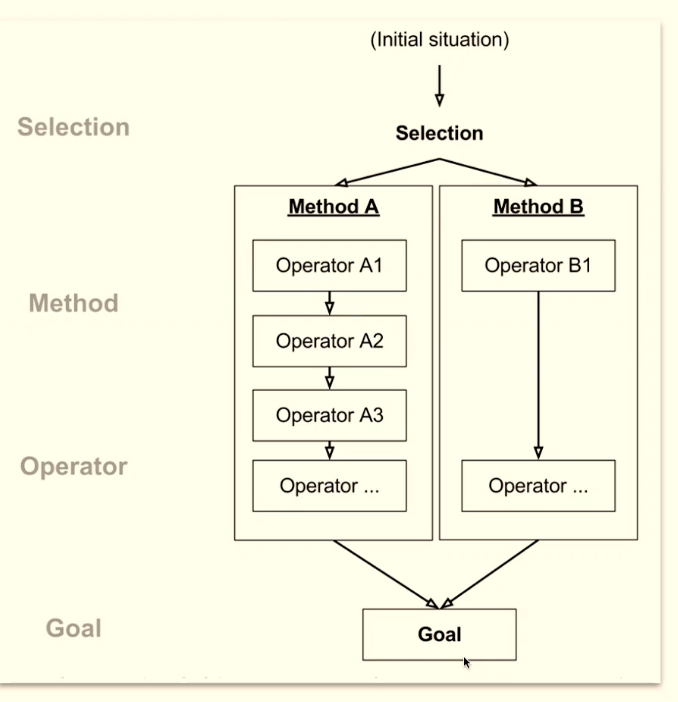
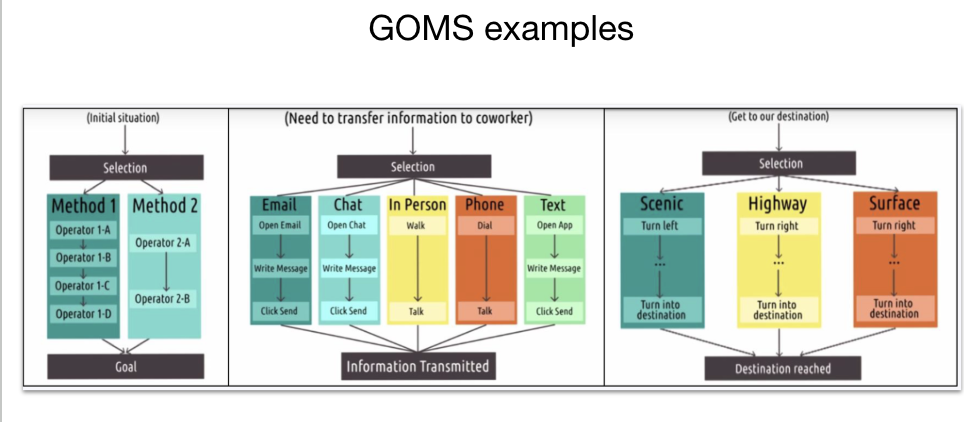
What is the GOMS approach?

GOMS approach considers humans as input/output systems, partially including cognitive and motor skills.

  1. Goals → single or multiple to use HCI product

  2. Operators → series of operations to execute the selected method

  3. Methods → series of operations to achieve the goal

  4. Selection rules →  to select which method to use 

Methods can be compared using: Number of steps, Execution time (keystroke vs. tap), etc. 

Select the method that minimizes the number of steps.
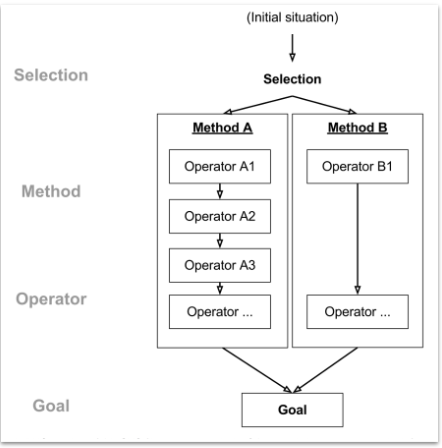
<p>GOMS approach considers humans as input/output systems, partially including cognitive and motor skills.</p><ol><li><p><strong>Goals</strong> → single or multiple to use HCI product</p></li><li><p><strong>Operators</strong> → series of operations to execute the selected method</p></li><li><p><strong>Methods</strong> → series of operations to achieve the goal</p></li><li><p><strong>Selection rules</strong> →&nbsp; to select which method to use&nbsp;</p></li></ol><p><u>Methods</u> can be compared using: Number of steps, Execution time (keystroke vs. tap), etc.&nbsp;</p><p><span style="font-family: &quot;Helvetica Neue&quot;, sans-serif;"><strong>Select the method that minimizes the number of steps.</strong></span></p>
4
New cards

What are 2 advantages of using GOMS?

  • It can predict interaction behavior (e.g., task completion time) of the users to aid our design

  • It can provide structured approach to quantify the interaction among different design alternatives

5
New cards

What are 2 disadvantages of using GOMS?

  • Cognitive processes are not part of GOMs

  • Oftentimes, we are discarding the novice users

6
New cards

What is missing in GOMS?

cognitive processes

  • GOMS considers humans as Input/Output machine, but do not include what is happening in between. For instance, some people might prefer email over in person meetings. 
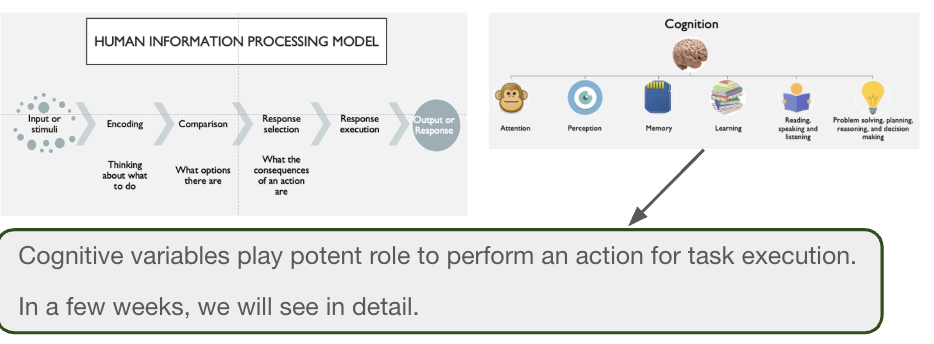
<p><strong>cognitive processes</strong></p><ul><li><p><span style="font-family: &quot;Helvetica Neue&quot;, sans-serif;">GOMS considers humans as Input/Output machine, but do not include what is happening in between. For instance, some people might prefer email over in person meetings.&nbsp;</span></p></li></ul><p></p>
7
New cards

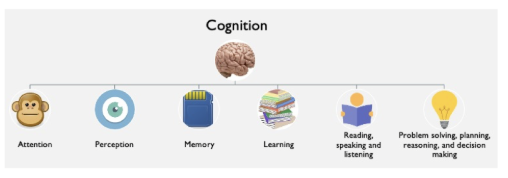
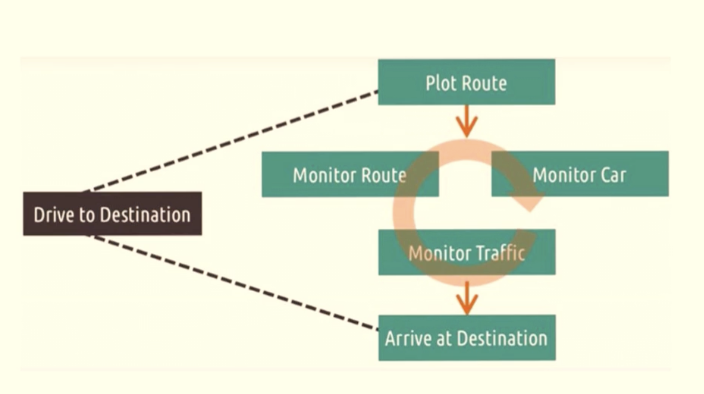
What is cognitive task analysis (CTA)?

more emphasis on cognitive aspects of the tasks. this approach aims at analyzing and understanding cognitive processes to perform the task

some factors:

  • memory

  • attention

  • cognitive load

<p>more emphasis on cognitive aspects of the tasks. this approach aims at analyzing and understanding cognitive processes to perform the task</p><p><strong>some factors:</strong></p><ul><li><p>memory</p></li><li><p>attention</p></li><li><p>cognitive load</p></li></ul><p></p>
8
New cards
<p>What are pros of CTA?</p>

What are pros of CTA?

  • less formalism yet good enough to design interfaces

  • considers cognitive aspects of task

    • how easy to perform?

      • less/more cognitive load

      • attention hungry or seamless

      • recognition over recall

9
New cards
<p>What are cons of CTA?</p>

What are cons of CTA?

  • needs collaboration with different field

  • time

  • hard to carry out if you are new in desiging interfaces
10
New cards
<p>What is prototyping?</p>

What is prototyping?

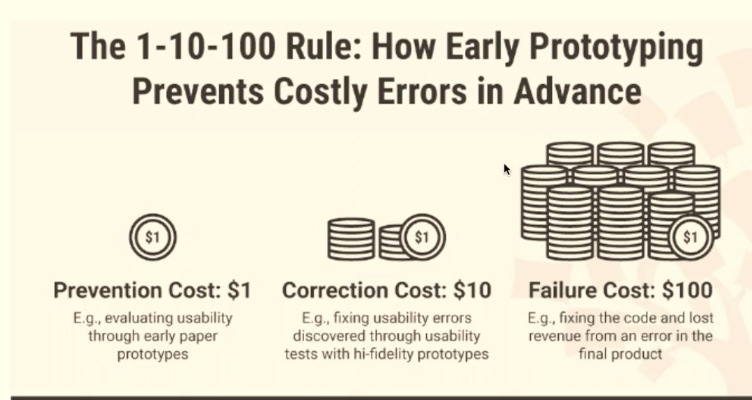
“Prototyping is an experimental process where design teams implement ideas into tangible forms from paper to digital.”

  • With prototyping your team will diminish, prevention, correction, and failure costs.
<p>“Prototyping is an experimental process where design teams implement ideas into tangible forms from paper to digital.”</p><ul><li><p><span style="font-family: &quot;Helvetica Neue&quot;, sans-serif;">With prototyping your team will diminish, <strong>prevention</strong>, <strong>correction</strong>, and <strong>failure</strong> costs.</span></p></li></ul><p></p>
11
New cards

Why is it good to prototype?

  • a clear picture of the potential benefits, risks and costs to stakeholders

  • adapt changes early to avoid commitment to a single, falsely-ideal version

  • users’ feedback to help pinpoint which elements/variants work best 

  • improve time-to-market by minimizing the number of errors to correct before product release.
<ul><li><p><span style="font-family: &quot;Helvetica Neue&quot;, sans-serif;">a clear picture of the potential benefits, risks and costs to stakeholders</span></p></li><li><p><span style="font-family: &quot;Helvetica Neue&quot;, sans-serif;">adapt changes early to avoid commitment to a single, falsely-ideal version</span></p></li><li><p><span style="font-family: &quot;Helvetica Neue&quot;, sans-serif;">users’ feedback to help pinpoint which elements/variants work best&nbsp;</span></p></li><li><p><span style="font-family: &quot;Helvetica Neue&quot;, sans-serif;">improve time-to-market by minimizing the number of errors to correct before product release.</span></p></li></ul><p></p>
12
New cards

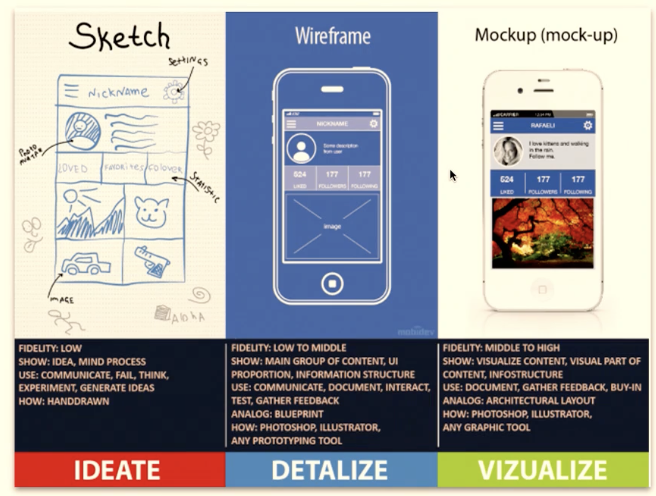
Describe the low fidelity prototype, paper prototypes

  • Cheap and quick iteration

  • Pieces serve as documentation [this is important for your project]

  • Good for team building

  • Honest feedback by user [Low emotional and time investment]

[-] Paper prototypes lacks realism and requires in person testing.

13
New cards

What can you learn with low-fi paper prototypes?

  • conceptual model

  • functionality

  • navigation & task flow

  • terminology

  • screen contents

<ul><li><p>conceptual model</p></li><li><p>functionality</p></li><li><p>navigation &amp; task flow</p></li><li><p>terminology</p></li><li><p>screen contents</p></li></ul><p></p>
14
New cards

What can’t you learn with low-fi paper prototypes?

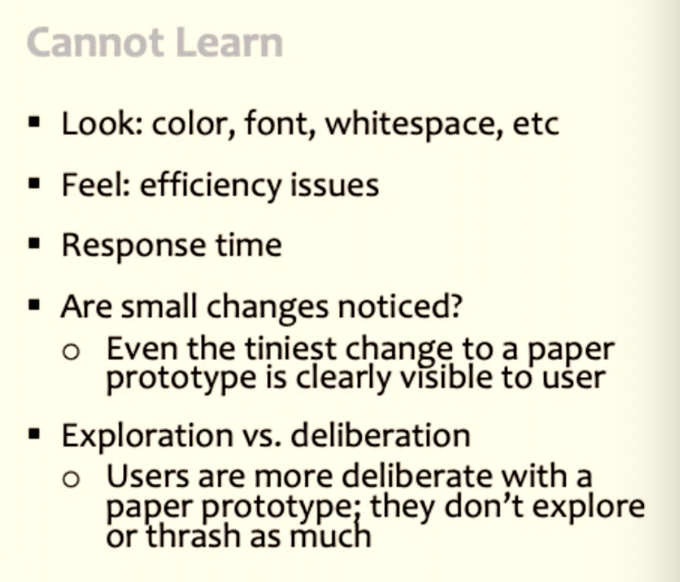
  • look

  • feel

  • response time

  • are small changes noticed?

  • exploration vs deliberation

<ul><li><p>look</p></li><li><p>feel</p></li><li><p>response time</p></li><li><p>are small changes noticed?</p></li><li><p>exploration vs deliberation</p></li></ul><p></p>
15
New cards
<p>Describe the medium fidelity prototype, <strong>clickable wireframes</strong></p>

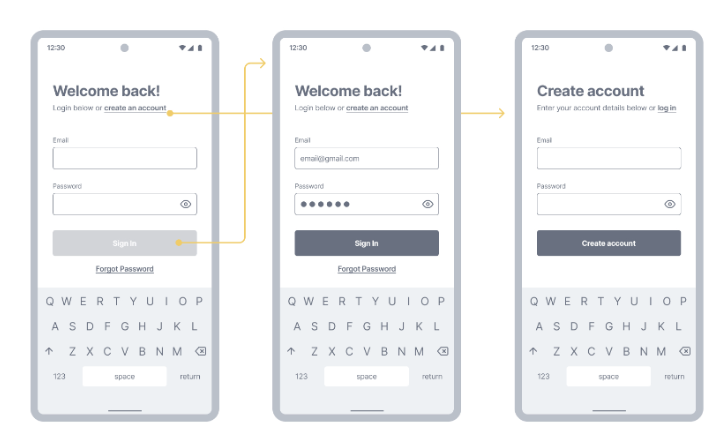
Describe the medium fidelity prototype, clickable wireframes

“Just like paper prototypes, clickable wireframes often don’t look like the finished product, but they do have one significant advantage over paper prototypes — they don’t require a separate person to work as a facilitator during the testing session.”

  • You can interact with prototype

  • Content and visual design are less emphasized

  • Mostly designed with wireframe software, e.g. figma.

  • Content is static but allows (clickable) interactions

  • You can view and interact on a device

More on wireframes

  • Interactive storyboard

  • Placement of items

  • No real content

  • All pages available

  • Good guideline for developers

  • Architecture and layout

  • Flow of the interaction with UI


<p><span style="background-color: transparent; font-family: &quot;Helvetica Neue&quot;, sans-serif;">“Just like paper prototypes, clickable wireframes often don’t look like the finished product, but they do have one significant advantage over paper prototypes — <strong>they don’t require a separate person to work as a facilitator during the testing session</strong>.”</span></p><ul><li><p><span style="background-color: transparent; font-family: &quot;Helvetica Neue&quot;, sans-serif;">You can interact with prototype</span></p></li><li><p><span style="background-color: transparent; font-family: &quot;Helvetica Neue&quot;, sans-serif;">Content and visual design are less emphasized</span></p></li><li><p><span style="background-color: transparent; font-family: &quot;Helvetica Neue&quot;, sans-serif;">Mostly designed with wireframe software, e.g. figma.</span></p></li><li><p><span style="background-color: transparent; font-family: &quot;Helvetica Neue&quot;, sans-serif;">Content is static but allows (clickable) interactions</span></p></li><li><p><span style="background-color: transparent; font-family: &quot;Helvetica Neue&quot;, sans-serif;">You can view and interact on a device</span></p></li></ul><p></p><p><span style="background-color: transparent; font-family: &quot;Helvetica Neue&quot;, sans-serif;"><strong>More on wireframes</strong></span></p><ul><li><p><span style="background-color: transparent; font-family: &quot;Helvetica Neue&quot;, sans-serif;">Interactive storyboard</span></p></li><li><p><span style="background-color: transparent; font-family: &quot;Helvetica Neue&quot;, sans-serif;">Placement of items</span></p></li><li><p><span style="background-color: transparent; font-family: &quot;Helvetica Neue&quot;, sans-serif;">No real content</span></p></li><li><p><span style="background-color: transparent; font-family: &quot;Helvetica Neue&quot;, sans-serif;">All pages available</span></p></li><li><p><span style="background-color: transparent; font-family: &quot;Helvetica Neue&quot;, sans-serif;">Good guideline for developers</span></p></li><li><p><span style="background-color: transparent; font-family: &quot;Helvetica Neue&quot;, sans-serif;">Architecture and layout</span></p></li><li><p><span style="background-color: transparent; font-family: &quot;Helvetica Neue&quot;, sans-serif;">Flow of the interaction with UI</span></p></li></ul><p><br></p><p></p>
16
New cards
<p>Describe the high fidelity prototype</p>

Describe the high fidelity prototype

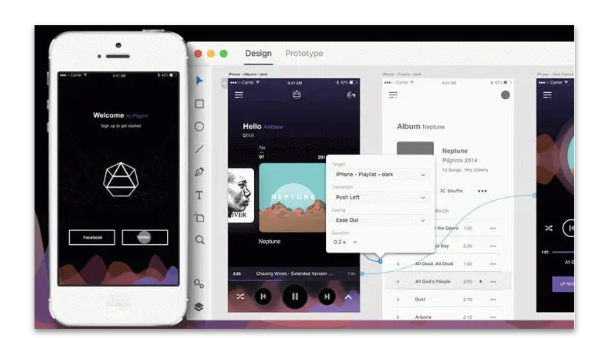
“High-fidelity (hi-fi) prototypes appear and function as similar as possible to the actual product that will ship.”

  • Visual design: Realistic and detailed design — all interface elements, spacing, and graphics look just like a real app or website.

  • Content: Designers use real or similar-to-real content. The prototype includes most or all of the content that will appear in the final design.

  • Interactivity: Prototypes are highly realistic in their interactions.

Hi-fi prototypes will be created with a software tool, e.g. Figma, Sketch, Adobe XD.

  • [+] You will get meaningful feedback during usability test

  • [+] UI element level details (test affordance and animations)

  • [+] Good demonstration to stakeholders

  • [-] time demanding 

  • [-] costly to build

17
New cards
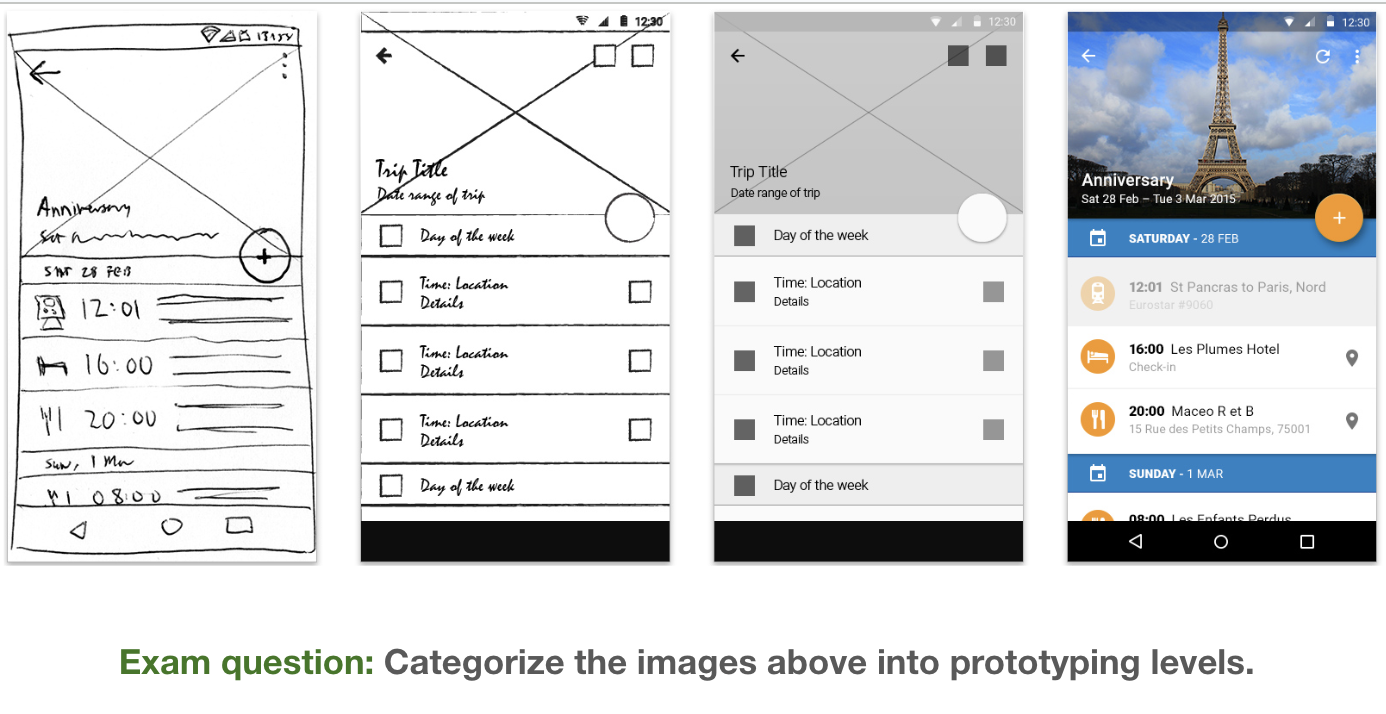
<p>Analyze in content, interaction, and visual </p>

Analyze in content, interaction, and visual

P1: low fidelity = 1+2

P2: medium fidelity = 3

P3: high fidelity = 4

18
New cards

What does fidelity refer to?

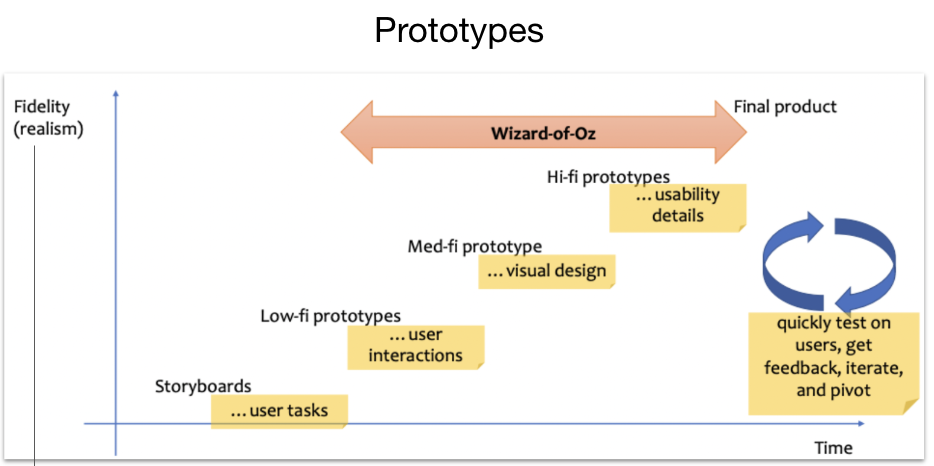
Fidelity refers to the level of detail and functionality you include in your prototype. [Visual design, content, and interactivity]

<p><span style="background-color: transparent; font-family: &quot;Helvetica Neue&quot;, sans-serif;"><strong>Fidelity</strong> refers to the level of detail and functionality you include in your prototype. [Visual design, content, and interactivity]</span></p>