CSC 203 chapter 7: Array-Oriented Programming with NumPy
 Studied by 0 people
 Call Kai
 Learn
Learn Practice Test
 Spaced Repetition
 Match
Match Flashcards
 Knowt Play
1/66

There's no tags or description
Looks like no tags are added yet.
Name | Mastery | Learn | Test | Matching | Spaced | Call with Kai |
|---|
No analytics yet
Send a link to your students to track their progress
67 Terms
ndarray
n-dimensional array type
import numpy as np
The NumPy documentation recommends importing the numpy module as np so that you can access its members with "np."
np.array()
array function receives as an argument an array or other collection of elements and returns a new array containing the argument’s elements
The array function
copies its argument’s contents into the array
numpy.ndarray
the type of object that function array returns
Example input: type(array_name)
When outputting an array, how is it formatted?
NumPy separates each value from the next with a comma and a space and right-aligns all the values using the same field width. It determines the field width based on the value that occupies the largest number of character positions
Ex:
numbers = np.array([2, 3, 5, 7, 11])
numbers
array([ 2, 3, 5, 7, 11])
Arrays with Multidimensional Arguments
NumPy auto-formats arrays, based on their number of dimensions, aligning the columns within each row.

An array object provides attributes that enable you to
discover information about its structure and contents
NumPy does not display trailing 0s to the
right of the decimal point in floating-point values.
array_name.dtype
returns an array’s data type
int64
Numpy’s default data type for integers
64 corresponds to 64-bit (8-byte) integers
float64
Numpy’s default data type for floats
64 corresponds to 64-bit (8-byte) floating-point values
bool
Boolean data type
object
for non-numeric data (such as strings)
array_name.ndim
returns an integer that tells us how many dimensions (rows) the array has
array_name.shape
returns a tuple specifying an array’s dimensions
(rows, columns)
array_name.size
returns an array’s total number of elements
If multidimensional, __ is the product of the array’s shape tuple values
array_name.itemsize
the number of bytes required to store each element
8 if int64 or float64
4 if int32 or float32
Arrays are iterable so you could use
for loops
array_name.flat
You can iterate through a multidimensional array as if it were one-dimensional by using its flat attribute
np.zeros()
creates a new array of specified shapes and types, filled with 0s
numpy.zeros((shape), dtype = None)
np.ones()
returns a new array of given shape and type, with 1s
numpy.ones((shape), dtype = None)
By default, functions zeros and ones create
arrays containing float64 values.
zeros, ones, full: The first argument to these functions must be
an integer or a tuple of integers specifying the desired dimensions
For an integer, each function returns a one-dimensional array with the specified number of elements
For a tuple of integers, these functions return a multidimensional array with the specified dimensions
zeros, ones, full: You can specify the array’s element type with the
zeros and ones function’s dtype keyword argument. Optional
dtype=
np.full()
Return a new array of given shape and type, filled with fill_value.
numpy.full((shape), fill_value, dtype=None)
np.arange(start, stop+1, step)
creates an array of equally spaced values within a defined interval. Similar to using built-in function range
np.linspace(start, stop, num=_ )
produces evenly spaced floating-point ranges. The function’s first two arguments specify the starting and ending values in the range, and the ending value is included in the array. The optional keyword argument num specifies the number of evenly spaced values to produce—this argument’s default value is 50
array_name.reshape(rows,columns)
transforms an array into different number of dimensions. (rows, columns). New shape must have the same number of elements as the original
Most array operations execute significantly
faster than corresponding list operations.
%timeit
times the average duration of operations
np.random.randint( _ , size=())
generates an array with random integers. Arguments (left to right) include:
generate random integers from 0 to _
size = how many random integers to generate
NumPy provides many operators which enable you to
write simple expressions that perform operations on entire arrays
Element-wise operations are applied to
every element in an array
Which operators are commutative?
+ and *. This means the order of the expression does not matter
2 * var is the same as var * 2
scalar
one operand that is a single value
broadcasting
allows us to perform arithmetic operations on arrays of different shapes without reshaping them. It automatically adjusts the smaller array to match the larger array's shape by replicating its values along the necessary dimensions
When one operand is a scalar, NumPy performs the element-wise calculations as if the scalar were an array of the same shape as the other operand, but with the scalar value in all its elements

arithmetic operations require as operands
two arrays of the same size and shape
You may perform arithmetic operations and augmented assignments between
arrays of the same shape. The result is a new array formed by performing an operation on the arrays element-wise in each operand.
Arithmetic between arrays of integers and floating-point numbers results in an array of floating-point numbers
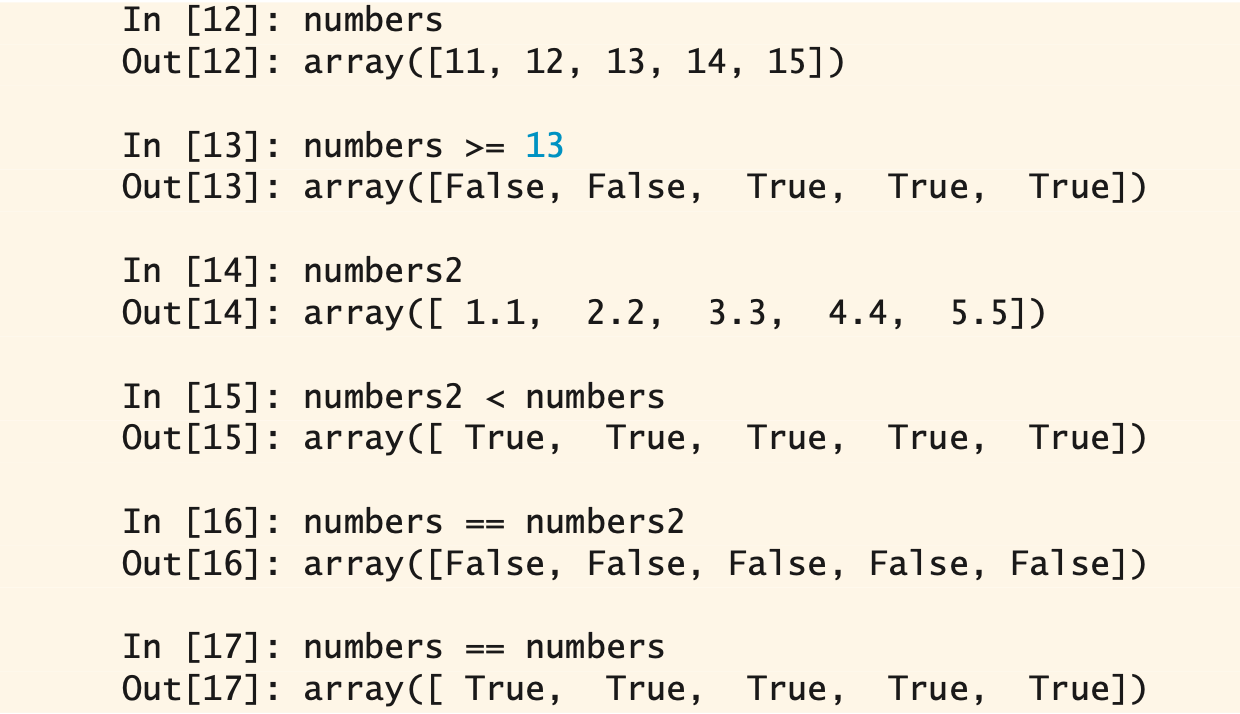
You can compare arrays with individual values and with other arrays. Comparisons are performed
element-wise. Such comparisons produce arrays of Boolean values in which each element’s True or False value indicates the comparison result.
Broadcasting is used to compare an array with a scalar
Each of the following is a functional-style programming reduction
We can use methods to calculate sum, min, max, mean, std (standard deviation) and var (variance) on an array —
The keyword (axis=_)
refers to specific array dimensions in a two-dimensional array
axis=0
performs the calculation on values within each column. Vertically
axis=1
performs the calculation on values within each row. Horizontally
universal functions (or ufuncs)
perform various element-wise operations using one or two array or array-like (such as lists) arguments. Some are called when you use operators like + and * on arrays
np.sqrt(array_name)
a universal function that calculates the square root of an array’s values
np.add(array_1, array_2)
a universal function that adds two arrays with the same shape. It’s equivalent to: array_1 + array_2
np.multiply(array_name, scalar)
Universal function that broadcasts. It multiplies every element of array_name by the scalar value. It’s equivalent to: array_name * scalar
A one-dimensional array with the same length as each row of a two-dimensional array
can be supported by broadcasting
One-dimensional arrays can be indexed and sliced using the same syntax and techniques
that lists and tuples use
To select an element in a two-dimensional array,
specify a tuple containing the element’s row and column indices in [ ]
![<p>specify a tuple containing the element’s row and column indices in [ ] </p>](https://knowt-user-attachments.s3.amazonaws.com/cb4bcc18-06b6-4320-8823-a66bd2f21ca7.png)
To select a single row from a two-dimensional array,
specify only one index in square brackets

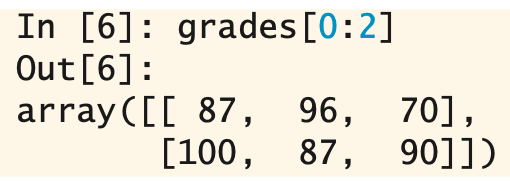
To select multiple sequential rows,
use slice notation
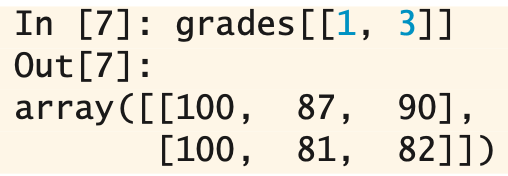
To select multiple non-sequential rows,
use a list of row indices separated by ,
You can select subsets of the columns by providing a tuple specifying
the row(s) and column(s) to select. Each can be a specific index, a slice, or a list.
[:,_] a slice representing all rows
[_, # :#] select consecutive columns using a slice
[_, [#, #]] specific columns using a list of column indices
views
objects that “see” the data in other objects, rather than having their own copies of the data. Also known as a shallow copy
array_name.view()
returns a new array object with a view of the original array object’s data. Modifying a value in the original or view array, changes it in the other
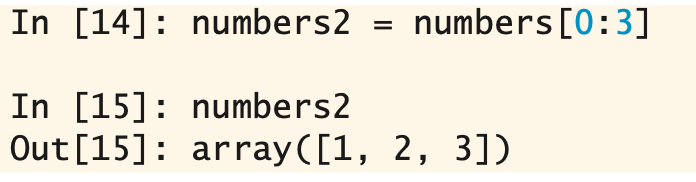
Slices also create
views of the original array
array_name.copy()
returns a new array object with a deep copy of the original array object’s data. Creates a deep copy with independent copies of the original data
array_name.resize(rows,columns)
modifies the original array’s shape
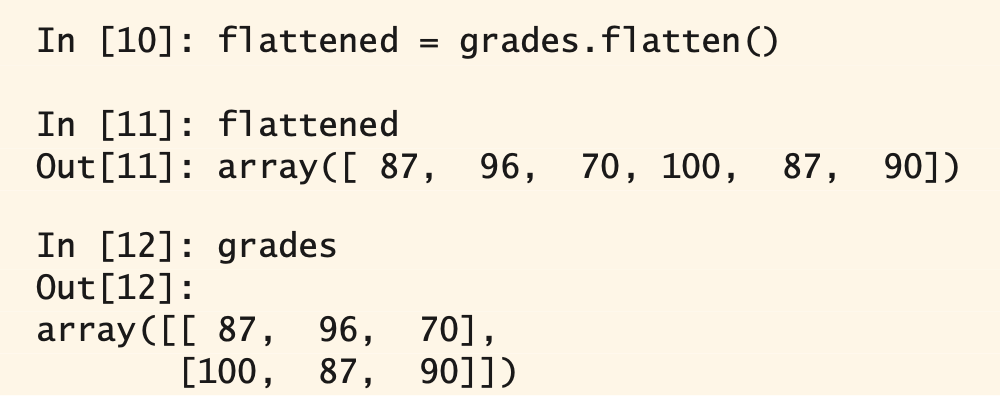
array_name.flatten()
Takes a multidimensional array and flattens it into a single dimension. Deep copies the original array’s data
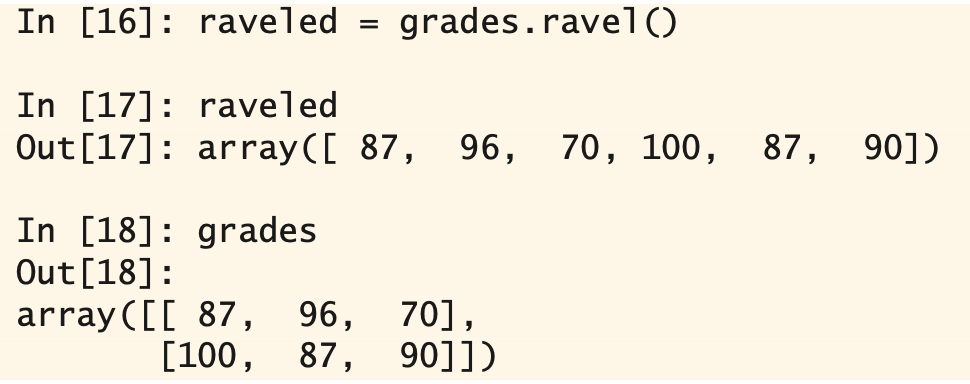
array_name.ravel()
Takes a multidimensional array and flattens it into a single dimension. Produces a view of the original array, which shares the original array’s data
transpose an array’s rows and columns
“flip” the array, so the rows become the columns and the columns become the rows
array_name.T
the T attribute returns a transposed view (shallow copy) of the array. Transposing does not modify the original array
horizontal stacking and vertical stacking does what?
combine arrays by adding more rows or more columns
hstack (horizontal stack) function
np.hstack((array_1, array_2))
pass a tuple containing the arrays to combine. Combines arrays by adding onto the rows
vstack (vertical stack) function
np.vstack((array_1, array_2))
pass a tuple containing the arrays to combine. Places the arrays on top of each other
 Note
Note  Flashcards (124)