DBMS L8
 Studied by 0 people
 Call Kai
 Learn
Learn Practice Test
 Spaced Repetition
 Match
Match Flashcards
 Knowt Play
1/25

Earn XP
Description and Tags
Retrieving Data Using the SQL SELECT Statement
Name | Mastery | Learn | Test | Matching | Spaced | Call with Kai |
|---|
No analytics yet
Send a link to your students to track their progress
26 Terms

SELECT
identifies the columns to be displayed

FROM
identifies the table containing those columns.

SELECT *
selecting all columns
![<p>SELECT [col_name], [col_name]</p>](https://knowt-user-attachments.s3.amazonaws.com/555b39d8-4ca7-4034-9d56-6cdab39f3be0.png)
SELECT [col_name], [col_name]
selecting specific columns
True
(True or False) SQL statements are not case-sensitive.
true
(True or False) SQL statements can be entered on one or more lines.
true
(True or False) Keywords cannot be abbreviated or split across lines.
true
(True or False) Clauses are usually placed on separate lines.
true
(True or False) Indents are used to enhance readability.
false
(True or False) In SQL Developer, SQL statements can optionally be terminated by a semicolon (;). Semicolons are not required when you execute multiple SQL statements.
True
(True or False) In SQL*Plus, you are required to end each SQL statement with a semicolon (;).
SQL Developer
Default heading alignment: Left-aligned
Default heading display: Uppercase
SQL*Plus
Character and Data column headings are left-aligned.
Number column headings are right-aligned.
Default heading display: Uppercase
Arithmetic Expressions
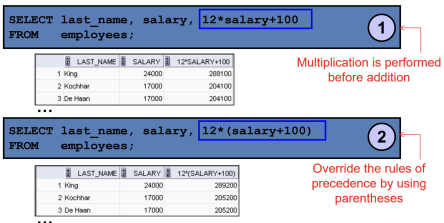
Create expressions with number and date data by using arithmetic operators.
add
+
subtract
-
multiply
*
divide
/
operator precedence
Null
is a value that is unavailable, unassigned, unknown, or inapplicable
false
(True or False) Null is the same as zero or a blank space.
Column Alias
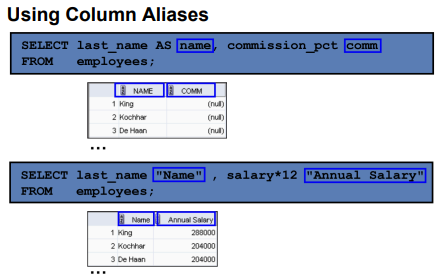
Renames a column heading
Immediately follows the column name (There can also be the optional AS keyword between the column name and alias.)
Requires doubles quotation marks if it contains spaces or special characters, or if it is case-sensitive
Concatenation Operator
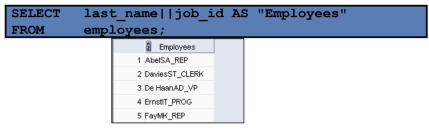
Links columns or character strings to other columns
Is represented by two vertical bars (||)
Creates a resultant column that is a character expression
literal
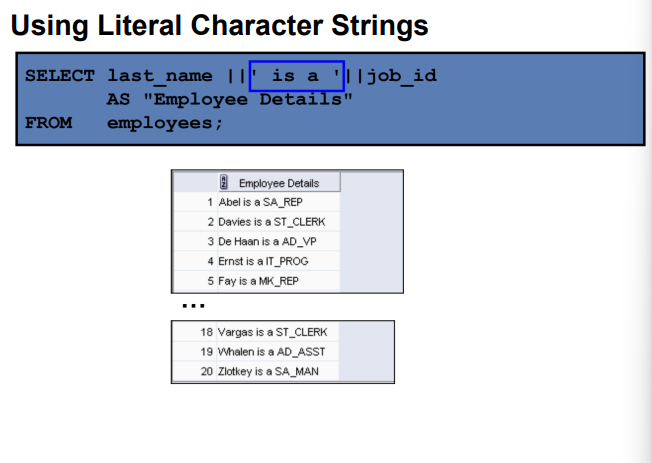
is a character, a number, or a date that is included in the SELECT statement.
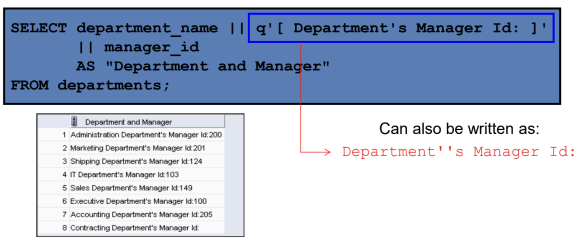
Alternative Quote (q) Operator
Specify your own quotation mark delimiter.
Select any delimiter.
Increase readability and usability
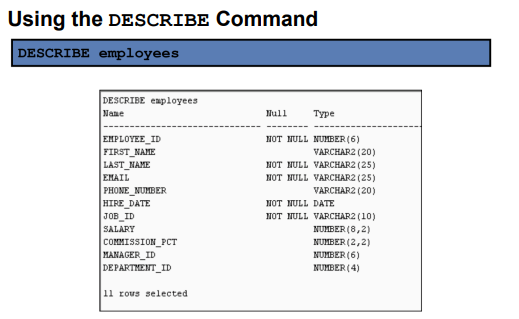
DESCRIBE OR DESC
Use this command to display the structure of a table
 Note
Note  Flashcards (39)