Pro Tools Final
 Studied by 0 people
 Call Kai
 Learn
Learn Practice Test
 Spaced Repetition
 Match
Match Flashcards
 Knowt Play
1/153

There's no tags or description
Looks like no tags are added yet.
Name | Mastery | Learn | Test | Matching | Spaced | Call with Kai |
|---|
No analytics yet
Send a link to your students to track their progress
154 Terms
Frequency
Pitch
Waveform
Shape
Amplitude
Intensity
Frequency is measured in cycles per second, commonly measured in __________.
Hertz
The amplitude of a sound is commonly measured in __________.
Decibels
The highest frequency that can generally be heard by a human being is ___________.
20kHz
The Nyquist-Shannon sampling theorem states that in order to accurately reproduce a signal, it should be periodically sampled at a rate that is at least ___ times the highest frequency you wish to record.
2
The maximum dynamic range of 24-bit audio is ______.
144 dB
True or False:
Of the four versions of Pro Tools (Pro Tools Intro, Pro Tools Artist, Pro Tools Studio, and Pro Tools Ultimate), only Pro Tools Ultimate supports surround mixing.
False
Command
Ctrl
Option
Alt
Control
Start
Return
Enter
When powering up your Pro Tools system, which device should be turned on last?
Monitor Speakers
The default shortcut to start or stop playback is _______________.
Spacebar
When creating a Pro Tools session, which are valid Audio File Types?
AIFF and BWF (WAV)
True or False: A Pro Tools session file contains audio files.
False
The __________ file stores graphic representations of audio files in your session.
WaveCache
True or False: When you create a session, Pro Tools will automatically create a folder to put the session file and the other elements of the session into for easy organization.
True
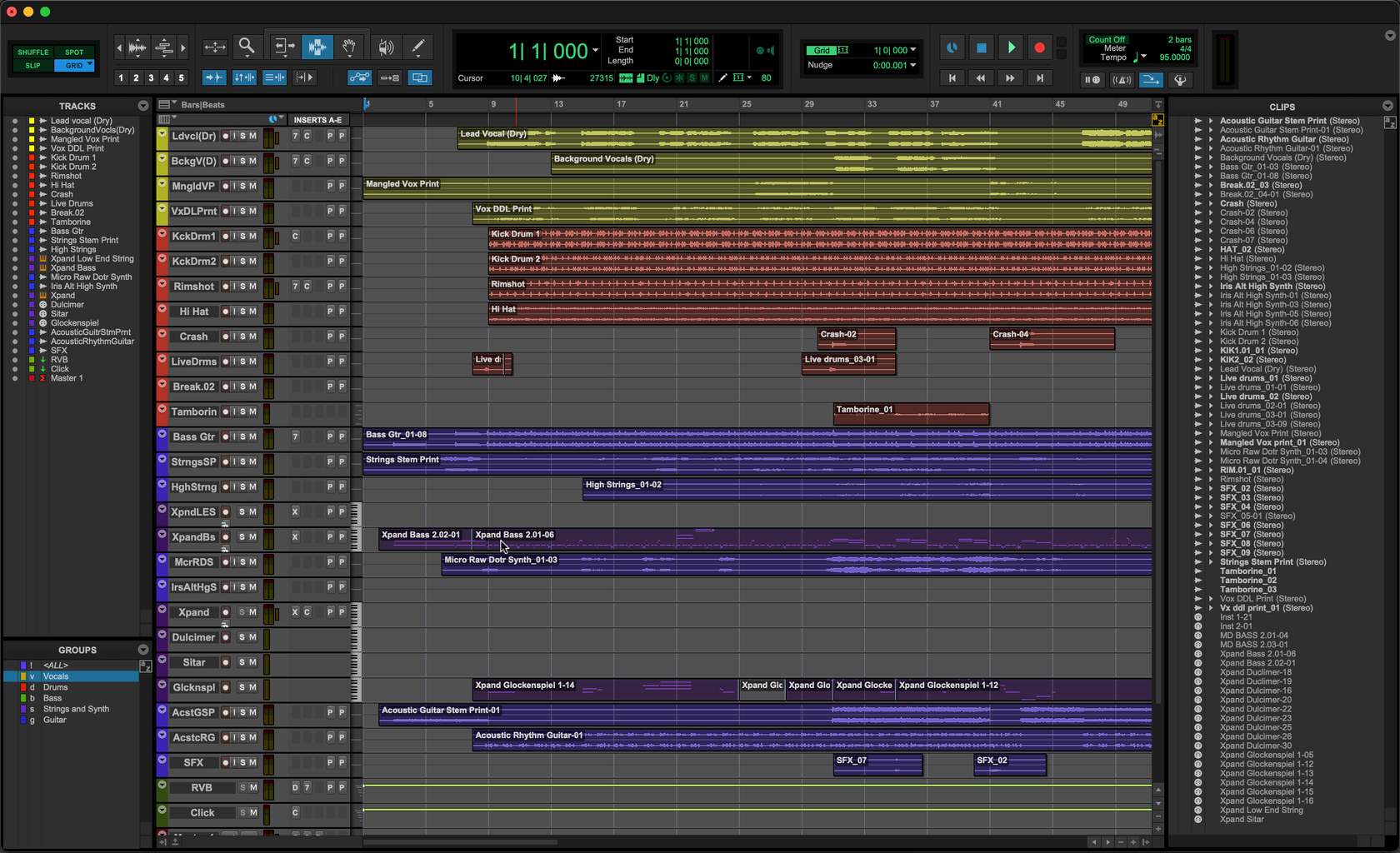
Fill in the blank: The Pro Tools window shown below is called the __________ window.
Edit
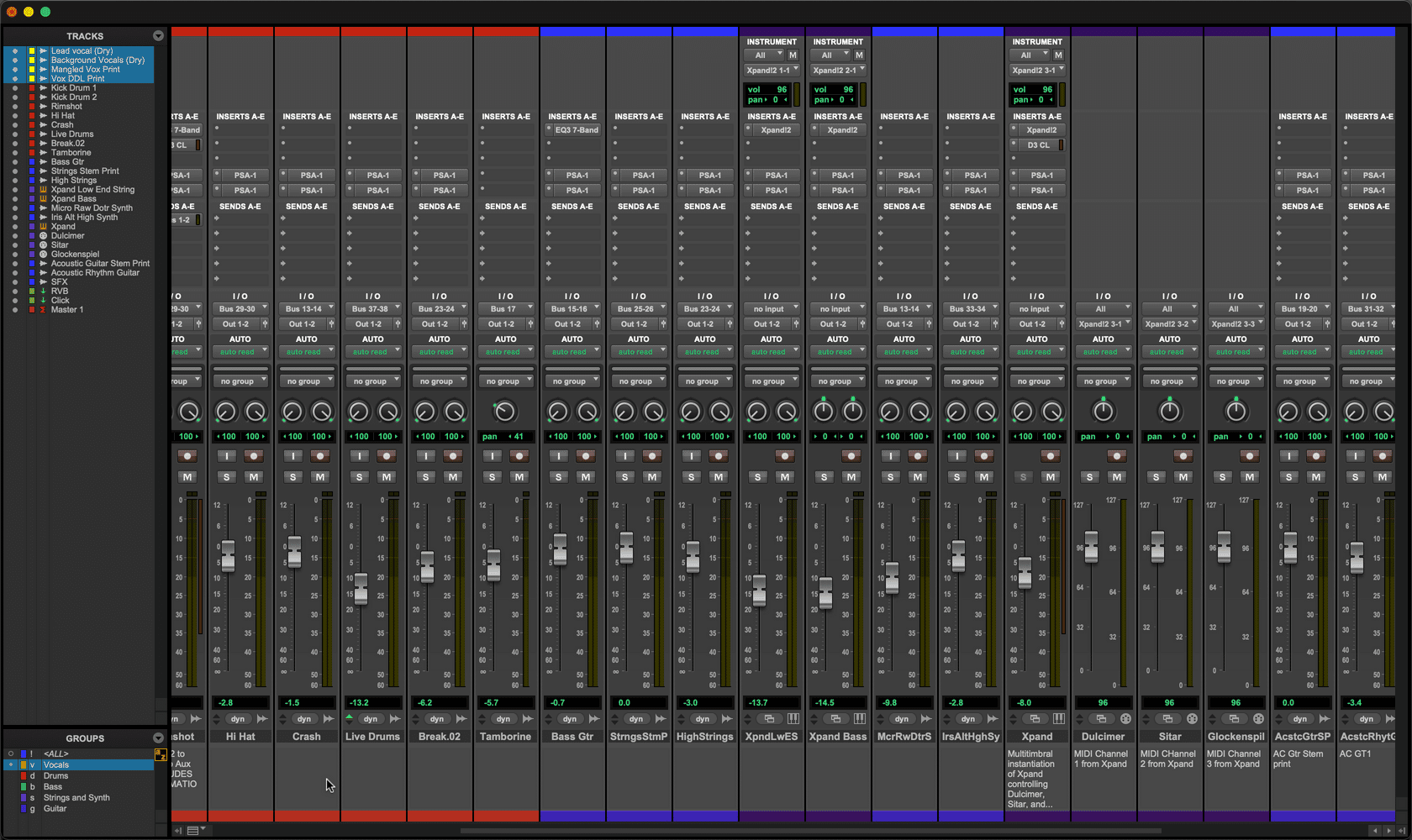
Fill in the blank: The Pro Tools window shown below is called the __________ window.
Mix

Fill in the blank: The Pro Tools window shown below is called the __________ window.
Transport
A new Pro Tools session can be created from the _________ menu.
File
The Mix window can be shown from the __________ menu.
Window
The Edit window's timecode ruler can be shown or hidden from the _________ menu.
View
Audio
Audio is recorded to this kind of track.
Aux Input
Track is identified in the Tracks List and Mix window with a downward-facing arrow icon.
MIDI
Commonly used in conjunction with an Auxiliary Input track.
Instrument
MIDI can be recorded to this track type and heard audibly.
Master Fader
Controls the level of an output
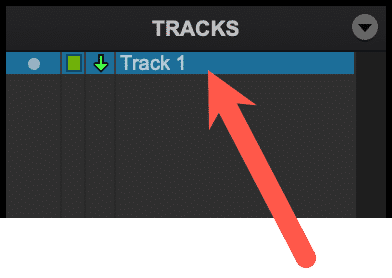
The track shown here is a(n) _______________ track.
Aux Input
Which are types of Folder tracks?
Basic and Routing
From which Pro Tools menu can a track be created?
Track
What is the default shortcut to open the New Tracks dialog box?
Shift+Command+N (Mac), or Shift+Ctrl+N (Windows)
From which Edit/Mix window view can a track's Output be set?
I/O
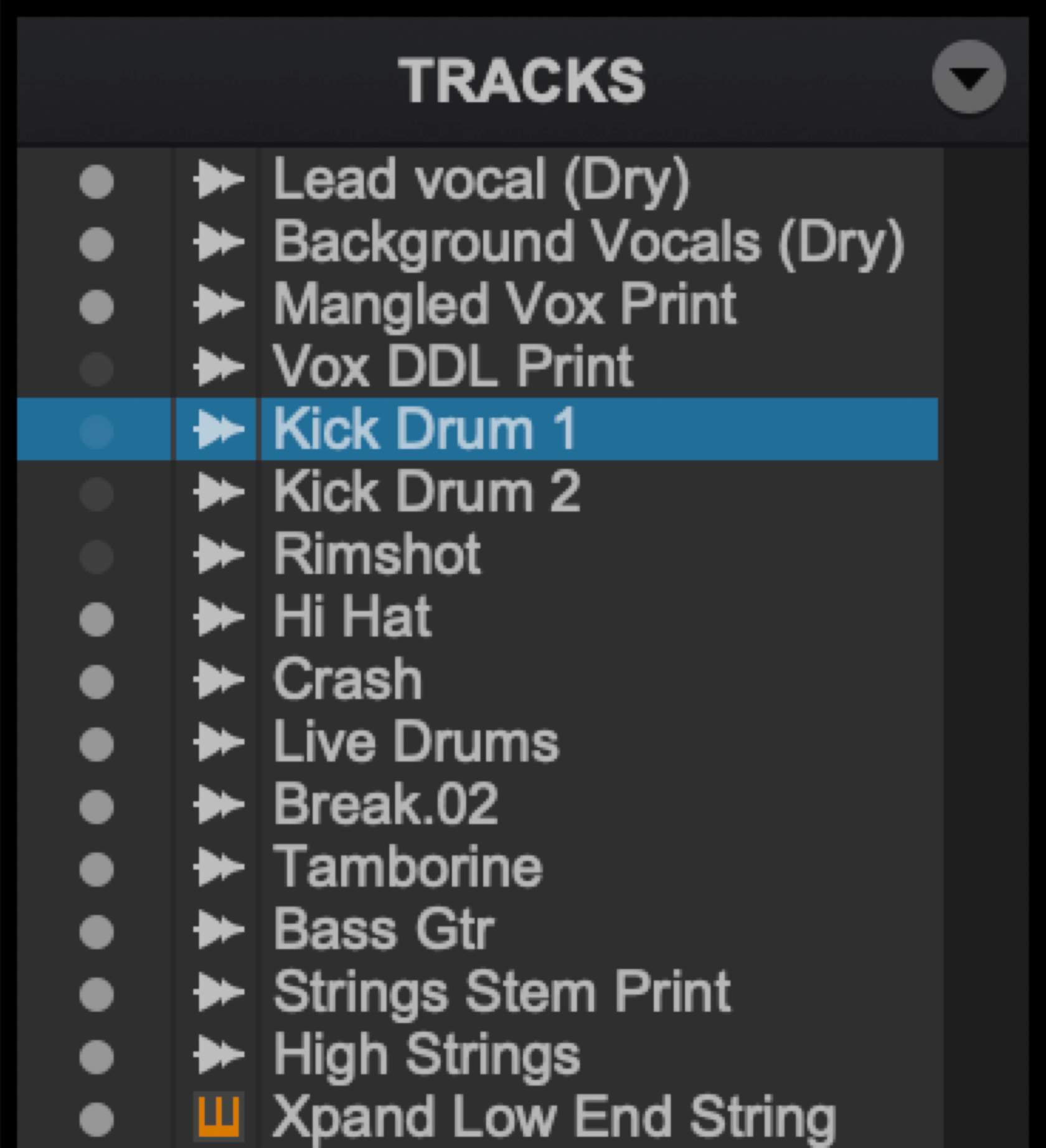
True or False? In the image shown, the Kick Drum 1 track is shown in the tracks area of the Edit window.
False
True or False? Deleting a track can be undone.
False
What is the difference between ADDING an audio file or clip and COPYING an audio file or clip when using the Import Audio dialog box?
Adding references the audio file in its original location; copying creates a new file in the session's Audio Files folder.
The Workspace Browser can be opened from the _____________ menu.
Window
True or False? A location can by typed directly into the Main Counter field.
True
What is the default shortcut to immediately place your playback cursor at the beginning of your session's timeline?
Return
F5
Zoomer
F6
Trim
F7
Selector
F8
Grabber
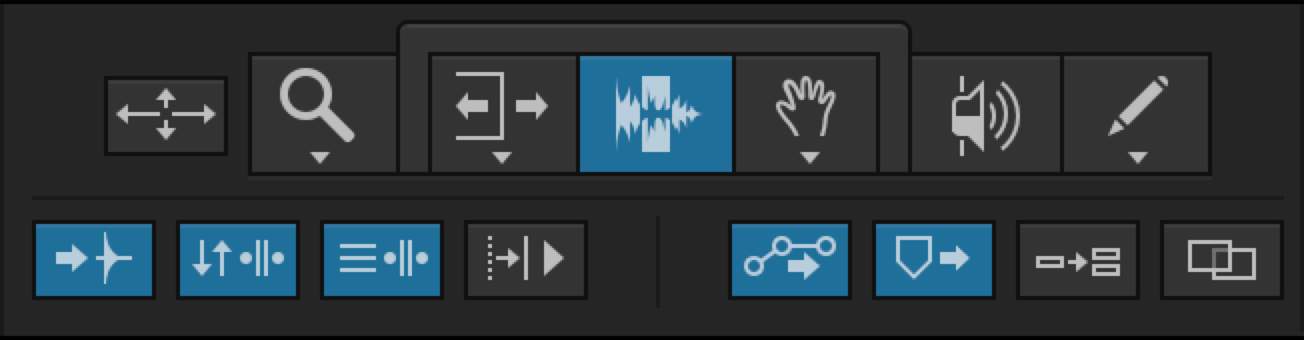
True or False? Based on the image shown, the Insertion Follows Playback option is enabled.
False
Trim Tool
Adjust clip boundaries
Selector Tool
Define an area on a track
Grabber Tool
Move Clips
Double-clicking a clip with the Selector tool will ________________ the clip.
Select
Upper half of track
Selector Tool
Lower half of track
Grabber Tool
Beginning or end of clip
Trim Tool
Slip
Clips can move freely.
Shuffle
Clips will snap end-to-end.
Absolute Grid
Clips will snap to the nearest line.
Spot
A location for a clip can by typed into a dialog box.
Which are the types of Grid mode?
Absolute and Relative
Tempo Ruler (Conductor Track) is disabled
A static tempo will be applied, from the Tempo field in the Edit window toolbar.
Tempo Ruler (Conductor Track) is enabled
Tempo settings in the Tempo Ruler will be in effect, allowing for tempo changes
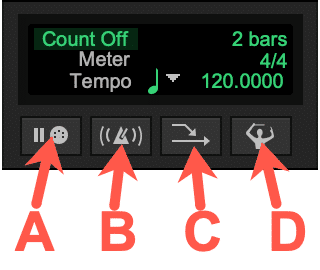
Refer to the Image: Which button will enable you to have your session's tempo change as it plays?
D
What kind of track is created when you create a click track from Track > Create Click Track?
Aux Input
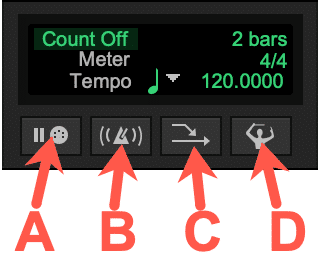
Refer to the Image: Which button will enable you to hear a click track in your session?
B
True or False: When recording audio in Pro Tools, the fader level of the recording track affects the input of that track.
False
True or False: By default, the names of recorded clips are based on the track's name (at the time of recording).
True
Which of the following are default shortcuts to begin recording?
Command+Spacebar (Mac) or Ctrl+Spacebar (Windows)
F12
3 (numeric keypad)
In which window can a pre-roll value be typed?
Transport
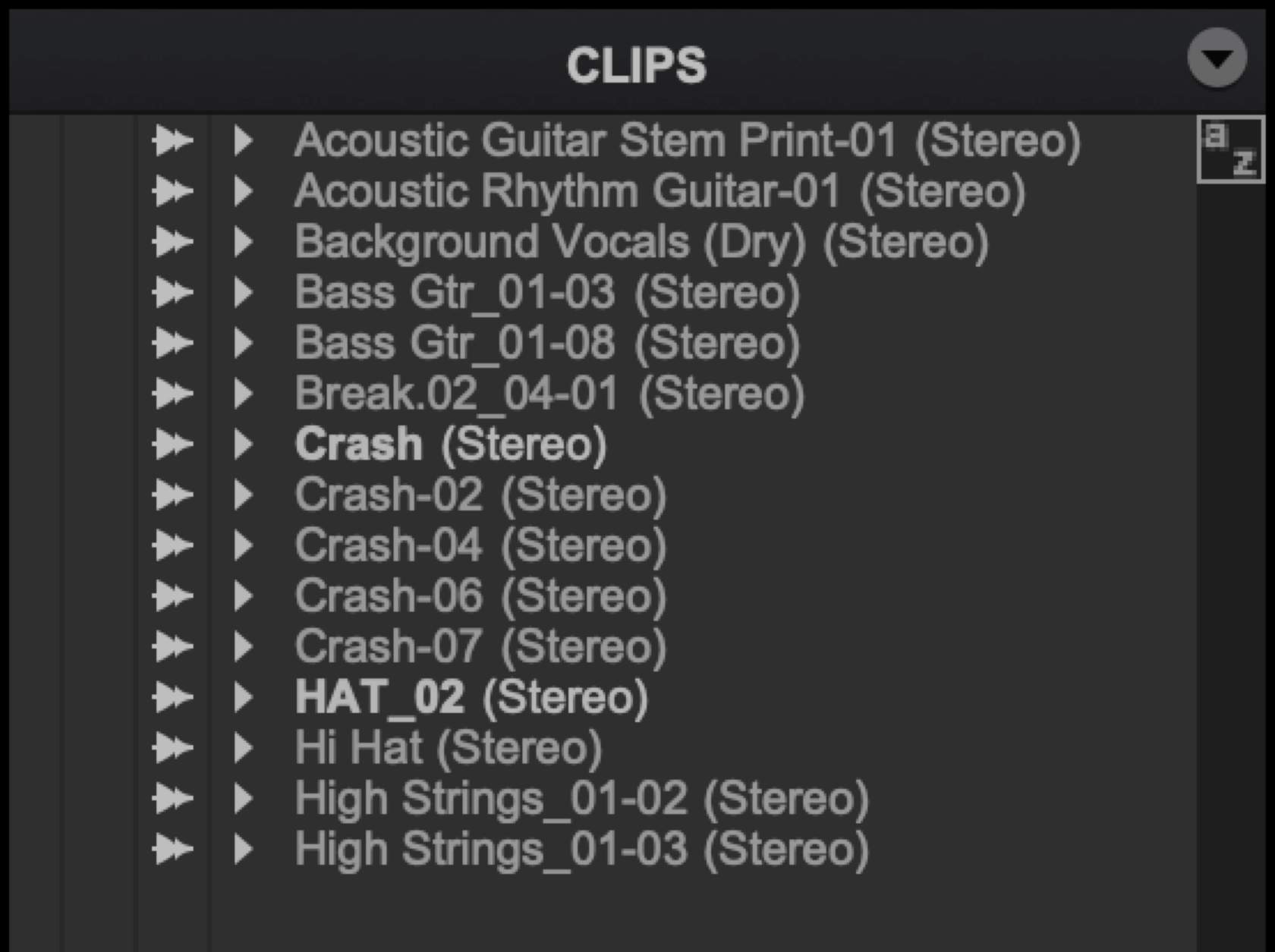
Refer to the Image: How many whole-file clips are shown below?
2
True or False: MIDI on its own makes no sound.
True
Which track types support MIDI clips?
MIDI
Instrument
A MIDI track is commonly used in combination with a(n) ______________ track.
Aux Input
An Instrument track combines the functionality of a MIDI track and a(n) ___________ track.
Aux Input
In Pro Tools, there are _________ ticks per quarter note.
960
Pro Tools' default tempo is ________ BPM.
120
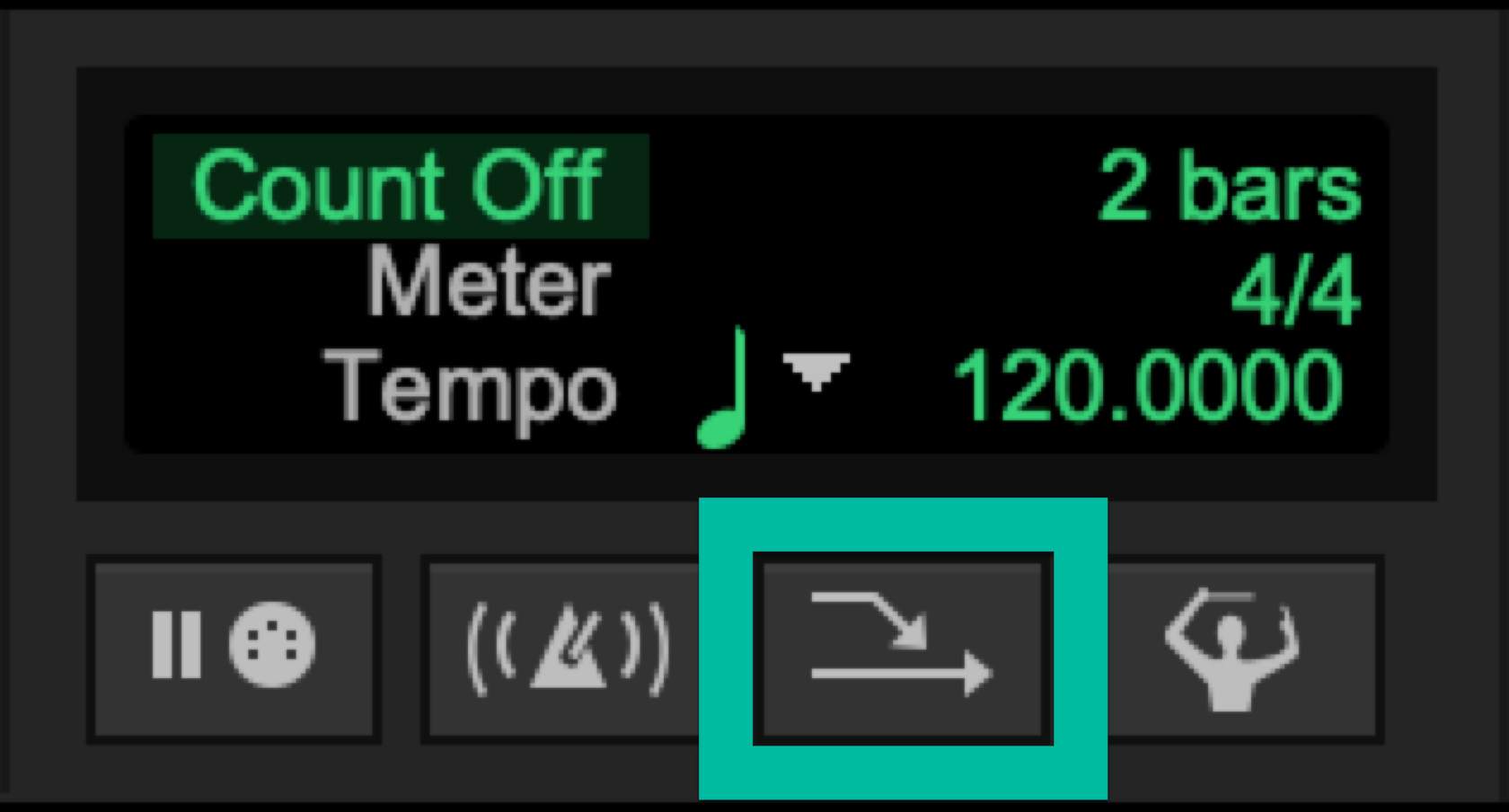
Refer to the Image: What is the name of the control outlined below?
MIDI Merge
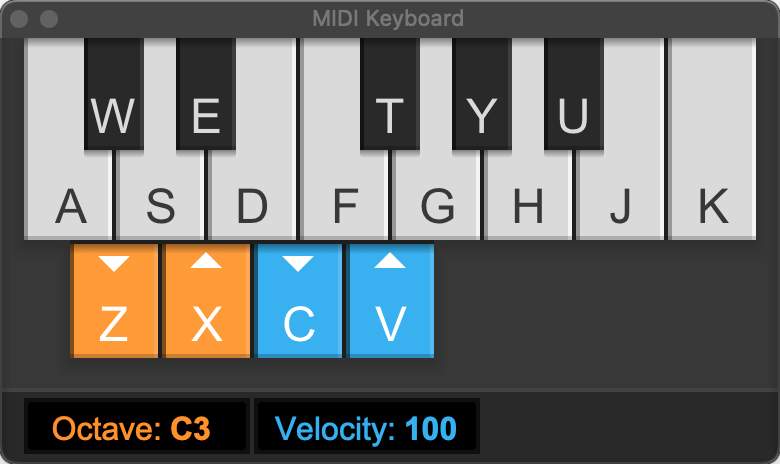
The MIDI Keyboard can be accessed from the ____________ menu.
Window
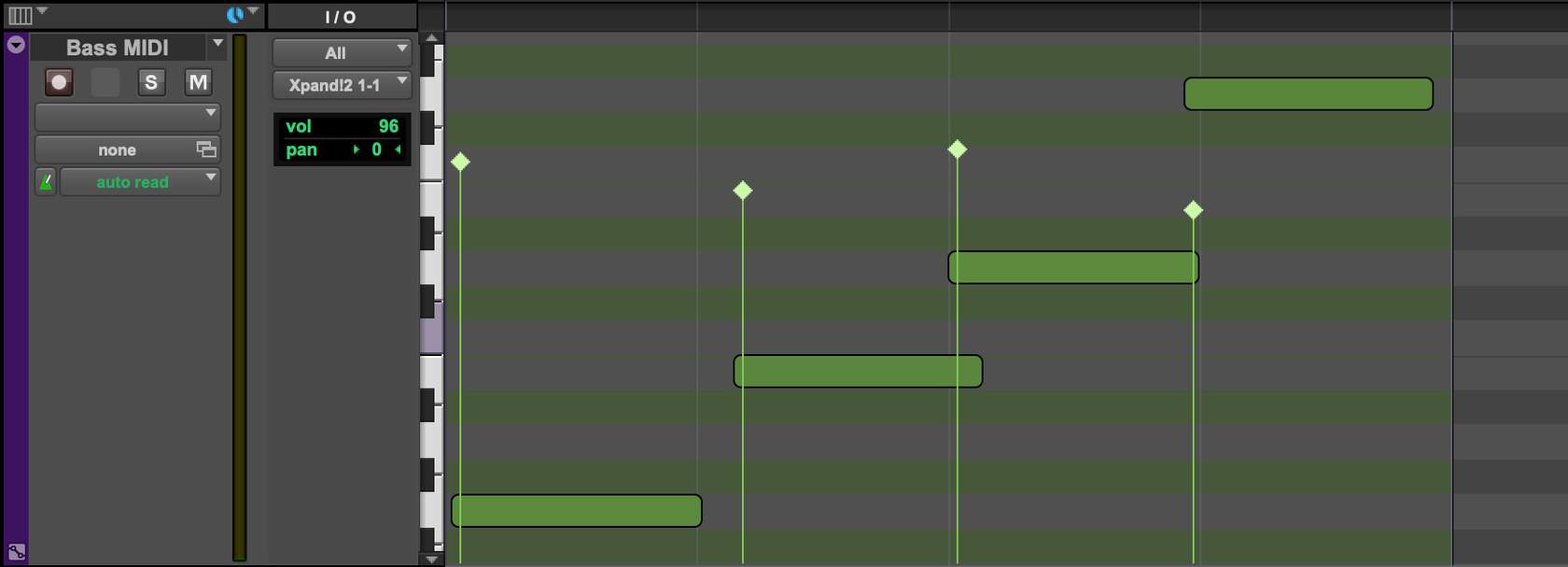
Refer to the Image: The Bass MIDI track is in ________________ view.
Velocity
In order to select all tracks, hold the ____________ key and click on the track name of an unselected track.
Option (Mac) or Alt (Windows)
In order to select individual non-adjacent tracks, hold the ____________ key and click on the track name of an unselected track.
Command (Mac) or Ctrl (Windows)
Cut
Command+X (Mac) or Ctrl+X (Windows)
Copy
Command+C (Mac) or Ctrl+C (Windows)
Paste
Command+V (Mac) or Ctrl+V (Windows)
Undo
Command+Z (Mac) or Ctrl+Z (Windows)
True or False? Edit > Duplicate can be used to quickly multiple copies of a clip with a single mouse click.
False
The Heal Separation feature can be found in the _________ menu.
Edit
Consolidate Clip can be found in the ________________ menu.
Edit
After selecting a clip, pressing the Plus (+) key on the numeric keypad will ___________ .
Nudge the clip later in time
True or False? In order to nudge a clip, your computer's keyboard must have a numeric keypad.
False
True or False? A fade's shape can be changed after it is created.
True
Mixing within a DAW like Pro Tools is referred to mixing "_____________________".
In the Box
Insert
Most commonly used for effects
Send
A copy of the signal to be routed to another destination
Volume Fader
Controls the output amplitude of the track
Pan
Controls the position (left to right) of the track's output
True or False? The inserts on an audio track are affected by the track's volume fader.
False
To quickly set a volume fader to unity (0.0 dB), hold the _______________ key and click the fader.
Option (Mac) or Alt (Windows)
An arrangement whereby the output of a number of tracks is routed to the input of a stereo Auxiliary Input track is called a(n) _____________ .
Subgroup
A track's Solo Safe state can be toggled by holding the _________ key and clicking the Solo button of the track.
Command (Mac) or Control (Windows)
True or False? All versions of Pro Tools support a maximum of 1 Master Fader track.
False
True or False? The inserts on a Master Fader track are affected by the track's volume fader.
True
 Note
Note  Flashcards (58)