Database Conceptual Modeling
 Studied by 0 people
 Call Kai
 Learn
Learn Practice Test
 Spaced Repetition
 Match
Match Flashcards
 Knowt Play
1/45

There's no tags or description
Looks like no tags are added yet.
Name | Mastery | Learn | Test | Matching | Spaced | Call with Kai |
|---|
No analytics yet
Send a link to your students to track their progress
46 Terms
Database
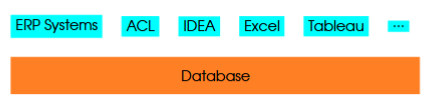
foundation for most, if not all, software tools we use in accounting
some examples:
ERP systems
auditing tools
microsoft excel
tableau
ERP Systems
modern systems typically use a kind of 4-tier architecture
one of the three layers is the database layer
this is where data is stored and processed
everything including “accounting” data (debits and credits) is stored in database
Auditing Tools
tools such as ACL and IDEA are specifically developed for auditing purposes
based on database but have different “package” in marketing sense
many functions such as gap analysis and duplicate detection, can be done by directly using database tools
Microsoft Excel
powerful tool
PivotTable function is a good example of how much it is used in accounting firms
behind the function is database technology
must organize the data in some “database” way before we can use the function
getting external data: you need to know database bc you would need to connect from Excel to databases as a means to collect data
Tableau
more recent tool built on Excel
based on database technology
it will be very easy to learn if you know database
Database Management Systems (DBMS)
specific systems such as Microsoft Access and Oracle
different types:
desktop
workgroup
enterprise
Desktop
type of DBMS is relatively small, usually designed for handling small amount of data
supported users: single
usually these systems are installed on desktops for personal use and support small sizes of database
examples: Microsoft Access and OpenOffice Base
Access can do most of what you can do on Excel, but the ways the tools are used differ
Workgroup
type of DBMS more powerful than desktop-based systems
usually they are supposed to support department-level uses with relative small numbers of users
examples: Microsoft SQL Server, MySQL, and Postgres
supported user: many (department level)
Enterprise
type of DBMS typically used in large ERP systems such as SAP and Oracle
they support larger number of users (enterprise level)
the most powerful among database systems
examples: IMB DB2 and Oracle
Type of Database Tech: Relational Database
store data in relations
relation: two-dimensional structure, list like a table
has rows or columns
relations or tables are used to keep track of “things”
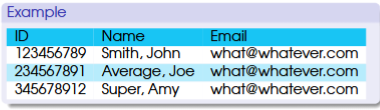
example: table of students = relation
“student” is a type of thing
students are people not “things” but from a database perspective, everything is a “thing”
Records
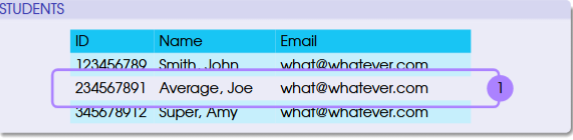
rows in a table
each one represents a specific thing (vis-a-vis type of thing represented by a table)
in this example, each one refers to individual students
example: one holds info about the student named Joe Average but no one else
Attributes and Fields
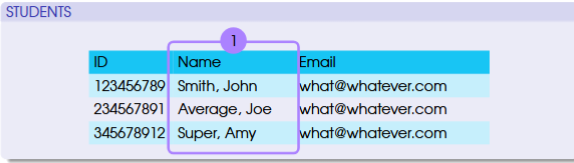
columns of a table that store those characteristics that we use to describe the ‘thing’ we want to keep track
each one represents a characteristic of the thing (e.g., Name)
Relational Database: Data Integrity Rules
entry integrity
no two instances of the entity are the same, otherwise we can’t tell who is who
in other words, each row in the table must be unique and identifiable
enforced by primary key: one column or the combination of multiple columns that can be used to uniquely identify all rows in the table (e.g., student ID number to identify students)
referential integrity
ensure that data can be referenced and tables are properly listed when there are many tables (which is the case for relational database)
foreign key in one table is used to link to another table
values under foreign key column(s) are matched to those under the primary key of the other or the source table
NO “dangling” values under the foreign key that have no matches in the other table
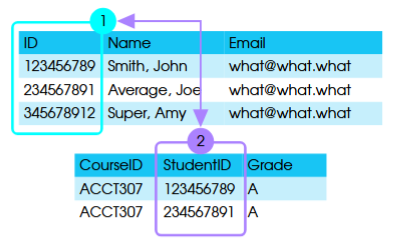
referential integrity means all student IDs in the enrollment table must have matches in the student table
Primary Key
it is the ID, in a student table that stores personal info of students
ID can be used to uniquely identify the student
another example: combination of course ID and studentID bc both info found in a student enrollment table tell us who is taking what classes and their grades

Foreign Key
it is the Student ID, which is linked to the column ID in the student table
Another concept of relational database: Meta Data
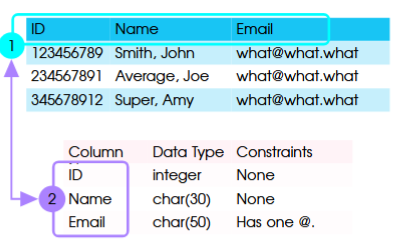
it means data about data
about how table and its columns are defined
also known as data dictional or data definition
example: one table about the info and a second table about the definitions of the data from the first table (column, data type and constraints)
example: email’s constraint → must have one special character “@”
Another concept of relational database: Schema
refers to the logical structure of a database: how data are defined, organized, and used
logical structure can be contrasted with physical structure
refers to physical storage of data:
how much disk space do we need
what hardware devices do we use
how we attach the database hardware to the computer network so that users can access data
three types:
external
internal
conceptual
Type of Schema: External
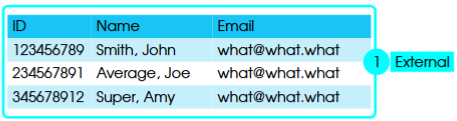
top level is about what we see and how we use data
different users may see or use different portions of the data and present the data differently
example: we may show data in plain tables or fancy reports
table or report: shows many records together
form: displays on only one record
Type of Schema: Internal
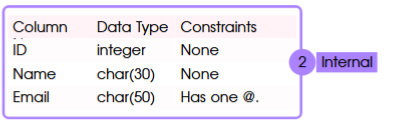
bottom level of schema is about how we define a table and its columns
definitions on name, length, data type, and constraints
need to specify primary key
description: detailed definition and design
related concepts: data definition
Type of Schema: Conceptual
somewhere in between
at this level, we give a high level overview of what data are available in the database
showing “things” about which we are going to maintain some information and how they are related to each other
related concepts: entities and relationships
Example of Conceptual Schema
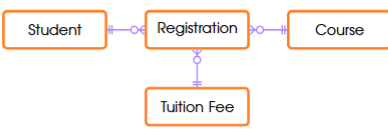
keeping track of four “things”:
student
course
registration
tuition fee
how are things related to one another?
we can tell that students must do their registration, which involves classes and tuition fees are assessed based on the registration
internal schema will provide more detailed info about students
ER Model
entity-relationship (ER) model
systematic method for developing a conceptual schema for database design
understanding the nature of the data is the very first step of analyzing data
idea: to show database design in a diagram, which is why we call this ER diagram (ERD)
graphical presentation
consists of a set of concepts and symbols:
entity
relationship
attribute
key
cardinality
Simple ER Diagram
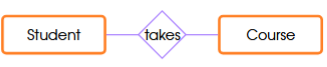
two elements:
entity: the “thing” we want to keep track of in the database
two things: student and course
relationship: how things are related
example: student takes course
ER Model: Entity
type of thing we want to keep track of
example: using the term student here as an entity = we are talking about the generalized type or class
generalized, not specific individual things (synonym: “class”)
examples:
student
course
product
purchase order
customer
Instance
specific individual things of the type
example: actual individual students such as John Smith
example: different types of purchase orders
ER Mode: Attribute
characteristics of an entity that we want to keep track of
all instances of the same entity should have the same set of attributes
instances may have different “values” for the same attribute, otherwise they would be the same and not identifiable
example: student entity
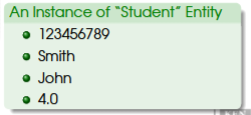
student entity has four attributes:
CWID
last name
first name
GPA
thus, all instances (students) should have some information for these four attributes
values for each student (instance) may be different
Value
the attribute of an instance is a specific value
otherwise known as characteristics of a specific individual thing of the type
ER Model: Identifier
an attribute or the combination of multiple attributes we use to uniquely identify individual instances
example: for the entity student, we can use the attribute CWID as the identifier
in the SAP system, we use material number as the identifier for the material entity
simple identifier: if only one attribute is used
composite identifier: multiple attributes used together
example: address
model address as an entity and use the combination of number, street, city, state/province, and country as the identifier
ER Model: Relationship
refers to how entities are linked in a database
example: (student) takes (course)
potential attribute for the relationship (“takes”) is a grade
relationship is not the same as relation
can have attributes, meaning some characteristics can be used to describe the relationship
“describe”: can treat the relationship as an entity and store some data about it
Degree of Relationship
related to a relationship
refers to the number of entities involved in the relationship
typical relationship: two entities involved (binary relationship)
example: student-takes-course
ternary relationship: three entities or, more generally, N-ary relationship
ER Model: Unary Relationship
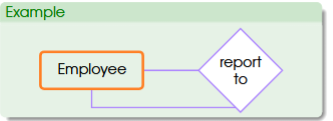
the relationship between an entity and itself
also called a recursive relationship
recall that an entity is a type of thing, not an individual thing
example: the relationship between entity employee with itself
“employee reports to employee” means the supervisor-subordinate relationship between individual employees
of course, all employees are “employee” regardless whether they are supervisors or subordinates
ER Model: Relationship: Cardinality
simply means “count”: how many are involved in the relationship
count is about how many “instances”
given a relationship of two entities A and B:
from the perspective (side) of A: an instance of A is linked to how many instances on the other side (cardinality of B = A - B)
from the perspective (side) of B: an instance of B is linked to how many instances of A on the other side (cardinality of A = A - B)
2 broad categories:
maximum cardinality
minimum cardinality
Maximum Cardinality
maximum number of instances of an entity can participate in the relationship
note: it is the up limit, so any number lower than that is allowed
three broad types of relationship:
one-to-one
one-to-many
many-to-many
Minimum Cardinality
minimum number of instances of an entity must participate in the relationship
it’s a minimum, so it’s a requirement (not optional)
Maximum Cardinality: One-to-One
basically means that an instance from one side is associated with one instance from the other side
does not matter which side you look at the relationship
be careful when you take side for interpretation
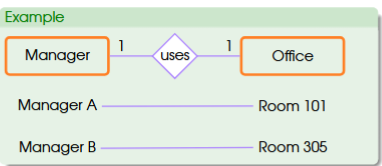
example: manager and office
manager: from the side of the manager, one manager can have x office on the other side. (the second “one” (x) is referred to as the cardinality of office. One is one so there is no difference in terms of number)
office: from the perspective (side) of office: one office can be occupied by one (y) manager on the other side. (y is referred to as the cardinality of manager)
Maximum Cardinality: One-to-Many
an instance on the one side can have many related instances from the other side (many side)
an instance on the many side will have a maximum of one related instance on one side
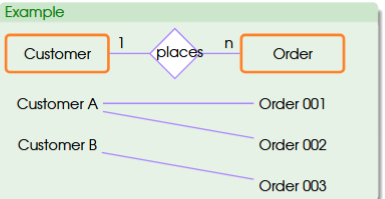
example: customer and order
customer: from the perspective of customer, one customer can have many (n) orders on the other side (many (n) is referred to as the cardinality of order)
order: from the perspective of order, one order can be placed by (1) customer on the other side (1 is referred to as the cardinality of customer)
Maximum Cardinality: Many-to-Many
an instance on either side can have many related instances from the other side
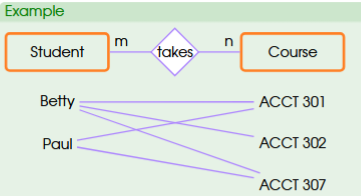
example: student and course
student: a student can take many n courses. this many (n) is the cardinality of course.
course: one course can be taken by many (m) students. this many (m) students is the cardinality of student.
Notation 1
rectangle as entity
name of the entity is put as text within the rectangle, usually in boldface font
attributes
list attributes under the entity name within the rectangle
identifier
identifier of an entity is one attribute or the combination of multiple attributes
underline the attribute(s) to identify the identifier
relationship
a line that links two entities is used to represent the relationship between the two
simple description of relationship is put in a diamond shape
note: diamond shape is often omitted to make diagram less crowded
cardinality
numbers and letters are used to represent cardinalities
letters (usually m or n) represent “many”
example: cardinalities
customer = 1
order = n

Notation 2
basically the first notation but we are adding one more thing: minimum cardinality
in this notion, we can have a bit more info about the relationship between two entities
minimum cardinality: min number of instances that are required to participate in the relationship
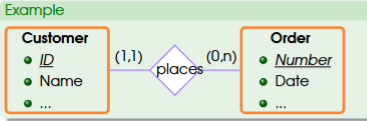
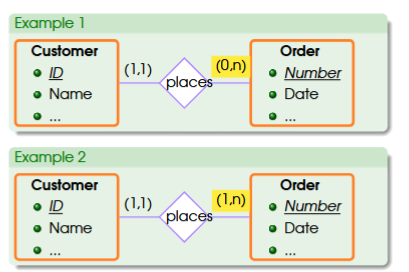
example: customer places order
one customer can have a minimum of 0, maximum many orders. in this case, customer can have no orders at all (0, n)
one order can be placed by minimum one, maximum one customer. this means that one order can be associated with one but only one customer
Compare Notations 2
first example: customer can have many orders or non
this means we can create a new customer in our system and then try to sell something
second example: customer must have at least one order
this means that we are not going to put a customer in our system without an order
additional questions:
can two customers have the same name?
how many orders can a customer place on the same day?
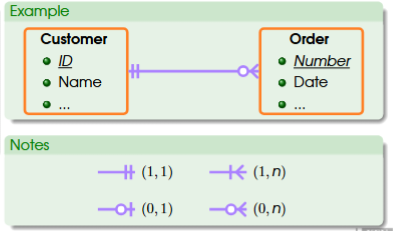
Notation 3
based on notation 2 except for two differences:
symbols are used instead of numbers and letters for cardinalities
relationship descriptions are not shown here but keep the line
circle = 0
vertical bar = 1
crow’s foot = three-line claw means many
minimum-maximum is just a combination of the three base symbols
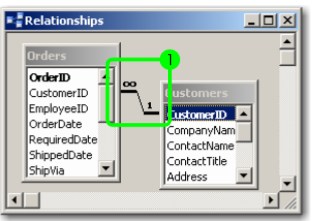
Notation 4: Microsoft Access
infinity sign means many
General Rules to Develop an ER Model
identify entities: what are the “things” we want to keep track in the system? what “things” can be modeled as entities?
method for identifying entities: REA model
identify relationships: how are things related?
most common relationship: one that can be described by using verbs
example: student “takes” course; customer “place” orders
identify cardinalities: what rules should the relationships follow?
very important step bc it has some impact on how we interpret and verify data
REA Approach
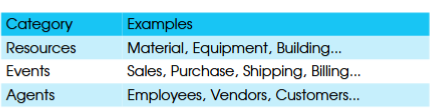
resources, events, and agents
idea: if we can identify all resources, events, and agents of a business, we can have a good collection of entities for developing a business database.
more specifically:
resources: things that have economic value for a business (aka economic resources)
events: business activities that have some impact on economic resources (e.g., sales, purchases, and production among others)
agents: whoever participate in business activities (e.g., employees, customers, suppliers, among others)
REA Approach: Rules to Identify Relationships
an event involves at least one resource
an event has at least one participant (agent) in most cases
example: sales event usually involves sales people at least
an event is often paired with another event in terms of impact on resources (duality)
in one event, we get something (resource), in the other we give up something else (“get-give” duality).
 Note
Note  Flashcards (44)