GIST 8132 - Final Exam
 Studied by 0 people
 Call Kai
 Learn
Learn Practice Test
 Spaced Repetition
 Match
Match Flashcards
 Knowt Play
1/10

There's no tags or description
Looks like no tags are added yet.
Name | Mastery | Learn | Test | Matching | Spaced | Call with Kai |
|---|
No analytics yet
Send a link to your students to track their progress
11 Terms
Enterprise Enabled Multi-user Geodatabase
Enterprise geodatabase (formerly ArcSDE) allowing for geospatial data access and management inside RDBMS.
Multi-user access
Supports long transactions and version-based workflows
Scalable for large, continuous databases
Translates spatial and non-spatial queries from ArcGIS to RDBMS
Performs ArcGIS operations on data
Why use an Enterprise Enable Multi-user Geodatabase
Large, non-tiled layers
Rapid spatial searching
Storage options for raster and vector data, in a common form
RDBMS security
Simultaneous access by multiple users
Versioning and multi-user editing
Backup
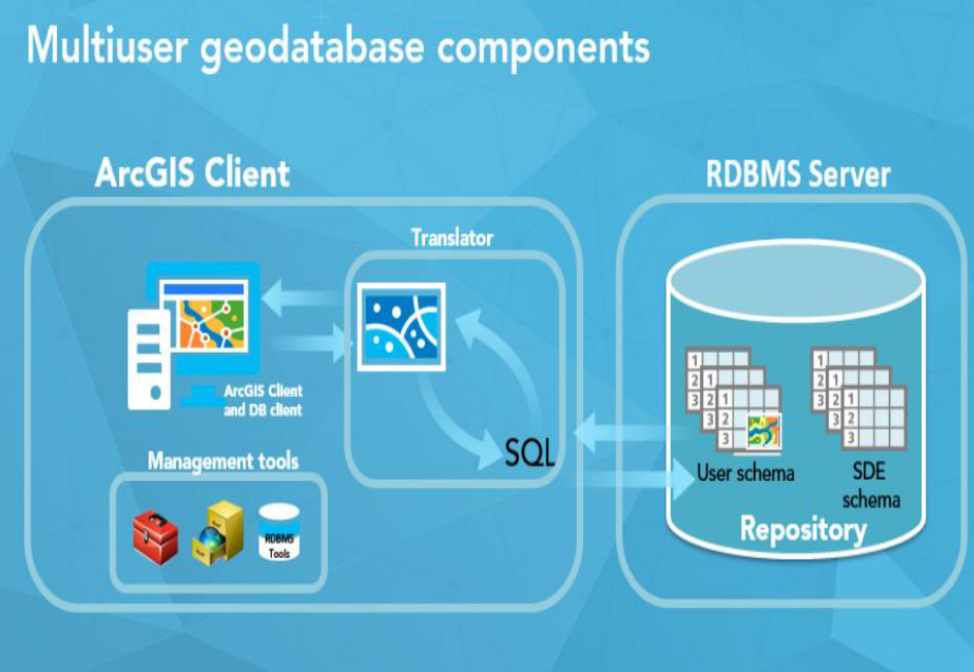
Components of Multi-user Geodatabase Technology
Client = ArcGIS Pro, ArcGIS Server, RDBMS Client
ArcSDE/Enterprise Geodatabase Repository = User data, gdb tables
Management tools = Geoprocessing tools
Translator = Translates map into SQL
What Databases and Geodatabased each provide
Database | Geodatabases |
|
|
Potential causes of error when trying to connect to a database in ArcGIS Pro
Incorrect credentials
Database client wasn’t opened before opening ArcGIS pro
Default permission given to a user when granting access to a dataset.
Select only
Python expression to grant all privileges to user jsmith
arcpy.management.ChangePrivileges(datasetName, “jsmith'“, "GRANT", "GRANT")
Fundamentals of Enterprise GIS
Enterprise Geodatabase is only one component
Don’t own data, but are responsible for it
Data access based on levels
Number of transactions and users more important than size of data
Uses external database software (e.g. Oracle 19c)
Steps to enable Enterprise Multiuser Databases
Install RDBMS
Configure
Run Create Enterprise Geodatabase tool
Role of Geodatabase System Tables
They are repositories/data dictionaries
Enforce geodatabase behaviour
Store information about the geodatabase
Keep track of the data stored in the geodatabase
 Note
Note  Flashcards (105)