Chapter 1 - The Node.js Platform
 Studied by 0 people
 Call Kai
 Learn
Learn Practice Test
 Spaced Repetition
 Match
Match Flashcards
 Knowt Play
1/11

There's no tags or description
Looks like no tags are added yet.
Name | Mastery | Learn | Test | Matching | Spaced | Call with Kai |
|---|
No analytics yet
Send a link to your students to track their progress
12 Terms
Why I/O (Input/Output) operations are slow?
I/O (Input/Output) operations, such as accessing data from a disk or network, are significantly slower than accessing RAM. This is due to the physical limitations of these devices and the time it takes to transfer data. Additionally, human input, like mouse clicks, can further slow down I/O operations.
Blocking I/O
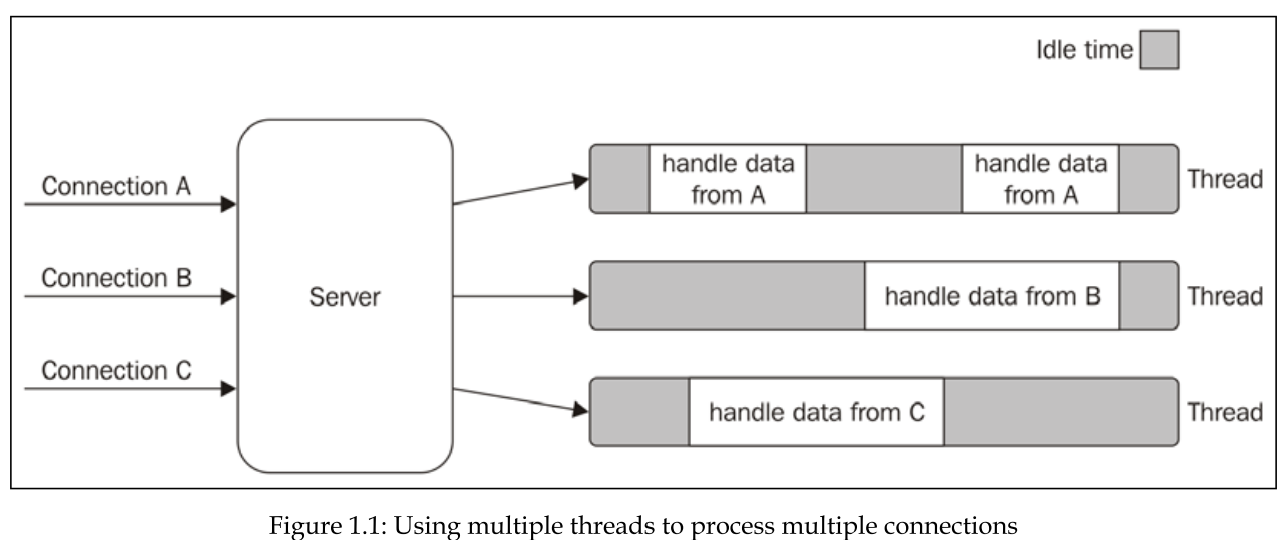
Traditional blocking I/O can significantly hinder performance, especially in applications like web servers. When a thread encounters an I/O operation, it pauses until the operation finishes. This can lead to inefficiencies, as threads are idle while waiting for I/O, and can limit the number of concurrent connections a server can handle.
a web server can be implemented using blocking I/O, but it's generally not recommended for high-traffic websites. Blocking I/O can limit the number of concurrent connections a server can handle, as each connection requires a dedicated thread to handle it. This can lead to performance bottlenecks and scalability issues.
The traditional approach to solving Blocking I/O
The traditional approach to solving this problem is to use a separate thread (or process) to handle each concurrent connection.
But, a thread is not cheap in terms of system resources, it consumes memory and causes context switches. So having a long-running thread for each connection and not using it for most of the time means wasting precious memory and CPU cycles.
Non-blocking I/O in modern operating systems. (Buy-waiting)
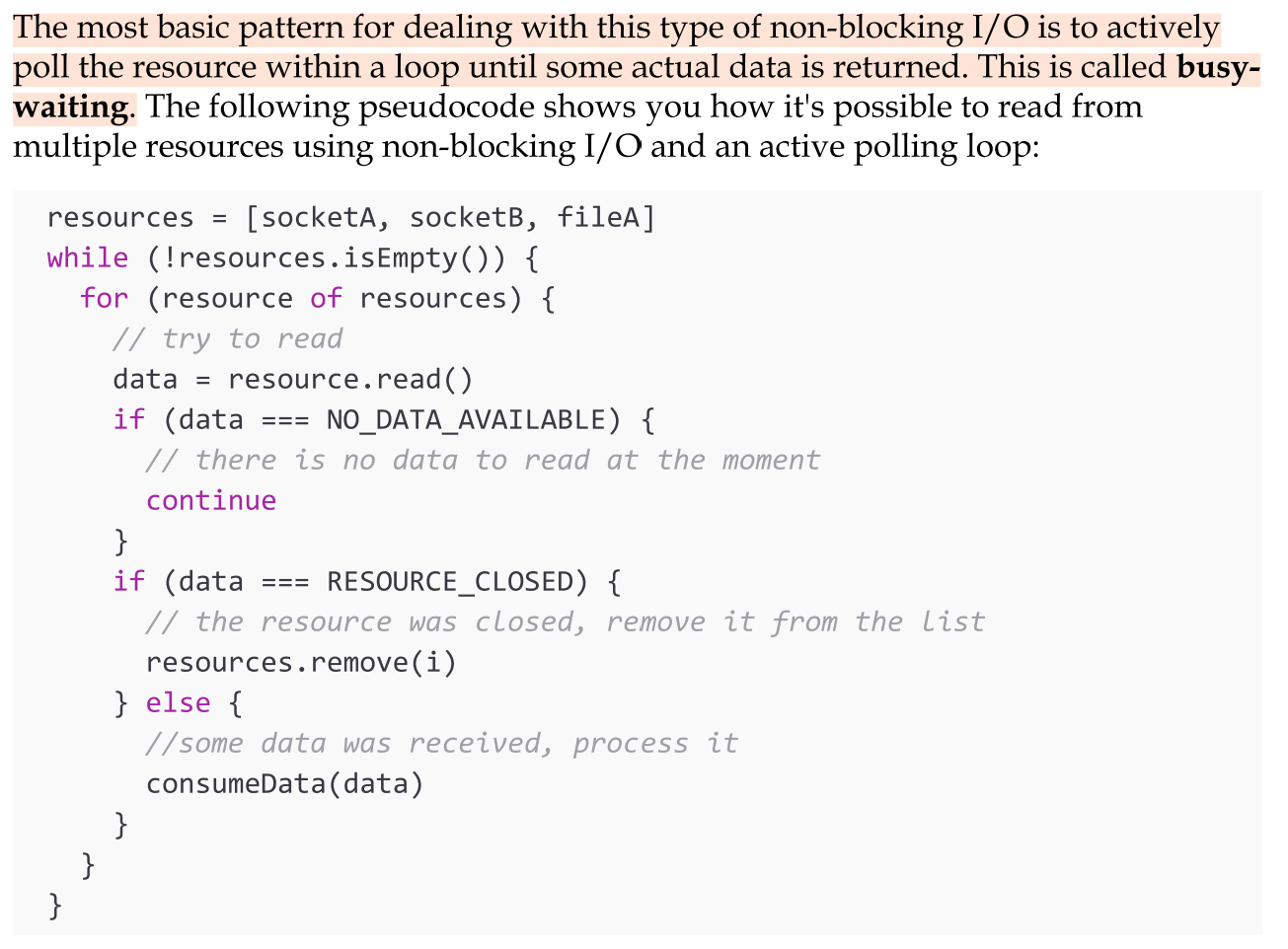
Most modern operating systems support another mechanism to access resources, called non-blocking I/O. In this operating mode, the system call always returns immediately without waiting for the data to be read or written. If no results are available at the moment of the call, the function will simply return a predefined constant, indicating that there is no data available to return at that moment.
The most basic pattern for dealing with this type of non-blocking I/O is to actively poll the resource within a loop until some actual data is returned. This is called Busy-waiting. Busy-waiting is definitely not an ideal technique for processing non-blocking resources.
Event demultiplexing
Most modern operating systems provide a native mechanism to handle concurrent non-blocking resources in an efficient way. We are talking about the synchronous event demultiplexer (also known as the event notification interface).
Multiplexing refers to the method by which multiple signals are combined into one so that they can be easily transmitted over a medium with limited capacity.
Demultiplexing refers to the opposite operation, whereby the signal is split again into its original components. Both terms are used in other areas (for example, video processing) to describe the general operation of combining different things into one and vice versa.
Demultiplexing in asynchronous usage
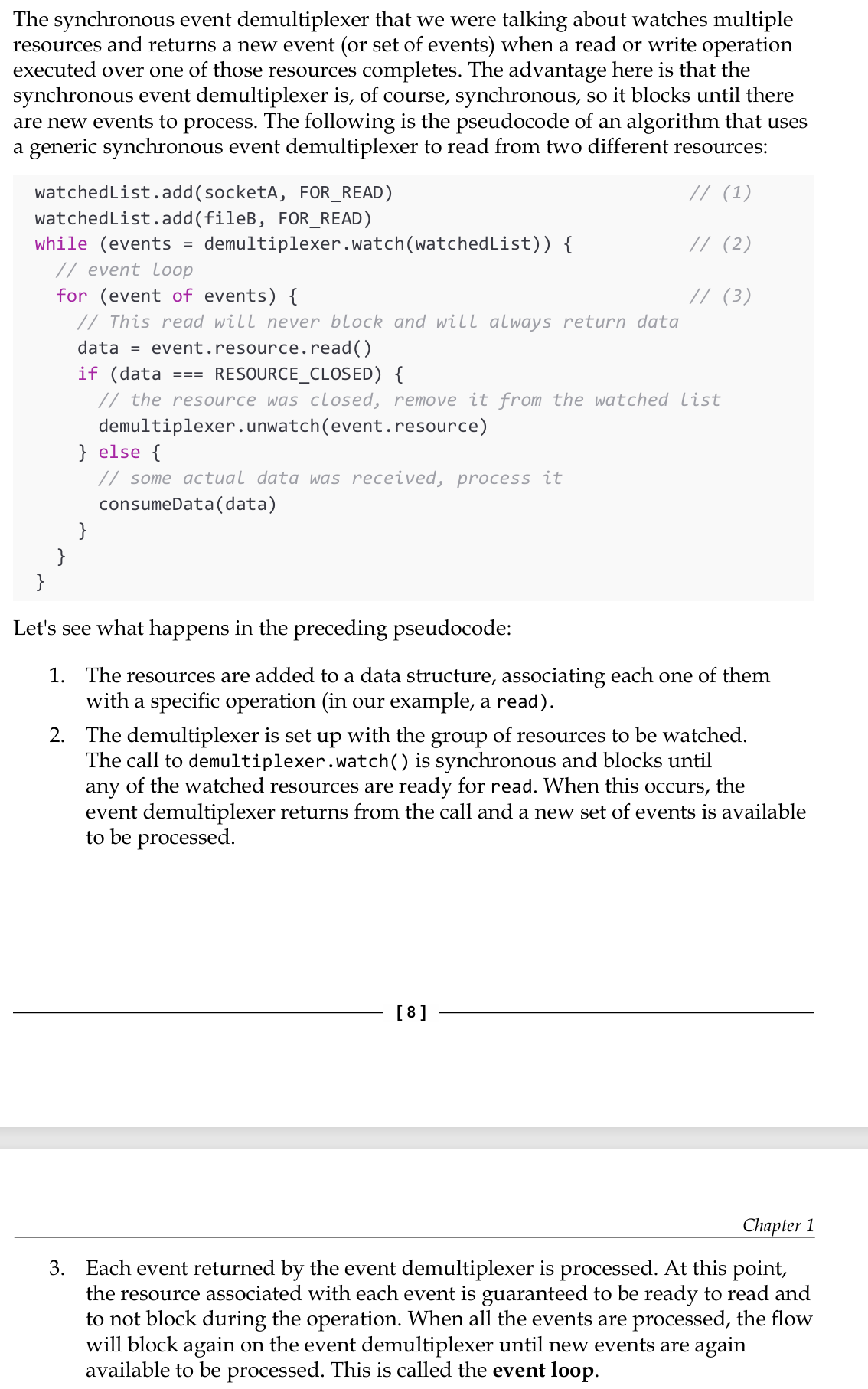
The synchronous event demultiplexer that we were talking about watches multiple resources and returns a new event (or set of events) when a read or write operation executed over one of those resources completes.
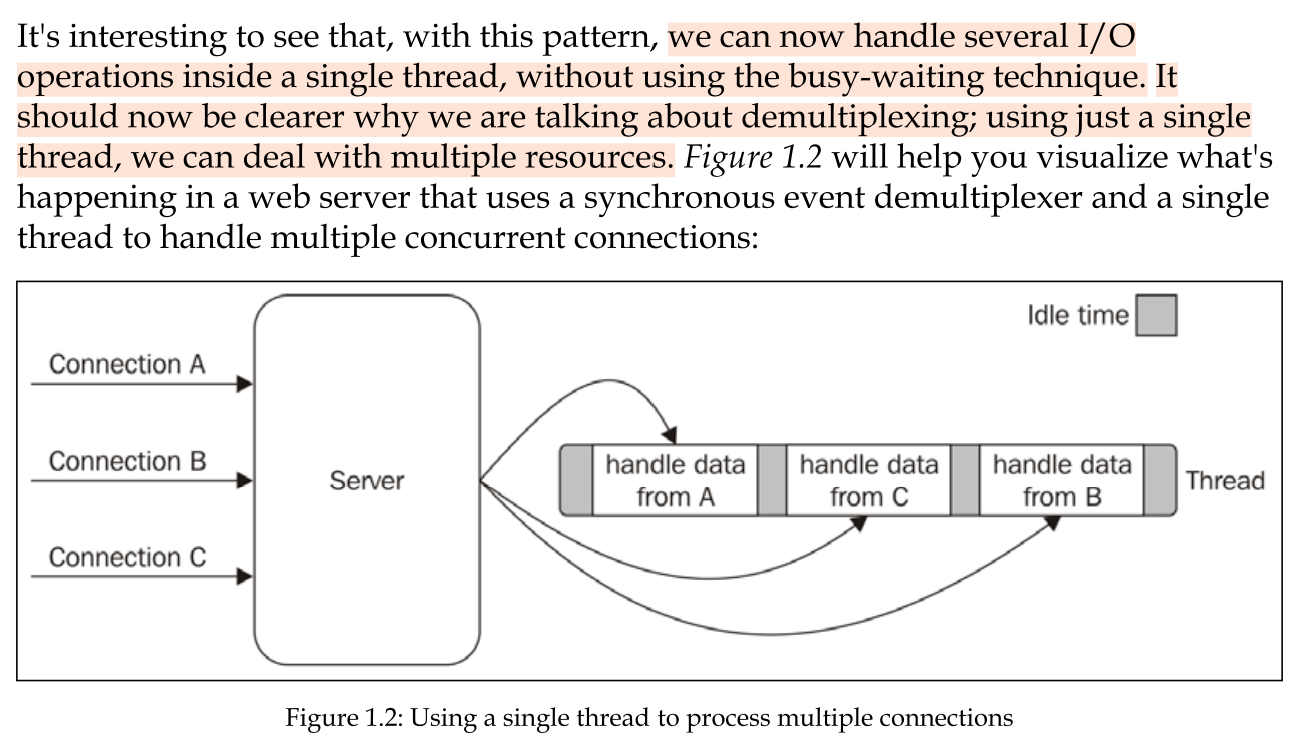
Now handling several I/O operations inside a single thread, without using the busy-waiting technique.
As this shows, using only one thread does not impair our ability to run multiple I/O- bound tasks concurrently. The tasks are spread over time, instead of being spread across multiple threads.
The reactor pattern
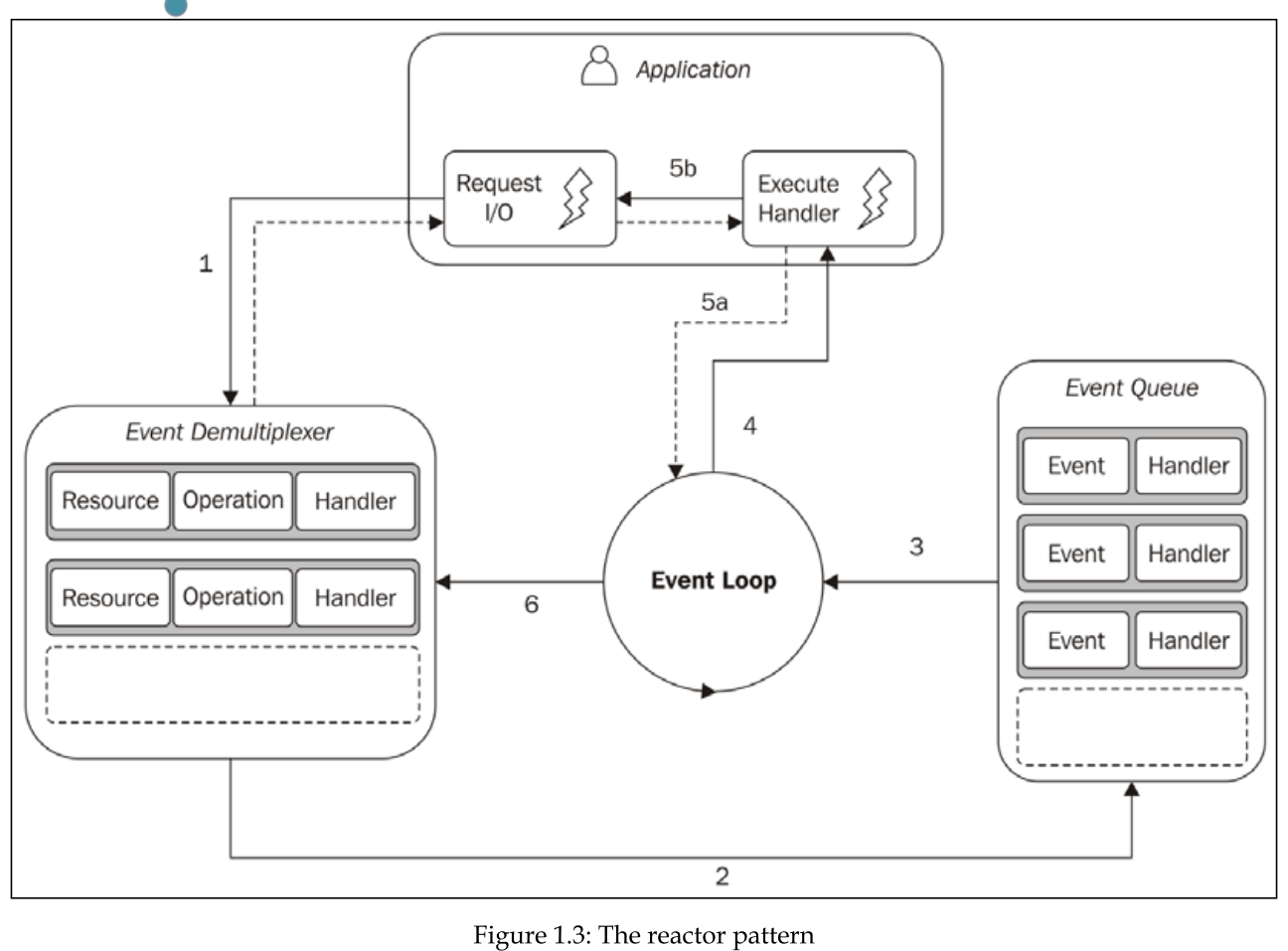
The main idea behind the reactor pattern is to have a handler associated with each I/O operation. A handler in Node.js is represented by a callback (or cb for short) function.
The handler will be invoked as soon as an event is produced and processed by the event loop.
This pattern allows the application to react to events as they occur, improving efficiency by using a single thread to manage multiple I/O operations without blocking.
what happens in an application using the reactor pattern?
The application initiates a non-blocking I/O operation by sending a request to the Event Demultiplexer, along with a specified handler for when the operation completes.
The Event Demultiplexer adds completed I/O operation events to the Event Queue.
At this point, the Event Loop iterates over the items of the Event Queue.
For each event, the associated handler is invoked.
The handler, which is part of the application code, gives back control
to the Event Loop when its execution completes (5a). While the handler executes, it can request new asynchronous operations (5b), causing new items to be added to the Event Demultiplexer (1).
When all the items in the Event Queue are processed, the Event Loop blocks again on the Event Demultiplexer, which then triggers another cycle when a new event is available.
(39-40)
Libuv. The I/O engine of NodeJS
Different operating systems have unique interfaces for event demultiplexers (like epoll on Linux, kqueue on macOS, and IOCP on Windows), and I/O operations can behave inconsistently depending on the resource type. For example, Unix systems require separate threads to handle non-blocking behavior for regular filesystem files. To address these inconsistencies, Node.js uses libuv, a native library that abstracts system calls, normalizes non-blocking behavior across platforms, and implements the reactor pattern to manage event loops and asynchronous I/O.
(40-)
The recipoe for Nodejs
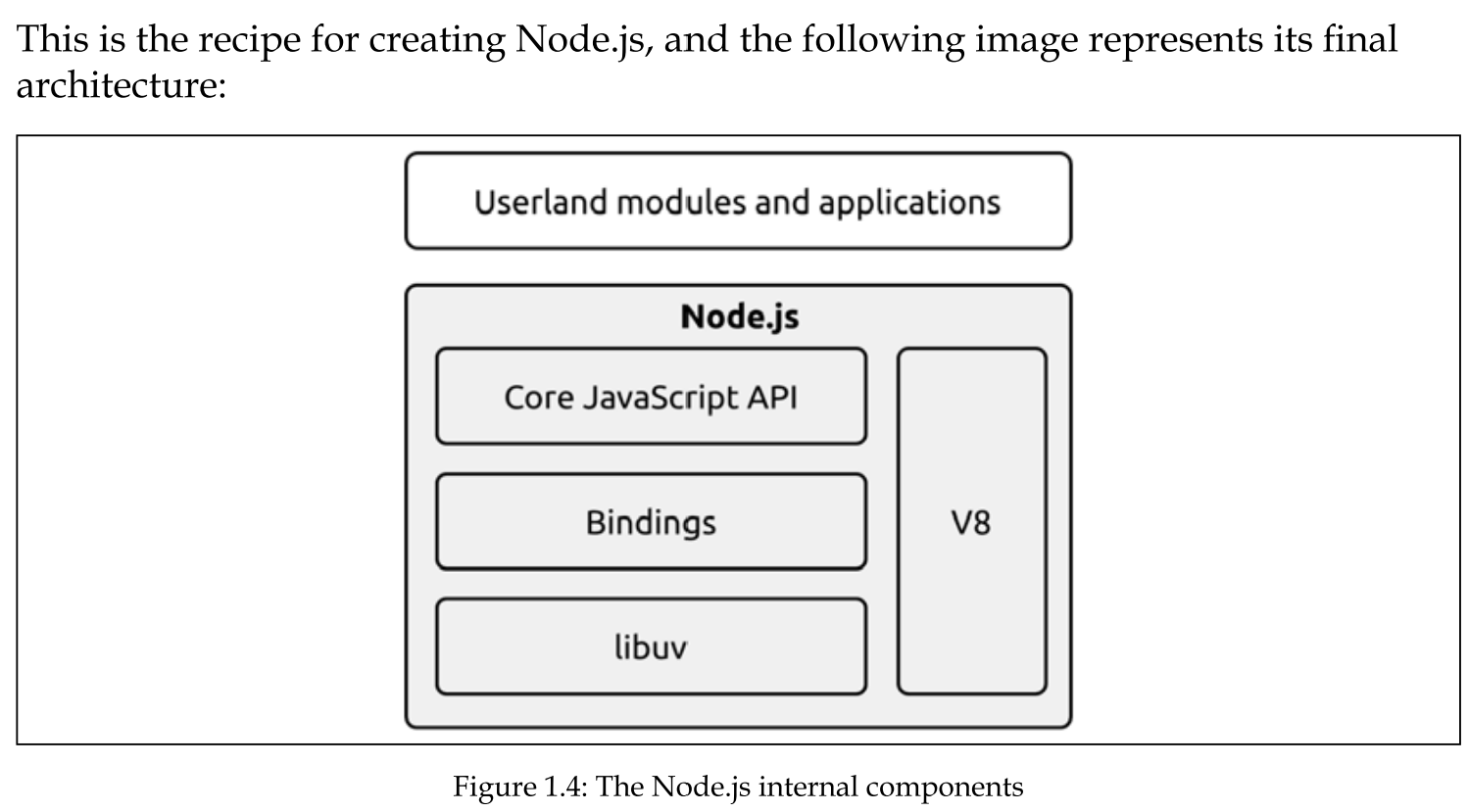
The reactor pattern and libuv are the basic building blocks of Node.js, but we need three more components to build the full platform:
A set of bindings responsible for wrapping and exposing libuv and otherlow-level functionalities to JavaScript.
V8, the JavaScript engine originally developed by Google for the Chrome browser. This is one of the reasons why Node.js is so fast and efficient. V8 is acclaimed for its revolutionary design, its speed, and for its efficient memory management.
A core JavaScript library that implements the high-level Node.js API.
The difference of JS in NodeJS
The JavaScript used in Node.js differs significantly from JavaScript used in browsers due to their distinct environments. In Node.js, there is no DOM, nor are there browser-specific objects like window or document. Instead, Node.js has access to various operating system-level services.
Browsers deliberately restrict to maintain security and prevent unauthorized access to system resources. While browsers provide a higher-level, sandboxed interface to protect users, Node.js has more extensive capabilities, including full access to the filesystem, network, and other OS-level functionalities.
Running native code in Nodejs
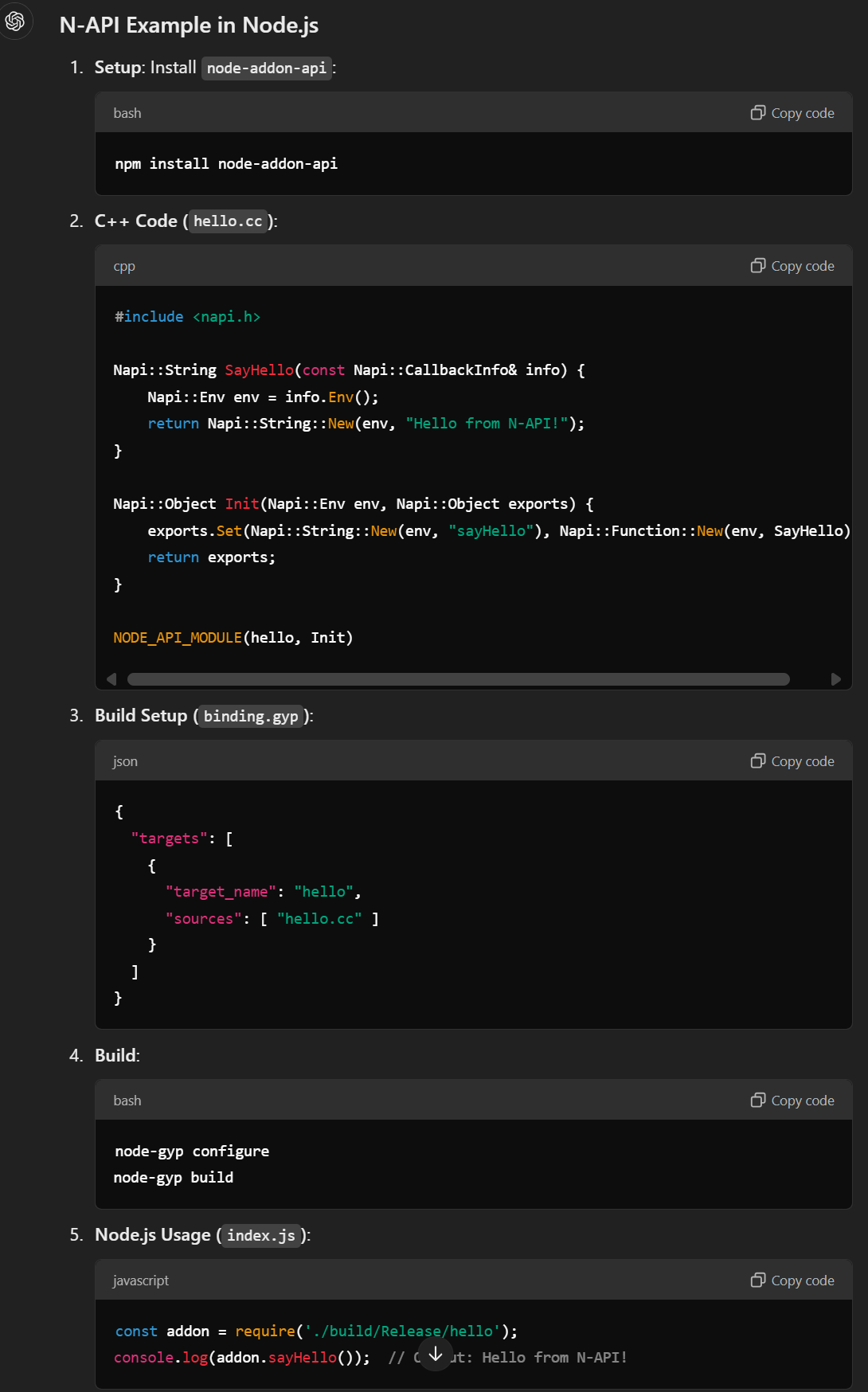
Native Code Integration: Node.js enables the creation of userland modules that can bind to native C/C++ code using the N-API interface. This feature allows easy integration of numerous open-source libraries and reuse of legacy C/C++ code, avoiding complex migrations.
Hardware Interaction: Native code is essential for low-level access, like communication with hardware drivers and ports (e.g., USB, serial), making Node.js suitable for IoT and robotics.
Performance Benefits: For CPU-intensive tasks, offloading computation to native code can greatly enhance performance compared to JavaScript execution in V8.
WebAssembly Support: Modern JavaScript VMs, including Node.js, support WebAssembly, enabling the compilation of languages like C++ or Rust to run efficiently without direct native code interfacing.
 Note
Note  Flashcards (25)