M2: Describe core infrastructure security services in Azure
 Studied by 0 people
 Call Kai
 Learn
Learn Practice Test
 Spaced Repetition
 Match
Match Flashcards
 Knowt Play
1/21

There's no tags or description
Looks like no tags are added yet.
Name | Mastery | Learn | Test | Matching | Spaced | Call with Kai |
|---|
No analytics yet
Send a link to your students to track their progress
22 Terms
Distributed Denial of Service (DDoS) attack
The aim of a Distributed Denial of Service (DDoS) attack is to overwhelm the organization resources of applications and servers, making them unresponsive or slow for genuine users. A DDoS attack will usually target any public-facing device that can be accessed through the internet.
Types of DDoS attacks ?
Volumetric attacks: These are volume-based attacks that flood the network layer with seemingly legitimate traffic, overwhelming the available bandwidth. Legitimate traffic can't get through.
Protocol attacks: Protocol attacks render a target inaccessible by exhausting server resources with false protocol requests that exploit weaknesses in layer 3 (network) and layer 4 (transport) protocols.
Resource (application) layer attacks: These attacks target web application packets, to disrupt the transmission of data between hosts.
Azure DDoS Protection
The Azure DDoS Protection service is designed to help protect your applications and servers by analyzing network traffic and discarding anything that looks like a DDoS attack.
Features of Azure DDoS Protection
Azure DDoS Protection service protects at layer 3 (network layer) and layer 4 (transport layer). Key benefits provided include:
1) Always-on traffic monitoring
2) Adaptive real time tuning
3) DDoS Protection telemetry, monitoring, and alerting
Types of tiers supported by Azure DDoS Protection
1) DDoS IP Protection (pay-per-protected IP model)
2) DDoS Network Protection
Firewall
A firewall is a security device, either hardware, software, or a combination of both, that monitors and controls incoming and outgoing network traffic based on predetermined security rules. Its primary purpose is to establish a barrier between a trusted internal network and untrusted external networks, such as the internet, to protect the internal network from malicious attacks.
Azure Firewall
Azure Firewall is a managed, cloud-based network security service that provides threat protection for your cloud workloads and resources running in Azure.
Features of Azure Firewall
1) Stateful Firewall
2) Built-in high availability and availability zones
3) Network and application level filtering
4) Source and destination network address translation (NAT)
5) Threat intelligence
6) Logging and Monitoring
7) Integration with Azure Services
Azure Firewall is offered in three SKUs: Standard, Premium, and Basic
Web Application Firewall
Web Application Firewall (WAF) provides centralized protection of your web applications from common exploits and vulnerabilities. A centralized WAF helps make security management simpler, improves the response time to a security threat, and allows patching a known vulnerability in one place, instead of securing each individual web application. A WAF also gives application administrators better assurance of protection against threats and intrusions.
Reasons for Network segmentation in Azure:
The ability to group related assets that are a part of (or support) workload operations.
Isolation of resources.
Governance policies set by the organization.
Features of Network Segmentation
Network segmentation also supports the Zero Trust model and a layered approach to security that is part of a defense in depth strategy.
Network segmentation can secure interactions between perimeters. This approach can strengthen an organization's security posture, contain risks in a breach, and stop attackers from gaining access to an entire workload.
Azure Virtual Network
Azure Virtual Network (VNet) is the fundamental building block for your organization's private network in Azure. A virtual network is similar to a traditional network that you'd operate in your own data center, but brings with it additional benefits of Azure's infrastructure such as scale, availability, and isolation.
Enables organizations to segment their network. Organizations can create multiple virtual networks per region per subscription, and multiple smaller networks (subnets) can be created within each virtual network.
no traffic allowed across VNets or inbound to the virtual network, by default.
Network security groups (NSGs):
Network security groups (NSGs) allows to define rules to filter network traffic to and from Azure resources in an Azure virtual network; for example, a virtual machine.
The same network security group, however, can be associated to as many different subnets and network interfaces as you choose.
NSG security rules are evaluated by priority using five information points:
source, source port, destination, destination port, and protocol
By default, Azure creates a series of rules, _____ inbound and _____ outbound rules
three
You can't remove the default rules, but you can override them by creating new rules with higher priorities.
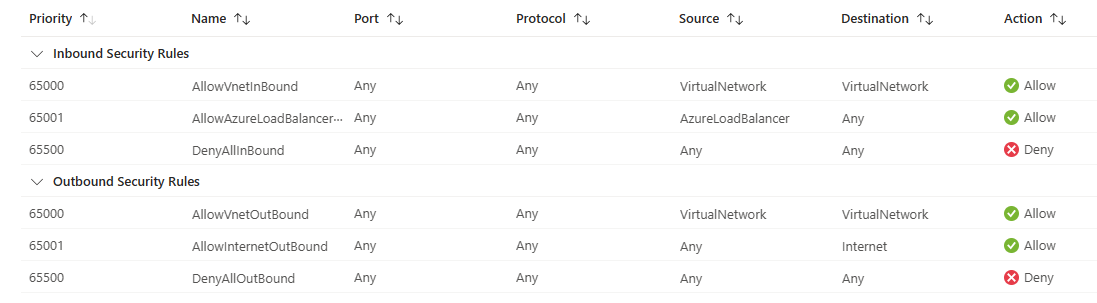
NSG vs Azure Firewall
The Azure Firewall service complements network security group functionality. Together, they provide better "defense-in-depth" network security. Network security groups provide distributed network layer traffic filtering to limit traffic to resources within virtual networks in each subscription. Azure Firewall is a fully stateful, centralized network firewall as-a-service, which provides network and application-level protection across different subscriptions and virtual networks.
Azure Bastion
Azure Bastion is a service that lets you connect to a virtual machine using your browser and the Azure portal. The Azure Bastion service is a fully platform-managed PaaS service that you provision inside your virtual network. Azure Bastion provides secure and seamless RDP and SSH connectivity to your virtual machines directly from the Azure portal using Transport Layer Security (TLS). When you connect via Azure Bastion, your virtual machines don't need a public IP address, agent, or special client software.
Using Azure Bastion protects your virtual machines from exposing RDP/SSH ports to the outside world, while still providing secure access using RDP/SSH.
Azure Bastion deployment is per virtual network with support for virtual network peering, not per subscription/account or virtual machine.
Key benefits of Azure Bastion:
RDP and SSH directly in Azure portal
Remote session over TLS and firewall traversal for RDP/SSH
No Public IP required on the Azure VM
No hassle managing NSGs
Protection against port scanning
Hardening in one place to protect against zero-day exploits
Azure Key Vault
Azure Key Vault is a cloud service for securely storing and accessing secrets. A secret is anything that you want to tightly control access to, such as API keys, passwords, certificates, or cryptographic keys
Azure Key Vault provide solution for
Secrets management
Key management
Certificate management
Service tiers of Azure key vaults
Azure Key Vault has two service tiers: Standard, which encrypts with a software key, and a Premium tier, which includes hardware security module (HSM)-protected keys.
Azure key vaults features
Securely store secrets and keys
Monitor access and use
Simplified administration of application secrets
Authentication is done via Microsoft Entra. Authorization may be done via Azure role-based access control (Azure RBAC) or Key Vault access policy.
 Note
Note  Flashcards (42)