ITEC 1100
 View linked note
 Call Kai
 Learn
Learn Practice Test
 Spaced Repetition
 Match
Match Flashcards
 Knowt Play
1/54

Earn XP
Description and Tags
Name | Mastery | Learn | Test | Matching | Spaced | Call with Kai |
|---|
No analytics yet
Send a link to your students to track their progress
55 Terms
Computer
A device (usually but not always electronic) that is capable of executing programs/instructions
Bit
One binary digit that can have two possible values
Possible values of a bit
0 and 1
Byte
8 bits that can have 256 values
Possible values of a byte
0 to 255
255 in binary
1111 1111
255 in hex
FFFFFF
Text storage in computers
A series of binary codes for each character (one byte in ASCII and two bytes in UNICODE)
Main parts of a computer (Von Neumann)
CPU, input, output, memory, sometimes permanent storage
Main properties of digital media
Programmable/procedural, interactive/participatory, encyclopedic, multi-dimensional, distributed
Decimal value of 11 (binary)
3
Decimal value of 101
5
Decimal value of 1010
10
Decimal value for 1111
15
Resolution
Number of pixels in each dimension
Aspect ratio
Ratio of resolution dimensions
Color depth
Number of bits per color per pixel
Vector graphics
Defines the operation
Raster graphics
Specifies exact pixel values
Object coordinate system
Defines the location of a point relative to the top-left of the object it belongs to
World coordinate system
Defines the location of a point relative to the top-left of the world
How Image Blur Works
Averaging the RGB values of the points around each pixel
Sprite
Small, sometimes animated, shape that represents a character or an object
Keyframe
An important point in time when shape or movement changes
Keyframe usage in animation
Changes between them are linear and can be interpolated by the software
Quantitative data
Numeric data
Qualitative data
Descriptive data (e.g. text, speech, video)
Subjective data
Opinion of the person providing it
Objective data
Fact-based and measurable
HTML Element
Commands to format or style content and place objects on a webpage
Identification of an HTML element
Elements are wrapped in <>
HTML element attribute
Extra data provided for an element
Two HTML attribute examples
Src for <img> element and href for <a> element
<img src="x.jpg" width="100">
Display an image called x.jpg (in the same location as the html file) with a scaled width of 100
width="100" units
Pixels
width="100%" units
Percent of available space
True or False: HTML ignores line breaks in the file
True
Line break element
<br>
New paragraph element
<p></p>
Display a table as wide as the browser window, with 3 rows and 3 columns, with the multiplication table for 4-6
<table border="1" width="100%">
	<tr>
		<td>16</td>
		<td>20</td>
		<td>24</td>
	</tr>
	<tr>
		<td>20</td>
		<td>25</td>
		<td>30</td>
	</tr>
	<tr>
		<td>24</td>
		<td>30</td>
		<td>36</td>
	</tr>
</table>HTML unordered list with 3 items
<ul>
	<li>Item 1</li>
	<li>Item 2</li>
	<li>Item 3</li>
</ul>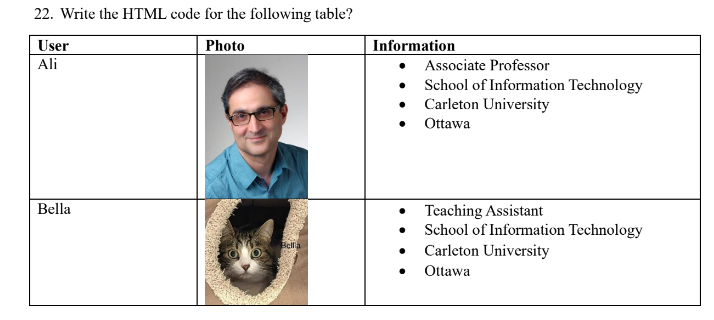
HTML for this table
<table border="1" width="100%">
	<tr>
		<td><b>User</b></td>
		<td><b>Photo</b></td>
		<td><b>Information</b></td>
	</tr>
	<tr>
		<td>Ali</td>
		<td><img src="Ali.jpg"></td>
		<td>
			<ul>
				<li>Associate Professor</li>
				<li>School of Information Technology</li>
				<li>Carleton University</li>
				<li>Ottawa</li>
			</ul>
		</td>
	</tr>
	<tr>
		<td>Bella</td>
		<td><img src="Bella.jpg"></td>
		<td>
			<ul>
				<li>Teaching Assistant</li>
				<li>School of Information Technology</li>
				<li>Carleton University</li>
				<li>Ottawa</li>
			</ul>
		</td>
	</tr>
</table>How to resize an <img>
Edit the width attribute
HTML button element
<button>Click Here</button>
HTML user input element
<input id="userData">
