C. MS-900 101-150
 Studied by 0 people
 Call Kai
 Learn
Learn Practice Test
 Spaced Repetition
 Match
Match Flashcards
 Knowt Play
1/22

There's no tags or description
Looks like no tags are added yet.
Name | Mastery | Learn | Test | Matching | Spaced | Call with Kai |
|---|
No analytics yet
Send a link to your students to track their progress
23 Terms
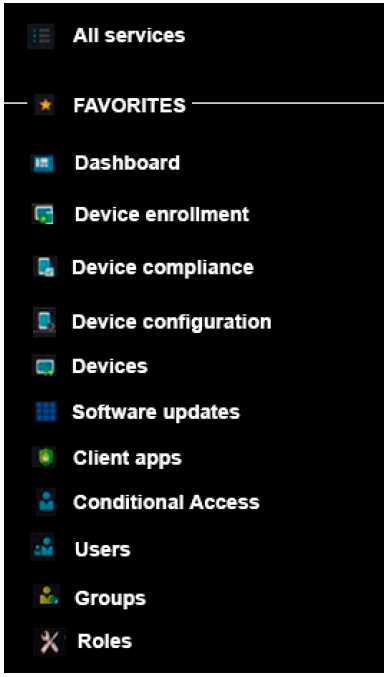
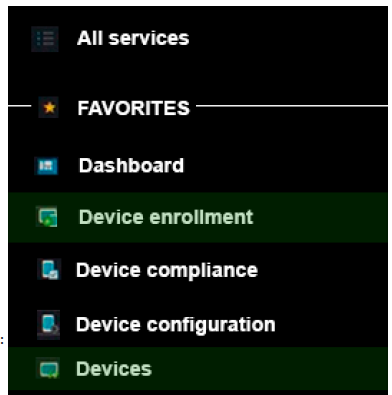
106: A company has Microsoft Surface devices that run Windows The company plans to deploy devices by using Windows AutoPilot. You need to import a CSV file to ensure that the devices are ready for deployment. In the Microsoft 365 Device Management portal, which two blades should you use?
Device Enrollment and Devices (DED)
107: Private, Public, or GA?
Complete compliance testing.
Complete QA testing for recently released features.
Prepare QA results and end-user documentation.
Complete compliance testing. Private
Complete QA testing for recently released features. Public
Prepare QA results and end-user documentation. GA
111: Drop down - Options: Windows Virtual Desktop, AAD App Proxy, AAD Connect, MS Intune.
Users must be able to use incompatible applications on a Windows 10 device
Cloud-based applications must use the same credentials as on-premises applications
Users must be prevented from copying company data from managed applications installed on unmanaged devices
Windows Virtual Desktop - Users must be able to use incompatible applications on a Windows 10 device
Azure AD Connect - Cloud-based applications must use the same credentials as on-premises applications
Microsoft Intune - Users must be prevented from copying company data from managed applications installed on unmanaged devices
112: Yes or No
Microsoft 365 global administrators use Microsoft Workplace Analytics to examine network traffic patterns for troubleshooting purposes
Microsoft Workplace Analytics can be helpful in understanding the usage patterns of various Microsoft 365 services
Microsoft Workplace Analytics helps business examine the work of teams so that they can become more productive
No. Microsoft 365 global administrators use Microsoft Workplace Analytics to examine network traffic patterns for troubleshooting purposes
Yes. Microsoft Workplace Analytics can be helpful in understanding the usage patterns of various Microsoft 365 services
Yes. Microsoft Workplace Analytics helps business examine the work of teams so that they can become more productive
113: A company assigns a Microsoft 365 license to each employee. You need to install Microsoft Office 365 ProPlus on each employee laptop computer. Which three methods can you use?
A. Use System Center Configuration Manager (SCCM) to deploy Office 365 ProPlus from a local distribution source.
B. Use System Center Configuration Manager (SCCM) to deploy Office 365 ProPlus from an Office Windows Installer (MSI) package.
C. Download the Office 365 ProPlus Windows Installer (MSI) package. Install Office 365 ProPlus from a local distribution source.
D. Use the Office Deployment Tool (ODT) to download installation files to a local distribution source. Install Office 365 ProPlus by using the downloaded files.
E. Enable users to download and install Office 365 ProPlus from the Office 365 portal.
A. Use System Center Configuration Manager (SCCM) to deploy Office 365 ProPlus from a local distribution source.
D. Use the Office Deployment Tool (ODT) to download installation files to a local distribution source. Install Office 365 ProPlus by using the downloaded files.
E. Enable users to download and install Office 365 ProPlus from the Office 365 portal
117: A company plans to deploy automated workflows for managers to approve. You need to determine which Microsoft 365 products allow access to personal workflows. Which two products should the managers use? Each correct answer presents a partial solution.
A. Power Automate
B. Microsoft Excel
C. Yammer
D. Microsoft Teams
A. Power Automate
D. Microsoft Teams
122: What happens when you enable external access by using the Microsoft 365 admin portal? Drop down:
Users can send sharing invitations for specific content.
Data becomes available to anonymous users.
You must configure Active Directory Federation Services (AD FS).
The Everyone group is applied to all shares and granted full control
Users can send sharing invites for specific content
130: A company uses Microsoft 365. The company is considering using MyAnalytics. You need to identify the features of MyAnalytics. What are two features of MyAnalytics?
A. suggestions in Microsoft Outlook to review outstanding tasks
B. suggestions in Microsoft Teams to delay delivery of chat messages
C. suggestions in Microsoft Outlook to delay delivery of emails
D. suggestions in Teams to review outstanding tasks
A. suggestions in Microsoft Outlook to review outstanding tasks
C. suggestions in Microsoft Outlook to delay delivery of emails
131: Yes or No, Employees must use a browser to co-author docs, spreadsheets, and presentations
No, Employees must use a browser to co-author docs, spreadsheets, and presentations
134: You are the Microsoft 365 administrator for a company. You need to customize a usage report for Microsoft Yammer. Which two tools can you use?
A. Microsoft SQL Server Analysis Services
B. Microsoft SQL Server Reporting Services
C. Microsoft Power BI in a browser
D. Microsoft Power BI Desktop
E. Microsoft Visual Studio
C. Microsoft Power BI in a browser
D. Microsoft Power BI Desktop
139: A company uses Microsoft cloud services. You need to change the update channels for the Microsoft 365 Apps for enterprise by using a Microsoft supported method. Which two methods can you use?
A. Windows 10 Update Assistant
B. Group Policy
C. Client app
D. Office Deployment Tool
E. Readiness Toolkit
B. Group Policy
D. Office Deployment Tool
141: yes or no
Dynamics 365 is an infrastructure as a service (laaS) solution.
A Microsoft 365 subscription includes a free subscription to Dynamics 365.
Dynamics 365 has an integrated customer relationship management (CRM) application that uses Microsoft 365 Apps.
No: Dynamics 365 is an infrastructure as a service (laaS) solution.
No: A Microsoft 365 subscription includes a free subscription to Dynamics 365.
No: Dynamics 365 has an integrated customer relationship management (CRM) application that uses Microsoft 365 Apps.
146: yes or no
You can use Windows Autopilot to manage MS Office, Edge, and Windows using admin templates
No, You can use Windows Autopilot to manage MS Office, Edge, and Windows using admin templates
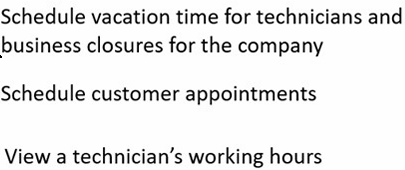
150: Options: Booking Calendar, Booking Page, Staff Page
Schedule vacation time for technicians and business closures for the company
Schedule customer appointments
View a technician's working hours
Booking Calendar - Schedule vacation time for technicians and business closures for the company
Booking Page - Schedule customer appointments
Staff page - View a technician's working hours
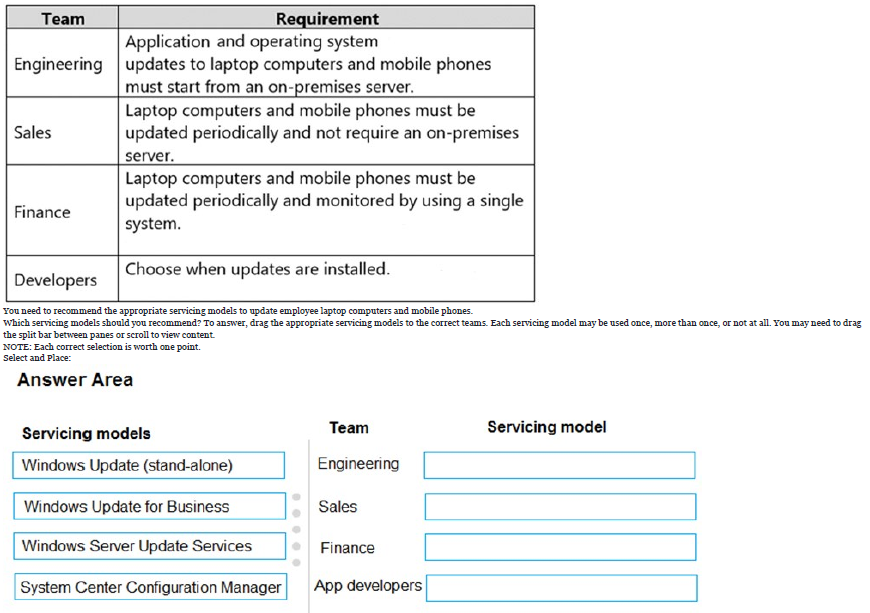
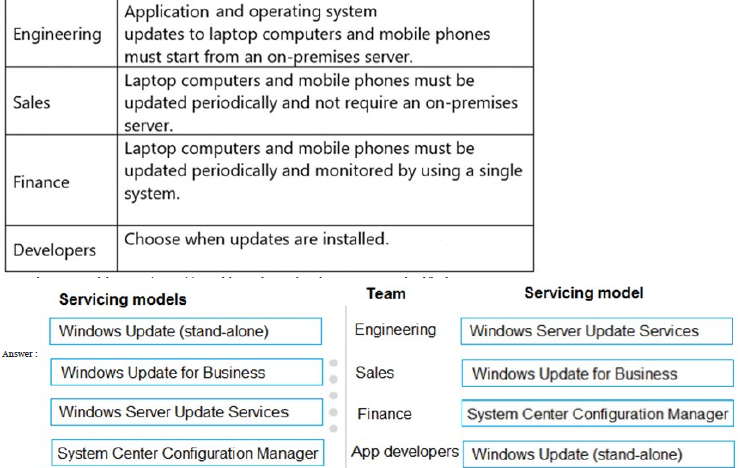
133: See image
You need to recommend the appropriate servicing models to update employee laptop computers and mobile phones.
Which servicing models should you recommend?
see image
104: You are the desktop administrator for an organization.
You need to ensure that Office 365 ProPlus is installed on all employee computers.
Which three tools can you use to deploy Office 365 ProPlus?
A. Microsoft Intune
B. System Center Operations Manager
C. Windows Installer (MSI) package
D. System Center Configuration Manager
E. Office Deployment Tool
A. Microsoft Intune
D. System Center Configuration Manager
E. Office Deployment Tool
110: A company plans to migrate to Microsoft 365. Corporate devices run Windows 7 or Windows 10.
You must upgrade all devices to use Office 365 ProPlus and minimize costs.
You need to standardize corporate device deployments.
Which three actions should you perform?
A. Implement Windows AutoPilot
B. Deploy policies by using Configuration Manager
C. Upgrade all devices to Windows 10
D. Deploy policies by using Microsoft Intune
E. Instruct users to download and install a Windows Installer package for Office 365 ProPlus
A. Implement Windows AutoPilot
C. Upgrade all devices to Windows 10
D. Deploy policies by using Microsoft Intune
115: Drag
A company uses Microsoft 365 and Windows 10.
You need to identify which servicing tools the company should use for Windows 10.
Which servicing tool should you choose for each description?
Options: Windows Update, Endpoint Config Mgr
Tool description:
Limited control over feature updates and the ability to manually defer updates
Full control over feature updates and multiple deployment options
Windows Update: Limited control over feature updates and the ability to manually defer updates
Endpoint Config Mgr: Full control over feature updates and multiple deployment options
123: You are the Microsoft 365 administrator for a company. You deploy Windows 10 to all devices by using Windows Autopilot.
You need to ensure that employees can install Microsoft Office 365 ProPlus on their devices. Multiple answers
A. Use the self-install option on the Office 365 dashboard
B. Download and install the Office ProPlus Windows Installer (MSI) package
C. Enable auto-deployment of Office 365 apps for all devices
D. Update the Windows AutoPilot deployment profile to include the Office 365 apps
A. Use the self-install option on the Office 365 dashboard
C. Enable auto-deployment of Office 365 apps for all devices
135: Drag:
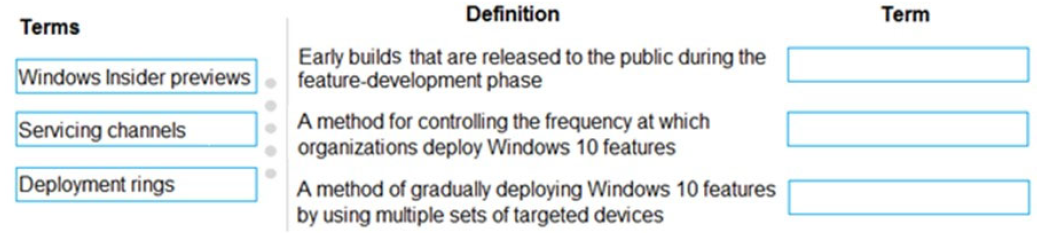
You are the Microsoft 365 administrator for a company. The company plans to upgrade client operating systems to Windows 10.
You need to explain the concepts of Windows as a Service (WaaS) to the management team.
Options:
Windows Insider Preview
Servicing Channel
Deployment Rings
Definition
Early builds that are released to the public during the feature-development phase
A method for controlling the frequency at which organizations deploy Windows 10 features
A method of gradually deploying Windows 10 features by using multiple sets of targeted devices
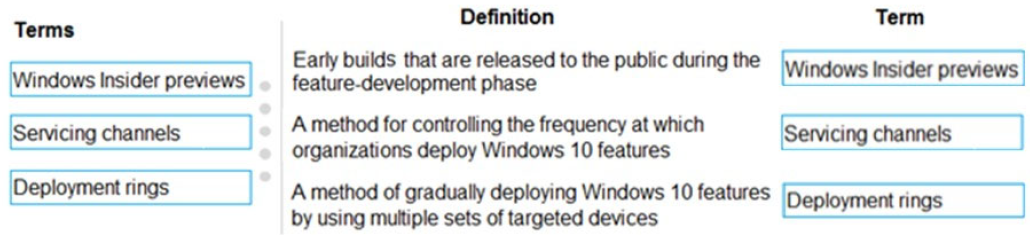
Windows Insider Preview: Early builds that are released to the public during the feature-development phase
Servicing Channel: A method for controlling the frequency at which organizations deploy Windows 10 features
Deployment Rings: A method of gradually deploying Windows 10 features by using multiple sets of targeted devices
145: Y/N
Azure Virtual Desktop (formerly Windows Virtual Desktop) provides user access to a full desktop through a web browser
Azure Virtual Desktop (formerly Windows Virtual Desktop) provides user access to a virtualized application in the cloud
Azure Virtual Desktop (formerly Windows Virtual Desktop) provides user access to a full desktop environment when the user’s device is offline
Yes: Azure Virtual Desktop (formerly Windows Virtual Desktop) provides user access to a full desktop through a web browser
Yes: Azure Virtual Desktop (formerly Windows Virtual Desktop) provides user access to a virtualized application in the cloud
No: Azure Virtual Desktop (formerly Windows Virtual Desktop) provides user access to a full desktop environment when the user’s device is offline
148: A company implements Microsoft 365.
The company needs to deploy Microsoft 365 Apps for enterprise to their client computers from the cloud.
You need to identify the solution that meets the requirement.
Which solution should you select?
A. Office Deployment Tool
B. Windows Update
C. Microsoft Remote Connectivity Analyzer
D. Microsoft FastTrack
A. Office Deployment Tool
149: An automobile repair company uses Microsoft Bookings.
Customers can schedule appointments for automobile services with technicians.
Options:
Booking Calendar
Booking Page
Staff Page
Services Page
Description:
Schedule vacation time for technicians and business closures for the company
Schedule customer appointments
View a technician's working hours
Booking calendar: Schedule vacation time for technicians and business closures for the company
Booking page: Schedule customer appointments
Staff page: View a technician's working hours
 Note
Note  Flashcards (44)