CS Pre‑Engineering Module Certification Exam Study Guide
 Call Kai
 Learn
Learn Practice Test
 Spaced Repetition
 Match
Match Flashcards
 Knowt Play
1/53

There's no tags or description
Looks like no tags are added yet.
Name | Mastery | Learn | Test | Matching | Spaced | Call with Kai |
|---|
No analytics yet
Send a link to your students to track their progress
54 Terms
Common Programming Languages
C++, Java, Python, Scratch
C++
Compiled, high‑performance language.
Strongly typed; supports object‑oriented programming (OOP).
Used in robotics, embedded systems, game engines.
Java
Compiled to bytecode; runs on the Java Virtual Machine (JVM).
“Write once, run anywhere.”
Heavy use of classes and objects.
Python
Interpreted, high‑level, readable syntax.
Great for beginners, data science, automation, AI.
Scratch
Block‑based visual programming.
Teaches logic, loops, events, and sequencing.
Web Design & Databases
HTML (HyperText Markup Language), SQL (Structured Query Language), Database Systems (Oracle, DB2)
HTML (HyperText Markup Language)
Structure of web pages.
Uses tags like
<html>,<body>,<p>,<img>.
SQL (Structured Query Language)
Used to search, retrieve, and manipulate data.
Common commands:
SELECT(retrieve data)INSERT(add data)UPDATE(modify data)DELETE(remove data)
Database Systems
Oracle – enterprise‑level relational database.
DB2 – IBM’s ( International Business Machines Corporation) relational database system.
Oracle is known for its speed in processing large volumes of data and transactions, while IBM Db2 is recognized for its reliability and scalability
Oracle
Known for its wide range of applications, tools, and partners, and its ability to manage large datasets with features like Real Application Clusters and Partitioning.
DB2
Developed by IBM, it is known for its reliability, scalability, and integration with IBM hardware and software.
IP Address
Unique number identifying a device on a network.
An IP (Internet Protocol) address is a unique numerical label assigned to each device on a network, enabling identification and communication over the internet or local networks.
I/O (Input/Output)
The process by which a computer communicates with external devices, users, or other systems, transferring data in and out of the system.
Input is the data or signals received by the system, such as keystrokes from a keyboard or clicks from a mouse, while output is the data or signals sent from the system, like displaying text on a monitor or printing a document.
Performing I/O allows computers to interact with their environment and execute tasks based on external information.
Communication between a computer and external world.
Infinite Loop
Loop that never ends due to missing or incorrect exit condition.
An infinite loop is a programming construct where a set of instructions continues to execute indefinitely, causing the program to run without terminating.
This can occur due to a lack of a proper exit condition or logical errors in the code. Infinite loops can lead to system slowdowns or crashes, and they are often unintentional mistakes in programming.
They can be created intentionally in certain applications, such as system processes or user interfaces, but they are generally undesirable in most cases
Memory Access Violation
Program tries to access memory it shouldn’t.
A memory access violation occurs when a program attempts to read, write, or execute memory that it is not permitted to access.
A memory access violation, also known as an access violation or segmentation fault, is an error raised by the operating system when a program tries to access a memory location in a way that is not allowed.
This can happen if program attempts to:
Access memory outside its allocated range or virtual address space.
Write to memory marked as read-only, such as string literals or code segments.
Dereference a null or uninitialized pointer, or use a pointer after the memory it points to has been freed.
Access memory beyond the bounds of an array or buffer.
Execute code in memory pages not marked as executable
HTTP / HTTPS
Protocols for web communication; HTTPS is secure/encrypted.
Difference Between HTTP and HTTPS
HTTP (Hypertext Transfer Protocol) and HTTPS (Hypertext Transfer Protocol Secure) are both protocols used for communication between web browsers and servers, but they differ significantly in security, performance, and use cases.
HTTP is a stateless application-layer protocol built on top of TCP. It transfers data in plain text, meaning anyone intercepting the communication can read or modify it. It typically uses port 80 and is suitable for non-sensitive data like blogs or public information. While it offers low latency and less CPU usage, it lacks encryption, making it vulnerable to man-in-the-middle (MITM) attacks and data breaches.
HTTPS, on the other hand, is HTTP combined with TLS/SSL encryption. It ensures data confidentiality, integrity, and authentication by encrypting all communication between client and server. HTTPS uses port 443 and is essential for sensitive transactions like online banking, e-commerce, and login systems.
Modern browsers display a padlock icon for HTTPS sites, boosting user trust and improving SEO rankings.
Networking & Communication
Internet vs. In
Internet vs Intranet
Internet – global network.
Intranet – private internal network.
| Access | Open to everyone worldwide | Restricted to authorized users within an organization |
| Purpose | Global communication, information sharing, entertainment, e-commerce | Internal communication, collaboration, knowledge sharing |
| Security | Less secure, exposed to cyber threats | More secure, controlled access and permissions |
| Scale | Billions of users and devices | Limited to organization members |
| Information | Unlimited and public | Limited and organization-specific |
| Examples | Websites, social media, online services | Company portals, internal document repositories, employee dashboards |
Computer, Server, Cloud
Computer – general‑purpose device.
Server – provides resources/services to other computers
Cloud – remote servers accessed over the internet
Computer: A device that processes data and performs calculations, often referred to as a personal computer, laptop, or server.
Server: A computer that provides resources and services to other computers over a network, such as data storage, processing, or application hosting.
Cloud: A computing model that provides services over the internet, including servers, storage, databases, and software, allowing users to access resources without managing physical hardware.
These definitions provide a foundational understanding of each term in the context of computing and technology.
Services
ISP – provides internet access.
DHCP – assigns IP addresses automatically.
DNS – translates domain names to IP addresses.
ISP (Internet Service Provider): An intermediary that connects end users to the global network of servers and services, managing DNS operations and providing DNS resolvers to users.
DHCP (Dynamic Host Configuration Protocol): A protocol that automates the assignment of IP addresses and other network configuration details to devices on a network.
DNS (Domain Name System): A system that translates human-readable domain names into IP addresses, allowing users to access websites using simple names instead of complex numerical addresses.
These services are essential for the smooth operation of modern networks, ensuring devices connect reliably and efficiently.
Hardware
Switch – connects devices within a network.
Router – connects networks; directs traffic.
Wi‑Fi – wireless networking technology.
Switch: A device that connects multiple computers or devices within a local area network (LAN) and allows them to communicate and share resources. It forwards data packets based on MAC addresses, ensuring that data is sent only to the intended recipient.
Router: A device that connects multiple networks together, directing data traffic between them. It selects the best path for data packets to reach their destination, allowing different networks to communicate with each other.
Wi-Fi: A wireless networking technology that enables devices to connect to the internet wirelessly. It uses radio waves to transmit data between devices and is commonly used in homes and businesses for internet access.
Computer Architecture
Software Levels
BIOS – basic startup firmware.
Operating System – manages hardware (Windows, Linux, macOS).
Drivers – allow OS to communicate with hardware.
Applications – programs users run.
BIOS: A firmware program embedded in a computer's motherboard that initializes hardware and prepares the environment for the operating system to load. It performs hardware initialization during the booting process and loads a boot loader from a mass storage device.
Operating System: A software system that manages computer hardware resources, provides services to applications, and manages the execution of programs. It is responsible for executing instructions and managing memory and input/output operations.
Drivers: Software that enables communication between the operating system and hardware devices. Drivers are necessary for the operating system to interact with hardware components like printers, modems, and network interfaces.
Applications: Software programs that run on a computer's operating system and are executed by the operating system. Applications can be used for various purposes, such as word processing, web browsing, and multimedia
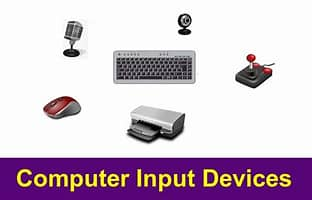
Input devices
Keyboard, mouse, scanner, microphone.
An input device is any hardware component that allows a user to enter data and instructions into a computer. Examples of common input devices include:
Keyboards: Used for typing text and commands.
Mice: Pointing devices that control the cursor on the screen.
Touchscreens: Devices that allow users to interact with the screen by touching it.
Microphones: Convert sound waves into electrical signals for voice input.
Input devices are essential for interacting with a computer, allowing users to input data, control the system, and perform various tasks.
Output Devices
Monitor, printer, speakers
An output device is a hardware component that converts data into a form that can be perceived by humans, such as text, images, audio, or video. Examples of output devices include:
Monitors: Display screens that show visual information.
Printers: Devices that produce hard copies of documents.
Speakers: Audio output devices that play sound.
Projectors: Used to display large images on a screen.
These devices are essential for displaying the results of computer processes and enabling users to interact with the system.
Processing Units
CPU – general processing.
FPU – handles floating‑point math.
GPU – graphics and parallel processing.
Central Processing Unit (CPU): The main processor that executes program instructions and controls system operations. It is designed for general-purpose computing and can handle tasks step-by-step.
Floating Point Unit (FPU): A processor that performs operations on floating point numbers, originally a separate coprocessor but now integrated into the CPU for improved performance.
Graphics Processing Unit (GPU): A specialized processor designed to perform many calculations simultaneously, primarily for graphics tasks such as rendering images and videos. It can handle parallel tasks and is often used in AI and machine learning applications.
These processing units work together to manage different types of tasks and enhance overall system performance.
Memory
RAM – temporary, volatile.
ROM – permanent, non‑volatile.
In essence, RAM provides the workspace for active computing tasks, while ROM provides the foundational instructions that allow the computer to boot and operate correctly.
RAM (Random Access Memory) is volatile memory used for temporary data storage, while ROM (Read-Only Memory) is non-volatile memory used for permanent storage of essential instructions.
Random Access Memory (RAM)
RAM is a type of volatile memory, meaning it loses all stored data when the computer is powered off. It temporarily stores data and programs that the CPU is currently using, allowing for fast access and processing. RAM is essential for running applications, switching between programs, and storing immediate results of computations
ROM is non-volatile memory, retaining its data even when the computer is turned off. It stores permanent instructions required for the computer to start up, such as the BIOS or UEFI firmware. ROM is generally not writable during normal operation, though some types allow limited reprogramming.
Storage Devices
HDD, SSD, flash drives.
HDD (Hard Disk Drive): A traditional storage device that uses spinning disks coated with magnetic material to store data. It has been around for decades and is known for its large storage capacity at a lower cost per gigabyte, but it is slower and more susceptible to physical wear and tear.
2
SSD (Solid State Drive): A newer technology that uses flash memory to store data, providing faster data access speeds and greater durability due to the lack of moving parts. SSDs are more energy-efficient and offer higher performance, but they are generally more expensive per gigabyte.
3
Flash Drives: Portable storage devices that use NAND flash memory to store data. They are designed for portability and easy transfer between devices, making them ideal for backup and transferring files quickly. Flash drives are typically used for smaller storage capacities, ranging from 8 GB to 256 GB.
Cybersecurity Basics
Malware Types, Firewall
Malware Types
Virus – attaches to files; spreads when executed.
Worm – self‑replicates across networks.
Denial of Service (DoS) – overwhelms a system to shut it down.
Spam – unwanted messages.
Malware refers to any software designed to harm, disrupt, or gain unauthorized access to a computer system. Here are some common types of malware:
Viruses: Self-replicating programs that attach to legitimate software and spread when the infected program is run. They can damage system files and steal data.
Worms: Self-replicating malware that spreads automatically across networks without user action. They can consume system resources and slow down performance.
Ransomware: Malware that locks files and demands payment to unlock them, often using encryption.
Spyware: Software that secretly monitors user activities, collecting sensitive information like passwords and browsing history.
Trojans: Malware that disguises itself as legitimate software, allowing attackers to gain access to the system.
Adware: Software that displays unwanted advertisements and tracks user behavior.
Botnets: Networks of infected devices controlled by hackers, used for attacks like DDoS or sending spam.
Understanding these types of malware is crucial for effective cybersecurity and prevention.
Firewall
Filters incoming/outgoing network traffic.
A firewall is a network security device that monitors and controls incoming and outgoing network traffic based on predetermined security rules. Its primary purpose is to establish a barrier between a trusted internal network and untrusted external networks, such as the internet. Firewalls can be implemented as hardware or software and are essential for protecting networks from unauthorized access, malicious traffic, and potential threats. They work by inspecting data packets and determining whether to allow or block them based on a set of rules, which can include criteria like source and destination IP addresses, port numbers, and protocol types.
Number Systems
Binary, Hexadecimal (go over pages and practice converting from and to with your study pages in-person and on phone pictures) _ PLEASE PRACTICE and go over past assignment and practice pages on this
Binary
Binary (Base 2)
Digits: 0, 1
Examples:
1 → 12
2 → 102
3 → 112
15 → 11112
Hexadecimal
Hexadecimal (Base 16)
Digits: 0–9, A–F
Examples:
10 → A
15 → F
16 → 10
30 → 1E
Pseudocode & Program Logic: LOOPS
Loops
For loop – repeats a set number of times.
While loop – repeats while condition is true.
For loops are ideal when the number of iterations is known in advance or when iterating over a sequence like a list, tuple, string, or range. They handle initialization, condition checking, and iteration updates internally, making them concise and less error-prone for fixed repetitions.
While loops excel when the number of iterations is unknown and depends on a condition that may change dynamically during execution. They require explicit initialization and update of loop variables, offering more flexibility but also more responsibility to avoid infinite loops.
Queues & Stacks
Queue – FIFO (first in, first out).
Stack – LIFO (last in, first out).
Stacks and Queues Structure
12
Stacks and queues are linear data structures that organize elements in a specific order, but they differ in how elements are inserted and removed.
A stack follows the Last In, First Out (LIFO) principle — the last element pushed is the first to be popped. A queue follows the First In, First Out (FIFO) principle — the first element enqueued is the first to be dequeued.
Stack Structure and Pointers A stack can be implemented using arrays or linked lists.
In an array-based stack, a single pointer (top) tracks the index of the most recently added element.
In a linked list stack, top points to the head node, and each node points to the next.
Key operations:
push(x) → add element at top
pop() → remove element from top
peek() → view element at top without removing
Queue Structure and Pointers A queue typically uses two pointers:
front → points to the first element
rear → points to the last element
In array-based queues, these pointers move forward as elements are added/removed, often using a circular buffer to reuse space. In linked list queues, front points to the head node and rear to the tail node.
Key operations:
enqueue(x) → add element at rear
dequeue() → remove element from front
peek() → view element at front without removing
Principles Recap
LIFO (Stack): Useful for function call management, undo/redo, backtracking.
FIFO (Queue): Ideal for task scheduling, BFS traversal, buffering.
Functions
Reusable blocks of code with inputs and outputs.
a function is a self-contained block of code designed to perform a specific task. A named block of statements that can be called (invoked) from other parts of the program to perform a specific operation and optionally return a value function generally has three parts: Declaration (Prototype) Tells the compiler the function’s name, return type, and parameters. Definition Contains the actual code (body) of the function. Call Executes the function from main() or another function.
Errors
Compile Time | Syntax errors; caught before running. |
Run Time | Errors during execution (divide by zero). |
Logical | Program runs but gives wrong output. |
Memory Allocation Error | Program cannot get required memory. |
Compile Time Errors: Errors that occur when the code violates the rules of writing syntax, detected by the compiler before the code can be compiled. Examples include syntax errors, type mismatches, and missing declarations.
2
Run Time Errors: Errors that occur during program execution, often due to unexpected conditions. Examples include division by zero, accessing invalid memory, and using undefined variables.
2
Logical Errors: Errors caused by flawed algorithms or incorrect assumptions, leading to incorrect output. They are not detected by the compiler and require testing or debugging.
2
Divide by Zero Error: A specific type of run-time error that occurs when dividing a number by zero, which is mathematically invalid.
2
Memory Allocation Error: An error that occurs when the program attempts to allocate memory for an object that has already been allocated, leading to a memory leak or other issues.
2
Understanding these errors is crucial for writing robust and error-free code, as they can significantly impact the program's performance and reliability.
Variable Types
Integer – whole numbers.
Character – single symbol.
String – text.
Floating Point – decimals.
Array – list of values.
Integer (int)
Definition: Stores whole numbers (positive, negative, or zero) without a fractional part.
int age = 25; // integer variable
Typical Range (on 32-bit systems): -2,147,483,648 to 2,147,483,647
2. Character (char)
Definition: Stores a single character (letter, digit, symbol) using its ASCII value.
Example:
C
Copy code
char grade = 'A'; // single character
Size: Usually 1 byte (can store values from -128 to 127 or 0 to 255 depending on signedness).
3. String
Definition: A sequence of characters ending with a null character '\0' in C.
Example:
C
Copy code
char name[] = "Alice"; // string stored as an array of chars
Note: C does not have a built-in string type; strings are implemented as char arrays.
4. Floating Point (float, double)
Definition: Stores numbers with fractional parts (decimals).
Example:
C
Copy code
float price = 19.99f; // single precision
double pi = 3.14159265; // double precision
Precision: float ≈ 6–7 decimal digits, double ≈ 15–16 decimal digits.
5. Array
Definition: A collection of elements of the same type stored in contiguous memory locations.
Example:
C
Copy code
int numbers[5] = {1, 2, 3, 4, 5}; // array of integers
Follow program code to determine output or value of given variables
Comments
Notes for humans; ignored by computer.
Comments are non-executable text within source code that serve as annotations to explain, clarify, or document the logic for developers. They are ignored by compilers and interpreters, but are essential for readability, maintainability, and collaboration.
Key purposes include:
Explaining complex logic or algorithms that may not be obvious from the code itself.
Documenting functions, classes, or modules with their purpose, parameters, and return values.
Clarifying design decisions and trade-offs.
Marking TODOs for future improvements.
Debugging by temporarily disabling code without deleting it.
Types of Comments:
Single-line: Short notes, often starting with # in Python or // in C/Java.
Multi-line: Longer explanations, enclosed in """ in Python or /* */ in C/Java.
Inline: Placed at the end of a statement to explain a specific part.
Debugging
Finding and fixing logic errors.
Debugging is the process of finding, isolating, and resolving coding errors (bugs) in software programs. It involves identifying, analyzing, and fixing parts of a program that cause incorrect behavior, ensuring the software functions correctly and efficiently. Debugging is a critical skill in computer science, essential for improving software performance and user satisfactio
Application Problems
Binary & Hex Conversions
Convert between decimal, binary, and hex.
Understand place values:
Binary: 20,21,22...
Hex: 160,161,162...
Follow Program Code
Determine variable values after loops and conditions.
Predict printed output
(google search this for examples)
Robotics & Movement Logic
Understand simple robot commands:
Move forward/backward
Turn left/right
Repeat loops to form shapes (square, triangle)
Evaluate pseudocode to determine final robot position.
(google search this for examples)
Final tips for success
Practice converting numbers between binary, decimal, and hex.
Review simple pseudocode problems and trace them step‑by‑step.
Understand networking basics—these show up often.
Know the difference between malware types.
Be comfortable identifying logic errors in short programs.
CHECK AI PAGE I MADE FOR SAMPLE PROBLEMS AND STEP-BY-STEP SOLUTIONS

