Automation & Orchestration
 Call Kai
 Learn
Learn Practice Test
 Spaced Repetition
 Match
Match Flashcards
 Knowt Play
1/26

There's no tags or description
Looks like no tags are added yet.
Name | Mastery | Learn | Test | Matching | Spaced | Call with Kai |
|---|
No analytics yet
Send a link to your students to track their progress
27 Terms
Why is automation important in data centers? What steps are involved in deploying a single Virtual Machine (VM)
Because many problems are caused by human error (manual mistakes). Even a “simple” task like deploying a VM has many steps and can easily go wrong.
From the data center perspective:
Choose a server to run the VM
Configure the hypervisor (software that runs VMs, e.g., like VirtualBox but in data centers)
Assign an IP address to the VM
Configure the network so traffic reaches the VM
Choose a remote disk server and allocate storage
Configure the hypervisor to send requests from the VM to the storage server
Which data center tasks can be automated?
Create and deploy virtual resources (VMs, containers)
Monitoring & accounting → measure system load (CPU, memory usage)
Optimization → balance load, reduce network traffic
Software updates (OS, apps, libraries)
Security management → firewalls, passwords, secrets
👉 Basically: deployment, monitoring, scaling, updates, security.
What are the 6 levels of automation?
Level 0: Manual (no automation)
Level 1: Automated setup/configuration
Level 2: Automated monitoring (measure system)
Level 3: Automated analysis & prediction (detect trends)
Level 4: Automated root cause detection
(Root cause = real underlying reason for a problem)Level 5: Automated problem fixing (self-healing)
👉 Higher level = system becomes more autonomous.
What is Infrastructure as Code (IaC)? What is Immutable Infrastructure? Benefits of IaC?
Managing infrastructure (servers, networks, storage) using code files, not manual setup.
You treat infrastructure like software:
Version control (Git)
Code review
Testing
Instead of patching (modifying) a running server, you replace it with a new updated one (image).
Benefits of IaC?
Consistency → no configuration drift
(Drift = servers slowly becoming different over time)Reproducibility → identical Dev/Test/Prod environments
Speed → automated provisioning
Tools:
Terraform → provisioning (creating resources)
Ansible → configuration management
What are containers and why are they popular?
Lightweight isolated environments
Use OS-level isolation (Linux features like namespaces & cgroups)
Docker is most common
Package application + required libraries together
👉 Advantage: “It works on my machine” problem disappears.
Why do we need orchestration? What does orchestration software do?
Because containers:
Start quickly
Have short lifetimes
Often exist in many copies
Manually managing them is too complex.
Orchestration Software:
Automates deployment
Dynamic scaling (automatically increase/decrease instances)
Coordination across servers
Resilience (automatic recovery)
👉 If cloud = computer, orchestration = new operating system.
What is Kubernetes (K8s)?What does it mean that Kubernetes “reconciles declared state with actual state”? Main Capabilities:
Open-source container orchestration platform (originally from Google).
Manages containerized applications in distributed systems.
You declare what you want (e.g., 3 containers running).
Kubernetes constantly checks and makes reality match that goal.
Service naming & discovery
Load balancing
Storage orchestration
Optimized placement
Auto recovery
Config & secrets management
Rollouts & rollbacks
How does Kubernetes handle service naming?
Users access a service name, not individual containers.
Kubernetes assigns:
Domain name or
IP address
Kubernetes routes requests to one container.
👉 Users don’t see internal container details.
How does Kubernetes scale and balance load? How does Kubernetes manage storage?
Starts multiple container instances
Can limit max number
Uses load balancer to distribute requests
(Load balancer = software that spreads traffic across instances.)
When starting a container, it connects to external storage automatically.
Types:
Host file system
File storage (NFS, EFS)
Block storage (EBS)
(Block storage = raw disk-like storage.)
How does Kubernetes place containers?
Does NOT request new cloud resources automatically.
You define available nodes.
Kubernetes assigns containers efficiently (bin packing).
Important terms:
Node = server (physical or virtual)
Cluster = group of nodes
How does Kubernetes handle container startup?
Starts container → container initialization
Waits until it’s ready → Delayed availability
Then sends traffic → failure detection
probes each container with a user-defined health check
If container fails → it terminates and replaces it
(This prevents sending traffic to unready services.)
Why does Kubernetes separate configuration from container images?
Allows changing configs without rebuilding images.
Configuration includes:
Network connections
Storage connections
Passwords
Tokens
Encryption keys
👉 More flexible & secure.
How does Kubernetes update applications safely? (Rollout & Rollback)
Gradually replace old containers with new version
Control update speed
Keep old containers running
Rollback if problems occur
👉 Safe updates with minimal downtime.
What are Kubernetes limitations?
No app-specific optimizations
Does NOT build containers (Docker does)
No event-passing middleware
No built-in logging/monitoring system
👉 It manages containers, not everything around them.
Why is Kubernetes difficult for beginners?
Very complex system
Many components
Constant evolution
Overlapping features
Poor documentation
Inconsistent terminology
👉 Hard to fully master.
Define Cluster, Node, and Pod in Kubernetes.
Cluster = A group of machines running containerized applications.
Node = A single machine (physical or virtual) inside the cluster.
Pod = Smallest deployable unit in Kubernetes.
👉 Think:
Cluster = whole system
Node = one server
Pod = smallest running unit
What is special about a Pod? How do containers inside a pod communicate?
Often contains one container, but can have multiple.
All containers in a pod run on the same node.
Users communicate with the pod, not individual containers.
Share the same IP address
Communicate via localhost (like processes on same OS)
Must not use the same port number
👉 Important: Pod = shared network identity.
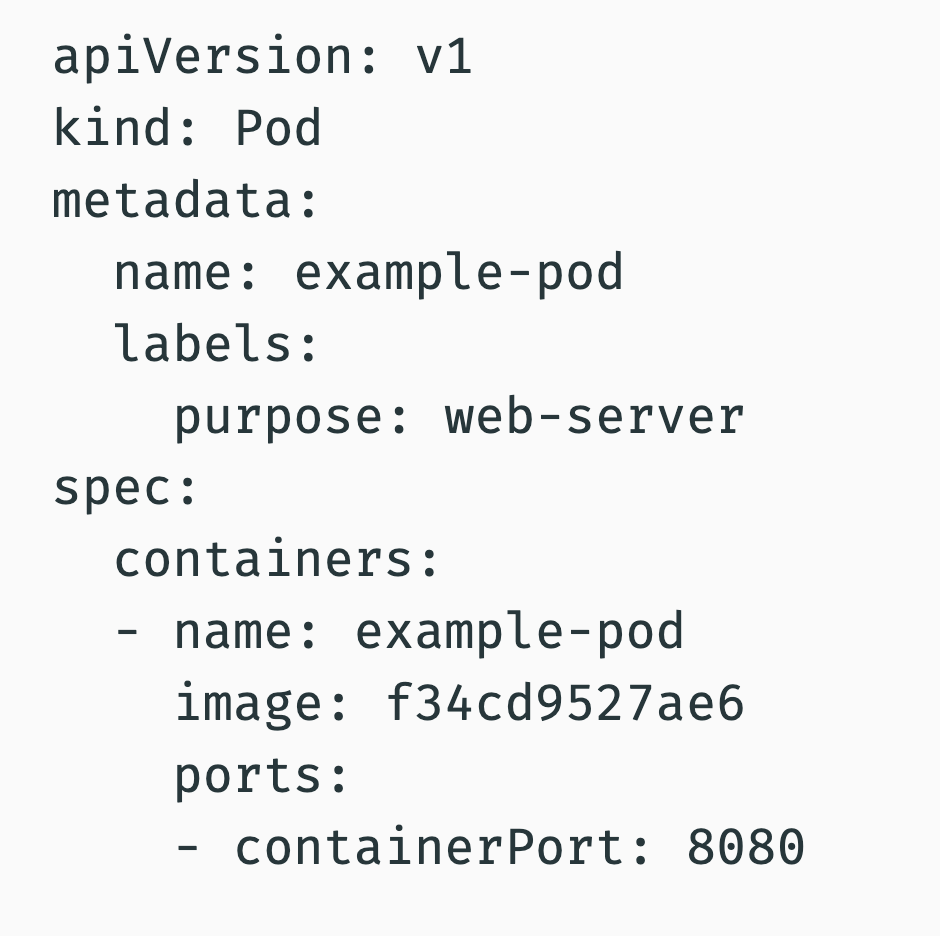
What are the main components of a Kubernetes Pod YAML file?
A simplified structure:
apiVersion→ API version usedkind: Pod→ defines resource typemetadata→ name + labelsspec→ container configurationimage→ container image usedcontainerPort→ port exposed
👉 YAML = configuration file format (human-readable).
Labels are used for organizing and selecting pods.
What is an Init Container? Why are init containers useful?
A special container that runs before main containers start. → in initialization pod
All init containers must finish successfully before the main containers run.
They can:
Check if required storage exists
Test access to repositories
Verify environment
Stop pod if requirements are missing
👉 Guarantees: Either all main containers start correctly, or none start.
What types of nodes exist in Kubernetes?
Control Plane Node (Master Node)
Used by cluster owner
Runs control software
Creates & manages pods
Worker Node
Runs actual pods
Provides service to users
👉 Control plane = brain
Worker node = muscle
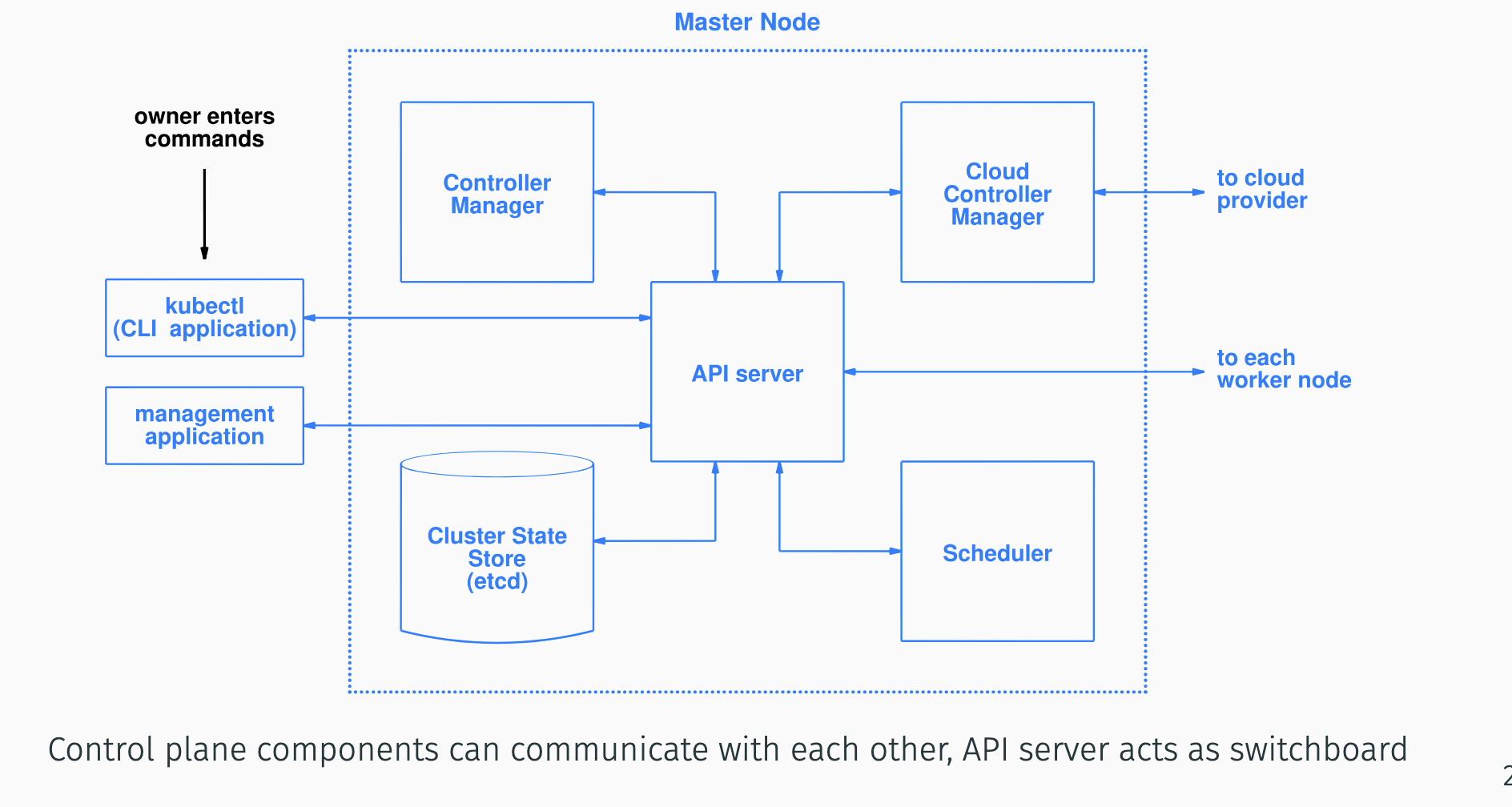
What are the main Kubernetes control plane components and their roles?
API Server (kube-apiserver)
Entry point of cluster. All communication goes through it.Scheduler (kube-scheduler)
Assigns pods to nodes.Cluster State Store (etcd)
Stores configuration + current state.Controller Manager
Ensures system matches desired state
(like a thermostat: compares actual vs target)Cloud Controller Manager
Handles cloud provider interactions.kubectl
Command line tool to manage cluster.
👉 API server acts like a switchboard.
How do control plane components communicate?
All components communicate via the API server.
API server acts as central hub.
Stores state in etcd.
Scheduler & controllers interact through API server.
👉 No direct chaos — everything goes through API server.
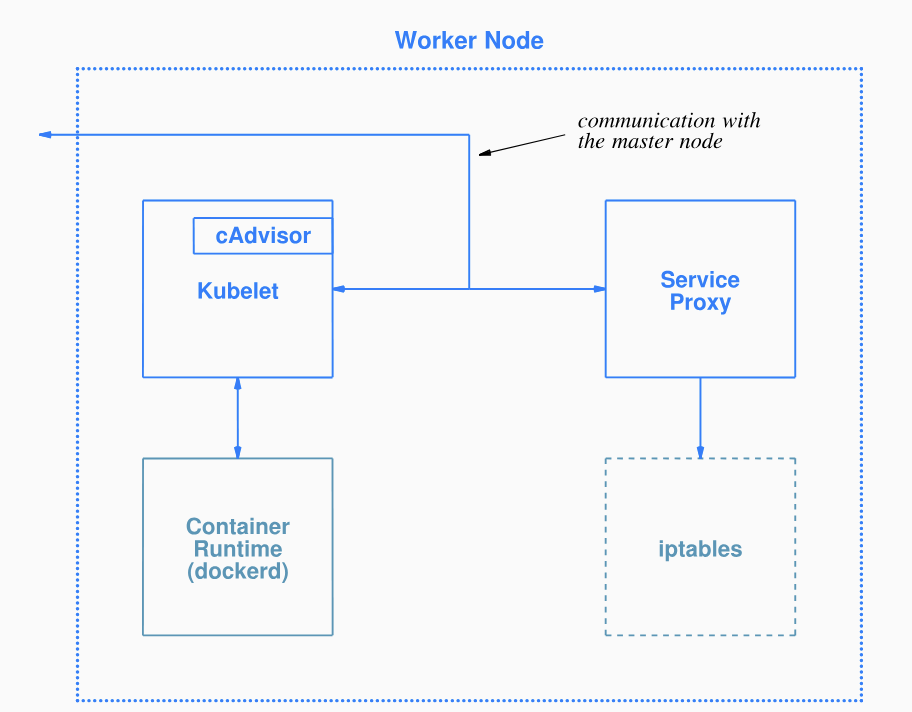
What software runs on a worker node?
kubelet
Runs and monitors pods
Communicates with control plane
kube-proxy
Configures networking (iptables)
Handles traffic routing
Container Runtime
Runs containers (e.g., Docker)
👉 kubelet = local manager
kube-proxy = network manager
container runtime = actual executor
What additional Kubernetes features support scaling and management?
Replicas
Define number of pod copies
Deployments
Automate scaling using intent-based approach
(You define desired state, system matches it)
StatefulSets
For stateful apps (with memory/data)
Each pod gets permanent unique ID
DaemonSet
Runs one pod per specified node
Used for background services
Garbage Collection
Removes terminated objects
Uses dependency rules
1) What is TTL Controller? 2) What is a Job facility? 3) What is a CronJob facility? 3) What is a Services facility?
1) Deletes finished resources after a defined time.
TTL = Time To Live.
2) Creates specific number of pods and monitors them.
Can stop after certain completion condition.
Example: stop when one pod finishes.
3) Runs jobs periodically (like Unix cron).
4) Group multiple pods under one access policy.
Pods can restart without affecting service.
👉 Important for microservices.
What are advantages and disadvantages of orchestration?
dvantages:
Higher efficiency
Better resource coordination
Fewer human errors → cost savings
Disadvantages:
− Cascading failures (system-wide problems)
− Run-away resource usage
− Larger security attack surface
− High complexity
What orchestration options does AWS provide?
Amazon EKS (Elastic Kubernetes Service)
Managed Kubernetes
Worker nodes on EC2 or Fargate
Costs $0.10 per hour
Amazon ECS (Elastic Container Service)
AWS proprietary orchestration
Runs on EC2 or Fargate
No extra charge
👉 EKS = Kubernetes
ECS = AWS-native solution

