Using Databases
 Call Kai
 Learn
Learn Practice Test
 Spaced Repetition
 Match
Match Flashcards
 Knowt Play
1/64

There's no tags or description
Looks like no tags are added yet.
Name | Mastery | Learn | Test | Matching | Spaced | Call with Kai |
|---|
No analytics yet
Send a link to your students to track their progress
65 Terms
Database
A collection of related data that can be easily stored, organized, and queried.
Databases provide many advantages over simple Excel lists.
A database is a collection of related data that can be easily stored, organized, and queried. Databases enable multiple users to share and access data simultaneously.
There are three main types of databases: relational databases, object-oriented databases, and multidimensional databases. A category of information in a database is stored in a field. A group of related fields is called a record, and a group of related records is a table.
When you create a database, you must organize data into various tables based on logical groupings. In relational databases, "relationships" are established among tables using primary keys and foreign keys.
Database Advantages
Organize, view, and print data in different ways for different users
Centralized data makes sharing easier and reduces entry errors
Validation checks ensure data accuracy and reliability
Handle large data sets and process data more efficiently than Excel
Databases allow you to organize, view, and print the data they contain in a variety of ways to suit individual users’ needs. For example, Ron’s admissions office can create a report showing total student enrollment, while the financial aid office can create a report showing which students are behind in payments.
By centralizing data in one place, databases make it easier for users to share data. And, because users only have to enter data into one place in the database, they reduce the possibility of errors being introduced when data is entered or updated.
Through a series of validation and consistency checks, databases ensure that the data stored in the database is accurate and reliable.
Databases can manage larger amounts of data and can process that data more efficiently than can Excel spreadsheets.
Database Components
Fields
Displayed in columns
Each field is identified by a field name (e.g. name, age, address)
Records
A group of related fields is called a record. (e.g. name + age + address is a record for a student)
Table / File
A group of related records is called a table (or file)
Tables usually are organized by a common subject (e.g. multiple students’ records)
Data Types
When you create a database, you assign each field in the database a field name. You also indicate what type of data can be stored in the field. This is called the data type (or field type). The following are common data types in Microsoft Access:
Short Text fields store text and/or numbers.
Number fields store values that can be used to perform calculations.
Calculated fields store the contents of a calculation.
Date/Time fields store dates and times.
Long Text fields store long pieces of text.
OLE Object fields store objects like pictures or video clips.
Hyperlink fields store hyperlinks.
Types of Databases
Relational databases include only data, which is organized into separate logical groupings (or tables) that contain related data. For example, at a college, a database could have a table with student contact information and another table with class registration information.
Object-oriented databases store data in objects, not tables. These objects contain not only data, but also methods for processing or manipulating that data. Object-oriented databases are adept at handling unstructured data such as audio and video clips, pictures, and extremely large documents.
Multidimensional databases store data in multiple dimensions. This distinguishes them from a relational database, which stores data in two-dimensional tables. Multidimensional databases organize data in a cube format.
Creating Database Tables
When you create a database, you must organize data into various tables based on logical groupings. Each table in the database should contain a related group of data on a single topic.
For example, at a college you might find a number of different tables in a database:
A table that includes student contact information (names, addresses, and so on)
A table that includes course information (names of courses, credits per course, and so on)
A table that includes financial aid information (types of financial aid, amount paid, and so on)
When tables are created properly, the goal is to reduce data redundancy by recording data only once. This process is called normalization of the data.
Primary Key / Key Field
To understand how tables work together in databases, you first have to understand primary keys.
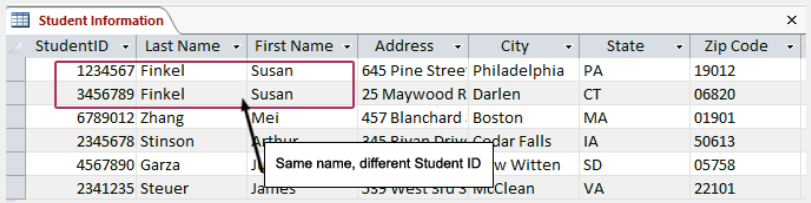
Each record in a database table is assigned a primary key (or key field) to ensure that the record is unique and won’t be confused with other records. For example, in your student record, a primary key might be your student ID or Social Security number because no other student at your school will have the same number as you do.
In this table, two students have the same name.
However, the records are never confused with each other because each student is assigned a unique Student ID. The Student ID field is the primary key. By establishing a primary key and ensuring that it is unique, it is not possible to duplicate records in a table.
Foreign Keys
In relational databases, "relationships" are established among tables to allow the data in the tables to be shared.
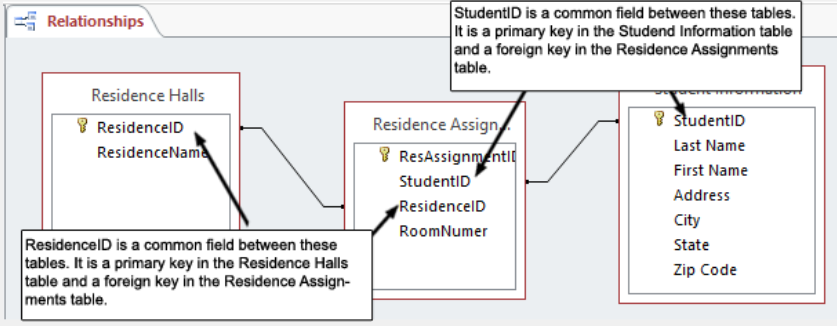
In order to establish a relationship between two tables, the primary key of one table is included in the related table. For example, a college database would have one table with student contact information (name, city, state, phone, and so on) and another table with residence assignment (ResidenceID, room number and so on).
These two tables would be linked by a primary key such as a student ID number. When the primary key of one table is included to establish a relationship with another table, it is called a foreign key in the related table. Foreign keys in related tables have to contain the same type of data as that in the primary key.
Alphabetic check
Confirms that only textual characters (such as “Gwen”) are entered in a field.
Binary Large Object (BLOB)
Data encoded in binary form.
Browsing
An option with most databases where you view records.
Calculated field (or computed field)
A numeric field that stores the contents of a calculation, which is generated with a formula in the numeric field.
Completeness check
Ensures that all fields defined as “required” have data entered into them.
Consistency check
Compares the values of data in two or more fields to determine if these values are reasonable.
Data centralization
Ensuring data integrity; instead of being in multiple lists that have to be maintained, the information is maintained in only one place.
Data dictionary (or database schema)
Description of the data. This description is contained in the database’s files.
Data inconsistency
Each time the information in the list changes, multiple lists must be updated and if not, then inconsistent data results.
Data integrity
Data integrity
Data redundancy
Duplicated data between lists.
Data type (or field type)
Indicates what type of data can be stored in the field.
Database administrator (or database designer)
An individual trained in the design and building of databases, to assist with the construction of large databases.
Database-Management System (DBMS)
Specially designed application software (such as Oracle Database or Microsoft Access) that interacts with the user, other applications, and the database to capture and analyze data.
Database query
A question you ask the database so that it provides you with the records you wish to view.
Date/Time field
Holds data such as birthdays and due dates.
Default value
The value the database uses for the field unless the user enters another value.
Export
Involves putting data into an electronic file in a format that another application can understand.
Field
A database stores each category of information in a field. Fields are displayed in columns.
Field constraint
A property that must be satisfied for an entry to be accepted into the field.
Field name
Each field is identified by a field name, which is a way of describing the field.
Field size
Defines the maximum number of characters or numbers that a field can hold.
Foreign key
The primary key of another table that is included for purposes of establishing relationships with that other table.
Hyperlink field
Stores hyperlinks to Web pages.
Input form
Provides a view of the data fields to be filled, with appropriate labels to assist database users in populating the database.
Join query
When you want to extract data that is in two or more tables, you use a join query. The query actually links (or joins) the two tables using the common field in both tables and extracts the relevant data from each.
Long Text field
Like a text field but can hold long pieces of text.
Many-to-many relationship
Characterized by records in one table being related to multiple records in a second table and vice versa.
Metadata
Data that describes other data; an integral part of the data dictionary.
Multidimensional database
Stores data in more than two dimensions.
Normalization
In databases, the goal is to reduce data redundancy by recording data only once. This process is called normalization of the data.
Number field
Stores values that can be used to perform calculations.
Numeric check
Confirms that only numbers are entered in the field.
Object-oriented database
Stores data in objects, rather than in tables.
Object Query Language (OQL)
Similar in many respects to SQL (structured query language), a standard language used to construct queries to extract data from databases.
OLE (Object Linking and Embedding) Object field
Holds items such as pictures, video clips, or documents.
One-to-many relationship
Characterized by a record in one table and occurring most frequently in relational databases.
One-to-one relationship
Indicates that for each record in a table there is only one corresponding record in a related table.
Primary key (or key field)
To keep records distinct, each record must have one field (the primary key) that has a value unique to that record.
Query
A question or inquiry.
Query language
Software used to retrieve and display records. A query language consists of its own vocabulary and sentence structure, which you use to frame the requests.
Range check
Ensures that the data entered into the database falls within a certain range of numbers.
Record
A group of related fields.
Referential integrity
Means that for each value in the foreign key of one table, there is a corresponding value in the primary key of the related table.
Relation
A table that contains related data.
Relational algebra
The use of English-like expressions that have variables and operations, much like algebraic equations.
Relational database
Organizes data in table format by logically grouping similar data into a relation (a table that contains related data).
Relationship
A link between tables that defines how the data is related.
Select query
Displays a subset of data from a table (or tables) based on the criteria you specify.
Sort
Involves organizing data in a new fashion.
Short Text field
Hold any combination of alphanumeric data (letters or numbers).
Structured (analytical) data
Relational databases excel in the storage of structured (analytical) data.
Structured Query Language (SQL)
A type of query language used by almost all relational and object relational databases to extract records from a database.
Table (or file)
A group of related records.
Unstructured data
Object-oriented databases are more adept at handling unstructured data that includes nontraditional data such as audio clips (including MP3 files), video clips, pictures, and extremely large documents.
Validation
Process of ensuring that data entered into the database is correct (or at least reasonable) and complete.
Validation rule
Set up in the database to alert the user if a clearly wrong entry is entered in the field instead of a valid entry.

