ACS 3916 FINAL
 Studied by 1 person
 Call Kai
 Learn
Learn Practice Test
 Spaced Repetition
 Match
Match Flashcards
 Knowt Play
1/138

There's no tags or description
Looks like no tags are added yet.
Name | Mastery | Learn | Test | Matching | Spaced |
|---|
No study sessions yet.
139 Terms
why bad design happens
do you have the same skills and knowledge of the typical users?
are you using design in its real-world usage setting?
many biases creep up that impact out ability to properly design
characteristics of a good interface
people feel satisfied when they use them
people can complete their tasks error free
people can complete their needed tasks in a reasonable time
people can learn how to use the system and its functionalities
interface vs interaction
interface
what a person can touch, use, read
ex: monitor, smartphone, laptop, chair, door
the thing that we can interact with
interaction
the dialogue between a person and an object
ex: swipe, tap, sitting down, pushing, pulling
the thing we do with or to the interface
interaction cycle
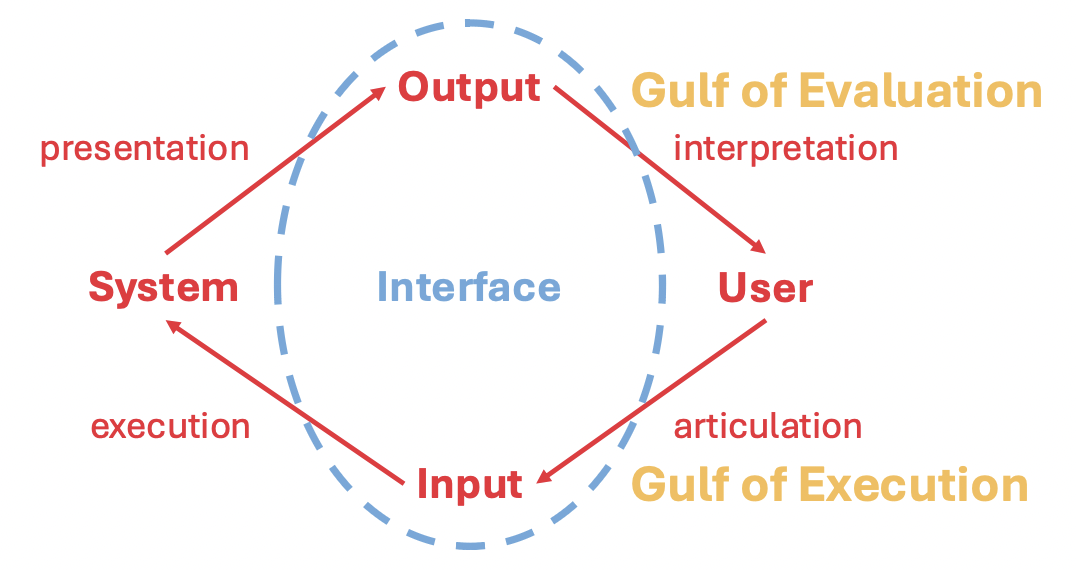
gulf of execution
the way the user must translate their plans into input that the system can understand is not always natural or intuitive.
a gulf of execution arises when the user has difficulties providing instructions that are executable by the system
gulf of execution causes
lack of clear and concise instructions
complex or confusing user interfaces or overly simplified interfaces
limited user skills or experience
technical limitations or hardware
gulf of execution consequences
user frustration and confusion
increased effort
decreased effectiveness and efficiency
reduced enjoyment and satisfaction
gulf of evaluation
arises when the user has trouble interpreting the system output, considering their goals

gulf of evaluation causes
lack of clear and meaningful feedback
poorly designed graphical user interfaces
limited user knowledge or experience
technical limitations or error
gulf of evaluation consequences
user uncertainty and confusion
increased effort
decreased confidence and trust
decreased effectiveness of the system or interface
5 primary requirements
functional
data
environmental (context of use)
usability
user experience
functional requirements
what should the product do?
data requirements
what kinds of data need to be accessed and stored?
environmental requirements
in what circumstances will the product be expected to operate?
there are physical, social, support and technical constraints
environment requirements - physical
what lighting, noise, movement, dust, clothing, temperature is expected in the physical environment
environment requirements - social
are social aspects a consideration?
synchronous or asynchronous
environment requirements - support
what supports should be available
will assistance be needed to use the system and how will it be obtained?
should help be automated
environment requirements - technical
what technologies will your system run on and what technological limitations exist?
usability goals
effectiveness
efficiency
safety
utility
learnability
memorability
usability goals - effectiveness
is the system doing what it is supposed to?
often measured using task completion rates and error rates
usability goals - efficiency
how much time will it take users to perform tasks?
typically considered once they have become familiarized with the interface
generally the more steps it tales to carry out a task, the less efficient a system is
once users have learned how to use a product to carry out their tasks, can they sustain high level of efficiency? can they improve their efficiency?
measured by time to complete a task, number of individual operations
usability goals - safety
involves protecting the user from dangerous conditions and undesirable situations
need to provide means from recovering from errors, undo operations, confirmation dialogs
what is the range of errors that are possible using the product? what measures are there to permit users to recover easily from them?
evaluation criteria: number of errors and time to recover from errors
usability goals - utilitty
provide sufficient functionality to accommodate a range of user tasks, without complex workarounds
does the user interface provide sufficient functionality for the users to carry out tasks as naturally as possible? does it provide the features you need to work well?
criteria: availability of core tasks
usability goals - learnability
how easy is the user interface to learn?
this is often balanced with identifying the time users are willing to spend to learn the system
is it possible for the user to work out how to use the interface by exploring and trying certain actions? how hard will it be to learn the whole set of functions in this way? should we consider primary or secondary actions separately?
criteria: time to learn a tasks, errors made in learning a task
usability goals - memorability
once learned, how easy is the system to remember
can we help users remember with aids and appropriately designed icons, action groupings
will users remember all steps needed to carry out a task? what types of interface support have been provided to help users remember how to carry out tasks?
criteria: errors made in carrying out a task after a system has been learned and time taken to complete a task
user experience requirements
usability is more about utility and ease of use, user experience is about us
humans have emotions and mental states which impact the success of an interface'
boredom, frustration, anger, excited, satisfied
categorizing stakeholders
people who have an interest in the design of the interface as stakeholders
3 categories
primary - frequent hands-on users
secondary - occasional users
tertiary - affected by introduction of interface
user factors affect the design of our interfaces
age - reduce number of tasks, big buttons, minimal design
diverse abilities - colour consideration, sounds
culture - icons and colour
other user characteristics
motivations
goals
pain points
behaviours
experience can be further divided
novices - provide high visibility of functions and prompts, keep interface constrained
intermediate - show reminders and tips, offer flexibility
experts - provide shortcuts, customization, access and power
user centred design - investigate
goal is to learn about the users
discover their goals
realize their lived experiences and expectations
understand their preferences
investigate questions
who are our users?
who are the other stakeholders involved?
what are the requirements of the system?
what are the requirements of the system?
how do users accomplish it now? how long does it take?
what do users want? what do they need?
what have they tried? what solutions have they found?
investigate methods
personas
user scenarios
interview
focus groups
user surveys
user centred design: ideate
goal is to generate lots of ideas
there are systemic ways to ideate which can increase chances of success
create as many unique ideas as possible
then increment those ideas (10+10)
ideate methods
brainstorming
sketching
affinity diagrams or card sorting
play-acting
user centred design - prototype
goal is to quickly test an idea without spending time or money on full development
are easier for users to provide feedback on rather than abstract concepts or ideas
will quickly bring subtleties and nuances to light that you probably hadn’t considered
technical constraints keep the scope reasonable
prototype methods
paper prototypes
screenshots
video or design mockups
functional prototypes
user centred design - evaluate
did we build the right thing?
allows you to determine how well your interface performs when given to users
gives you a point from which to branch back to any of the previous steps
what needs to be fixed, added, removed?
evaluate methods
usability testing
lab experiments
real-world deployment
cognitive walkthroughs and heuristic evaluations
user centred design - produce
many steps to production - we don’t cover
personas
consolidate descriptions of user behaviours into representative individual profiles to humanize design focus, test scenarios and help with our interaction design
a persona will have:
details that accurately reflect the features of the group
rich descriptions
life-like personality
typically built from detailed qualitative data
creating a persona
1. identify behaviours: activities, attitudes, aptitudes and skills, motivations
2. map persona to behavioural variables: accurately represent the way multiple people cluster through 1 persona
3. synthesize background, work experience, relevant goals, motivations, personality traits, likes/dislikes, pain points
4. check for redundancy and completeness
5. expand descriptions through third person narrative
user stories
one sentence story told from the users point of view to inspire and inform design decisions
ex: as a (type of user), I want to (action), so that (why)
scenarios
an informal narrative/story of how a task is accomplished from a users pov
helps define when, where, and how the story of a persona takes place
describe the persons goals, as well as their daily activities and tasks
scenario granularity
meant as an ideation tool for design and requirement gathering
if too much detail is added we risk ideation that is too specific to the one scenario
keep scenarios high-level and avoid design specifics
only a few general references to the persona
IDEO - Look
observe people to discover what they do rather than what they say they do
direct observation:
allows you to be an insider or an outsider
good for understanding the nature and context of tasks
requires time and commitment
indirect observation:
good for tracking users activities
ex: fly on the wall, day in the life
IDEO - fly on the wall
how: observe and record behaviour within its context, without inferring with peoples activities
why: useful to see what people actually do within real contexts and time frames, without your influence
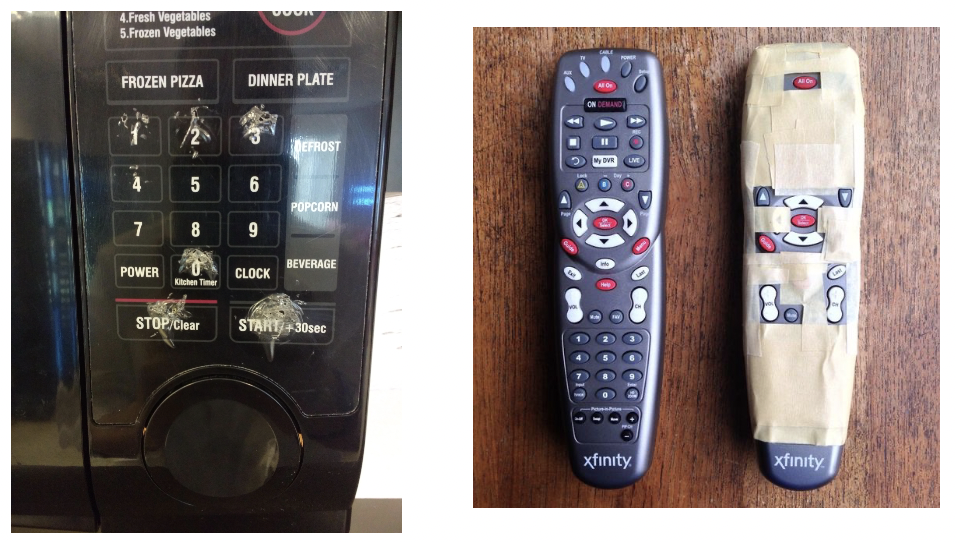
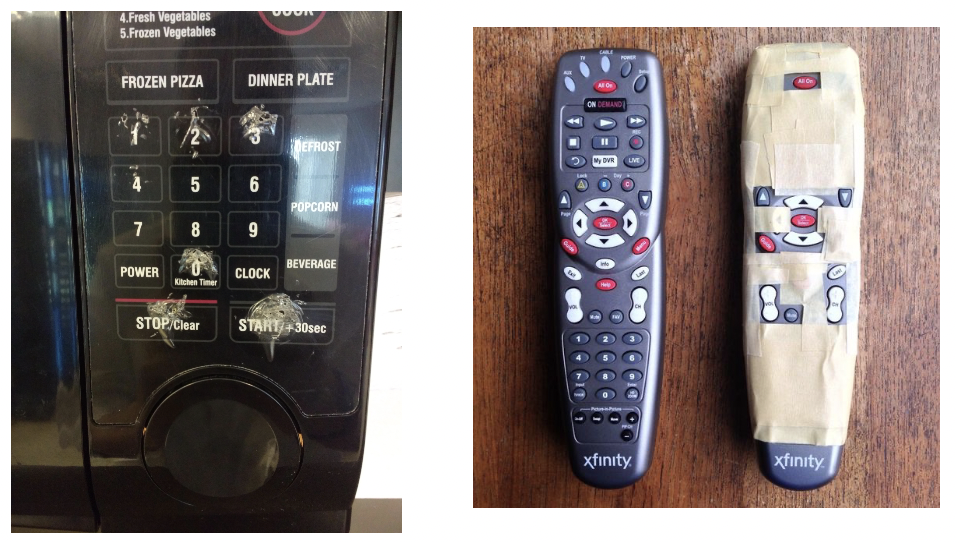
IDEO - behavioural archaeology
how: look for evidence of peoples activities inherent in the placement, wear patterns and organization of things
why: this more closely revels how artifacts and environments figure in people’s lives, highlighting habits and values
IDEO - shadowing
how: tag along with people to observe and understand their interactions, routines and contexts
why: can reveal design opportunities and show how a product may complement or affect a user’s b behaviour
IDEO - rapid ethnography
how: spend as much time as you can with people relevant to the design topic. establish their trust to visit and/or participate in their natural habitat and witness specific activities
why: this is a good way to achieve a deep firsthand understanding of habits, rituals, natural language, and meanings around activities and artifacts
cooperation of people being observed is required
data analysis and refinement of collection methods is continuous as understanding grows
can produce a huge amount of data
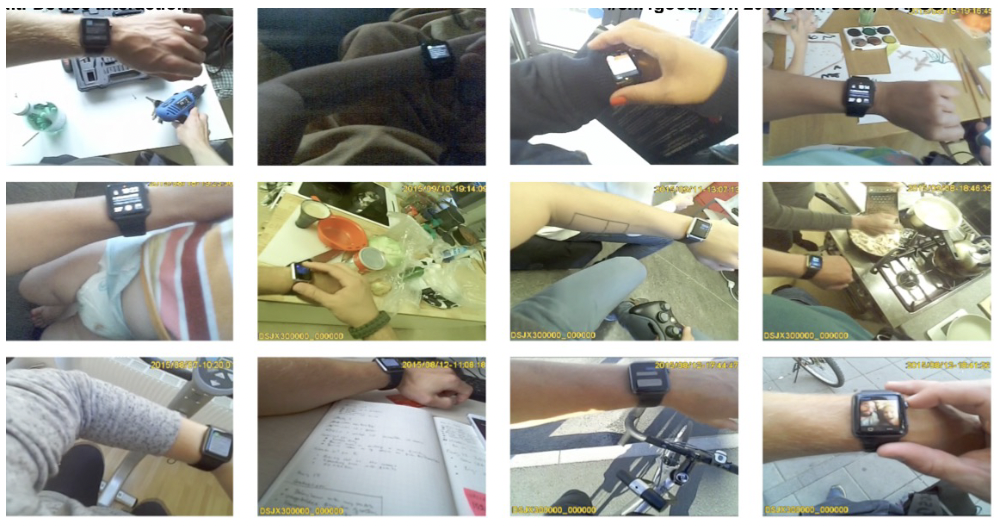
IDEO - photo/video capture - still photo survey
how: follow a planned shooting script and capture pictures of specific objects, activities, etc.
why: visual evidence can be user to uncover patterns of behaviour and use of a product
IDEO - ask
looking gives you insight into the state of someones environment and their use of an interface, but doesn’t tell you why
IDEO - surveys and questionnaires
how: ask a series of targeted questions in order to ascertain particular characteristics and perceptions of users
why: this is a way to quickly elicit answers from a large number of people
can contain a mix of open and closed questions - associated with qualitative and quantitative data
design of questionnaire is crucial
concision - questions should be clear and specific
closed questions - when possible ask closed questions and offer a range of answers
order - general questions should precede specific ones
instructions - provide clear instructions
compounding - avoid compounding questions
leading questions - do not lead participants with either your question or answers
types of questions
binary - yes/no
multiple choice - select 1
multiple choice - select all that apply
open-ended
rating scales
IDEO - card sort
how: on separate cards name possible features, functions, items or design attributes. ask people to organize the cards spatially in a way that makes sense to them
why: this helps to expose peoples mental models of elements of an interface. their organization will reveal expectations and priorities that you can then consider
works well when rethinking or ideating an info arch., flow of interactions or a group of functionalities
not meant as an evaluation technique for current systems
IDEO - narration
how: participants perform a task, ask them to describe aloud what they are thinking
why: useful way to find out motivations, concerns, perceptions and reasoning
helps understand a persons thought process and understandings of how something works
beneficial as an accompaniment to Look methods previously discussed
great tool when testing prototypes
IDEO - learn
we have info from looking and asking - now make sense of the data
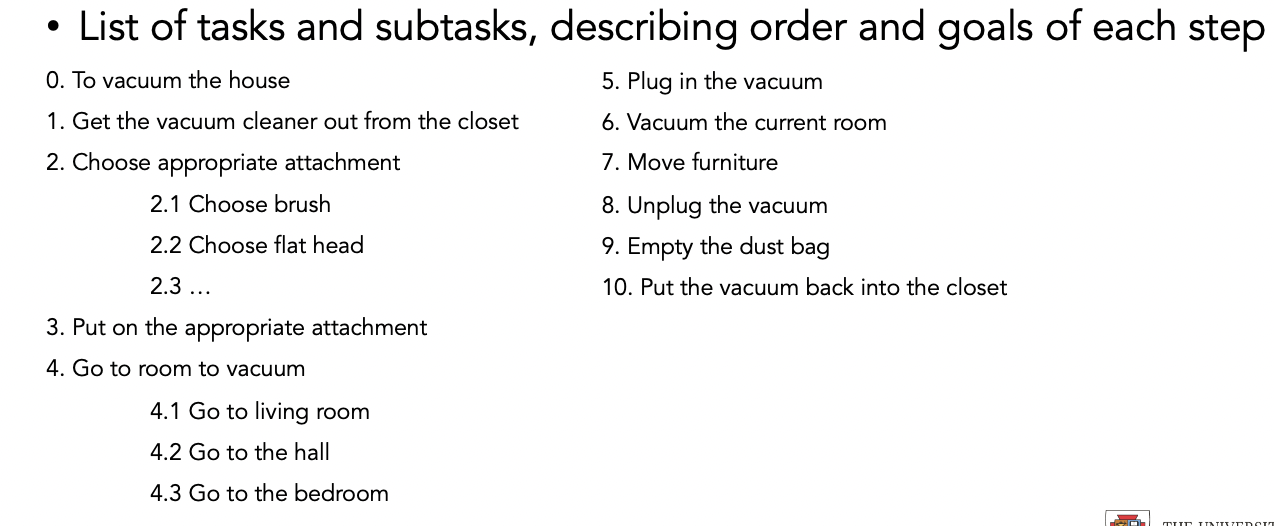
IDEO - task analysis
scenarios
get inside the head-space, contact, situation of the person who will be using the interface
create concrete, simple, representations of a task to be done
more explicit and focused than scenarios
mainly done to investigate an existing task
perfect for working through functionality and interface ideas
can use it to evaluate your interface
IDEO - secondary research
how: review articles, papers, documentation and applications pertinent to your interface to develop an informed pov on the design issues
why: useful way to ground observations and to develop a pov on the state of the art
IDEO - try
try alongside your users while looking and asking to get a better sense of the interactions they have
try techniques once you start getting ideas to test them early for their feasibility
IDEO - try it yourself
how: use the product or prototype you are designing for
why: trying the product being designed prompt the team to appreciate the experience actual users will have
IDEO - empathy tools
how: use tools like clouded glasses and weighted gloves to experience processes as though you yourself have the abilities of different users
why: this is an easy way to prompt an empathetic understanding of a variety of users
user centred design: ideate goals
generate lots of ideas
notice issues and potential solutions
sketching attributes
quick - quick and easy to make
timely - can be easy to provide when needed
inexpensive - cost shouldn’t inhibit explorations
disposable - if you can’t throw it away, it probably isn’t a sketch
plentiful - final ideas tend to exist together with earlier sketches
open - rough and fluid sketches provide openness and freedom
constrained resolution - meant only to convert purpose or concept, does not need to offer high resolution
ambiguous - early on, can afford the generation of new ideas
explore not confirm - value lies in the concept not the actual sketch
8+8 sketching
each team member sketches 8 unique ideas on their own
come together and discuss and choose a handful of your favourite ideas
for each shortlisted sketch/idea, each team member sketches 8 unique variations
choose most appropriate
user centred design: prototype
tangible creation of artifacts at various levels of resolution for development and testing ideas
can take many forms:
cardboard, foam, software, video, clay, paper
defined less by form and more by function
now trying to make our ideas real
would be:
fast, disposable, focused
why prototype?
communication - invigorates discussion among stakeholders
clarify/refine requirements - once a stakeholder can see, hold, touch, interact you realize more than from a drawing
learning and problem solving - may quickly realize an idea doesn’t work
reflect and answer questions - easy to iterate and choose alternatives now rather than later
save time and money - cheaper than full production
persuade
what to prototype?
whatever you’re unsure of in your deign?
workflow, task design
screen layouts and information display
graphical design, look and feel
technical aspects
difficult, controversial, critical areas
when to prototype?
to get out of a rut, focus discussion, reach agreement
when you need to communicate ideas
when you have questions and can’t proceed until they are answered
functionality - tasks, structure, clarity, completeness
appearance - branding, aesthetics, colours, shapes, icons
prototyping phases
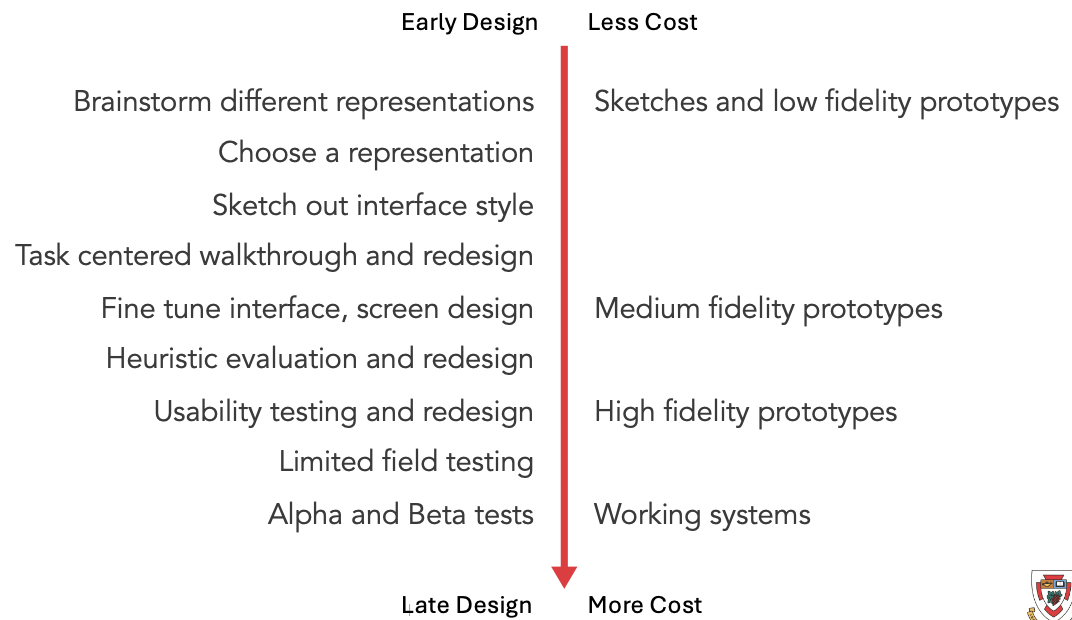
prototyping : fidelity
fidelity speaks to how close the prototype / medium is to the final design / product
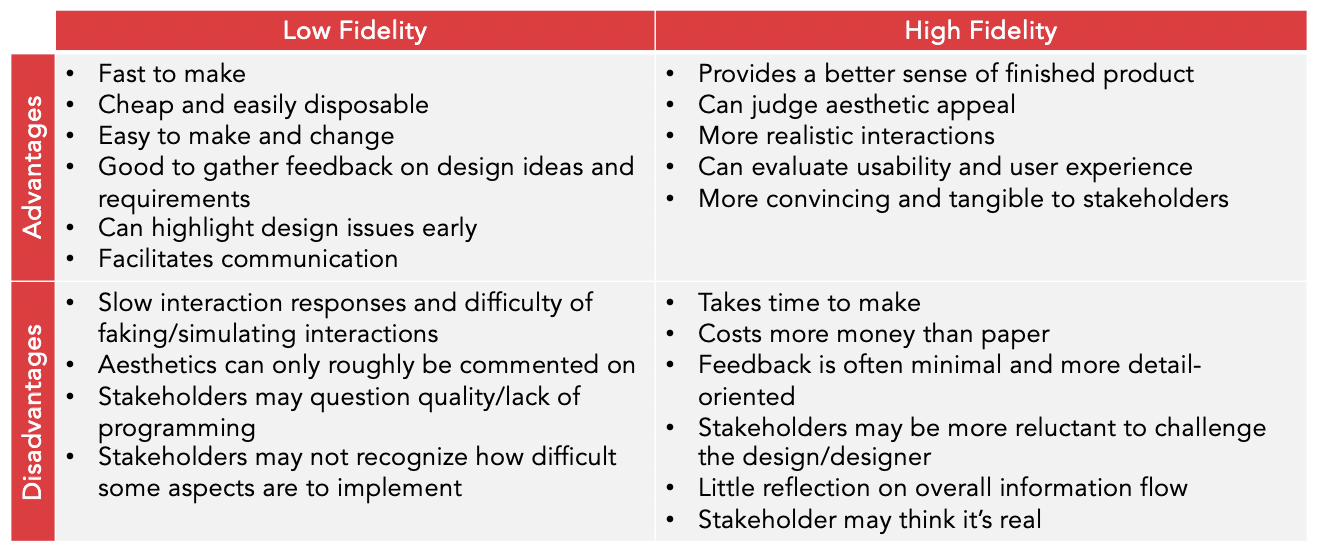
prototyping : low fidelity
meant to be rough, quick to build, easy to change and throw away
uses a medium which is unlike the final medium - paper, cardboard, etc.
purposes:
proof of concepts
will help to generate and narrow requirements
will flesh out critical interaction issues early on
facilitate communication with stakeholders
prototyping : high fidelity
meant to be more like the final product
increased completeness and detail with higher degree of functionality, polish, interaction, visual design
purposes:
conveys a “closer-to final” design which requires very little interactive imagination from the stakeholder
typically, can be used to gather usability and user experience metrics
low and high fidelity pros and cons
Scoping prototypes
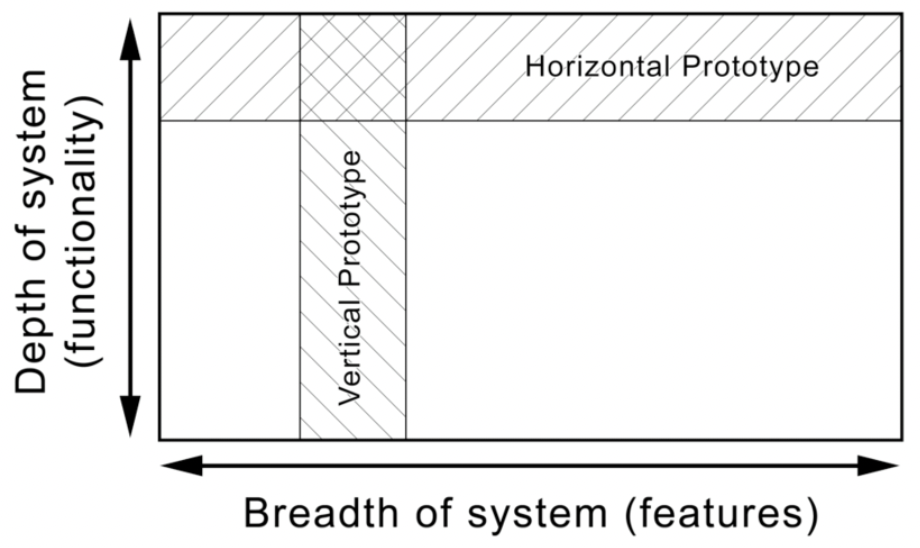
thought of as two-dimensional and sitting along a spectrum which involves compromises
low > medium > high
horizontal vs vertical
horizontal
provides a superficial interface with no underlying functionality for a range of different functions
vertical
provide a functionality and detail for only a few select functions which can more rigorously be tested
prototype lifetime - 3 integration methods
three methods of managing integration of a prototype
evolutionary - prototype is altered to incorporate changes and eventually becomes the final product
modular - product is built as separate prototypes and then added to the final product
throw-away - prototype serves to enable user research and discovery and is then discarded
design principles
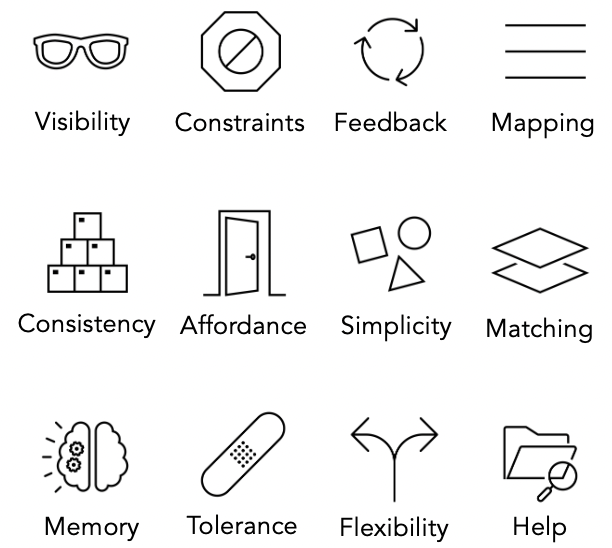
design principles - visibility
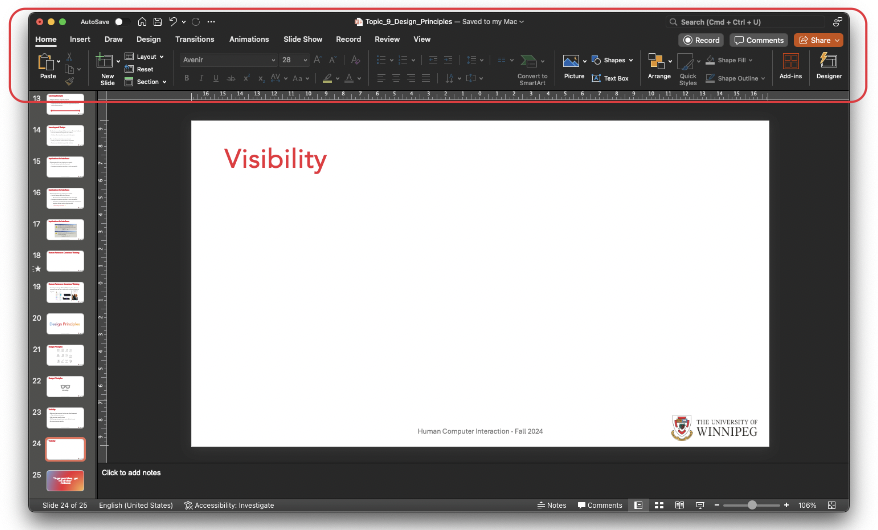
make sure core user functions are clearly apparent
this also means they should be discoverable ex: toolbars, floating buttons
hide secondary user functions
visible properties guide users as to what to do next
design principles - feedback
continuously inform the user about what the system is doing
let the user know how the system interpreted input
user should always be aware of what is going on
feedback should be as specific as possible based on the users input and current context
longer jobs, the more detail that you can provide the better
should be in the users language and provide solutions
design principles - feedback guidelines
when options are present, be very clear
use simple, positive, user-centred and application / context specific language
use action verbs instead of ok, yes, no to address the concern
design principles - memory
promote recognition over recall
design principles - affordance
physical objects offer “real” affordances, interfaces exhibit “perceived” affordances

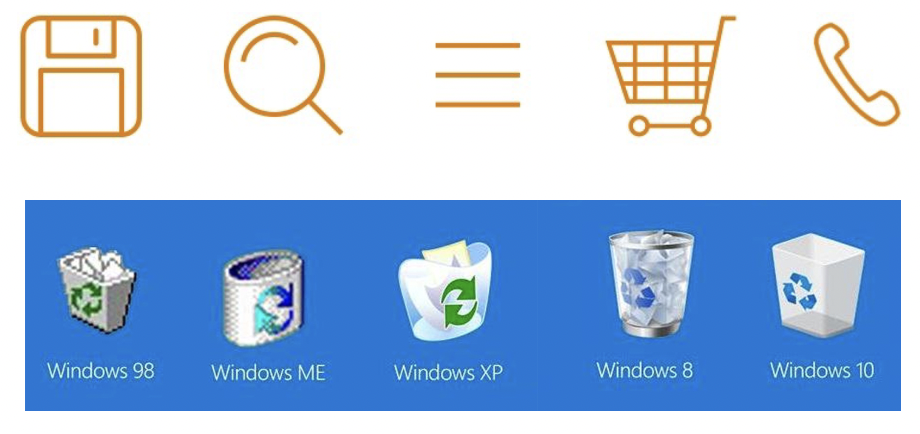
design principles - mapping
relate controls to the intuitive understanding of how they should be used
use common icons
use natural, logical order based on user expectations
offer affordances that indicate actions
cursor blinking
cursor changing to the pen for drawing
design principles - mapping : degrees of freedom
the number of degrees of freedom is how many dimensions something can be manipulated in
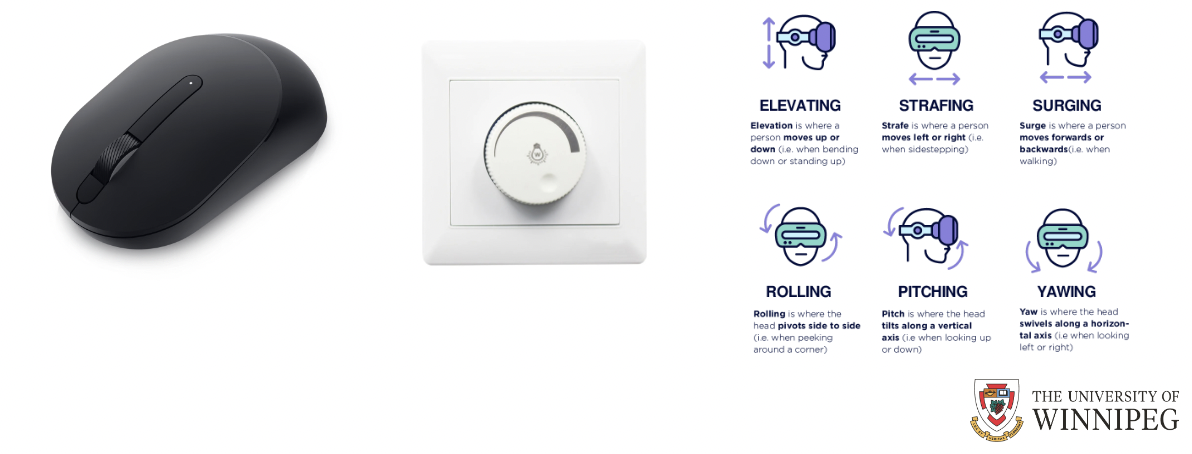
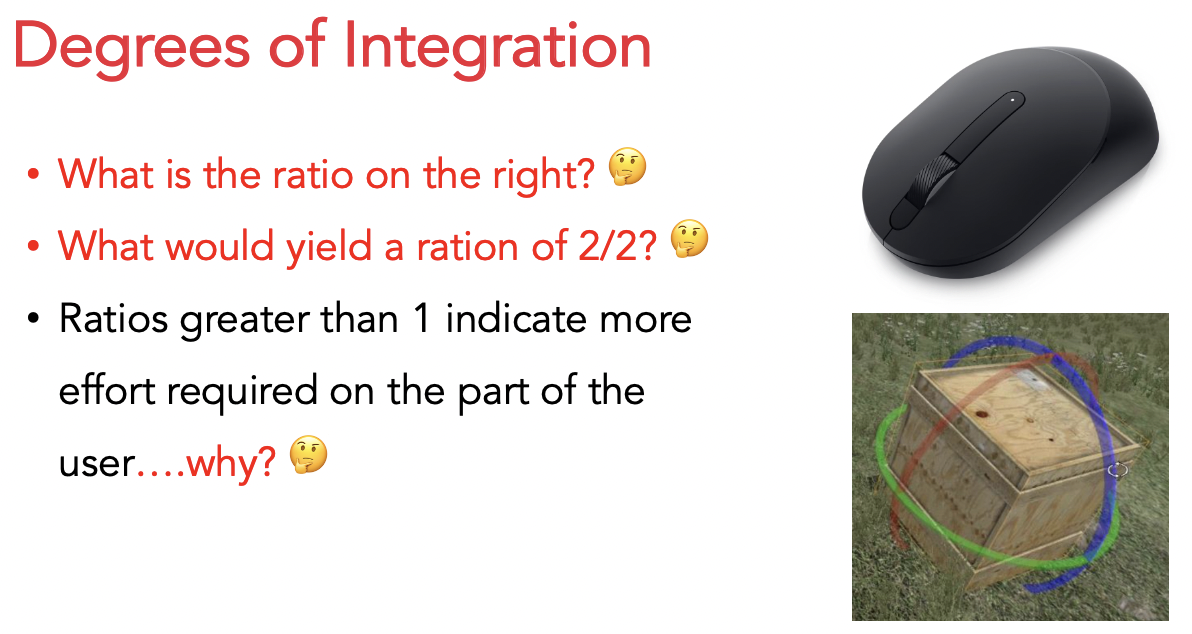
design principles - mapping : degree of integration
ratio of degrees of freedom of system / part of system to the degrees of freedom of the input device
design principles - mapping : degrees of compatibility
similarity between physical action and response of the object
clicking and dragging an object has a high degree of compatibility
design principles - constraints: 4 kinds
restricts the kinds of user actions that can take place, ideally reduces the number of errors that can happen
physical
cultural
semantic
logical
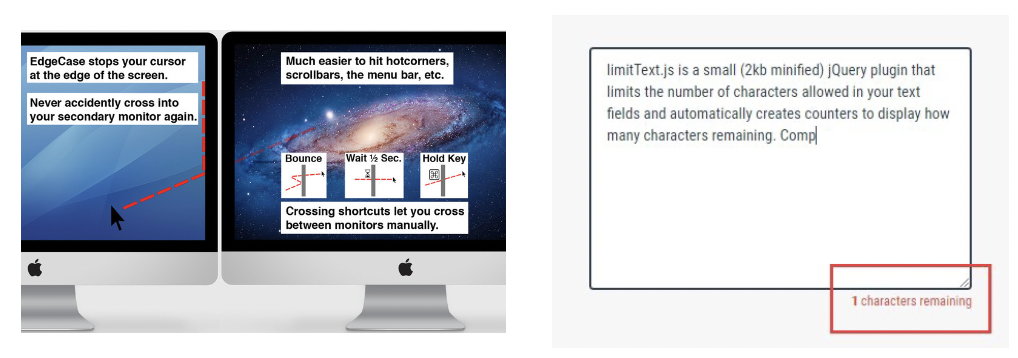
design principles - constraints: physical
use properties of the physical world to suggest action
physical constraints can also be digital
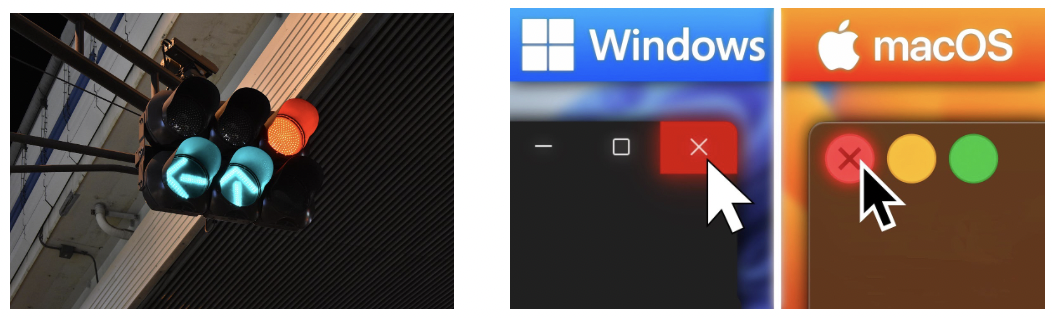
design principles - constraints: cultural
based on cultural norms, can also be brand conventions, that are ideally clear even across cultures
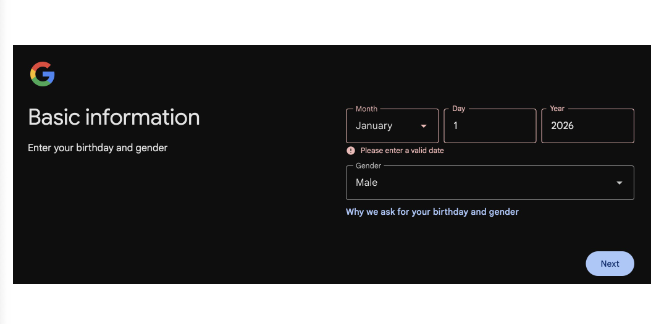
design principles - constraints: semantic
rely on the meaning of a situation to control possible actions
design principles - constraints: logical
use logic to take advantage of relationships between things and actions
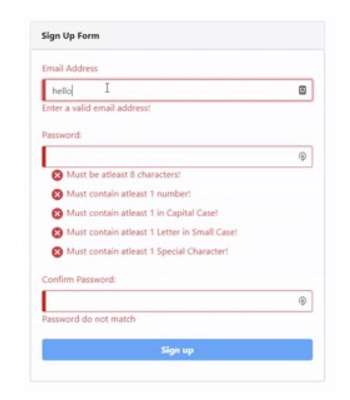
design principles - constraints: tolerance - types of errors
no matter how good the design, users will find a way to use it in a way you did not intend.
types of errors
mistakes
conscious deliberations that lead to an error instead of he correct solution
intended action leads to unintended result
ex: misunderstanding a warning and trying to correct for the wrong thing
slips
unconscious behaviour that gets misdirected en route to satisfying a goal, often arise from similarity of actions
unintended action leads to unintended result
ex: clicking on X when meant to minimize
design principles - constraints: tolerance - types of slips
loss of activation - focus or memory lapse while doing the action
loss of intention - forgetting the goal partway through
omissions due to interpretations - breaking attention
omissions due to satisfied goals - forgetting something due to accomplished task
design principles - constraints: tolerance - mistakes vs slips
slips - often occur due to a lapse in attention or a change in routine and when the user is on autopilot and is not devoting full attention
mistakes - typically occur when a user does not understand something (often due to incomplete or incorrect information) and takes the wrong action
design principles - constraints: tolerance - designing for slips and mistakes
prevent slips before they occur by eliminating error prone conditions - use constraints
allow for user correction through feedback and undo
provide valuable error messages that offer ideas
lower demands on conscious short-term memory
organize content and keep actions short
minimize interruptions in the interface and use forcing functions
use icons that are different enough from each other
capture errors or unintended actions
warn - warn people that something unusual happened
gag - deal with errors by preventing the user from continuing
self-correct - system queues correct action
design principles - simplicity
common tasks should be easy to perform - minimize number of steps
use the minimum amount of visual information needed
simplicity leads to quickly recognized and understood functionalities
less information == less time to process
simplicity promotes memorability
less to remember
design principles - matching
match between the system and the real world
speak the users language
any terminology conveyed should be based on the users language for the task
use meaningful icons and abbreviations
design principles - consistency
should support consistency in both the appearance and the interactions
consistent language / wording and graphics
same info / controls / button styles in the same locations
style and appearance is repeated to enhance recognition
inconsistency can lead to:
user frustration
increased learning time
errors
disorientation
design principles - flexibility
users should be free to do what they want and not be restricted by the system
should always offer ways out of situations
strategies:
cancel button
undo
interrupt / pause
quit
defaults
enable / disable features
offer shortcuts - accelerators, navigation jumps, type-ahead
many solutions are often unseen / unused by the novice user, but will eventually be discovered and then used as an expert user
design principles - help
not a replacement for bad design
for simple systems they are often walk up and use
most other systems:
feature / function rich
users will want to become experts rather than casual users
intermediate users can use reminding
types of help:
tutorial and online tours
manuals
reminders / tool-tips
constraints
walkthroughs
search
cognition
relates to involving conscious and unconscious activity
interacting with technology is cognitive
we must consider cognitive abilities and limitations
provides insight into what users can and cannot be expected to do
helps to identify and explain causes of interaction issues
 Note
Note  Flashcards (22)