C# Study

0.0(0)
Studied by 11 people
call kaiCall Kai
learnLearn
examPractice Test
spaced repetitionSpaced Repetition
heart puzzleMatch
flashcardsFlashcards
GameKnowt Play
Card Sorting

1/54

flashcard set

Earn XP

Last updated 11:19 PM on 9/30/23
Name
Mastery
Learn
Test
Matching
Spaced
Call with Kai

No analytics yet

Send a link to your students to track their progress

55 Terms

1
New cards
What is C#?
C# is a modern, object-oriented programming language developed by Microsoft. It is designed to be simple, efficient, and type-safe. C# is commonly used for developing Windows desktop applications, video games, and web applications using the .NET framework.
2
New cards
List the Reasons why we use c#
1. Easy to pickup
2. Widely used for developing Desktop and Web Application
3. Large Community - The larger the community the better it is as new tools and software will be developing to make it better.
4. Code Readability is Easy
3
New cards
What is a Main Method and what does it do?
The Main method, which is the entry point for all C# programs, the method that executes first.
4
New cards
What are the types of classes in C#? (SAPS)

1. Static class: A static class cannot be instantiated and only contains static members. It is typically used to provide utility functions or constants that can be accessed from anywhere in the program.
2. Abstract class: An abstract class is a class that cannot be instantiated and is only used as a base class for other classes. It can contain abstract methods, which must be implemented by any derived class, as well as non-abstract methods that can be inherited by derived classes.
3. Partial class: A partial class allows you to split a class's definition into multiple files within the same namespace. This can be useful for organizing code and separating different concerns.
4. Sealed class: A sealed class is a class that cannot be inherited by any other class. It is typically used to prevent further modifications to a specific class's behavior or structure.
5
New cards
What does Static Mean?
In C#, static refers to a class or member that belongs to the class itself, rather than an instance of that class. A static class cannot be instantiated and can only contain static members, such as static methods, static properties, and static fields. These members can be accessed directly from the class itself, without needing to create an instance of the class.

By marking a class or member as static, we indicate that it belongs to the class itself, rather than to an instance of the class. This can be useful for providing utility functions, managing global state, or enforcing constraints on the behavior of classes and objects.
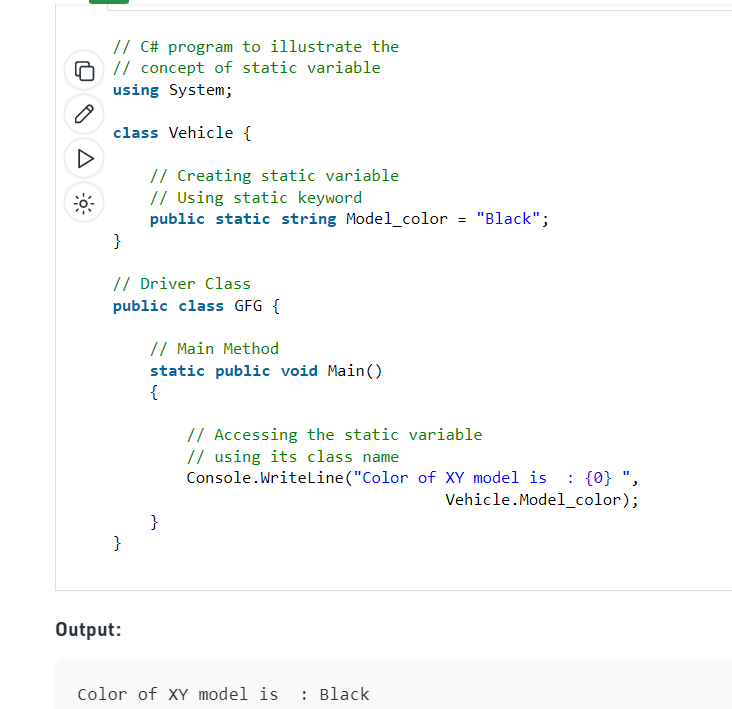
In C#, static refers to a class or member that belongs to the class itself, rather than an instance of that class.  A static class cannot be instantiated and can only contain static members, such as static methods, static properties, and static fields. These members can be accessed directly from the class itself, without needing to create an instance of the class.

By marking a class or member as static, we indicate that it belongs to the class itself, rather than to an instance of the class. This can be useful for providing utility functions, managing global state, or enforcing constraints on the behavior of classes and objects.
6
New cards
What does Public Mean?
The public keyword is an access modifier for types and type members. Public access is the most permissive access level. There are no restrictions on accessing public members
7
New cards
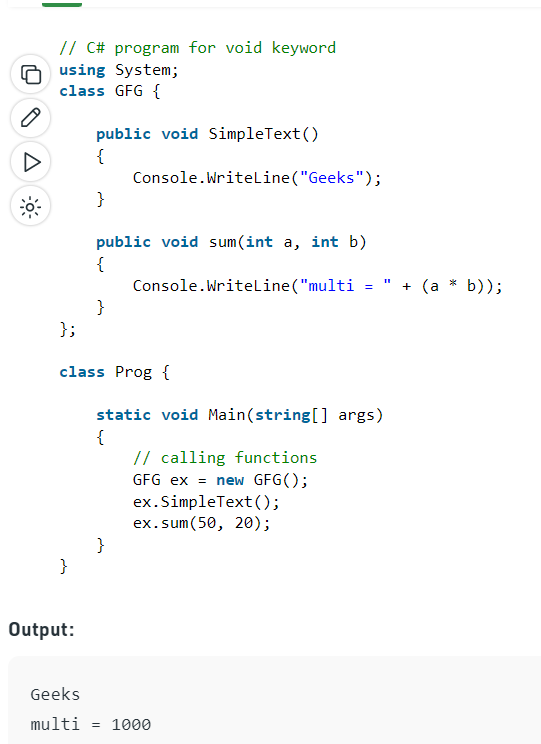
what does Void Mean?
You use void as the return type of a method (or a local function) to specify that the method doesn't return a value
8
New cards

What is a partial Class?
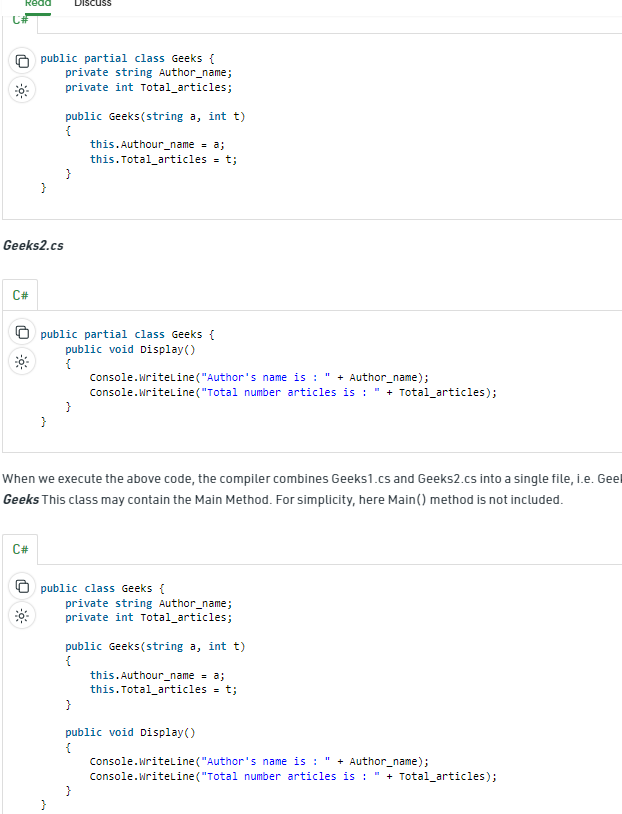
Partial class allows its members to partially divide or share source (.cs) files. It provides a special ability to implement the functionality of a single class into multiple files and all these files are combined into a single class file when the application is compiled.
 Partial class allows its members to partially divide or share source (.cs) files. It provides a special ability to implement the functionality of a single class into multiple files and all these files are combined into a single class file when the application is compiled.
9
New cards
What is an abstract class? What is an Abstract method? Why do we use abstract?
An abstract class is a class that cannot be instantiated on its own, but is meant to be inherited by other classes. It typically includes abstract methods that have no implementation but must be implemented by any derived class. An abstract class can also include regular methods with implementation, and can have instance variables and constructors. By defining an abstract class, you can provide a common base for several derived classes that share some common functionality.

Abstract method: can only be used in an abstract class, and it does not have a body. The body is provided by the derived class (inherited from)

\
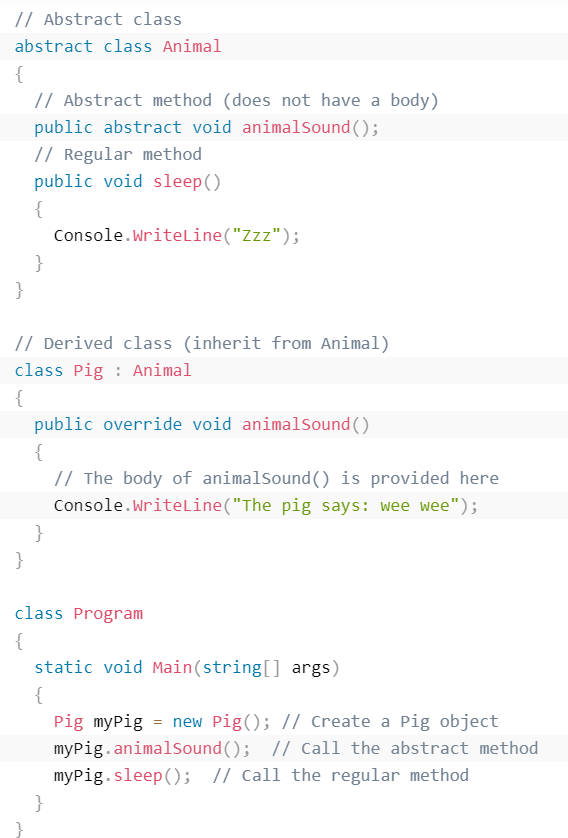
An abstract class is a class that cannot be instantiated on its own, but is meant to be inherited by other classes. It typically includes abstract methods that have no implementation but must be implemented by any derived class. An abstract class can also include regular methods with implementation, and can have instance variables and constructors. By defining an abstract class, you can provide a common base for several derived classes that share some common functionality.

Abstract method: can only be used in an abstract class, and it does not have a body. The body is provided by the derived class (inherited from)

\
10
New cards
What is Interface?
Another way to achieve abstraction in C#, is with interfaces. An interface is a reference type in C# that defines a set of properties, methods, and events that a class or a struct can implement.

It's like a contract that specifies what a class must have in terms of methods and properties, but not how they should be implemented. When a class implements an interface, it must provide an implementation for all the methods and properties declared in the interface. This ensures that the class adheres to a certain structure and behavior, and allows for more flexible and maintainable code.
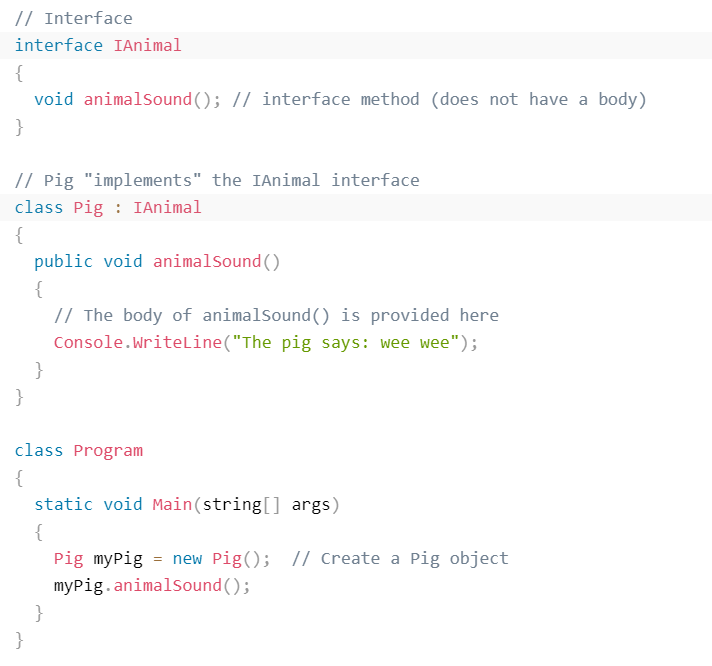
Another way to achieve abstraction in C#, is with interfaces. An interface is a reference type in C# that defines a set of properties, methods, and events that a class or a struct can implement.

 It's like a contract that specifies what a class must have in terms of methods and properties, but not how they should be implemented. When a class implements an interface, it must provide an implementation for all the methods and properties declared in the interface. This ensures that the class adheres to a certain structure and behavior, and allows for more flexible and maintainable code.
11
New cards
Can you explain inheritance and how it works? When do you use inheritance and why should you not?
Inheritance is a fundamental concept in object-oriented programming where a new class is created from an existing class, inheriting all of its properties and methods. The new class, called a subclass or derived class, can then add or modify these properties and methods to suit its specific needs

\
In C#, inheritance can be achieved using the "class" keyword followed by the name of the derived class, followed by a colon and the name of the base class. Abstract classes and interfaces are also used to implement inheritance in C#.

\
In general, inheritance should be used when there is a clear "is-a" relationship between two classes, and when there is a significant amount of code or functionality that can be reused from an existing class. However, it's important to be careful when using inheritance, as it can lead to complex and tightly-coupled code if not used properly.
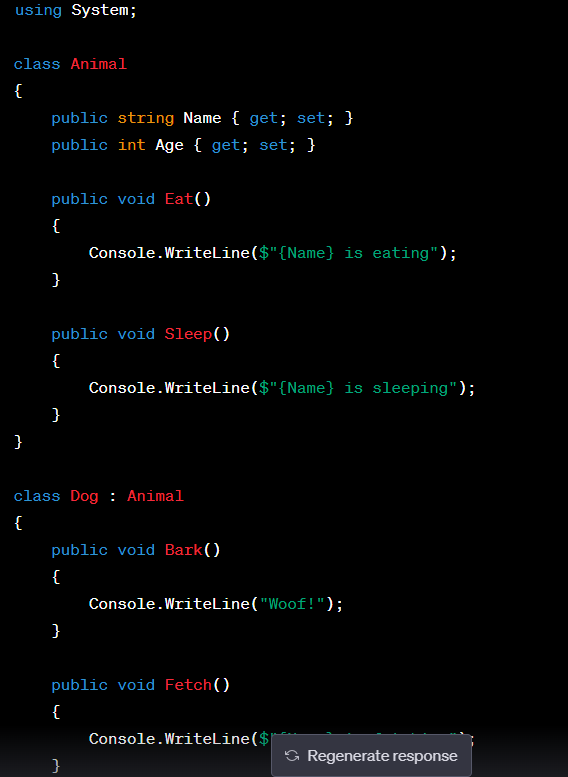
Inheritance is a fundamental concept in object-oriented programming where a new class is created from an existing class, inheriting all of its properties and methods. The new class, called a subclass or derived class, can then add or modify these properties and methods to suit its specific needs

\
In C#, inheritance can be achieved using the "class" keyword followed by the name of the derived class, followed by a colon and the name of the base class. Abstract classes and interfaces are also used to implement inheritance in C#.

\
In general, inheritance should be used when there is a clear "is-a" relationship between two classes, and when there is a significant amount of code or functionality that can be reused from an existing class. However, it's important to be careful when using inheritance, as it can lead to complex and tightly-coupled code if not used properly.
12
New cards
What are the 4 different types of inheritance?

1. Single Inheritance (1 derive ->1 parent)
2. Multiple Inheritance ( 1 derive ->2 parent)
3. Multi-level Inheritance (1 derive -> 1 derive ->1 parent)
4. Hierarchical Inheritance (multiple derive ->1 parent)
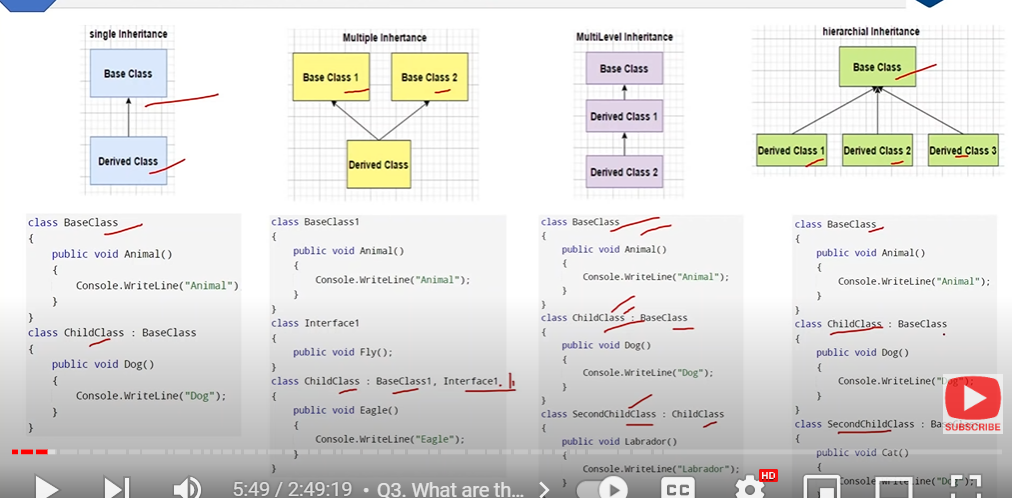
1. Single Inheritance (1 derive ->1 parent)
2. Multiple Inheritance ( 1 derive ->2 parent)
3. Multi-level Inheritance (1 derive -> 1 derive ->1 parent)
4. Hierarchical Inheritance (multiple derive ->1 parent)
13
New cards
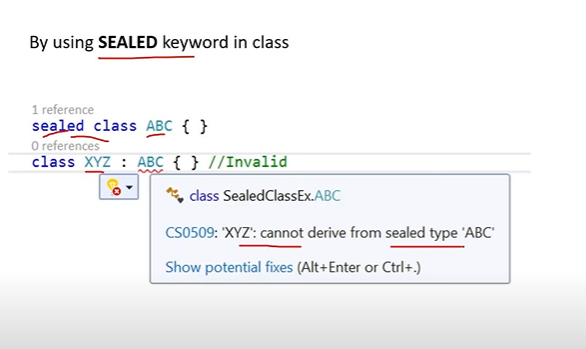
How do you prevent a class from being inherited?
By using SEALED keyword in class
14
New cards
What is Polymorphism? What are its types?
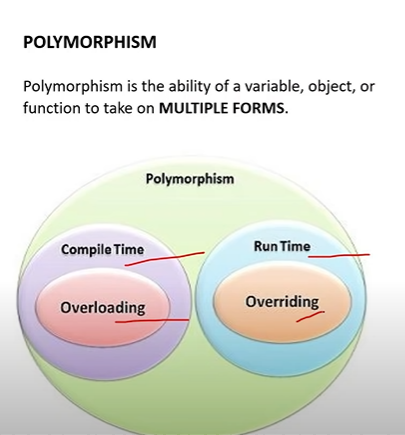
Polymorphism is the ability of a variable, function or object to take on multiple forms. Its types are:
1. Runtime Polymorphism (Overriding Method)
2. Compile Time Polymorphism(Overloading Method)
Polymorphism is the ability of a variable, function or object to take on multiple forms. Its types are:
1. Runtime Polymorphism (Overriding Method)
2. Compile Time Polymorphism(Overloading Method)
15
New cards
What is Method Overloading? When do you want to use it? What ways can you overload a method? Does order matter in method signature?
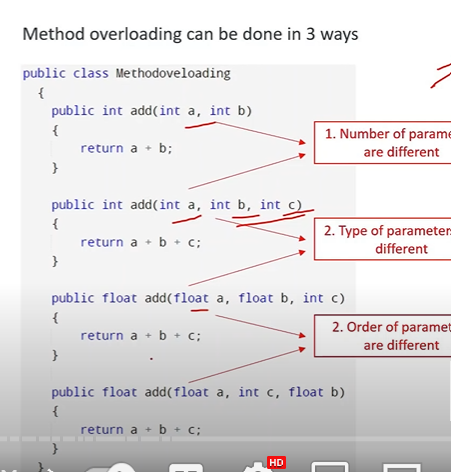
Method overloading is used when you want to define multiple methods with the same name in a class, but with different parameter types or numbers. This allows you to provide different ways to call the same method depending on the input data.

You would typically use method overloading when you have a method that performs a similar operation, but with different input data types or numbers. For example, you might have a `CalculateArea` method that can accept different shapes, such as a rectangle or a circle, and calculate the area of each shape accordingly.

There are 3 ways a method can be overloaded: the amount of parameters taken, the type of parameter taken, or the order of the parameters.

Does order matter in method signature?

The order of the parameters make a difference because it is a different signature. Imagine you had a human signature and altered the order of the letters, it would no longer be the same signature
Method overloading is used when you want to define multiple methods with the same name in a class, but with different parameter types or numbers. This allows you to provide different ways to call the same method depending on the input data.

You would typically use method overloading when you have a method that performs a similar operation, but with different input data types or numbers. For example, you might have a `CalculateArea` method that can accept different shapes, such as a rectangle or a circle, and calculate the area of each shape accordingly.

There are 3 ways a method can be overloaded: the amount of parameters taken, the type of parameter taken, or the order of the parameters.

Does order matter in method signature?

The order of the parameters make a difference because it is a different signature. Imagine you had a human signature and altered the order of the letters, it would no longer be the same signature
16
New cards
What is Compile Time and Run Time?
Compile time is when you are building the project before the program is ran. Sometimes the .Net complier catches build errors before running the program.

Runtime is after the project is built and is running. Run Time errors can show after running such as "object reference not set to an object".
17
New cards
What is the difference between overloading and overriding? When do you want to use it?
Overloading is multiple methods of the same name in the same class, all methods behave differently. It is a compile time polymorphism. It does not require inheritance.

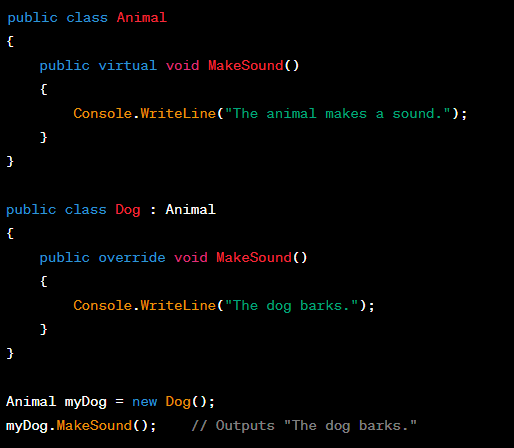
Overriding is creating a new method in the derived class with the same name and signature as a method in the base class. It is a runtime polymorphism.
Overriding uses VIRTUAL keyword in the base class and OVERRIDE keyword in the derived class and required INHERITANCE.

\
You would typically use method overloading when you have a method that performs a similar operation, but with different input data types or numbers. For example, you might have a `CalculateArea` method that can accept different shapes, such as a rectangle or a circle, and calculate the area of each shape accordingly.

\
You would use method overriding when you want to customize the behavior of a method in a subclass while still maintaining the same name and signature as the method in the parent class For example, you might have a `Draw` method in a parent class `Shape`, and then provide a different implementation of `Draw` in each subclass, such as `Rectangle` or `Circle`, to draw the specific shape.
18
New cards
What is the difference between abstract class and an interface?
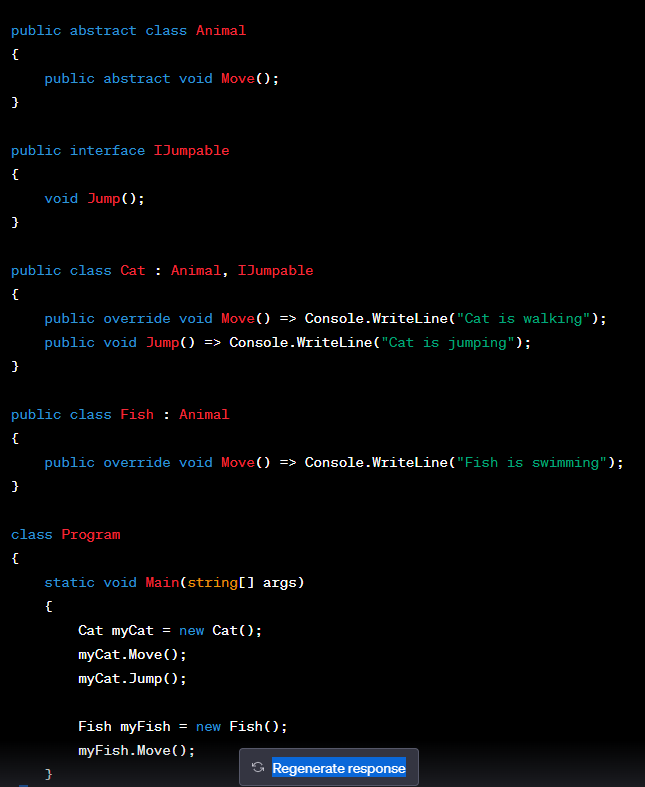
An abstract class is a type of class that cannot be instantiated and is typically used as a base class that provides common functionality to its derived classes. Derived classes can then inherit from the abstract class and provide implementations or override for the abstract members. Abstract classes can contain declaration and definitions of methods. There can only be one abstract class per class.

An interface is a contract that defines a set of methods and properties that a class must implement. It contains only declarations of its members and doesn't provide any implementation. A class can implement one or more interfaces to provide the necessary functionality and behavior.

So, abstract classes provide a way to share code among related classes, while interfaces define a set of methods and properties that a class must implement to adhere to a certain contract.
An abstract class is a type of class that cannot be instantiated and is typically used as a base class that provides common functionality to its derived classes. Derived classes can then inherit from the abstract class and provide implementations or override for the abstract members. Abstract classes can contain declaration and definitions of methods. There can only be one abstract class per class.

An interface is a contract that defines a set of methods and properties that a class must implement. It contains only declarations of its members and doesn't provide any implementation. A class can implement one or more interfaces to provide the necessary functionality and behavior.

So, abstract classes provide a way to share code among related classes, while interfaces define a set of methods and properties that a class must implement to adhere to a certain contract.
19
New cards
When to use Interface vs Abstract class?
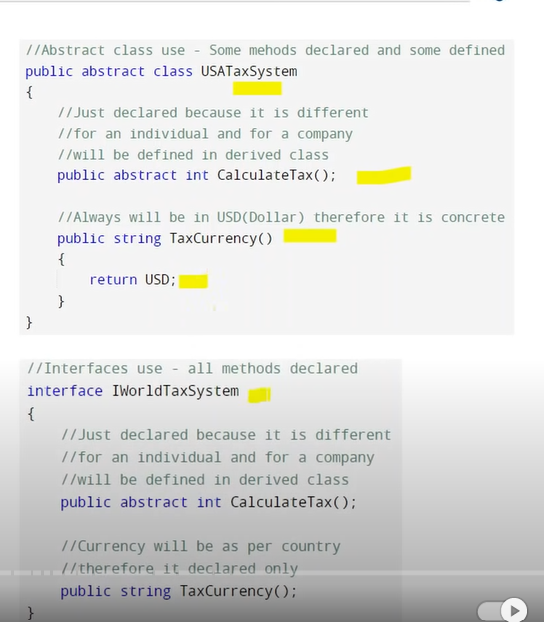
Abstract is a good choice when you are sure some methods are concrete and must be implemented in the same way in all derived classes

Interfaces is used when you know a method is going to be used but implemented differently by independent derived classes.
Abstract is a good choice when you are sure some methods are concrete and must be implemented in the same way in all derived classes

Interfaces is used when you know a method is going to be used but implemented differently by independent derived classes.
20
New cards
Can you create an instance of an abstract class or an interface?
No, abstract class and interface can only be used for inheritance, not for object creation.
21
New cards
What are access specifiers? What is the default access modifier in a class? PPPIPI
Access specifiers are keywords that specify the accessibility of a class, method, property or field. They are:

1\. Public - A public member can be accessed from anywhere in the program, including from outside the class or assembly. This is the most permissive access modifier.

2\. Private - A private member can only be accessed from within the same class or struct. It is not visible to code outside the class or struct.

3\. Protected - A protected member can be accessed from within the same class or struct, as well as from any derived class or struct. It is not visible to code outside the class hierarchy.

4\. Internal - An internal member can be accessed from within the same assembly, but not from outside the assembly. This access modifier is useful for creating libraries or modules that are used within a single application. For example: if you have two projects and you reference the base project with a class called “employee” to the derived project. If Employee class is public, the derived class can see everything, but if it is internal, it is not accessible to the derived class.

5\. ProtectedInternal - A protected internal member can be accessed from within the same assembly, as well as from any derived class or struct, regardless of whether the derived class or struct is in a different assembly. This access modifier provides a combination of the protected and internal access modifiers.

The default access modifier is internal - short answer

The default access for everything in C# is **"the most restricted access you could declare for that member" - long answer**
22
New cards
What is an Assembly?
Think of an assembly as a container that holds all the code and resources needed to run a .NET application. It's like a box that contains everything your application needs to work properly, such as classes or types, files or images, metadata, etc.

Assemblies provide several benefits for .NET applications, including:


1. Versioning: Assemblies have a version number that can be used to manage and track changes to the application over time.
2. Deployment: Assemblies can be easily deployed and installed on target machines, simplifying the deployment process.
3. Security: Assemblies can be digitally signed and verified, providing a level of security and trust for the application.
4. Code reuse: Assemblies can be shared and reused across multiple applications, reducing development time and effort.
23
New cards
What is the difference between continue and break?
In C#, continue and break are control flow statements that are used to alter the flow of execution in loops.

Continue is used to skip the current iteration of a loop and move on to the next iteration. When continue is encountered in a loop, the remaining statements in the loop body are skipped and the loop immediately moves on to the next iteration. The loop condition is then evaluated again to determine whether to continue or exit the loop.

Here's an example of using continue in a loop:

```javascript
for (int i = 0; i < 10; i++)
{
if (i % 2 == 0)
{
continue; // skip even numbers
}
Console.WriteLine(i);
}
```

In this example, the loop iterates from 0 to 9, but the continue statement is used to skip even numbers. As a result, only odd numbers are printed to the console.

\
Break, on the other hand, is used to exit a loop prematurely. When break is encountered in a loop, the loop immediately terminates and control is transferred to the statement following the loop. The loop condition is not evaluated again.

Here's an example of using break in a loop:

```javascript
for (int i = 0; i < 10; i++)
{
if (i == 5)
{
break; // exit loop when i == 5
}
Console.WriteLine(i);
}
```

In this example, the loop iterates from 0 to 9, but the break statement is used to exit the loop when i is equal to 5. As a result, only the numbers 0 through 4 are printed to the console.
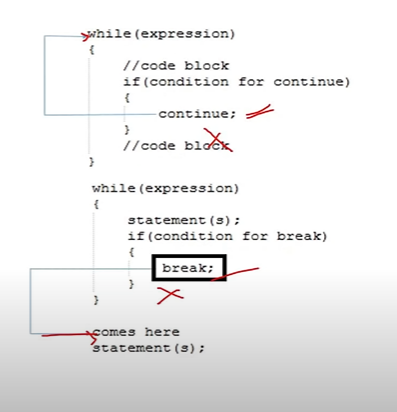
In C#, continue and break are control flow statements that are used to alter the flow of execution in loops. 

Continue is used to skip the current iteration of a loop and move on to the next iteration. When continue is encountered in a loop, the remaining statements in the loop body are skipped and the loop immediately moves on to the next iteration. The loop condition is then evaluated again to determine whether to continue or exit the loop.

Here's an example of using continue in a loop:

```javascript
for (int i = 0; i < 10; i++)
{
    if (i % 2 == 0)
    {
        continue; // skip even numbers
    }
    Console.WriteLine(i);
}
```

In this example, the loop iterates from 0 to 9, but the continue statement is used to skip even numbers. As a result, only odd numbers are printed to the console.

\
Break, on the other hand, is used to exit a loop prematurely. When break is encountered in a loop, the loop immediately terminates and control is transferred to the statement following the loop. The loop condition is not evaluated again.

Here's an example of using break in a loop:

```javascript
for (int i = 0; i < 10; i++)
{
    if (i == 5)
    {
        break; // exit loop when i == 5
    }
    Console.WriteLine(i);
}
```

In this example, the loop iterates from 0 to 9, but the break statement is used to exit the loop when i is equal to 5. As a result, only the numbers 0 through 4 are printed to the console.
24
New cards
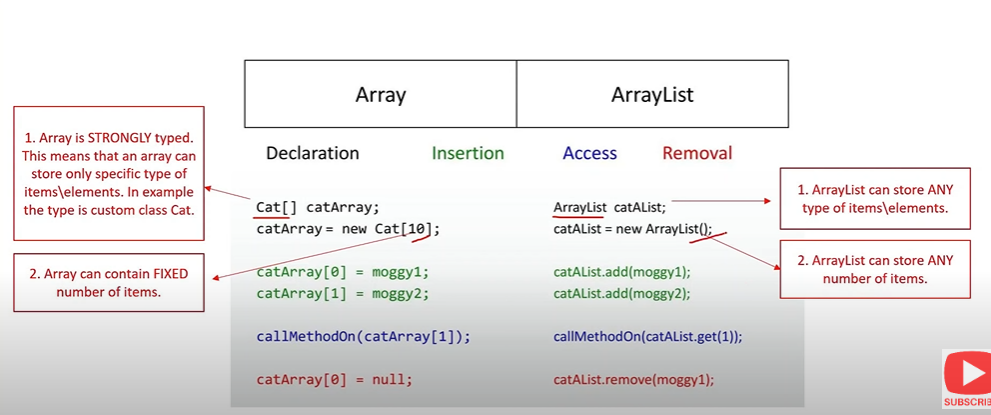
Difference between Array and ArrayList (at least 2)
Array:
1. Array is STRONGLY typed - which means that an array can store only specific types of elements.
2. Arrays can contain FIXED number of items

Arraylist:
1. ArrayList is capable of storing all types of elements regardless of type
2. ArrayList can hold any amounts of items
Array:
1. Array is STRONGLY typed - which means that an array can store only specific types of elements. 
2. Arrays can contain FIXED number of items

Arraylist:
1. ArrayList is capable of storing all types of elements regardless of type 
2. ArrayList can hold any amounts of items
25
New cards
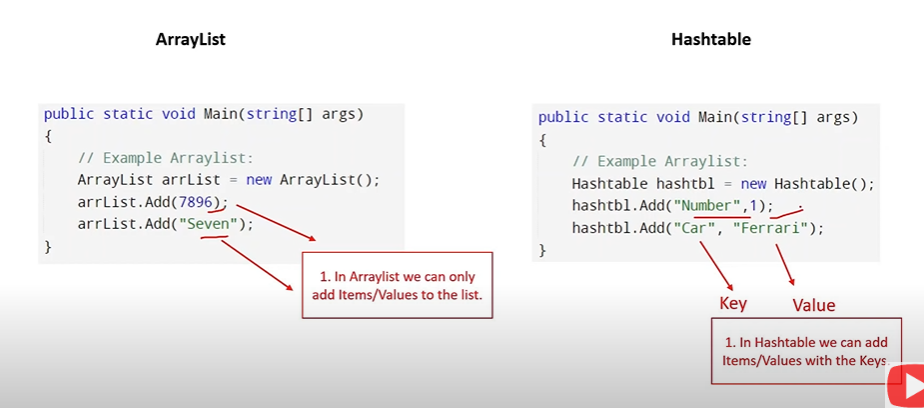
Difference between Arraylist and Hashtable?
Arraylist: we can only add items directly to the list

Hashtable: we can add items with a key
Arraylist: we can only add items directly to the list

Hashtable: we can add items with a key
26
New cards
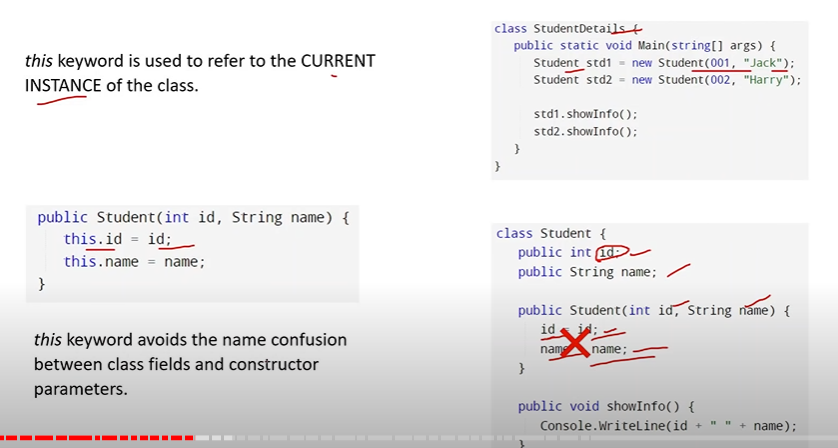
What is "this" keyword in c#? When do you use it?
"this" keyword is used to refer to the current instance of the class. You use it to reduce confusion between class fields and constructor parameters
27
New cards
What is boxing and unboxing? Can you provide an example? Why is boxing and unboxing used?
Boxing is the process of converting a value type to an object reference type. When a value type is boxed, a new object is created on the heap and the value of the value type is copied into the object. The object reference that is returned can then be used to access the value type as an object.

For example, consider the following code:

```csharp
int num = 42;
object obj = num; // boxing
```

In this example, the int value 42 is boxed into an object reference type. The obj variable now contains a reference to the boxed int value.

\
Unboxing is the process of converting an object reference type back to a value type. When an object is unboxed, the value of the value type is copied from the object back into a value type variable.

For example, consider the following code:

```csharp
int num = 42;
object obj = num; // boxing
int num2 = (int)obj; // unboxing
```

In this example, the int value 42 is boxed into an object reference type and stored in the obj variable. The obj variable is then unboxed back into an int value and stored in the num2 variable.

Boxing and unboxing can be useful in certain situations, such as when working with anything that expects object parameters. However, they can also be inefficient and can lead to performance issues if used excessively. Therefore, it is important to use boxing and unboxing judiciously and only when necessary.
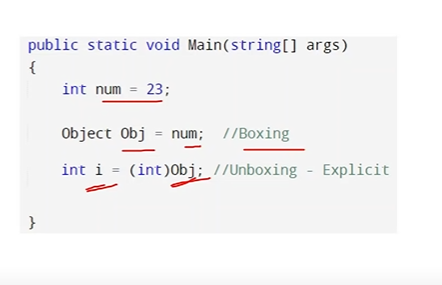
Boxing is the process of converting a value type to an object reference type. When a value type is boxed, a new object is created on the heap and the value of the value type is copied into the object. The object reference that is returned can then be used to access the value type as an object.

For example, consider the following code:

```csharp
int num = 42;
object obj = num; // boxing
```

In this example, the int value 42 is boxed into an object reference type. The obj variable now contains a reference to the boxed int value.

\
Unboxing is the process of converting an object reference type back to a value type. When an object is unboxed, the value of the value type is copied from the object back into a value type variable.

For example, consider the following code:

```csharp
int num = 42;
object obj = num; // boxing
int num2 = (int)obj; // unboxing
```

In this example, the int value 42 is boxed into an object reference type and stored in the obj variable. The obj variable is then unboxed back into an int value and stored in the num2 variable.

Boxing and unboxing can be useful in certain situations, such as when working with anything that expects object parameters. However, they can also be inefficient and can lead to performance issues if used excessively. Therefore, it is important to use boxing and unboxing judiciously and only when necessary.
28
New cards
What about explicit boxing and unboxing?
In C#, the term "explicit" refers to a type conversion that requires an explicit cast or conversion operator to be used.

When a type conversion is explicit, it means that the conversion cannot be performed implicitly by the compiler. Instead, the programmer must explicitly specify the conversion using a cast or conversion operator.

\
For example, consider the following code:

```javascript
int num = 42;
object obj = (object)num; // explicit boxing
```

In this example, the conversion from int to object is explicit because it requires an explicit cast to be performed. The (object) cast tells the compiler to convert the int value to an object reference type.

Similarly, consider the following code:

```javascript
int num = (int)3.14; // explicit cast
```

In this example, the conversion from double to int is explicit because it requires an explicit cast to be performed. The (int) cast tells the compiler to convert the double value 3.14 to an int value.
29
New cards
What are the basic string operations in C#?
Strings are a fundamental data type in C# and there are many built in operations that can be performed.


1. Concatenation - Strings can be concatenated using the + operator or the string.Concat method.
2. Length - The length of a string can be obtained using the Length property
3. Substring - A substring of a string can be obtained using the Substring method. For example:

` string str = "Hello world"; string substr = str.Substring(6); // "world"`


4. IndexOf - The index of a character or substring within a string can be obtained using the IndexOf method. 
5. Replace - A string can be replaced with another string using the Replace method
6. ToUpper/ToLower - A string can be converted to uppercase or lowercase using the ToUpper or ToLower method
7. regular expressions (regex) can be considered as string operations in C#. Regular expressions are used to match patterns in strings and are a powerful tool for working with text data.


1. Match: The Match method is used to search a string for a pattern that matches a regular expression
2. Replace: The Replace method is used to replace all occurrences of a pattern in a string with a specified replacement string.
3. Split: The Split method is used to split a string into an array of substrings based on a specified delimiter pattern.
30
New cards
What is the difference between String and StringBuilder? When to use which?
String is an immutable type, which means that once a string is created, it cannot be modified. Any operation that modifies a string actually creates a new string object. This can be inefficient if you need to perform a lot of string manipulations, as it can result in a lot of memory allocations and deallocations.

For example:

```javascript
string firstName = "John";
string lastName = "Doe";
string fullName = firstName + " " + lastName;
```

In this example, we are concatenating the firstName and lastName strings together to create a fullName string. Since we are only concatenating a few strings together, using string is efficient and easy to read.

StringBuilder, on the other hand, is a mutable type that is designed for efficient string manipulation. It allows you to modify a string in place, without creating a new string object each time. This can be much more efficient than using string if you need to perform a lot of string manipulations.

For example:

```csharp
StringBuilder sb = new StringBuilder();
for (int i = 0; i < 1000; i++)
{
sb.Append("hello");
}
string result = sb.ToString();
```

In this example, we are using a StringBuilder to build a long string by appending the word "hello" to it 1000 times. Since we are concatenating many smaller strings together, using StringBuilder is more efficient than using string, as it avoids creating a new string object each time.

Example 3: Performing a complex search and replace operation

If you need to perform a complex search and replace operation, StringBuilder is a better choice. For example:

```javascript
string input = "The quick brown fox jumps over the lazy dog";
StringBuilder sb = new StringBuilder(input);
sb.Replace("brown", "red");
sb.Replace("fox", "cat");
string result = sb.ToString();
```

In this example, we are using a StringBuilder to perform a complex search and replace operation on the input string. We are replacing the word "brown" with "red" and the word "fox" with "cat". Since we are performing a complex operation that involves multiple search and replace operations, using StringBuilder is more efficient than using string.
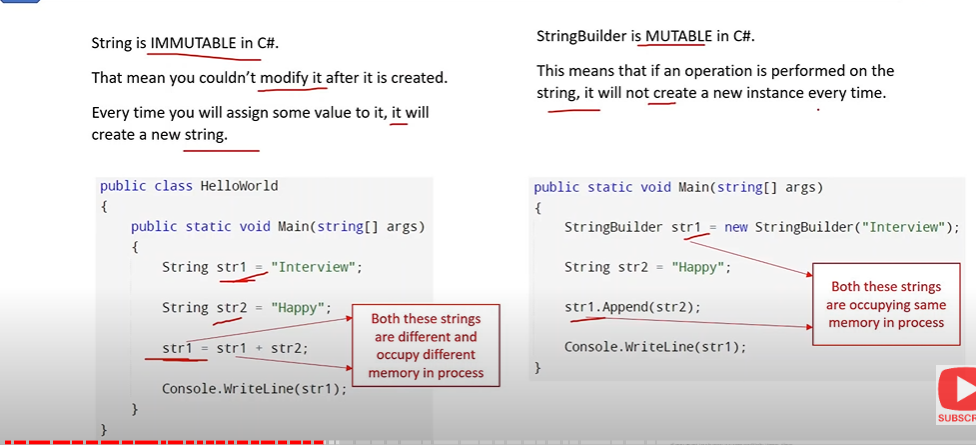
String is an immutable type, which means that once a string is created, it cannot be modified. Any operation that modifies a string actually creates a new string object. This can be inefficient if you need to perform a lot of string manipulations, as it can result in a lot of memory allocations and deallocations.

For example:

```javascript
string firstName = "John";
string lastName = "Doe";
string fullName = firstName + " " + lastName;
```

In this example, we are concatenating the firstName and lastName strings together to create a fullName string. Since we are only concatenating a few strings together, using string is efficient and easy to read.

StringBuilder, on the other hand, is a mutable type that is designed for efficient string manipulation. It allows you to modify a string in place, without creating a new string object each time. This can be much more efficient than using string if you need to perform a lot of string manipulations.

For example:

```csharp
StringBuilder sb = new StringBuilder();
for (int i = 0; i < 1000; i++)
{
    sb.Append("hello");
}
string result = sb.ToString();
```

In this example, we are using a StringBuilder to build a long string by appending the word "hello" to it 1000 times. Since we are concatenating many smaller strings together, using StringBuilder is more efficient than using string, as it avoids creating a new string object each time.

Example 3: Performing a complex search and replace operation

If you need to perform a complex search and replace operation, StringBuilder is a better choice. For example:

```javascript
string input = "The quick brown fox jumps over the lazy dog";
StringBuilder sb = new StringBuilder(input);
sb.Replace("brown", "red");
sb.Replace("fox", "cat");
string result = sb.ToString();
```

In this example, we are using a StringBuilder to perform a complex search and replace operation on the input string. We are replacing the word "brown" with "red" and the word "fox" with "cat". Since we are performing a complex operation that involves multiple search and replace operations, using StringBuilder is more efficient than using string.
31
New cards
What is String Interpolation?
String interpolation is a feature in C# that allows you to embed expressions into string literals, making it easier to create formatted strings. With string interpolation, you can include variables, expressions, and even method calls directly in a string literal, without having to concatenate strings or use format specifiers.

In C#, string interpolation is denoted by the $ character before the opening quote of a string literal. Within the string literal, expressions can be enclosed in curly braces {} to indicate that they should be evaluated and their values should be included in the resulting string.

Here's an example of string interpolation in C#:

```javascript
Copystring name = "John";
int age = 30;
string message = $"My name is {name} and I am {age} years old.";
```

In this example, we are using string interpolation to create a formatted string that includes the name and age variables. The resulting message string will be "My name is John and I am 30 years old."
32
New cards
What is Enum in C#?
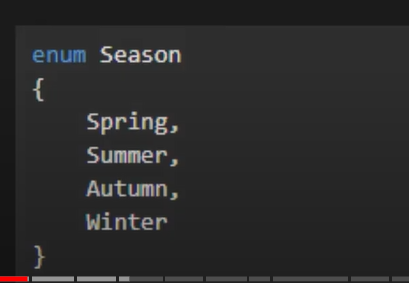
Enum(enumeration) type is a value type that represents a group of constants. It is defined by enum keyword.
33
New cards
What is Property in C#?
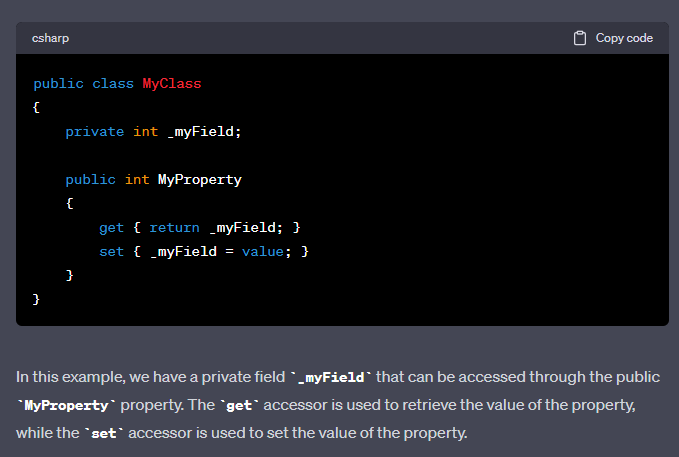
A property is a special member of a class that provides a way to read or write a private variable, with some extra features like encapsulation and validation. Properties in C# are typically defined using a combination of a private field and public getter
34
New cards
What is a namespace?
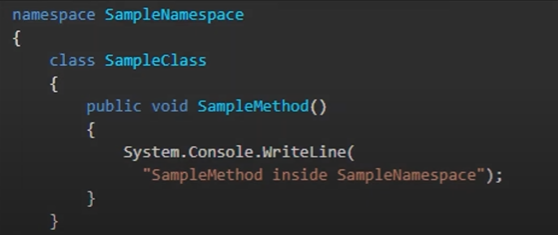
A namespace in C# is a way to organize code and avoid naming conflicts between classes, interfaces, and other types. It provides a way to group related code together and make it easier to manage and maintain. Namespace declarations are usually placed at the beginning of a code file and use the `namespace` keyword followed by the namespace name.
 A namespace in C# is a way to organize code and avoid naming conflicts between classes, interfaces, and other types. It provides a way to group related code together and make it easier to manage and maintain. Namespace declarations are usually placed at the beginning of a code file and use the `namespace` keyword followed by the namespace name.
35
New cards
What is LINQ? How is it used in relation to Entity Framework?
Language-Integrated Query (LINQ) allows developers to write queries using a syntax that is similar to SQL, and it provides a set of standard query operators that can be used to for data manipulation

\
\
In Entity Framework, LINQ is used to write queries that retrieve data from a database. When you use Entity Framework to work with a database, you typically define a set of classes that represent the tables in the database, and you use LINQ to write queries that retrieve data from those tables.
36
New cards
What is a class? what is an object?
A class is a blueprint or template that describes the behavior and properties of a certain type of object. An object is an instance of that class that is created in memory when the program is executed.

When you create an object, you are creating a specific instance of the class, with its own unique values for the properties and methods defined by the class. You can create multiple objects from the same class, and each object will have its own set of property values and methods that can be called.
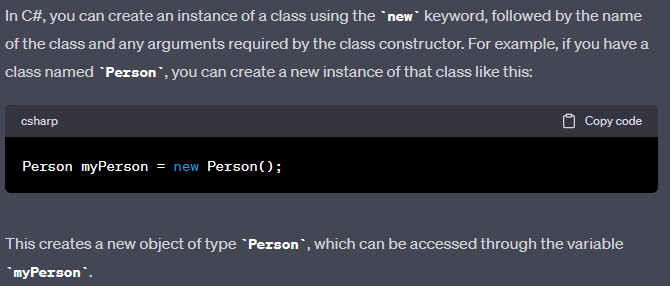
 A class is a blueprint or template that describes the behavior and properties of a certain type of object. An object is an instance of that class that is created in memory when the program is executed. 

When you create an object, you are creating a specific instance of the class, with its own unique values for the properties and methods defined by the class. You can create multiple objects from the same class, and each object will have its own set of property values and methods that can be called.
37
New cards
What is Reflection? Why do we use it? Advantages and Disadvantages?
Reflection in C# is used to retrieve metadata on types at runtime.

- Reflection is useful in following situations:
1. For retrieving attribute information at runtime.
2. For examining and instantiating types in an assembly.
3. For building new types at runtime.
4. For performing late binding, accessing methods on types created at runtime

- Advantage of Reflection
1. Custom attributes can be retrieved.
2. Invoke a particular method.
3. Know about private & public methods.

- Disadvantage of Reflection
1. Performance can hamper a lot.
2. Overhead at runtime.
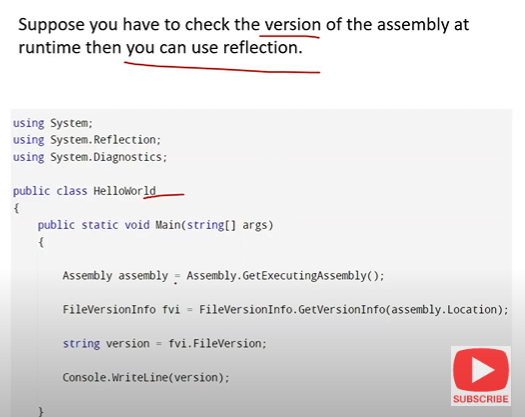
Reflection in C# is used to retrieve metadata on types at runtime. 

- Reflection is useful in following situations:
1. For retrieving attribute information at runtime.
2. For examining and instantiating types in an assembly.
3. For building new types at runtime.
4. For performing late binding, accessing methods on types created at runtime

- Advantage of Reflection
1. Custom attributes can be retrieved.
2. Invoke a particular method.
3. Know about private & public methods.
	
- Disadvantage of Reflection
1. Performance can hamper a lot.
2. Overhead at runtime.
38
New cards
What is a delegate?
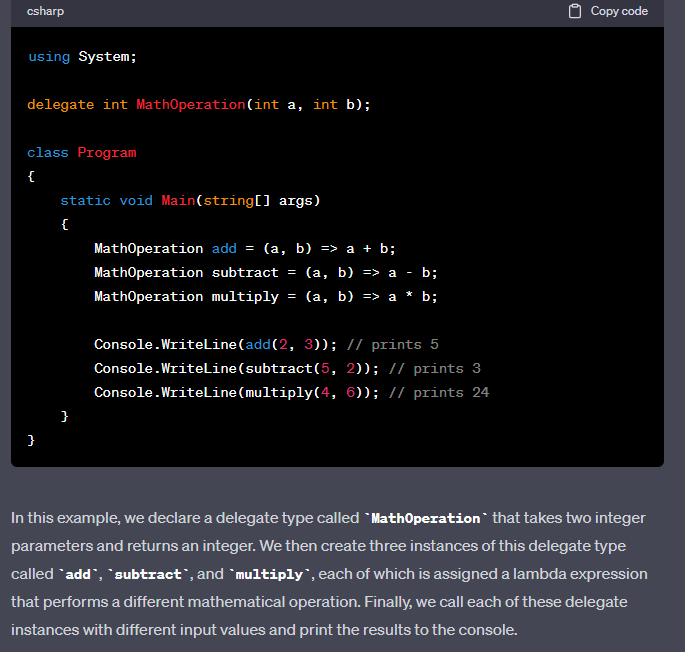
A delegate is like a pointer to a method. You can assign a delegate to a method, and then later call the delegate to execute that method. Delegates are useful when you want to pass a method as a parameter to another method or store a reference to a method in a variable.
39
New cards
What is a Generic class? Why is it used?
In C#, you can write a generic class, method, or interface by using a type parameter to represent the type of data that the class, method, or interface will work with. add to : Classes, methods, fields, etc.

\
To create an instance of the a generic class, you specify the type of data that the stack will hold, like this:

```javascript
Stack intStack = new Stack();
Stack stringStack = new Stack();
```

In this example, we are creating two instances of the Stack class, one for int values and one for string values. The intStack instance will hold int values, while the stringStack instance will hold string values.

Generics are a powerful feature of C# that allow you to write flexible and reusable code that can work with any type of data. By using generics, you can write code that is more efficient, more maintainable, and more flexible than code that is written for specific data types.
40
New cards
What is serialization? When do you use it?
Serialization is a process of converting object to its Binary Format(Bytes). Once it is converted to bytes, it can be stored and written to a storage device

It is mostly used in WebAPI to convert class objects into JSON String.
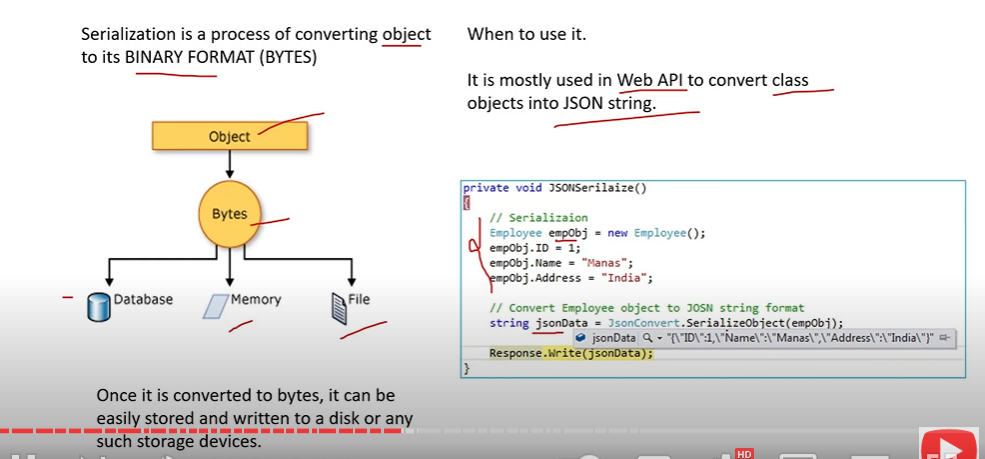
Serialization is a process of converting object to its Binary Format(Bytes). Once it is converted to bytes, it can be stored and written to a storage device

It is mostly used in WebAPI to convert class objects into JSON String.
41
New cards
Abstraction vs Encapsulation?
Abstraction is the process of identifying the relevant qualities and behaviors an object should possess without representing the back ground, unnecessary details (design process)
Encapsulation: a process of hiding all the internal details of an object from the outside real world ( implementation)

For example: lets design a method validate():
○ In designing the method, we call two methods checkname() and checkaddress(); we only want to see validate() instead of all three so we use encapsulation to make the methods not shown using private
42
New cards
Explain virtual keyword
Used to define some logic in the parent class which can be overridden in the child class
43
New cards
What is a Constructor?
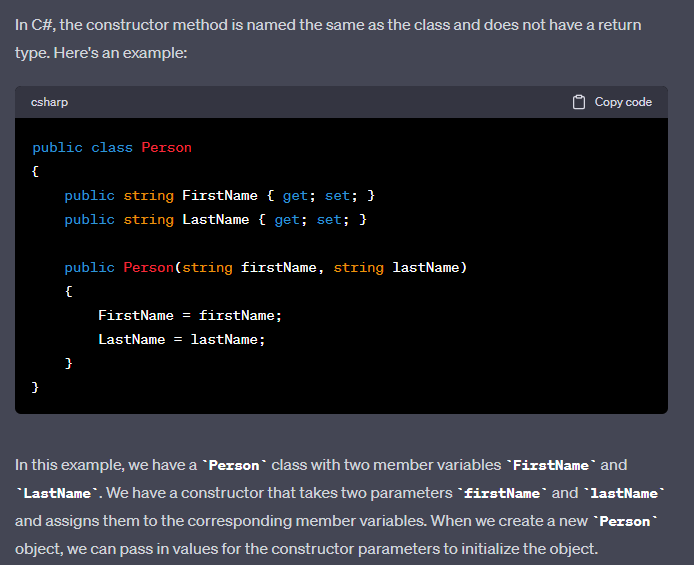
A constructor is a method that is used to initialize objects. It can be used to set initial values for field when an object of a class is created.
44
New cards
What does type-safe mean in C#?
In C#, "type-safe" refers to a feature of the language that helps prevent programming errors related to type mismatches.

C# is a statically typed language, which means that each variable and expression in a program has a specific data type that is determined at compile-time. Type safety ensures that any operation or assignment involving a variable or expression is only allowed if the operation is compatible with the data type of that variable or expression.

For example, if you try to assign a string value to an integer variable, the C# compiler will generate an error, because the two data types are not compatible
45
New cards
What is data encapsulation?
Encapsulation is one of the four pillars of object-oriented programming (OOP). It refers to the idea of bundling data and methods that operate on that data within a single unit, called a class. The purpose of encapsulation is to protect the data within the class from being modified directly by other code outside the class, and to ensure that the data can only be accessed through a controlled interface provided by the class.

In other words, encapsulation allows us to hide the implementation details of a class and only expose a public interface that other parts of the program can interact with. This makes it easier to manage complexity, maintain code, and reduce errors caused by external interference with the internal workings of the class.

For example, let's say we have a class called Car with data members such as make, model, and year, and methods such as start, drive, and stop. By encapsulating the data and methods of the Car class within a single unit, we can ensure that the car's make, model, and year cannot be directly accessed or modified by other code outside the class. Instead, other parts of the program can only interact with the car by calling the public methods provided by the Car class.

Overall, encapsulation is an important concept in OOP as it allows us to control access to our data and methods, which leads to more reliable and maintainable code.
46
New cards
What does Private mean?
Private is an access modifier which restricts code inside a class to be inherited or used outside of that class.
47
New cards
What does protected class member mean?
In C#, a protected class member is a member (e.g., field, property, method) of a class that is accessible only within the class and its derived classes. This means that a protected member cannot be accessed outside of the class hierarchy, but can be accessed within the class and its subclasses.

\
In C#, `base(name)` is used to explicitly call the constructor of the base class that takes a string parameter, passing the `name` variable as an argument. This is useful when you want to initialize the base class's state with some value passed from the derived class.

If you don't explicitly call the base constructor, the default constructor of the base class will be called automatically. However, if the base class does not have a default constructor and you don't explicitly call a base constructor that matches the parameters of the derived class constructor, you'll get a compilation error.
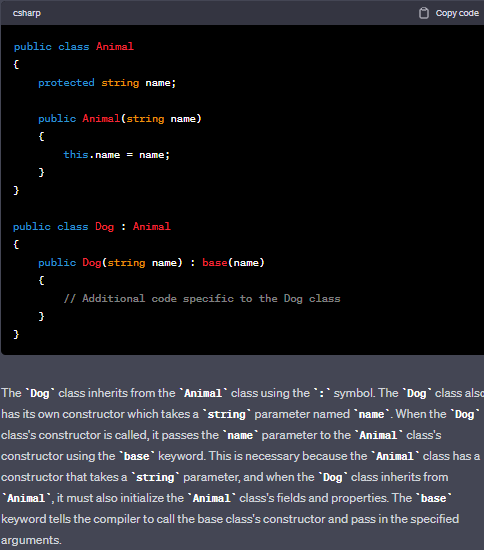
In C#, a protected class member is a member (e.g., field, property, method) of a class that is accessible only within the class and its derived classes. This means that a protected member cannot be accessed outside of the class hierarchy, but can be accessed within the class and its subclasses.

\
In C#, `base(name)` is used to explicitly call the constructor of the base class that takes a string parameter, passing the `name` variable as an argument. This is useful when you want to initialize the base class's state with some value passed from the derived class.

If you don't explicitly call the base constructor, the default constructor of the base class will be called automatically. However, if the base class does not have a default constructor and you don't explicitly call a base constructor that matches the parameters of the derived class constructor, you'll get a compilation error.
48
New cards
What is class vs struct?
Firstly, a struct is a value type, while a class is a reference type. This means that when you create a struct, it is stored directly in memory, while an object created from a class is stored in memory, but a reference to that object is passed around.

Secondly, structs cannot inherit from other classes or structs, and cannot be inherited from. They can, however, implement interfaces.

Lastly, structs are typically used for small, simple data structures that don't require a lot of behavior. Examples of such structs are Point, Rectangle, and Color.
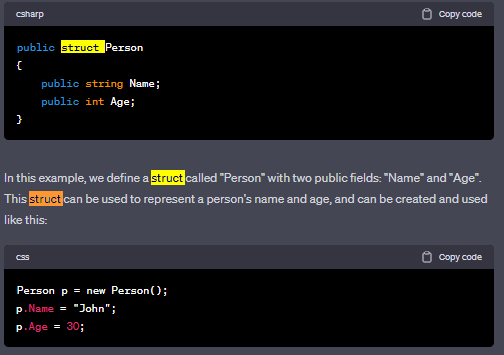
Firstly, a struct is a value type, while a class is a reference type. This means that when you create a struct, it is stored directly in memory, while an object created from a class is stored in memory, but a reference to that object is passed around.

Secondly, structs cannot inherit from other classes or structs, and cannot be inherited from. They can, however, implement interfaces.

Lastly, structs are typically used for small, simple data structures that don't require a lot of behavior. Examples of such structs are Point, Rectangle, and Color.
49
New cards
What is IEnumerable and IQueryable?
IEnumerable and IQueryable are interfaces to query data.

`IEnumerable` is used to iterate over a collection of objects. It provides a simple way to traverse a collection and read its data, but it does not provide any functionality for querying the data. When you use `IEnumerable`, all the data in the collection is loaded into memory at once.

`IQueryable`, on the other hand, provides a way to query a data source that can be translated into a query against a database. It provides a more powerful way to query data by allowing you to perform filtering, sorting, and projection operations on the data before it is loaded into memory. `IQueryable` can be used with LINQ to SQL, Entity Framework, or other ORMs (Object-Relational Mapping frameworks) to execute the query against a database.

In summary, `IEnumerable` is used for querying in-memory collections, while `IQueryable` is used for querying a data source that can be translated into a query against a database
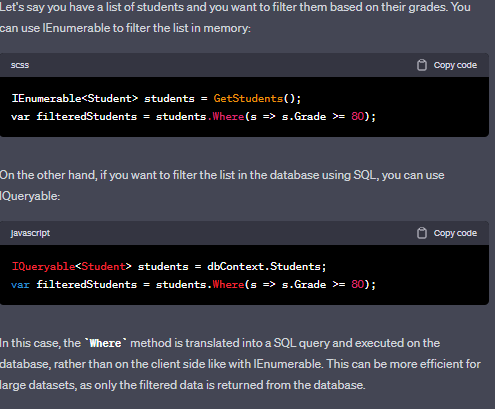
IEnumerable and IQueryable are interfaces to query data.

`IEnumerable` is used to iterate over a collection of objects. It provides a simple way to traverse a collection and read its data, but it does not provide any functionality for querying the data. When you use `IEnumerable`, all the data in the collection is loaded into memory at once.

`IQueryable`, on the other hand, provides a way to query a data source that can be translated into a query against a database. It provides a more powerful way to query data by allowing you to perform filtering, sorting, and projection operations on the data before it is loaded into memory. `IQueryable` can be used with LINQ to SQL, Entity Framework, or other ORMs (Object-Relational Mapping frameworks) to execute the query against a database.

In summary, `IEnumerable` is used for querying in-memory collections, while `IQueryable` is used for querying a data source that can be translated into a query against a database
50
New cards
What is ‘using’ statement?
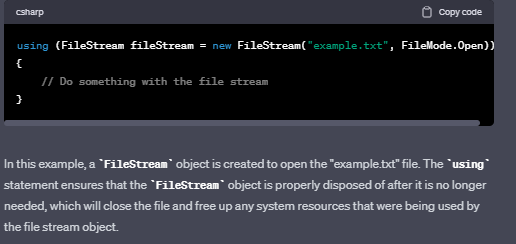
The `using` statement in C# is used to declare variables that need to be disposed of after usage, such as database connections or file streams. By using the `using` statement, the resource is automatically disposed of once it is no longer needed, and memory is freed up, preventing potential memory leaks and improving performance.
51
New cards
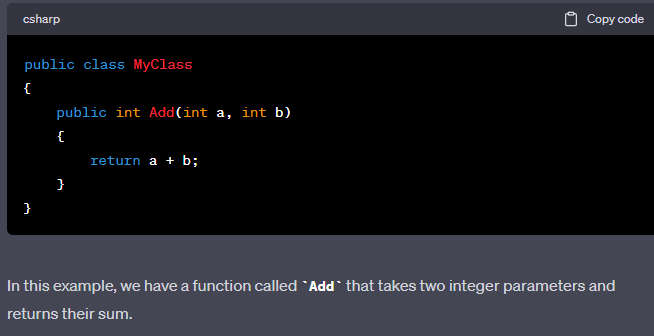
What is a function in C#?
A function is a method that performs a specific task and returns a value (or nothing, in the case of a void method). Functions in C# are typically defined using the `return` keyword to indicate the value that the function should return
52
New cards
How do you implement Exception Handling?
Exception handling is a mechanism for detecting and responding to errors that occur during program execution. Exception handling allows you to gracefully handle errors and prevent your program from crashing or behaving unpredictably.

\
A simple example can be a try-catch block:

```javascript
try
{
// code that might throw an exception
}
catch (Exception ex)
{
// code to handle the exception
}
```


1. The try block contains the code that might throw an exception. If an exception is thrown, the program will immediately jump to the catch block.
2. The catch block contains the code that will handle the exception. The catch block takes an Exception object as a parameter, which contains information about the exception that was thrown. You can use the information in the Exception object to determine what went wrong and take appropriate action. For example, you might log the error, display an error message to the user, or retry the operation. You can use multiple catch blocks to handle different types of exceptions that might be thrown by the code in a try block
53
New cards
What is finally?
The finally block is used to define a section of code that will be executed regardless of the outcome of the code in the try block. The finally block is typically used to perform cleanup operations, such as closing files or releasing resources, that need to be done regardless of whether an exception occurred or not.

Here's an example of how to use a finally block:

```javascript
FileStream file = null;
try
{
file = new FileStream("file.txt", FileMode.Open);
// code to read from the file
}
catch (IOException ex)
{
Console.WriteLine("Error: " + ex.Message);
}
finally
{
if (file != null)
{
file.Close();
}
}
```
54
New cards

what is async vs await ? what are Asyncronous Functions? Write me an example in c#

Async vs Await:

  • async is a keyword used to define a method as asynchronous. It allows the method to be executed asynchronously, meaning it can run concurrently with other operations.

  • await is used within an async method to pause the execution of the method until a specified asynchronous operation completes. It allows the method to wait for the result of the asynchronous operation.

Asynchronous Functions:

Asynchronous functions are methods that can be executed concurrently with other operations, allowing for improved performance and responsiveness in applications. They are typically used when performing time-consuming or I/O-bound tasks, such as network requests or file operations.

Example in C#:

using System;
using System.Net.Http;
using System.Threading.Tasks;

public class Program
{
    public static async Task Main()
    {
        await DoAsyncOperation();
        Console.WriteLine("Async operation completed.");
    }

    public static async Task DoAsyncOperation()
    {
        HttpClient client = new HttpClient();
        string response = await client.GetStringAsync("https://api.example.com/data");
        Console.WriteLine(response);
    }
}

In this example, the Main method is marked as async, allowing the DoAsyncOperation method to be called asynchronously using the await keyword. The DoAsyncOperation method performs an HTTP request asynchronously using the HttpClient class and awaits the response. Once the response is received, it is printed to the console.

55
New cards
What is collections?
In C#, a collection is a group of related objects that can be manipulated and accessed as a single unit. You can have:


1. Lists
2. Dictionary
3. Stack
4. Sets

Explore top notes

note
Chapter 24: Lipid Metabolism
Updated 1261d ago
0.0(0)
note
A Day with My Cat
Updated 89d ago
0.0(0)
note
APUSH Unit 4
Updated 681d ago
0.0(0)
note
Minerals and Rocks
Updated 1262d ago
0.0(0)
note
4.1: Reconstruction
Updated 1253d ago
0.0(0)
note
Chapter 24: Lipid Metabolism
Updated 1261d ago
0.0(0)
note
A Day with My Cat
Updated 89d ago
0.0(0)
note
APUSH Unit 4
Updated 681d ago
0.0(0)
note
Minerals and Rocks
Updated 1262d ago
0.0(0)
note
4.1: Reconstruction
Updated 1253d ago
0.0(0)

Explore top flashcards

flashcards
Senderos 2 Chapter 1
83
Updated 187d ago
0.0(0)
flashcards
APHG Unit 3 Vocab
63
Updated 1229d ago
0.0(0)
flashcards
📙 ALL VERB SETS 📙
55
Updated 725d ago
0.0(0)
flashcards
unit 7
99
Updated 777d ago
0.0(0)
flashcards
Psychology Ch 12 and 13
58
Updated 1116d ago
0.0(0)
flashcards
Biology Lab Chemistry of Life
32
Updated 910d ago
0.0(0)
flashcards
Probook 6 2024
41
Updated 764d ago
0.0(0)
flashcards
Senderos 2 Chapter 1
83
Updated 187d ago
0.0(0)
flashcards
APHG Unit 3 Vocab
63
Updated 1229d ago
0.0(0)
flashcards
📙 ALL VERB SETS 📙
55
Updated 725d ago
0.0(0)
flashcards
unit 7
99
Updated 777d ago
0.0(0)
flashcards
Psychology Ch 12 and 13
58
Updated 1116d ago
0.0(0)
flashcards
Biology Lab Chemistry of Life
32
Updated 910d ago
0.0(0)
flashcards
Probook 6 2024
41
Updated 764d ago
0.0(0)