DCF Valuation Modelling
 Studied by 0 people
 Call Kai
 Learn
Learn Practice Test
 Spaced Repetition
 Match
Match Flashcards
 Knowt Play
1/76

There's no tags or description
Looks like no tags are added yet.
Name | Mastery | Learn | Test | Matching | Spaced | Call with Kai |
|---|
No analytics yet
Send a link to your students to track their progress
77 Terms
Compact DCF Model and Utility of DCFs
Useful to construct compact DCFs as they:
help learn the main features of a DCF Model w/o the complexity
assist in decision making in situations where quick analysis is needed
DCF Models are used to value businesses
Business value depends on the quantity and timing of expected future cash flows
Important Dates
Cash Flow Timing
dates within each year that case flows occur (middle, end)
simplified model typically uses EOY for simplicity however in a complete DCF cashflows can occur at ¼ of the year, ½ through the year, EOY
Valuation Dates
Date that is set and used for valuation, all cash flow quantities will be adjusted for this date
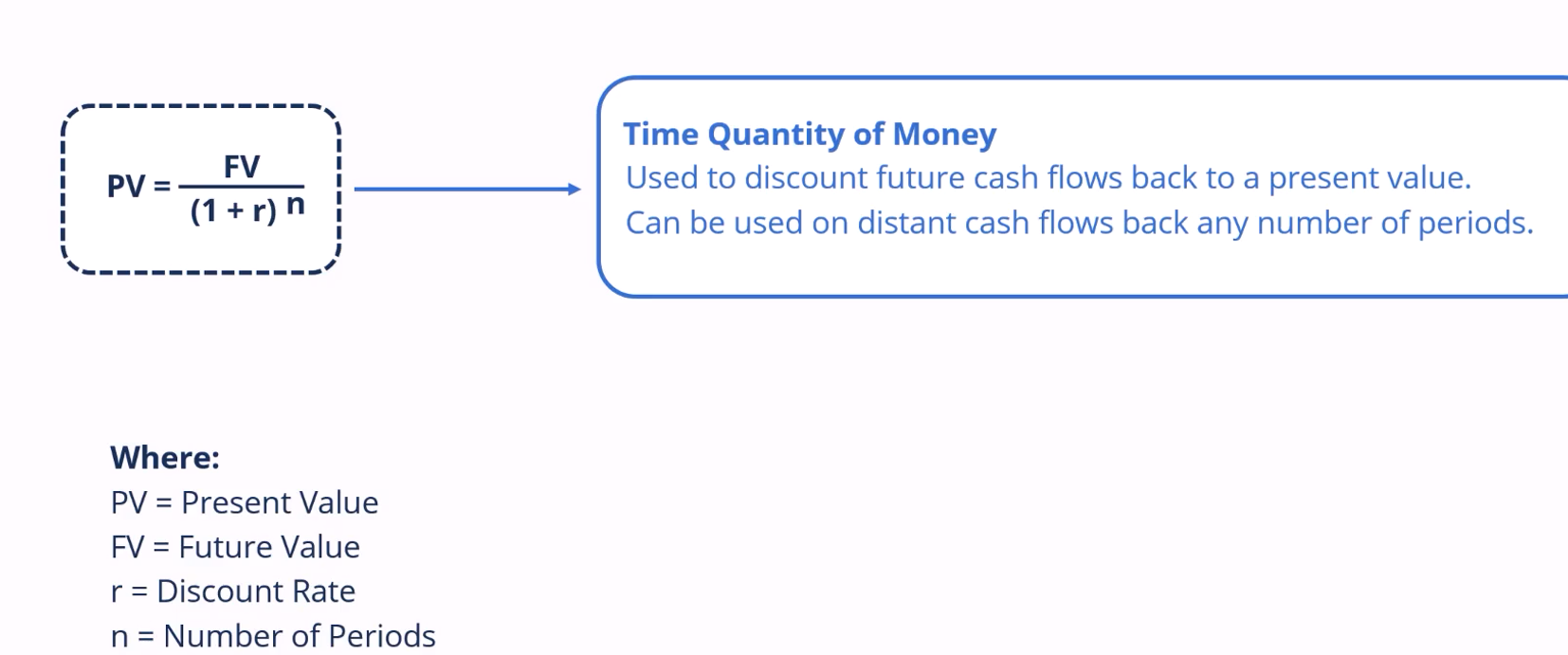
Time quantity of money
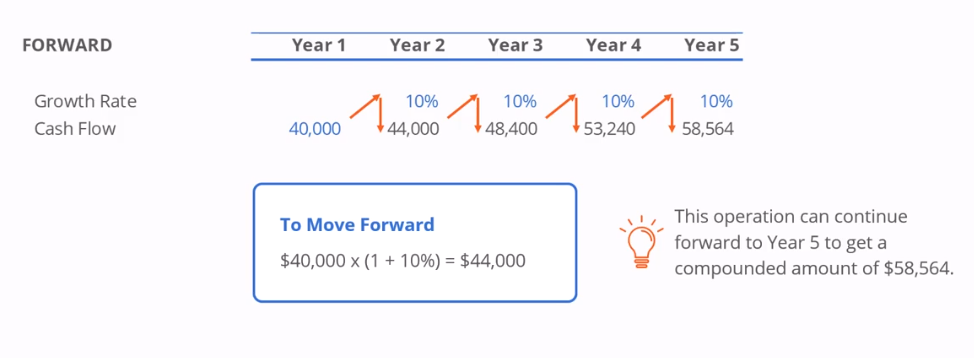
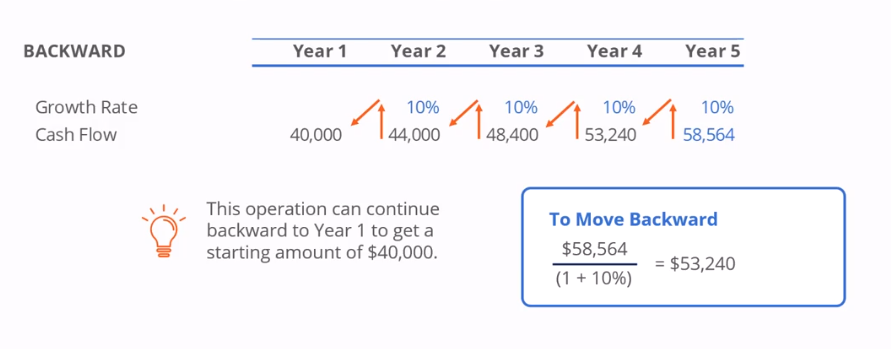
Moving cash flows forward or backward is usually referred to as the time value of money
for some reason CFI prefers time quantity of money as the quantity of money is changing over time
Choosing Cash Flows and Discount Rates
Using the wrong cash flows and incorrect discount rates is a common mistake
As a general rule:

Consistency is needed between the numerator and denominator

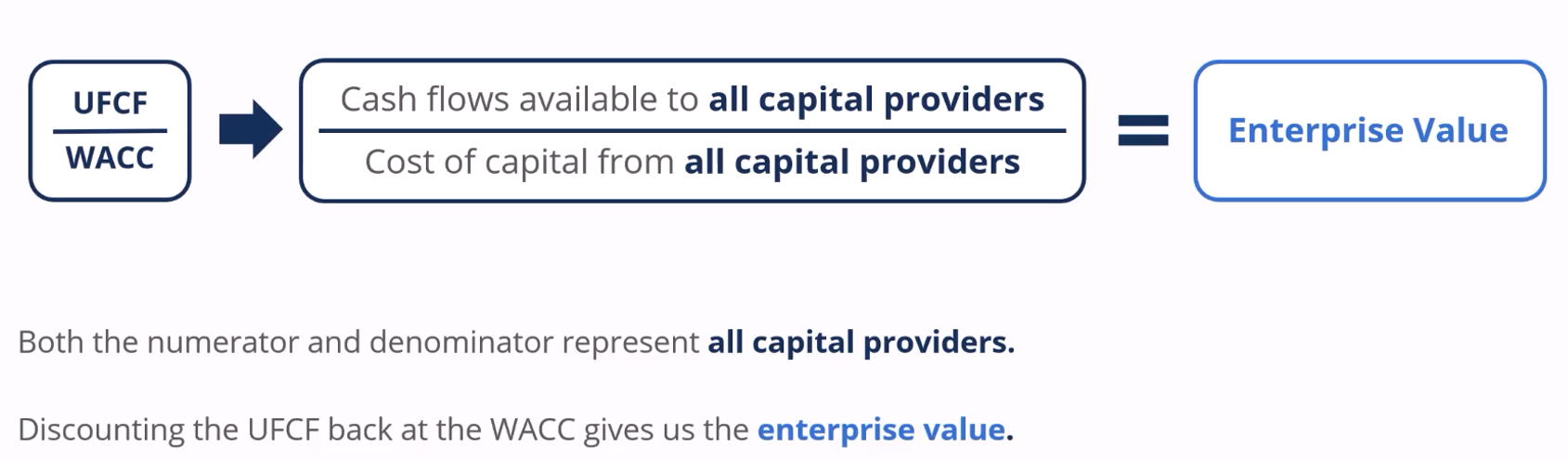
Both the numerator and denominator should represent all capital providers
Discounting all UFCF back at the WACC gives the EV.
Forecasting Period
Often assume that the business is a ongoing concern when doing a valuation analysis (aka operating continuously)
This is done by separating cash flows into two parts
Discrete Forecasts
Shows the first few years when the company grows faster than the economy
Growth fore the company slows in later years as competitors enter the market
Eventually the company is mature and grows in line with the economy (point where TV occurs)
Terminal Value
covers the steady state period which continues indefinitely
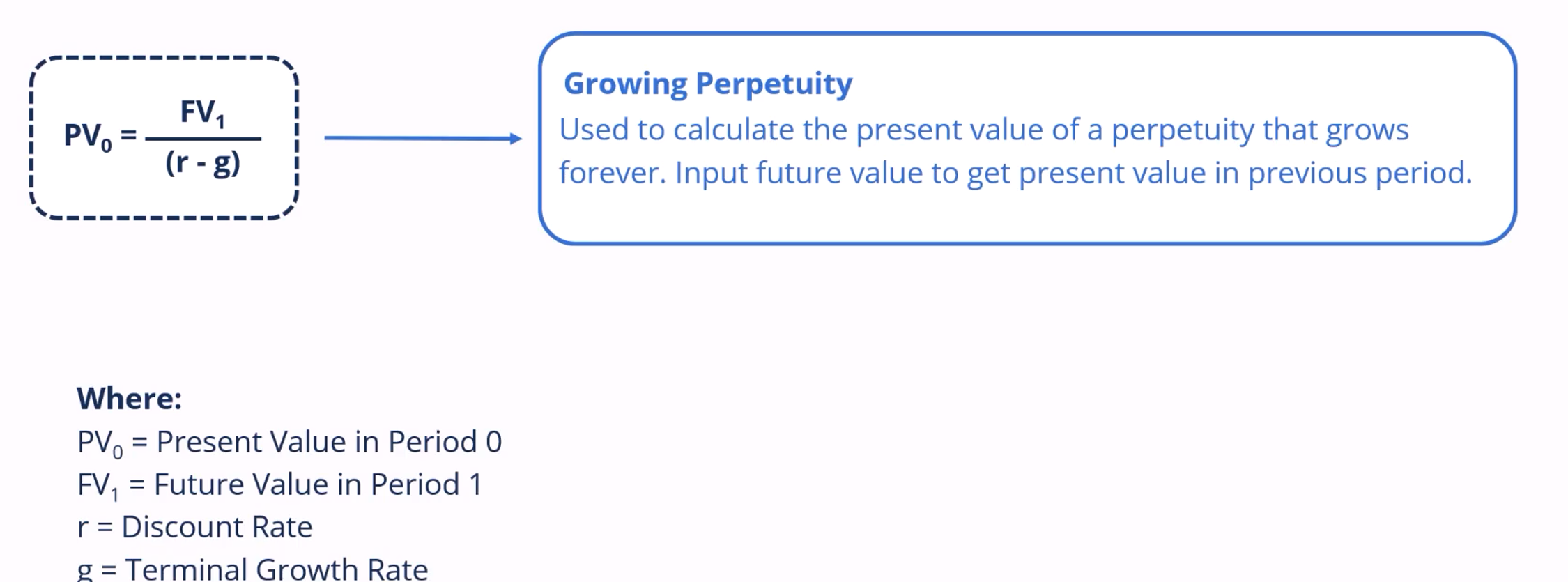
not practical to forecast the cash flows forever in the model, therefore a growing perpetuity formula is used to value the perpetual cash flows
Discrete Forecast
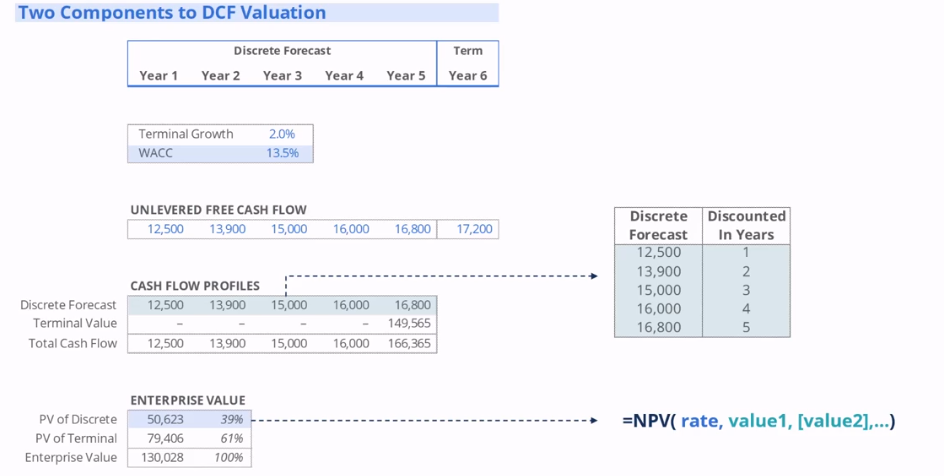
Note that in this example the NPV function gives the present value at the end of year 0, however we don’t have any control over the timing of cash flows or the valuation date
in this example, the function is taking the cash flows over the 5 year period and discounting it leading to a PV of over $50000
Terminal Value
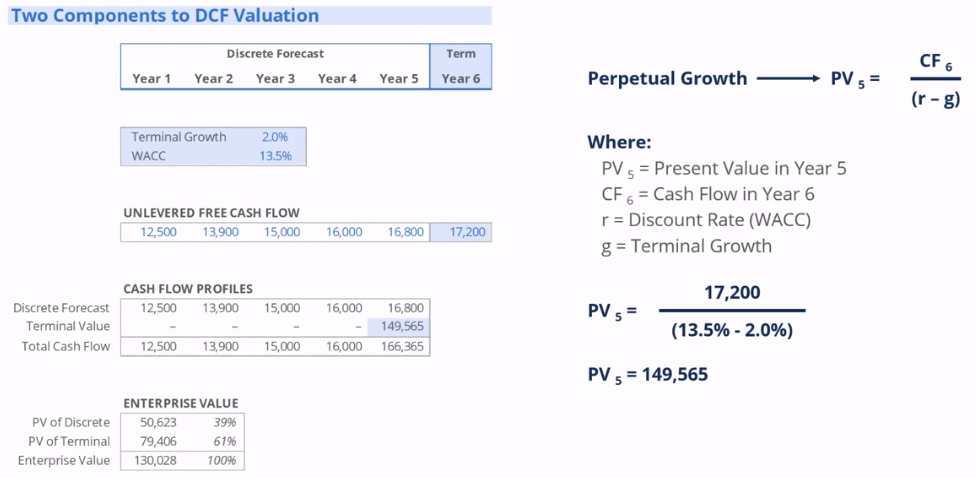
assumes that the UFCF of 17200 is going to grow forever at a rate of 2% (Terminal Growth Rate)
note that running the PV of a terminal UFCF will give a present value one year prior (aka last year of discrete forecast)
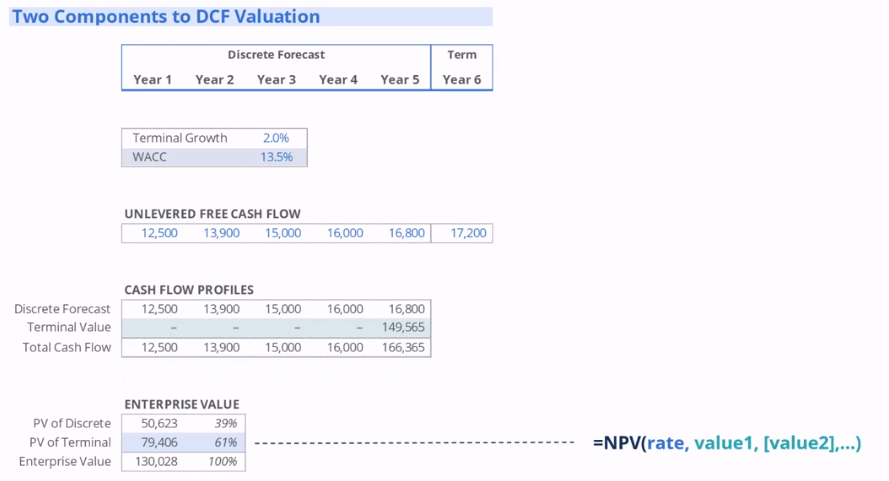
Enterprise Value
Represents our view of the company’s value
Calculated by:
PV of Discrete Forecast + PV of Terminal Value
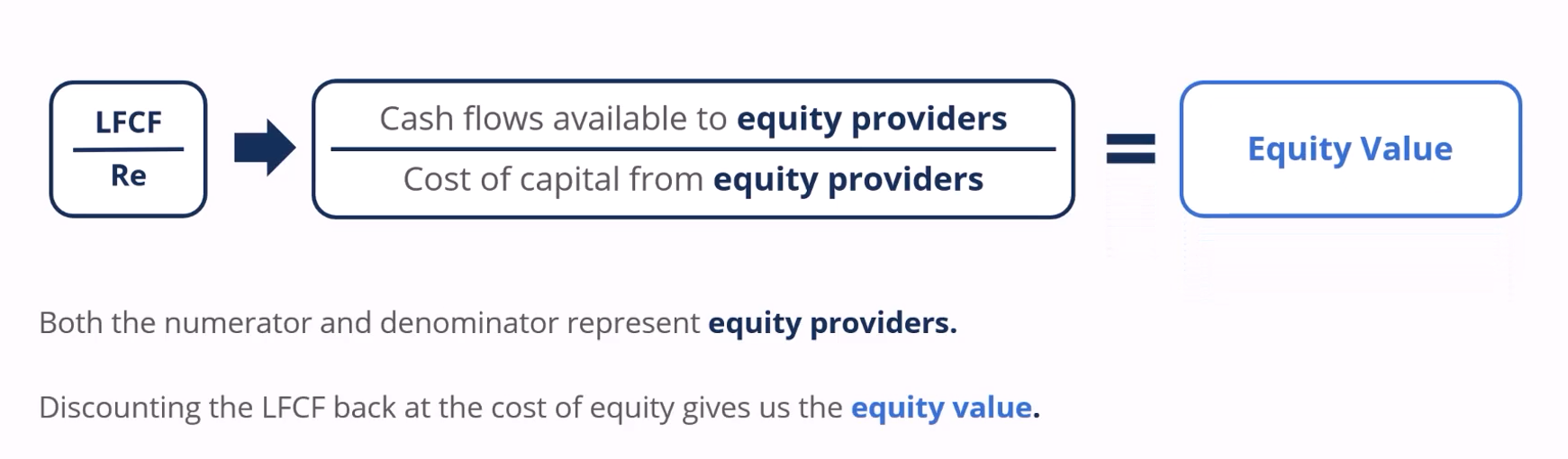
Equity Value
value that equity holders are entitled to
Calculated by:
Enterprise Value - Net Debt
Equity value for a singular shareholder can be calculated by:
Equity Value / Shares Outstanding
This represents our view of equity value per share and can be compared against the market price
Net Debt
Net debt reflects cash being used to pay off debt
Calculated by:
Total Debt - Cash
Enterprise Value – Equity Value (may not be a general rule)
Cell Colours Shortcut
Alt + H + H
Can be used with multiple cells
Remove cell colour: Alt + H + H + N (No Fill)
Group Tabs / Sheets Shortcut
Careful with this shortcut as any actions taken in one tab / sheet will be replicated on all the sheets that are grouped
Ctrl + Shift + Page Up / Page Down
Model Flow for DCF
First is the UFCF Schedule which draws from EBITDA, Current Taxes, Capital Expenditure and Cash from Working Capital variables
Remember that Taxes, Capex and Cash from WC will be negative.
UFCF will allow the calculation of the DCF schedule, split into the discrete forecast and terminal values
Next is sensitivity analysis which allows for plotting enterprise value, varying it across different terminal growth rates and values for WACC, where we are then able to find equity value per share and the premium / discount
DCF Schedule
After finding the UFCF, repeat the values for the discrete forecast
The terminal value however uses the last cash flow divided by WACC - terminal growth rate
After finding the discrete forecast and terminal value respectively, use the NPV functions to find the Enterprise Value
Enterprise Value subtracting net debt can then be used to calculate Equity Value
Equity Value per share can be calculated by dividing shares outstanding with Equity Value
Equity Value per share can then be compared against current price to determine the premium/discount of the current share price relative to EVPS
Setting forecast dates
Forecast dates can be odne using the Edate function in excel
=Edate(Start Date, No of Months)
Start date is typically given by the first forecast date
Sensitivity Schedule Inputs
Typically pull them from the DCF assumptions and includes:
terminal growth rate, WACC, Enterprise Value, Net Debt, Shares Outstanding, Current Price
Typically placed on the very top of the schedule as they are meant to be informative for viewers
Sensitivity Table
Start with the first table typically the EV table and drive the other tables using the first table
Each table shows the Enterprise value, Equity Vlaue, EVPS, Premium/Discount to current price under different circumstances (WACC and terminal growth rate)
Above the WACC and terminal growth rate we should also put the enterprise value in the top left corner (only for the first table)
This is done by selecting the entire table (inc WACC and terminal growth rate): Alt + A + W + T
The row input cell must refer to the terminal growth rate
The column input cell must refer to the WACC in the DCF
Ensure that workbook calculation is set to automatic
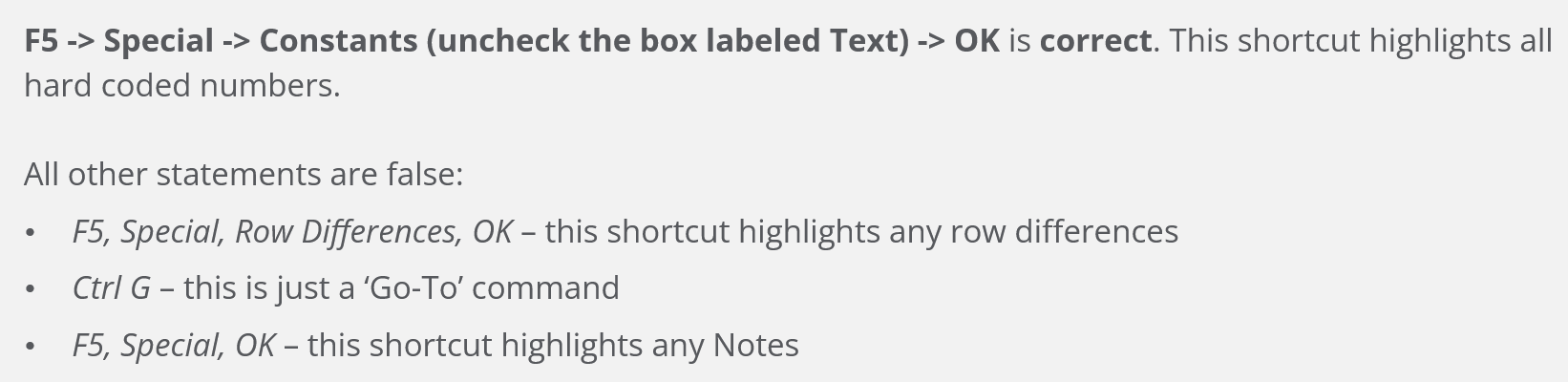
Another Quick Check is the WACC and terminal growth rate we calculated being hard coded
Typically, we also repeat the terminal growth rate and the WACC across all the sensitivity tables
Font Colour Keyboard Shortcut
Select cell with data
Alt + H + FC
Calculating Equity Value Table
Essentially once we have derived all the enterprise value variables in the top table, it is possible to find all the equity value variables
This is done by the same formula: Enterprise Value - Net Debt = Equity Value
Ensure the Net Debt is locked using the F4 Function
Calculating Equity Value Per Share table
Following the correct calculation of the equity value the equity value per share can be derived simply by:
Equity Value / Shares Outstanding
Ensure that shares outstanding variable is locked
Calculating premium/discount to current price table
Following the calculation of the equity value per share the premium / discount can simply be derived by
Equity Value Per Share / Current Price - 1
Ensure that current price variable is locked
Data Table Important takeaways
Ensure that calculation options are always running on automatic by default
if there are a number of data tables running inside one model, it may be necessary to select the calculation option running on automatic except for data tables
This will mean that the F9 key will need to be refreshed to update
The Y and X axis cannot move under any circumstances
This can be somewhat mitigated by hardcoding the WACC and Terminal Growth Value manually to centre the table
Valuation Techniques
Three most common analysis techniques
Comparable Trading Analysis
looks at the valuation for similar peer companies that are publicly traded
relative valuation technique, as the target company is valued relative to where its peers are trading in public markets
Precedent Transaction Analysis
looks at the acquisition prices for similar peer companies in recent transactions
relative valuation technique as the target company is valued to where its peers have been acquired in past transactions
DCF Analysis
builds a model of the company to get the present value of all the company’s future free cash flows
absolute valuation technique, aka the intrinsic valuation technique, the value of peers is not considered in this process
Various Views of Value
Comparable Trading Analysis
Market participants move the stock prices for peer companies so this technique shows their view
Precedent Transaction Analysis
Previous buyers set acquisition prices, so this technique shows their collective view
DCF Analysis
One builds the DCF model, select the inputs, therefore outputting “your view”
Advantages and Disadvantages of the techniques
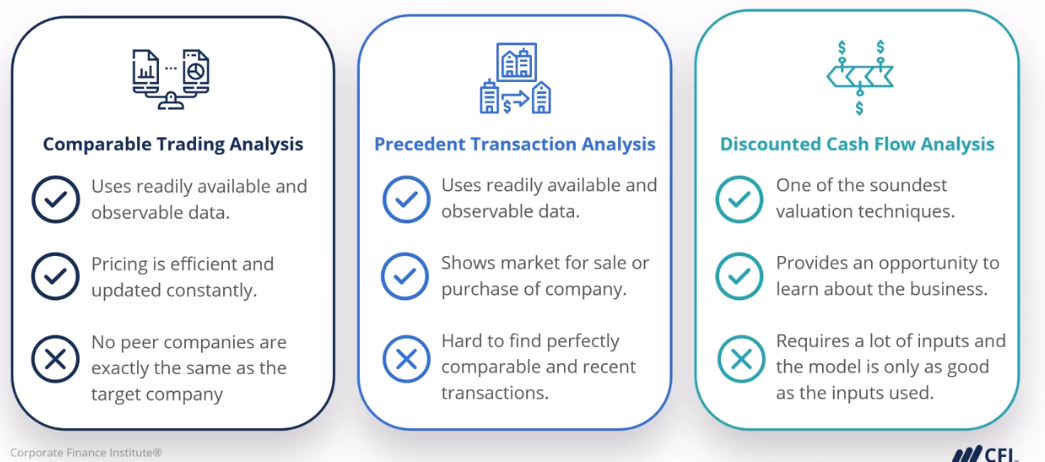
Importance of model design
Upfront model design is critically important as:
will result in a better financial model in the end
will save large amounts of time on the model build
Why model businesses
Modelling provides a deeper understanding of a business as modelling essentially forces you to understand all aspects of the business
Start by understanding how it generates revenue or its cost structure in terms of variable and fixed costs, furthermore we also need to understand tax regulations and the company’s obligations (current or deferred)
Model Design
Start by thinking about inputs needed for the model
Once gathered think about the calculations needed to lead us to the outputs
In a linear flow we are going from the inputs, calculations all the way to the outputs
The role of financial models
Decision Making
Financial decisions can be very complex, therefore models are important tools to assist with decision making
Communication
Financial models must be easy for other to understand, dashboards are necessary so that figures can be clearly and easily communicated
Preferred Model Design
Using a DCF as the prime example, we are trying to make an informed decision about the valuation of a company
The preferred method is to design using the opposite order, designing backward ensures all schedules support the outputs
This also ensures the right level of detail through the financial model
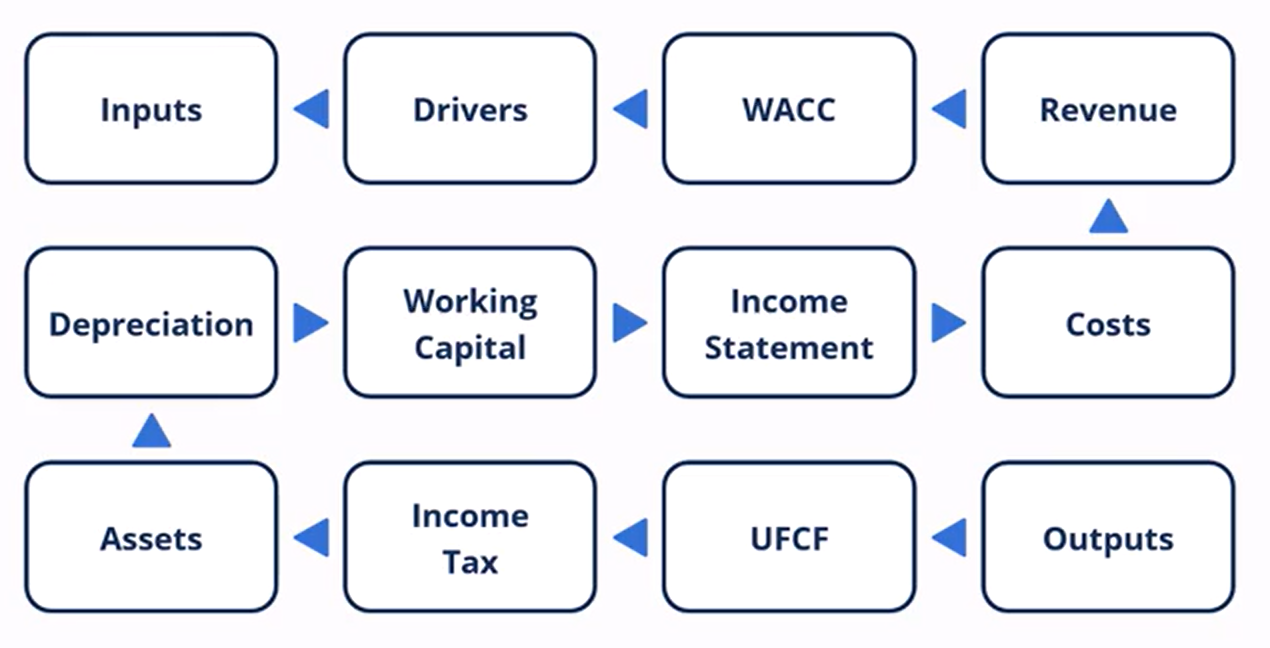
Preferred model layout (communications perspective)
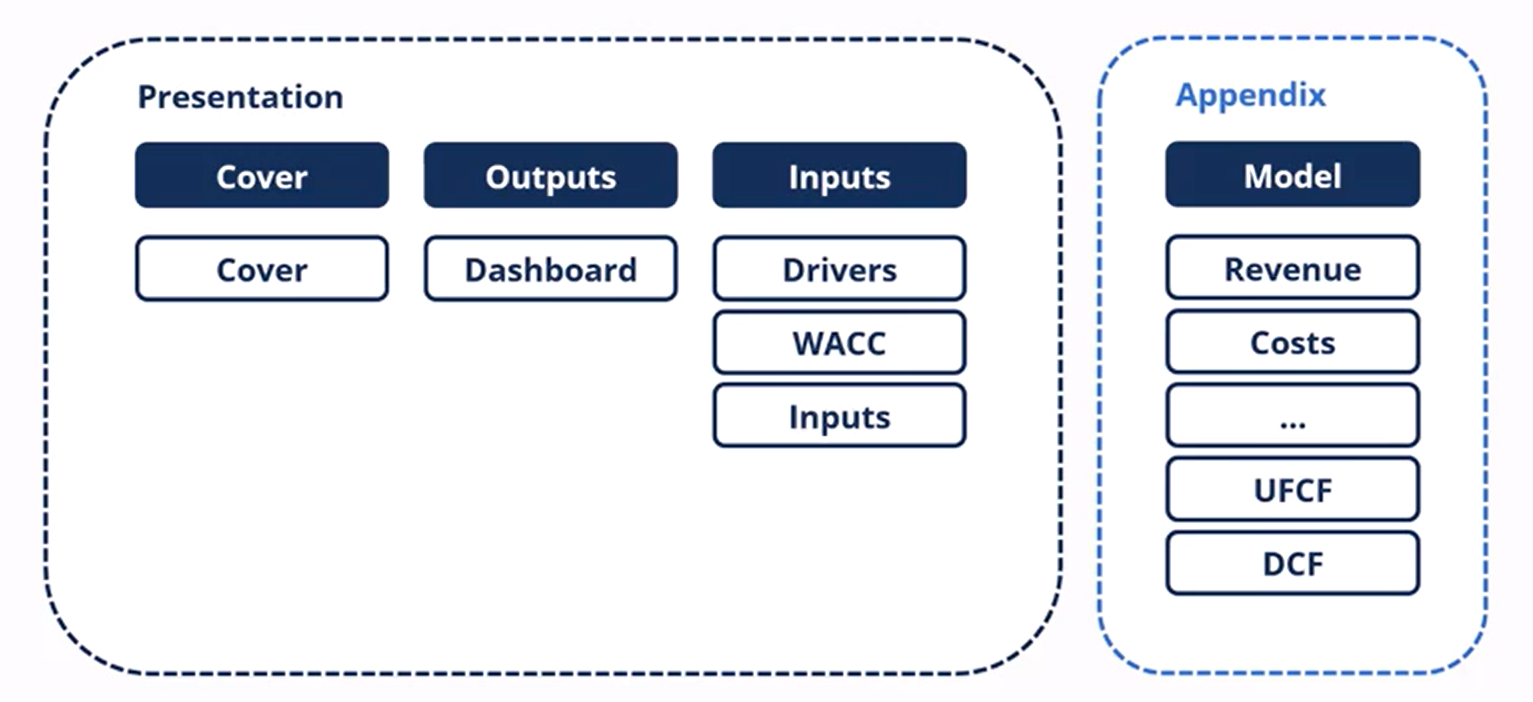
Cover:
Typically consists of the business name, date, legal disclaimers and possibly model alerts
Sets the stage for the model and lets the readers know that the model has been formatted to be an effective financial presentation
Dashboard
shows all the outputs and summarises the results from the inputs
Inputs
consists of the drivers, WACC and inputs that are the engine of the model
Appendix
large number of schedules that are driving all the calculations and formulas inside the model
this is gonna show everything in detail and how we’ve come to a decision
Building Blocks and how to employ them
Should always think of models in a modular fashion made up of building blocks
This reduces the difficulty and also enhances learning potential as one can simply practice one particular building block to get really proficient
How to save building blocks
Those engaged in modelling typically have portfolios of schedules that facilitate model construction
These are often referred to as building blocks, they might include schedules for claculating revenue, costs or taxes
this allows to approach financial modelling in a modular fashion made up of a collection of schedules
Once the schedule has been built and properly reviewed for integrity, they can be saved in a single excel file or multiple excel file with singular schedules for easy usage.
Understanding Drivers
Model drivers are the most important inputs in the financial model, therefore we need to test how the model reacts when the drivers move
evaluating the importance of the model inputs
isolate the drivers so that we can test how the model reacts to them
need to separate model drivers from other less important inputs
model drivers are volatile and have a significant impact on model outputs
identifying the drivers requires detailed knowledge of the business
Testing model drivers
using an example, sales volume and sales price can be volatile and may have large impacts on the business
therefore the first step is identifying the model drivers through conversations with the business owners and understanding the business
the next logical step is to consider a minimum and maximum value for the drivers (best and worst case)
this can be used to find and estimate a base case
only the model drivers need to be tested with switches this way as errors can create large deviations
Choose Function
Used to switch between wors, base and best case scenarios for an input driver (sales volume growth for example)
Formula:
=Choose(Index Number/Switch, Value 1, Value 2, Value 3)
Values are the best, base and worst case
Index Function
Formula:
=Index(Array,Row_Num)
Array will be the cases
Row numbers will be the driver switch cell
Combo Box
Developer tab needed, which can be done through excel options
Alt + F + T
Customise ribbon → Developer tab check
Once developer tab is available as an option, select the insert function and combo box
Once a combo box has been created, select format
Input range should be the best, base and worst case variables
Cell link should be the driver switch cell
Errors will occur as the program will put a 0 by default
Macabacus library function
Bring up library manager for macabacus → create a personal or corporate shared library → group schedules according to type (operational, financial)
this would allow an easy way to access lots of schedules quickly across the whole organisation
Macabacus Uploading to library
Select the entire schedule → Macabacus ribbon → settings → library manager → tables → new groups / within a group → publish
Macabacus inserting tables into sheets
Typically start by clicking library → tables → library should pop up with library of schedules → simply double click to insert the model into the sheet
Isolating the schedule for uploads
can be done using the flatten option on macabacus
the function will replace all worksheets referencing other workbooks or worksheets with values
Macabacus show all precedents
Ctrl + Alt + [ to initiate
Ctrl = Alt + \ to clear
Macabacus format colour
Using format and colour under the macabacus tab, select format → colour → font colours → autocolour sheet
this will automatically make all formulas black and all inputs blue
Operational Schedules
used to model the operational movements of a business
typically positioned on the top of the model tab in a DCF worksheet
Current Taxes
“current” is an accounting term meaning in the current period, also often thought of as cash taxes
these are the amounts that are paid to the government as tax payments
these represent the physical cash outflows from the company
important for DCF as they can be used to calculate UFCF values
Deferred taxes
Are essentially “non-cash” taxes, amount that the company will have to pay at some point in the future
Most jurisdictions will offer these deferred taxes in the form of accelerated depreciation (done by adding accounting depreciation and subtracting tax depreciation to lead to a lower payable balance)
Some jurisdictions also offer companies the ability to carry a tax loss forward into the future (credits that can be used to minimise the tax company pays)
Total Taxes
Simply the current taxes + deferred taxes
Income statements often only show one line for the total taxes, however it is important to note that many companies will have current and deferred taxes
this can be identified in the cash flow statement particularly cash from operations where deferred taxes will be added back to net income
Levered Tax Schedule
Starts with EBT
Shows taxes that are payable when the company has debt in it’s capital structure
Needed to calculate tax lines in the income statements
Unlevered Tax Schedule
Starts with EBIT
Shows taxes that are payable excluding debt in the company’s capital structure
Needed to calculate the tax shield
Tax Shield Calculation
the tax shield is essentially the tax savings for the company when it uses debt to finance part of it’s operations resulting in an overall lower taxable income for the company hence the “shield”
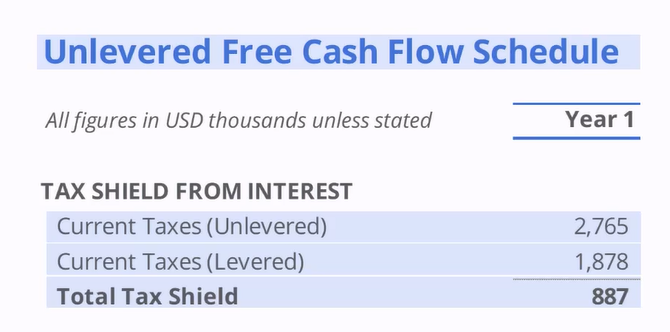
EBITDA Method for calculating UFCF
more common in capital market groups
shorter and uses EBITDA which is a common measure of profitability
method is also shorter as it starts with an unlevered term and ends with an unlevered term
Net Income Method for calculating UFCF
method is longer as it starts with a levered term and ends with an unlevered term
the unlevering is done by adding the interest and subtracting the tax shield
the tax shield being the difference between the amount of cash taxes saved by having debt in the capital structure
WACC Formula
Discount rate that is used to discount the UFCF
WACC must represent the cost of capital from all capital providers (debt and equity)
Typically debt has a lower weight than equity
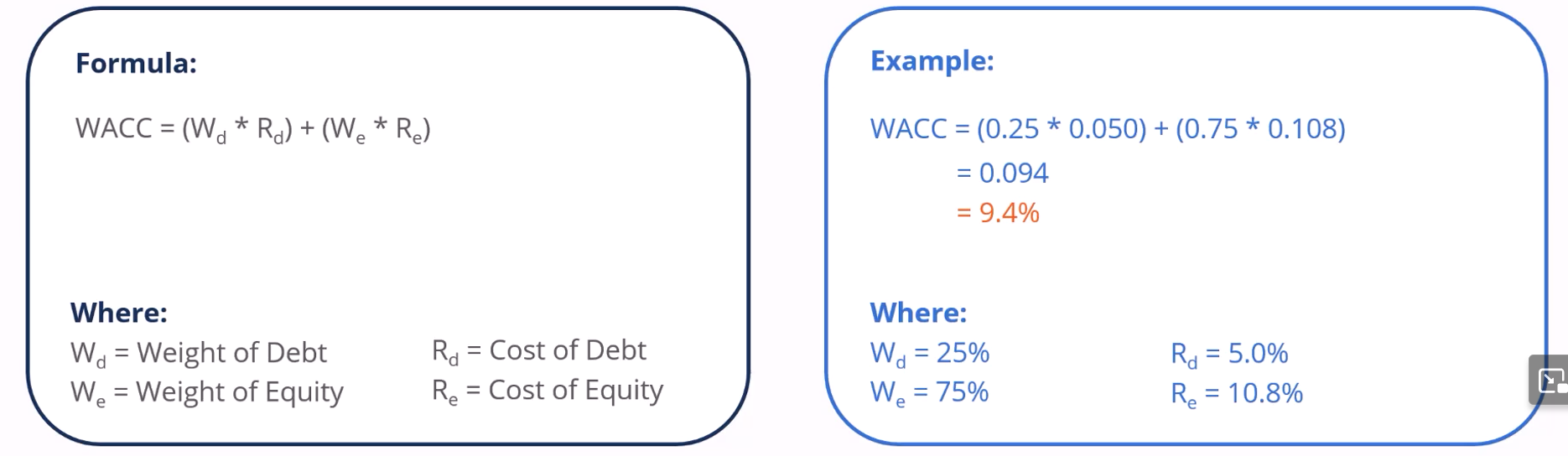
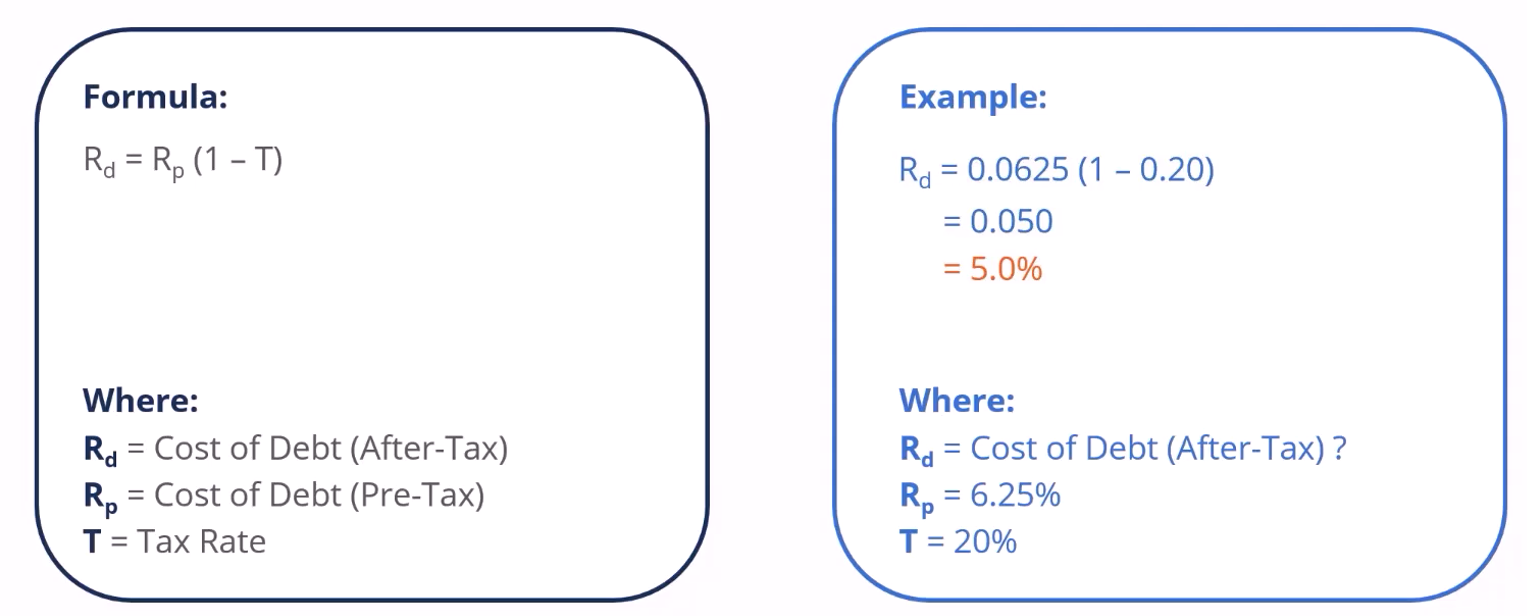
Cost of Debt Formula
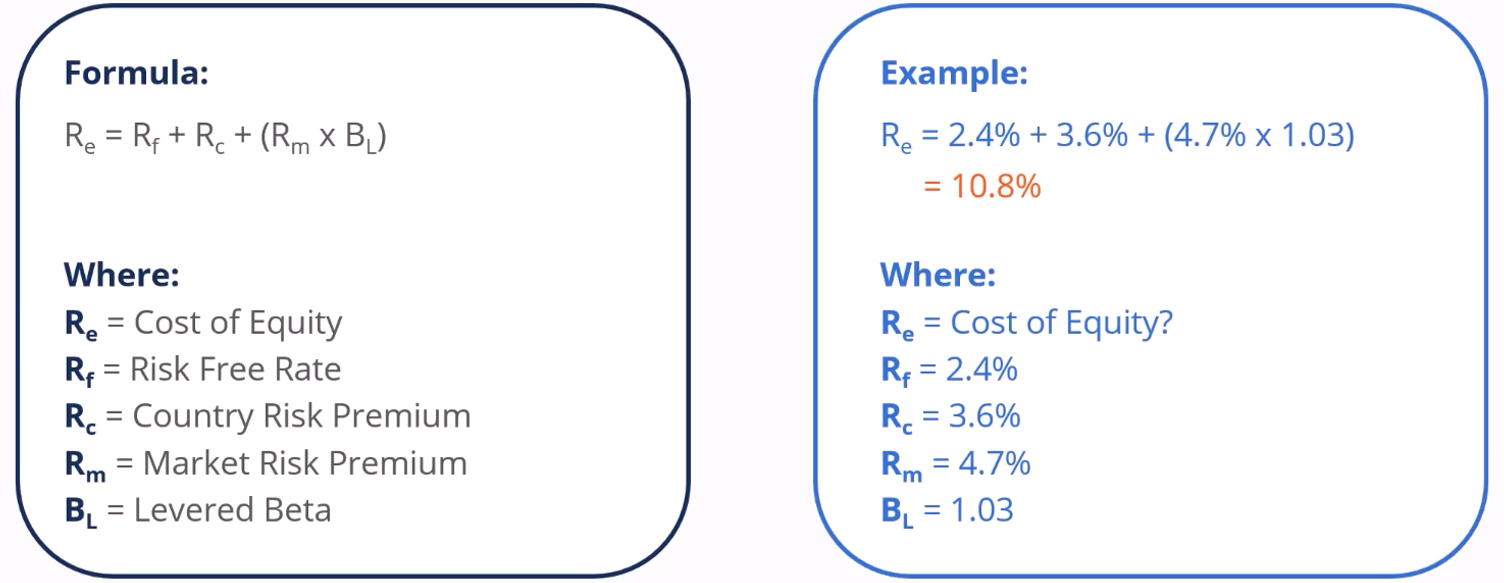
Cost of Equity Formula
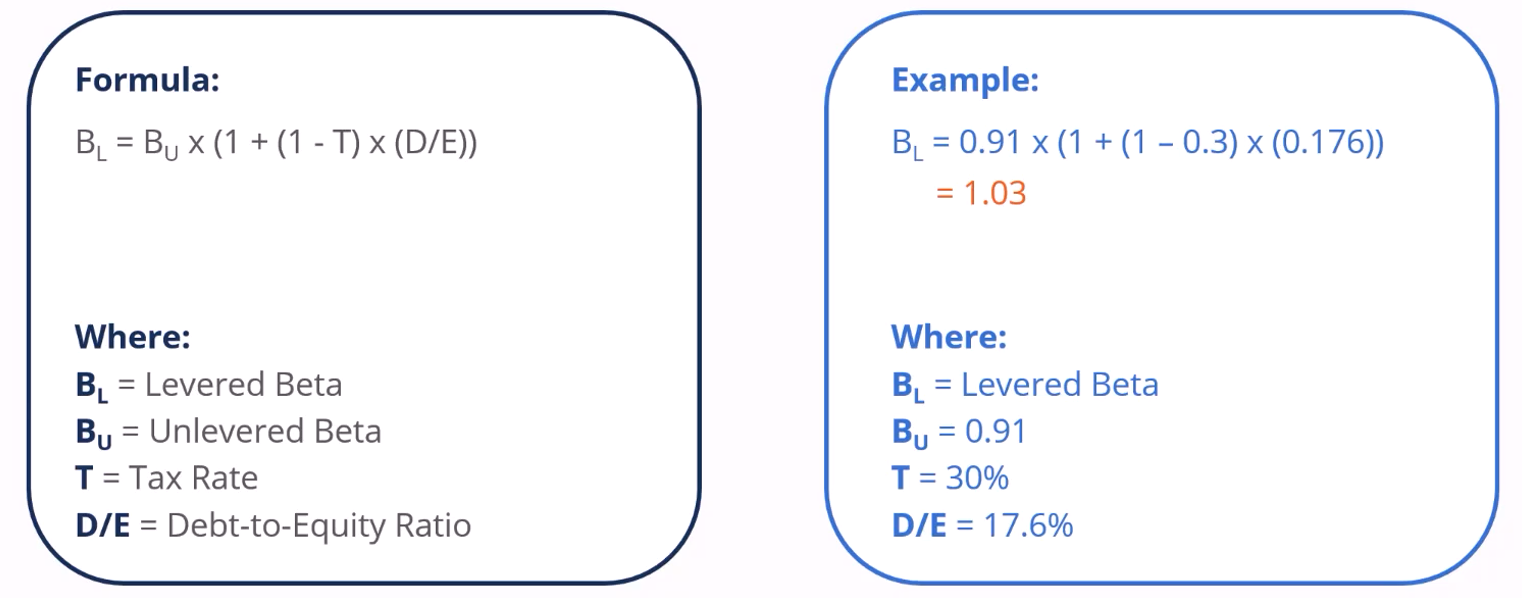
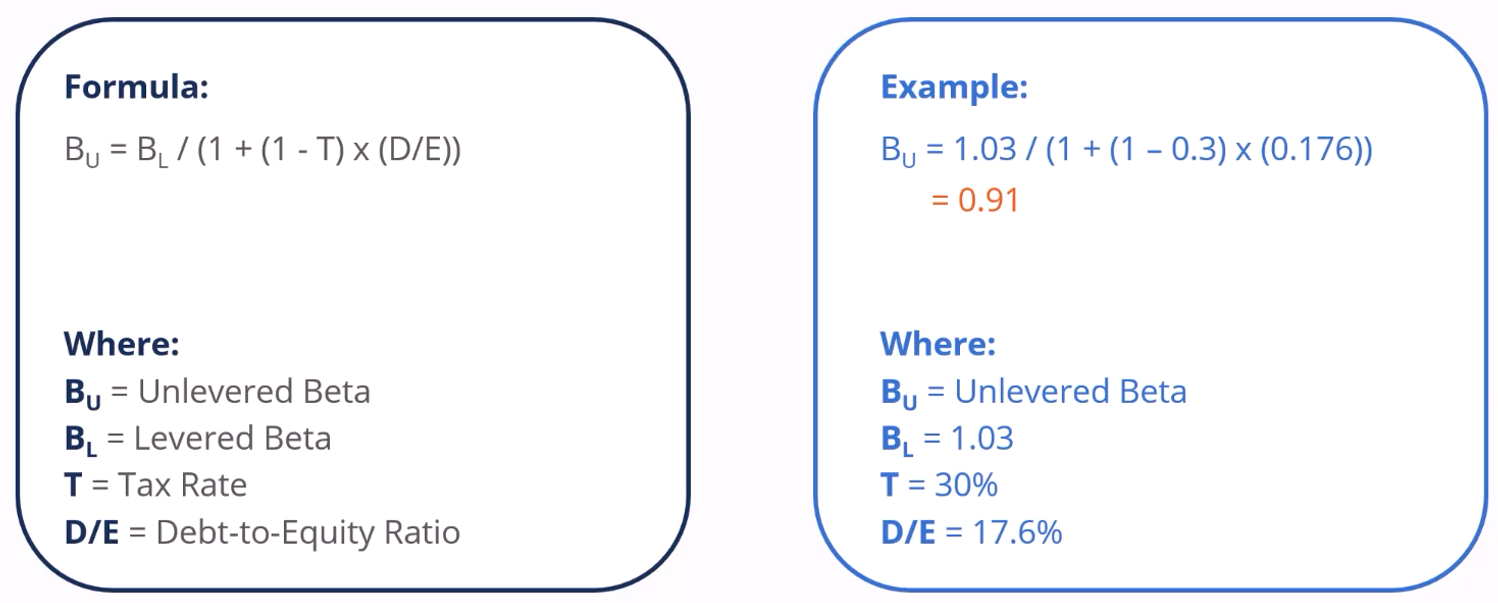
Levered Beta Formula
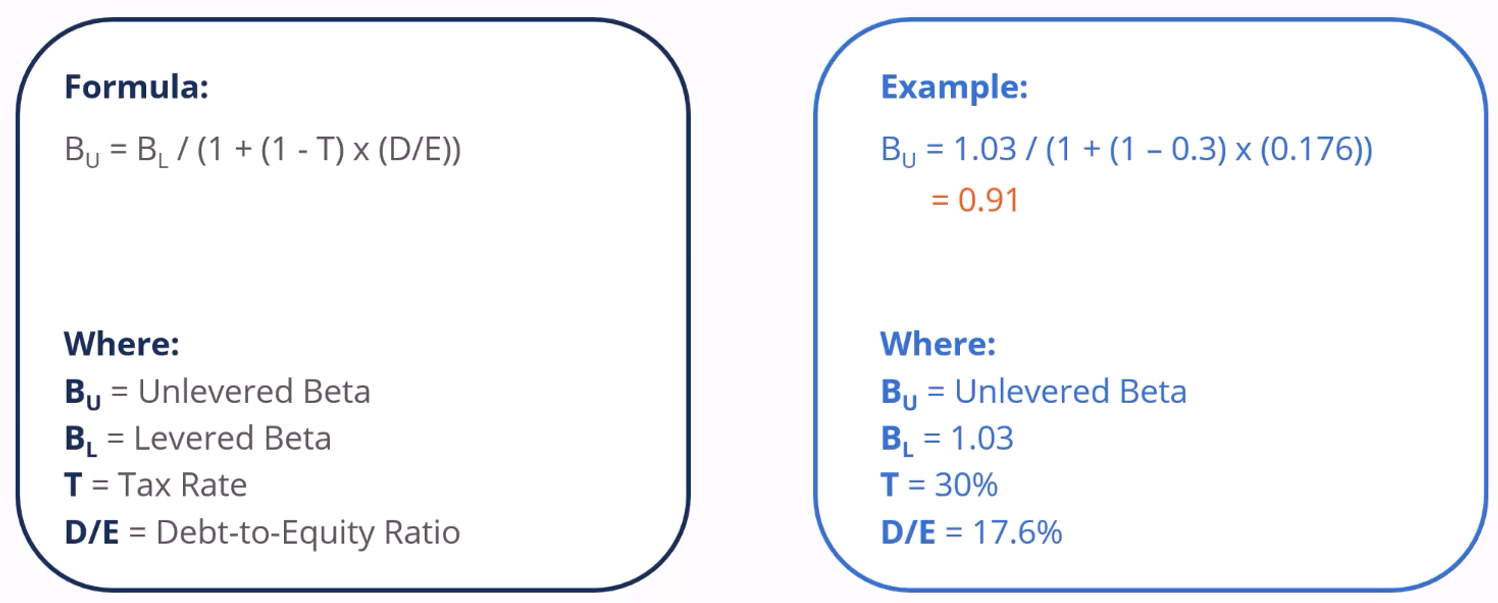
Unlevered Beta Formula
Equity Risk Premium
Can be calculated by Levered Beta * Market Risk Premium
After Tax Cost of Debt
Can be calculated by Pre Tax Cost of Debt * (1 - Tax Rate)
Model Alert for WACC and terminal growth
Essentially used for ensuring that the terminal growth rate is not equal or supercedes the WACC, as otherwise the equation (GGM) would not work
Can be constructed by an if function:
IF(Terminal Growth Rate > WACC), 1, 0
Can be further improved with custom format cells (Ctrl +1)
[=0],"No"_);[=1],"Yes"
Can also be improved with conditional formatting (Alt + H + L + N)
Select the cell and condition this case being “1”
Format by Colour
Select Colour
Components to forecasting well for DCFs
It is critical that DCFs are able to forecast forever, this is done in 2 components
Discrete Forecast
This forecast is till the steady state where the company’s growth will outpace the economy’s growth
Terminal Forecast
This forecast is theoretically till forever and is where the company’s growth will be identical to the growth rate of the economy as the business matures
Important to be accurate with the terminal value as it repeats and grows forever and will carry a heavy weight in the valuation of the company
Key Timings for DCFs
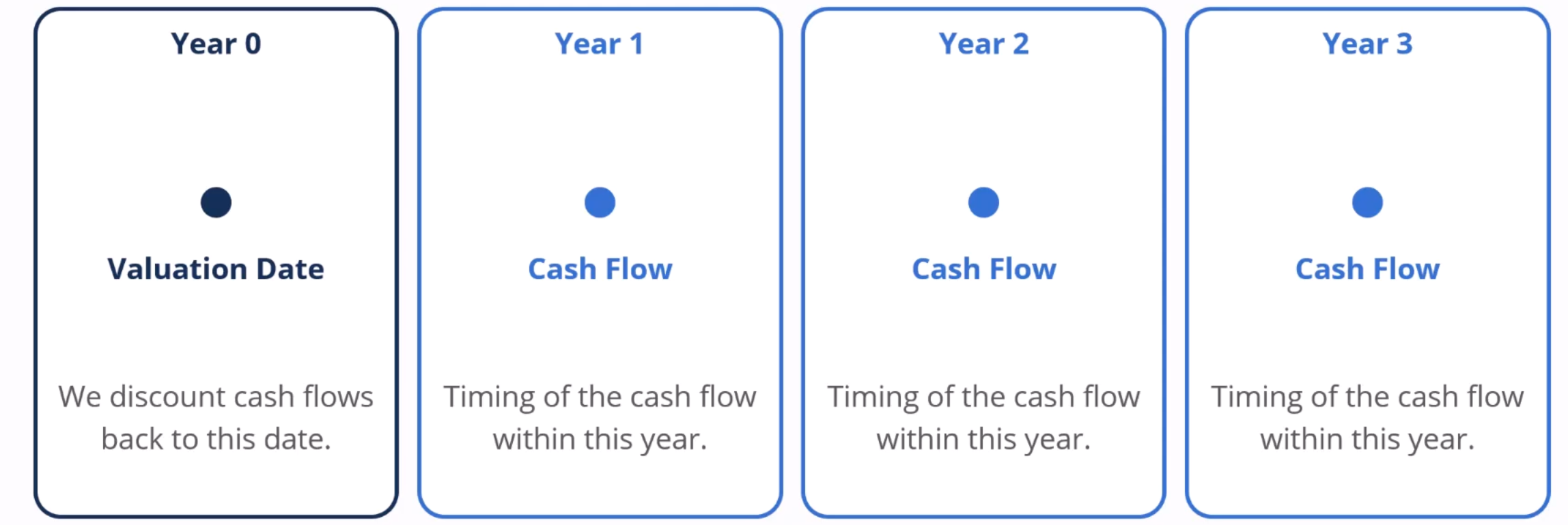
Understanding and determining the timing of cash flow and the valuation date
Valuation dates can be set at any period within the first period (typically at the end or the beginning of the period when doing valuation work)
However for cash flows, it may be useful to understand the underlying business, a business that generates most of its revenue in Q4 will have timings at the center of the 4th Quarter
Businesses with no seasonality meanwhile would generate its cash flows evenly resulting in a timing in the middle of the year shown below
Dates to consider
Fiscal Year End
date of the fiscal year end for the company
date can be easily found in the financial statements
common to see the same month and day every year
Cash Flow Timing
date in which the cash flow is expected to occur
this could be closer to the fiscal year end if Q4 is seasonally strong
Between two fiscal year dates if there is no seasonality
Valuation Date
Date in which all cash flows are discounted into
Date is set by the model building team
Present Value of the business will be as of this date
Present Value / time quantity of money formula
Growing Perpetuity Formula
Edate Function
Useful for filling out discrete forecast and terminal forecast tables with fiscal year end and cash flow timing data
Formula
=EDATE(Starting Date Cell, Months usually 12)
Unadjusted Cash Flow
The discrete forecast is simply the UFCF copied and pasted
The terminal value can be found by using the growth perpetuity method
Terminal UFCF / (WACC - Terminal Growth)
Partial Period Adjustment
Companies may oftentimes have a fiscal year end date that is different hence the need to do partial adjustments
This is because from the valuation date we are only looking into the future hence we are ignoring the data prior to the valuation date
Can be calculated using the YEARFRAC formula
YEARFRAC(Fiscal Year End, Valuation Date)
Discounting using YEARFRAC
YEARFRAC can also be used with discounting
This is done by inputting the formula
Previous Cell + YearFrac(Cash Flow Timing, Valuation Date)
Using the TQM formula we are then able to find the discrete forecast and terminal value
XNPV Function
Formula is as follows:
XNPV(WACC, Undiscounted Cash Flows including valuation date and all dates including valuation dates)
it is important to have the first cash flow as 0, it will correspond to the valuation date
The manual and XNPV calculations of Enterprise Value may differ due to the treatment of leap years by the function and the manual method
Finding Percentages of Discrete and Terminal
This may be necessary to calculate and it is done by simply adding the discounted discrete forecasts for the PV of discrete
PV of terminal is calculated by taking the discounted terminal value
EV is obviously the sum of both these values and we can then find the contributions of both the TV and Discrete
Terminal tends to be higher as it stretches to infinity
Terminal Value using multiple method
Multiply EBITDA of the final term with the multiple for the terminal value
However there might be some cases where FYE doesnt align with the final cash flow timing, in this case we might have to find terminal adjustment
This terminal adjustment is calculated by the yearfrac function between FYE and the final cash flow timing
Afterwards the terminal value would be adjusted with the formula:
(EBITDA x Multiple) / (1+WACC)^Terminal Adjustment
This in turn will discount the terminal value by the correct amount of time
Model Dashboards
Model drivers are critical inputs that must be shown
A toggle is often provided to change these drivers as well
A DCF dashboard would need to have a toggle to show the range of enterprise and equity values
A range of valuations are normal as different views and valuations may differ for the WACC and growth rate of the company
These can be done using data tables
Data Tables to find Enterprise Value
First the top left will typically have an area to input the enterprise value into the table
It is important to ensure that the enterprise value matches the method used such as perpetuity/multiple
After this select the entire table and create a data table using the shortcut
Alt + A + W + T / Alt + D + T
Row Input Cell: Terminal Growth Rate (select the cell with the TGR),
Column Input Cell: WACC (select the cell with WACC)
Ensure workbook calculation is set to automatic
Master Switch Linking between outputs and inputs
Typically done by going to input side switch and linking it to the output side switch
Change the input side combo box to the output side cell
Create a combo box for the output side and select the range as usual being the best, base and worst case while the cell link would be set for the switch
1 Dimensional Data Tables
This is used to calculate the best, base and worst case for enterprise value
Select EV and the numbers 1,2,3 signifying the cases
Column being the EV
Row input cell being the numbers
This would allow easily calculation for equity value and equity value per share
Checks and Balances
 Note
Note  Flashcards (86)