SQL Condition
 Studied by 0 people
 Call Kai
 Learn
Learn Practice Test
 Spaced Repetition
 Match
Match Flashcards
 Knowt Play
1/21

There's no tags or description
Looks like no tags are added yet.
Name | Mastery | Learn | Test | Matching | Spaced | Call with Kai |
|---|
No analytics yet
Send a link to your students to track their progress
22 Terms
WHERE
used to specify a condition
note: the condition must be a complete and returns a value of either true or false
WHERE Country = ‘USA’
this would check each customer as to whether the value under the column Country equals “USA”
true: the customer will be included in the result
false: the customer willl be ignored
Quotation Marks
these are needed to enclose text values
either single or double quotations marks would work
example: WHERE Country = ‘USA’
if these aren’t used, an error would pop up since there is not a column named “USA” (error = error for us; a result that we do not want)
Enter Parameter
asks for some input
if this message pops up, it means you forgot quotation marks
in other cases, it means you have a typo in one of the columns
Condition for Numbers
left as is
example: WHERE gpa = 4.0
Condition for Data
date and time are special types of data in database
pound signs (#) are needed to enclose a data value (also called number signs, or hashtags, in the cellphone era)
example: WHERE DoB = #1/1/2020#
to find out who was (or rather will be) born on 1/1/2020
example: WHERE BirthDate = #8/30/1963#
the column BirthDate must be mentioned in the select section since this is the column we are identifying
must be enclosed in pound signs
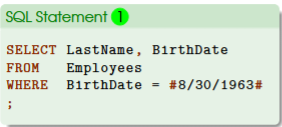
What happens if there are no pound signs enclosing date and time?
the system will give an empty table (no error message)
this is bc the system treats the expression 8/30/1963 as an arithmetic calculation: 8 divided by 30 divided by 1963, which gives us 0.00…
we can never find anyone born on 0.00…
but we can find someone who meets the following condition: WHERE BirthDate = 25253
Data Based on Multiple Values
example: list of all employees from two cities: Seattle and London
anyone who works in either two cities would be included in the result
WHERE block, we will use the keyword IN to specify a list of valid, exact values
this means that a row (an employee) will be included if the value of the City column is in the specified list
ORDER BY block, we will specify how the result should be sorted
ORDER BY City ASC, FirstName DESC
(1) sort the records alphabetically (A → Z) based on the values under the column City
(2) within the same city, sort records alphabetically (Z→ A) based on the values of the column FirstName
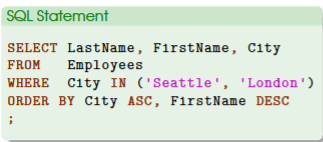
How to Specify List of Text
enclosed within parentheses
use comma to separate values, if there are more than one
the usual ways of specifying different data types apply here as well
Finding Similar Things Based on Certain Patterns
useful when the exact values are unknown or the number of values are too big
example: WHERE CompanyName LIKE ‘*queen*’
keyword LIKE is used to specify a pattern (not an exact value)
asterisks * is a wildcard, which may be replaced with anything
this condition means that a company’s name is like “queen” and the asterisks indicate that the term “queen” can be anywhere in the company’s name
Placement of Asterisks
WHERE CompanyName LIKE ‘queen*’
if we are looking for a company whose name begins with the term
WHERE CompanyName LIKE ‘*queen’
if we are looking for a name that ends with the term
Find Range of Things
WHERE block, we will use BETWEEN and AND keywords to specify the range
the two keywords must be used together in the format of BETWEEN x AND y
range specified by BETWEEN AND are inclusive, meaning it includes two values in the expression; can be used for time ranges, numerical ranges, and textual ranges
for periods: WHERE HireDate BETWEEN #1/1/1992# AND #12/31/1992#
pound signs are needed bc these are dates
numerical ranges: WHERE gpa BETWEEN 3 AND 4
numbers as is
textual ranges: WHERE FirstName BETWEEN ‘a’ AND ‘b’
trickier, the system uses alphabetic order to evaluate textual ranges
text length matters
shorter textual values are listed before long ones
note: order is based on first character first then the second character
in this case, amy and adam will be ordered after a but before b
no b names will be included such as barry or betty
Complex Conditions
use operators to build more complex conditions (can be any of the comparison and logical operators)
use parentheses to specify the order of evaluation like how we do arithmetic calculations; ensures which is evaluated first and last
each condition must be complete
important otherwise you will get an unexpected result
this is related to how the system evaluates two special values: true or false
Complete Conditions
value of TRUE is often given as 1
example: comparison of WHERE 1<2 will be evaluated as TRUE bc 1 is indeed less than 2
if this condition is put in an SQL statement, you will get the whole table because 1<2 is true for all records
value of FALSE is often given as 0
example: a comparison of WHERE 1>2 will be evaluated as FALSE bc 1 is indeed less than 2
you will get an empty table if you put this condition in a SQL statement bc 1>2 is false for all records
if you write something like WHERE 0, then you will get nothing bc a value of 0 is the same as FALSE
Comparison Operators
include <, >, <=, and >=
equal signs always come last in <= and >=
Logical Operators
include NOT, AND, and OR
AND: both conditions are met
OR: either condition is sufficient
NOT: get the opposite
Complex Condition: NOT
to negate something or get something opposite
example: we have a table of 100 rows and if a generic condition A gives us 20 rows, then NOT A will give us the rest of the table (e.g., 80 rows)
in some cases, the operator NOT may be combined with other operators
NOT IN
NOT BETWEEN … AND
City NOT IN (‘Seattle’, ‘London’) works just as well as NOT (City IN (‘Seattle’, ‘London’))
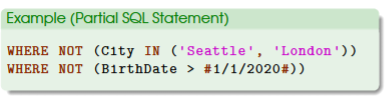
NOT BETWEEN … AND …
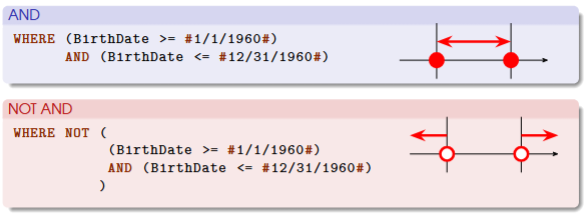
does not include the two end points
example: WHERE BirthDate NOT BETWEEN #1/1/960# AND #12/31/1960#
only the BETWEEN AND condition are the values included between the two end points

AND keyword
record must meet BOTH conditions to be included in the result
if the record meets only one of the two, then it will be discarded
logically…
TRUE and TRUE is TRUE
FALSE and FALSE is FALSE
TRUE and FALSE is FALSE
OR keyword
only meets either one of the two conditions to be included in the result
logically …
TRUE or TRUE is TRUE
TRUE or FALSE is TRUE
FALSE or FALSE is FALSE
AND Range examples
AND: birthdate one is equivalent to the following: WHERE BirthDate BETWEEN #1/1/1960# AND #12/31/1960#
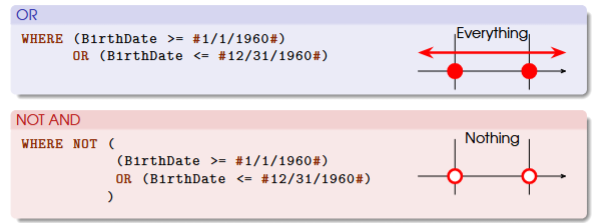
OR Range examples
OR: a birthdate needs to meet either conditions to be included in the result, so all dates of birth will fall in the combined range — thus covering the whole time horizon
opposite case for negating
IN
a column is in a list of specific values
use comma to separate columns and parentheses to enclose the list
 Note
Note  Flashcards (118)