MSYS 116 Quiz 3 Info Systems (Correct Coverage)
 Studied by 5 people
 Call Kai
 Learn
Learn Practice Test
 Spaced Repetition
 Match
Match Flashcards
 Knowt Play
1/94

Earn XP
Description and Tags
Name | Mastery | Learn | Test | Matching | Spaced | Call with Kai |
|---|
No analytics yet
Send a link to your students to track their progress
95 Terms
System
A regularly interacting or interdependent group of items forming a unified whole
Parts of a System
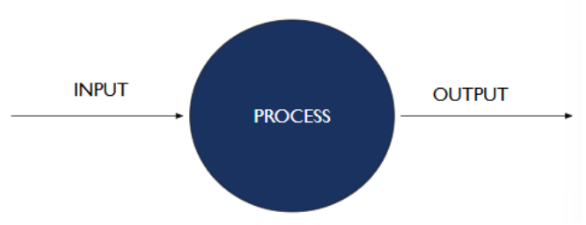
Input → Process → Output
Processing taking in the input and manipulating it to achieve the desired objective which is the output
Parts of a System with Storage
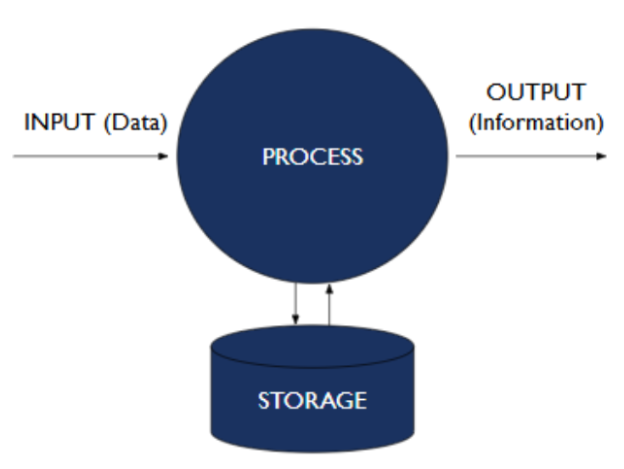
Input → Process → Output → Store
Store the data so we don’t need to keep processing over and over again
Parts of an Information System
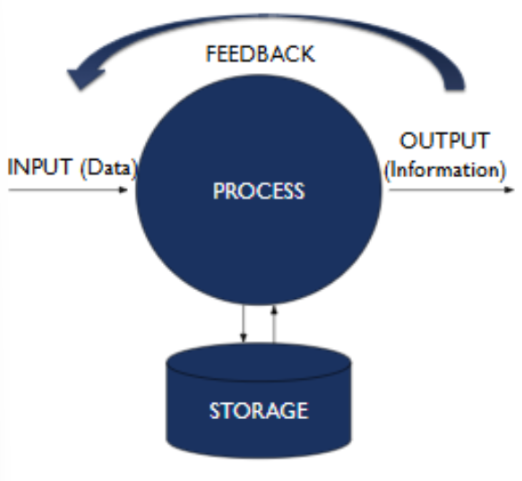
Input
Process
Output
Store
Feedback
Information System
A set of interrelated components
Collect (input)
Manipulate (process)
Store
Disseminate (output) data and information
Provide a corrective reaction (feedback) to meet an objective
Input
Activity of gathering and capturing raw data
Processing
Converting data into useful outputs
Output
Producing useful information
Feedback
Information from the system used to make changes to input or processing activities to ensure it meets its objectives
A clinic still uses a paper-based medical record system. A nurse interviews the patient and writes the answers into the correct fields on a paper form. The completed record is placed in filing cabinets for future reference. When new information is needed, the patient is interviewed again to update the record.
Identify the following components of the Information System:
Input: __________________________
Processing: ______________________
Output: _________________________
Storage: ________________________
Feedback: _______________________
Input: Nurse interviewing the patient to gather data
Processing: Writing and organizing the answers into the paper record
Output: Completed health record
Storage: Filing cabinets and drawers
Feedback: Re-interviewing/updating the patient record when new data is needed
Computer-Based Information System
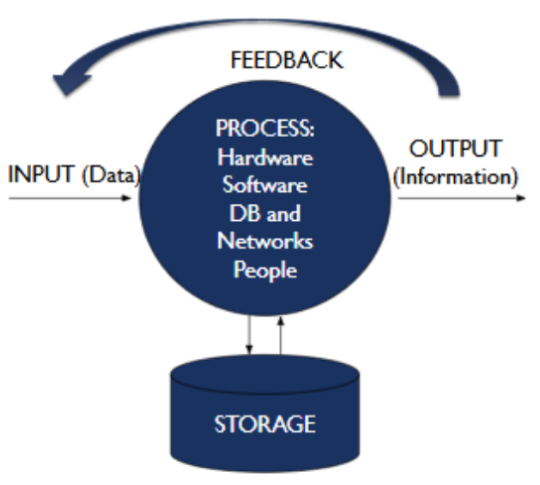
Input (data)
Process
hardware
software
database and networks
people
Output (information)
Storage
Feedback
IT
Study of the technological resources that we will use like the hardware, software, database, etc.
How are IT and IS related?
IT is an enabler for the IS to make it more efficient and convert data to information in an efficient manner
Can you have an IS without IT?
Yes like paper-based record keeping which is an IS
Purpose of IT
Automate manual processes (e.g. computers to arrange data)
Solve problems (e.g. computers do computations for us)
Improve decision-making (by producing info efficiently)
Streamline processes
Gain competitive advantage
Which of the following is not a purpose of IT?
Provide a corrective reaction (feedback) to meet an objective
Types of Information Systems
personal
group
enterprise
Personal Information System
Intended output is beneficial for single user only
EX. Waze, My Fitness Pal
Group Information System
Multiple people put input and the output is also beneficial for whole group
EX. Google Docs, Google Drive
Enterprise Information System
For big corporations and companies
Support all operations of big firms, organization, etc.
Which of the following is an example of a Group Information System?
A shared online document where multiple team members edit a report in real time
Information System for Specific Domains
Sales and Marketing
Inventory
Hospital
Public Health
Identification: IS or IT ?
Focuses on how health data is collected and organized to create patient history.
IS
Identification: IS or IT ?
Focuses on what technologies (hardware/software) are used to make processes faster and more efficient.
IT
Identification: IS or IT ?
Providing clinicians access to complete patient histories for decision-making is an example of:
IS
Identification: IS or IT ?
Using databases to store encoded patient records for quick retrieval is an example of:
IT
True or False: An Information System is concerned with workflows and use of data, while IT supports it using technology.
True
True or False: IT defines the healthcare objective, while IS only installs computers.
False
True or False: Restricting access so only authorized doctors can view records is an IS goal implemented using IT tools.
True
Which of the following is an IS problem?
Designing how patient information is collected and used for care
Which of the following is an IT solution supporting healthcare?
Implementing login systems and access controls in EMR software
Nationwide disease reporting is considered an IS because it:
Defines how health data is collected, processed, and used for public health decisions
IS vs IT
IS = Purpose and Workflow → What data? Why? How used?
IT = Tools and Technology → What system, hardware, or software makes it work efficiently?
Information System (IS)
Provide clinicians access to complete patient histories for care decisions
Claims document submission by RHUs and verification by PhilHealth
Nationwide surveillance and reporting of daily COVID-19 cases
Allow patient records to be accessed only by their doctors
Maintain institutional control and custody of patient records.
Information Technology (IT)
Use computers to encode patient histories and store them in databases for easy retrieval
Encode documents in the RHU using computers and transmit them to PhilHealth electronically using Application Programming Interfaces (APIs)
Use computers to generate electronic Case Investigation Forms (CIF) and aggregate the nationwide submissions using a data warehouse
Implement login features, roles, and access controls in the EMR software
Use on-premise physicals servers to store the electronic medical records
Identification: IS or IT?
Designing a workflow for submitting claims from RHUs to PhilHealth is an example of:
IS
Identification: IS or IT?
Using APIs to electronically transmit those claims is an example of:
IT
Identification: IS or IT?
Ensuring patient records remain under institutional control and custody refers to:
IS
Identification: IS or IT?
Installing on-premise servers to store EMRs refers to:
IT
True or False: Information Systems can exist even without computers.
True
True or False: Information Technology replaces the Information System.
False
True or False: A database is part of IT used to implement the goals defined by an IS.
True
Which of the following best describes an Information System?
A process for collecting, managing, and using health data
Which is an example of IT improving an existing IS?
Encoding vaccination data into a computerized registry
What is the main role of IT in health informatics?
Provide technological tools to automate and streamline processes
A hospital decides that doctors must see a patient’s full history before prescribing medication.
This decision is part of: IS or IT?
IS
The hospital installs EMR software so doctors can instantly retrieve those histories.
This action is part of: IS or IT?
IT
Public health officials require daily disease reports to monitor outbreaks.
This requirement is: IS or IT?
IS
They implement a data warehouse to aggregate nationwide reports automatically.
This implementation is: IS or IT?
IT
Health Information Systems
Combination of IS (how we get health data and convert to info) and technological resources to be more efficient
Allow health stakeholders to process patient health information efficiently
Health Information Systems Examples
Philippine Health Information Exchange (PHIE)
Hospital Management Information Systems
Clinic Information Systems
Pharmacy Information Systems
Laboratory Information Systems
Why discuss IT?
People involved in implementing computer systems has to understand current and future business needs so they can make informed acquisition decisions
Decisions include organizing components, understanding the trade-offs, knowing the cost and complexity, etc.
Hardware Components
Central Processing Unit (CPU)
Memory and storage
Input Devices
Output Devices
Secondary Storage
Communication Devices
Central Processing Unit
Processing device
Carries out basic arithmetic, logical, control, and input/output operations
The “brain” of the computer
Physical characteristics of the CPU
Most CPUs are collections of digital circuits imprinted on silicon wafers, or chips
Each no bigger than the tip of a pencil eraser
Memory and storage
Provides the CPU with a working storage area for programs and data
Memory / storage hierarchy
Registers - fast, expensive
Cache - fast, expensive
Main Memory - fast, affordable
Flash Memory - slower, cheap
Hard Drives - slow, very cheap
Tape - very slow, affordable
Non-volatile memory
Retains its information, even when power is removed
Random access memory
After turning off the computer, it will forget the data
Storage capacity
Storing data in bits or bytes (8 bits = 1 byte)
Bytes
Brain Keeps Melting Gradually Till Prof Ends
Name | Abbr. | Number of bytes |
Byte | B | 1 |
Kilobyte | KB | 210 (Approx. 1024 Bytes) |
Megabyte | MB | 220 (Approx. 1024 KB) |
Gigabyte | GB | 230 (Approx. 1024 MB) |
Terabyte | TB | 240 (Approx. 1024 GB) |
Petabyte | PB | 250 (Approx. 1024 TB) |
Exabyte | EB | 260 (Approx. 1024 PB) |
Input Devices
Devices used to input general types of data
Examples of Input Devices
Keyboard, Mouse
Mic, Speech recognition technology
Cameras and Scanners
Optical Data Readers (Barcode reader, QR Code scanner, etc.)
Magnetic stripe card and contactless cards
Pen input devices
Radio Frequency Identification
Which of the following is an input device?
Keyboard
Which of the following is NOT an input device?
Printer
Output Devices
Used to display the output from the computer
Output Device Examples
Monitors
Printers
Plotters
Audio Players
Computer System Types
Portable Computers
Nonportable Computers Single-Use Computers
Multiple-User Computers
Portable Computers
Handheld computers
Laptops
Personal computers designed for use by mobile users
Notebooks, Netbooks
Mobile phones
Tablet Computers
“BYOD” – Bring Your Own Devices
Nonportable Computers Single-Use Computers
Desktop Computers
Nettop Computers
Workstations
Thin client, desktop, workstations
Low-cost, centrally managed computer with no extra drives
In a thin client, instead of buying separate computers for ever person, just buy sets of keyboards, mouses, etc but they’re all connected to 1 computer
Memory is shared, CPU is shared, etc.
Nettop Computers
Inexpensive desktop computer
Smaller, lighter
Consumes less power than traditional desktop computer
Workstations
More powerful than personal computers but still small enough to fit on a desktop
Multiple-User Computers
Servers
Mainframe
Supercomputer
Servers
Used by many users to perform a specific task, such as running network or Internet applications
Need to invest in main memory and storage since this will determine how many users the server can handle at the same time
Which statement best describes the role of a server in a multiple-user computer system?
It handles all computing requirements since transactions happen on the server.
Mainframe
Large, powerful computer shared by hundreds of concurrent users connected to the machine over a network
Traditional way of deploying computers
Supercomputer
The most powerful computers with the fastest processing speed and highest performance
If you have specialized requirements, computing, and needs, what kind of Multiple-User Computer should you use?
Supercomputer
True or False: For AI and machine learning, I need to use a supercomputer
False
Supercomputer vs Mainframe
Supercomputer: Performs very fast, complex calculations in memory; used for simulations or tasks like beating chess grandmasters.
Mainframe: Processes large volumes of data from external sources, e.g., credit card transactions or payroll processing; optimized for reliability and concurrent users.
Which belongs to Embedded Systems?
DVD players
What kind of computer is a Nettop Computer?
Nonportable Computers Single-Use Computers
What kind of computer is a Mobile phones?
Portable Computers
True or False: Laptops and tablets belong to the portable computing category
True
True or False: A thin client is considered a portable computer
False
A workstation used in an office and not meant to be moved is what?
Nonportable Computer
In the memory / storage hierarchy, what is higher than main memory?
Registers
True or False: Flash Memory is cheaper than tape
False
Which of the following is not an input device?
Plotters
How many bytes is a Kilobyte?
210 (Approx. 1024 Bytes)
How many bytes is a petabyte?
250 (Approx. 1024 TB)
How many bytes is an exabyte?
260 (Approx. 1024 PB)
How many bytes is an terabyte?
240 (Approx. 1024 GB)
How many bites in a byte?
8 bits in 1 byte
 Note
Note  Flashcards (52)