CNIT 345 - Exam 1
 Studied by 5 people
 Call Kai
 Learn
Learn Practice Test
 Spaced Repetition
 Match
Match Flashcards
 Knowt Play
1/140

There's no tags or description
Looks like no tags are added yet.
Name | Mastery | Learn | Test | Matching | Spaced | Call with Kai |
|---|
No analytics yet
Send a link to your students to track their progress
141 Terms
VLAN Trunking - It's inefficient to require each VLAN to...
pass inter-switch traffic on a dedicated link
VLAN Trunking - Each VLAN can maintain its own...
STP-topology, IP range, & network requirements
VLAN Trunking Protocol - is intended to...
reduce administrative tasks within a network
VLAN Trunking Protoco - propogates...
all or part of the VLAN database to other switches within the domain
VLAN Trunking Protoco - redueces the number of..
configuration tasks that must be completed
"VTP Communication - In v3, updates are only accepted from the...
primary server
VTP Operation
1. Configure all VLANs on the primary switch (server) 2. Configure each switch to be a member of the VTP Domain 3. Configure the VTP role on each switch
Limitations of Classful Subnetworking
"- Only subnet the major network once - All subnets must be of equivalent size"
RIP Operations - Immediate neighbors send...
...routing updates at regular intervals
RIP Operation - Timers - Route Update Timer
30 second timer for routing updates between directly connected routers
RIP Operation - Timers - Hold-Down Timer
180 second timer which sets route to invalid, Originally referred to as garbage-collection time, Reset by successful reception of route update from neighbor, Will not accept modifications to this destination route during this time.
RIP Operation - Timers - Route Flush Timer
60 second timer which prunes routing table of an invalid route
Limitations of RIPv1
"Classful IP Routing, Maximum network diameter - 15 hops, Fixed Metrics, Failures of update mechanisms, Slow convergence, No support for dynamic load balancing,
RIPv2
"Updated Addressing Architecture, >> Classless IP Routing - VLSM, CIDR, and Supernetting", Backwards compatible with RIP, "Support for updated Address Architecture, Added marginal security"
RIPv2 Updated Fields
"Subnet Mask >>> Contains the subnet mask for the network in the Internetwork Address field "Next Hop >>> Contains the IP address of the next hop (neighbor) for the network specified in the Internetwork Address field"
RIPv2 Authentication
Simply used to prevent routing tables from being updated by non-neighbor updates, Only the first route entry in the routing table entry list is used for authentication, no encryption mechanism for the authentication credentials, No enforcement of 16 octet password length
Limitations of RIPv2
Maximum network diameter >>> 15 hops, Fixed Metrics >>> Counting to Infinity, Failures of update mechanisms, Slow convergence, No support for dynamic load balancing
RIPv2...The Next Generation
RIPng, Uses UDP 521
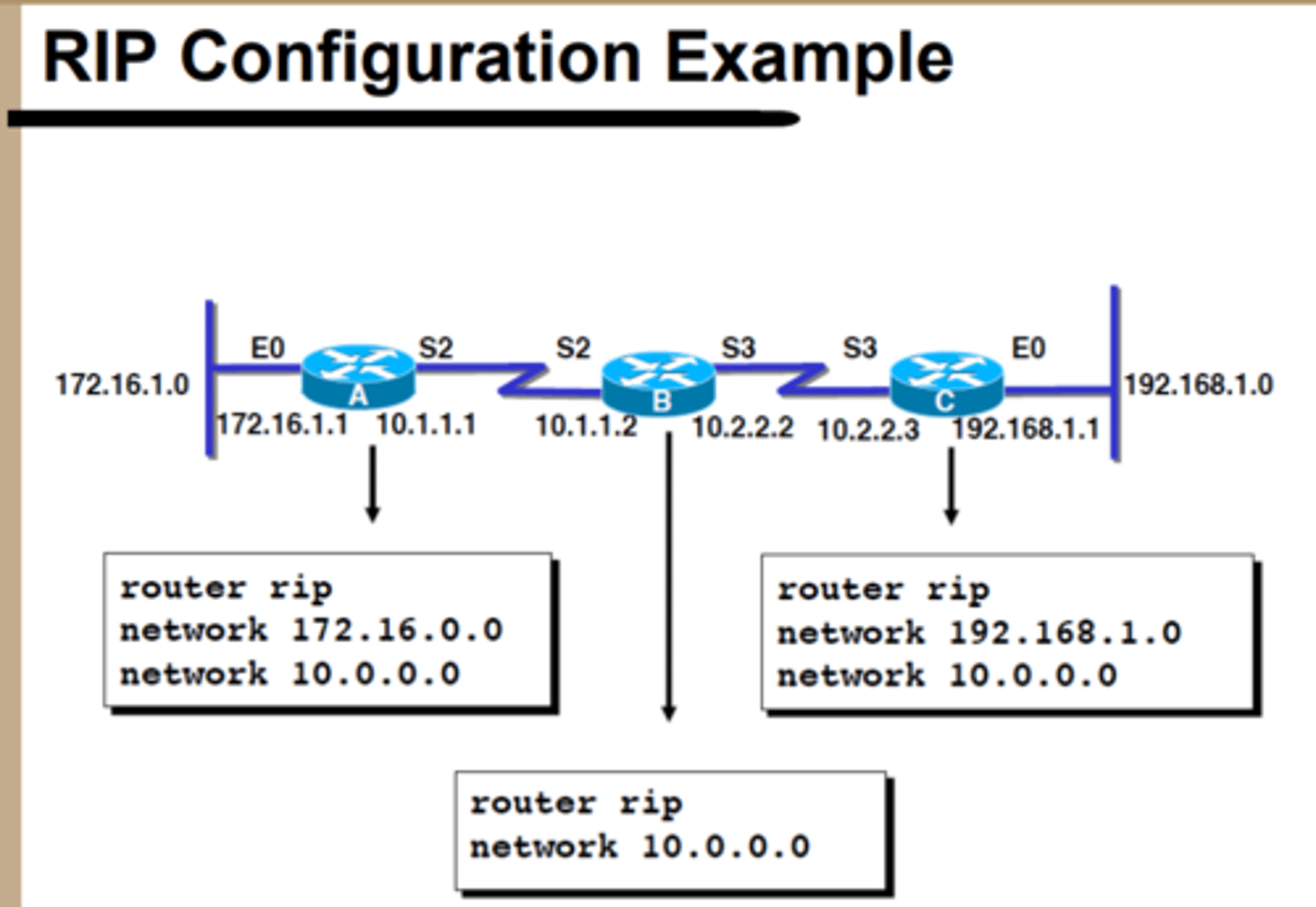
RIP Configuration Example
Supernetting Advantages
Efficient use of address space
Reduces resources required on other routers
Improves network stability
Aggregation
Combination of all hosts in a a network into a single advertised route
Supernetting Requirements
Each network mush share high-order bits
Any routing protocol must pass subnet masks (Extended Network Prefixes)
Potential Issues with Supernetting
Wasted space for creating supernets that are too large
Potential to creat overlapping networks that will result in unreachable hosts
Potential inaccuracies in routing tables
Network design considerations
Plan for growth - allocate subnets and supernets with a plan
Think about routing - pass subnet masks with network IDs
Supernetting and summarization points can math geographic segmentation or hierarchical topology
Address allocation with consistency
Document
Route Summarization steps
Convert the addresses to binary format and align them in a list.
Locate the bit where the common pattern of digits ends.
(It might be helpful to draw a vertical line marking the last matching bit in the common pattern.)
Count the number of common bits.
The summary route number is represented by the first IP address in the block, followed by a slash, followed by the number of common bits.
Route Summarization
Routing information advertised out an interface is automatically summarized at major (classful) network address boundaries by RIP, IGRP, and EIGRP.
For OSPF and IS-IS, you must configure summarization.
Longest Prefix Match
Selecting routes from route summaries—If more than one entry in the routing table matches a particular destination, the longest prefix match in the routing table is used.
Several routes might match one destination, but the longest matching prefix is used.
What is a subnet mask
A binary string used to determine which network an IP address belongs to.
An IP address has two components: the network address and the host address
Hosts and Subnet masks
Network devices use the IP address and defined netmask to determine if the destination is a local subnet, or a remote network:
- If the address is part of the local subnet, the device will ARP to retrieve the MAC of the system in question to communicate over the data-link layer...
- If the address is found to be on a remote network, then the network device routes packets to the gateway which uses its routing table to determine the correct location
Routers and Subnet Masks
A routing table is present on all IP nodes. The routing table stores information about IP networks and how they can be reached (either directly or indirectly).
Because all IP nodes perform some form of IP routing, routing tables are not exclusive to IP routers. Any node loading the TCP/IP protocol has a routing table.
0.0.0.0
Means all possible IPs from 0.0.0.0 to 255.255.255.255
Filters and ACLs
Can block individually or summarize with bits in common
LAN Backbones (Serial)
Two or more devices connect via a daisy-chain type link
Simplest type of backbone
Not typical in enterprise installations
Can cause unexpected errors if to many devices are chained.
LAN Backbones (Collapsed Backbone)
One router connection to each telephone closet
Simplest and most typical backbone architecture
Assumes user communities are within close physical proximity
Impractical when functional user groups are dispersed
Improper network segmentation results in excessive routing
LAN Backbones (Simple Distributed Backbone)
Hierarchical design
Intermediate devices could switches or routers
Easily Daisy-Chain linked
Scalable
LAN Backbones (Paralell Backbone)
Redundant router connections to each telephone closet
Synergy when used in conjunction with VLANs
More granular segmentation of user groups
Minimizes routed traffic
May increase LAN performance
May address security and fault-tolerance concerns
LAN Backbones (Aggregates Backbone)
Multiple connections to each wiring closet
Typically have one main device in each closet which terminates core connections
Increases capacity on the LAN (How?)Minimizes routed traffic
Adds redundancy, fault tolerance, and potentially addresses security
Typically used in large networks
Link Aggregation
The process by which multiple physical connections are combined and viewed as a single logical link
AKA - trunking, port trunking, link bonding, aggregated interfaces (Ethernet), multilink
Increasing your redundancy and scalability
Not just switches and routers, can be connected to servers, NAS servers
802.3ad (1999) - Link Aggregation Control Protocol (LACP)
Most popular Ethernet-based aggregation standard
Moved to 802.1AX - recently upgrades
Proprietary Aggregation protocols
Cisco - Port Aggregation Protocol (PAgP) - EtherChannel
Intel - Port Sharing
Nortel - MultiLink Trunking (MLT)
Link Aggregation - Design
- Create Link Aggregation Group (LAG)
- More than 2, max of 8
- Becomes an interface bound together - Port Channel on sh Interface
- Up to 6 LAGs limitation
- Can be done on a trunk
- Active or passive setup
- Active mode send LACP packets to bring up the group
- Passive mode accept connection
- Much like desirable and dynamic for DCP
- EtherChannel is desirable and auto
Aggregation Requirements
Can aggregate 10/100/1000/10000/40000/1000000 Mbps links
- All links must be the same speed
- All links must be the same duplex setting
- Number of physical ports in the logical link is limited by capacity of device
- Typical limit is 8 active physical interfaces
Aggregation Requirements
Both end points [devices] must support aggregation
Aggregation must originate & terminate on the same device
Should use same physical media between end points
Link Aggregation Results
- Reliability
- Redundancy and Fail Over
- Higher capacity
- Aggregate throughput from all interfaces
- Requires an access algorithm that is supported by all devices in the trunk
- Potentially postpones need for upgraded infrastructure
- Does NOT increase capacity for any single flow
Types of Aggregate Links
Switch to Switch/Router
Switch to Server
Switch to End Host
Link Aggregation Protocols
LACP - Link Aggregation Control Protocol"
IEEE Standard
Designed to dynamically establish, maintain, terminate, and troubleshoot membership in an aggregated set of interfaces
110 Byte LACPDU
4 modes of operation - Off, On, Active, Passive
Up to 16 interface per Group (only 8 active interfaces)
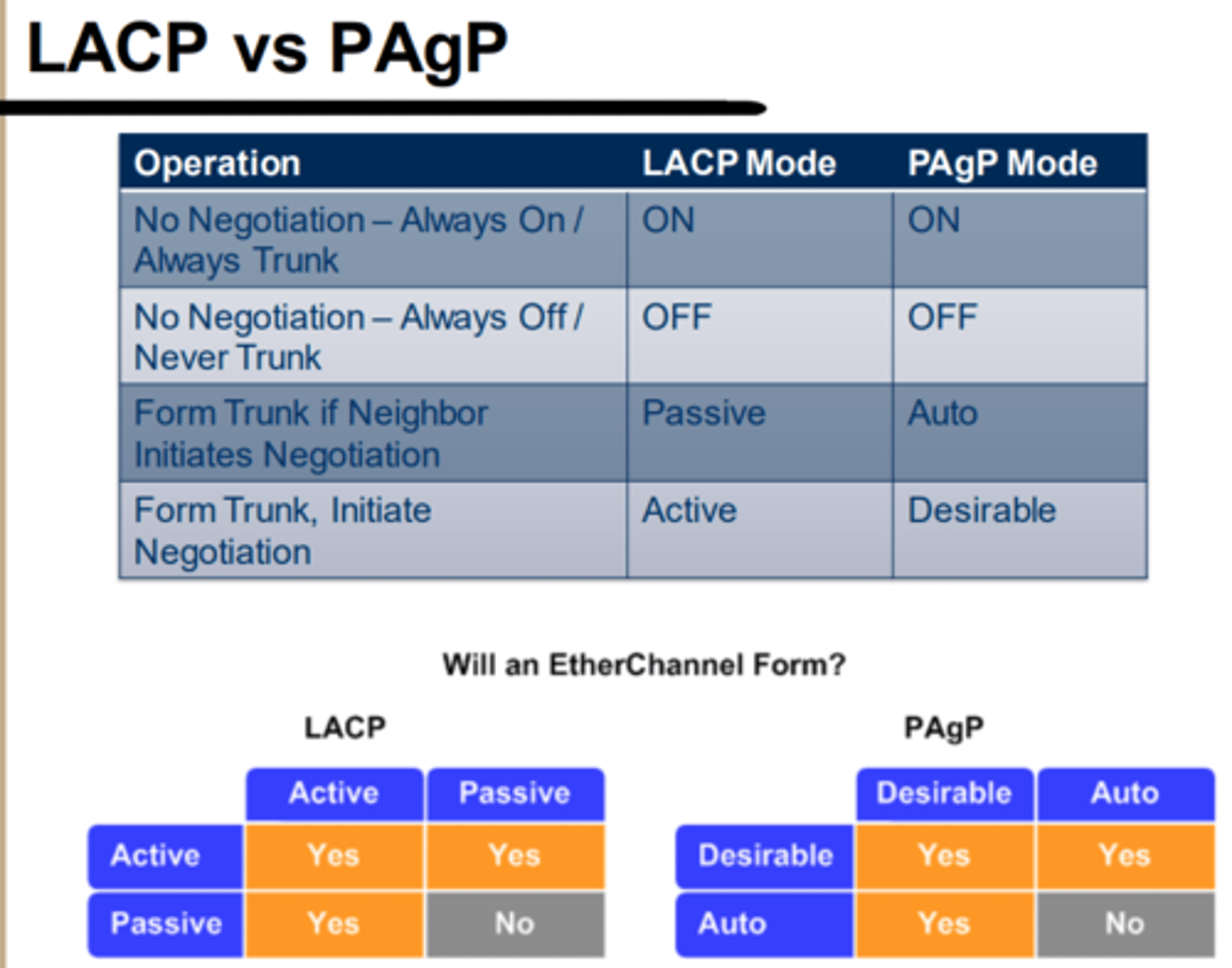
Link Aggregation Protocols
PAgP - Port Aggregation Protocol
Cisco Proprietary
Designed to dynamically establish, maintain ,terminate, and troubleshoot membership in an aggregated set of interfaces
All VLAN, duplex, and speed configurations must be identical for an interface to initially join a trunk (EtherChannel)
Once EtherChannel is established, a change to one member interface will propagate to ALL interfaces in group62 Byte PAgP PDU
4 modes of operation - On, Off, Auto, Desirable
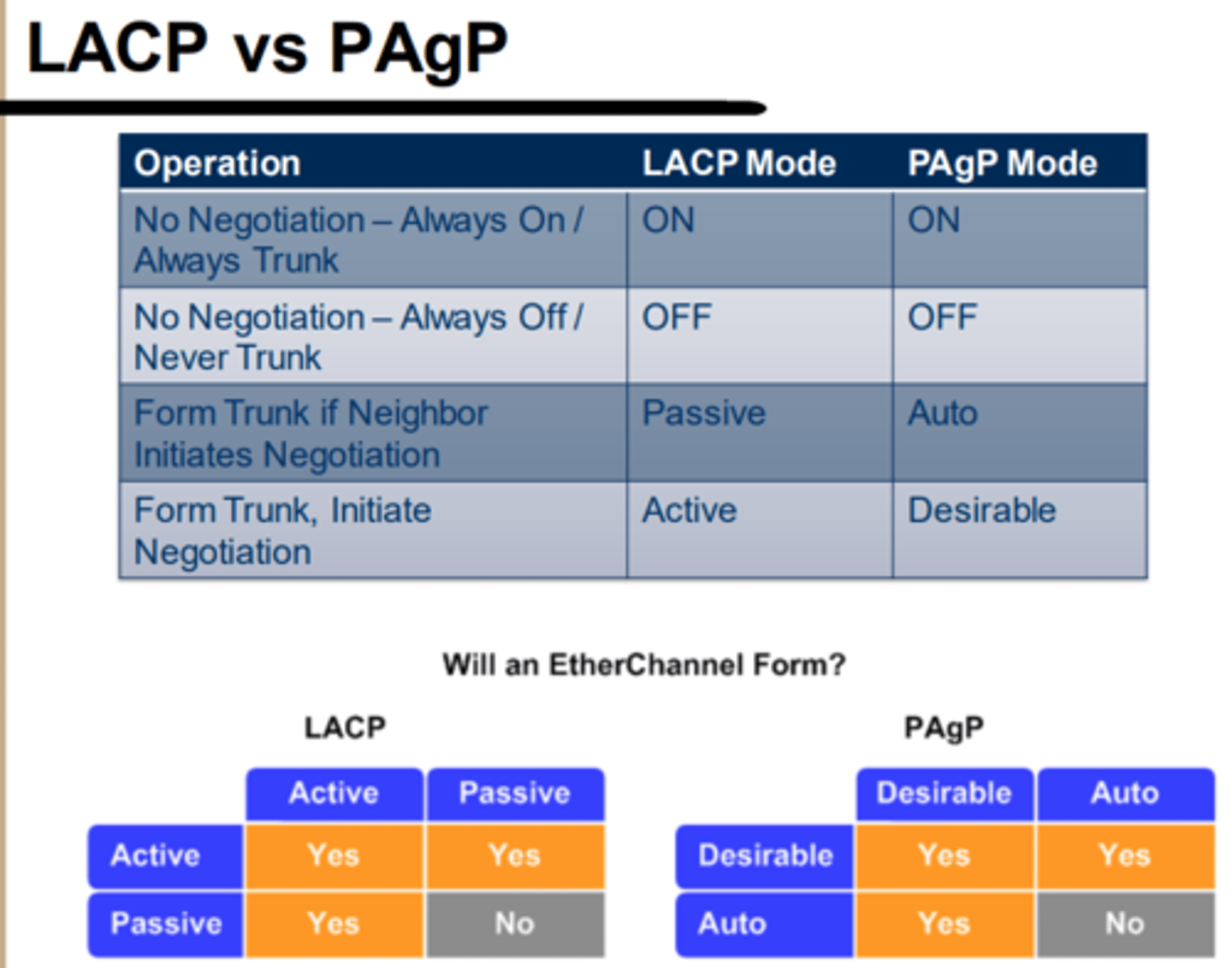
Aggregation in Action
1. Determine requirements and allocate interfaces on switches
2. Define interfaces as L2 or L3 (for capable devices)
3. Create Virtual Link
4. Assign interfaces to Virtual Link
PVST+
Cisco proprietary adds Vlan features to Spanning Tree
RSTP
802.1W faster convergance, across multiple manufacturers
Rapid PVST+
Ciscos improvement with additional Vlan features
Root Switch/Bridge Selection >>> Plan is based on
Plan is based on lowest MAC address, Priority is between 0 - 65536 in multiples of 4096
Port Roles - Blocked port
Startup - forward no traffic
Port Roles - Designated port
Forwards all traffic
Port Roles - Root port
Shortest path to root, forwards all traffic
STP Hello TImer
2 seconds
Max Age Timer
20 seconds how long blocking ports keep blocking before transitioning
Forward delay
15 seconds how long ports keep listing before transitioning
STP Convergance
Topology may not be static, Recalculation of STP
Problems with STP
Very Slow convergance - Lack reliability - no security - does not consider physical topology
Rapid STP
Election process is the same as STP - Backwards compatible Defines new Port Roles
The native VLAN is typically not...
tagged, even over a trunk port
VLAN Trunking multiplexes multiple... over a single...
Multiplexes multiple VLANs over a single physical connection OR over a single logical connection (aggregate link)
VTP
VLAN Trunking Protocol
"VTP Communication - A server is authoritative for...
...all VLANs within the domain"
Problems/Dangers with VTP
"Extending VLANs to switches that don't need them configured...
Problems/Dangers with VTP - Mitigations
Disable VTP (Know what your network is doing), Change the Native VLAN ID, Disable unused ports, Do not trunk VLANs unless necessary, Filter traffic appropriately
Purpose of Layer 3 Addressing
- "End to End communication - Uniquely identifiable network ID - Uniquely identifiable host ID"
Subnetwork Mask - Performs a logical bitwise... with IP Address to determine...
"Performs a logical bitwise AND function with IP Address to determine Network ID (and Host ID)"
Classless InterDomain Routing (CIDR)
"- No consideration for address classes - Provides the most granular control of network address space - Introduces the idea of supernetting"
RIP
Routing Information Protocol
All RIP traffic is sent to/from...
...UDP 520
RIP Operations - One route per known & reachable destination network is maintained in routing table, which contains:
"1. Destination IP Address 2. Distance-Vector Metric 3. Next Hop IP Address 4. Route Change Flag 5. Route Timer"
Verifying the Routing Protocol—RIP
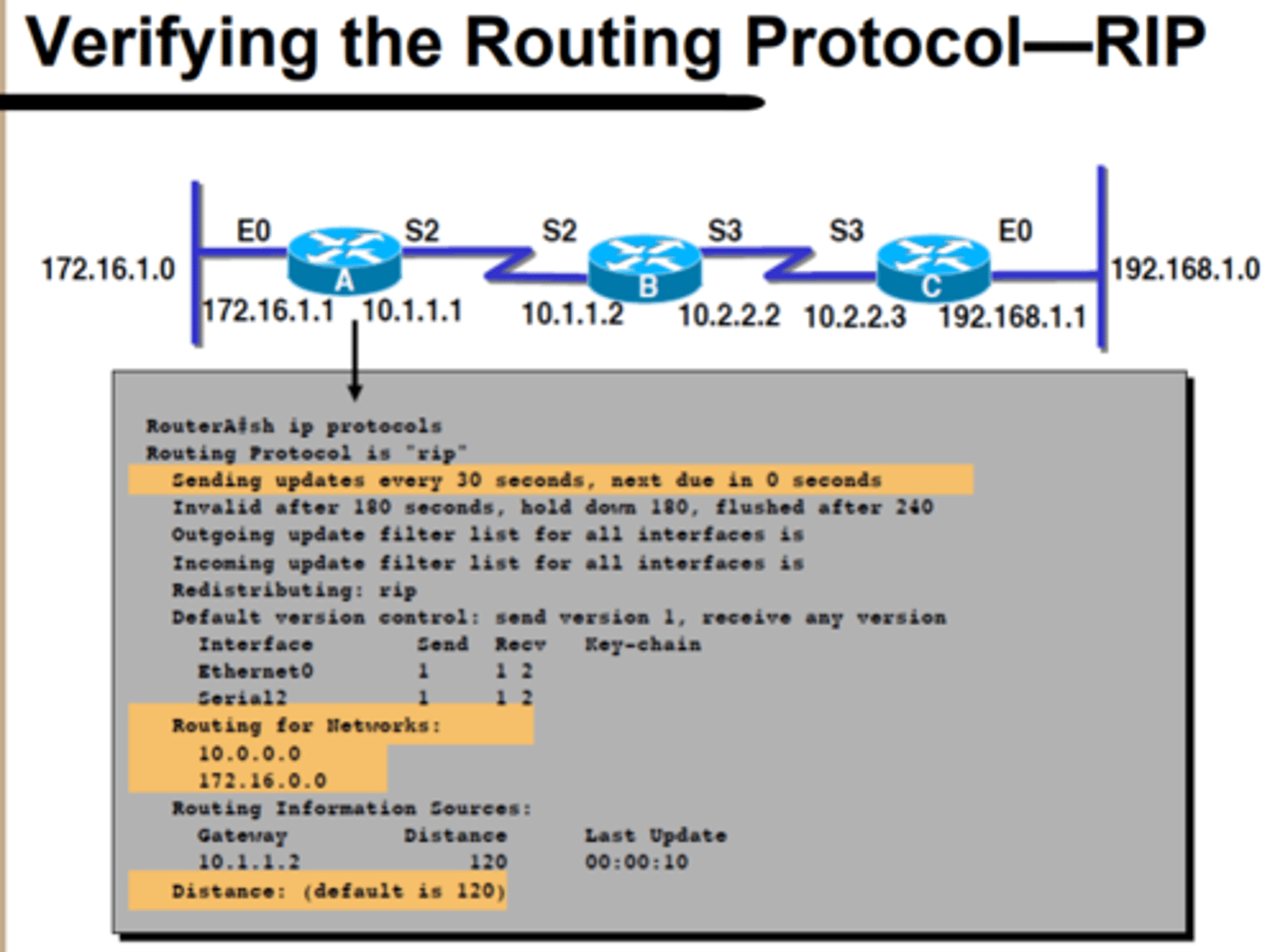
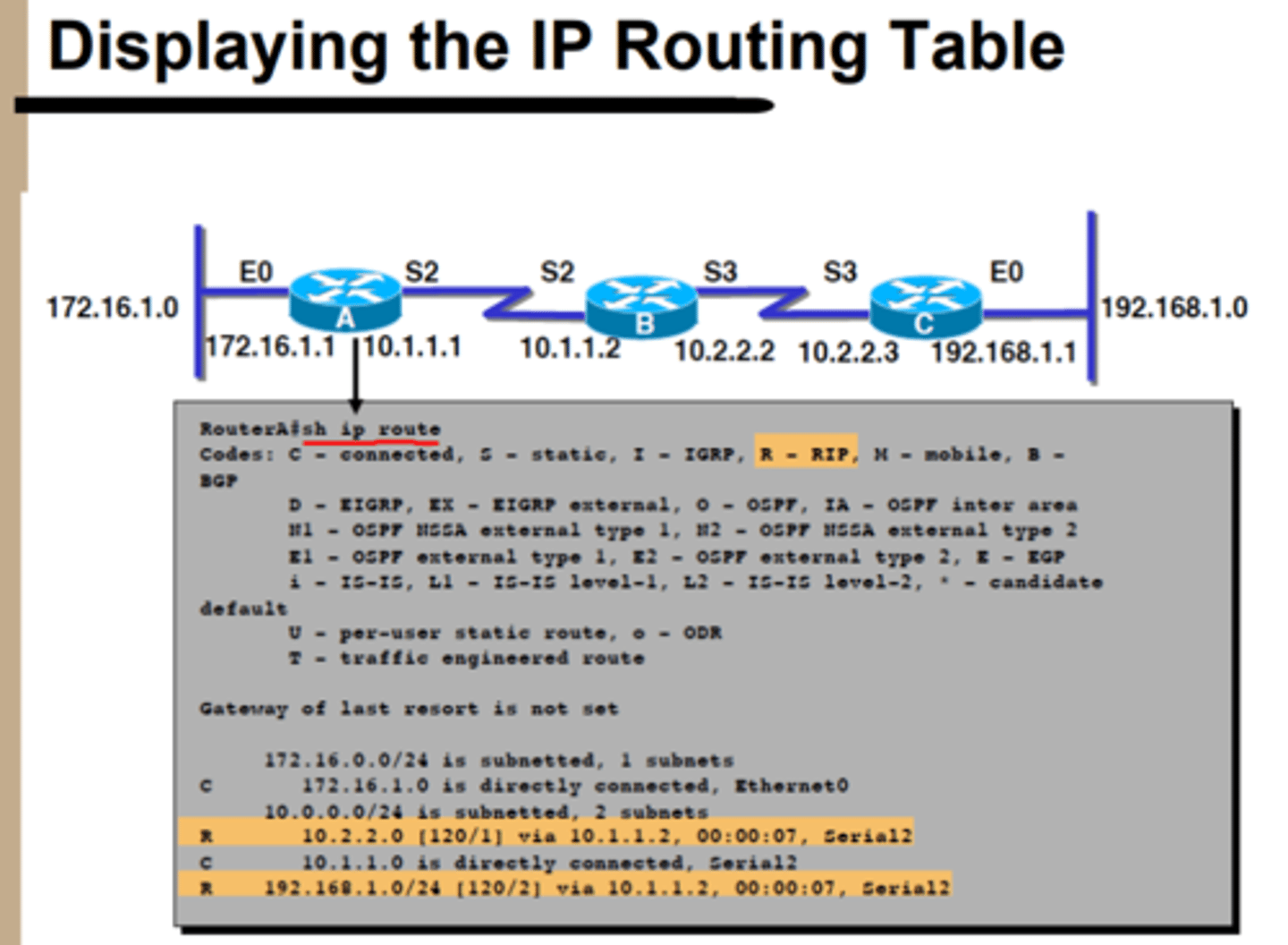
Displaying the IP Routing Table - RIP
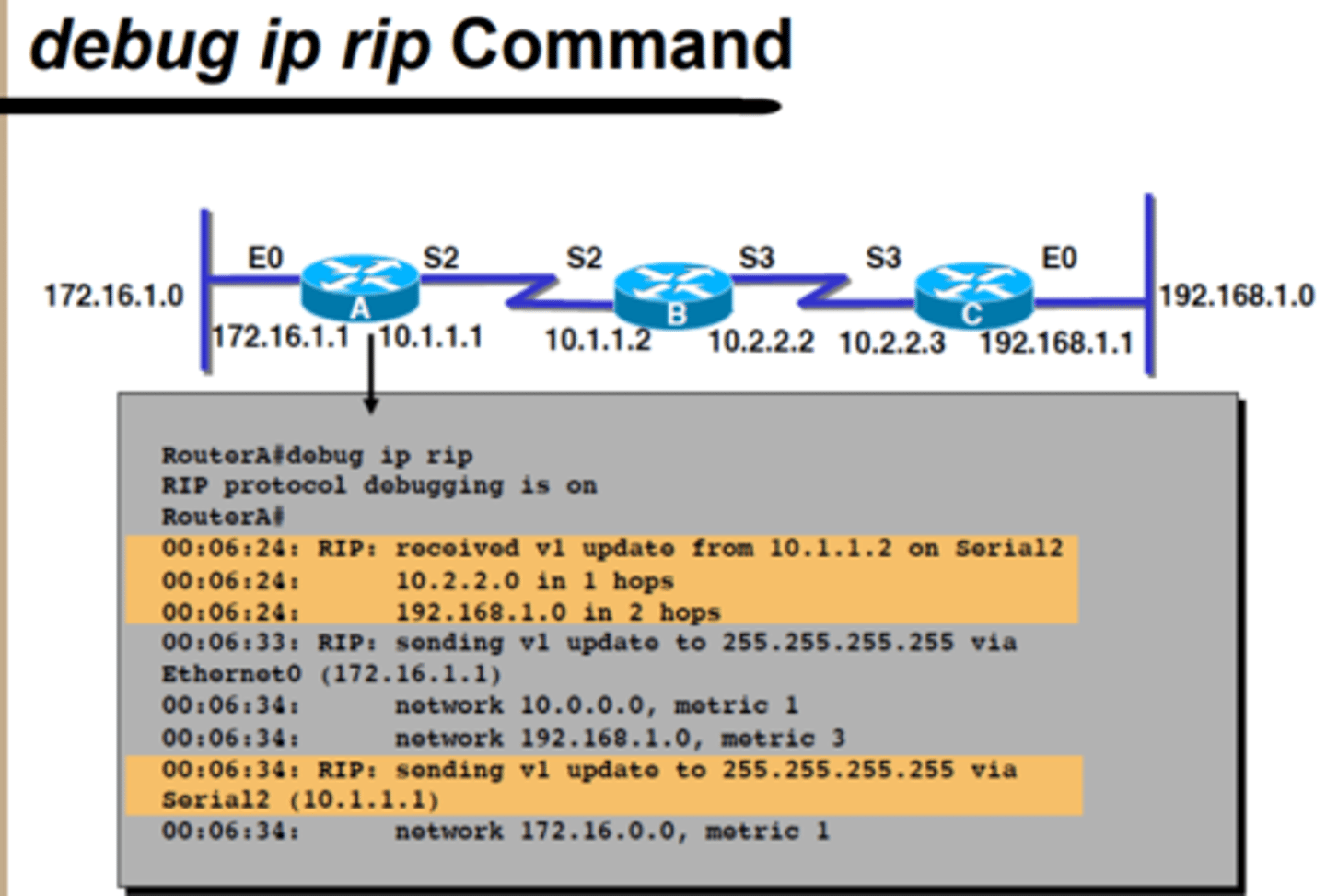
debug ip rip Command
Supernetting
Combination of network address space into a larger single network
Summarization
Combination of routes into a single advertised entry
Routers and Subnet Masks >>> When an IP packet is to be forwarded, the routing table is used to determine...
When an IP packet is to be forwarded, the routing table is used to determine:
- The forwarding or next-hop IP address:
STP = IEEE ____________, Runs on_______ & ___________, prevents _________________
Runs on bridges and switches, prevents broadcast storms
Remembering the OSI Model
Please Do Not Throw Sausage Pizza Away
OSI Detailed Diagram
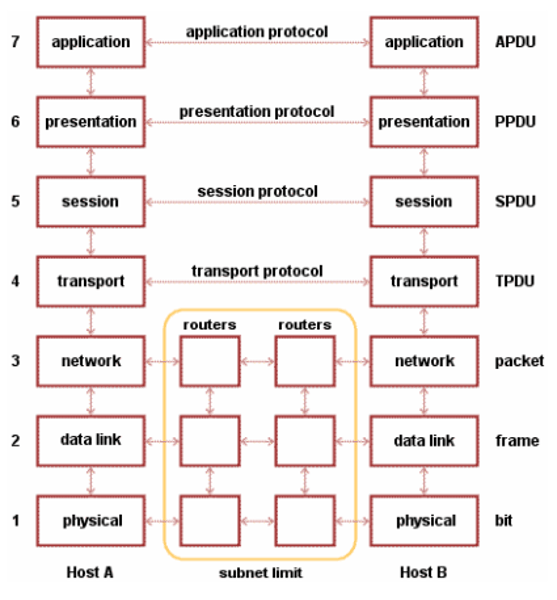
"Layer 2 & 3 Review - Routing - Basic Actions
1. Packet is Filtered >>> ACL / Firewalls
2. Packet is Forwarded >>> match found in Routing Table OR default route
3. Packet is Dropped >>> no match in Routing Table OR No default route specified
4. Packet can also be re-addressed (NAT)
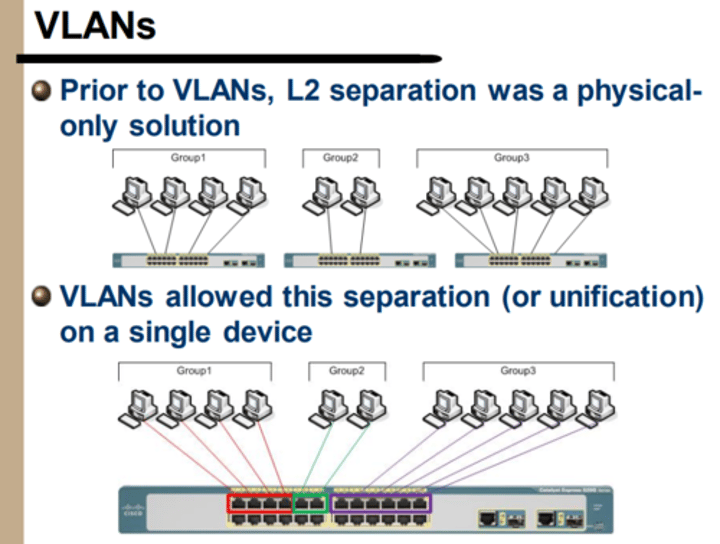
VLANs - Prior to VLANs, L2 separation was a physical only solution
"VLANs allowed this separation (or unification) on a single device"
VLAN = IEEE standard...
802.1Q
VLANs work by incorporating a... into the Ethernet Frame
4-byte "shim" header
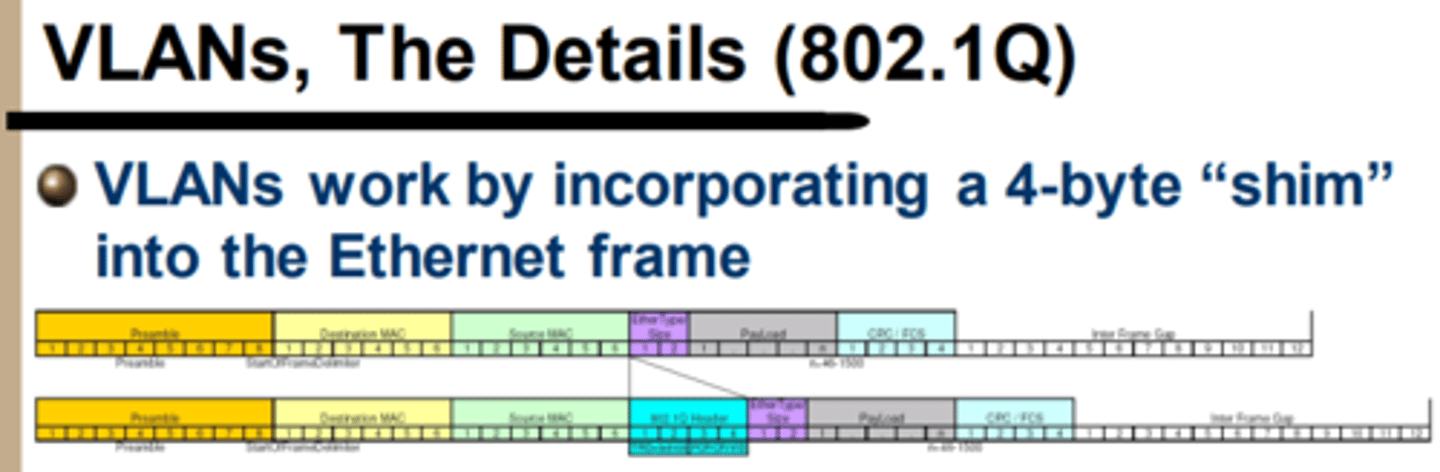
"Tagged vs. Untagged Traffic >>> Edge Interfaces must be..."
traffic must be UNTAGGED
Tagged vs. Untagged Traffic >>> Trunk Interfaces must be...
traffic must be TAGGED
""We will use edge interfaces to connect... and trunks to connect to...
We will use edge interfaces to connect hosts and trunks to connect to other switches"
Tagging - Layer 3 Interfaces will will not understand... and will not pay attention to
will not understand VLAN tagging and will not pay attention to 802.1Q tags >>> An IP address can be directly configured
Tagging - Layer 3 Interfaces are configured on L3-capable siwithces / L2-capable routers via...
no switchport
Tagging - Layer 2 Interfaces - Untagged - Untagged ports can handle traffic for only...
1x VLAN
Tagging - Layer 2 Interfaces - Untagged - Egress traffic will be ...
untagged
"Tagging - Layer 2 Interfaces - Untagged - If a tag is set on ingress traffic other than the configured access VLAN..."
it will be dropped
Tagging - Layer 2 Interfaces - Untagged - Traffic is forwarded only...
within the configured VLAN
Tagging - Layer 2 Interfaces - Tagged - Trunk ports can forward traffic for...
multiple VLANs
Tagging - Layer 2 Interfaces - Tagged - 802.1Q tags are used to keep track of...
which VLAN a frame is associated with
Tagging - Layer 2 Interfaces - Tagged - Egress traffic is... and ingress traffic is...
"Egress traffic is untagged and ingress traffic is expected to have a tag"
Tagging - Layer 2 Interfaces - Tagged - Untagged ingress traffic is placed in the...
Native VLAN
"Native VLAN - the native VLAN is typically called...
VLAN 1
Native VLAN - all ports are ________ ports in the Native VLAN by default
access ports
 Note
Note  Flashcards (150)