WGU - Intro to IT - D322 - Full study guide sections 2-8
 Studied by 0 people
 Call Kai
 Learn
Learn Practice Test
 Spaced Repetition
 Match
Match Flashcards
 Knowt Play
1/414

There's no tags or description
Looks like no tags are added yet.
Name | Mastery | Learn | Test | Matching | Spaced | Call with Kai |
|---|
No analytics yet
Send a link to your students to track their progress
415 Terms
Specifically, IT functions cover five different domains:
communication
data collection and management
information security management
consumer relationship management
process improvement
IT governance is
the system of processes that ensures the effective and efficient use of IT to enable an organization to achieve its business goals and to add value to key stakeholders in an organization.
Network administrators
set up, maintain, and monitor the hardware and software that support the networking components of the computer systems.
Systems administrators
set up, maintain, and monitor devices that support business operations. These devices include anything from projectors and smartboards in a training room to the devices in the server room.
Web administrators
control the outward-facing content on an organization's website and intranets and ensure that the sites function and integrate with back-end systems, such as supporting databases.
Database administrators
configure and troubleshoot an organization's data repositories.
Cybersecurity analysts
monitor the behaviors of the system components for anomalies and malicious attacks. They also put measures in place to deter, detect, and mitigate internal and external threats.
Technical support specialists
provide end-user training and help users resolve issues accessing resources and systems.
Outsourcing
uses the resources and skills of a developed workforce from an external organization.
Insourcing
assigns a project to employees within the organization. Insourcing generally requires the development of new operations and processes, making it an expensive option.
The project management life cycle is represented differently in various models, but projects generally include four phases:
initiation, planning, execution, and closure.
Project initiation
broadly defines the project. It usually begins with a business case, followed by a feasibility study. During the feasibility study, research assesses whether the business case will lead to a reasonable, feasible solution. Project stakeholders provide input in the analysis of the business case, resulting in a project charter, or project initiation document, that outlines the business needs, the stakeholders, and the business case.
Project planning (1 of 2)
includes developing a road map that everyone follows. This phase starts with setting the project goals, commonly using the SMART or CLEAR frameworks, both of which are described below.
Specific: Set a specific goal that answers the questions who, what, where, when, which, and why.
Measurable: Create criteria that can be used to measure the success of the goal.
Attainable: Ensure the goal is attainable given the resources.
Realistic: Assess the willingness to work toward the goal.
Timely: The goal should be achievable within the available timeframe.
Collaborative: The goal should encourage employees to work together.
Limited: The goal should be limited in scope and time to keep it manageable.
Emotional: The goal should tap into the passion of employees and be something they can form an emotional connection to. This can optimize the quality of work.
Appreciable: Break larger goals into smaller tasks that can be quickly achieved.
Refinable: As new situations arise, be flexible and refine the goal as needed.
Project planning (2 of 2)
defines the project scope and drafts a project management plan. The project management plan identifies project resources, including cost and time estimations. A project generally has each of the following documents by the end of the planning phase:
scope statement outlining the objectives, deliverables, and milestones
work breakdown structure (WBS) breaking the project into manageable segments for the team
milestones defining high-level goals to meet throughout the project's duration
communication plan outlining the frequency and methods of communicating with stakeholders
risk management plan identifying foreseeable risks, including cost overruns and delays
Project Execution
During project execution, project deliverables are developed and completed. A kickoff meeting usually marks the start of this phase. Tasks typically include developing the project team, assigning resources, setting up tracking systems, conducting status meetings, and monitoring the project timetable.
Project performance is constantly observed during the execution phase. Key performance indicators, or metrics, are used to monitor the progress of the project, determining whether the project is on track to meet the defined milestones.
Project Closure
At the project closure phase, the project is declared complete and the project team is dissolved. Project managers complete the final project documentation, including financial reports. Generally, meetings are also a part of this phase, allowing members of the project team to reflect on strengths and opportunities for improvement.
Risks in execution
typically revolve around budget, people, technology, equipment, and stakeholder support. Issues that can deem a project unsuccessful include cost overrun, insufficient staff, inadequate tools to support the project, and lack of support from project stakeholders. Planning in advance is one of the best ways to mitigate risks of execution.
Risks of integration
The outcome of a project will likely affect other systems and processes in an organization. Risks of integration can be mitigated by assessing potential disruptions, ensuring adequate support from stakeholders, and having a shared understanding of the project's complexity.
Two key strategies to successfully identify risks are frequent monitoring of project parameters and milestones and sound communication between project participants.
Scope creep
uncontrolled change of a project's scope, typically adding tasks and increased, unplanned costs to the project
Budget risk
budget control issues, such as underestimated or improper allocation of cost
Resistance to change
departments and individuals resist organizational changes resulting from the project
Resource risk
inability to secure sufficient resources for the project
ex.
Mei is concerned that some team members may become unavailable during the project.
Contract risk
a vendor fails to deliver on contractual obligations
Disputes risk
Disputes or disagreements between project participants
Project dependencies
especially when completion of some tasks is dependent on the completion of other tasks
Project assumptions risk
when assumptions about the project are invalidated during project development
Benefit shortfall
the project meets the requirements but delivers fewer benefits than outlined in the business case
Requirements quality risk
requirements have not been properly validated or documented
Force majeure risk
the chance of a major negative event beyond human control, such as a natural disaster
Software Development Life Cycle
Planning,
Design,
Implementation,
Testing,
Deployment,
Maintenance
System Development Life Cycle
Requirement Analysis,
Design,
Implementation,
Testing
The goal of the requirements analysis is
to determine what services the system will provide, identify any conditions (such as time constraints and security), and define how users will interact with the system.
Requirements analysis requires
significant input from stakeholders, such as potential users, as well as those with other ties, such as legal or financial interests. In cases where the beneficiary is an entity, like a company or government agency, requirements analysis may start with a feasibility study. The feasibility study determines whether development is possible under the given constraints and whether the development aligns with the organization's mission. In the case of producing commercial off-the-shelf (COTS) systems for the mass market, requirements analysis is likely to begin with a market study by the system developer.
The requirements analysis process consists of three steps:
1). Compiling and analyzing the needs of the system use
2). Negotiating with project stakeholders on trade-offs between wants, needs, costs, and feasibility
3). Developing a set of requirements identifying the necessary features and services of the completed system
The system requirement specification (SRS) is
a written agreement between all parties that records the system requirements and guides system development. The SRS also helps resolve disputes that arise during development. Because of how important the SRS is in the development process, organizations such as IEEE and large systems clients, such as the U.S. Department of Defense, have adopted standards for requirement specifications.
The SRS should clearly define objectives to determine a system's success. Too often, however, the SRS fails to delineate the system objectives.
While the requirements analysis describes the system, the Design
creates a plan for constructing the system. Requirements analysis identifies the problem to be solved, while design plans a solution. Requirements analysis is often equated with deciding what the system should do, whereas design is equated with deciding how the system would do it. If, for example, the user's ability to access necessary systems using a limited number of steps is defined as a user requirement, the design phase may include the layout of drop-down boxes and the coloring scheme. When tterm-193he design phase is complete, the organization should have a detailed description of the system structure.
during the implementation phase
The system is built, including such things as developing programs and databases and creating data files.
It is during the implementation stage of software development projects, for example, that the distinction between a system analyst and a programmer becomes clear. A system analyst is involved throughout the entire development process. A programmer is primarily tasked with writing programs that implement the design produced by a system analyst.
Many factors influence the successful implementation of a system—training, team skills, team communication, effective project management, quality assurance, and upper-management commitment are just a few.
During system maintenance
the system is monitored, evaluated, and modified as needed. System maintenance is a continuous phase that covers a wide variety of activities, including troubleshooting application errors and incompatibilities, updating documentation, and providing end-user support. There are four primary categories of software maintenance: corrective, adaptive, perfective, and preventive.
The goal of corrective maintenance is
to remove errors to ensure functionality of the system. In Mei's medical office, if a patient record application causes the operating system to reboot, Mei might begin corrective maintenance by reviewing the application and/or operating system logs.
Adaptive maintenance is
performed when organizational changes affect system requirements, such as changes in the organizational procedures, forms, or system controls and security needs. For example, Mei's medical office might change how nurses obtain and verify their patients' identity, such as adding barcode reader functionality to read barcodes from patients' wristbands.
Perfective maintenance
is performed when new components are introduced, or existing components are improved, to enhance overall system performance. Examples of perfective maintenance include a new operating system for performance improvement or a new technology to increase efficiency.
Preventive maintenance
refers to changes made to increase the life span of systems and could include restructuring, optimizing code, or updating documentation that impacts the scalability, stability, and maintainability of the system. One maintenance activity that could be categorized as preventative is testing air conditioning units in the server rooms.
glass-box testing, commonly referred to as white-box testing,
includes having developers test internal structures of software.
Black-box testing
does not rely on the tester's knowledge of the system's structure but is focused on the user experience (UX).
Methodologies that fall within the black-box category are
alpha, beta, and user acceptance testing.
In alpha testing, the first stage
developers and/or an internal UX team test a preliminary version of the software, providing feedback about performance and functionality.
The second stage is beta testing, sometimes referred to as pilot testing.
In this stage, the next version of the system is given to a segment of end users for similar testing from their perspective before the final version is released.
The final stage is referred to as user acceptance testing.
During this stage, the users test the system in an operational setting to make sure the system continues to align with business objectives and meet the goals of the stakeholders.
There are three types of system documentation:
user documentation,
system documentation, and
technical documentation.
User documentation
explains the system to users and may include information such as how to access certain features, frequently asked questions (FAQs), and contact information for customer support.
System documentation
describes the system's internal configuration so the system can be maintained later in its life cycle. A major part of software development system documentation is software code. The code needs to be versioned and presented in a readable format. Versioned code allows developers to track modifications and reverse any changes that have been problematic. Readability is important so that any contributing developer can read the code.
Technical documentation
describes how to install and maintain the system, including information about installing updates and providing feedback to the development team.
Prototyping is
building and evaluating basic versions of a proposed system. Rapid prototyping involves quickly constructing a simple sample that may consist of only a few screen images, indicating how the system would function. Rapid prototyping is used to build a "rough draft" of a product, with minimal resources and effort, giving stakeholders a clear picture of the intended system.
Open-source development permits users
to modify the software code. Possibly the most notable example is the Linux operating system.
Agile methods are system development methodologies that
propose incremental implementations, respond to rapidly changing requirements, and reduce the emphasis on rigorous requirements. Scrum and extreme programming are both examples of agile methodologies.
Scrum is a hands-on system consisting of simple steps:
1). The system owner makes a prioritized wish list.
2). The scrum team selects an item toward the top of the wish list and plans the implementation during an event called "sprint."
3). The team completes the list of objectives while assessing progress in daily meetings called scrums.
4). The sprint ends with the system ready to be released.
5). A new sprint starts, using another item on the wish list.
6). This process continues until the prioritized wish list is clear.
Following the extreme programming (XP) model, systems are
developed by a team of fewer than a dozen individuals working in a communal workspace, where they freely share ideas and assist each other in the development project. The system is developed incrementally by repeated daily cycles of informal requirements analyses, designs, and common tests. New, expanded versions of the system appear on a regular basis. Each version is usually evaluated by the project stakeholders.
Agile development is quick, increases customer satisfaction, values employees, and reduces rework.
Data mirroring, data backups, and off-site storage are some of the strategies used for disaster recovery and business continuity.
Data mirroring
involves setting up the operating system to simultaneously write copies of the data on several storage devices. If something happens to one drive, another drive will be used in place of the faulty one, enabling the systems to recover functionality quickly without significant degradation of service.
Data mirroring, data backups, and off-site storage are some of the strategies used for disaster recovery and business continuity.
Data backups
can be stored on any data storage device, but tape archival is common for businesses. Tape drives are inexpensive and can be transported to an off-site location.
Data mirroring, data backups, and off-site storage are some of the strategies used for disaster recovery and business continuity.
Off-site locations
are a common solution for disaster recovery; if the primary site is damaged in some way, the data can likely be restored at another site. Includes Cloud storage
Hot storage
Hot storage allows organizations the quickest access to restore critical data in the event of a disaster or catastrophe. Hot storage solutions typically involve the latest and greatest storage equipment and the fastest protocols. In addition, hot storage is typically located close to the client or in multiple locations to ensure fast access. Some hot data storage solutions include Microsoft's Azure Hot Blobs and Amazon's AWS service, but these premium solutions can be quite expensive because of the high-performing resources and protocols involved.
Cold storage
Cold storage offers less frequent access and is maintained on minimal equipment that is considered lower performance. Returning to normal operations after a disaster is slower with cold storage. Some examples of cold storage include tape backup, offline cloud storage, and even some online services such as Amazon Glacier and Google Coldline. One significant advantage of cold storage, however, is that it is less expensive than hot storage.
Mobile computing
is the use of handheld devices, such as laptops, smartphones, and tablets. Due to the miniaturization of hardware, mobile devices are approaching the computational capabilities and speed of larger computing systems, while continuously decreasing in size. The popularity of mobile computing devices continues to increase the demand for infrastructures that adequately support these needs.
Internet of Things (IoT).
system of interconnected devices. Smart home devices, wearables, and connected cars are examples of IoT devices.
Globalization
refers to the growing interdependence of the world's economies and cultures, brought about by the trade of goods and services and the flow of information and people.
END OF SECTION 7
END OF SECTION 7
Which two software application packages would be classified as productivity software?
Choose 2 answers
Word processor
Spreadsheet program
FTP client
Word processor
Spreadsheet program
Which statement correctly describes the operating system?
- Consists of programs that end users run to accomplish some tasks and is sometimes referred to as horizontal software
- Works with hardware to provide a network service that can be distributed across several machines on the network
- Requires the user to have specialized training concerning specific commands that must be entered with proper syntax
- Allows the user to control the actions of the software, and through the software, to access hardware.
Allows the user to control the actions of the software, and through the software, to access hardware.
Which action by application programs requires support from a networked operating system?
A word processor program edits texts within a file.
An Internet browser displays a web page.
Photo editing software enhances a picture.
A payroll program computes the federal tax of an employee.
An Internet browser displays a web page.
Which characteristic identifies application software that is cloud-based?
Hosted on an individual computer
Hosted in the internal business network
Provided by servers in the internal business network
Provided by third-party providers
Provided by third-party providers
What type of software permits free temporary use followed by long-term activation for a fee?
Proprietary
Public Domain
Open Source
Shareware
Shareware
What statement is true concerning compiled and interpreted computer language?
- Both compiled and interpreted languages are written in binary code.
- A compiler translates an entire program into an executable program, which can be run at a later time, while the interpreter does this incrementally.
- A compiled language program is portable and can be run on multiple types of systems, whereas an interpreted program runs on a single type of system.
- An interpreted language program runs faster than a compiled language program.
A compiler translates an entire program into an executable program, which can be run at a later time, while the interpreter does this incrementally.
Which language is often used for rapid prototyping and the creation of GUIs?
TCL
C++
COBOL
Python
TCL
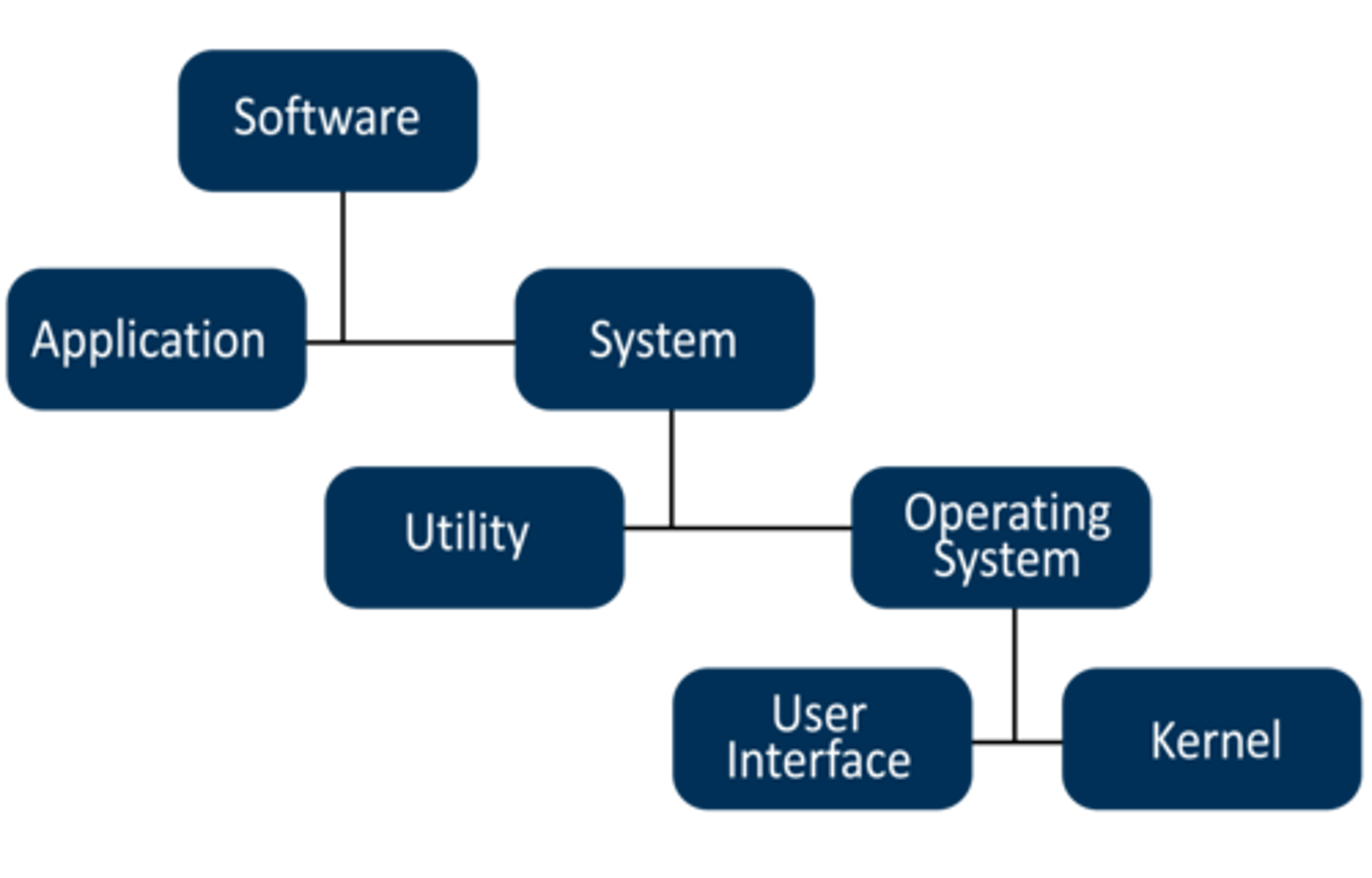
system software
general-purpose software that is used to operate computer hardware. It provides a platform to run application software.
Software can be divided into 2 types.
system and application software.
computer software
Detailed, preprogrammed instructions that control and coordinate the computer hardware components in an information system
Types of system software
operating system and utility programs
- Microsoft Windows
- Linux
- Mac OS X
- DOS
application software
specific-purpose software used to perform a specific task.
Types of application software
- Web browser
- Accounting
- Communication
- Data management
- Desktop publishing
- Groupware
- Presentation graphics
- Programming
- Word processing
software hierarchy
computer science
The art of blending human ideas and digital tools to increase problem solving power
operating system (OS)
controls the overall operation of a computer. It provides the ability for a user to store and retrieve files, facilitates a user interface to request the execution of programs, and maintains the environment necessary to execute programs.
Three of the most common operating systems are
Windows, Mac, and Linux.
Windows
An operating system by Microsoft that incorporates a user-friendly, graphical interface. However it is closed-sourced.
Mac
Operating System developed by Apple, they are closed-source and are known for their media editing and graphic rendering capabilities.
Linux
An open-source operating system software. There are many different versions of Linux, referred to as flavors, including Linux Mint, Mandrake, Fedora, Ubuntu, Debian, and CentOS. These operating systems are free for anyone to use. However, there are vendors (e.g., Red Hat, Cisco) that offer Linux-based operating systems, adding cost for support and/or hardware.
Utility Software
extends the capabilities of an operating system and helps customize the operating system's function.
Kernel
the internal part of an operating system. Contains the operating system components that perform the basic functions required by the computer installation.
Also stores a collection of device drivers and software that communicates with controllers or other peripheral devices.
user interface
allows end users to communicate with the operating system.
Types of user interface
Command line interface (CLI), Graphical User Interface(GUI), Menus and dialogue boxes
Graphical User Interface (GUIs).
Allow end users to issue commands through input devices such as mouses, keyboards, or touch screens.
Command-line interfaces (CLIs)
a type of user interface that communicate with end users through textual messages using a keyboard and monitor.
Operating System Role
Tasked with protecting the computer's resources from unauthorized users. It uses the end-users information during each computer log-in to control access to the system and resources.
user account
a record within the operating system with information such as a name, password, and user privileges (e.g., administrator vs. standard user).
Purpose of Accounts
Accounts are established by the administrator, whose account is often called a superuser or root account. When the end user supplies the proper credentials during the log-in procedure, the user is given access to the operating system.
Administrator Role
Administrators can alter settings, modify critical software packages, and perform other maintenance activities denied to other users.
File managers
are able to bundle files into directories or folders
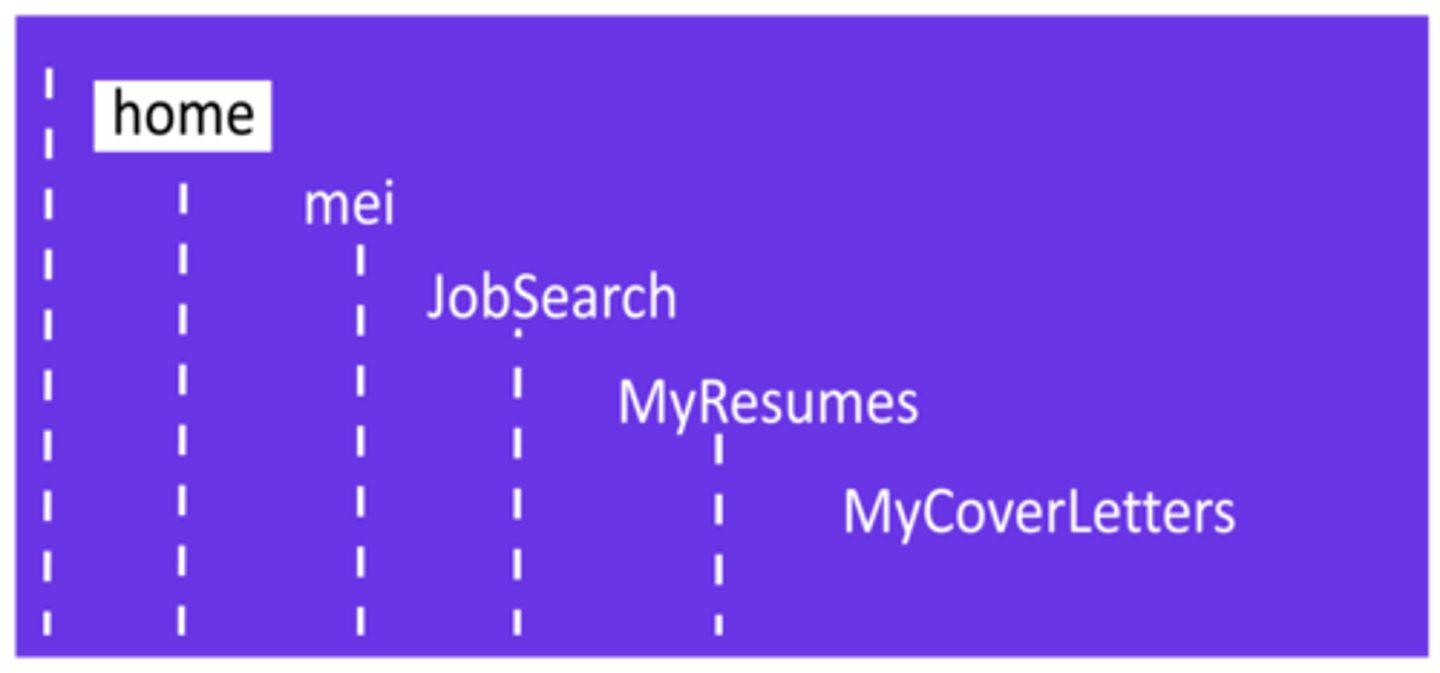
hierarchical file structure.
Directories that are placed within other directories
directory-path
Tells a user where the file is located within the file system, often written as the folder names separated by slashes.
Linux file hierarchy diagram.
Linux file management structure starting with a top Home level, then a sublevel named Mei, a subsequent sublevel named jobsearch, then a sublevel named myresumes, and finally a sublevel named mycoverletters. All of the names are entirely in lowercase.
 Note
Note  Flashcards (110)