MODULE 1: ACCESS AND USE OF COMMON BUSINESS TOOLS
 Studied by 2 people
 Call Kai
 Learn
Learn Practice Test
 Spaced Repetition
 Match
Match Flashcards
 Knowt Play
1/64

There's no tags or description
Looks like no tags are added yet.
Name | Mastery | Learn | Test | Matching | Spaced | Call with Kai |
|---|
No analytics yet
Send a link to your students to track their progress
65 Terms
It can be considered as any asset that helps or assists the organization to achieve its stated aims or objectives
Business Tools
Examples of Common Business Tools
Digital Cameras
Mobile Telephones
Pagers
Scanners
Photocopiers
Notebooks
Batteries
Keyboard
Brochures
Information
Knowledge
Manuals
Software
Wiki
Email
Possible Names in Defining a Business Tool
Portable and Attractive Tool
Significant Small Items
Significant Small Tools
This states that the item is portable and probably does not have a fixed location.
Portable and Attractive Tool
It states that they are attractive, meaning they could be a target for theft or excessive use
Portable and Attractive Tool
This is very similar as the items are small so they can be easily lost and they are significant to the business
Significant Small Items
Is a list of all tools that are to be controlled
The Register/Tool Register
Storing the Details
Spreadsheets
Asset Register
Database Software
Electronic format of storing details
Spreadsheets
Paper approach where all the details are recorded in a book
Asset Register
Can be configured to suit the needs of the business
Database Software
Tool Description
Brand
Model
Purchase Date
Supplier
Warranty Expiry Date
Depreciation
Storage Location
Physical Location
Serial Number
Asset Number
Barcodes
Department Associated Equipment
Generally globally unique so that no two serial numbers should be the same and they will identify each item
Serial Number
A number given by the manufacturer
Serial Number
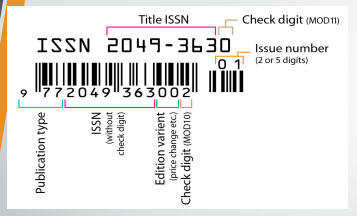
Serial Number
Uniquely identifies the product you or your organization purchased
Asset Number
A number given by the company
Asset Number
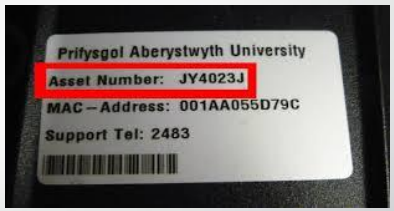
Asset Number
An asset number can be represented by a _____ for software
License Number
An asset number can be represented by a _____ for hardware appliance
Service Tag
A method of representing data in a visual, machine-readable form
Barcodes
Represented data by varying the widths and spacings of parallel lines
Barcodes

Barcodes
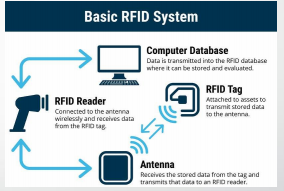
Basic RFID System
RFID Tag
Antenna
RFID Reader
Computer Database
Uses electromagnetic fields to automatically identify and track tags attached to objects
Radio Frequency Identification Tags
It consists of a tiny radio transponder; a radio receiver and transmitter
Radio Frequency Identification Tags
A radio receiver and transmitter
Radio Transponder
Radio Frequency Identification Tags
Attached to assets to transmits stored data to the antenna
Radio Frequency Identification Tags
Receives the stored data from the tag and transmits that data to an RFID reader
Antenna
Connected to the antenna wirelessly and receives data from the RFID tag
RFID Reader
Data is transmitted into the RFID database where it can be stored and evaluated
Computer Database
Acceptable Usage of Business Tools
Establish rules or policies on tool use
Have controls that restrict use to business purposes
Inform staff of usage rules
Consider out of hours use of the tool
It is often required in an emergency
Software
Serial numbers may also be required and stored separately
Software
Storage material may not suit a new computer
Software
It is very attractive for theft
Software
It means fast - easily updateable
Wiki
Great for internal information
Wiki
It must have access rules
Wiki
It must have content rules
Wiki
It need to set access rules where calls can be made to
Landline
It also set rules on how long for personal access
Landline
Some systems may require training
Landline
Answering the telephone to external people will impact on the business
Landline
It has very similar rules to telephone
It may have rules on private use
It may have rules on content
It may have rules about the presentation of emails
Who has the tool?
Tools can be given to STAFF for business use
This determines who can have the tool
Rosters
This ensures the tool is available
Rosters
This resolves conflict should this arise due to more than one person requiring the tool on the same day
Rosters
Must be some level of security in the storage location
Storage
Conflict between easy access and flexibility compared with control and security
Storage
Cost of security and the cost of the tools
Storage
It should consider if the tool has special storage requirements
Storage
Security Tools
Locks
Swipe Card Access
Security Cameras
Passwords
Police Checks
It can specify consideration regarding employment before they commence work
Employment Contracts
It ensures that staff understand importance of issues
Employment Contracts
It identify and advise staff of consequences of breaking the rules
Employment Contracts
Lockable Storage
Standard Keys
Cables with Locks for Laptops
Retina Scans
Voice Prints
Facial Recognition
Lockable Storage for High Security Control
Retina Scans
Voice Prints
Facial Recognition
This is a check on the control procedures
Audit
This is a procedure to check that the tool is there
Stocktakes
 Note
Note  Flashcards (101)