Section 2: Networking Fundamentals
 Call Kai
 Learn
Learn Practice Test
 Spaced Repetition
 Match
Match Flashcards
 Knowt Play
1/42

There's no tags or description
Looks like no tags are added yet.
Name | Mastery | Learn | Test | Matching | Spaced | Call with Kai |
|---|
No analytics yet
Send a link to your students to track their progress
43 Terms
What is a Network?
A network is a group of devices that are connected together - communicating with each other and sharing resources. Devices in the network can include computers, phones, servers, printers, routers, etc.
What is a PAN?
PAN, or Personal Area Network, is a very small network around a single person, typically a few meters. The most common form of PAN is wireless bluetooth connection
What is a LAN?
LAN, or Local Area Network is a network that covers a small physical area like a home, office, school, small building, etc. Devices in LANs typically connect via Wi-Fi or ethernet cables
What are Clients?
Clients are devices that users access the network with. Clients can be in the form of a laptop, phone, tablets, etc. (Any device that simply connect to the network)
        Network
           │
     ┌─────┼─────┬
     │     │     │
Laptop Phone TabletWhat are Servers?
Servers are essentially computers that provide resources to the rest of your network such as email servers, file servers, web servers, etc.
           Network
              │
           Server
        ┌─────┼─────┐
        │     │     │
Client Client ClientWhat are Hubs?
Hubs are older network devices that connects multiple devices in a LAN and broadcasts incoming data to all connected ports, regardless of intended destination.
Unlike switches, Hubs does not filter or direct traffic and sends data to every device, which makes it inefficient and insecure compared to switches.
Hubs are not commonly used in modern networks and have limitations such as increased network errors due to their broadcasting nature. Hubs were first developed a long time ago and eventually evolved into bridges then switches.
Hubs - “Send data to everyone”
           Router
              │
              Hub
       ┌──────┼──────┬
       │      │      │
Laptop Printer PCWhat are Switches?
A Network Switch is a hardware device that connects multiple devices—such as computers, printers, and servers—within a Local Area Network (LAN). Switches are a much smarter version of a hub b/c switches can learn which devices are on which port and only forward traffic to those intended recipients. Switches essentially perform the same function as a hub but provide more security and more efficient bandwidth utilization.
Switch - “Send data only to the right device”
           Router
              │
            Switch
       ┌──────┼──────┬──────┐
       │      │      │      │
Laptop Printer PC ServerWhat are WAPs/APs?
Wireless Access Points (WAPs) or Access Points (APs) allow wireless devices to connect to a wired network. WAPs connects to a router or switch via an Ethernet cable, which then allows for devices to wirelessly connect to the network. WAPs are used to broadcast data over a radio frequency wave such as Wi-Fi
Internet
   │
Router
   │
Switch
   │
Wireless Access Point (WAP)
   ├── Laptop
   ├── Phone
└── TabletWhat are Routers?
Routers are used to connect different networks together. It receives an internet connection from an ISP and routes it to devices in the network, either via wired (Ethernet) or wireless (Wi-Fi) connections.Modern routers predominately rely on the internet protocol to route the traffic across the network
           Internet
               │
            Router
        ┌──────┼──────┐
        │      │      │
Laptop Phone Smart TVWhat are Firewalls?
Firewalls are security barriers between internal networks and the external world (usually the internet). Firewalls can monitor and control incoming and outgoing network traffic based on security rules determined by access control lists. Firewalls can be hardware based, software based, or a combination of both
          Internet
              │
           Firewall
              │
            Router
              │
           Internal LAN
       ┌──────┼──────┐
       │      │      │
Laptop Server PrinterWhat are Load Balancers?
Load balancers are devices or software that distribute network or application traffic across multiple servers so that no single server becomes overloaded. Instead of all users connecting to one server, a load balancer sits in front of multiple servers and decides where each request should go. This prevents any one server from becoming bottlenecks, improving overall network performance.
Users
  │
Load Balancer
 ├── Server 1
 ├── Server 2
└── Server 3What is a Proxy?
A proxy or proxy server acts as an intermediary between an client and another server. Instead of directly connecting to a website or service, the client sends the request to the proxy first and the proxy forwards the request to the destination.
Proxy can provide functionality such as web filtering, shared network connections, data caching, and enhancing security and privacy
Employee Computer
        │
     Proxy Server
        │
      Internet
        │
WebsiteWhat is an IDS?
IDS, or Intrusion Detection System, is a security system that monitors network traffic or system activity to detect suspicious behavior, attacks, or policy violations (Detects unauthorized access or anomalies). It’s main job is to identify potential threats and alert administrators.
An IDS monitors traffic flowing through a network and analyzes it for signs of attacks such as:
Malware
Hacking attempts
Unusual traffic patterns
Unauthorized access
IDS does NOT block traffic, it simply detects and alerts
Internet
   │
 Router
   │
   IDS
   │
 Internal Network
 ├── Client
 ├── Server
└── DatabaseWhat is an IPS?
IPS, or Intrusion Prevention System, is a network security system that monitors network traffic for malicious activity and automatically blocks or prevents attacks. Simply put, IPS detects threats and actively stops them before they reach the network.
IPS sits inline in the network, meaning all traffic must pass through it. It analyzes packets and takes action if it detects malicious behavior
IPS can:
Block packets
Drop connection
Quarantine traffic
Alert admins
IPS detects and automatically blocks threats
Internet
   │
 Router
   │
   IPS
   │
 Internal Network
 ├── Client
 ├── Server
└── DatabaseWhat is a Controller?
Controllers are systems that centrally manage and control multiple network devices such as switches, routers, or wireless access points. Instead of configuring each device individually, a controller lets administrators manage the entire network from one place
Without controller:
Admin → Switch 1
Admin → Switch 2
Admin → Switch 3
Admin → Access Point 1
Admin → Access Point 2
With controller:
        Network Controller
               │
      ┌────────┼────────┐
      │        │        │
   Switch   Switch   Access Point
Typically, controllers are used in the context of Software-Defined Networking (SDN). These controllers manage how traffic flows through the network. Simply put, a network controller is a centralized system used to manage, configure, and monitor multiple network devices from a single interface.
What is a NAS?
A NAS, or Network-Attached Storage, is a dedicated devices that stores files and allows multiple users or devices on a network to access those files. Instead of storing data on one computer, a NAS connects to the network so everyone on the network can share and access the same storage.
        Router / Switch
              │
        ┌─────┼─────┐
        │     │     │
     Laptop  Phone  PC
              │
             NAS
All devices on the network can access, share, and download files on the NAS
What is a WAN?
A WAN, or Wide-Area Network, is a network that connects multiple smaller networks over large geographic distances such as across cities, countries, or continents. For example, inside a building you typically have a LAN (Local Area Network). When multiple LANs are connected together across long distances, they form a WAN.
Office A
 LAN
  │
Router
  │
  WAN
  │
Router
  │
 LAN
Office BWhat is a WAN Link?
WAN link is a connection that allows networks in different geographic locations to communication with each other over a WAN. A WAN connects multiple LANs across cities, countries, or even continents.
Simply put, a WAN link is the communication connection that connects networks over long distances. (Wether it be wired or wireless connection)
Office A LAN ─── WAN Link ─── Office B LANWhat is a Node?
Any device connected to a network (computer, printer, router)
What is an IP Address?
An IP address (Internet Protocol address) is a unique numerical identifier assigned to a device on a network, used to identify and locate the device and enable communication between devices over that network.
What is a MAC Address?
A MAC (Media Access Control) address is a unique identifier assigned to a device’s network interface card (NIC). It is used to identify a device on a local network at the hardware level.
Unlike an IP address, which can change, a MAC address is usually fixed and tied to the physical hardware of the device. Every network-enabled device (such as a laptop, phone, or tablet) has a MAC address.
What is a Host Name?
A host name is the name assigned to any device on a network, and it’s often the same as the device’s computer or machine name. A human-readable name for a device (like server1).
Host Name is used to identify and locate devices on a network
What is a Port?
A port is a logical communication endpoint that allows network traffic to be directed to specific services or applications on a device. Port numbers help the operating system determine which program should receive incoming data.
Ports allow different services such as email, web, or remote access to receive the correct network traffic on a device.
What is a Client/Server Model and its pros and cons?
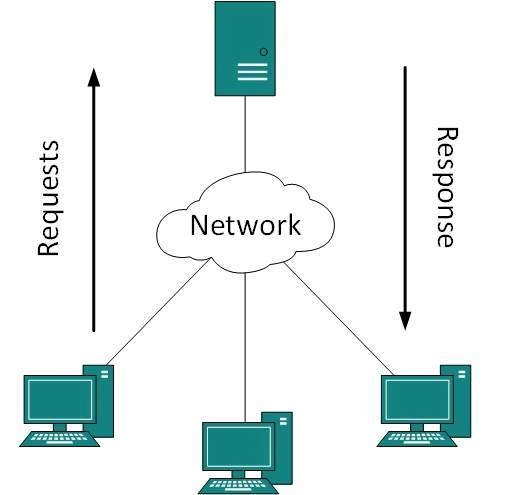
The Client/ Server model is a network architecture where clients request services to a centralized server and that server provide those services, and is one of the most common ways modern applications and the internet work (The leading model we use).
Key benefits of a Client/ Server Model:
Administration and Backup - Since there is only one server, creating a backup of that server and management is much easier
Scalability - Having a singular server allows for an easy migration to the cloud
Downsides to a Client/ Server Model:
Higher Costs - Requires dedicated resources, machines and software, to setup a client/server model
What is a Peer-to-Peer Model (P2P) and its pros and cons?
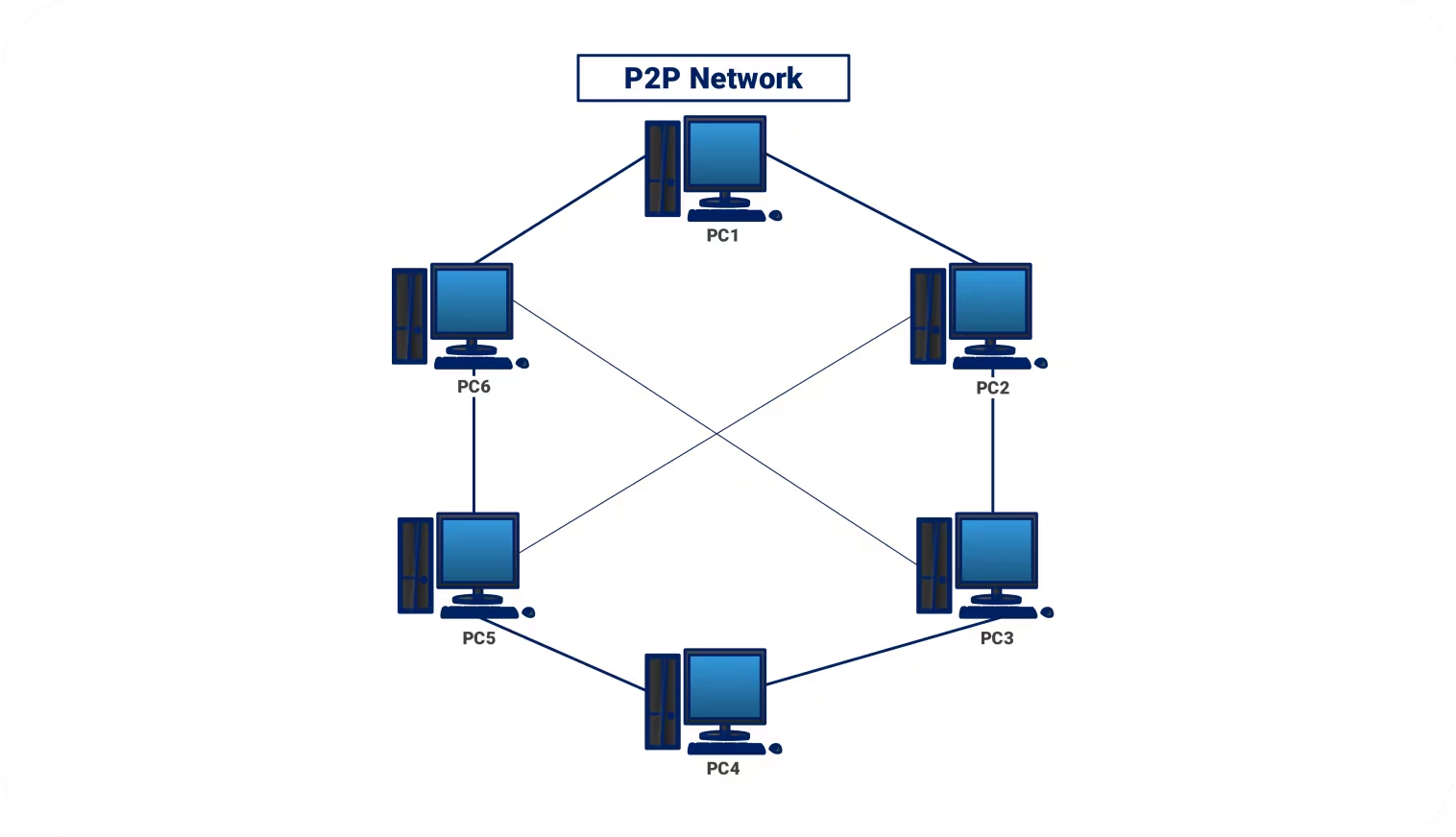
The Peer-to-Peer model is a network architecture where devices communicate directly with each other without a central server, and each device acts as both a client and server. Essentially, P2P is an architecture where machines on the same network can share resources together directly
Key benefits of P2P:
Lower Costs/ No infrastructure setup - There is no specialized hardware setup required, just software that allowed machines to communicate with each other
Downsides of P2P:
Decentralized Management, poor scalability - Since P2P does not have a centralized server, all clients must be backed up individually and managed, thus becomes inefficient for larger networks.
Accessibility - For a client to provide services, it must be online. Online machines can not request resources from offline machines
What network architecture do most companies prefer and why?
Most companies prefer the Client–Server Model over the Peer-to-Peer Model because it is easier to manage, more secure, and more scalable.
In a client–server model, a centralized server provides resources and services to multiple client machines. This centralized structure allows administrators to manage users, data, security policies, and backups from a single location. For example, instead of backing up data from every individual computer on the network, administrators can back up the centralized servers that store the critical data.
In contrast, a peer-to-peer network has no centralized server, and each machine can act as both a client and a server. Because resources and data are distributed across many computers, management becomes more difficult. As the network grows and more machines are added, administrators would need to manage and potentially back up data on many different devices, making the system harder to maintain and secure.
For these reasons, most organizations use the client–server model, especially in large or enterprise environments.
What is a CAN?
A CAN, or Campus Area Network, is a network that connects multiple LANs within a limited geographic area, such as a university campus, business park, or military base. It is larger than a LAN but smaller than a WAN.
What is a MAN?
A MAN (Metropolitan Area Network) is a network that connects multiple LANs across a city or large urban area. It is larger than a CAN but smaller than a WAN.
What is IEEE 802.11?
Wi-Fi (IEEE 802.11) is a wireless networking standard designed to provide connectivity for devices like laptops, smartphones, and IoT devices. It uses radio waves, typically via access points (APs), to allow devices to communicate over a network without cables.
What is IEEE 802.3?
Ethernet (IEEE 802.3) is a wired networking standard that provides high-speed, reliable connections for devices on a LAN. It transmits data through Ethernet cables or fiber optic cables. It specifies how devices communicate over Ethernet, including cabling types, signaling, data rates, and network access methods (like CSMA/CD).
What is a Network Topology?
A Network Topology refers to the arrangement of different elements like links, nodes, clients, and servers that make up a computer network. It is a physical or logical layout of nodes (devices) and connections in a network. It describes how devices are connected and how data flows between them
What is a Physical Network Topology?
A Physical Topology is used to show how the network devices and components are physically cabled and connected together. It is the actual physical layout of devices (nodes) and cables in a network. It shows how devices are physically connected to each other and where cables, hubs, switches, or other network hardware are placed
Essentially a map of all networking hardware (computers, switches, routers, hubs, cables, WAPs, etc.) in a building, office, or business
What is a Logical Network Topology?
A Logical Topology talks about how the traffic is actually going to flow in the network. It is the way data actually flows through a network, regardless of the physical connections between devices. It shows how devices communicate with each other, which may differ from the physical layout
What is the difference between Logical and Physical Network Topologies?
Physical Topology focuses on the physical layout of the cabling and devices while Logical Topology focuses on the logical or network flow of the data
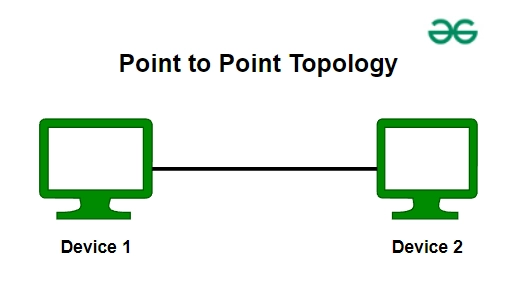
What is a Point-to-Point Network Topology?
A point-to-point topology is a network setup where two devices are directly connected to each other with a dedicated communication link. It is the simplest type of network topology. (Only two devices are involved in Point-to-Point Topology)
Point-to-Point is considered to be simple and reliable for small scale connections but is not practical for larger enterprise networks
What is a Ring Network Topology?
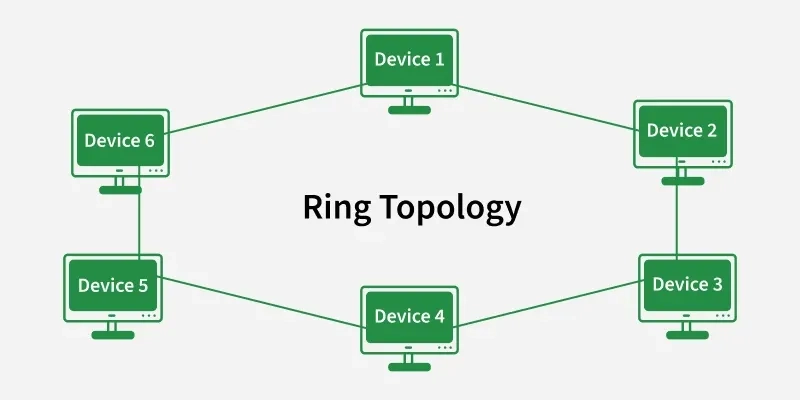
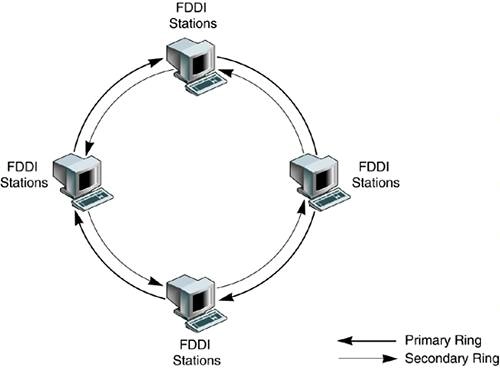
Ring Topology is a network configuration where each device is connected to two other devices, forming a circular data path. Data travels in one or both directions around the loop until it reaches the intended recipient. This topology benefits from preventing data collisions but if one node fails in the ring, it could disrupt the entire network.
Ring Topology offers simplicity but is vulnerable to single points of failure
What is FDDI?
A FDDI, or Fiber Distributed Data Interface, is a network standard that uses a dual-ring topology over fiber optic cables to transmit data at high speeds, typically 100 Mbps. Essentially, a FDDI ring is like having two ring topologies stacked on top of each other, one acts as the primary ring that carries traffic and the other acts as a secondary backup ring. FDDI is designed for LANs or MANs that require high reliability and fault tolerance
What is a Bus Network Topology?
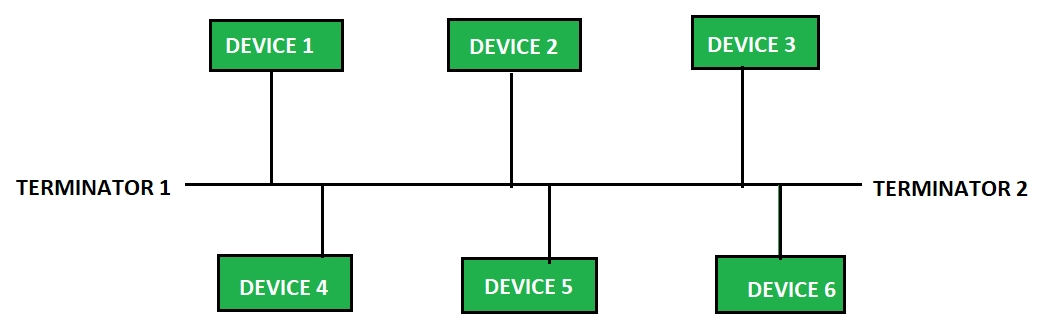
Bus Topology is a network configuration where all devices are connected to a single central cable, called the backbone(or bus). Data sent by a device travels along the backbone and can be received by any device on the network. This is a simple and inexpensive setup has limitations. A break in the backbone can bring down the entire network and performance degrades as devices are added. (older topology and not commonly used)
Bus Topology offers simplicity but is vulnerable to single points of failure
What is a Star Network Topology?
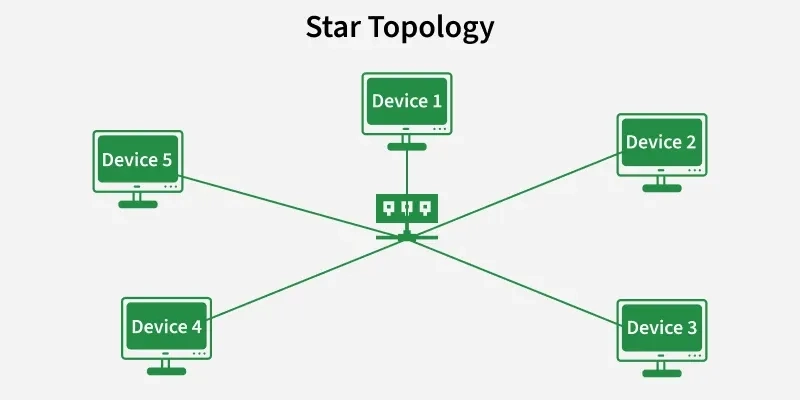
A Star Topology is a network configuration where all devices (nodes are connected to a central device, typically a switch or hub. All data between devices passes through this central point. The central device manages data flow and allows for easy additions or removal of devices without affecting the network
Star Topology provides a centralized network management but rely heavily on the functioning of the central point (Switch)
What is a Hub-and-Spoke Network Topology?
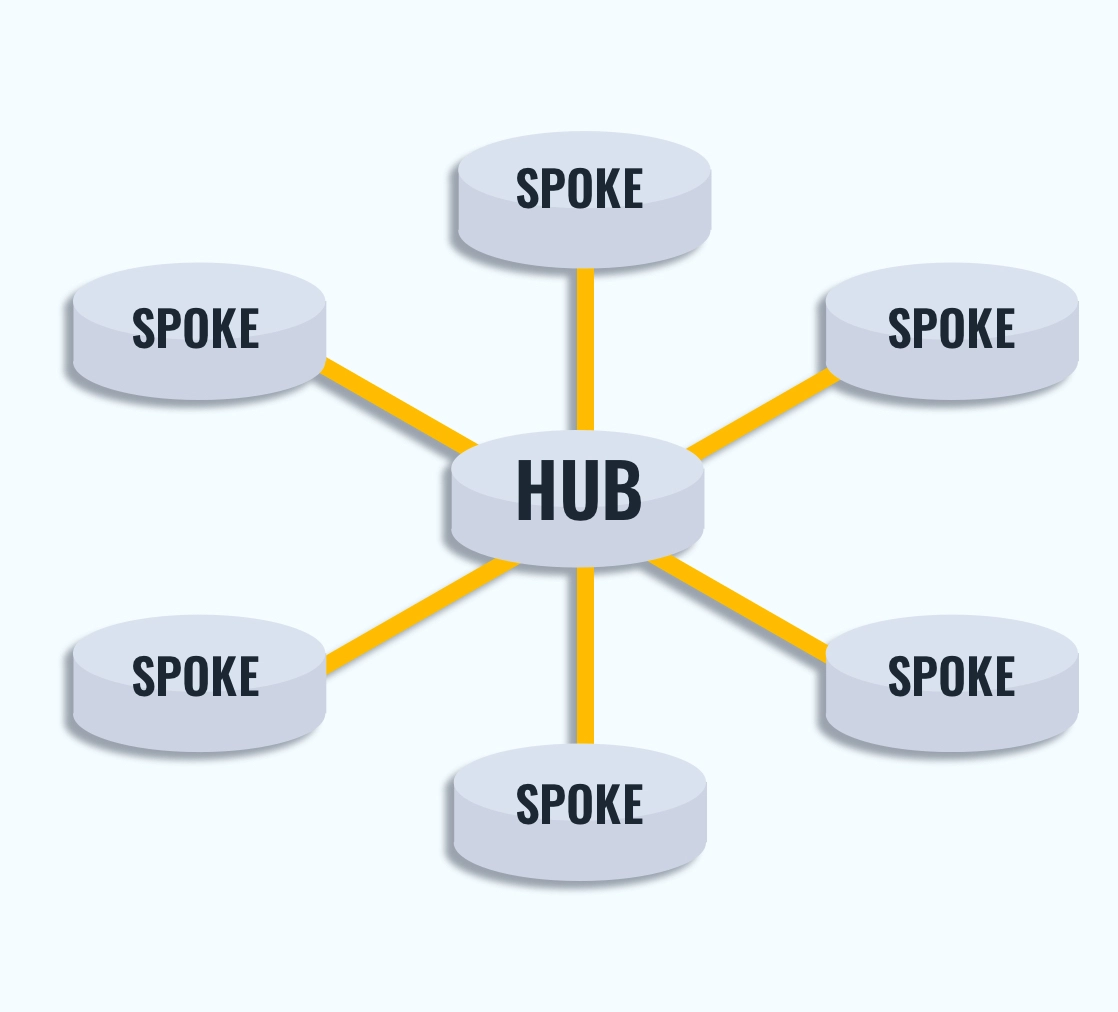
A Hub-and-Spoke Topology is a variation of the star topology where a central hub or switch is connected to multiple remote sites called spokes. Each spoke can itself be a star topology, connecting multiple devices locally. All communication between spokes passes through the central hub, which acts as the main point of control.
Hub-and-Spoke Topology provides a centralized network management but rely heavily on the functioning of the central point (Hub)
What is a Full-Mesh Network Topology?
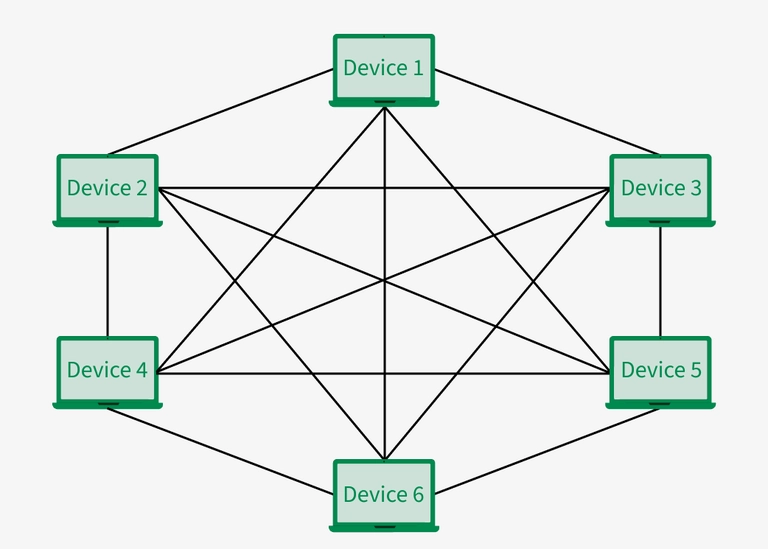
A Full-Mesh Topology is a network configuration where every device, or node, is directly connected to every other device. Essentially, there is a point-to-point connection between all devices on the network, creating paths for data to travel and providing redundancy and reliability. This topology benefits from fault tolerance - if one link fails, data can take another path, but is quite expensive and complicated to configure
Mesh Topology offers robustness and redundancy but can be complex and costly to implement
What is a Partial-Mesh Network Topology?
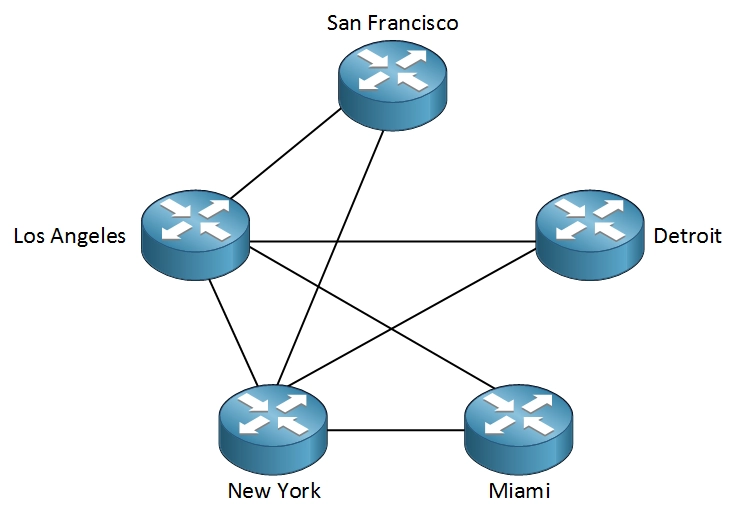
A Partial-Mesh Topology is a network configuration where some nodes are organized in a full-mesh scheme, while others are only connected to one or two devices in the network. This provides redundancy and reliability, but with less cost and complexity than a Full-Mesh Topology
Mesh Topology offers robustness and redundancy but can be complex and costly to implement
What is a NIC?
A NIC, or Network Interface Card, is a hardware component that allows a device to connect to a network. It acts as the interface between a computer and the network so the device can send and receive data.
It connects a device to a network (LAN or Internet) and provides a unique identifier called a MAC address

