CA Week 12 Notes
 Studied by 0 people
 Call Kai
 Learn
Learn Practice Test
 Spaced Repetition
 Match
Match Flashcards
 Knowt Play
1/68

Earn XP
Description and Tags
Databases
Name | Mastery | Learn | Test | Matching | Spaced | Call with Kai |
|---|
No analytics yet
Send a link to your students to track their progress
69 Terms
Database Examples
When we think of databases, we often think of tables of information:
iTunes shows the title, artist, running time in a row
Your car’s information is one line in the state’s database of automobile registrations
The U.S. is a row in the demography table for the World Factbook's listing of country name, population, etc.
How are databases different from tables of information?
Databases are different because not just data, but data with INFORMATION tied to it (metadata)
Metadata in databases enables…
Content search
Two most important roles in defining metadata
Identifying the type of data: Each different type of value is given a unique tag
Define the affinity of the data: Tages enclose all data that is logically related (how they are associated with each other
____ is a language for Metadata Tags
XML
XML Stands for…
Extensible Markup Language
Information about XML/Extensible Markup Language
A tagging scheme
No standard tags to learn
Tags are created AS needed (not standardized ones like in HTML)
A self-describing language
T/F there is a required first line with XML language
TRUE it is: <?xml version="1.0" encoding="UTF-8"?>
XML: First tag
Root element that encloses all other tags
XML: Element naming
NO SPACES in tags!!
don’t start with xml or XML
No numbers or punctuation
Can be alphanumeric with underscores only
XML: Closing Tags
Matched pairs: <tag></tag> or singletons <tag/>
XML: Case Sensitivity
Tags and attributes are case-sensitive
XML: Proper nesting
All tags must be correctly nested
XML: Attribute quoting
Use straight NOT CURLY single or double quotes
XML: White Space
White space is preserved and converted into single space
XML: Comments
take the form <!-- this is a comment -->
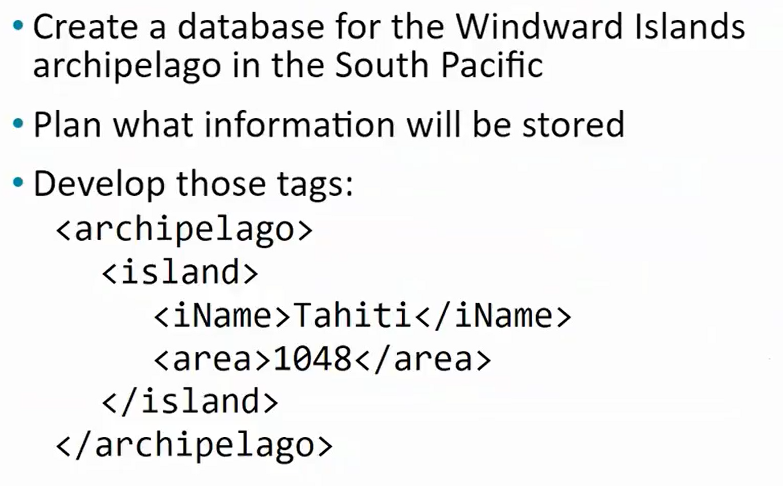
Example of XML
Archipelago is made up of islands and every island has a name and an area
Expanding the Use of XML
Create a database of two similar items/additional items
Put both sets of information in the file
As long as the two sets use the same tags for the common information, they can be combined
Extra data is allowed, and additional tags can be created (such as <a_name> to identify which archipelago is being used)
Building on the Initial XML
Group sets of information by surrounding them with tags
Root element: The tag that encloses all content of the XML file
For our islands XML, the <archipelago> tag was the root element
XML Attributes
Like HTML tags, XML tags have attributes
Must always be set inside straight (not curly) quotation marks
Tag attribute values can be enclosed either in paired single or paired double quotes:
<entry location ="Hawai'i">Da Poke Shack</entry>
Use attributes for additional metadata, not for content
Use of attributes is for additional metadata
To add data to help us identify what the item is
NOT to store content
Do not want to put the store name Da Poke Shack inside of the metadata

Showing expanded XML set
Storing two sets of information
Can always add on
XML is a flexible way to encode _______
metadata
Three encoding rules of XML
Identification Rule
Affinity Rule
Collection Rule
Identification Rule
Label Data with Tags
Allows you to label data with tags consistently
you choose the tags, but once you’ve decided you must ALWAYS surround that kind of data with that tag
Affinity Rule
Group data together that references an entity
Always group data referencing an entity
Enclose a pair of tags all tagged data referring to the same thing
Grouping keeps the data together
Grouping makes an association of the tagged data items as related to each other as features of the same thing
Collection Rule
Group instances
When you have several instances of the same kind of data, enclosing them in tags
Keeps them together and implies that they are instances of the same type
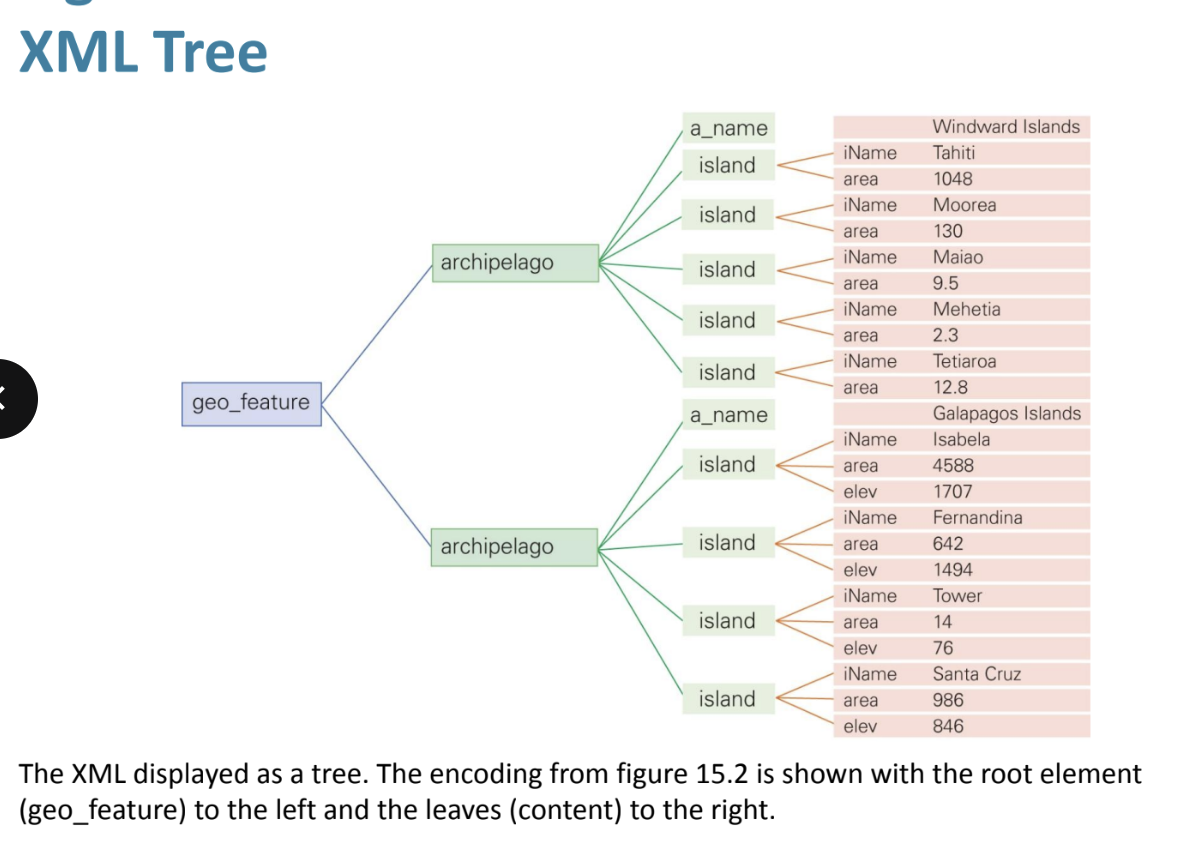
The XML Tree Rules
Produces XML encodings of information produce hierarchical descriptions
Can be thought of as trees
The hierarchy is a consequence of how the tags enclose one another in data
Visual of the XML Tree
Database tables
Any group of things with common characteristics that specifically identify each one
Contain a set of things with common attributes
See visual

Database Table Vocab: Entities
Rows of the database table
Database Table Vocab: Attribute Name
Column heading
Database Table Vocab: Entity Instance
Value in a row
Database Table Vocab: Table Instance
the whole table
Things to know about Database tables
Rows are all different — attributes uniquely identify each one
Even when we don’t know the data for an attribute value it is still a characteristic
Rows and columns can be in any order
Rearranging the rows or columns will result in the same table
All of the same data is still there
If we add (or remove) rows or change values, we create a new table instance (new table)
Two rows can have the same value for some attributes, but NOT ALL attributes
You cannot have two IDENTICAL rows
More information about entities and attributes
Entity: Anything defined by a specific set of attributes
A table exists with a name and column headings, even with no data (an “empty instance”)
Entities have data types which define the form of the information stored as an attribute value (number, text, image, etc.)
Entities (rows) are differentiated data of databases, each one able to be told apart from the others by the difference in their attributes
(column values)
Relations vs. Data Base Tables
Tables are technically called relations, but we’ll call them database tables (so they are the same thing)
Database table rules
Rows MUST always be different, even after adding rows
No perfect duplicates
Be sure the table has all of the attributes (columns) needed to tell the entities apart
You can always add a sequence number to guarantee every row is different
AKA an ID
Keys
By itself, repeated data in a column is not a problem
We are interested in columns in which all of the entries are always different to uniquely identify an entity
Such a column is called a candidate key
Doesn’t have to be just one column (it can be multiple columns together)
Primary Key
A candidate key that the computer and user agree will used to locate unique entries during database operations
Database scheme definition
the database table’s metadata
Information about the database scheme
Succinctly describes a database table
Attributes are listed, one per row
For each attribute, the user specifies its data type and whether or not it is the primary key
Customary to include a brief description
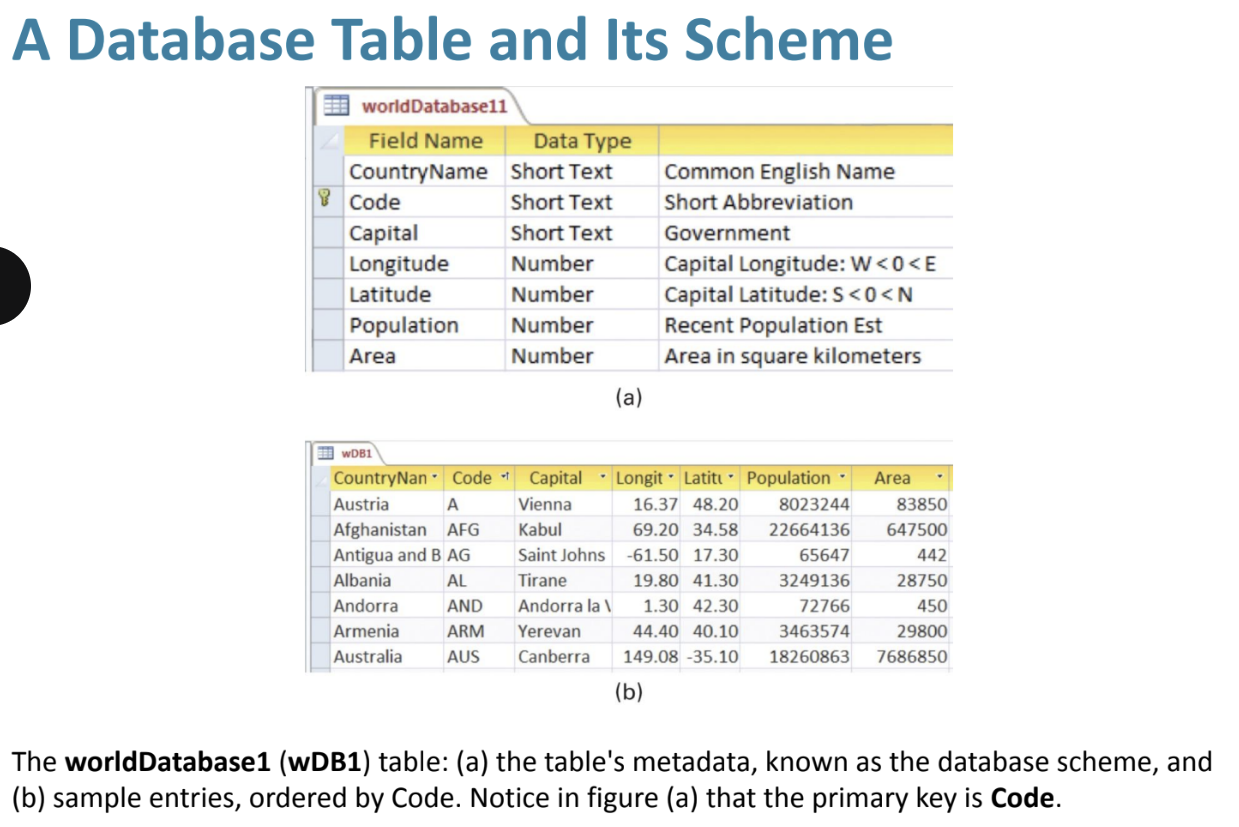
Database and its scheme visual
Top is the scheme and the bottom is what the scheme is describing in the table
To get information from database tables, we write a _____ to describe what we want
query
Query Definition
command that tells the database system how to manipulate its tables to compute the answer
The answer will be in the form of another database table
Six Query Operations
Project (pronounced like projector)
Select
Cross-Product
Union
Difference
Join
Project
Picks out and arranges columns from one database table to create a new, possibly “narrower”, table
Select
Picks out rows according to specified criteria
Cross-Product Operation
combines two tables in a process like multiplication
For each row in the first table, we make a new row by appending a row from the second table
All combinations are in the result
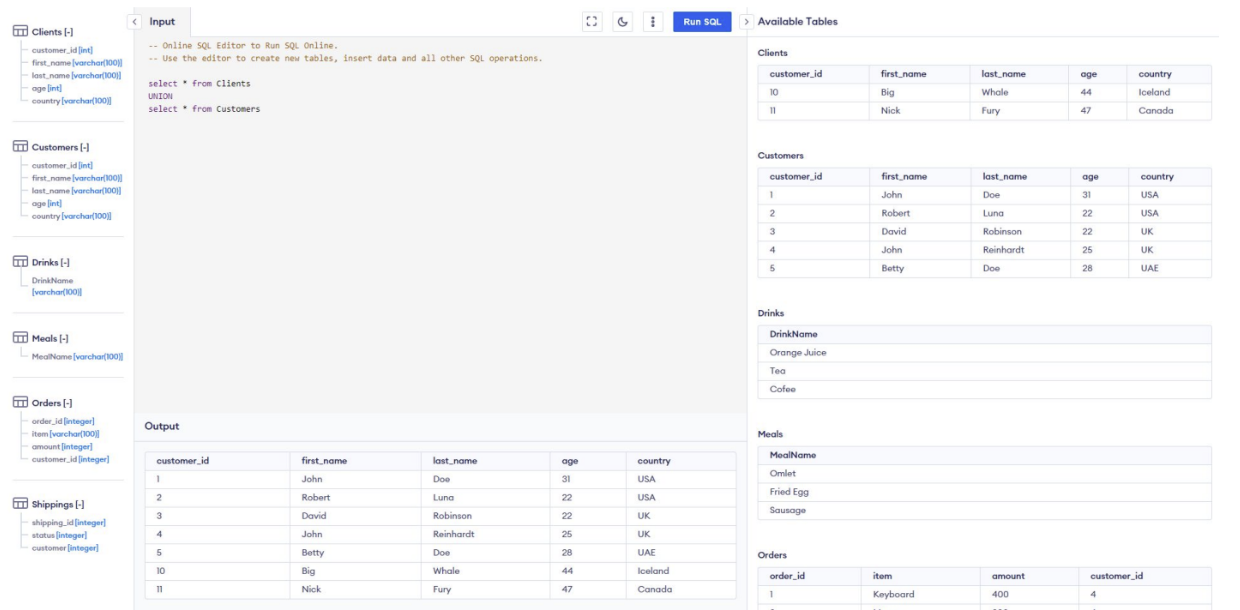
Union
Combines two tables with compatible attributes (same columns)
The result has rows from both tables
For any rows that are in both table, only one copy is included in the result
Difference
Contains the rows of the first table that are not also in the second (OPPOSITE of a Union)
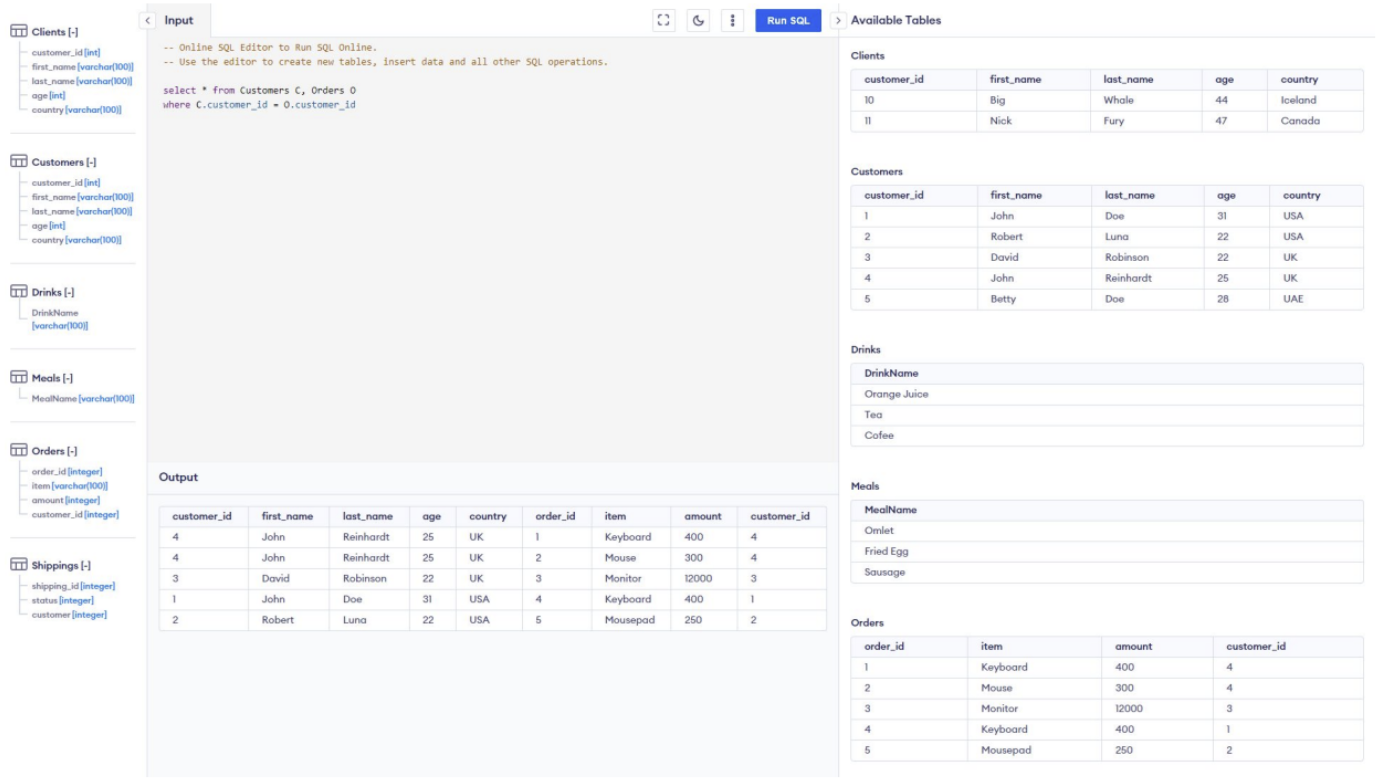
Join
A combination of a cross product followed by a select operation
Takes two database tables, and an attribute from each one (D1.a1 and D2.a2)
Crosses the two tables and then uses Select to find those rows of the cross in which the two attributes match: where D1.a1 = D2.a2
Puts tables together while matching up related data
SQL definition & stands for
The Language of Databases, stands for Structured Query Language
SQL Information
The operations we call Project and Select are combined into one command called select
Uses WHERE you specify the formula
SQL uses INNER JOIN rather than JOIN because it has several variations for joining data
In SQL * means
everything
What does Select * FROM Customers mean?
Select everything in the customers table
SELECT customer_id, first_name, last name FROM Customers; gives us…
A smaller version of the customers table, it is not EVERYTHING that is in the table
SELECT customer_id, first_name, last name FROM Customers
where customer_id>3
further reduces the table that is outputted because now the value in the customer id instance must be greater than 3
Cross Product
Combines two tables in a process like multiplication
For each row in the first table, we make a new row by appending a row form the second table
All combinations are in the result
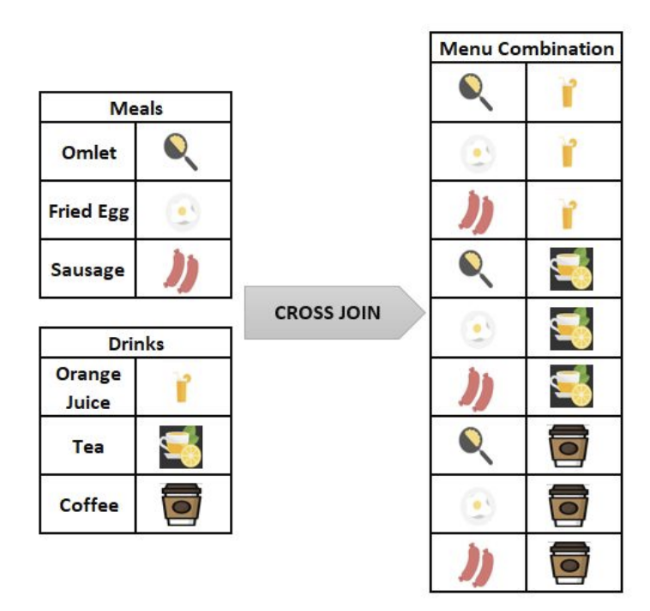
Visual of cross-product/cross join, other side tells you code on how to make it
CREATE TABLE Meals (mealName varchar(255));
Run SQL
CREATE TABLE Drinks (drinkName varchar(255));
Run SQL
INSERT INTO Drinks VALUES (“tea”);
Run SQL
INSERT INTO Drinks VALUES (“orange juice”);
KEEP RUNNING SQL AFTER EACH COMMAND
INSERT INTO Meals VALUES (“sausage”);
INSERT INTO Meals VALUES (“eggs”);
SELECT * Meals
CROSS JOIN Drinks
In order to do a union there must be…
Compatible attributes (like same column names)
visual: note that the clients and customers tables have the same column headings
Join: A Cross-Product followed by a Select operation
Takes two database tables, and an attribute from each one (D1.a1 and D2.a2)
Crosses the two tables and then uses Select to find those rows of the cross in which the two attributes match: where D1.a1 = D2.a2
Puts tables together while matching up related data
OTHER SIDE IS VISUAL!!
Two forms of tables
Physical database
Logical database
Physical database definition
stored on the disk drives of computer systems and is the permanent repository of the database
Physical database infromation
Designed by database administrators
Data must be accessed fast
Set up to avoid redundancy (duplicate information)
Only one copy of each piece of stored data
Want to make sure that there are not duplicates
Logical database definition
known as the view of the database, created for users on-the-fly, customized for their needs
Logical database information
Like what we see on the SQL website
Shows different users the customized view of the
information they need and want
What we need when we need it
Doesn’t exist permanently, but is created every time they need it
Retrieved from the one copy stored in the physical database, and provided to the users as needed
Creating a new copy each time is essential
If it were to be created once and then stored on the user’s computer, then there would be two copies of the information, and they would get out of sync
Review on Queries
Specifications using the five operations and Join to define a table from other tables
Written in Structured Query Language (SQL)
SQL allows a new query to be run each time it is selected or opened, with updated data as input connecting the logical database to the physical one
Summary of Information!!
XML tags are an effective way to record metadata in a file
Metadata is used to identify values; it can capture the affinity among values of the same entity, and can collect a group of entity instances
Database tables have names and fields that describe the attributes of the entities contained in the table
Logical databases (database views) are useful windows into physical databases
 Note
Note  Flashcards (30)