Module 1.2: SQL SELECT Statement
 Studied by 3 people
 Call Kai
 Learn
Learn Practice Test
 Spaced Repetition
 Match
Match Flashcards
 Knowt Play
1/28

Earn XP
Description and Tags
Prelim Topic
Name | Mastery | Learn | Test | Matching | Spaced | Call with Kai |
|---|
No analytics yet
Send a link to your students to track their progress
29 Terms
SELECT statement
It retrieves information from the database. With this, you can use Projection, Selection, and Joining.
Projection
Choose the columns in a table that are returned by a query. Choose as few or as many of the columns as needed.
Selection
Choose the rows in a table that are returned by a query. Various criteria can be used to restrict the rows that are retrieved.
Joining
Bring together data that is stored in different tables by specifying the link between them.
SELECT
(Syntax)
Is a list of one or more columns
*
(asterisk)
(Syntax)
This selects all columns
DISTINCT
(Syntax)
Suppresses duplicates
AS
(syntax)
keyword in SQL to give a column a temporary name, or alias, which serves as the heading in your query's result set.
FROM
(syntax)
specifies the table containing the columns
Keyword
(SQL Terms)
It refers to an individual SQL statement
Ex: SELECT, FROM
Clause
(SQL Terms)
It is a part of a SQL statement
Ex: SELECT employee_id, last_name
Statement
(SQL Terms)
A combination of two or more clauses.
Ex: SELECT * FROM employees
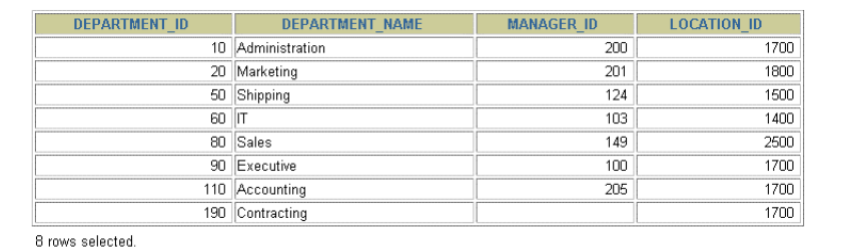
SELECT * FROM departments;
This statement selects all columns of data in the “departments” table.
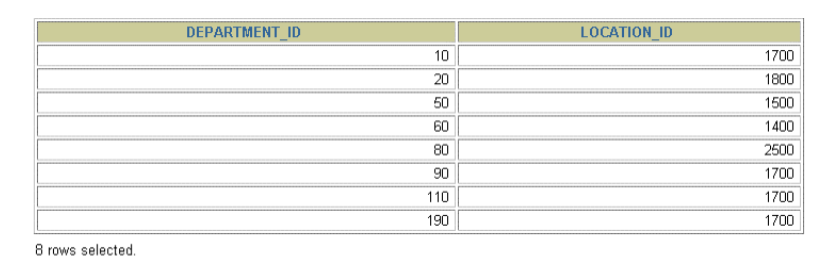
SELECT department_id, location_id FROM departments;
This statement is used to display specific columns of the “departments” table by specifying column names, separated by commas.
This displays the columns department_id and location_id from the departments table
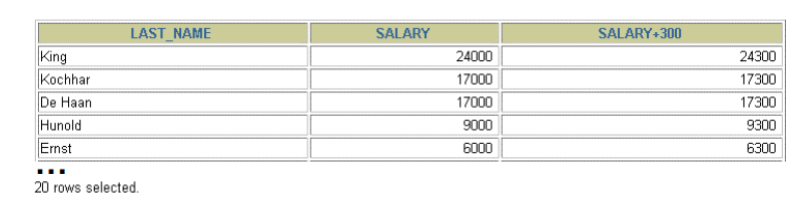
SELECT last_name, salary, salary + 300 FROM employees;
This statement uses the addition operator to calculate a salary increase of 300 for all employees and displays a new SALARY + 300 column in the output.
Displays the “last_name” column, “salary” column, and the salary increase of 300 from the employees table
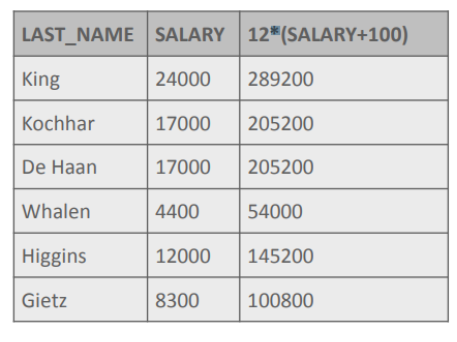
SELECT last_name, salary, 12*(SALARY+100) FROM employees;
You can override rules of precedence by using parenthesis to specify the desired order in which operators are to be executed
This displays the last name, salary, and annual compensation of employees. It calculates the annual compensation as follows: adding a monthly bonus of $100 to the monthly salary, and then multiplying that subtotal by 12.
Because of the parenthesis, addition takes priority over multiplication
NULL
It is a value that is unavailable, unassigned, unknown, or inapplicable.
In a database, you can use this to represent unknown values in your database
True
a NULL value is not the same as a zero or a space
True
if you try to divide by NULL, the result is NULL or unknown
True
If you try to divide by zero, you get an error.
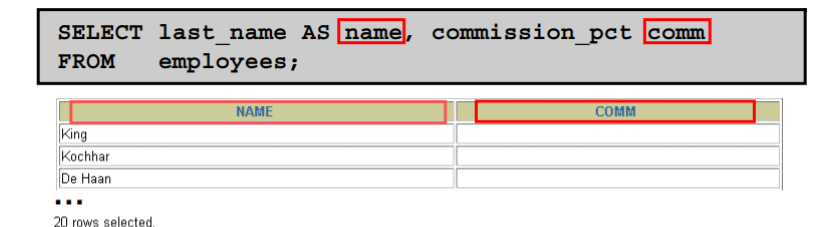
SELECT last_name AS name, commission_pct comm FROM employees;
(Using Column Aliases)
This displays the names and commission percentages of all the employees.
Notice that the optional AS keyword has been used before the column alias name.
The result of the query is the same whether the AS keyword is used or not.
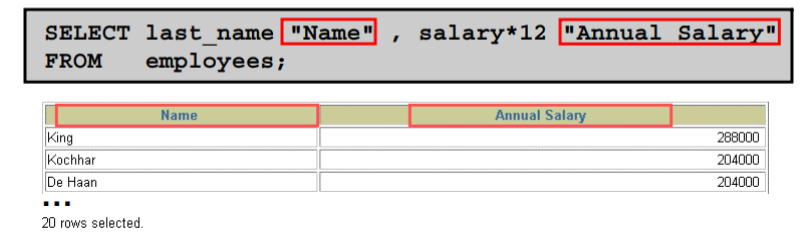
SELECT last_name “Name”, salary*12 “Annual Salary” FROM employees;
(Using Column Aliases)
This displays the last names and annual salaries of all the employees.
Because Annual Salary contains a space, it has been enclosed in double quotation marks. Notice that the column heading in the output is exactly the same as the column alias
True
By default, alias headings appear in uppercase
True
If an alias contains spaces or special characters like # or $, or if it is case sensitive, it is enclosed in double quotation marks (“ “)
True
It is best practice to always use the AS keyword when making an alias for a column to make the statement easier to read
||
The concatenation operator is represented by this
Links columns or character strings to other columns
creates a resultant column that is a character expression
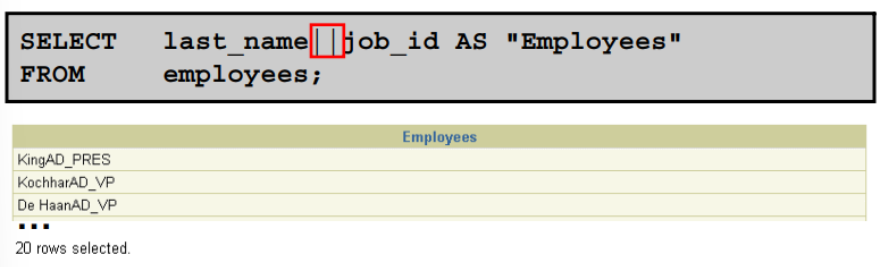
SELECT last_name||job_id AS “Employees” FROM employees;
(Using Concatenation Operator)
In this example, LAST_NAME and JOB_ID are concatenated, and they are given the alias “Employees”
Notice that the employee last name and job code are combined to make single output column.
The AS keyword before the alias name makes the SELECT clause easier to read
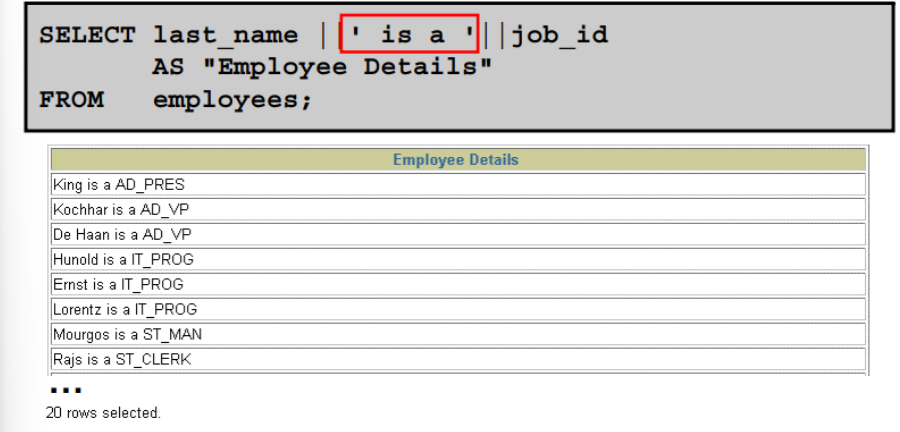
SELECT last_name || ‘is a’ || job_id AS “Employee Details” FROM employees;
(Using Concatenation Operator - Literal Character Strings)
This example displays last names and job codes of all employees. The column has the heading “Employee Details”
Notice the spaces between the single quotation marks in the SELECT statement. The spaces improve the readability of the output.
‘is a’ is an example of a Literal Character Strings and is used as a concatenation to give the returned rows meaning.
SELECT department name || q’ [, it’s assigned Manager Id: ]’ || manager_id AS “Department and Manager” FROM departments;
(Using Concatenation Operator - Alternative Quote (q) Operator)
In the example shown, the string contains a single quotation mark, which is normally interpreted as a delimiter of a character string. By using the q operator, however, the brackets [] are used as the quotation mark delimiter. The string between the brackets delimiters is interpreted as a literal character string.
![<p>(Using Concatenation Operator - Alternative Quote (q) Operator)</p><ul><li><p><span><span>In the example shown, the string contains a single quotation mark, which is normally interpreted as a delimiter of a character string. By using the q operator, however, the </span></span><strong>brackets []</strong><span><span> are used as the quotation mark delimiter. The string between the brackets delimiters is interpreted as a literal character string.</span></span></p></li></ul><p></p>](https://knowt-user-attachments.s3.amazonaws.com/937cd977-033b-4a63-8dcc-5aac30d0a8f9.png)
 Note
Note  Flashcards (92)