A Level Computer Science
0.0(0)
 Studied by 8 people
 Call Kai
 Learn
Learn Practice Test
 Spaced Repetition
 Match
Match Flashcards
 Knowt Play
Card Sorting
1/140

Earn XP
Description and Tags
Last updated 10:35 PM on 8/12/23
Name | Mastery | Learn | Test | Matching | Spaced | Call with Kai |
|---|
No analytics yet
Send a link to your students to track their progress
141 Terms
1
New cards
Units: ALU and CU
Arithmetic Logic Unit (ALU): Carries out calculations and decisions.
\
Control Unit (CU): Controls how data moves around the CPU, moves data between GPU and memory, decodes instructions
\
Control Unit (CU): Controls how data moves around the CPU, moves data between GPU and memory, decodes instructions
2
New cards
4 Registers: MDR, MAR, CIR, ACC
Memory data register (MDR): stores data or instructions that are to be fetched from/sent to memory
\
Memory address register (MAR): stores address of data or instructions that are to be fetched from/sent to memory
\
Current instruction register (CIR): stores the most recently fetched instruction
\
Accumulator (ACC): stores results of calculations made by ALU
\
Memory address register (MAR): stores address of data or instructions that are to be fetched from/sent to memory
\
Current instruction register (CIR): stores the most recently fetched instruction
\
Accumulator (ACC): stores results of calculations made by ALU
3
New cards
Purpose of the PC
Program Counter (PC):
Keeps track of memory location of line of machine code being executed, points to next instructions after each FDE cycle
Keeps track of memory location of line of machine code being executed, points to next instructions after each FDE cycle
4
New cards
3 Buses
Data: Carries data between processor and memory
Address: Carries address of the memory being used
Control: Sends control signals from control unit
Address: Carries address of the memory being used
Control: Sends control signals from control unit
5
New cards
FDE cycle
Fetch: Contents of PC are fetched, +1 to counter
Decode: The instruction is decoded
Execute: Executes the instruction
Decode: The instruction is decoded
Execute: Executes the instruction
6
New cards
Factors affecting performance of GPU
1\. Clock speed
2\. Core count: like lots of little computers
3\. Amount of cache
4\. Pipelining
2\. Core count: like lots of little computers
3\. Amount of cache
4\. Pipelining
7
New cards
What is cache
Cache: Temporary store info to let it be accessed faster
8
New cards
Pipelining
Pipelining: Different parts of CPU work on different parts of FDE, speeds up
\
Works if instructions can be predicted
\
Works if instructions can be predicted
9
New cards
Pipelining: Different parts of CPU work on different parts of FDE, speeds up
\
Works if instructions can be predicted
\
Works if instructions can be predicted
Von Neumann Architecture: Single control, arithmetic, memory store
\
Harvard Architecture: Separate memory units, buses for data. Less “traffic”
\
Harvard Architecture: Separate memory units, buses for data. Less “traffic”
10
New cards
Contemporary processors
Simultaneous multithreading: 2 “threads” run on 1 core at once
\
Out of order execution: Instructions execute ahead, if resource available
\
Branch prediction: Predicts where program will go
\
Variable clock speed: Can increase clock speed
\
Power conservation: No use parts that aren’t needed
\
Out of order execution: Instructions execute ahead, if resource available
\
Branch prediction: Predicts where program will go
\
Variable clock speed: Can increase clock speed
\
Power conservation: No use parts that aren’t needed
11
New cards
Types of processor
RISC (Reduced Instruction Set Computing): Smaller range of instructions, so fewer transistors needed, so less power is required, so less cost to produce, take 1 clock cycle instead of several, so easier to pipeline, fewer addressing modes than CISC
\
CISC (Complex Instruction Set Computing)
\
CISC (Complex Instruction Set Computing)
12
New cards
GPUs
GPU (Graphics processing unit):
Used in modelling physical systems, machine learning, breaking passwords. etc.
Used in modelling physical systems, machine learning, breaking passwords. etc.
13
New cards
Parallel processing
Parallel processing: Many computations carried out simultaneously to solve a problem
\
SIMD: Same instruction on multiple data
\
MIMD: Different instructions on different data
\
SIMD: Same instruction on multiple data
\
MIMD: Different instructions on different data
14
New cards
Input devices
Input: Keyboards, mice, microphones, scanners, joysticks etc.
15
New cards
Output devices
Output: Printers, speakers, monitors, actuators
16
New cards
Storage devices categories
Magnetic: High capacity, low-cost. Unsuitable for portable devices.
Example: hard disk drive
\
Optical: Resilient, low-cost. Uses lasers. Example: blue-ray
\
Flash: Low power consumption, read from and written to at high speeds, high-cost.
Example: USB memory stick
Example: hard disk drive
\
Optical: Resilient, low-cost. Uses lasers. Example: blue-ray
\
Flash: Low power consumption, read from and written to at high speeds, high-cost.
Example: USB memory stick
17
New cards
RAM (Random access memory)
RAM:
\- Volatile (loses its content when power is lost)
\- Read from or write to
\- Used to store part of operating systems, programs that are currently in use
\- Volatile (loses its content when power is lost)
\- Read from or write to
\- Used to store part of operating systems, programs that are currently in use
18
New cards
ROM (read-only memory)
ROM:
\- Non-volatile
\- Read only
\- Used to store computer’s boot program
\- Non-volatile
\- Read only
\- Used to store computer’s boot program
19
New cards
Virtual storage
Virtual Storage: Storage can be added without new hardware
\
Requires internet connection though
\
Requires internet connection though
20
New cards
4 functions of the Operating System (OS)
Functions of OS:
\- Manage system hardware
\- Manage installation and running of programs
\- Manage security
\- Provide UI
\- Manage system hardware
\- Manage installation and running of programs
\- Manage security
\- Provide UI
21
New cards
Paging and Segmentation
Paging: Memory is split into equal-size chunks, called pages
\
Segmentation: Memory is split according to logical breaks within the program
\
Segmentation: Memory is split according to logical breaks within the program
22
New cards
Disk thrashing
Disk Thrashing: When a computer has to swap too often it slows it down.
\
Use of virtual memory as extension of the computer’s memory.
RAM Is a lot more expensive than virtual memory.
Pages stored in virtual memory when not needed and swapped when needed.
\
\
Use of virtual memory as extension of the computer’s memory.
RAM Is a lot more expensive than virtual memory.
Pages stored in virtual memory when not needed and swapped when needed.
\
23
New cards
What are Interrupts
Interrupts: At the end of each F-D-E cycle, the processor checks for interrupts.
\
If there are, and they are of sufficient priority, the interrupt service routine is carried out. Interrupts are carried in order of priority
\
If there are, and they are of sufficient priority, the interrupt service routine is carried out. Interrupts are carried in order of priority
24
New cards
5 Scheduling Algorithms
Round robin: Each process gets fixed amount of time
First come first serve: Trivial
Shortest job first: Needs to know the time each job will take
Shortest remaining time: Has to estimate time of each process
Multilevel feedback queue: Priority system
First come first serve: Trivial
Shortest job first: Needs to know the time each job will take
Shortest remaining time: Has to estimate time of each process
Multilevel feedback queue: Priority system
25
New cards
5 Types of operating systems
Distributed: Multiple computers work together on a single task
Embedded: Runs on embedded systems, eg washing machine, fridge, etc.
Multitasking: Run multiple programs at once
Multi-user: Allows multiple users to use the system simultaneously
Real-time: Runs actions within a guaranteed amount of time. eg Autopilot on plane
Embedded: Runs on embedded systems, eg washing machine, fridge, etc.
Multitasking: Run multiple programs at once
Multi-user: Allows multiple users to use the system simultaneously
Real-time: Runs actions within a guaranteed amount of time. eg Autopilot on plane
26
New cards
BIOS
BIOS: gets the computer up and running
27
New cards
Device drivers
Device drivers: Software that tells the OS how to communicate with the hardware
28
New cards
2 Software types
Applications software: Lets users perform tasks or produce something. eg photoshop, word, browser
\
Utility software: Small program that has one purpose. eg antivirus, backup
\
Utility software: Small program that has one purpose. eg antivirus, backup
29
New cards
Closed source vs Open source
Closed source: Only machine code is distributed. Usually made by companies with lots of developers
\
Open source: Anyone can modify the source code to their needs, and update the program, Usually free, as no developers needed, users are the ones responsible for upkeep
\
Open source: Anyone can modify the source code to their needs, and update the program, Usually free, as no developers needed, users are the ones responsible for upkeep
30
New cards
Compilers and Interpreters
Compilers: Converts high-level code to machine code. Can be run instantly, no need for extra software, makes source code inaccessible.
\
Interpreter: Reads and executes high-level code line by line. Used in developing.
\
Interpreter: Reads and executes high-level code line by line. Used in developing.
31
New cards
4 steps how Compilers work
Lexical analysis: Identifies parts that make up the program, creates symbol table to keep track of variables and subroutines
\
Syntax analysis: Analysis of structure of the language (if rules are followed)
\
Code generation: Abstract code is converted to object code
\
Code optimisation: Tweaks the code so it runs as efficiently as possible, e.g. optimising for speed and using as little memory as possible.
\
Syntax analysis: Analysis of structure of the language (if rules are followed)
\
Code generation: Abstract code is converted to object code
\
Code optimisation: Tweaks the code so it runs as efficiently as possible, e.g. optimising for speed and using as little memory as possible.
32
New cards
Libraries & Linker
Libraries: Code already written and compiled and packaged as a library.
Can be reused by other programmers.
It saves a lot of time, and can be used with multiple languages
\
Linker: Combines compiled code from a library into a single executable file
Can be reused by other programmers.
It saves a lot of time, and can be used with multiple languages
\
Linker: Combines compiled code from a library into a single executable file
33
New cards
Waterfall Lifecycle
Waterfall Lifecycle:
Each stage started after previous complete
\
Works for low-risk projects, when the outcome is expected and everyone has clear responsibilities
\
Not suited for high-risk projects, if a problem is discovered at a later stage, a lot of work may have been wasted
Each stage started after previous complete
\
Works for low-risk projects, when the outcome is expected and everyone has clear responsibilities
\
Not suited for high-risk projects, if a problem is discovered at a later stage, a lot of work may have been wasted
34
New cards
Rapid Application Development
Rapid application development:
Prototype is built, evaluated, then improved
\
Good for projects where the requirements aren’t entirely clear
\
Works for small projects and small teams but does not scale well
\
Will have excellent usability , but not particularly efficient code
Prototype is built, evaluated, then improved
\
Good for projects where the requirements aren’t entirely clear
\
Works for small projects and small teams but does not scale well
\
Will have excellent usability , but not particularly efficient code
35
New cards
Spiral Model
Spiral model:
Objectives determined, risks are identified, part of the project worked on is made and tested, then a plan is made what will happen at next iteration of the spiral
\
Manages risk well but requires people skilled in risk management
Objectives determined, risks are identified, part of the project worked on is made and tested, then a plan is made what will happen at next iteration of the spiral
\
Manages risk well but requires people skilled in risk management
36
New cards
Agile Methodologies
Agile methodologies:
Group of methods focusing on the quality of the software
\
Example: Extreme Programming
\
Extreme Programming:
\
Program is coded, tested and improved Pair programming is used: One writes the code, the other analyses it. And switching roles at regular intervals.
\
Quality of such code is high, as emphasis on programming is high
Group of methods focusing on the quality of the software
\
Example: Extreme Programming
\
Extreme Programming:
\
Program is coded, tested and improved Pair programming is used: One writes the code, the other analyses it. And switching roles at regular intervals.
\
Quality of such code is high, as emphasis on programming is high
37
New cards
4 High-level Paradigms
Procedural: Instructions given in a sequence
\
Object-oriented: Solution is represented by objects that interact
\
Functional: Solution is built from functions
\
Declarative: Characteristics of a solution are stated, rather than how the problem is solved
\
Object-oriented: Solution is represented by objects that interact
\
Functional: Solution is built from functions
\
Declarative: Characteristics of a solution are stated, rather than how the problem is solved
38
New cards
Procedural Languages
Procedural languages: Programs are broken into subroutines. These can be combined to form a solution
39
New cards
4 Ways of addressing memory
Direct addressing: LDA 6 loads the Content of Location 6
\
Indirect addressing: Same as Direct, but the final output is LOADED as well (aka repeating)
\
Indexed addressing: Adds the value of the index to the LDA 6 so it will be LDA 11 if index
\
Immediate addressing: Loads the required value, and not the address. LDA 6 would load 6 itself
\
Indirect addressing: Same as Direct, but the final output is LOADED as well (aka repeating)
\
Indexed addressing: Adds the value of the index to the LDA 6 so it will be LDA 11 if index
\
Immediate addressing: Loads the required value, and not the address. LDA 6 would load 6 itself
40
New cards
Definitions of: Class, Object, Attribute, Method, Inheritance, Encapsulation, Polymorphism
Class: Templated used to define an object
\
Object: Instance of a class
\
Attribute: Variable contained within and associated to an object
\
Method: A subroutine associated with an object
\
Inheritance: Class inherits the methods and attributes of parent class, the child can have its own Encapsulation: Private attributes can only be amended with public methods.
\
Polymorphism: Ability for objects of different classes to be treated the same way. E.g. a House and a Bungalow
\
Object: Instance of a class
\
Attribute: Variable contained within and associated to an object
\
Method: A subroutine associated with an object
\
Inheritance: Class inherits the methods and attributes of parent class, the child can have its own Encapsulation: Private attributes can only be amended with public methods.
\
Polymorphism: Ability for objects of different classes to be treated the same way. E.g. a House and a Bungalow
41
New cards
Lossy vs lossless
Lossy: Information is removed. Used on image, video, sound. etc.
Lossy will not feel different, but on a bit level it will take less space.
Artefacts occur when there is too much compression. eg JPEG, MP3, MP4
\
Lossless: No information removed.
Used in document and program files. Less reductions. eg PNG
Lossy will not feel different, but on a bit level it will take less space.
Artefacts occur when there is too much compression. eg JPEG, MP3, MP4
\
Lossless: No information removed.
Used in document and program files. Less reductions. eg PNG
42
New cards
Run-length encoding and Dictionary coding
Run length encoding: AAAABBCCCDDDDDDDBBBAAA as 4A2B3C7D3B3A
\
Dictionary coding: Reference and data is stored as numbers, and numbers are typed instead of words. Numbers referring to words.
\
Dictionary coding: Reference and data is stored as numbers, and numbers are typed instead of words. Numbers referring to words.
43
New cards
Symmetric and Asymmetric Encryption
Symmetric: The same key is used for both encrypting and decrypting data. The problem is how to send the key though?
\
Asymmetric: Public key is used to encrypt data, which is known by anyone. The encrypted data has to be decrypted with a private key, which is secret. This takes a lot of power though.
\
Asymmetric: Public key is used to encrypt data, which is known by anyone. The encrypted data has to be decrypted with a private key, which is secret. This takes a lot of power though.
44
New cards
Hashing & 3 key points
Hashing: Function that takes any input and gives fixed-size output. eg 256 letters
\
1\. Must be irreversible: Impossible to find the input given only output.
\
2\. Must be deterministic: Same input will always give same output
\
3\. Must have collision resistance: Reduce number of collisions by making sure all outputs are equally likely.
Collision is 2+ inputs giving same output
\
1\. Must be irreversible: Impossible to find the input given only output.
\
2\. Must be deterministic: Same input will always give same output
\
3\. Must have collision resistance: Reduce number of collisions by making sure all outputs are equally likely.
Collision is 2+ inputs giving same output
45
New cards
3 Uses of Hashing
Uses of hashing:
1\.Passwords. Systems store hash of passwords, not the password itself.
\
2\. Proving a document wasn’t tampered with. Whole computer is hashed, after a while hashed once more. If the hashes are different, its proof it was tampered with.
\
3\. Hash tables. Each piece of data is stored with a key. Allows data be accessed way faster this way rather than having to search for it.
1\.Passwords. Systems store hash of passwords, not the password itself.
\
2\. Proving a document wasn’t tampered with. Whole computer is hashed, after a while hashed once more. If the hashes are different, its proof it was tampered with.
\
3\. Hash tables. Each piece of data is stored with a key. Allows data be accessed way faster this way rather than having to search for it.
46
New cards
Database
Database: Organised in terms of tables, records and fields.
\
Field: Single piece of data. eg Customer id 5, Name 5, Telephone number 5
\
Record: Collection of fields composing an entry. eg Name 1, Name 2, Name 3
\
Table: Complete set of records & fields
\
Field: Single piece of data. eg Customer id 5, Name 5, Telephone number 5
\
Record: Collection of fields composing an entry. eg Name 1, Name 2, Name 3
\
Table: Complete set of records & fields
47
New cards
Flat-file Database
Flat-file database: Like an excel spreadsheet
48
New cards
Relational Databases, primary, foreign keys and secondary key
Relational databases: Based on multiple tables
\
Primary key: A field that has a unique value for every record in the table. eg booking ID in hotel, or car registration number
\
Foreign key: Creates a link between two tables. eg Table 1: Booking info Table 2: customer info.
Then the foreign key would be Customer id (links both tables)
\
Secondary key: Field by which records are searched, speeds up search time but takes extra space.
\
Primary key: A field that has a unique value for every record in the table. eg booking ID in hotel, or car registration number
\
Foreign key: Creates a link between two tables. eg Table 1: Booking info Table 2: customer info.
Then the foreign key would be Customer id (links both tables)
\
Secondary key: Field by which records are searched, speeds up search time but takes extra space.
49
New cards
4 Entity Relationships
One to one: eg Each employee has one set of pay details, and each pay detail belongs to one employee
\
One to many: eg Each customer can place many orders, but each order belongs only to one customer.
\
Many to many: eg Each order has many items, and each item can be ordered many times. This is very difficult to implement. These relationships are avoided.
\
Many to many can be described as One to Many to One. eg Order, Item-In-Order, Item
\
One to many: eg Each customer can place many orders, but each order belongs only to one customer.
\
Many to many: eg Each order has many items, and each item can be ordered many times. This is very difficult to implement. These relationships are avoided.
\
Many to many can be described as One to Many to One. eg Order, Item-In-Order, Item
50
New cards
2 ways of Capturing Data
OMR: Optical mark recognition: Computer identifies where areas of a form have been shaded. eg multiple choice questions
\
OCR: Optical character recognition: Convert images of typed docs into text
\
OCR: Optical character recognition: Convert images of typed docs into text
51
New cards
3 Standard Data Formats (For data exchange)
SQL: Transfer data between systems
\
CSV: Comma-separated value. Each field is separated by a comma
\
JSON: JavaScript Object notation. Things are represented as objects, which contain other objects.
\
CSV: Comma-separated value. Each field is separated by a comma
\
JSON: JavaScript Object notation. Things are represented as objects, which contain other objects.
52
New cards
3 steps to Normalisation
First normal form: Data in every field is atomic (cannot be broken down). No fields repeat, Every record has a primary key.
\
Second normal form: Every field must only depend on all of the primary keys.
\
Third normal form: No field must depend on any field other than the primary key
\
The key, the whole key, and nothing but the key
\
Second normal form: Every field must only depend on all of the primary keys.
\
Third normal form: No field must depend on any field other than the primary key
\
The key, the whole key, and nothing but the key
53
New cards
7 SQL Commands
SELECT ... FROM: Retrieve specific fields from a specified table. eg SELECT forename FROM customer
\
WHERE: Filter results that are returned. eg SELECT forename FROM customer WHERE surname = “Khan”
\
LIKE: Used with WHERE to select fields that match a pattern. eg SELECT Name, Abbreviation FROM States WHERE Name LIKE ‘New %’DELETE: Delete code. eg DELETE FROM Customer WHERE forename = ‘Jason’
\
INSERT: Add records into a table. eg INSERT INTO Customer (forename, surname, phone_number VALUES (‘Jason’, ‘Pitt’, ‘0131 0496 0680’), (‘George’, ‘Rouse’, ‘0770 900502’)
\
DROP: Delete the whole table. eg DROP TABLE CustomerJOIN: Combine information.
\
WHERE: Filter results that are returned. eg SELECT forename FROM customer WHERE surname = “Khan”
\
LIKE: Used with WHERE to select fields that match a pattern. eg SELECT Name, Abbreviation FROM States WHERE Name LIKE ‘New %’DELETE: Delete code. eg DELETE FROM Customer WHERE forename = ‘Jason’
\
INSERT: Add records into a table. eg INSERT INTO Customer (forename, surname, phone_number VALUES (‘Jason’, ‘Pitt’, ‘0131 0496 0680’), (‘George’, ‘Rouse’, ‘0770 900502’)
\
DROP: Delete the whole table. eg DROP TABLE CustomerJOIN: Combine information.
54
New cards
Referential integrity
Referential integrity: Guarantee the consistency of a database by making sure no record points to a record that does not exist
55
New cards
Transaction processing and A.C.I.D.
Atomicity: Change is performed or not performed. Half-finished changes must halt.
\
Consistency: Databases have rules. Transactions should never break these rules
\
Isolation: Transaction must not be able to be affected by a different one.
\
Durability: Once written, transactions must not be lost.
\
Consistency: Databases have rules. Transactions should never break these rules
\
Isolation: Transaction must not be able to be affected by a different one.
\
Durability: Once written, transactions must not be lost.
56
New cards
Record locking
Record locking: Issues may arise if many people try to access the same database
\
Prevents anyone accessing a record in use by another person
\
Prevents anyone accessing a record in use by another person
57
New cards
Redundancy
Redundancy: Companies can create mirror databases, which are perfect clones.
If the original database fails, the server can switch to the mirrored one.
If the original database fails, the server can switch to the mirrored one.
58
New cards
Layering
Layering: Dividing a complex system into separate slices of functionality
\
Allows the creation and maintenance of parts of a system without having to take the whole system into the account
\
Protocols on each layer only communicate with protocols above or below.
\
Allows the creation and maintenance of parts of a system without having to take the whole system into the account
\
Protocols on each layer only communicate with protocols above or below.
59
New cards
4 layers of Stack Protocol
Application layer: Packages data and passes it to the transport layer. eg DNS
\
Transport layer: Concerned with making/breaking connections via routers eg TCP
\
Internet layer: Provides links across different network types. eg IPv6
\
Link layer: Passes data to the physical network. eg Can work with stuff like copper wire, optical fibre/ wireless etc.
\
Transport layer: Concerned with making/breaking connections via routers eg TCP
\
Internet layer: Provides links across different network types. eg IPv6
\
Link layer: Passes data to the physical network. eg Can work with stuff like copper wire, optical fibre/ wireless etc.
60
New cards
DNS Hierarchy: 3-tier domain system
Top level domain: com, uk, edu, fr
2nd level domain: org, co
3rd level domain: ocr, bbc, hodder
2nd level domain: org, co
3rd level domain: ocr, bbc, hodder
61
New cards
LANs and WANs
Local area network (LAN): Networks in defined, limited location. Could be room, building, etc. Infrastructure is owned by organisations.
\
Wide area networks (WAN): Cover a large geographical area. Made from many LANs.
\
Wide area networks (WAN): Cover a large geographical area. Made from many LANs.
62
New cards
4 tiers to Packet switching
Contents: Header, payload, trailer.
\
Header: Source address, destination address, packet sequence number, protocol.
\
Payload: Data
\
Trailer: Calculation for error, end of packet market.
\
Benefit: Performs better for multiple users, does not tie up large chunks of a network. If one route is unavailable, there are always others. One of examples of how redundancy can boost reliability.
\
Header: Source address, destination address, packet sequence number, protocol.
\
Payload: Data
\
Trailer: Calculation for error, end of packet market.
\
Benefit: Performs better for multiple users, does not tie up large chunks of a network. If one route is unavailable, there are always others. One of examples of how redundancy can boost reliability.
63
New cards
Firewalls
Firewalls: Protects a network by monitoring traffic going into and out of the network
\
Usually hardware devices Inspect packets of data entering and leaving the network
\
Can block these packets according to rules
Can restrict access to certain sites or file types
\
Usually hardware devices Inspect packets of data entering and leaving the network
\
Can block these packets according to rules
Can restrict access to certain sites or file types
64
New cards
4 uses of Proxies
Proxies: Sits between a network and the internet.
\
1\. Caching: Proxies keep copies of data that has been downloaded from the internet.
Downside: file or website might get out of date, but it is faster to access this way
\
2\. Logging and monitoring traffic: Like a firewall.
\
3\. Security: External users only have contact with the proxy. Cannot see or access devices inside the network
\
4\. Privacy: The IP request comes from the proxy, not from the user, as far as a website is concerned.
\
1\. Caching: Proxies keep copies of data that has been downloaded from the internet.
Downside: file or website might get out of date, but it is faster to access this way
\
2\. Logging and monitoring traffic: Like a firewall.
\
3\. Security: External users only have contact with the proxy. Cannot see or access devices inside the network
\
4\. Privacy: The IP request comes from the proxy, not from the user, as far as a website is concerned.
65
New cards
6 Network Hardware pieces
Network interface card: Allows computer to connect to a network
\
Router: To connect to networks on the internet
\
Hub: Connects other devices to form a network, broadcasts all data everywhere, the correct destination accepts the data
\
Switches: Connects other devices to form a network. Has ports. Keeps track of addresses of devices connected to each port.
\
Wireless access point: Connected to a wired network, provides a wireless signal
Other devices use wireless to connect to Wi-Fi networks. Range: 100 metres
\
Transmission media: For short distances copper cables are used. For longer distances, fibre optic is used.
\
Router: To connect to networks on the internet
\
Hub: Connects other devices to form a network, broadcasts all data everywhere, the correct destination accepts the data
\
Switches: Connects other devices to form a network. Has ports. Keeps track of addresses of devices connected to each port.
\
Wireless access point: Connected to a wired network, provides a wireless signal
Other devices use wireless to connect to Wi-Fi networks. Range: 100 metres
\
Transmission media: For short distances copper cables are used. For longer distances, fibre optic is used.
66
New cards
Client-server and peer to peer
Client-server: Client computers need not be powerful.
Servers provide services such as file storage and access, printing, internet access, security features (logins, audits)
\
Peer-to-peer: Each computer on a network has an equal status.
Cheap way to implement a network. Popular way on the internet to pass files between users without the need to go through servers.
Servers provide services such as file storage and access, printing, internet access, security features (logins, audits)
\
Peer-to-peer: Each computer on a network has an equal status.
Cheap way to implement a network. Popular way on the internet to pass files between users without the need to go through servers.
67
New cards
Search Engine Spider
Search Engine Spider:
1\. Visits a page , index the words on that page
\
2\.Follow one of the links and go to the next page to be indexed.
\
3\. Occasionally go to a random page to not get stuck. When a search term is entered, the search engine looks for all the pages that contain all the words entered
1\. Visits a page , index the words on that page
\
2\.Follow one of the links and go to the next page to be indexed.
\
3\. Occasionally go to a random page to not get stuck. When a search term is entered, the search engine looks for all the pages that contain all the words entered
68
New cards
PageRank Algorithm
PageRank Algorithm:
Look at the number of links going to a page and the number of links going out from it.
\
Page with many links pointing to it is likely to be important.
\
This is used to generate a weight for the page, called the PageRank which is used to order the pages returned by the search engine.
\
The PageRank of the site B linking to site A is also taken into account when determining the PageRank of the site A.
Look at the number of links going to a page and the number of links going out from it.
\
Page with many links pointing to it is likely to be important.
\
This is used to generate a weight for the page, called the PageRank which is used to order the pages returned by the search engine.
\
The PageRank of the site B linking to site A is also taken into account when determining the PageRank of the site A.
69
New cards
Server and client-side processing
Server and client-side processing:
Browser requests a page from the server
\
Server runs its scripts to produce the web page to send back
\
Browser receives the page from the server , renders HTML and CSS, and runs any client-side scripts as needed
\
Benefit: Web traffic reduced, fewer delays as the server does less processing, data is validated before being sent to the server. All thanks to client-side processing
\
Trade-off: The user can turn off or amend the client-side script. So it needs to be a guarantee that a script will run the intended way.
Browser requests a page from the server
\
Server runs its scripts to produce the web page to send back
\
Browser receives the page from the server , renders HTML and CSS, and runs any client-side scripts as needed
\
Benefit: Web traffic reduced, fewer delays as the server does less processing, data is validated before being sent to the server. All thanks to client-side processing
\
Trade-off: The user can turn off or amend the client-side script. So it needs to be a guarantee that a script will run the intended way.
70
New cards
Data Types
1\. Integer 7
2\. Floating point 4.6
3\. Boolean True
4\. Character "a"
5\. String "hello"
2\. Floating point 4.6
3\. Boolean True
4\. Character "a"
5\. String "hello"
71
New cards
Skills I need to know
1\. Convert between binary, denary and hexadecimal
\
2\. Convert negative integer into two’s complement
\
3\. Write down the absolute value in binary, then flip the 1s and 0s, add 1
\
4\. Adding, subtracting normally and using two’s complement
\
5\. Using “scientific notation” in binary
\
2\. Convert negative integer into two’s complement
\
3\. Write down the absolute value in binary, then flip the 1s and 0s, add 1
\
4\. Adding, subtracting normally and using two’s complement
\
5\. Using “scientific notation” in binary
72
New cards
Two’s Complement structure
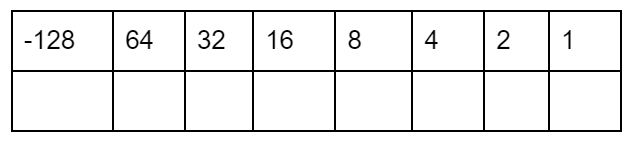
73
New cards
Logical operators, de Morgan's rules, truth tables
Operand: 00 11 01 00
Mask: 11 11 00 00
\
¬ NOT: Reverse the value of each bit
^ AND: Both inputs must be true for the output to be true
v OR: One or both of the inputs must be true for the output to be true
v̲ XOR: Just one of the inputs must be true for the output to be true
\
Truth tables: Complex formulas such as ¬ (A v B) ^ C need to have truth tables expressed for them, step by step
\
De Morgan’s Rules: ¬(A v B) == ¬A ^ ¬B¬(A ^ B) == ¬A v ¬B
Mask: 11 11 00 00
\
¬ NOT: Reverse the value of each bit
^ AND: Both inputs must be true for the output to be true
v OR: One or both of the inputs must be true for the output to be true
v̲ XOR: Just one of the inputs must be true for the output to be true
\
Truth tables: Complex formulas such as ¬ (A v B) ^ C need to have truth tables expressed for them, step by step
\
De Morgan’s Rules: ¬(A v B) == ¬A ^ ¬B¬(A ^ B) == ¬A v ¬B
74
New cards
Karnaugh Maps
Learn more about Karnaugh maps by watching a youtube video
\
Tables of inputs mapped against outputs
\
Four scenarios: 00, 01, 11, 10
\
Tables of inputs mapped against outputs
\
Four scenarios: 00, 01, 11, 10
75
New cards
Half-adder and Full adder
Half adder: Sum is A v B, Carry is A ^ B
\
Full adder: Also has input C(in) from the half-adder.
Made from 2 HALF adders and 1 OR gate NAND (Not and) ¬^
\
Flip-flop circuits: Can exist as either state, storing a 1 or 0.
\
Full adder: Also has input C(in) from the half-adder.
Made from 2 HALF adders and 1 OR gate NAND (Not and) ¬^
\
Flip-flop circuits: Can exist as either state, storing a 1 or 0.
76
New cards
Data Structures
Arrays: Have a scope, can only hold data of the same type, uses a single identifier and an index. eg Names\[4\].
2 dimensional array: Names\[4, 2\]
Frank Hameed Yin Hannah Marta
\
Records:
Eg Bill Wilson, 0222234675, bw@somemail.co.uk
\
Lists: ordered data structure, not needing to define attributes in advance makes it easier to initialise than a record, accessing data is easier
\
Tuples: like lists, but immutable, so data cannot be modified
2 dimensional array: Names\[4, 2\]
Frank Hameed Yin Hannah Marta
\
Records:
Eg Bill Wilson, 0222234675, bw@somemail.co.uk
\
Lists: ordered data structure, not needing to define attributes in advance makes it easier to initialise than a record, accessing data is easier
\
Tuples: like lists, but immutable, so data cannot be modified
77
New cards
Linked list
Linked list: Each element in the list is pointed to by another element, and each element points to another element (unless it's the last or the first element)
78
New cards
Stacks
PUSH: adds to the top of the stack
POP: removes from the bottom of the stack
POP: removes from the bottom of the stack
79
New cards
Queues
PUSH: adds to the end of the queue
POP: removes the first element from the queue
POP: removes the first element from the queue
80
New cards
Graphs
Depth-first traversal:
Visit the first node attached to the starting node, visit all nodes connected to this first node, visit the second node directly attached to the starting nodes, continue until all nodes are visited. Stack
\
Breadth-first traversal: Visit first node attached to the starting node, visit second node, continue until all nodes attached have been visited. Move to the first node attached to the starting node, repeat the process. Queue.
Visit the first node attached to the starting node, visit all nodes connected to this first node, visit the second node directly attached to the starting nodes, continue until all nodes are visited. Stack
\
Breadth-first traversal: Visit first node attached to the starting node, visit second node, continue until all nodes attached have been visited. Move to the first node attached to the starting node, repeat the process. Queue.
81
New cards
Binary Trees traversal
Pre-order: Visit node. Traverse left sub-tree. Traverse right subtree.
\
In-order: Traverse left sub-tree. Visit node. Traverse right subtree.
\
Post-order: Traverse the left sub-tree. Traverse the right subtree. Visit the node.
\
In-order: Traverse left sub-tree. Visit node. Traverse right subtree.
\
Post-order: Traverse the left sub-tree. Traverse the right subtree. Visit the node.
82
New cards
5 points about Data Protection Act 1998
Data Protection Act 1998:
1\. Data should be processed fairly and lawfully
\
2\. Data should be relevant and not excessive
\
3\. Data should be accurate and up to date
\
4\. Data should only be kept for as long as necessary
\
5\. Individuals have the right to access data kept about them Security must be in place to prevent unauthorised access to the data
\
Data may not be transferred outside the EU unless the country has adequate data protection legislation
1\. Data should be processed fairly and lawfully
\
2\. Data should be relevant and not excessive
\
3\. Data should be accurate and up to date
\
4\. Data should only be kept for as long as necessary
\
5\. Individuals have the right to access data kept about them Security must be in place to prevent unauthorised access to the data
\
Data may not be transferred outside the EU unless the country has adequate data protection legislation
83
New cards
Data Protection Act 2018
Data Protection Act 2018:
1\. Lawfulness, fairness and transparency
2\. Purpose limitation
3\. Data minimisation
4\. Accuracy
5\. Storage limitation
5\. Security
6\. Accountability
1\. Lawfulness, fairness and transparency
2\. Purpose limitation
3\. Data minimisation
4\. Accuracy
5\. Storage limitation
5\. Security
6\. Accountability
84
New cards
Exemptions from the Data Protection Act
Exemptions from the Data Protection Act:
\
1\. National security and crime
2\. Data used to assist with the collection of taxes
3\. Any data solely for the individual, family or household use
\
1\. National security and crime
2\. Data used to assist with the collection of taxes
3\. Any data solely for the individual, family or household use
85
New cards
3 points about Computer Misuse Act 1990
Computer Misuse Act 1990:
1\. Unauthorised access to computer material is a criminal offence
\
2\. Unauthorised access with intent to commit or make more offences, is an offence
\
3\. Unauthorised access with intent to harm or break a computer system
1\. Unauthorised access to computer material is a criminal offence
\
2\. Unauthorised access with intent to commit or make more offences, is an offence
\
3\. Unauthorised access with intent to harm or break a computer system
86
New cards
Hacker hats
Black hat: Intent on causing damage or getting personal gain. Criminal and illegal
\
White hat: Ethical hackers that are employed by service owners to seek out vulnerabilities. They have permission so they are not gaining unauthorised access so its legal
\
Grey hat: Seek out vulnerabilities in order to report them to the owner for a fee. Also illegal.
\
White hat: Ethical hackers that are employed by service owners to seek out vulnerabilities. They have permission so they are not gaining unauthorised access so its legal
\
Grey hat: Seek out vulnerabilities in order to report them to the owner for a fee. Also illegal.
87
New cards
5 Features used to minimise the threat from Hackers
1\. Digital signatures: Use encrypted messages to confirm identity of the sender
\
2\. Secure Sockets Layer (SSL): Protocol that enables encrypted links between computers to ensure security of the transaction
\
3\. User IDs, passwords and access rights
\
4\. Anti-malware software
\
5\. Firewalls
\
2\. Secure Sockets Layer (SSL): Protocol that enables encrypted links between computers to ensure security of the transaction
\
3\. User IDs, passwords and access rights
\
4\. Anti-malware software
\
5\. Firewalls
88
New cards
Copyright, Design and Patents Act 1988
Copyright, Design and Patents Act 1988:
\
It is illegal to copy, modify and distribute any copyright material including software with no permission
\
Includes patents, which are not automatic, and have to be applied for
\
It is illegal to copy, modify and distribute any copyright material including software with no permission
\
Includes patents, which are not automatic, and have to be applied for
89
New cards
Open source software vs Proprietary software
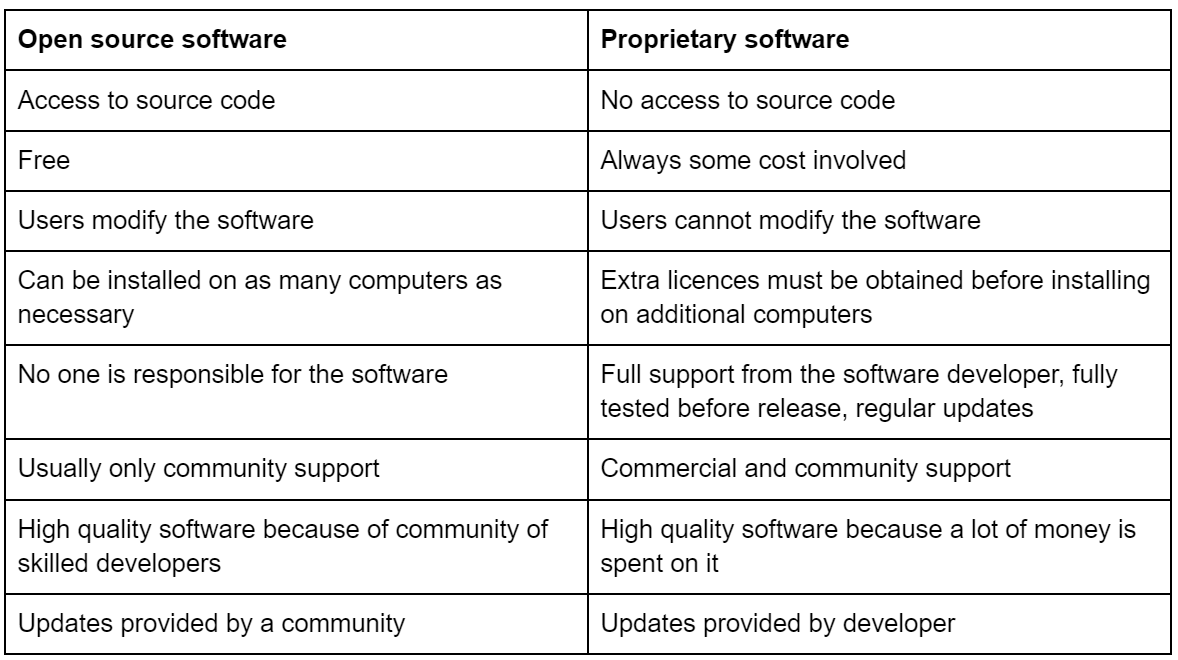
90
New cards
Creative Commons licence
Creative Commons:
\
Public domain: No restrictions
\
Attribution: Like public domain, but owner must be credited
\
Attribution non-commercial: Work can only be used for non-commercial purposes
\
Public domain: No restrictions
\
Attribution: Like public domain, but owner must be credited
\
Attribution non-commercial: Work can only be used for non-commercial purposes
91
New cards
Dangers of Piracy
Dangers of Piracy:
\
1\. Deprives author of some income for their work
\
2\. Risk criminal charges
\
3\. No access to software support
\
4\. May introduce malware onto their system
\
1\. Deprives author of some income for their work
\
2\. Risk criminal charges
\
3\. No access to software support
\
4\. May introduce malware onto their system
92
New cards
Reducing Piracy
Reducing Piracy:
\
1\. Product keys to ensure that only one user with the decryption key can access the material
\
2\. Watermarks that are visible on the product Websites that offer pirated material being shut down
\
1\. Product keys to ensure that only one user with the decryption key can access the material
\
2\. Watermarks that are visible on the product Websites that offer pirated material being shut down
93
New cards
Regulation of Investigatory Powers Act 2000
Regulation of Investigatory Powers Act 2000:
\
1\. Grants rights for police and other government departments to Demand internet service providers to grant access to a customer’s communications
\
2\. Allow mass surveillance of communications Demand access to protected information
\
3\. Allow monitoring of an individual’s internet activities
\
1\. Grants rights for police and other government departments to Demand internet service providers to grant access to a customer’s communications
\
2\. Allow mass surveillance of communications Demand access to protected information
\
3\. Allow monitoring of an individual’s internet activities
94
New cards
Computers in the workplace
Computers in the workplace:
\
1\. Changed skill set required from the modern workforce
\
2\. Fewer traditional high-street shops and more in-person roles
\
3\. Online shopping
\
4\. Online banking
\
1\. Changed skill set required from the modern workforce
\
2\. Fewer traditional high-street shops and more in-person roles
\
3\. Online shopping
\
4\. Online banking
95
New cards
Automated Decision Making
Automated Decision Making:
\
1\. Computers automatically make decisions, analysing data frequently and rapidly
\
2\. Use complex algorithms to reach a decision
\
3\. Important to get these algorithms right in order to avoid incorrect decisions
\
4\. Can make some processes very impersonal
\
1\. Computers automatically make decisions, analysing data frequently and rapidly
\
2\. Use complex algorithms to reach a decision
\
3\. Important to get these algorithms right in order to avoid incorrect decisions
\
4\. Can make some processes very impersonal
96
New cards
Applications of Automated Decision Making
Applications of Automated Decision Making:
\
1\. Electrical power distribution
\
2\. Emergency services
\
3\. Stock market trading
\
4\. Airborne collision avoidance systems in planes
\
5\. Driverless cars
\
6\. Finance, banks decide when someone can get a credit card based on their history
\
1\. Electrical power distribution
\
2\. Emergency services
\
3\. Stock market trading
\
4\. Airborne collision avoidance systems in planes
\
5\. Driverless cars
\
6\. Finance, banks decide when someone can get a credit card based on their history
97
New cards
Machine Learning
Machine Learning:
Many tasks found easy by humans are difficult for computers.
Eg recognising objects, deciding whether a station platform is full or not
Many tasks found easy by humans are difficult for computers.
Eg recognising objects, deciding whether a station platform is full or not
98
New cards
Artificial Neural Networks
Artificial Neural Networks:
\
1\. Learn from data sets with known inputs and outputs
\
2\. Generates weightings for mathematical patterns
\
3\. When new similar but unknown data is provided, it uses these weightings to predict the result
\
4\. If there is difference between actual and predicted result, the network applies this knowledge to adjust the weightings it gives to the rule it has applied
\
1\. Learn from data sets with known inputs and outputs
\
2\. Generates weightings for mathematical patterns
\
3\. When new similar but unknown data is provided, it uses these weightings to predict the result
\
4\. If there is difference between actual and predicted result, the network applies this knowledge to adjust the weightings it gives to the rule it has applied
99
New cards
Environmental Effects
Environmental Effects:
\
1\. People want access to latest device despite previous version working well
\
2\. Manufacturers made devices that cannot be repaired economically in order to reduce the price
\
3\. Computers are hazardous waste
\
4\. In some cases, kids pick the waste and try to sell it, exposing them to significant danger
\
5\. Toxic materials within a computer: PVC, bromine compounds, mercury, chromium
\
6\. Cloud data centres use more energy than the aviation industry
\
1\. People want access to latest device despite previous version working well
\
2\. Manufacturers made devices that cannot be repaired economically in order to reduce the price
\
3\. Computers are hazardous waste
\
4\. In some cases, kids pick the waste and try to sell it, exposing them to significant danger
\
5\. Toxic materials within a computer: PVC, bromine compounds, mercury, chromium
\
6\. Cloud data centres use more energy than the aviation industry
100
New cards
Positive side of computers regarding environmental effects
Positive side of computers regarding environmental effects:
\
1\. Devices became more efficient
A lot of office work can now be done remotely using computer networks , reducing need for travel
\
2\. More efficient logistics to ensure goods are moved more effectively using computerised route planning
\
1\. Devices became more efficient
A lot of office work can now be done remotely using computer networks , reducing need for travel
\
2\. More efficient logistics to ensure goods are moved more effectively using computerised route planning
 Note
Note  Flashcards (20)