IS 300 Exam 2
 Studied by 3 people
 Call Kai
 Learn
Learn Practice Test
 Spaced Repetition
 Match
Match Flashcards
 Knowt Play
1/155

There's no tags or description
Looks like no tags are added yet.
Name | Mastery | Learn | Test | Matching | Spaced | Call with Kai |
|---|
No analytics yet
Send a link to your students to track their progress
156 Terms
Computer Network
a system that connects computers and other devices (e.g., printers) via communications media so that data and information can be transmitted among them.
Broadband
based on the Federal Communications Commission (FCC) 2010 definition, broadband is the transmission capacity of a communications medium.
The various types of computer networks range from small to worldwide. They include (from smallest to largest):
personal area networks (PANs), local area networks (LANs), metropolitan area networks (MANs), wide area networks (WANs), and the ultimate WAN, the Internet.
Personal Area Network (PAN)
are short-range networks—typically a few meters—that are used for communication among devices close to one person. They can be wired or wireless.
Local Area Network (LAN):
connects two or more devices in a limited geographical region, usually within the same building, so that every device on the network can communicate with every other device.
Metropolitan Area Network (PAN)
are relatively large computer networks that cover a metropolitan area.
Enterprise Network:
organizational interconnected networks consisting of multiple LANs and may also include multiple WANs in this chapter) faster than 4 megabits per second (Mbps). Corporate backbone networks are high-speed central networks to which multiple smaller networks (such as LANs and smaller WANs) connect. The LANs are called embedded LANs because they connect to the backbone WAN.
Software-defined networks (SDN)
- are an emerging technology that is becoming increasingly important to help organizations manage their data flows across their enterprise networks.
- With SDN, decisions controlling how network traffic flows across network devices are managed centrally by software. The software dynamically adjusts data flows to meet business and application needs.
Network Fundamentals
- Today, computer networks communicate via digital signals, which are discrete pulses that are either on or off, representing a series of bits (0s and 1s). This quality allows digital signals to convey information in a binary form that can be interpreted by computers.
Network Protocols:
- Protocol
- Ethernet
- TCP/IP
Protocol:
a common set of rules and procedures that enable nodes on a network to communicate with one another. Computing devices that are connected to the network must access and share the network to transmit and receive data. These devices are often referred to as nodes of the network. They work together by adhering to a common set of rules and procedures—known as a protocol—that enable them to communicate with one another. The two major protocols are the Ethernet and Transmission Control Protocol/Internet Protocol.
Ethernet:
A common LAN protocol. Many organizations use 100-gigabit Ethernet, where the network provides data transmission speeds of 100 gigabits (100 billion bits) per second.
Transmission Control Protocol/Internet Protocol (TCP/IP):
the protocol of the Internet. TCP/IP uses a suite of protocols, the main ones being the Transmission Control Protocol (TCP) and the Internet Protocol (IP).
TCP basic functions
• It manages the movement of data packets between computers by establishing a connection between the computers
• it sequences the transfer of packets
• it acknowledges the packets that have been transmitted
Internet Protocol (IP):
is responsible for disassembling, delivering, and reassembling the data during transmission. Provides addresses to the LAN to enable communications.
Packets:
Before data are transmitted over the Internet, they are divided into small, fixed bundles called packets.
Packet Switching:
the transmission technology that breaks up blocks of data into packets is called packet switching. Each packet carries the information that will help it reach its destination—the sender's IP address, the intended receiver's IP address, the number of packets in the message, and the number of the particular packet within the message. Each packet travels independently across the network and can be routed through different paths in the network. When the packets reach their destination, they are reassembled into the original message.
TCP 3 Way Handshake
- 3-Way Handshake, SYN, SYN-ACK, ACK
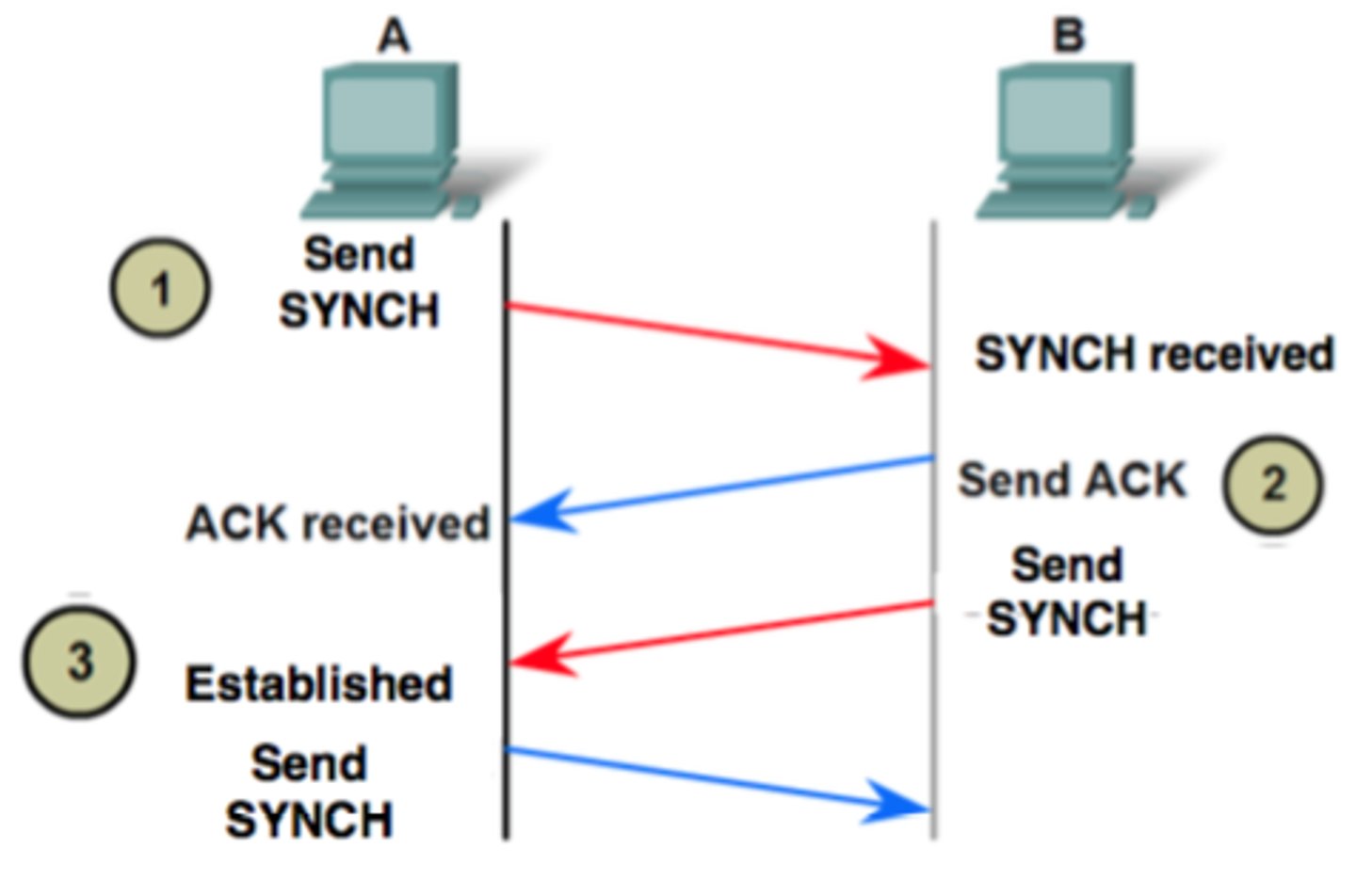
TCP/IP functions in four layers:
- Application Layer
- Transport Layer
- Internet Layer
- Network Interface Layer
Application Layer:
enables client application programs to access the other layers, and it defines the protocols that applications use to exchange data.
Transport Layer:
provides the application layer with communication and packet services.
Internet Layer:
responsible for addressing, routing, and packaging data packets.
Network Interface Layer:
network path is determined, placing packets on, and receives them from, the network medium, which can be any networking technology.
Modem
connects you to the Internet.
Router
- connects your devices to your home network (also known as a Local Area Network or LAN) or Wi-Fi network and then your devices can wirelessly communicate with each other.
- A router by itself, does not connect you to the Internet. A Router moves packets between LAN's.
Iot
(Internet of Things) refers to a network of physical objects of things that are embedded with electronics, sensors, software, and network creativity. These physical objects can exchange data with each other
Client/Server Computing:
- links two or more computers in an arrangement in which some machines, called servers, provide computing services for user PCs, called clients. Usually, an organization performs the bulk of its processing or application/data storage on suitably powerful servers that can be accessed by less powerful client machines. The client requests applications, data, or processing from the server, which acts on these requests by "serving" the desired commodity.
Client/server computing leads to the ideas of "fat" clients and "thin" clients.
As discussed in Plug IT In 2, fat clients have large storage and processing power and therefore can run local programs (such as Microsoft Office) if the network goes down. In contrast, thin clients may have no local storage and only limited processing power. Thus, they must depend on the network to run applications. For this reason, they are of little value when the network is not functioning
Peer-to-Peer (P2P) Processing
is a type of client/server distributed processing where each computer acts as both a client and a server. Each computer can access (as assigned for security or integrity purposes) all files on all other computers.
Type of P2P (1 out of 3 ) - Unused CPU power
- accesses unused CPU power among networked computers. An application of this type is SETI@home (http://setiathome.ssl.berkeley.edu). These applications are from open-source projects, and they can be downloaded at no cost.
Type of P2P (2 out of 3 ) - Real Time Person-to-Person collaboration
An example of real time P2P is Microsoft SharePoint Workspace (http://office.microsoft.com/en-us/sharepoint-workspace). This product provides P2P collaborative applications that use buddy lists to establish a connection and allow real-time collaboration within the application.
Type of P2P (3 out of 3 ) - Advanced Search and File Sharing
- This category is characterized by natural language searches of millions of peer systems. It enables users to discover other users, not just data and Web pages. One example of this category is BitTorrent.
BitTorrent
- is an open-source, free, peer-to-peer file-sharing application that simplifies the problem of sharing large files by dividing them into tiny pieces, or "torrents." BitTorrent addresses two of the biggest problems of file sharing: (1) downloading bogs down when many people access a file at once, and (2) some people leech, meaning they download content but refuse to share it. BitTorrent eliminates the bottleneck by enabling all users to share little pieces of a file at the same time—a process called swarming. The program prevents leeching because users must upload a file while they download it. Thus, the more popular the content, the more efficiently it travels over a network.
VPN
using the public internet to build a secure, private network connecting distant locations
Media Types:
- Twisted-Pair Wire, Coaxial Cable, Fiber Optics, Wi Fi
Communications Channel:
- a pathway or medium communicating data from one location to another.
Communications Media:
is the physical media used to send data (e.g., twisted-pair wire, coaxial cable, fiber optic cable, satellite, etc.).
Twisted-Pair Wire:
the most prevalent form of communications wiring used for almost all business telephone wiring and as the name suggests, it consists of strands of copper wire twisted in pairs. It is relatively inexpensive to purchase, widely available, and easy to work with.
Coaxial Cable:
a single strand of insulated copper wire. It is much less susceptible to electrical interference, and it can carry much more data than twisted pair. It is commonly used to carry high-speed data traffic as well as television signals.
Fiber-Optic Cable:
consists of thousands of very thin filaments of glass fibers that transmit information via light pulses generated by lasers. The fiber-optic cable is surrounded by cladding, a coating that prevents the light from leaking out of the fiber. Backbone of the Internet.
The Internet
The Internet is a global WAN that connects approximately one million organizational computer networks in more than 200 countries on all continents, including Antarctica. It has become so widespread that it features in the daily routine of some three billion people. Participating computer systems include smartphones, PCs, LANs, databases, and mainframes.
Internet service provider (ISP):
a company that provides Internet connections for a fee.
Network Access Points (NAPs):
exchange points for Internet traffic. They determine how traffic is routed. NAPs are key components of the Internet backbone.
Internet Protocol (IP) address
- distinguishes your device from all other computers and consists of sets of numbers, in four parts, separated by dots. For example, the IP address of one computer might be 135.62.128.91. You can access a Web site by typing this number in the address bar of your browser.
Addresses on the Internet:
- - • Currently, there are two IP addressing schemes. The first scheme, IPv4, is the most widely used. IP addresses using IPv4 consist of 32 bits, meaning that there are 232 possibilities for IP addresses, or 4,294,967,295 distinct addresses. Note that the IP address in the preceding paragraph (135.62.128.91) is an IPv4 address. At the time that IPv4 was developed, there were not as many computers that need addresses as there are today. Therefore, a new IP addressing scheme has been developed, IPv6.
- • IP addresses using IPv6 consist of 128 bits, meaning that there are 2128 possibilities for distinct IP addresses, which is an unimaginably large number. IPv6, which is replacing IPv4, will accommodate the rapidly increasing number of devices that need IP addresses, such as smartphones.
Internet Backbone:
The primary network connections and telecommunications lines that link the nodes of the Internet using a fiber-optic network that is operated primarily by large telecommunications companies.
Intranet:
a network that uses Internet protocols so that users can take advantage of familiar applications and work habits. Intranets support discovery (easy and inexpensive browsing and search), communication, and collaboration inside an organization.
Extranet:
connects parts of the intranets of different organizations which enables business partners to communicate securely over the Internet using virtual private networks (VPNs)
World Wide Web:
- a system of universally accepted standards for storing, retrieving, formatting, and displaying information via a client/server architecture.
- Many people equate the Internet with the World Wide Web. However, they are not the same thing. The Internet functions as a transport mechanism, whereas the World Wide Web is an application that uses those transport functions. Other applications, such as e-mail, also run on the Internet.
Hypertext:
text displayed on a computer display or other electronic device with references, called hyperlinks, to other text that the reader can immediately access, or where text can be revealed progressively at additional levels of details.
Hyperlink:
is a connection from a hypertext file or document to another location or file, typically activated by clicking on a highlighted word or image on the screen, or by touching the screen.
Uniform Resource Locator (URL):
points to the address of a specific resource on the Web. For instance, the URL for Microsoft is http://www.microsoft.com.
Search Engine:
a computer program that searches for specific information by keywords and then reports the results.
Metasearch Engines:
search several engines at once and then integrate the findings to answer users' queries.
Reduced Performance in the Near Future:
Researchers assert that if Internet bandwidth is not improved rapidly within a few years the Internet will only function at a much-reduced speed.
Internet2:
developed by many U.S. universities collaborating with industry and government which develops and deploys advanced network applications such as remote medical diagnosis, digital libraries, distance education, online simulation, and virtual laboratories.
Communication:
a major category of network applications related to communication technologies delivered online (e.g., including e-mail, call centers, chat rooms, and voice).
Unified Communications (UC):
simplifies and integrates all forms of communications (voice, voice mail, fax, chat, e-mail, instant messaging, short message service, presence (location) services, and videoconferencing) on a common hardware and software platform.
Teleconferencing
- is the use of electronic communication technology that enables two or more people at different locations to hold a conference. There are several types of teleconferencing. The oldest and simplest is a telephone conference call, where several people talk to one another from multiple locations. The biggest disadvantage of conference calls is that they do not allow the participants to communicate face to face nor can they see graphs, charts, and pictures at other locations.
Video Teleconferencing
• participants in one location can view participants, documents, and presentations at other locations.
telepresence
latest version of videoconferencing • enables participants to seamlessly share data, voice, pictures, graphics, and animation by electronic means. Conferees can also transmit data along with voice and video, which allows them to work together on documents and to exchange computer files.
Electronic Teleconferencing:
- the use of electronic communication technology that enables two or more people at different locations to hold a conference.
Telecommuting Employees:
workers who have no permanent office at their companies, preferring to work at home offices, in airport lounges, or client conference rooms, or on a high school stadium bleacher.
Telecommuting:
the process in which highly prized "knowledge" workers are now able to work anywhere and anytime.
Knowledge workers:
are being called the distributed workforce, or "digital nomads."
Collaboration:
efforts by two or more entities (that is, individuals, teams, groups, or organizations) who work together to accomplish certain tasks.
Workgroup:
two or more individuals who act together to perform some tasks.
Workflow:
the movement of information as it progresses through the sequence of steps that make up an organization's work procedures. Workflow management makes it possible to pass documents, information, and tasks from one participant to another in a way that is governed by the organization's rules or procedures.
Virtual Group (Team):
Virtual groups conduct virtual meetings—that is, they "meet" electronically.
Virtual collaboration (or e-collaboration):
the use of digital technologies that enable organizations or individuals who are geographically dispersed to collaboratively plan, design, develop, manage, and research products, services, and innovative applications.
Crowdsourcing:
a process in which an organization outsources a task to an undefined, generally large group of people in the form of an open call. This is part of the Collaboration network application category.
Synchronous Collaboration:
all team members meet at the same time.
Asynchronous Collaboration:
occurs when team members cannot meet at the same time.
Telepresence systems
- are highly integrated multi-codec, multi-monitor, multi-microphone, and multi-channel speaker systems.
- used to present interactive video and audio between locations with near life like audio quality and with near life size video images.
E-learning:
learning supported by the Web. It can take place inside classrooms as a support to conventional teaching, such as when students work on the Web during class. It also can take place in virtual classrooms, in which all coursework is completed.
Distance Learning (DL):
refers to any learning situation in which teachers and students do not meet face-to-face.
MOOC's (Massive Open Online Courses):
A new form of distance learning which are a tool for democratizing higher education. Several factors have contributed to the growth of MOOCs, including improved technology and the rapidly increasing costs of traditional universities. MOOCs are highly automated, complete with computer-graded assignments and exams. MOOCs have not yet proved that they can effectively teach the thousands of students who enroll in them. In addition, they do not provide revenues for universities.
Virtual universities:
- online universities in which students take classes via the Internet either at home or in an off -site location.
Business analytics (BA):
the process of developing actionable decisions or recommendations for actions based on insights generated from historical data. Business analytics examines data with a variety of tools and techniques, formulates descriptive, predictive, and prescriptive models, and communicates these results to organizational decision makers.
Business intelligence (BI):
has been defined as a broad category of applications, technologies, and processes for gathering, storing, accessing, and analyzing data to help business users make better decisions. Many experts argue that the terms should be used interchangeably.
What is the manager's job and three basic roles
- responsibility to make decisions to facilitate productivity and communicate
- Interpersonal, Informational, and Decisional roles
Interpersonal roles:
Figurehead, leader, liaison
Informational roles:
Monitor, disseminator, spokesperson, analyzer
Decisional roles:
- Entrepreneur, disturbance handler, resource allocator, negotiator
- A decision refers to a choice among two or more alternatives that individuals and groups make.
Decisions are diverse and are made continuously.
- Decision making is a systematic process
A Framework for Computerized Decision Analysis:
- To better understand business analytics, note that various types of decisions can be placed along two major dimensions: problem structure and the nature of the decision
Problem Structure:
- The first dimension is problem structure, where decision-making processes fall along a continuum ranging from highly structured to highly unstructured (see the left column in Figure 5.2).
Structured Decisions
- deal with routine and repetitive problems for which standard solutions exist, such as inventory control. In a structured decision, the first three phases of the decision process—intelligence, design, and choice—are laid out in a particular sequence, and the procedures for obtaining the best (or at least a good enough) solution are known. These types of decisions are candidates for decision automation.
Unstructured Decisions
- These decisions are intended to deal with "fuzzy," complex problems for which there are no cut-and-dried solutions. An unstructured decision is one in which there is no standardized procedure for carrying out any of the three phases. In making such a decision, human intuition and judgment often play an important role. Typical unstructured decisions include planning new service offerings, hiring an executive, and choosing a set of research and development (R&D) projects for the coming year. Although BA cannot make unstructured decisions, it can provide information that assists decision makers.
Semi- Structured Decisions
- in which only some of the decision-process phases are structured. Semi structured decisions require a combination of standard solution procedures and individual judgment. Examples of semi structured decisions are evaluating employees, setting marketing budgets for consumer products, performing capital acquisition analysis, and trading bonds.
The Nature of Decisions:
- The second dimension of decision support deals with the nature of decisions. All managerial decisions fall into one of three broad categories:
Operational control:
- Executing specific tasks efficiently and effectively
Management control:
- Acquiring and using resources efficiently in accomplishing organizational goals
Strategic planning:
The long-range goals and policies for growth and resource allocation
Decision:
- a choice among two or more alternatives that individuals and groups make. Decisions are diverse and are made continuously
Phases of the Decision-Making Process
- Intelligence Phase
- Design Phase
- Choice Phase
- Implementation Phase
Intelligence Phase:
- managers examine a situation and then identify and define the problem or opportunity.
Design Phase:
- decision makers construct a model for addressing the situation. They perform this task by making assumptions that simplify reality and by expressing the relationships among all the relevant variables. Managers then validate the model by using test data. Finally, decision makers set criteria for evaluating all the potential solutions that are proposed.
Choice Phase:
- involves selecting a solution or course of action that seems best suited to resolve the problem. Th is solution (the decision) is then implemented.
Implementation Phase:
is successful if the proposed solution solves the problem or seizes the opportunity. If the solution fails, then the process returns to the previous phases. Computer-based decision support assists managers in the decision-making process.
The Business Analytics Process:
- the process of developing actionable decisions or recommendations for actions based on insights generated from historical data.
 Note
Note  Flashcards (24)