Chapter 7: User Input and HTI
 Studied by 0 people
 Call Kai
 Learn
Learn Practice Test
 Spaced Repetition
 Match
Match Flashcards
 Knowt Play
1/99

There's no tags or description
Looks like no tags are added yet.
Name | Mastery | Learn | Test | Matching | Spaced | Call with Kai |
|---|
No analytics yet
Send a link to your students to track their progress
100 Terms
Human/Technology Interface
Boundary between the human and the assistive technology device across which information is exchanged
What makes up the essence of the human/technology interface?
The exchange of information back and forth across the boundary
Why do the OTs focus on finding the optimal human technology interface?
To match a user's remaining motor control abilities with desired activity outputs, in order to increase independence and participation in meaningful occupations
Through what 2 ways does the Human Activity Assistive Technology (HAAT) Model enable participation?
1. Control interfaces (mainstream or specialized technology)
2. Anatomical sites (lack of motor control, control sites)
What is the control interface?
- Hardware the user uses to control the device (keyboard, mouse, joystick)
- The mechanism allowing users or other systems to interact with, command, and receive feedback from a device or software
2 Types of Control Interfaces
1. Mainstream devices (e.g. phones, tablets)
2. Specialized assistive technology (e.g. power wheelchairs)
What 2 major components does the human/technology interface link?
1. Human
2. Device
What part of the assistive technology device accommodates for lack of motor control; control interface or anatomical site?
Anatomical site
What can the human/technology interface accommodate for in electronic devices?
Lack of motor control
What can lead to reduced motor control, requiring specialized human technology interfaces?
- Muscle tone (high or low)
- Strength
- Endurance
- Range of motion (e.g. passive, active)
- Presence and type of tremor
- Postural control and balance
- Gross and fine motor
- Position
Control Sites
Body sites that can be used to control a device
7 Types of Control Sites
1. Hand or fingers
2. Arm
3. Head
4. Eye
5. Leg
6. Foot
7. Mouth (e.g. tongue, respiratory)
True or False: Each control site can perform a variety of movements or actions.
True
When is the mouth commonly used as a control site for the human/technology interface?
For switches based on respiration or phonation
How can the mouth or respiratory air flow be used as a control site to access switches?
By sip (inhaling) or puff (exhaling)
What are control sites selected based on?
Precision, endurance, reliability, and available motor control, with hands preferred first, followed by head, then gross motor or alternative sites
What can existing control site functions be improved by?
Control enhancers
True or False: Most electronic assistive technology devices can be accessed by more than one type of control interface and selection method.
True
What is the order of preference for control sites?
1. Hands are preferred for dexterity
2. Head control is next if hand use is limited
3. Gross motor sites are used when necessary
Why are hands preferred first for control sites?
Hands and fingers are the most dexterous allowing precise, fast, and efficient control with the least cognitive and physical effort.
When is head control preferred?
preferred next when hand use is not reliable because the head can still provide fairly precise, controlled movements, though it is more fatiguing and less refined than hand control.
Why are gross motor sites used last?
used last because these movements are larger, less precise, and more tiring, making them slower and less efficient for tasks requiring accuracy.
What is the order of preference based on?
Order of preference based on precision, efficiency, and endurance; maximizes functional performance while minimizing fatigue and error
What are 5 challenges with head control?
1. Head movements are naturally gross, making precise, fine motor tasks (like typing) difficult
2. Fatigue can occur quickly due to sustained or repetitive head movements
3. Difficulty isolating head movements, as they often combine multiple planes of motion
4. Need for consistent positioning and postural stability to maintain accuracy
5. Potential for involuntary or reflexive movements that reduce control and accuracy
What 3 elements of the human/technology interface contribute to the operation of an assistive technology device?
1. Control interface
2. Selection set
3. Selection method
Control Interface
Hardware by which the human in the assistive technology system operates or controls a device
Examples of Control Interfaces
Keyboard
Switch
Touch screen/pad
Mouse
Joystick
What is the selection set?
Device the user uses to make choices; group of items that are available for the user to select through the control interface
What is the selection set for typing on a computer?
Keyboard
What is the selection set for a power wheelchair control?
Controls that move the chair forward/backward, right/left, or make the chair stop
Selection Method
Makes selections; The group of items available to make choices from (entire keyboard)
What are the 2 basic selection methods that an individual with a disability can use?
1. Direct
2. Indirect
Direct Selection
A selection method that allows the user to identify a target and go directly to it by using voice, finger, hand, eye, or other body movement
How many interfaces does a direct selection method generally have?
One interface for each selection that can be made (e.g. each letter on a keyboard has a separate key)
True or False: At any one time, all of the elements of the selection set are equally available for selecting in a direct selection method.
True
Why is direct selection considered the most physically demanding method?
Because it requires refined, controlled movements
What are the keyboard types are control interfaces for direct selection?
- Standard keyboard
- Expanded keyboard
- Contracted keyboards
- Concept keyboards.
What are positioning considerations for direct selection?
- Positioning the keyboard for use
- Mouth Sticks, Head pointers, and hand pointers
- Keyboard layouts
- Key Guards and Shields
Reduce accidental injuries
Indirect Selection
A selection method that involves intermediary steps to make a selection
What are the 3 most common indirect selection methods?
1. Scanning
2. Directed scanning
3. Coded access
Scanning
The presentation of a selection set on a display where each item in the selection set is sequentially lit or indicated by sound or speech
How does the user choose a selection in the scanning method?
By activating a control interface to select that item (e.g. single switch, switch array)
What 3 skills does the scanning method require?
1. Visual tracking
2. Attention
3. Sequencing
What is an advantage of the scanning method?
Requires very little motor control to make a selection
4 Selection Formats for Scanning
1. Linear
2. Rotary
3. Group item
4. Row-column
Linear Scanning Format
Presentation of items in a vertical or horizontal line, that are scanned one at a time until the desired selection is highlighted and selected by the user
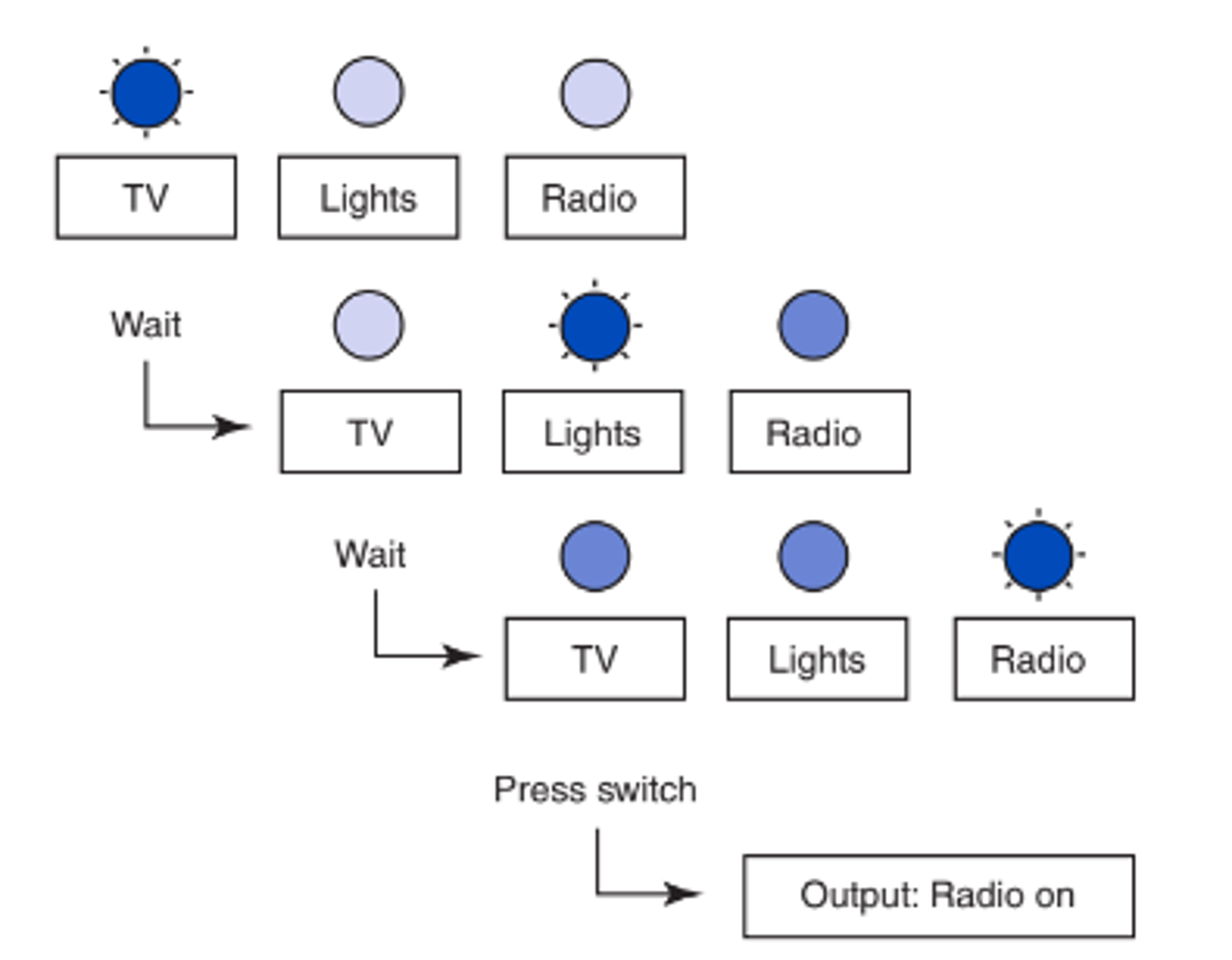
Rotary Scanning
Presentation of items in a circle that are scanned one at a time
Group item scanning
The user first selects a group, then is able to narrow the selection down from there.
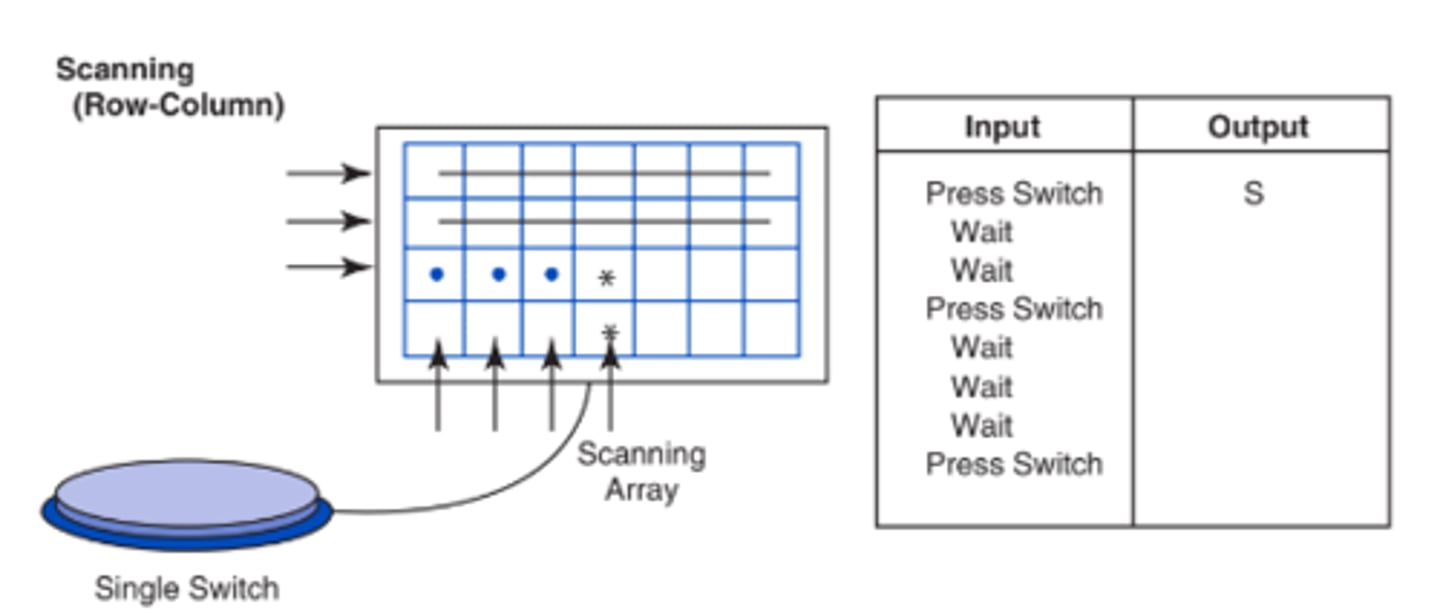
Row-Column Scanning
The highlighting of each row followed by each column sequentially until the desired item is selected
3 Selection Techniques for Scanning
1. Automatic
2. Step
3. Inverse
Automatic Scanning
Presentation of items in sequence from which the user may choose in a respective time-frame
Step Scanning
The activation of a control interface once for each item to advance through the choices in the selection set to make the desired selection by either an additional control interface or an acceptance time
What does step scanning allow?
Allows the user to control the speed at which the items are presented
Which type of scanning gives the user the most control?
step scanning but motor fatigue may be high because of repeated control interface activation
Inverse Scanning
Scanning that is initiated by the individual activating and holding the control interface closed (e.g. keeping a switch pressed) until the desired choice appears and the individual releases the control interface to make the selection
How could you speed up scanning for a patient?
- reduce the number of steps needed to reach a desired item so limit the choices to allow for quicker selection.
- You could group the choices, place them in columns, half the choices or quarter them, accelerate scanning by reducing selection time and the number of scan steps required.
Directed Scanning
A hybrid approach in which the user activates the control interface to select the direction of the scan, vertically or horizontally by holding down the joystick/switch and either waiting for an acceptance time interval or hitting an additional switch to select the desired item
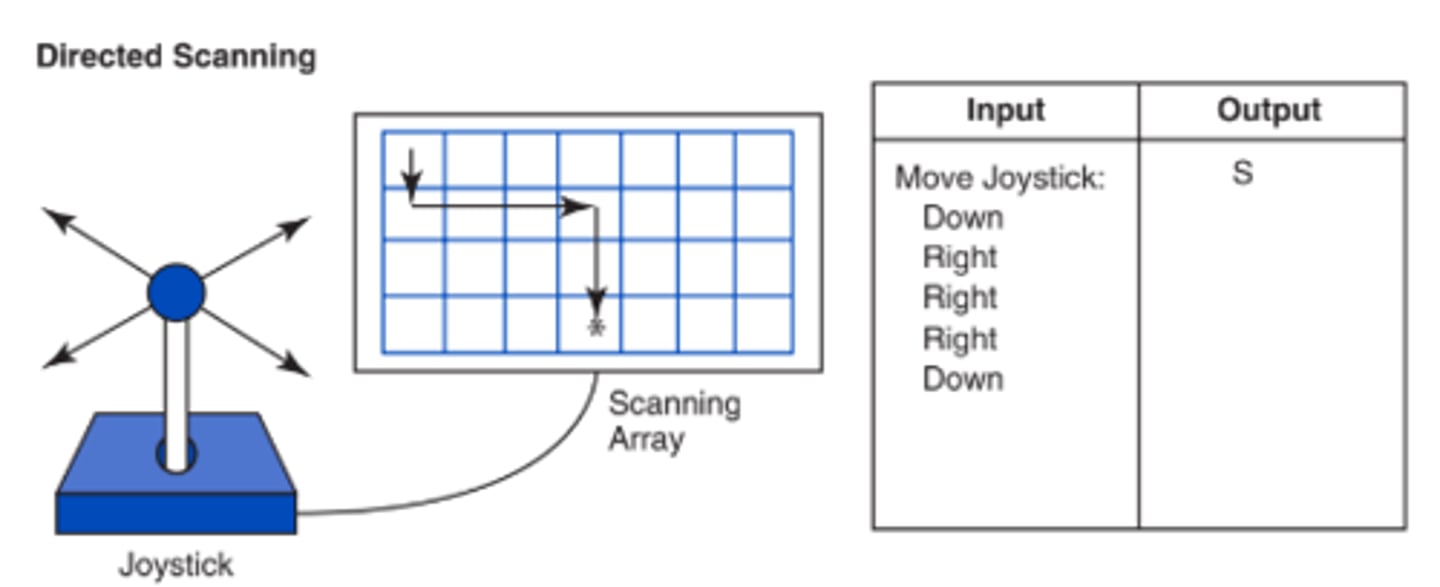
What does directed scanning allow for?
- Allows faster selection than single-switch scanning, gives the user more motor control over moving and timing
- Requires fewer steps to reach a selection while still accommodating limited fine motor control
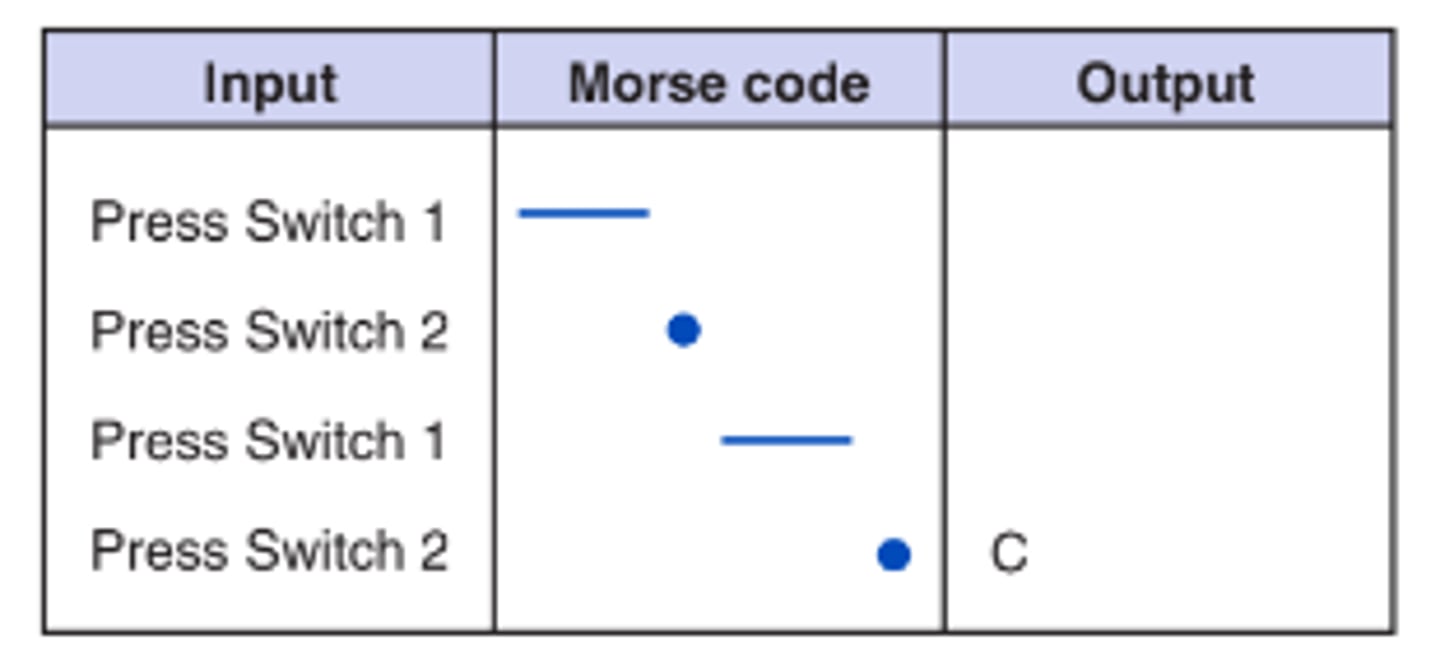
Coded Access
An indirect approach that uses a distinct sequence of movements to input a code for each item in the selection set (e.g. morse code)
Rate Enhancement (Autocorrect/Word Completion)
Refers to all approaches that result in the number of characters generated being greater than the number of selections the individual makes (e.g. ASAP vs. as soon as possible)
2 Categories of Rate Enhancement
1. Encoding techniques (e.g. memory, chart, display)
2. Prediction techniques (e.g. word prediction, abbreviation)
Encoding techniques (ASAP)
using shortcuts or codes to represent words or phrases (e.g., abbreviation expansion, coded access).
Prediction techniques (word prediction/word completion)
the system predicts likely words or options based on previous input (e.g., word prediction or word completion).
What do both prediction and encoding techniques do?
Both reduce the number of selections required, increasing speed and efficiency.
What does word prediction rely on?
recognition
What does recognition mean in word prediction?
The user only needs to recognize the desired word from a list of options provided by the system.
What are the 2 types of word prediction?
fixed and adaptive
What is fixed word prediction?
has a stored word list based on frequency used
What is adaptive word prediction?
Adaptive vocabularies change the ordering of words in the dictionary list by keeping track of the words used by the person.
How are words listed in adaptive word prediction?
The words are always listed in frequency-of-use order customized to the individual user.
Why is adaptive word prediction more effective for users?
It is more directly matched to the user's needs and recent usage.
What does abbreviation expansion rely on?
recall
What is abbreviation expansion?
- A technique in which a shortened form of a word or phrase (the abbreviation) stands for the entire word or phrase (the expansion)
- user must remember the specific abbreviation and what full word or phrase it represents
How does abbreviation expansion work on the device?
- The abbreviations are automatically expanded by the device into the desired word or phrase.
- ex: typing IRL converts to in real life
2 Types of Speech Output
1. Digital recording
2. Speech synthesis
Digital Recording
Storage of human speech in electronic memory circuits to be retrieved later
Speech synthesis
generates the speech electronically instead of storing the entire signal; reduces the amount of memory required
What body part is the first to be assessed (also known as the control site of choice)?
Hands
How can basic hand function be observed?
By using a grasp module
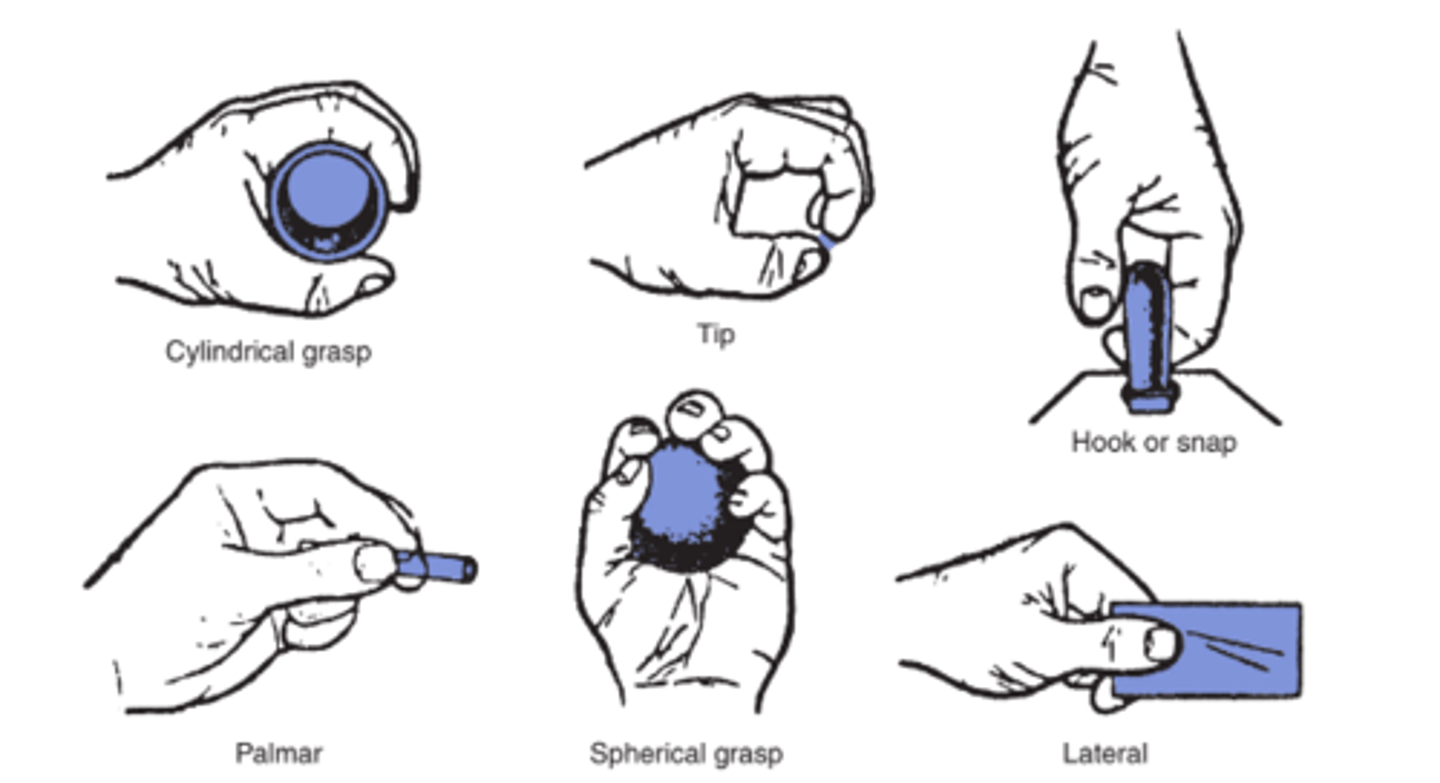
What 4 things does training improve?
Speed, accuracy, endurance, and participation
What are motor training outcomes?
Changes in a person's motor abilities and control that occur as a result of structured practice using assistive technology or control interfaces.
What can training programs result in?
- Improved accuracy and consistency of movement when using a control interface
- Increased speed and efficiency of device use
- Greater endurance and reduced fatigue during access
- Expansion of usable control sites (e.g., adding head or hand as options)
- Development of reliable switch use and timing for scanning
- Improved participation in communication, mobility, environmental control, or cognitive tasks
What are text to speech programs?
Convert text characters into the codes required by the speech synthesizer by analyzing a word or sentence.
In text to speech programs, what happens when the speech synthesizer receives the codes?
they are combined phonetically into the word the user wants to say
What is included in a physical skills evaluation?
- ROM, Strength, endurance, muscle tone, primitive reflexes and reactions
- Identify a backup control site
What is assessed for head control?
Ability to right the head when moved out of vertical alignment in the lateral plane and anterior posterior plane.
What is assessed for postural control?
Ability to maintain the trunk in vertical alignment, how much postural control is needed to use the device, and sitting and standing balance.
What is the overall goal of a physical skills evaluation for device access?
Determine the most functional position for the individual and evaluate their ability to physically access a device.
What is the overall progression in motor training?
Progression from cause and effect to symbolic communication.
What are the 4 stages of motor training?
1. cause and effect
2. time dependent response
3. choice making (multiple options)
4. symbolic communication
What happens during the cause and effect stage of motor training?
The individual learns activating a control produces an immediate result and that their movement can control the environment.
What happens during the time dependent response stage of motor training?
The individual practices activating the control at the right time to produce an outcome, developing attention, waiting, and reaction time.
What happens during the choice making stage of motor training?
The individual uses a control to choose between options, requiring motor accuracy, vigilance, and sequencing.
What happens during the symbolic communication stage of motor training?
The individual uses symbols, words, or icons to communicate meaning, combining motor control with cognitive and language skills.
Why is the motor training progression important?
It develops motor skills systematically and supports transition from basic movement control to functional device use.
Why must training be individualized based on?
age and diagnosis
What is considered with making training individualized?
- Reliability of movement
- Volitional movement
- Safety
- Easily performed movement
- Efficiency of movement
- Prior successful movements
- Response within a time frame
- Time required between switch activation matches child's reaction time
Training in a child with CP
- Focus on developmental learning and cause-and-effect first, often over a longer time frame
- Training is play-based and motivating (toys, games, interactive software)
- Emphasis on positioning, tone management, and reflex inhibition
- Skills are built slowly and systematically, with repetition and caregiver involvement
- Expect high training needs and gradual skill acquisition
Training in an adult with MS
- Focus on energy conservation and fatigue management
- Training must be flexible, accounting for fluctuating performance and disease progression
- Emphasis on efficiency, rate enhancement, and backup access methods
- Sessions may be shorter with rest breaks
- Anticipate the need for alternate control sites as symptoms change
Training in adults post stroke (CVA)
- Focus on relearning motor control using existing cognitive skills
- Training targets timing, accuracy, and coordination of movement
- More rapid progression from cause-and-effect to functional tasks is often possible
- Emphasis on repetition, task-specific practice, and functional relevance
- May incorporate compensatory strategies for unilateral weakness or neglect
 Note
Note  Flashcards (24)