IS117 Ch 5 - How to use the CSS box model
 Call Kai
 Learn
Learn Practice Test
 Spaced Repetition
 Match
Match Flashcards
 Knowt Play
1/16

There's no tags or description
Looks like no tags are added yet.
Name | Mastery | Learn | Test | Matching | Spaced | Call with Kai |
|---|
No analytics yet
Send a link to your students to track their progress
17 Terms
the css content-box model diagram
content —> padding —> border —> margin
all of these added up on OUTSIDE of content box is the overall size of the box
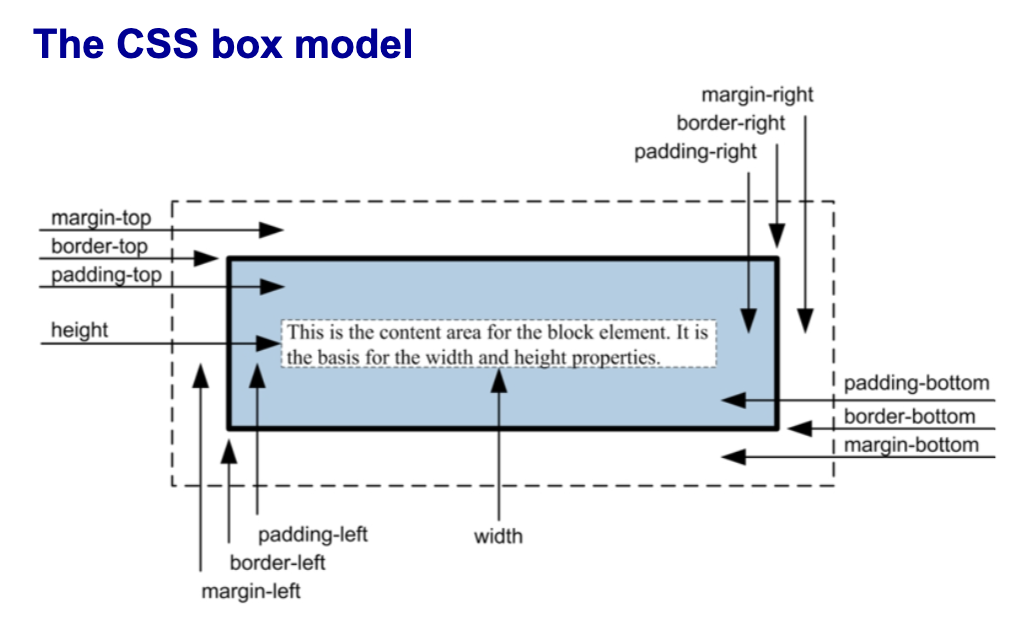
content box
box-sizing: content-box;. In this mode, when you set a width, you are only setting the width of the content area. If you then add padding or a border, they are added on top of that width, making the element physically larger than you intended.
The Math:
Actual Width=width+padding+border
automatic box-sizing property
box-sizing: content-box;
box-sizing: border-box;
everything gets added INWARDS
the width you set is the final width
the width you specify includes the content, the padding, and the border. If you add padding,
the browser shrinks the content area to make room for it, keeping the total width of the element exactly what you defined.
The Math:
Actual Width=width(padding and border are absorbed inside)
reset selector
a universal selector that resets properties for the whole page, essentially “resetting” it
example below: eliminates inconsistent default browser spacing caused by padding and borders.
Creates a clean, predictable "blank canvas" where an element's size matches exactly what you set in your CSS.
*{
margin: 0;
padding: 0;
box-sizing: border-box;
}
how to use a reset style sheet
1. Download the CSS file for the style sheet from the internet.
2. Save the CSS file in the correct location.
3. Code a <link> element for the reset style sheet in each HTML document before the other style sheets.
width: 90%;
sets to 90% of the parent it is nested in!
ex. A <div> inside a <body> will be 90% of the body. But if you put a small box inside a medium box, the small box will only be 90% of that medium box.
properties for setting borders and what they do
border
border-side
border-width
border-style
border-color
border-side-width
border-side-style
border-side-color
border all four sides
border-sideNameRLTB set width style color to one specific side only
border-width all 4 sides border thickness
border-style kind of line for all four sides (?)
border-color color of all four sides border
border-sideNameRLTB-width thickness of border for one specific side
border-sideNameRLTB-style line type for a specific side
border-sideNameRLTB-color color for one specific side
syntax for shorthand properties
border: [width] [style] [color];
border-side: [width] [style] [color];
how inset works in here:
color: blue;
border: 1px inset; /* uses the element's color
property */
The inset style is a 3D effect that makes the element look like it is embedded or "sunk" into the page.
The browser automatically takes your currentColor and creates two shades:
A darker shade for the top and left edges. (dark blue)
A lighter shade for the bottom and right edges. (light blue)
border-radius and box-shadow properties formatting
border-radius: radius; /* applies to all four corners */
border-radius: topLeft topRight lowerRight lowerLeft;
^^ clockwise from top left
box-shadow: horizontalOffset verticalOffset blurRadius
spread color;
properties for working with backgrounds
background
background-color
background-image
background-repeat
background-attachment
background-position
background: A shorthand to set all background properties (color, image, size, etc.) in a single line.background-color: Sets the solid fill color behind the element's content.background-image: Sets an image (or multiple images) to display in the background.background-repeat: Determines if the background image tiles/repeats horizontally, vertically, both, or not at all. to fill the allotted spacebackground-attachment: Sets whether the background image scrolls with the page or stays fixed in place.background-position: Sets the starting coordinates of the background image (e.g.,center,top left).
ex:
background: blue;
background: blue url("../images/texture.gif");
background: #808080 url("../images/header.jpg")
repeat-y scroll center top;
syntax for shorthand background property
background: [color] [image] [repeat] [attachment] [position];
ex:
background: blue;
background: blue url("../images/texture.gif");
background: #808080 url("../images/header.jpg")
repeat-y scroll center top;
how to control image repetition
background-repeat: repeat; /* repeats both directions */
background-repeat: repeat-x; /* repeats horizontally */
background-repeat: repeat-y; /* repeats vertically */
background-repeat: no-repeat; /* doesn't repeat */
how to control image position
background-position: left top; /* 0% from left, 0% from top */
background-position: center top; /* centered horizontally, 0% from top */
background-position: 90% 90%; /* 90% from left, 90% from top */
how to control image scrolling
background-attachment: scroll; /* image moves as you scroll */
background-attachment: fixed; /* image does not move as you scroll */
syntax for a linear gradient background image property
background-image: linear-gradient(direction, color %, color %, ... );

